door lock Seat Leon SC 2017 User Guide
[x] Cancel search | Manufacturer: SEAT, Model Year: 2017, Model line: Leon SC, Model: Seat Leon SC 2017Pages: 332, PDF Size: 7.25 MB
Page 104 of 332
Emergencies
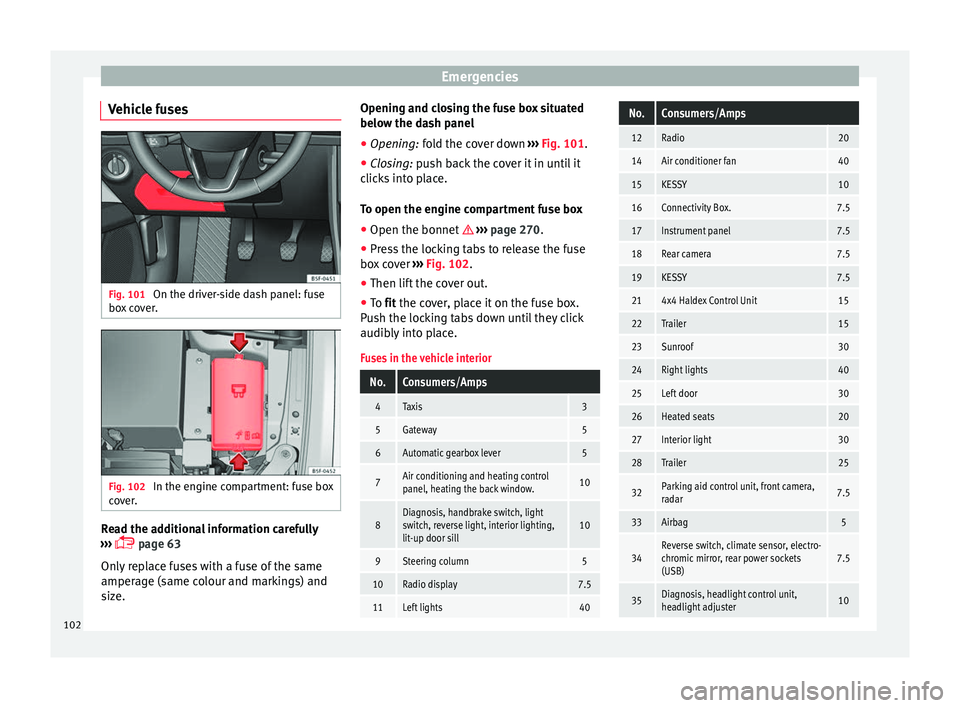
Vehicle fuses Fig. 101
On the driver-side dash panel: fuse
bo x
c
over. Fig. 102
In the engine compartment: fuse box
c o
v
er. Read the additional information carefully
› ›
›
page 63
Only replace fuses with a fuse of the same
amperage (same colour and markings) and
size. Opening and closing the fuse box situated
below the da
sh panel
● Opening: fold the cover down ››
› Fig. 101.
● Closing: push back the cover it in until it
clic
ks into place.
To open the engine compartment fuse box
● Open the bonnet ›››
page 270.
● Press the locking tabs to release the fuse
box c
over ››› Fig. 102.
● Then lift the cover out.
● To fit the cover, place it on the fuse box.
Pu
sh the locking tabs down until they click
audibly into place.
Fuses in the vehicle interior
No.Consumers/Amps
4Taxis3
5Gateway5
6Automatic gearbox lever5
7Air conditioning and heating control
panel, heating the back window.10
8Diagnosis, handbrake switch, light
switch, reverse light, interior lighting,
lit-up door sill10
9Steering column5
10Radio display7.5
11Left lights40
No.Consumers/Amps
12Radio20
14Air conditioner fan40
15KESSY10
16Connectivity Box.7.5
17Instrument panel7.5
18Rear camera7.5
19KESSY7.5
214x4 Haldex Control Unit15
22Trailer15
23Sunroof30
24Right lights40
25Left door30
26Heated seats20
27Interior light30
28Trailer25
32Parking aid control unit, front camera,
radar7.5
33Airbag5
34Reverse switch, climate sensor, electro-
chromic mirror, rear power sockets
(USB)7.5
35Diagnosis, headlight control unit,
headlight adjuster10 102
Page 105 of 332

Fuses and bulbsNo.Consumers/Amps
36Right LED headlight7.5
37Left LED headlight7.5
38Trailer25
39Right door30
4012V socket20
42Central locking40
43SEAT Sound, beats sound CAN and
MOST.30
44Trailer15
45Electric driver's seat15
47Rear window wiper15
49Starter motor; clutch sensor5
52Driving mode.15
53Heated rear window30
Fuse arrangement in engine compartment
No.Consumers/Amps
1ESP control unit25
2ESP control unit40/60
3Engine control unit (diesel/pet-
rol)30/15
4Engine sensors5/10
No.Consumers/Amps
5Engine sensors7.5/10
6Brake light sensor5
7Engine power supply5/10
8Lambda probe10/15
9Engine5/10/20
10Fuel pump control unit10/15/20
11PTC40
12PTC40
13Automatic gearbox control unit15/30
15Horn15
16Fuel pump control unit5/15/20
17Engine control unit7.5
18Terminal 30 (positive reference)5
19Front windscreen washer30
20Alarm horn10
22Engine control unit5
23Starter motor30
24PTC40
31Electronic differential CUPRA15
33Automatic gearbox pump30
CAUTION
● Alw a
ys carefully remove the fuse box cov-
ers and refit them correctly to avoid problems
with your vehicle.
● Protect the fuse boxes when open to avoid
the entry of
dust or humidity. Dirt and humid-
ity inside fuse boxes can cause damage to
the electrical system. Note
● In the v ehic
le, there are more fuses than
those indicated in this chapter. These should
only be changed by a specialised workshop.
● Positions not containing a fuse do not ap-
pear in the fo
llowing tables.
● Some of the equipment listed in the tables
below pert
ain only to certain versions of the
model or are optional extras.
● Please note that the above lists, while cor-
rect at
the time of printing, are subject to
change. Changing bulbs
Topic
intr
oduction Read the additional information carefully
› ›
›
page 64.
Changing bulbs requires a certain degree of
practical skill. »
103
Technical data
Advice
Operation
Emergencies
Safety
Page 115 of 332
Controls and displays
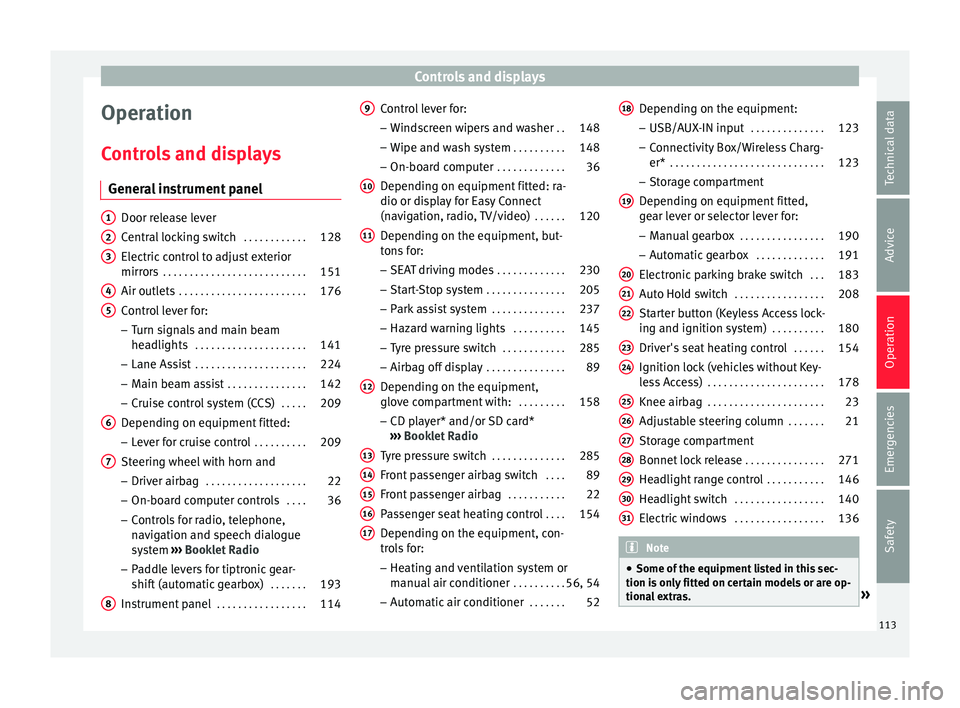
Operation
C ontr
o
ls and displays
General instrument panel Door release lever
Centr
al
locking switch . . . . . . . . . . . .128
Electric control to adjust exterior
mirrors . . . . . . . . . . . . . . . . . . . . . . . . . . . 151
Air outl
ets . . . . . . . . . . . . . . . . . . . . . . . . 176
Control lever for:
– Turn s ign
als and main beam
headlights . . . . . . . . . . . . . . . . . . . . . 141
– Lane Ass i
st . . . . . . . . . . . . . . . . . . . . . 224
– Main beam a
ssist . . . . . . . . . . . . . . . 142
– Cruise c
ontrol system (CCS) . . . . .209
Depending on equipment fitted:
– Lev er f
or cruise control . . . . . . . . . .209
Steering wheel with horn and – Driver airbag . . . . . . . . . . . . . . . . . . . 22
– On-boar d c
omputer controls . . . .36
– Contro
ls for radio, telephone,
navigation and speech dialogue
system ›››
Booklet Radio
– Paddle levers for tiptronic gear-
shift (automatic gearbox) . . . . . . .193
Instrument panel . . . . . . . . . . . . . . . . . 114
1 2
3
4
5
6
7
8 Control lever for:
– Wind
s
creen wipers and washer . .148
– Wipe and wa
sh system . . . . . . . . . . 148
– On-board c
omputer . . . . . . . . . . . . . 36
Depending on equipment fitted: ra-
dio or disp
lay for Easy Connect
(navigation, radio, TV/video) . . . . . .120
Depending on the equipment, but-
tons
for:
– SEAT driving modes . . . . . . . . . . . . .230
– Star t
-Stop system . . . . . . . . . . . . . . . 205
– Park a
ssist system . . . . . . . . . . . . . . 237
– Hazard w
arning lights . . . . . . . . . .145
– Tyr
e pressure switch . . . . . . . . . . . .285
– Airbag off di
splay . . . . . . . . . . . . . . . 89
Depending on the equipment,
glov e c
ompartment with: . . . . . . . . .158
– CD pl a
yer* and/or SD card*
››› Booklet Radio
Tyre pressure switch . . . . . . . . . . . . . .285
Front passenger airbag switch . . . .89
Front passenger airbag . . . . . . . . . . .22
Passenger seat heating control . . . .154
Depending on the equipment, con-
tro l
s for:
– Heating and ventilation system or
manual air conditioner . . . . . . . . . .56, 54
– Autom atic
air conditioner . . . . . . .52
9
10
11
12
13
14
15
16
17 Depending on the equipment:
– USB/A UX
-IN inp
ut . . . . . . . . . . . . . . 123
– Connectivity
Box/Wireless Charg-
er* . . . . . . . . . . . . . . . . . . . . . . . . . . . . . 123
– Storag
e compartment
Depending on equipment fitted,
gear lever or selector lever for:
– Manual gearbox . . . . . . . . . . . . . . . . 190
– Automatic
gearbox . . . . . . . . . . . . . 191
Electronic parking brake switch . . .183
Auto Hold switch . . . . . . . . . . . . . . . . . 208
Starter button (Keyless Access lock-
ing and ignition sys
tem) . . . . . . . . . . 180
Driver's seat heating control . . . . . .154
Ignition lock (vehicles without Key-
les
s Access) . . . . . . . . . . . . . . . . . . . . . . 178
Knee airbag . . . . . . . . . . . . . . . . . . . . . . 23
Adjustable steering column . . . . . . .21
Storage compartment
Bonnet lock
release . . . . . . . . . . . . . . . 271
Headlight range control . . . . . . . . . . .146
Headlight switch . . . . . . . . . . . . . . . . . 140
Electric windows . . . . . . . . . . . . . . . . . 136 Note
● Some of the equipment li
sted in this sec-
tion is only fitted on certain models or are op-
tional extras. » 18
19
20
21
22
23
24
25
26
27
28
29
30
31
113
Technical data
Advice
Operation
Emergencies
Safety
Page 127 of 332

Opening and closing
Opening and closing C entr
a
l locking system
Description Read the additional information carefully
›› ›
page 15
The vehicle can be locked and unlocked via
the central locking system. There are several
methods, depending on the vehicle equip-
ment:
● key with remote control ››
›
page 127 ,
● lock on driver door (emergency opening
›››
page 15) or
● interior central locking switch ›››
page 128.
Unlocking one side of the vehicle only
When you lock the vehicle with the key, the
doors and the rear lid are locked. When you
open the door, you can either unlock only the
driver door, or all the vehicle doors. To select
the required option, use Easy Connect*
››› page 128.
Auto Lock*
The Auto Lock function locks the doors and
the rear lid when the vehicle exceeds a speed
of about 15 km/h (9 mph). The vehicle is unlocked again when the igni-
tion key i
s removed. Alternatively, the vehicle
can also be unlocked via the central locking
switch or by pulling one of the inside door
handles. The Auto Lock function can be
switched on and off on the sound system or
on the Easy Connect* system ››› page 128.
In the event of an accident in which the air-
bags inflate, the doors will be automatically
unlocked to facilitate access and assistance.
Anti-theft alarm system*
If the anti-theft alarm system senses interfer-
ence with the vehicle it triggers an audible
and visible alarm.
The anti-theft alarm system is automatically
switched on when locking the vehicle. It
switches off when the vehicle is unlocked
from a distance.
When the driver door is unlocked with the
key, you should switch on the ignition within
15 seconds. Otherwise the alarm will be trig-
gered. On some export versions, the alarm is
triggered immediately when you open a door.
To deactivate the alarm, press the button
on the remote control key, or switch on the
ignition. After a certain time, the alarm will
automatically switch off.
Switch off the vehicle interior monitoring and
tow-away protection if you wish to prevent the alarm from being triggered accidentally
››› page 135.
Turn signals
The turn signals will flash twice when the ve-
hicle is unlocked and once when the vehicle
is locked.
If it does not flash, this indicates that one of
the doors, the rear lid or the bonnet is not
closed correctly.
Accidental lock-out
The central locking system prevents you from
being locked out of the vehicle in the follow-
ing situations: ● If the driver door is open, the vehicle can-
not be lock
ed with the central locking switch
››› page 128.
Lock the vehicle with the remote control key,
when all the doors and the rear lid have been
closed. This prevents the accidental locking
of the vehicle. WARNING
Do not leave anyone (especially children) in
the v ehic
le if it is locked from the outside and
the anti-theft security system* is enabled, as
the doors and windows cannot then be
opened from the inside. Locked doors could
delay assistance in an emergency, potentially
putting lives at risk. » 125
Technical data
Advice
Operation
Emergencies
Safety
Page 128 of 332
Operation
Note
● Never l e
ave any valuable items in the vehi-
cle unattended. Even a locked vehicle is not a
safe.
● If the diode on the driver door sill lights up
for about 30 sec
onds when the vehicle is
locked, the central locking system or anti-
theft alarm* is not working properly. You
should have the fault repaired at a SEAT Offi-
cial Service or specialised workshop.
● The vehicle interior monitoring of the anti-
theft a
larm* system will only function as in-
tended if the windows and the sunroof* are
closed. Car key
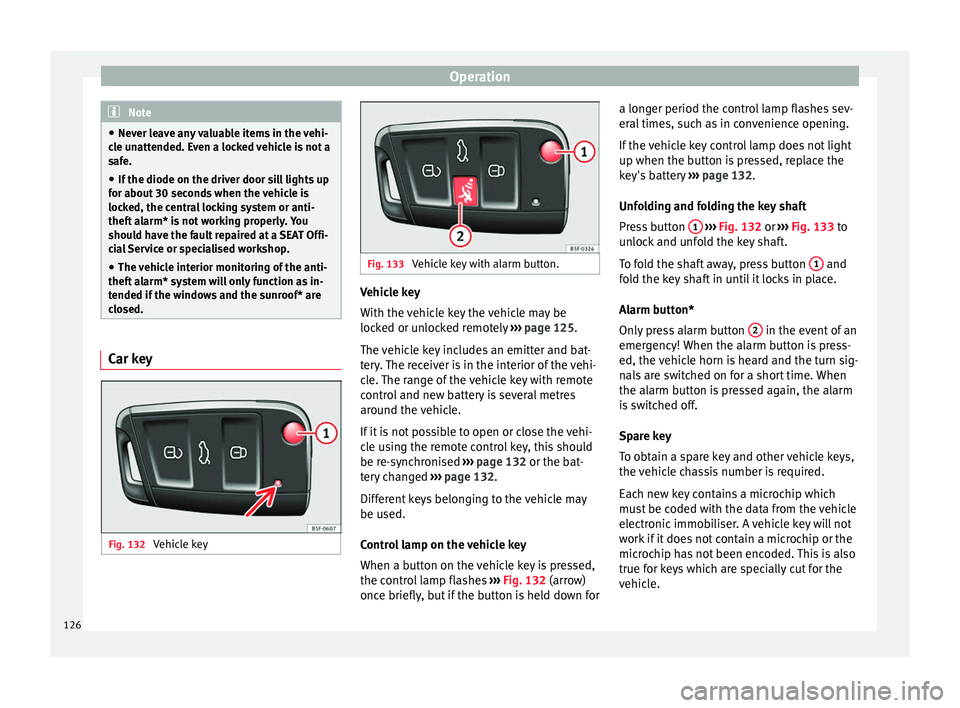
Fig. 132
Vehicle key Fig. 133
Vehicle key with alarm button. Vehicle key
W
ith the
v
ehicle key the vehicle may be
locked or unlocked remotely ››› page 125.
The vehicle key includes an emitter and bat-
tery. The receiver is in the interior of the vehi-
cle. The range of the vehicle key with remote
control and new battery is several metres
around the vehicle.
If it is not possible to open or close the vehi-
cle using the remote control key, this should
be re-synchronised ››› page 132 or the bat-
tery changed ››› page 132.
Different keys belonging to the vehicle may
be used.
Control lamp on the vehicle key
When a button on the vehicle key is pressed,
the control lamp flashes ››› Fig. 132 (arrow)
once briefly, but if the button is held down for a longer period the control lamp flashes sev-
eral time
s, such as in convenience opening.
If the vehicle key control lamp does not light
up when the button is pressed, replace the
key's battery ››› page 132.
Unfolding and folding the key shaft
Press button 1
› ››
Fig. 132
or ›
›› Fig. 133 to
unlock and unfold the key shaft.
To fold the shaft away, press button 1 and
f o
l
d the key shaft in until it locks in place.
Alarm button*
Only press alarm button 2 in the event of an
emer g
ency!
When the alarm button is press-
ed, the vehicle horn is heard and the turn sig-
nals are switched on for a short time. When
the alarm button is pressed again, the alarm
is switched off.
Spare key
To obtain a spare key and other vehicle keys,
the vehicle chassis number is required.
Each new key contains a microchip which
must be coded with the data from the vehicle
electronic immobiliser. A vehicle key will not
work if it does not contain a microchip or the
microchip has not been encoded. This is also
true for keys which are specially cut for the
vehicle.
126
Page 129 of 332

Opening and closing
The vehicle keys or new spare keys can be
o bt
ained fr
om a SEAT Official Service, a spe-
cialised workshop or an approved key service
qualified to create this kind of key.
New keys or spare keys must be synchron-
ised before use ››› page 132. CAUTION
All of the vehicle keys contain electronic com-
ponents. Pr ot
ect them from damage, impacts
and humidity. Note
● Only u
se the key button when you require
the corresponding function. Pushing the but-
ton unnecessarily could accidentally unlock
the vehicle or trigger the alarm. It is also pos-
sible even when you are outside the radius of
action.
● Key operation can be greatly influenced by
overl
apping radio signals close to the vehicle
working in the same range of frequencies, for
example, radio transmitters or mobile tele-
phones.
● Obstacles between the remote control and
the vehic
le, bad weather conditions and dis-
charged batteries can considerably reduce
the range of the remote control.
● If the buttons of the vehicle key are press-
ed ›››
Fig. 132 or ››› Fig. 133 or one of the cen-
tral locking buttons ››› page 128 is pressed
repeatedly in short succession, the central
locking briefly disconnects as protection against overloading. The vehicle is then un-
lock
ed. L
ock it if necessary. Unlocking/Locking by remote control
Read the additional information carefully
›› ›
page 15
The vehicle will be locked again automatical-
ly if you do not open one of the doors or the
rear lid within 30 seconds after unlocking the
car. This function prevents the vehicle from
remaining unlocked if the unlocking button is
pressed by mistake. This does not apply if
you press the button for at least one sec-
ond.
In vehicles with a security central locking
feature (selective unlocking of side doors)
››› page 127, when the button is pressed
once, only the driver door and the fuel tank
flap are unlocked. When the button is press-
ed a second time, all the vehicle doors are unlocked. WARNING
Observe the safety warnings ›››
in Descrip-
tion on pag e 125
. Note
● Do not u se the r
emote control key until the
vehicle is visible. ●
Other fu nction
s of the remote control key
››› page 137, Convenience opening and clos-
ing. Selective unlocking system
The selective unlocking system allows you to
only
u
nlock the driver door and the fuel tank
flap. All other doors and the rear lid remain
locked.
Unlocking the driver door and tank flap
– Press ( once) the b utt
on on the remote
control key or turn the key once in the
opening direction.
Unlocking all the doors, the rear lid and the
tank flap simultaneously. – Within 5 seconds, press ( twice) the
but-
ton on the remote control key, or turn the
key twice within 5 seconds in the opening
direction.
The anti-theft security system* and the anti-
theft alarm* are immediately disabled if you
unlock only the driver door, without unlock-
ing the other doors.
In vehicles with Easy Connect*, you can pro-
gramme the security central locking system
directly ››› page 128.
127
Technical data
Advice
Operation
Emergencies
Safety
Page 130 of 332
Operation
Adjusting the central locking You can use Easy Connect* to select which
doors
ar
e unlocked with the central locking
system. Using the radio or the Easy Connect*
system, you can select whether the vehicle
automatically closes with the “Auto Lock”
programme at speeds of more than 15 km/h
(9 mph).
Programming the unlocking of the doors (ve-
hicles with Easy Connect)
– Select: button > SETTINGS
fu
nction
b
utton > Opening and closing > Cen-
tral locking > Unlocking doors .
Programming the Auto Lock (vehicles with
Easy Connect)
– Select: button > SETTINGS
fu
nction
b
utton > Opening and closing > Cen-
tral locking > Locking while
driving .
Programming the Auto Lock (vehicles with
radio)
– Select: SETUP button > control button
Central locking > Locking while
driving .
Un loc
k
ing doors
You can choose to unlock all the doors or
only the driver door when you unlock the vehicle. In all
the options, the fuel
tank flap
is also unlocked.
With the Driver setting, when you press the
button on the remote control key once, on-
ly the driver door is unlocked. If that button is
pressed twice, the rest of the doors and the
rear lid will be unlocked.
In vehicles with a conventional key, turn the
key in the door lock, in the direction of open-
ing, twice within 2 seconds.
If the button is pressed, all the vehicle
doors are locked. At the same time, a confir-
mation signal* is heard.
Auto Lock while driving
If you select on, all the vehicle doors are
locked at speeds above 15 km/h (9 mph).
Central locking switch Read the additional information carefully
› ›
›
page 15
Please note the following when using the
central locking switch to lock your vehicle:
● It is not possible to open the doors or the
rear lid fr
om the outside (for safety reasons,
e.g. when stopped at traffic lights).
● The LED in the central locking switch lights
up when all the door
s are closed and locked. ●
You can open the door
s individually from
the inside by pulling the inside door handle.
● In the event of an accident in which the air-
bags
inflate, doors locked from the inside will
be automatically unlocked to facilitate access
and assistance. WARNING
● The centr a
l locking switch also operates
when the ignition is switched off and auto-
matically locks all the vehicle doors when the
button is pressed.
● The central locking switch does not operate
if the v
ehicle is locked from the outside and
the anti-theft security system is switched on.
● Locked doors could delay assistance in an
emergency
, potentially putting lives at risk.
Do not leave anyone, especially children, in
the vehicle. Note
Your vehicle will lock automatically when it
re ac
hes a speed of about 15 km/h (9 mph)
(Auto Lock) ››› page 125. You can unlock the
vehicle again using the button on the cen-
tral locking switch. 128
Page 131 of 332

Opening and closing
Related video Keyless Access Fig. 134
Technology Unlocking and locking the vehicle
with K
eyl
ess Access* Fig. 135
Keyless Access locking and ignition
sy s
t
em: In the proximity of the car. Fig. 136
Keyless Access locking and ignition
sys t
em: sensor surface A for unlocking in-
side the door h andl
e and sensor surface B for locking on the exterior of the handle.
Depending on the equipment, the vehicle
m
a
y
have the Keyless Access system.
Keyless Access is a key-free locking and igni-
tion system to unlock and lock the vehicle
without actively using its key. To do this, all
that is required is to have a valid vehicle key
in the detection area where you are attempt-
ing to access the vehicle ››› Fig. 135 and to
touch one of the sensor surfaces on the door
handles ››› Fig. 136 ››› .
The v
ehic
le can be unlocked and locked via
the front doors only. When doing so, the re-
mote control key must be no further than ap-
prox. 1.5 m from the door handle.
It does not matter where you carry the key, for
instance whether it is in your jacket pocket or
in a briefcase. Once the doors have been locked, they can-
not be opened again immedi
ately. This will
enable you to check that the doors are prop-
erly closed.
If you wish, when unlocking, you can unlock
only the corresponding door or the entire ve-
hicle. The necessary adjustments can be per-
formed in vehicles with a driver information
system ›››
page 33.
General information
If a valid key is in the proximity of the car
››› Fig. 135, the Keyless Access locking and
starting system gives the key entry as soon
as one of the sensor surfaces on the front
door handles is touched. The following fea-
tures are then available without having to
use the vehicle key actively:
● Keyless-Entry: unloc
king the vehicle using
the handles of the front doors or the soft-
touch/handle on the rear lid.
● Keyless-Exit: lockin
g the vehicle using the
sensor of the driver or passenger door han-
dle.
● Press & Drive: keyle
ss starting of the en-
gine with the starter button ››› page 178.
The central locking and locking systems oper-
ate in the same way as a normal locking and
unlocking system. Only the controls change. »
129
Technical data
Advice
Operation
Emergencies
Safety
Page 132 of 332

Operation
Unlocking the vehicle is confirmed with a
doub le
fl
ash of the indicator lights; locking
by a single flash.
If the vehicle is locked and then all doors and
the rear lid are closed leaving the last key
used inside the vehicle and none outside,
the vehicle will not lock immediately. All the
vehicle's indicator lights will flash four times.
The vehicle will lock after a few seconds if
you do not open any door or the rear lid.
The vehicle will lock again after a few sec-
onds if you unlock the vehicle but fail to open
any door or boot hatch.
Unlocking and opening the doors (Keyless-
Entry)
● Grip one of the front door handles. In doing
this, the sensor s
urface ››› Fig. 136 A (arrow)
on the h andl
e i
s touched and the vehicle un-
locks.
● Open the door.
On vehic
les with selective opening or info-
tainment system configuration, pulling the
door handle twice will unlock all doors.
On vehicles without a “Safe” security sys-
tem: shutting and locking doors (Keyless-Ex-
it)
● Switch the ignition off.
● Close the driver's door. ●
Touch (
once) the locking sensor surface B (arrow) on one of the front door handles. The
door th
at
i
s used must be closed.
On vehicles with a “Safe” security system:
shutting and locking doors (Keyless-Exit)
● Switch the ignition off.
● Close the driver's door.
● Touch (once) the sensor surface B (arrow)
on one of the fr
ont
door handles. The vehicle
locks with the “Safe” ››› page 131 system.
The door that is used must be closed.
● Touch (twice) the sensor surface B (arrow)
of one of
the fr
ont door handles to lock the
vehicle without activating the “Safe” security
system ››› page 131.
Unlocking and locking the boot hatch
When the vehicle is locked, the rear lid auto-
matically unlocks on opening if there is a val-
id vehicle key in the proximity ››› Fig. 135.
Open or close the rear lid normally.
After closing, the hatch locks automatically. If
the complete vehicle is unlocked, the rear lid
will not lock automatically after closing it.
What happens when locking the vehicle with
a second key
If there is a vehicle key inside the vehicle and
it is locked from the outside with a second
vehicle key, the key inside the vehicle is blocked for engine ignition
›››
page 178. In
order to enable engine ignition, the button
on the key inside the vehicle needs to be
pressed.
Automatically disabling sensors
If the vehicle is not locked or unlocked for a
long period of time, the proximity sensors on
the passenger doors are automatically disa-
bled.
If one of the sensor surfaces on the door han-
dles is often activated in an unusual manner
with the vehicle locked (e.g. by the branches
of a bush rubbing against it), all proximity
sensors are disabled for a certain period of
time.
Sensors will again be enabled:
● After a time.
● OR: if the vehicle is unlocked with the
butt
on on the key.
● OR: if the boot is opened.
● OR: if
the vehicle is unlocked manually with
the key
.
Keyless Access temporary disconnection
function*
You can deactivate the vehicle's Keyless Ac-
cess unlocking for a locking and unlocking
cycle.
130
Page 133 of 332

Opening and closing
● Mo v
e the g
ear lever to position P (if the ve-
hicle has automatic gearbox), since other-
wise the vehicle cannot be locked.
● Close the door.
● Push the central locking button on the
remote c
ontrol and touch the locking sensor
surface ››› Fig. 136 B on the driver door han-
dl e onc
e w
ithin the following 5 seconds. Do
not grip the door handle, otherwise the vehi-
cle will not lock. Deactivation is also possible
if the vehicle is locked through the driver’s
door lock.
● To check that the function has been deacti-
vated, w
ait at least 10 seconds, grip and pull
on the door handle. The door should not
open.
The next time the door can only be unlocked
via the remote control or the lock cylinder.
The next time the door is locked/unlocked,
Keyless Access will be active again.
Convenience functions
To close all the electric windows and the sun-
roof using the convenience function, keep a
finger for a few seconds on the locking sen-
sor surface B (arrow) of the door handle un-
ti l
the w
indows and roof have closed.
The doors opened by touching the sensor
surface of the door handle depend on the
settings that have been activated in the info-
tainment system with the button and theSETTINGS and
Openin
g and c
lo
sing function but-
t on
s. CAUTION
The sensor surfaces on the door handles
cou l
d engage if hit with a water jet or high
pressure steam if there is a valid vehicle key
in the proximity. If at least one of the electric
windows is open and the sensor surface B (arrow) on one of the handles is activated
continuou
s
ly, all windows will close. Note
● If the v
ehicle battery has little or no charge,
or the vehicle key battery is almost or entire-
ly out of charge, you will probably not be able
to lock or unlock the vehicle with the Keyless
Access system. The vehicle can be unlocked
or locked manually ››› page 97.
● To control the proper locking of the vehicle,
the rele
ase function is disabled for approx. 2
seconds.
● If the message Keyless access system
faulty is di
splayed on the screen of the
dash panel, abnormalities may occur in the
operation of the Keyless Access system. Con-
tact a specialised workshop. SEAT recom-
mends visiting a SEAT dealership for this.
● Depending on the function set on the info-
tainment sy
stem for the mirrors, the exterior
mirrors will unfold and the surround lighting
will come on when unlocking the vehicle us-
ing the sensor surface on the driver and pas-
senger door handles ››› page 150. ●
If ther e i
s no valid key inside the vehicle or
the system fails to detect one, a warning will
display on the dash panel screen. This could
happen if any other radio frequency signal in-
terferes with the key signal (e.g. from a mo-
bile device accessory) or if the key is covered
by another object (e.g. an aluminium case).
● If the sensors are very dirty, e.g. have a lay-
er of sa
lt, the correct functioning of the sen-
sors on the door handles may be affected. In
this case, clean the vehicle.
● If the vehicle is equipped with an automatic
gearbo
x, it may only be locked in the gear
stick is in position P. Anti-theft security system (Safelock)*
The following message is displayed on the in-
s
trument
p
anel to remind the driver that
when the vehicle is closed from the outside,
the anti-theft security system is switched on. Do not forget the Safelock.
Please see Instruction Manual . The
vehicle cannot be opened from inside. This
makes it more difficult for unauthorised per-
sons to break into the vehicle ››› in De-
s c
ription on p
age 125.
The anti-theft security system can be switch-
ed off each time the vehicle is locked:
● Turn the key a second time to the lock posi-
tion, in the door lock, w
ithin two seconds. If »
131
Technical data
Advice
Operation
Emergencies
Safety