park assist Seat Leon SC 2017 Owner's Guide
[x] Cancel search | Manufacturer: SEAT, Model Year: 2017, Model line: Leon SC, Model: Seat Leon SC 2017Pages: 332, PDF Size: 7.25 MB
Page 239 of 332

Driver assistance systems
● When c ornerin
g
● On r
oads in poor condition
● In unfavourable weather conditions
● When a sporty driving style is employed
● In the event of a serious distraction to the
driver
Fatigue det
ection will be restored when the
vehicle is stopped for more than 15 minutes,
when the ignition is switched off or when the
driver has unbuckled their seat belt and
opened the door.
In the event of slow driving during a long pe-
riod of time (below 65 km/h, 40 mph) the
system automatically re-establishes the tired-
ness calculation. When driving at a faster
speed the driving behaviour will be recalcula-
ted.
Parking aid
Relat
ed video Fig. 224
Safety General information
Assorted assistance systems – which vary
depending on the equipment
fitt
ed in the car
– will help you when parking or manoeu-
vring.
The rear parking aid is an audible assistant
that warns about obstacles located behind
the vehicle ››› page 238.
During parking, Parking System Plus assists
the driver by visually and audibly warning
them about obstacles detected in front and
behind the vehicle ››› page 239. WARNING
● Alw a
ys pay attention, also when looking
straight ahead, to traffic and the vehicle sur-
roundings. The assistance systems are not a
replacement for driver awareness. When in-
serting or removing the vehicle from a park-
ing space, or when performing similar ma-
noeuvres the driver always assumes the re-
sponsibility.
● Adapt your speed and driving style at all
times t
o suit visibility, weather, road and traf-
fic conditions.
● The ultrasound sensors have blind spots in
which ob
stacles and people are not regis-
tered. Pay special attention to children and
animals.
● Always keep visual control of the vehicle
surrou
ndings: use the mirrors for additional
help. CAUTION
Parking Aid functions may be negatively af-
fect ed b
y different factors that may lead to
damage to the vehicle or its immediate sur-
rounds:
● Under certain circumstances, the system
does not
detect or display certain objects:
– Objects such as chains, trailer draw bars,
fences, posts and thin trees.
– Objects that are located above the sen-
sors, such as protrusions in a wall.
– Objects with certain surfaces or struc-
tures, such as wire mesh fences or pow-
der snow.
● Certain surfaces of objects and garments
do not refl
ect the ultrasound sensors' sig-
nals. The system cannot detect, at least cor-
rectly, these objects or people wearing such
clothes.
● Ultrasound sensor signals may be affected
by e
xternal sound sources. In certain circum-
stances this may prevent them from detect-
ing people or objects.
● Please note that low obstacles detected by
the syst
em may no longer be registered by
the sensors as the car moves closer, so the
system will not give any further warning. In
certain circumstances, objects such as high
kerbs that could damage the bottom of the
vehicle are not detected either.
● If the first warning from the ParkPilot is ig-
nored, the v
ehicle could suffer considerable
damage. » 237
Technical data
Advice
Operation
Emergencies
Safety
Page 240 of 332
Operation
●
The knock s
or damage on the radiator
grille, bumper, wheel arch and vehicle under-
body can adjust the orientation of the sen-
sors. This can affect the parking aid function.
Have the function checked by a specialised
workshop. Note
● In c ert
ain situations, the system can give a
warning even though there is no obstacle in
the detected area, e.g:
–with rough or cobbled floors or ground
with long grass;
– with external ultrasound sources, such as
cleaning vehicles or other vehicles;
– In downpours, intense snow or dense ex-
haust gases;
– if the registration plate (front or rear) is
not properly affixed to the bumper sur-
face;
– or in locations such as the brow of a hill.
● In order to guarantee good system opera-
tion, keep the ultr
asound sensors clean, free
of snow or ice, and do not cover them with
adhesives or other objects.
● If you use high-pressure or vapour equip-
ment to c
lean the ultrasound sensors, apply
it directly only very briefly and always from a
distance of more than 10 cm.
● Retrofitting of accessories to the vehicle,
such a
s a bicycle rack, may interfere with the
operation of the Parking Aid. ●
In order t o f
amiliarise yourself with the sys-
tem, it is advised that you practice parking in
an area or car park that is free from traffic.
There must be good weather and light condi-
tions.
● The volume and tone of the warnings can
be modified, in addition t
o the indications
››› page 241.
● In vehicles without a driv
er information
system, these parameters can be modified in
a SEAT Official Service or in a specialised
workshop.
● Please observe information on towing a
trail
er ››› page 242.
● The display on the Easy Connect screen
shows
a slight time delay. Rear parking aid*
The rear Parking Aid assists the driver in
p
ark
in
g by means of audible warning
sounds.
Description
There are sensors integrated in the rear
bumper. When the sensors detect an obsta-
cle, you are alerted by audible warnings.
Make particularly sure that the sensors are
not covered by adhesives, residues and the
like, as this could affect the system's opera-
tion. Cleaning instructions ››› page 259. The approximate measurement range of the
rear sen
sors is:
side area0.60 m
central area1.60 m As you approach the obstacle, the time inter-
val
betw
een the audible warnings will be re-
duced. When you reach around 0.30 m the
warning will be constant: Do not continue to
move forward (or backward) ››› in General
inform ation on p
age 237, ››› in General in-
form ation on p
age 237 !
If you maintain separation from the obstacle,
the volume of the warning begins to reduce
after four seconds (does not affect the tone
of the constant warning).
Activating/Deactivating
When engaging reverse gear, the parking aid
is automatically switched on. This is con-
firmed with a short warning.
On disengaging reverse gear, the Parking Aid
system is disconnected immediately.
238
Page 241 of 332

Driver assistance systems
Parking aid plus* Fig. 225
Represented area. Parking system plus assists you audibly and
v
i
s
ually when parking.
There are sensors integrated in the front and
rear bumpers. When they detect an obstacle,
you are alerted by audible warnings and visu-
ally on the Easy Connect system.
In the event of danger of a frontal collision,
the audible warnings come from the front of
the vehicle, and in the event of the danger of
a rear-end collision they come from the rear.
Make particularly sure that the sensors are
not covered by adhesives, residues and the like, as this could affect the system's opera-
tion. Cle
aning instructions ››› page 259.
The approximate measurement range of the
sensors is:
1.20 m
0.60 m
1.60 m
0.60 m
As you approach the obstacle, the time inter-
val between the audible warnings will be re-
duced. When you reach around 0.30 m the
warning will be constant: do not continue to
move forward (or backward)!
If you maintain separation from the obstacle,
the volume of the warning begins to reduce
after four seconds (does not affect the tone
of the constant warning). A B
C
D Parking Aid operation
Fig. 226
Centre console: parking aid button. Manual connection of Parking Aid
● Press the butt
on
once.
Manual disconnection of Parking Aid
● Press the button
again.
Manual disconnection of Parking Aid display
(the audible sounds remain active)
● Press a button on the main menu of the fac-
tory
-assembled infotainment system.
● OR: press the BACK fu
nction button. »
239
Technical data
Advice
Operation
Emergencies
Safety
Page 242 of 332
Operation
Automatic connection of Parking Aid
● Engage reverse gear or turn the selector
l ev
er t
o position R.
● OR: depending on the equipment, if the
ve-
hicle rolls back 1)
.
● OR: If the vehicle approaches an obstacle
that
is in its forwards path at a speed below
10 km/h (6 mph) ››› page 240, Automatic ac-
tivation. The obstacle is detected as of a dis-
tance of approx. 95 cm if the automatic con-
nection is activated in the infotainment sys-
tem. A reduced display is shown.
Automatic disconnection of Parking Aid
● Move the selector lever to position P.
● OR: accelerate to more than approx.
10 km/h (6 mph) for
ward.
Temporary suppression of sound in Parking
Aid
● Press the function b
utton.
Change from reduced view to full view
● Engage reverse gear or turn the selector
lever t
o position R. ●
OR: depending on the equipment, if the
ve-
hicle rolls back 1)
.
● OR: press the car icon in reduced view.
If nec
essary, switch to the rear-assist image
(Rear View Camera “RVC”)
● Engage reverse gear or turn the selector
lever t
o position R.
● OR: Press the RVC fu
nction button.
A short confirmation signal will be heard and
the button symbol will light up yellow when
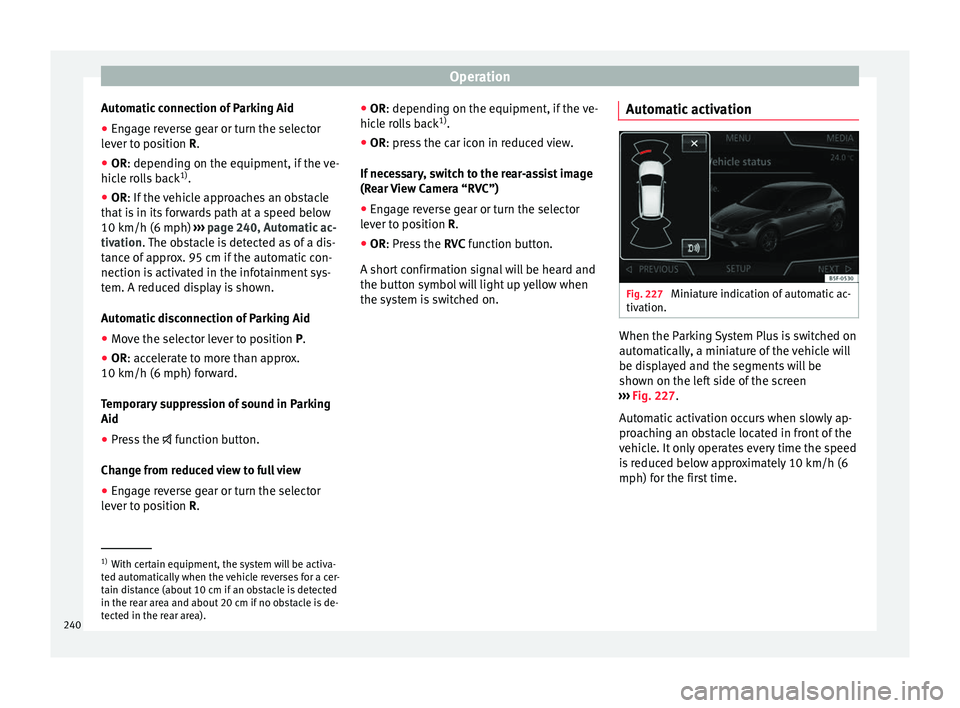
the system is switched on. Automatic activation Fig. 227
Miniature indication of automatic ac-
tiv ation. When the Parking System Plus is switched on
aut
om
atic
ally, a miniature of the vehicle will
be displayed and the segments will be
shown on the left side of the screen
››› Fig. 227.
Automatic activation occurs when slowly ap-
proaching an obstacle located in front of the
vehicle. It only operates every time the speed
is reduced below approximately 10 km/h (6
mph) for the first time. 1)
With certain equipment, the system will be activa-
ted aut om
atically when the vehicle reverses for a cer-
tain distance (about 10 cm if an obstacle is detected
in the rear area and about 20 cm if no obstacle is de-
tected in the rear area).
240
Page 243 of 332

Driver assistance systems
If the parking aid is switched off using the
b utt
on, the f
ollowing actions must be carried
out in order for it to automatically switch on:
● Switch off the ignition and switch it on
again.
● OR: ac
celerate above 10 km/h (6 mph) be-
for
e reducing speed below this number
again.
● OR: place the selector lever in position P
and then mov
e it from this position.
● OR: switch on and off the automatic activa-
tion in the Ea
sy Connect system menu.
The automatic activation with parking aid
miniature indication can be switched on and
off from the Easy Connect system menu
››› page 33:
● Switch the ignition on.
● Select: button and function button
SETTINGS > Parking and manoeu-
vring .
● Select the Automatic activation op-
tion. When the f
u
nction button check box is
activated , the function is on.
If the system has been activated automatical-
ly, an audible sound warning will only be giv-
en when obstacles in front are at a distance
of less than 50 cm. CAUTION
The automatic connection of the Parking Aid
only w
orks when you are driving slowly. If
driving style is not adapted to the circum-
stances, an accident and serious injury or
damage may be caused. Segments of the visual indication
Fig. 228
Parking Aid display on the Easy Con-
nect sy
s
tem screen. The distance of separation from the obstacle
c
an be e
s
timated using the segments around
the vehicle.
The optical indication of the segments works
as follows:
a white segment is dis-
played when the obstacle is not within
the vehicle's trajectory or the direction
of travel is in the opposite direction to
its location.
White segments: obstacles located in the
vehicl
e's trajectory and which are more
than 30 cm away from the vehicle are
displayed in yellow.
obstacles that are less than
30 cm away from the vehicle are dis-
played in red.
Moreover, with the SEAT Media System
Plus/Navi System radios, a yellow trail indi-
cates the vehicle's expected journey based
on the steering wheel angle.
Whenever the obstacle is located in the vehi-
cle’s direction of travel, the corresponding
audible warning will sound.
As the vehicle approaches an obstacle, the
segments are displayed closer to the vehicle.
When the penultimate segment is displayed,
this means that the vehicle has reached the
collision zone. In the collision zone, the ob-
stacles are represented in red, including
those out of the path. Do not continue to
move forward (or backward) ››› in General
inf orm
ation on p
age 237, ››› in General in-
f orm
ation on p
age 237 !
Adjusting the display and audible
warning
s The settings for the display and audible
w
arnin g
s are controlled via the Easy Con-
nect*. »
Yellow segments:
Red segments:
241
Technical data
Advice
Operation
Emergencies
Safety
Page 245 of 332

Driver assistance systems
the
button and the
S
ET
TINGS and
P ark
and m
anoeuvre function buttons.
● on
– permits
the u
se of the braking
while manoeuvring function.
● off – does not
permit the use of the
braking while manoeuvring function.
Temporary suppression of emergency brak-
ing
● When the function is deactivated with the
Brak in
g while manoeuvring button that appears
on the P ark
in
g System screen of the Easy
Connect system.
● Whenever any of the car doors, rear lid or
bonnet are opened.
R
ear Assist “Rear View Cam-
era”*
Rel
ated video Fig. 229
Safety Operating and safety warnings
WARNING
● The Re ar As
sist does not make it possible
to precisely calculate the distance from ob-
stacles (people, vehicles, etc.) and nor can it
overcome the system's own limits, hence us-
ing it may cause serious accidents and inju-
ries if used negligently or without due care.
The driver should be aware of his/her sur-
roundings at all times to ensure safe driving.
● The camera lens expands and distorts the
field of
vision and displays the objects on the
screen in a different, vague manner. The per-
ception of distances is also distorted by this
effect.
● Due to the screen resolution or insufficient
light condition
s, some items may be dis-
played in an unsatisfactory manner or not at
all. Take special care with thin posts, fences,
railings or trees that might not be displayed
on screen and could damage the vehicle.
● The rear assist has blind spots where it is
not pos
sible to represent people or objects
(small children, animals and certain objects
cannot be detected in its field of vision). Mon-
itor the vehicle's surrounding area at all
times.
● Keep the camera lens clean, free of ice and
snow
, and do not cover it.
● The system is not a replacement for driver
awar
eness. Supervise the parking operation
at all times, as well as the vehicle's surround-
ing area. Adapt your speed and driving style at all times to suit visibility, weather, road
and traffic
c
onditions.
● Do not be distracted from the traffic by
looking at
the screen.
● The images on the rear assist screen are
only tw
o-dimensional. Due to a lack of spatial
depth, protruding parts or holes in the road,
for example, are more difficult to detect or
may not be seen at all.
● Vehicle load modifies the representation of
the orientation lines
displayed. The width
represented by the lines diminishes with ve-
hicle load. Pay special attention to the vehi-
cle's surroundings when the inside of the ve-
hicle of the luggage compartment is carrying
a heavy load.
● In the following situations, the objects or
other vehic
les shown in the navigation sys-
tem display appear to be further away or
closer than they really are: Pay special atten-
tion:
– On moving from a horizontal plane to a
slope.
– On moving from a slope to a horizontal
plane.
– If the vehicle is heavily loaded at the
rear.
– When the vehicle approaches objects
that are not on the ground surface or are
jutting out from it. These objects may al-
so be outside the camera's angle of vi-
sion when reversing. » 243
Technical data
Advice
Operation
Emergencies
Safety
Page 246 of 332
Operation
Note
● It i s
important to take great care and pay
special attention if you are not yet familiar
with the system.
● Rear assist will not be available if the vehi-
cle's
rear lid is open. Instructions for use
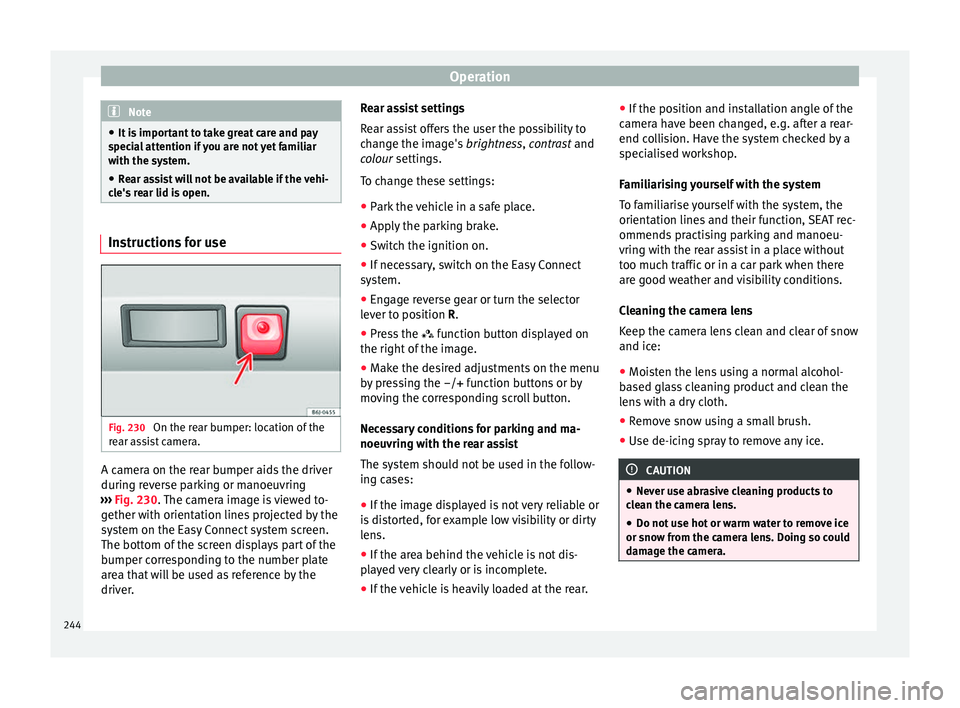
Fig. 230
On the rear bumper: location of the
r e
ar a
ssist camera. A camera on the rear bumper aids the driver
durin
g r
ev
erse parking or manoeuvring
››› Fig. 230. The camera image is viewed to-
gether with orientation lines projected by the
system on the Easy Connect system screen.
The bottom of the screen displays part of the
bumper corresponding to the number plate
area that will be used as reference by the
driver. Rear assist settings
Rear a
ssist offers the user the possibility to
change the image's brightness, contrast and
colour settings.
To change these settings:
● Park the vehicle in a safe place.
● Apply the parking brake.
● Switch the ignition on.
● If necessary, switch on the Easy Connect
syst
em.
● Engage reverse gear or turn the selector
lever t
o position R.
● Press the function b
utton displayed on
the right of the image.
● Make the desired adjustments on the menu
by pr
essing the –/+ function buttons or by
moving the corresponding scroll button.
Necessary conditions for parking and ma-
noeuvring with the rear assist
The system should not be used in the follow-
ing cases:
● If the image displayed is not very reliable or
is di
storted, for example low visibility or dirty
lens.
● If the area behind the vehicle is not dis-
pla
yed very clearly or is incomplete.
● If the vehicle is heavily loaded at the rear. ●
If the pos
ition and installation angle of the
camera have been changed, e.g. after a rear-
end collision. Have the system checked by a
specialised workshop.
Familiarising yourself with the system
To familiarise yourself with the system, the
orientation lines and their function, SEAT rec-
ommends practising parking and manoeu-
vring with the rear assist in a place without
too much traffic or in a car park when there
are good weather and visibility conditions.
Cleaning the camera lens
Keep the camera lens clean and clear of snow
and ice:
● Moisten the lens using a normal alcohol-
based gl
ass cleaning product and clean the
lens with a dry cloth.
● Remove snow using a small brush.
● Use de-icing spray to remove any ice. CAUTION
● Never u se abr
asive cleaning products to
clean the camera lens.
● Do not use hot or warm water to remove ice
or snow fr
om the camera lens. Doing so could
damage the camera. 244
Page 247 of 332

Driver assistance systems
Parking and manoeuvring with the
r e
ar a
ssist Fig. 231
Display on the Easy Connect system
s c
r
een: orientation lines. Switching the system on and off
●
The rear assist will switch on when the igni-
tion i s
on or the en
gine running, on engaging
reverse gear (manual gearbox) or on chang-
ing the selector lever to the R position (auto-
matic gearbox).
● The system switches off 8 seconds after
diseng
aging reverse gear (manual gearbox)
or removing the selector lever from the R po-
sition (automatic gearbox). The system will
also disconnect immediately after the igni-
tion is switched off. ●
The camera w
ill stop transmitting images
above the speed of 15 km/h (9 mph) with re-
verse engaged.
In combination with the Parking System Plus
››› page 237, the camera image will cease to
be transmitted immediately when reverse
gear is disengaged or when the selector lever
is moved from the R position, and the optical
information provided by the Parking Aid sys-
tem will be displayed.
Also in combination with the system, the rear
assist image can also be concealed:
● By pressing one of the Infotainment system
button
s on the display.
● OR: By pressing the miniature vehicle that
appe
ars on the left of the screen (which
switches to the full-screen mode of the Park-
ing System Plus's optical system).
If you wish to display the rear assist image
again:
● Disengage reverse, or change the selector
lever's
position, engage reverse again or
move the selector lever to position R.
● OR: Press the RVC fu
nction button1)Meaning of the orientation lines
›››
Fig. 231
Side lines: extension of the vehicle (the
approximate width of the vehicle plus the
rear view mirrors) on the road surface.
End of the side lines: the area marked in
green ends approximately 2 m behind
the vehicle on the road surface.
Intermediate line: indicates a distance of
approximately 1 m behind the vehicle on
the road surface.
Red horizontal line: indicates a safe dis-
tance of approximately 40 cm at the rear
of the vehicle on the road surface.
Parking manoeuvre
● Place the vehicle in front of the parking
spac
e and engage reverse gear (manual
gearbox) or move the selector to the R posi-
tion (automatic gearbox).
● Reverse slowly, and turn the steering wheel
so that the s
ide orientation lines lead to-
wards the parking space.
● Guide the vehicle into the parking space so
that the s
ide orientation lines run parallel to
it. 1
2
3
4
1)
WARNING: the RVC function b
utton will only be ac-
tivated and available when the reverse gear is en-
gaged or the selector lever is set to position R.
245
Technical data
Advice
Operation
Emergencies
Safety
Page 317 of 332
Index
Index
A
A C
C
. . . . . . . . . . . . . . . . . . . . . . . . . . . . . . . . . . . . 214
radar sensor . . . . . . . . . . . . . . . . . . . . . . . . . . . 217
Accessories . . . . . . . . . . . . . . . . . . . . . . . . . 159, 256
Adaptive cruise control . . . . . . . . . . . . . . . . . . . . 214 function for preventing overtaking in an insidelane . . . . . . . . . . . . . . . . . . . . . . . . . . . . . . . . 221
indications on the display . . . . . . . . . . . . . . . . 216
malfunction . . . . . . . . . . . . . . . . . . . . . . . . . . . . 215
radar sensor . . . . . . . . . . . . . . . . . . . . . . . . . . . 217
special driving situations . . . . . . . . . . . . . . . . . 222
warning and control lamp . . . . . . . . . . . . . . . . 216
Adaptive Cruise Control deactivating temporarily . . . . . . . . . . . . . . . . . 221
operating . . . . . . . . . . . . . . . . . . . . . . . . . . . . . . 218
Additional consumers (efficiency program) . . . . . 43
Adjusting front head restraints . . . . . . . . . . . . . . . . . . . . . . 78
front seats . . . . . . . . . . . . . . . . . . . . . . . . . . . . . 152
lights . . . . . . . . . . . . . . . . . . . . . . . . . . . . . . . . . 146
rear head restraints . . . . . . . . . . . . . . . . . . . . . 153
seats . . . . . . . . . . . . . . . . . . . . . . . . . . . . . . . . . . 75
Adjusting the head restraints front head restraints . . . . . . . . . . . . . . . . . . . . . 153
Adjustment CAR menu . . . . . . . . . . . . . . . . . . . . . . . . . . . . . 120
front head restraints . . . . . . . . . . . . . . . . . . . . . 153
rear head restraints . . . . . . . . . . . . . . . . . . . . . . 78
Airbag covers . . . . . . . . . . . . . . . . . . . . . . . . . . . . . 22
Airbags . . . . . . . . . . . . . . . . . . . . . . . . . . . . . . . . . . 85 description . . . . . . . . . . . . . . . . . . . . . . . . . . . . . 86
Airbag system . . . . . . . . . . . . . . . . . . . . . . . . . . 22, 85 activation . . . . . . . . . . . . . . . . . . . . . . . . . . . . . . 86
control lamp . . . . . . . . . . . . . . . . . . . . . . . . . . . . 90 deactivation of front airbag . . . . . . . . . . . . . . . . 89
desc
ription . . . . . . . . . . . . . . . . . . . . . . . . . . . . . 86
front airbags . . . . . . . . . . . . . . . . . . . . . . . . . 22, 87
functioning . . . . . . . . . . . . . . . . . . . . . . . . . . . . . 86
head-protection airbags . . . . . . . . . . . . . . . 24, 88
knee airbags . . . . . . . . . . . . . . . . . . . . . . . . . 23, 87
side airbags . . . . . . . . . . . . . . . . . . . . . . . . . 24, 87
Air conditioning Climatronic . . . . . . . . . . . . . . . . . . . . . . . . 52, 173
heating and fresh air . . . . . . . . . . . . . . . . . . . . . 56
manual air conditioning . . . . . . . . . . . . . . . . . . . 54
user instructions . . . . . . . . . . . . . . . . . . . . . . . . 175
Air outlets . . . . . . . . . . . . . . . . . . . . . . . . . . . . . . . 176
Air recirculation . . . . . . . . . . . . . . . . . . . . . . . . . . 176
Alcantara: cleaning . . . . . . . . . . . . . . . . . . . . . . . 263
Anchoring the front tow line. . . . . . . . . . . . . . . . . . . . . . . . . 99
Anti-freeze . . . . . . . . . . . . . . . . . . . . . . . . . . . . . . . 60
Anti-locking system . . . . . . . . . . . . . . . . . . . . . . . 187
Anti-puncture . . . . . . . . . . . . . . . . . . . . . . . . . . 65, 95
Anti-puncture kit . . . . . . . . . . . . . . . . . . . . . . . . 65, 95 check after 10 minutes . . . . . . . . . . . . . . . . . . . . 97
Anti-puncture set . . . . . . . . . . . . . . . . . . . . . . . . . . 95
Anti-theft alarm . . . . . . . . . . . . . . . . . . . . . 125, 133 trailer . . . . . . . . . . . . . . . . . . . . . . . . . . . . . . . . . 254
vehicle interior monitoring and anti-tow pro-tection . . . . . . . . . . . . . . . . . . . . . . . . . . . . . . 135
Anti-theft security system . . . . . . . . . . 15, 125, 131
Anti-tow protection . . . . . . . . . . . . . . . . . . . . . . . 135
Aspects to note before setting off . . . . . . . . . . . . . 74
ASR see Traction control system . . . . . . . . . . . . . . . 187
Assistance systems ACC . . . . . . . . . . . . . . . . . . . . . . . . . . . . . . . . . . 214
adaptive cruise control . . . . . . . . . . . . . . . . . . . 214
Auto Hold function . . . . . . . . . . . . . . . . . . . . . . 208
cruise control system . . . . . . . . . . . . . . . . . . . . 209
Emergency Assist . . . . . . . . . . . . . . . . . . . . . . . 228 emergency brake assist (Front Assist) . . . . . . . 210
fatigue detection
. . . . . . . . . . . . . . . . . . . . . . . 236
parking aid . . . . . . . . . . . . . . . . . . . . . . . 237, 238
traffic jam assist . . . . . . . . . . . . . . . . . . . . . . . . 227
traffic sign detection system . . . . . . . . . . . . . . 233
tyre monitoring . . . . . . . . . . . . . . . . . . . . . . . . . 284
tyre monitoring indicator . . . . . . . . . . . . . . . . . 285
tyre monitoring systems . . . . . . . . . . . . . . . . . 283
Assisted starting . . . . . . . . . . . . . . . . . . . . . . . . . . 70
Audible warning signal control and warning lamps . . . . . . . . . . . . . . . 119
lights . . . . . . . . . . . . . . . . . . . . . . . . . . . . . . . . . 140
unfastened safety belt . . . . . . . . . . . . . . . . . . . . 80
Auto Hold . . . . . . . . . . . . . . . . . . . . . . . . . . . . . . . 208
Auto Hold function . . . . . . . . . . . . . . . . . . . . . . . . 208
Auto Lock (central locking) . . . . . . . . . . . . . . . . . 125
Automatic car washes switching the Auto Hold function off . . . . . . . . 209
Automatic dipped beam control . . . . . . . . . . . . . 141
Automatic gearbox . . . . . . . . . . . . . . . . . . . . . . . . 191 downhill speed control . . . . . . . . . . . . . . . . . . 196
driving tips . . . . . . . . . . . . . . . . . . . . . . . . . . . . 194
emergency program . . . . . . . . . . . . . . . . . . . . . 197
kick-down feature . . . . . . . . . . . . . . . . . . . . . . . 195
launch control program . . . . . . . . . . . . . . . . . . 195
manual release of the selector lever . . . . . . . . . 50
safety interlock for ignition key . . . . . . . . . . . . 178
selector lever lock . . . . . . . . . . . . . . . . . . . . . . . 192
selector lever positions . . . . . . . . . . . . . . . . . . 191
steering wheel with gear shift paddles . . . . . . 193
tiptronic . . . . . . . . . . . . . . . . . . . . . . . . . . 191, 193
AUX-IN . . . . . . . . . . . . . . . . . . . . . . . . . . . . . . . . . . 123
B Battery . . . . . . . . . . . . . . . . . . . . . . . . . . . . . . . . . . 132
Before setting off . . . . . . . . . . . . . . . . . . . . . . . . . . 74
315
Page 318 of 332

Index
Belt tensioners contr
o
l lamp . . . . . . . . . . . . . . . . . . . . . . . . . . . . 90
Belt tightening . . . . . . . . . . . . . . . . . . . . . . . . . . . . 84
Bench seat . . . . . . . . . . . . . . . . . . . . . . . . . . . . . . 156
Biodiesel . . . . . . . . . . . . . . . . . . . . . . . . . . . . . . . . 267
Bonnet . . . . . . . . . . . . . . . . . . . . . . . . . . . . . 17, 270 opening the bonnet . . . . . . . . . . . . . . . . . . . . . 271
Brake emergency braking function . . . . . . . . . . . . . . 184
Brake assist . . . . . . . . . . . . . . . . . . . . . . . . . . . . . 187
Brake fluid . . . . . . . . . . . . . . . . . . . . . . . . . . . . . . . 61
Brakes . . . . . . . . . . . . . . . . . . . . . . . . . . . . . . . . . . 186 brake assist . . . . . . . . . . . . . . . . . . . . . . . . . . . . 187
brake fluid . . . . . . . . . . . . . . . . . . . . . . . . . . . . . 275
brake servo . . . . . . . . . . . . . . . . . . . . . . . . . . . . 186
electronic parking brake . . . . . . . . . . . . . . . . . 183
moving off . . . . . . . . . . . . . . . . . . . . . . . . . . . . . 190
new brake pads . . . . . . . . . . . . . . . . . . . . . . . . 186
C Camera cleaning . . . . . . . . . . . . . . . . . . . . . . . . . . . . . . 259
cleanliness . . . . . . . . . . . . . . . . . . . . . . . . . . . . 233
Lane Assist . . . . . . . . . . . . . . . . . . . . . . . . . . . . 224
Capacities . . . . . . . . . . . . . . . . . . . . . . . . . . . . . . . . 58 fuel tank . . . . . . . . . . . . . . . . . . . . . . . . . . . . . . 118
natural gas tank . . . . . . . . . . . . . . . . . . . . . . . . 265
windscreen washer water . . . . . . . . . . . . . . . . 276
Car-care products . . . . . . . . . . . . . . . . . . . . . . . . . 257
Catalytic converter . . . . . . . . . . . . . . . . . . . . . . . . 203 malfunction . . . . . . . . . . . . . . . . . . . . . . . . . . . . 203
CCS . . . . . . . . . . . . . . . . . . . . . . . . . . . . . . . . . . . . . 45
CD-ROM player (navigation) . . . . . . . . . . . . . . . . 158
Central locking adjusting . . . . . . . . . . . . . . . . . . . . . . . . . . . . . . 128
anti-theft alarm . . . . . . . . . . . . . . . . . . . . . . . . . 133
central locking switch . . . . . . . . . . . . . . . . . . . . 128 electric windows . . . . . . . . . . . . . . . . . . . . . . . . 137
emergency
locking . . . . . . . . . . . . . . . . . . . . . . . 16
Keyless Access . . . . . . . . . . . . . . . . . . . . . . . . . 129
Panoramic sliding/tilting sunroof . . . . . . . . . . 137
remote control key . . . . . . . . . . . . . . . . . . . . . . 127
selective unlocking system . . . . . . . . . . . . . . . 127
Central locking system . . . . . . . . . . . . . . . . . . . . . 125
Centre console . . . . . . . . . . . . . . . . . . . . . . . . . . . . 11
Cetane number (diesel fuel) . . . . . . . . . . . . . . . . 267
Changing a bulb . . . . . . . . . . . . . . . . . . . . . . . . . . 103 fog light . . . . . . . . . . . . . . . . . . . . . . . . . . . . . . . 106
number plate light . . . . . . . . . . . . . . . . . . . . . . 110
rear bulb in the side panel . . . . . . . . . . . . . . . . 108
rear bulbs . . . . . . . . . . . . . . . . . . . . . . . . . . . . . 107
Changing a wheel . . . . . . . . . . . . . . . . . . . . . . . . . 66 subsequent work . . . . . . . . . . . . . . . . . . . . . . . . 68
Changing gear engaging gears (manual gearbox) . . . . . . . . . 190
Changing main headlight turn signal . . . . . . . . . . . . . . . . . . . . . . . . . . . . . 105
Changing settings CAR menu . . . . . . . . . . . . . . . . . . . . . . . . . . . . . . 33
Changing the blades . . . . . . . . . . . . . . . . . . . . . . . 97
Changing the main beam headlight bulb main beam headlight . . . . . . . . . . . . . . . . . . . . 106
Changing the main headlight bulb day light . . . . . . . . . . . . . . . . . . . . . . . . . . . . . . 105
dipped headlight . . . . . . . . . . . . . . . . . . . . . . . 105
Changing the wiper blades . . . . . . . . . . . . . . . . . . 72
Charging the battery . . . . . . . . . . . . . . . . . . . . . . 278
Checking levels engine compartment . . . . . . . . . . . . . . . . . . . . 270
Childproof locks electric windows . . . . . . . . . . . . . . . . . . . . . . . . 136 Child seats . . . . . . . . . . . . . . . . . . . . . . . . . . . . 25, 92
cate gorisation into groups . . . . . . . . . . . . . . . . . 92
ISOFIX system . . . . . . . . . . . . . . . . . . . . . . . . . . . 27
safety instructions . . . . . . . . . . . . . . . . . . . . 25, 91
securing with seat belt . . . . . . . . . . . . . . . . . . . . 26
Top Tether system . . . . . . . . . . . . . . . . . . . . . 27, 29
Top Tether System . . . . . . . . . . . . . . . . . . . . . . . 29
Cleaning . . . . . . . . . . . . . . . . . . . . . . . . . . . . . . . . 257 alcantara . . . . . . . . . . . . . . . . . . . . . . . . . . . . . . 263
carbon parts . . . . . . . . . . . . . . . . . . . . . . . . . . . 260
Easy Connect control panel . . . . . . . . . . . . . . . 261
exhaust pipe . . . . . . . . . . . . . . . . . . . . . . . . . . . 261
fabrics . . . . . . . . . . . . . . . . . . . . . . . . . . . . . . . . 261
leather . . . . . . . . . . . . . . . . . . . . . . . . . . . . . . . . 262
natural leather . . . . . . . . . . . . . . . . . . . . . . . . . 263
plastic parts . . . . . . . . . . . . . . . . . . . . . . 260, 261
radio screen . . . . . . . . . . . . . . . . . . . . . . . . . . . 261
rims . . . . . . . . . . . . . . . . . . . . . . . . . . . . . . . . . . 260
seat belts . . . . . . . . . . . . . . . . . . . . . . . . . . . . . 264
trims . . . . . . . . . . . . . . . . . . . . . . . . . . . . . . . . . 259
washing the vehicle . . . . . . . . . . . . . . . . . . . . . 257
windows . . . . . . . . . . . . . . . . . . . . . . . . . . . . . . 260
Climatronic . . . . . . . . . . . . . . . . . . . . . . . . . . . . . . . 52
Close . . . . . . . . . . . . . . . . . . . . . . . . . . . . . . . . . . . 125
Closing . . . . . . . . . . . . . . . . . . . . . . . . . . . . . . . . . 125 bonnet . . . . . . . . . . . . . . . . . . . . . . . . . . . . . . . . 271
panoramic sliding sunroof . . . . . . . . . . . . . . . . 138windows . . . . . . . . . . . . . . . . . . . . . . . . . . . . . . 136
Clutch (warning lamp) . . . . . . . . . . . . . . . . . . . . . 197
Coming Home . . . . . . . . . . . . . . . . . . . . . . . . . . . . 143
Connectivity Box . . . . . . . . . . . . . . . . . . . . . . . . . . 123
Control and warning lamps . . . . . . . . . . . . . 47, 119 adaptive cruise control . . . . . . . . . . . . . . . . . . . 216
airbags . . . . . . . . . . . . . . . . . . . . . . . . . . . . . . . . 89airbag system . . . . . . . . . . . . . . . . . . . . . . . . . . . 90
applying the brake . . . . . . . . . . . . . . . . . . . . . . 216
ASR . . . . . . . . . . . . . . . . . . . . . . . . . . . . . . . . . . 188
316