air conditioning Seat Leon SC 2017 Owner's manual
[x] Cancel search | Manufacturer: SEAT, Model Year: 2017, Model line: Leon SC, Model: Seat Leon SC 2017Pages: 332, PDF Size: 7.25 MB
Page 7 of 332
Table of Contents
Table of Contents
The e s
senti
als . . . . . . . . . . . . . . . . . . . . . . . . 7
Exterior view . . . . . . . . . . . . . . . . . . . . . . . . . . . . 7
Exterior view . . . . . . . . . . . . . . . . . . . . . . . . . . . . 8
Driver-side general instrument panel (left-
hand drive) . . . . . . . . . . . . . . . . . . . . . . . . . . . . .
9
Driver-side general instrument panel (right-
hand drive) . . . . . . . . . . . . . . . . . . . . . . . . . . . . .
10
Centre console . . . . . . . . . . . . . . . . . . . . . . . . . . 11
Passenger-side general instrument panel (left-
hand drive) . . . . . . . . . . . . . . . . . . . . . . . . . . . . .
12
Passenger-side general instrument panel
(right-hand driv
e) . . . . . . . . . . . . . . . . . . . . . . . . 13
Interior view . . . . . . . . . . . . . . . . . . . . . . . . . . . . 14
How it works . . . . . . . . . . . . . . . . . . . . . . . . . . . . 15
Unlocking and locking . . . . . . . . . . . . . . . . . . . . 15
Before driving . . . . . . . . . . . . . . . . . . . . . . . . . . . 19
Airbags . . . . . . . . . . . . . . . . . . . . . . . . . . . . . . . . 22
Child seats . . . . . . . . . . . . . . . . . . . . . . . . . . . . . 25
Starting the vehicle . . . . . . . . . . . . . . . . . . . . . . 30
Lights and visibility . . . . . . . . . . . . . . . . . . . . . . 30
Easy Connect . . . . . . . . . . . . . . . . . . . . . . . . . . . 33
Driver information System . . . . . . . . . . . . . . . . . 36
Status display . . . . . . . . . . . . . . . . . . . . . . . . . . . 41
Cruise control . . . . . . . . . . . . . . . . . . . . . . . . . . . 45
Warning lamps . . . . . . . . . . . . . . . . . . . . . . . . . . 47
Gearbox lever . . . . . . . . . . . . . . . . . . . . . . . . . . . 50
Air conditioning . . . . . . . . . . . . . . . . . . . . . . . . . 52
Fluid Level control . . . . . . . . . . . . . . . . . . . . . . . 58
Emergencies . . . . . . . . . . . . . . . . . . . . . . . . . . . . 63
Fuses . . . . . . . . . . . . . . . . . . . . . . . . . . . . . . . . . . 63
Bulbs . . . . . . . . . . . . . . . . . . . . . . . . . . . . . . . . . . 64
Action in the event of a puncture . . . . . . . . . . . 64
Changing a wheel . . . . . . . . . . . . . . . . . . . . . . . 66
Snow chains . . . . . . . . . . . . . . . . . . . . . . . . . . . . 69
Emergency towing of the vehicle . . . . . . . . . . . 69 How to jump start . . . . . . . . . . . . . . . . . . . . . . . . 70
Changing the wiper blades . . . . . . . . . . . . . . . . 72
Safety . . . . . . . . . . . . . . . . . . . . . . . . . . . . . . . . 74
Safe driving . . . . . . . . . . . . . . . . . . . . . . . . . . . . 74
Safety first! . . . . . . . . . . . . . . . . . . . . . . . . . . . . . 74
Advice about driving . . . . . . . . . . . . . . . . . . . . . 74
Correct position of the vehicle occupants . . . . 75
Pedal area . . . . . . . . . . . . . . . . . . . . . . . . . . . . . . 79
Seat belts . . . . . . . . . . . . . . . . . . . . . . . . . . . . . . 80
Why wear a seat belt . . . . . . . . . . . . . . . . . . . . . 80
How to properly adjust your seatbelt . . . . . . . . 83
Seat belt tensioners . . . . . . . . . . . . . . . . . . . . . . 84
Airbag system . . . . . . . . . . . . . . . . . . . . . . . . . . 85
Brief introduction . . . . . . . . . . . . . . . . . . . . . . . . 85
Safety instructions about airbags . . . . . . . . . . . 87
Deactivating airbags . . . . . . . . . . . . . . . . . . . . . 89
Transporting children safely . . . . . . . . . . . . . . . 91
Safety for children . . . . . . . . . . . . . . . . . . . . . . . 91
Child seats . . . . . . . . . . . . . . . . . . . . . . . . . . . . . 92
Event Data Recorder . . . . . . . . . . . . . . . . . . . . . . 94
Description and operation . . . . . . . . . . . . . . . . . 94
Emergencies . . . . . . . . . . . . . . . . . . . . . . . . . . 95
Self-help . . . . . . . . . . . . . . . . . . . . . . . . . . . . . . . 95
Vehicle tool kit, anti-puncture kit* . . . . . . . . . . 95
Tyre repair . . . . . . . . . . . . . . . . . . . . . . . . . . . . . . 95
Manual unlocking/locking . . . . . . . . . . . . . . . . . 97
Changing the windscreen wiper blades . . . . . . 97
Towing or tow-starting . . . . . . . . . . . . . . . . . . . . 98
Fuses and bulbs . . . . . . . . . . . . . . . . . . . . . . . . . 101
Fuses . . . . . . . . . . . . . . . . . . . . . . . . . . . . . . . . . . 101
Changing bulbs . . . . . . . . . . . . . . . . . . . . . . . . . 103
Change the front bulbs . . . . . . . . . . . . . . . . . . . 105
Changing incandescent rear light bulbs . . . . . . 107
Side turn signals . . . . . . . . . . . . . . . . . . . . . . . . 110 Operation
. . . . . . . . . . . . . . . . . . . . . . . . . . . . . 113
Controls and displays . . . . . . . . . . . . . . . . . . . . 113
General instrument panel . . . . . . . . . . . . . . . . . 112
Instruments and warning/control lamps . . . . . 114
Instruments . . . . . . . . . . . . . . . . . . . . . . . . . . . . 114
Control lamps . . . . . . . . . . . . . . . . . . . . . . . . . . . 119
Introduction to the Easy Connect system* . . . . 120
System settings (CAR)* . . . . . . . . . . . . . . . . . . . 120
Communications and multimedia . . . . . . . . . . . 121
Steering wheel controls* . . . . . . . . . . . . . . . . . . 121
Multimedia . . . . . . . . . . . . . . . . . . . . . . . . . . . . . 123
Opening and closing . . . . . . . . . . . . . . . . . . . . . 125
Central locking system . . . . . . . . . . . . . . . . . . . . 125
Anti-theft alarm system* . . . . . . . . . . . . . . . . . . 133
Rear lid (luggage compartment) . . . . . . . . . . . . 135
Controls for the windows . . . . . . . . . . . . . . . . . . 136
Panoramic sliding sunroof* . . . . . . . . . . . . . . . . 138
Lights and visibility . . . . . . . . . . . . . . . . . . . . . . 140
Lights . . . . . . . . . . . . . . . . . . . . . . . . . . . . . . . . . 140
Visibility . . . . . . . . . . . . . . . . . . . . . . . . . . . . . . . 148
Windscreen wiper and window wiper sys-
tems . . . . . . . . . . . . . . . . . . . . . . . . . . . . . . . . . . 148 Mirr
or . . . . . . . . . . . . . . . . . . . . . . . . . . . . . . . . . 150
Seats and head restraints . . . . . . . . . . . . . . . . . 152
Adjusting the seats and headrests . . . . . . . . . . 152
Seat functions . . . . . . . . . . . . . . . . . . . . . . . . . . 154
Transport and practical equipment . . . . . . . . . 157
Storage compartments . . . . . . . . . . . . . . . . . . . 157
Storing objects . . . . . . . . . . . . . . . . . . . . . . . . . . 160
Roof carrier . . . . . . . . . . . . . . . . . . . . . . . . . . . . . 170
Air conditioning . . . . . . . . . . . . . . . . . . . . . . . . . 173
Heating, ventilation and cooling . . . . . . . . . . . . 173
Driving . . . . . . . . . . . . . . . . . . . . . . . . . . . . . . . . 178
Starting and stopping the engine . . . . . . . . . . . 178
Braking and parking . . . . . . . . . . . . . . . . . . . . . 183
Braking and stability systems . . . . . . . . . . . . . . 187
Manual gearbox . . . . . . . . . . . . . . . . . . . . . . . . . 190
5
Page 54 of 332

The essentials
Air conditioning Ho w doe
s
Climatronic* work? Fig. 57
In the centre console: Climatronic con-
tro l
s To switch a specific function on, press the ap-
pr
opri
at
e button. Press the button again to
switch off the function. The LED on each control lights up to indicate
that the r
espective function of a control has
been switched on.
1TemperatureThe left and right sides can be adjusted separately: Turn the control to adjust the temperature
2FanThe power of the fan is automatically adjusted. The fan is also adjusted manually by turning the control.
3Air distribution
The airflow adjusts automatically for comfort. You can also switch it on manually using the buttons 3.
: The air is directed at the chest of driver and passengers by the dash panel air vents.
: Air distribution to footwells.
: Upward air distribution.52
Page 55 of 332
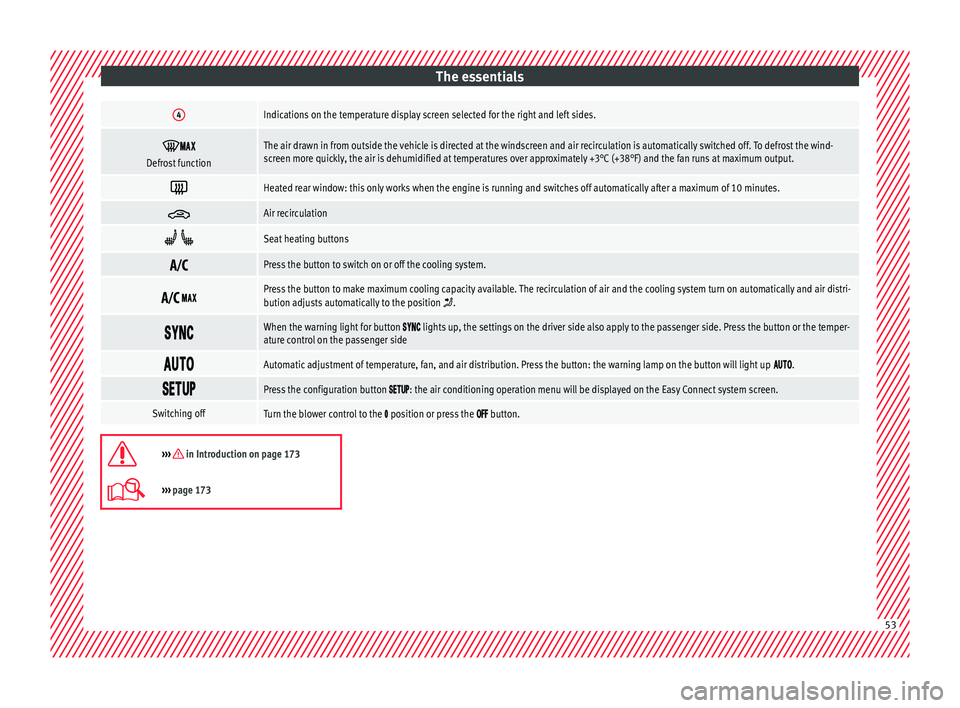
The essentials4Indications on the temperature display screen selected for the right and left sides.
Defrost functionThe air drawn in from outside the vehicle is directed at the windscreen and air recirculation is automatically switched off. To defrost the wind-
screen more quickly, the air is dehumidified at temperatures over approximately +3°C (+38°F) and the fan runs at maximum output.
Heated rear window: this only works when the engine is running and switches off automatically after a maximum of 10 minutes.
Air recirculation
Seat heating buttons
Press the button to switch on or off the cooling system.
Press the button to make maximum cooling capacity available. The recirculation of air and the cooling system turn on automatically and air distri-
bution adjusts automatically to the position .
When the warning light for button lights up, the settings on the driver side also apply to the passenger side. Press the button or the temper-
ature control on the passenger side
Automatic adjustment of temperature, fan, and air distribution. Press the button: the warning lamp on the button will light up .
Press the configuration button : the air conditioning operation menu will be displayed on the Easy Connect system screen.
Switching offTurn the blower control to the position or press the button.
››› in Introduction on page 173
›››
page 173 53
Page 56 of 332
The essentials
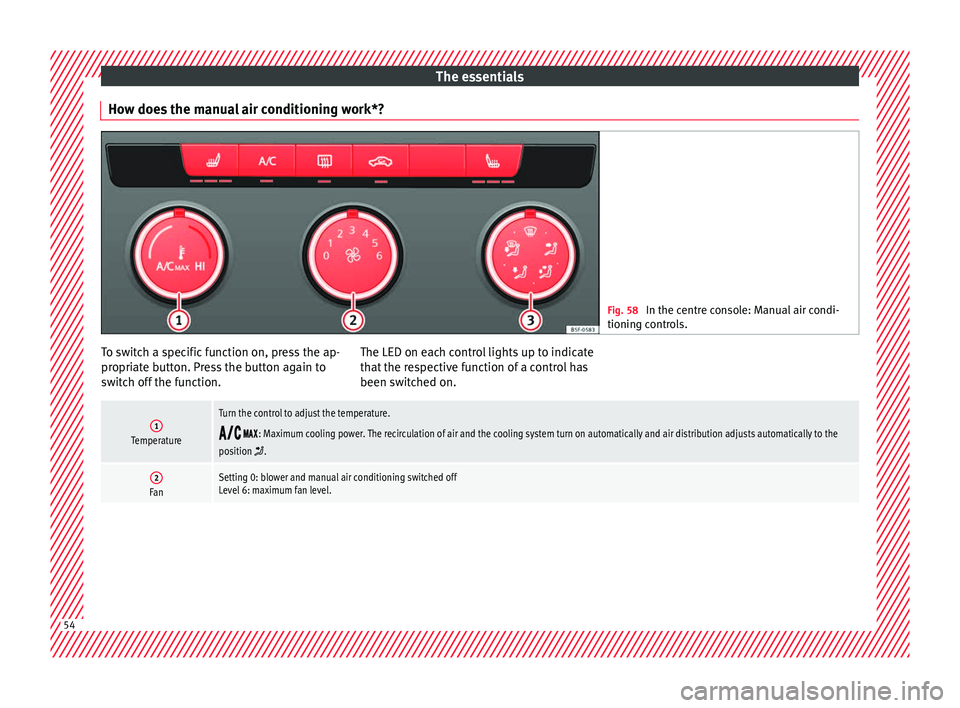
How does the manual air conditioning work*? Fig. 58
In the centre console: Manual air condi-
tioning c ontr
ols. To switch a specific function on, press the ap-
pr
opri
at
e button. Press the button again to
switch off the function. The LED on each control lights up to indicate
that the r
espective function of a control has
been switched on.
1Temperature
Turn the control to adjust the temperature.
: Maximum cooling power. The recirculation of air and the cooling system turn on automatically and air distribution adjusts automatically to the
position .
2FanSetting 0: blower and manual air conditioning switched off
Level 6: maximum fan level. 54
Page 104 of 332
Emergencies
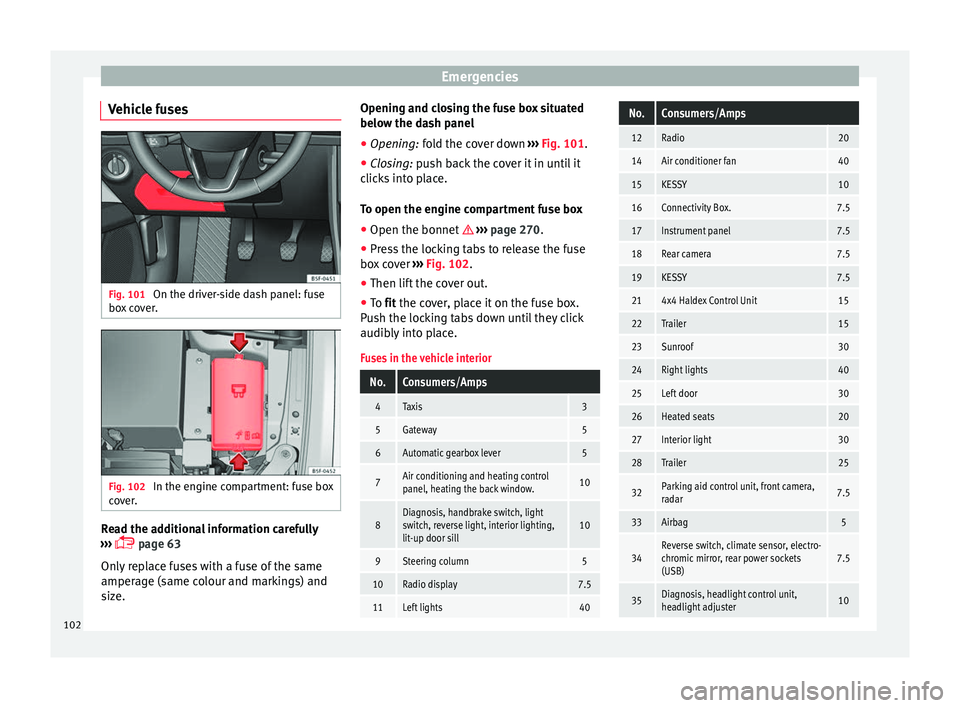
Vehicle fuses Fig. 101
On the driver-side dash panel: fuse
bo x
c
over. Fig. 102
In the engine compartment: fuse box
c o
v
er. Read the additional information carefully
› ›
›
page 63
Only replace fuses with a fuse of the same
amperage (same colour and markings) and
size. Opening and closing the fuse box situated
below the da
sh panel
● Opening: fold the cover down ››
› Fig. 101.
● Closing: push back the cover it in until it
clic
ks into place.
To open the engine compartment fuse box
● Open the bonnet ›››
page 270.
● Press the locking tabs to release the fuse
box c
over ››› Fig. 102.
● Then lift the cover out.
● To fit the cover, place it on the fuse box.
Pu
sh the locking tabs down until they click
audibly into place.
Fuses in the vehicle interior
No.Consumers/Amps
4Taxis3
5Gateway5
6Automatic gearbox lever5
7Air conditioning and heating control
panel, heating the back window.10
8Diagnosis, handbrake switch, light
switch, reverse light, interior lighting,
lit-up door sill10
9Steering column5
10Radio display7.5
11Left lights40
No.Consumers/Amps
12Radio20
14Air conditioner fan40
15KESSY10
16Connectivity Box.7.5
17Instrument panel7.5
18Rear camera7.5
19KESSY7.5
214x4 Haldex Control Unit15
22Trailer15
23Sunroof30
24Right lights40
25Left door30
26Heated seats20
27Interior light30
28Trailer25
32Parking aid control unit, front camera,
radar7.5
33Airbag5
34Reverse switch, climate sensor, electro-
chromic mirror, rear power sockets
(USB)7.5
35Diagnosis, headlight control unit,
headlight adjuster10 102
Page 175 of 332

Air conditioning
Distributing a load
Di s
trib
ute loads uniformly and secure them
correctly ››› .
Chec k
att
achments
Once the cross bars and roof carrier system
have been installed, check the bolted con-
nections and attachments after a short jour-
ney and subsequently with a certain frequen-
cy. WARNING
Exceeding the maximum authorised roof load
can r e
sult in accidents and considerable vehi-
cle damage.
● Never exceed the maximum authorised
load on the r
oof and on the axles or the vehi-
cle's maximum authorised weight.
● Never exceed the load capacity of the cross
bars
and the roof carrier system, even if the
maximum authorised roof load has not been
reached.
● Secure heavy items as far forward as possi-
ble and di
stribute the vehicle load uniformly. WARNING
If the load is loose or not secured, it could fall
from the r oof
carrier system or cause acci-
dents and injuries.
● Always use belts or retaining straps that
are suit
able and in a good condition.
● Secure the load properly. Air conditioning
He atin
g,
ventilation and cool-
ing
Introduction Read the additional information carefully
›› ›
page 52
Viewing Climatronic information
On the screen of Climatronic control unit and
on the screen of the factory-fitted Easy Con-
nect system, the theoretical values of the
temperature zones are shown.
The unit of temperature measurement can be
changed in the Easy Connect system.
Dust and pollen filter
The dust and pollen filter with its activated
charcoal cartridge serves as a barrier against
impurities in the air taken into the vehicle in-
terior.
The dust and pollen filter must be changed
regularly so that air conditioner performance
is not adversely affected.
If the filter loses efficiency prematurely due
to use in areas with very high levels of air
pollution, the filter must be changed more
frequently than stated in the Service Sched-
ule. WARNING
Reduced visibility through the windows in-
cr e
ases the risk of serious accidents.
● Always ensure that all windows are free of
ice and sno
w, and that they are not fogged,
so as to maintain good visibility of everything
outside.
● The maximum heat output required to de-
fros
t windows as quickly as possible is only
available when the engine has reached its
normal running temperature. Only drive when
you have good visibility.
● Always ensure that you use the heating
syst
em, fresh air system, air conditioner and
the heated rear window to maintain good visi-
bility to the outside.
● Never leave the air recirculation on for a
long period of time. If
the cooling system is
switched off and air recirculation mode
switched on, the windows can mist over very
quickly, considerably limiting visibility.
● Switch air recirculation mode off when it is
not requir
ed. WARNING
Stuffy or used air will increase fatigue and re-
duce driv er c
oncentration possibly resulting
in a serious accident.
● Never leave the fresh air fan turned off or
use the air rec
irculation for long periods of
time; the air in the vehicle interior will not be
refreshed. » 173
Technical data
Advice
Operation
Emergencies
Safety
Page 176 of 332
Operation
CAUTION
● Switc h the air c
onditioner off if you think it
may be broken. This will avoid additional
damage. Have the air conditioner checked by
a specialised workshop.
● Repairs to the air conditioner require spe-
ciali
st knowledge and special tools. SEAT rec-
ommends visiting a SEAT Official Service. Note
● When the coolin g sy
stem is turned off, air
coming from the outside will not be dried. To
prevent fogging of the windows, SEAT recom-
mends leaving the cooling system (compres-
sor) turned on. To do this, press the but-
ton. The button lamp should light up.
● The maximum heat output required to de-
frost
windows as quickly as possible is only
available when the engine has reached its
normal running temperature.
● Keep the air intake slots in front of the
windsc
reen free of snow, ice and leaves to en-
sure heating and cooling are not impaired,
and to prevent the windows from misting
over. Operating the Climatronic through the
E
a
sy C
onnect* system 3 Applies to vehicles with a Media System
Touc h/C
olour.
In the Easy Connect system it is also possible
to perform various adjustments to the Clima-
tronic.
Open the air conditioner menu
● Press the button on the Climatronic
contro l
panel.
● OR: press the button in Easy Connect.
W ith the r
otatin
g switch select the air con-
ditioner menu and open it.
On the touch screen you can see and change
the current settings, for example, the temper-
ature set for the driver and passenger sides,
the air distribution and the fan speed.
To switch a function on or off, or to select a
submenu, you must press the corresponding
function button.
Function button: function
OFFSwitch off and switch on the Climatron-
ic.
SYNCSynchronise driver and front passenger
temperatures.
Function button: function
SETTINGS
The air conditioning settings submenu
is opened. The following settings can al-
so be adjusted:
Air conditioning profile. : Ad-
just the power of the fan in AUTO mode.
You can choose between low, medium
and high.
Automatic air recirculation :
Switching automatic air recirculation on
and off ››› page 176.
BACK : Close the submenu. Operating the Climatronic through the
E
a
sy C
onnect* system 3
Applie
s
to vehicles with Media System Plus/Navi
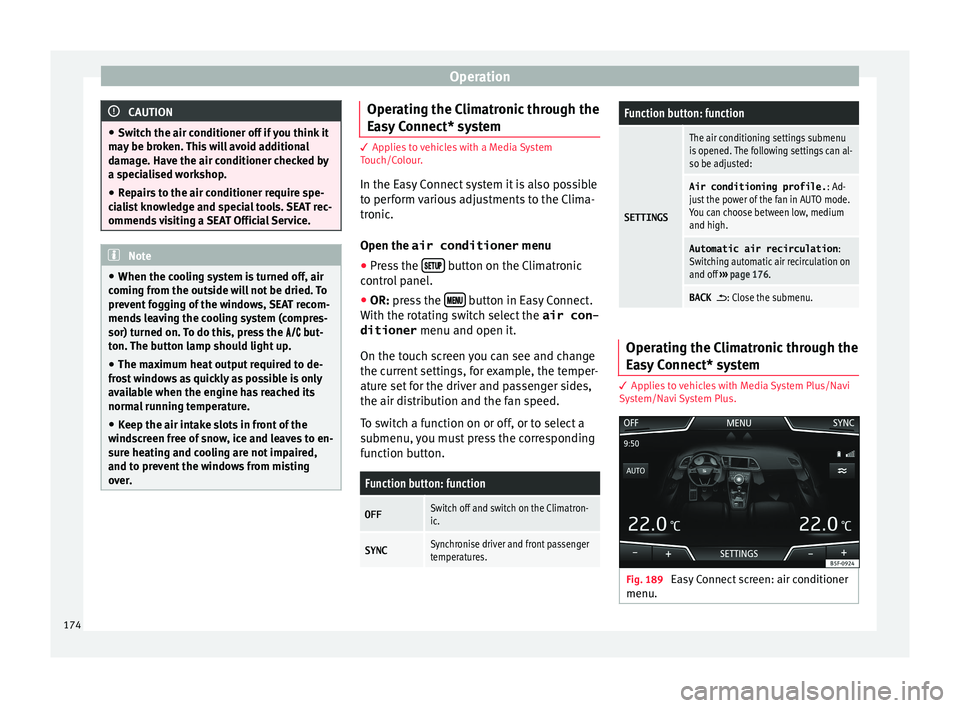
System/Navi System Plus. Fig. 189
Easy Connect screen: air conditioner
menu. 174
Page 177 of 332
Air conditioning
In the Easy Connect system it is also possible
t o per
form
various adjustments to the Clima-
tronic ››› Fig. 189.
Open the air conditioner menu
● Press the button on the Climatronic
c ontr
ol
panel.
On the top of the screen you can see and
change the current settings, such as, for ex-
ample, the temperature set for the driver side
and for that of passenger. Temperatures up
to +22°C (+72°F) are shown with blue arrows,
and temperatures over +22°C (+72°F) with
red arrows.
To switch a function on or off, or to select a
submenu, you must press the corresponding
function button.
Function button: function
OFFClimatronic is switched off.
ONClimatronic is switched on.
SYNCSynchronise driver and front passenger
temperatures.
Function button: function
SETTINGS
The air conditioning settings submenu
is opened. The following settings can al-
so be adjusted:
Air conditioning profile. : Ad-
just the power of the fan in AUTO mode.
You can choose between low, medium
and high.
Automatic air recirculation :
Switching automatic air recirculation on
and off ››› page 176.
Automatic supplementary heat-
er : Activate/deactivate the automatic
activation of the auxiliary heater for
colder countries (only for engines with
auxiliary heater). With the option deacti-
vated, depending on the outside tem-
perature the heating may need more
time than normal to reach a comfortable
temperature.
BACK : Close the submenu. Air conditioning user instructions
The interior cooling system only works when
the en
gine i
s ru
nning and fan is switched on.
The air conditioner operates most effectively
with the windows and the panoramic sliding
sunroof closed. However, if the vehicle has
heated up after standing in the sun for some
time, the air inside can be cooled more quick- ly by opening the windows and the panoram-
ic sliding s
unroof briefly.
Climatronic: change the temperature unit on
the screen of the radio or on the factory-fit-
ted navigation system
Changing the temperature display from Cel-
sius to Fahrenheit on radio or on the factory-
fitted navigation system is done using the
menu on the instrument panel
››› page 36.
The cooling system cannot be activated
If the air conditioning system cannot be
switched on, this may be caused by the fol-
lowing:
● The engine is not running.
● The fan is switched off.
● The air conditioner fuse has blown.
● The outside temperature is lower than ap-
proxim
ately +3°C (+38°F).
● The air conditioner compressor has been
temporarily
switched off because the engine
coolant temperature is too high.
● Another fault in the vehicle. Have the air
conditioner check
ed by a specialised work-
shop.
Special Characteristics
If the humidity and temperature outside the
vehicle are high, condensation can drip off »
175
Technical data
Advice
Operation
Emergencies
Safety
Page 179 of 332

Air conditioning
Air recirculation mode prevents the ambient
air fr om ent
erin
g the interior.
When the outside temperature is very high,
selecting manual air recirculation mode for a
short period refreshes the vehicle interior
more quickly.
For safety reasons, air recirculation mode is
switched off when the button is press-
ed or the air distributor turned to .
Switching the manual air recirculation mode
on and off
To switch system on: press the button un-
til the warning lamp lights up.
To switch system off: press the button un-
til the warning lamp goes off.
Functioning mode of automatic air recircula-
tion (air conditioning menu)
With the automatic air recirculation mode ac-
tivated, the entry of fresh air into the cabin
interior is enabled. If the system detects a
high concentration of hazardous substances
in the ambient air, air recirculation mode is
switched on automatically. When the level of
impurities drops to within a normal range, re-
circulation mode is switched off.
The system is unable to detect unpleasant
smells. The air recirculation will
not connect aut o-
matically in versions without humidity sensor
and in the following external conditions:
● The outside temperature is lower than +3°C
(+38°F).
● The cooling system is switched off and the
outside temper
ature is below +10°C (+50°F).
● The cooling system is switched off, the out-
side temper
ature is below +15°C (+59°F) and
the windscreen wipers are switched on.
Activation/deactivation of automatic air recir-
culation is done in the air conditioner menu,
under Configuration. WARNING
Observe the safety warnings ›››
in Intro-
duction on pag e 173
.
● If the cooling system is switched off and air
recir
culation mode switched on, the windows
can mist over very quickly, considerably limit-
ing visibility.
● Switch air recirculation mode off when it is
not requir
ed. CAUTION
Do not smoke when air recirculation is
swit c
hed on in vehicles with an air condition-
er. The smoke taken in could lie on the cool-
ing system vaporiser and on the activated
charcoal cartridge of the dust and pollen fil- ter, leading to a permanently unpleasant
smell
. Note
Climatronic: air recirculation mode is activa-
t ed t o pr
event exhaust gas or unpleasant
odours from entering the vehicle interior
when it is in reverse and while the automatic
windscreen wiper is working. 177Technical data
Advice
Operation
Emergencies
Safety
Page 232 of 332
Operation
SEAT Drive Profile* Intr oduction SEAT Drive Profile enables the driver to
choo
se betw
een four profiles or modes, Nor-
mal , Sport , Eco and Individual , that
modify the behaviour of various vehicle func-
tions, providing different driving experiences.
In the FR and X-PERIENCE models equipped
with dynamic chassis control, the Comfort
profile is also available.
In the Leon Cupra model the four profiles are Comfort , Sport, Cupra and Individual .
The Individual profile can be configured
according to personal preferences. The other
profiles are fixed.
Description Depending on the equipment fitted in the ve-
hic
l
e,
SEAT Drive Profile can operate on the
following functions: Engine
Depending on the pr
ofile selected, the en-
gine responds more spontaneously or more
in harmony with the movements of the accel-
erator. Additionally, when Eco mode is selec-
ted, the Start-stop function is automatically
activated.
In vehicles with automatic transmission, the
gear change points are modified to position
them in lower or higher engine speed ranges.
Additionally, the Eco 1)
mode activates the In-
ertia function, enabling consumption to be
further reduced.
In manual gearbox vehicles, Eco1)
mode cau-
ses the gear change recommendation indica-
tions that appear on the instrument panel to
vary, facilitating more efficient driving.
Dynamic chassis control (DCC)
DCC continuously adapts the shock absorb-
ers to the condition of the road and current
driving conditions, according to the pre-set
programme.
In the event of a fault in the DCC, the follow-
ing message is displayed on the instrument
screen Fault: damping setting .Address
Pow
er steering becomes more robust in
Sport mode to enable a sportier driving
style. In the Leon Cupra the power steering
becomes more robust in Cupra mode.
Air conditioning
In vehicles with Climatronic, this can operate
in eco 1)
mode, especially restricting fuel con-
sumption.
Adaptive Cruise Control (ACC) 2)
According to the active driving profile, the ac-
celeration gradient of the adaptive cruise
control varies.
Electronic self-locking differential 2)
The self-locking differential adapts its behav-
iour depending on the driving profile chosen.
Normal mode or Cupra mode can be selected
to prioritise improved traction in sport driv-
ing. 1)
In the Leon Cupra model, Ec o
mode is selected
through the Individual profile.
2) Applies to the Leon Cupra model.
230