gearbox Seat Mii 2012 User Guide
[x] Cancel search | Manufacturer: SEAT, Model Year: 2012, Model line: Mii, Model: Seat Mii 2012Pages: 308, PDF Size: 4.13 MB
Page 130 of 308

128Starting, changing gears, parking
Manual gearbox: Engaging gears
Fig. 86 Gear shift pat-
tern of a 5-speed manual
gearbox
The position of each of the gears is shown on the gear stick ⇒ Fig. 86.
● Keep the clutch pedal pushed all the way down.
● Move the gearbox lever to the required position
⇒
.
● Release the clutch pedal to engage clutch.
In some countries, it is necessary to press the clutch pedal to the floor to
start the engine.
Selecting reverse gear
● Engage reverse gear only when the vehicle is stopped.
● Keep the clutch pedal pushed all the way down
⇒
.
● Move the gear lever into the neutral position.
● Move the gear stick to the right and then backwards to reverse gear R
.
● Release the clutch pedal to engage clutch. Shifting down a gear
Shifting down a gear while driving must be carried out gear by gear, i.e. to
the gear immediately preceding the current gear and at an engine speed
that is not excessive
⇒
. At high speeds, or high engine speeds, skipping
one or various gears when shifting down a gear can cause damage to the
clutch and the gearbox, even if the clutch is not engaged during the process
⇒
.
WARNING
When the engine is running, the vehicle will start to move as soon as a
gear is engaged and the clutch released.
● Never engage the reverse gear when a vehicle is moving forward.
WARNING
As a consequence of shifting down a gear incorrectly, you may lose con-
trol of the vehicle and cause an accident with serious consequences.
CAUTION
If, at high speeds or high engine speeds the gear lever is shifted down to a
gear that is too low, serious damage can be caused to the clutch and gear-
box. This also applies if you press the clutch pedal and it does not engage.
CAUTION
To prevent damage and avoid premature wear, please observe the follow-
ing:
● While driving, do not leave your hand resting on the gear stick. The pres-
sure applied by your hand is transmitted to the gearbox selector forks.
● Always ensure that the vehicle is completely stopped before engaging
the reverse gear.
Page 131 of 308
129
Starting, changing gears, parking
● When changing gear, always make sure the clutch pedal is pushed right
to the floor.
● Never hold the vehicle “on the clutch” on hills.
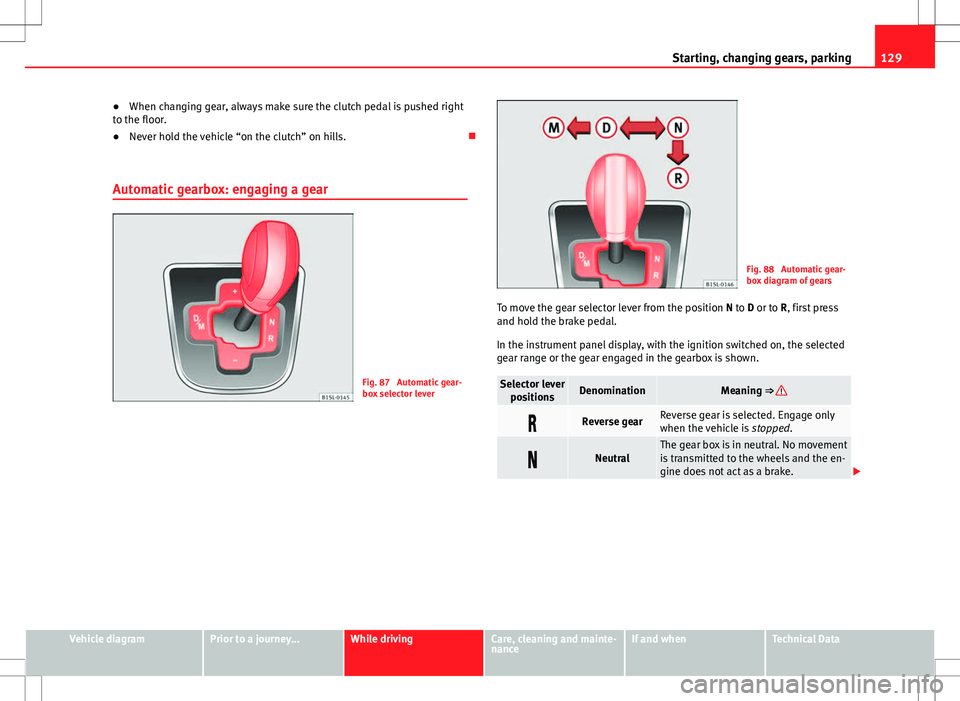
Automatic gearbox: engaging a gear
Fig. 87 Automatic gear-
box selector lever
Fig. 88 Automatic gear-
box diagram of gears
To move the gear selector lever from the position N to D or to R, first press
and hold the brake pedal.
In the instrument panel display, with the ignition switched on, the selected
gear range or the gear engaged in the gearbox is shown.
Selector lever positionsDenominationMeaning ⇒
Reverse gearReverse gear is selected. Engage only
when the vehicle is stopped.
NeutralThe gear box is in neutral. No movement
is transmitted to the wheels and the en-
gine does not act as a brake.
Vehicle diagramPrior to a journey...While drivingCare, cleaning and mainte-
nanceIf and whenTechnical Data
Page 132 of 308
130Starting, changing gears, parking
Selector lever
positionsDenominationMeaning ⇒
Standard driving position
The gears are changed (up and down)
automatically. The gear shifts are deter-
mined by the engine load, your individ-
ual driving style and the speed of the
vehicle.
Tiptronic driving
position (manual
shift programme)All gears can be changed (up and down)
manually ⇒ page 130. This is possible
as long as the system is not changing
gear automatically due to a traffic situa-
tion.
WARNING
Placing the selector lever in an incorrect position may cause loss of con-
trol of the vehicle and a serious accident.
● Do not press the accelerator when engaging a range of gears.
● With the engine running and a gear range selected, the vehicle will
move off when the brake pedal is released.
● Never engage reverse gear while driving.
● Unintentional movements of the vehicle could cause serious injury.
● As a driver, you should never leave your vehicle if the engine is run-
ning and a gear range is engaged. If you have to leave your vehicle while
the engine is running, you must always apply the handbrake and put the
selector lever in position N.
● Never engage the R gear range when the vehicle is moving.
● Never leave the vehicle without applying the handbrake. With the en-
gine running the vehicle moves downhill regardless of the gear range se-
lected.
Note
If, while driving, the selector lever is accidentally placed in position N, lift
your foot off the accelerator. Wait until the engine is running at idle speed
before selecting a new gear range.
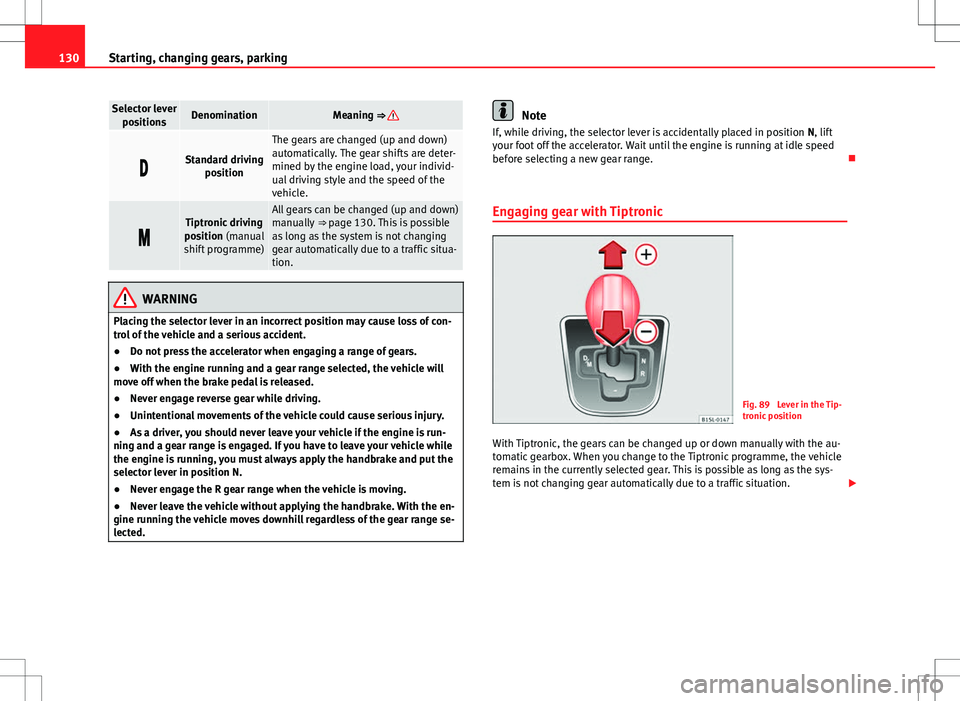
Engaging gear with Tiptronic
Fig. 89 Lever in the Tip-
tronic position
With Tiptronic, the gears can be changed up or down manually with the au-
tomatic gearbox. When you change to the Tiptronic programme, the vehicle
remains in the currently selected gear. This is possible as long as the sys-
tem is not changing gear automatically due to a traffic situation.
Page 133 of 308
131
Starting, changing gears, parking
Using Tiptronic
● Place the lever in the position D to the left on the Tiptronic shift gate M
⇒
in Automatic gearbox: engaging a gear on page 130.
● Press the lever forwards + or backwards – to move up or down a gear
⇒ Fig. 89.
● Place the lever back to the position M to the left on the Tiptronic shift
gate, to leave Tiptronic mode ⇒
in Automatic gearbox: engaging a gear
on page 130.
With the lever in the position D, and pressing forwards +
or backwards –the Tiptronic programme can be selected
M.
CAUTION
● When accelerating, the gearbox automatically shifts up into the next
gear shortly before the maximum engine speed is reached.
● When reducing speed manually, the gear box only shifts gear when the
engine can no longer exceed the maximum engine speed.
Driving with an automatic gearbox
The gearbox changes up or down gears automatically as the vehicle moves.
Driving down hills
The steeper the gradient, the lower the gear you will need to select. The low-
est gears increase the engine braking work. Never go down hills with the se-
lector lever in neutral N.
● You should reduce speed accordingly.
● Place the lever in the position D to the left on the Tiptronic shift gate M
⇒ page 130.
● Gently pull the selector lever back –
to change down a gear. Starting when going up a slope
The steeper the gradient, the lower the gear you will need.
When stopping on a slope with a gear range engaged, the vehicle must be
prevented from rolling backwards by always pressing the brake pedal or
pulling the handbrake lever up. When starting, release the brake pedal or
the handbrake ⇒
.
Kickdown
The kickdown system provides maximum acceleration when the gear selec-
tor lever is in the position D, or in the Tiptronic position M.
When the accelerator pedal is pressed right down, the automatic gearbox
will shift down to a lower gear, depending on road speed and engine speed.
This takes advantage of the maximum acceleration of the vehicle ⇒
.
When the accelerator is pressed to the floor, the automatic gearbox shifts to
the next gear only after the engine reaches the specified maximum engine
speed.
WARNING
Rapid acceleration can cause loss of traction and skidding, especially on
slippery ground. This could cause loss of control of the vehicle resulting
in an accident and serious injury.
● Always adapt your driving style to suit the flow of traffic.
● Only use the kickdown function or rapid acceleration if visibility,
weather, road and traffic conditions so permit.
● Never put other road users in danger by accelerating or with your
driving style.
CAUTION
If you stop on a hill with a gear range engaged, do not try to prevent the
vehicle from rolling back by pressing on the accelerator. Otherwise, the au-
tomatic gearbox may overheat causing damage.
Vehicle diagramPrior to a journey...While drivingCare, cleaning and mainte-
nanceIf and whenTechnical Data
Page 134 of 308

132Starting, changing gears, parking
Automatic gearbox malfunction
Back-up programme
When automatic gearbox warning and control lamps light up on the instru-
ment panel, there may be a system malfunction ⇒ page 124. In the event of
some faults the automatic gearbox functions using a backup programme.
When the backup programme is activated, it is possible to drive the vehicle,
however, at low speeds and within a selected range of gears.
With the manual gearbox, in some cases it is not possible to drive with all
the gears.
In all cases the automatic gearbox must be checked at a specialised work-
shop.
Automatic gearbox overheating
The automatic gearbox can overheat with a prolonged start up, or when
stopping and starting continuously. This overheating is displayed with a
warning lamp in the instrument panel. Additionally, an audible warning
can be heard. Stop and let the gearbox cool ⇒
.
The vehicle moves forward or back despite having selected a gear range
When the vehicle does not move in the required direction, the system may
not have the gear range correctly engaged. Press the brake pedal and en-
gage the gear range again. If the vehicle still does not move in the required
direction, there is a system malfunction. Seek specialist assistance and
have the system checked.
CAUTION
● When the gearbox is displayed as overheating for the first time, the vehi-
cle must be parked safely or must be driven at a speed of more than 20 km/
h (12 mph).
● When the warning lamp lights up and the audible warning is sounded,
the vehicle must be parked safely and the engine switched off. Let the gear-
box cool down.
● To prevent damage to the gearbox, driving must only be continued when
the warning lamps are no longer lit up. While the gearbox is overheated,
starting up and driving at walking speed should be avoided.
Recommended gear display
In some vehicles, the recommended gear for reducing fuel consumption is
displayed on the instrument panel display:
DisplayMeaning
Optimum gear.
Recommendation to change up a gear.
Recommendation to change down a gear.
WARNING
The recommended gear display is intended as a guideline only; it should
never replace the driver's attention to driving carefully.
● Responsibility for selecting the correct gear for each situation contin-
ues to lie with the driver, for example when overtaking or climbing a hill.
Page 139 of 308

137
Starting, changing gears, parking
To park the vehicle
Complete operations only in the sequence given.
● Park the vehicle on a suitable surface ⇒
.
● Press and hold the brake pedal until the vehicle comes to a standstill.
● Apply the handbrake firmly ⇒ page 136.
● For an automatic gearbox, move the selector lever to position P.
● Switch off the engine and release the brake pedal.
● Remove the key from the ignition.
● If necessary, turn the steering wheel slightly to lock the steering.
● With a manual gearbox, engage the 1st gear on flat ground and slopes,
or even the reverse gear on hills, and release the clutch pedal.
● Ensure that all passengers leave the vehicle, especially children.
● When leaving the vehicle, take all keys with you.
● Locking the vehicle.
Additional information for steep slopes and hills
Before switching off the engine, rotate the steering wheel so that if the vehi-
cle should move then it will be held by the kerb.
● On slopes, turn the front wheels so that they are against the edge of the
kerb.
● Uphill, turn the wheels towards the centre of the road.
WARNING
The components of the exhaust system reach very high temperatures.
This could cause a fire and considerable damage.
● Always park your vehicle so that no part of the exhaust system can
come in contact with flammable materials (such as wood, leaves, spilled
fuel, dried grass, etc).
CAUTION
● Special care should be taken when parking in areas with high kerbs or
fixed barriers. Objects protruding from the ground may damage the bumper
or other parts of the vehicle during manoeuvres. To avoid damage, stop be-
fore the wheels touched the barrier or kerb.
● Special attention is required when driving through entrances, over
ramps, kerbs or other objects. The vehicle underbody, bumpers, mudguards
and running gear, and the engine and exhaust system could be damaged as
you drive over these objects.
Information about the brakes
For the first 200 to 300 km (120 to 190 mph), the new brake pads have not
yet reached their maximum braking capacity, and need to be “run in” first
⇒
. The slightly reduced braking effect can be compensated for by in-
creasing pressure on the brake pedal. While running in, the full braking dis-
tance or emergency braking distance is larger then when the brake pads
have been run in. While running in, avoid full power braking or situations
requiring braking performance. For example, in heavy traffic.
The rate of wear of the brake pads depends to a great extent on the condi-
tions in which the vehicle is used and the way the vehicle is driven. If the
vehicle is used frequently in city traffic or for short trips or driven sport style,
visit a Specialised workshop regularly more frequently than advised in the
Maintenance Programme to have the brake pads checked.
If you drive with wet brakes, for example, after crossing areas of water, in
heavy rainfall or even after washing the vehicle, the effect of the brakes is
lessened as the brake discs are wet or even frozen (in winter). At higher
speed, “dry” the brakes as quickly as possible by braking gently several
times. Only do this without endangering vehicles behind you or any other
road users ⇒
.
Vehicle diagramPrior to a journey...While drivingCare, cleaning and mainte-
nanceIf and whenTechnical Data
Page 146 of 308

144Starting, changing gears, parking
Ecological driving
Introduction
Fuel consumption, environmental impact and engine, brake and tyre wear
depend largely on 3 factors:
● Personal driving style.
● Conditions of use (weather, road surface).
● Technical requirements.
Savings of up to 25% in fuel consumption are possible with an appropriate
driving style and the adoption of certain simple tips.
WARNING
Always adapt your speed and the distance to the vehicles ahead in line
with visibility, weather conditions, the condition of the road and the traf-
fic situation.
Economic driving style
Changing gear early
General instructions: The highest gear is always the most economical gear.
As a guideline, for the majority of vehicles: At a speed of 30 km/h (19 mph),
drive in third gear, at 40 km/h (25 mph) in fourth gear and at 50 km/h
(30 mph) in fifth gear.
In addition, “skipping” gears when shifting up helps to save fuel, weather
and traffic conditions permitting. Do not wait until the last moment before changing gear. Only use first gear
when you move off and change to second gear quickly. Avoid the kickdown
function in vehicles with automatic gearbox.
Vehicles with a gear display help to achieve an economical driving style as
the display indicates the best moment to change gear.
Let the vehicle roll
If you take your foot off the accelerator, the fuel supply is stopped and con-
sumption is reduced.
Allow the vehicle to roll without accelerating, for example when approach-
ing a red traffic light. However, if the vehicle is rolling too slowly or the dis-
tance is too long, the clutch pedal should be pressed to declutch. The en-
gine will then operate at idle speed.
If the vehicle is going to be at a standstill for a period of time, switch off the
engine; for example, while waiting at a level crossing.
Think ahead and “flow” with the traffic
Frequent acceleration and braking considerably increase fuel consumption.
If you think ahead as you drive and keep a safe distance from the vehicle in
front, it is possible to slow down by simply lifting your foot off the accelera-
tor. This eliminates the need for constant braking and acceleration.
Calm and steady driving
Constancy is more important than speed: The more you drive at a constant
speed, the lower the fuel consumption.
When driving on the motorway, it is more efficient to drive at a constant and
more moderate speed than to be continuously accelerating and braking. As
a general rule, you will reach your destination just as quickly when you drive
at a constant speed.
The cruise control function helps you to achieve a constant style of driving.
Page 156 of 308
154Driver assistance systems
● If the system detects a fault that could affect the working order of the
CCS.
● If you increase the stored speed by pressing the accelerator pedal for a
certain time.
● If the brake or clutch pedal is depressed.
● If the gear is changed with the manual gearbox.
● If the airbag is triggered.
Page 163 of 308

161
Driver assistance systems
flashesPossible causeSolution
The Start-Stop system is not
available.Contact a Specialised
workshop.
Some warning and control lamps will light up briefly when the ignition is
switched on to check certain functions. They will switch off after a few sec-
onds.
WARNING
If the warning lamps are ignored when they light up, the vehicle may
stall in traffic and cause accidents and severe injuries.
● Never ignore the warning lamps.
● Stop the vehicle at the next opportunity.
CAUTION
Failure to heed the control lamps when they light up may result in damage
to the vehicle. Start-Stop system
Fig. 101 At the top of
the centre console: Start-
Stop system button
With the Start-Stop system enabled, the engine is automatically stopped
when the vehicle is at a standstill. It will start again automatically as re-
quired.
This function remains enabled while the ignition is switched on. The instru-
ment panel display shows information on the current status ⇒ page 160.
Disconnect the Start-Stop system by hand whenever crossing water.
Vehicles with a manual gearbox
● When the vehicle is stopped, put it into neutral and release the clutch
pedal. The engine will stop.
● To restart, simply engage the clutch.
Vehicle diagramPrior to a journey...While drivingCare, cleaning and mainte-
nanceIf and whenTechnical Data
Page 164 of 308

162Driver assistance systems
Vehicles with an automatic gearbox
● When the vehicle is at a standstill, depress the brake or keep it pressed
down. The engine switches off.
● The engine will start again as soon as you release the brake pedal.
● With the gear lever set to position P, the engine will not start until a
range of gears is selected or the accelerator pedal is depressed.
Important conditions for the engine to stop automatically
● The driver's seat belt must be fastened.
● The driver door must be closed.
● The bonnet must be closed.
● The engine must have reached a minimum temperature.
● The vehicle must have moved since the last time the engine was stop-
ped.
● The vehicle's battery must be sufficiently charged.
● The battery temperature must not be too low or too high.
● The vehicle must not be on a very steep slope.
Conditions for the engine to restart automatically
The engine can be automatically restarted in the following cases:
● If the vehicle starts to moves.
● If the battery voltage drops.
Conditions requiring engine start-up using the key
The engine must be started by hand using the vehicle's key in the following
cases:
● If the driver unbuckles his/her seat belt.
● If the driver door is opened.
● If the bonnet is opened. Switching the Start-Stop system on and off
●
Press the button situated in the centre console ⇒ Fig. 101.
● The button will light up when the Start-Stop system is switched off.
The engine will start immediately if the vehicle is in Stop mode when the
system is switched off by hand.
WARNING
The brake servo and the electromechanical steering do not work when
the engine is switched off.
● The vehicle must never be allowed to move with the engine switched
off.
● Disconnect the Start-Stop system before working in the engine com-
partment.
CAUTION
The vehicle's battery could be damaged if the vehicle is used for long peri-
ods at very high outside temperatures.
Note
In some cases, it may be necessary to start the engine by hand using the
key. Refer to the corresponding control lamp on the instrument panel.
Hill-start aid*
This function is only included in vehicles with ESC. This device helps when starting uphill.