warning Seat Mii 2012 User Guide
[x] Cancel search | Manufacturer: SEAT, Model Year: 2012, Model line: Mii, Model: Seat Mii 2012Pages: 308, PDF Size: 4.13 MB
Page 24 of 308

22Instrument panel
SEAT information system
Introduction
With the ignition switched on it is possible to access different messages via
the display on the instrument panel display.
The number of messages displayed on the instrument panel display will
vary according to the vehicle electronics and equipment.
A specialised dealer will be able to programme or modify additional func-
tions, according to the vehicle equipment. SEAT recommends visiting a
Technical Service.
Additional information and warnings:
● Instrument panel ⇒ page 18
● Exterior mirrors ⇒ page 95
● Driver assistance systems ⇒ page 149
● Radio system ⇒ Booklet Radio system
WARNING
Any distraction may lead to an accident, with the risk of injury.
● Do not consult the messages on the instrument panel screen when
driving.
Note
On the screen of the SEAT Portable System (supplied by SEAT) ⇒ page 222
other functions of the vehicle can be seen. Control functions of the instrument panel display
Fig. 11 Windscreen wip-
er lever: button
A to
confirm the options and
rocker switch B
to
change the options
Calling up options
● Switch the ignition on.
● If a message or vehicle symbol is displayed, press OK/RESET
(⇒ Fig. 11
A).
● Press the top or bottom part of the rocker switch B until the desired op-
tion appears.
Multifunction display (MFI)
The multifunction display (MFI) has two automatic memories: 1 - Partial
memory and 2 - Total memory . The selected memory will be shown in the
lower right-hand corner of the display.
Page 25 of 308

23
Instrument panel
With the ignition switched on, and memory 1 or 2 displayed, briefly press
OK to change from one memory to another.
1
Trip memo-
ry (for a
single jour-
ney).
The memory stores the values for the journey and the con-
sumption from the moment the ignition is switched on un-
til it is switched off again.
If the journey is broken for more than 2 hours, the memory
is automatically erased. If the journey is continued in less
than 2 hours after the ignition is switched off, the new da-
ta is added to the data already stored in the memory.
2Total mem-
ory (for all
journeys).
The memory stores the values of any number of journeys,
until it counts a total of 19 hours and 59 minutes of driv-
ing, or 1999.9 km or miles of driving, depending on the
type of instrument panel fitted. On reaching either of these
limits, the memory is automatically erased and starts to
count from 0 again.
Possible displays
MenuFunctionTimeCurrent time in hours (h) and minutes (min).Journey durationThis indicates the hours (h) and minutes (min)
since the ignition was switched on.
Current fuel consump-
tionThe current fuel consumption display operates
throughout the journey, in litres/100 km; and with
the engine running and the vehicle stopped, in li-
tres/hour.
Average fuel consump-
tionAfter turning on the ignition, average fuel con-
sumption in litres/100 km will be shown after trav-
elling approximately 100 metres. Otherwise hori-
zontal lines are displayed. The value shown is up-
dated approximately every 5 seconds.
Distance to empty (the
distance you can trav-
el with the remaining
fuel)Approximate distance in km that can still be travel-
led with the fuel remaining in the tank, assuming
the same style of driving is maintained. This is cal-
culated using the current fuel consumption.
MenuFunctionDistance coveredDistance travelled, after ignition is switched on, in
km.
Average speedAfter starting the ignition, the average speed will
be shown after a distance of approximately 100
metres has been travelled. Otherwise horizontal
lines are displayed. The value shown is updated
approximately every 5 seconds.
Digital display of
speedCurrent speed displayed digitally.
Liquid coolant temper-
ature digital displayDigital display of the current temperature of the en-
gine liquid coolant.
Warning at --- km/hIf the stored speed is exceeded (between
30-250 km/h, or 18-155 mph), an audible warning
is given together with a visual warning.
Changing between display modes
● Press the rocker switch in the windscreen wiper lever.
Storing a speed for the speed warning
● Select the display Speed warning at --- km/h.
● Press OK
on the windscreen wiper lever to store the current speed and
switch off the warning.
● In addition, set the required speed by pressing the rocker switch on the
windscreen wiper lever or buttons
or on the multifunction steering
wheel for 5 seconds. Next, press OK again or wait a few seconds. The
speed is stored and the warning activated.
● To switch off , press OK
. The stored speed is deleted.
Manually erasing memory 1 or 2
● Select the memory to be erased.
● Press and hold the eject button OK
for approximately 2 seconds.
Vehicle diagramPrior to a journey...While drivingCare, cleaning and mainte-
nanceIf and whenTechnical Data
Page 27 of 308
25
Before starting the engine
Prior to a journey... Before starting the engine
Tips for driving
Introduction
Depending upon how you expect to use your vehicle, it may a good idea to
protect the engine from below. A guard underneath the engine may help to
reduce the risk of damage to the lower part of the vehicle and the oil sump
when driving over kerbs, or along dirt tracks or rough roads... Before instal-
lation, SEAT recommends going to a SEAT dealership.
Additional information and warnings:
● Ensure you are correctly seated ⇒ page 48
● Transporting ⇒ page 97
● Starting, changing gears, parking ⇒ page 119
● Ecological driving ⇒ page 144
● Notes for the user ⇒ page 233
WARNING
Driving under the influence of alcohol, drugs, medication or narcotics
may result in severe accidents and even loss of life.
● Alcohol, drugs, medication and narcotics may significantly alter per-
ception, affect reaction times and safety while driving, which could result
in the loss of control of the vehicle.
Journey preparations and safe driving
Check list
For your own safety, for the safety of vehicle occupants in the vehicle, and
for that of other road users, the following should be checked before and
during each journey
⇒
:
¥ Check that the lights and turn signals operate correctly.
¥ Check the tyre pressures (
⇒ page 210) and level of fuel
(⇒ page 171).
¥ Ensure there is good visibility through all the windows.
¥ Make sure that all objects and bags in the storage compartments, in
the luggage compartment and, where applicable, on the roof, are se-
curely fastened
⇒ page 97.
¥ Ensure there is nothing obstructing the free passage of the foot ped-
als.
¥ Use child retention systems appropriate for the child's body weight
and height
⇒ page 76.
¥ Correctly adjust front seat, head rests and rear-view mirrors to suit
your height
⇒ page 48, ⇒ page 95.
¥ Wear close-fitting shoes which do not prevent you from using the
pedals correctly.
¥ The driver's floor mat in the footwell should be fixed to the floor,
leaving the pedal area unobstructed.
¥ Before starting out, ensure you are correctly seated and remain in
this position throughout the journey. This applies to all passengers
in the vehicle
⇒ page 48.
Vehicle diagramPrior to a journey...While drivingCare, cleaning and mainte-
nanceIf and whenTechnical Data
Page 28 of 308

26Before starting the engine
Check list (Continued)
¥ Correctly fasten your seat belt before starting to drive and keep it se-
curely fastened throughout the journey. This applies to all
passengers in the vehicle
⇒ page 57.
¥ Never carry more passengers than the number of available seats and
seat belts in your vehicle.
¥ Never drive with impaired faculties (for example, due to medication,
alcohol or drugs).
¥ Do not allow yourself to be distracted from the traffic, for example, to
reset or switch on a menu, by other passengers or to answer a phone
call.
¥ Always try to adapt the speed of the vehicle and your style of driving
to the condition of the ground or the road and to weather and traffic
conditions.
¥ Observe the highway code and speed limits.
¥ On long journeys, rest at regular intervals (at least every 2 hours).
¥ If carrying animals, make sure they are correctly restrained in accord-
ance with their weight and size.
WARNING
Always observe traffic regulations and speed limits and try to anticipate
traffic movements. Correctly anticipating traffic situations may mean the
difference between arriving safe and sound at your destination or having
a serious accident.
Note
Regular servicing of your vehicle not only helps to keep it in good working
order but also helps to ensure road safety. Therefore, please ensure the ve-
hicle is taken for service as indicated in the Maintenance Programme. If the
vehicle is subjected to hard use, it may require certain maintenance work
before the next service date. Hard use may involve frequent driving in traffic
jams or driving in dusty areas. For further information, please refer to a SEAT
dealership or a specialised workshop.
Driving abroad
Check list
In some countries, certain safety regulations and requirements are in force
relating to exhaust gas emissions, which differ from the technical character-
istics of the vehicle. Before travelling abroad, SEAT recommends you con-
sult a SEAT dealership about the legal requirements and the following
points:
¥ Does the vehicle need technical modifications for driving abroad, for
example, adjustment of the headlamps?
¥ Does the vehicle have all the tools, diagnostics equipment and
spare parts required for inspections and repairs?
¥ Are there any SEAT dealers in the destination country?
¥ For petrol vehicles: Is unleaded petrol available at the right octane
rating?
¥ Are a suitable engine oil (
⇒ page 185) and other engine fluids com-
plying with SEAT specifications available in the destination country?
¥ Does the Portable Navigation System (supplied by SEAT) function
⇒
page 222 in the destination country with the available navigation
information?
¥ Are special tyres required in the destination country?
Page 29 of 308

27
Before starting the engine
CAUTION
SEAT does not accept liability for any damage to the vehicle due to the use
of a lower quality fuel, an inadequate service or the non-availability of genu-
ine spare parts.
Driving along flooded roadways
To prevent damage to the vehicle when driving through water, for example,
along a flooded road, please observe the following:
● Check the depth of the water before entering the flooded zone. The wa-
ter should never come above the lower edge of the bodywork ⇒
.
● Do not drive faster than a pedestrian.
● Do not stop in the water, use reverse gear or switch off the engine.
● Oncoming traffic will cause waves which raise the level of the water,
making it difficult to cross the water.
● Disconnect the Start-Stop system whenever crossing water.
WARNING
When driving through water, mud, melted snow, etc., please remember
that due to damp or frozen brake discs and pads in winter, the braking
effect may be delayed, therefore the required braking distance is greater.
● “Dry the brakes and remove ice” by braking carefully. Ensure that you
are not endangering other road-users or breaking traffic regulations in
the process.
● After driving through water, avoid sudden sharp manoeuvres.
CAUTION
● Driving through flooded areas may severely damage vehicle compo-
nents such as the engine, transmission, running gear or electrical system.
● Never drive through salt water as salt causes corrosion. Always rinse any
parts of the vehicle which have been in contact with salt water.
Vehicle diagramPrior to a journey...While drivingCare, cleaning and mainte-
nanceIf and whenTechnical Data
Page 30 of 308

28Unlocking and locking
Unlocking and locking
Vehicle key set
Introduction
Additional information and warnings:
● Adjustments to the SEAT information system ⇒ page 22
● Central locking and locking system ⇒ page 33
● Start and stop the engine ⇒ page 119
● Notes for the user ⇒ page 233
● Emergency locking and unlocking ⇒ page 243
WARNING
Swallowing batteries with a diameter of 20 mm or other types of lithium
battery may quickly result in serious injuries of even death.
● Always keep the vehicle keys and the key tab with the batteries,
spare batteries, flat batteries and other types of batteries larger than
20 mm out of the reach of children.
● Immediately seek medical assistance if you suspect the swallowing of
a battery.
WARNING
Careless or incorrect use of vehicle keys may result in severe injury and
accident.
● Always take all the keys with you whenever you leave the vehicle.
Children and unauthorised individuals could lock the doors or the rear
lid, start the engine or turn the ignition on activating electrical systems,
for example: the electric windows.
● Never leave children or disabled people alone in the vehicle. They
could be trapped in the vehicle in an emergency and will not be able to
get themselves to safety. For example, depending on the time of the
year, temperatures inside a locked and closed vehicle can be extremely
high or extremely low resulting in serious injuries and illness or even
death, particularly for young children.
● Never remove the key from the ignition if the vehicle is in motion. The
steering may lock and it will not be possible to turn the steering wheel.
Page 35 of 308

33
Unlocking and locking
Central locking* and locking system Introduction
Central locking functions correctly when all the doors and the rear lid are
correctly shut. If the driver door is open, the vehicle cannot be locked with
the key.
The battery of a vehicle left unlocked during a long period (for instance, in a
private garage) may run down and fail to start the motor.
Additional information and warnings:
● Exterior detail ⇒ page 6
● Vehicle key set ⇒ page 28
● Doors ⇒ page 38
● Rear lid ⇒ page 40
● Electric windows ⇒ page 43
● Emergency locking and unlocking ⇒ page 243
WARNING
The incorrect use of the central locking system may cause serious inju-
ries.
● The central locking system will lock all doors. A vehicle locked from
the inside can prevent any non-authorised individual from opening the
doors and accessing the vehicle. Nevertheless, in case of emergency or
accident, locked doors will complicate access to the passenger compart-
ment to help the passengers.
● Never leave children or disabled people alone in the vehicle. The cen-
tral locking button can be used to lock all the doors from within. There-
fore, passengers will be locked inside the vehicle. Individuals locked in
the vehicle can be exposed to very high or very low temperatures.
WARNING (Continued)
● Depending on the time of the year, temperatures inside a locked and
closed vehicle can be extremely high or extremely low resulting in seri-
ous injuries and illness or even death, particularly for young children.
● Never leave individuals locked in a closed and locked vehicle. In case
of emergency, they may not be able to exit the vehicle by themselves or
get help.
Description of the central locking system
The central locking system allows all doors and the rear lid to be locked and
unlocked centrally.
● From outside, using the vehicle key.
● From inside, by pushing the central locking button ⇒ page 36.
The central locking system can be activated or deactivated at a specialised
workshop.
In case of a vehicle key fault or central locking system fault, all doors can be
locked or unlocked manually.
Locking the vehicle after the airbags have been deployed
If the airbags are deployed due to an accident, the vehicle will be automati-
cally and completely unlocked. Depending on the amount of damage, the
vehicle can be locked following an accident in the following ways:
Vehicle diagramPrior to a journey...While drivingCare, cleaning and mainte-
nanceIf and whenTechnical Data
Page 39 of 308

37
Unlocking and locking
● The doors can be opened and unlocked individually from the inside by
pulling the inside door handle.
● The driver door cannot be locked using the central locking system when
it is still open. This avoids locking the vehicle key inside the vehicle when
there is nobody inside.
Deadlock*
FunctionNecessary operationsLocks the vehicle with the dead-
lock.Press the button once on the vehicle
key.
Locks the vehicle without the
deadlock.Press the button twice on the vehicle
key.
Press the central locking button on
the driver door once.
When the vehicle is locked, the deadlock deactivates the door handles,
making the vehicle difficult to open. The doors cannot be opened from in-
side ⇒
.
Upon switching off the ignition, the deadlock switched on warning will ap-
pear on the instrument panel display ( deadlock or SAFELOCK).
When the deadlock is switched off:
● The vehicle can be opened and unlocked from the inside using an inside
door handle. Control lamp on the driver door
When the vehicle is locked:MeaningThe red LED flashes for approximately 2
seconds at short intervals and then more
slowly.The deadlock is switched on.
The red LED flashes for about two sec-
onds then turns off. After 30 seconds, the
LED flashes again.The deadlock is switched off.
The red LED flashes for about two sec-
onds at short intervals. Subsequently,
the light will remain switched on for
about. 30 seconds.There is a fault in the locking
system. Contact a Specialised
workshop.
WARNING
Careless use of the deadlock can cause serious injury.
● Never leave anybody inside the vehicle if this is locked using the key.
When the deadlock is activated, doors cannot be opened from the inside!
● When the doors are locked, it is difficult to get to passengers in the
interior in case of an emergency. Passengers could remain trapped inside
in case of emergency.
Vehicle diagramPrior to a journey...While drivingCare, cleaning and mainte-
nanceIf and whenTechnical Data
Page 40 of 308
38Unlocking and locking
Doors
Introduction
Additional information and warnings:
● Vehicle key set ⇒ page 28
● Central locking and locking system ⇒ page 33
● Emergency locking and unlocking ⇒ page 243
WARNING
If a door is not correctly closed, it could open unexpectedly when driving
and cause serious injuries.
● Always stop immediately and close the door.
● When closing, ensure that the door has closed correctly. A closed
door should be flush with the corresponding parts of the bodywork.
● Open and close doors only when nobody is in the way of the door.
WARNING
A door held open by its retainer could be blown closed by the wind or
close if the vehicle is on a hill causing injury.
● When opening and closing doors, always use the door handle.
Note
On the display of the SEAT Portable System (supplied by SEAT), ⇒ page 222
can be seen if at least one vehicle door has been left open or is not correctly
closed. Childproof lock
The childproof lock prevents the rear doors from being
opened from the inside. This system prevents minors from
opening a door accidentally while the vehicle is running.
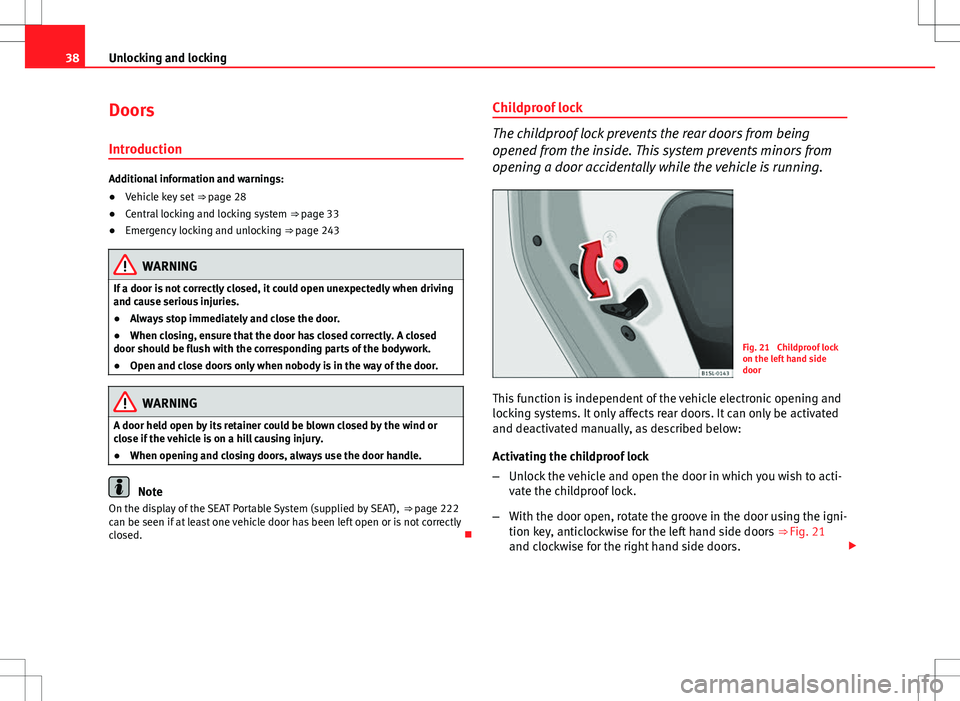
Fig. 21 Childproof lock
on the left hand side
door
This function is independent of the vehicle electronic opening and
locking systems. It only affects rear doors. It can only be activated
and deactivated manually, as described below:
Activating the childproof lock
– Unlock the vehicle and open the door in which you wish to acti-
vate the childproof lock.
– With the door open, rotate the groove in the door using the igni-
tion key, anticlockwise for the left hand side doors ⇒ Fig. 21
and clockwise for the right hand side doors.
Page 42 of 308
40Unlocking and locking
Rear lid
Introduction
Additional information and warnings:
● Exterior detail ⇒ page 6
● Central locking ⇒ page 33
● Transporting ⇒ page 97
● Emergency locking and unlocking ⇒ page 243
WARNING
Careless and unsuitable locking, opening and closing of the rear lid can
cause accidents and serious injury.
● Open and close the rear lid only when nobody is in the way.
● Do not close the rear lid by pushing it down with your hand on the
rear window. The rear window could break and cause injury.
● Ensure the rear lid is closed and locked correctly after closing, other-
wise, it may open unexpectedly while driving. A closed rear lid should be
flush with the corresponding parts of the bodywork.
● Always keep the rear lid closed while driving to avoid toxic gases en-
tering the interior.
● Do not open the rear lid when there is a load installed, for example a
carrier system. Likewise, the rear lid cannot be opened when a load is at-
tached to it, for example bicycles. An open rear lid could close itself if
there is an additional weight on it. If necessary, press down on the rear
lid and remove the load.
● Close and lock both the rear lid and all the other doors when you are
not using the vehicle. Ensure that nobody remains inside the vehicle.
WARNING (Continued)
● Never allow children to play inside or around the vehicle without su-
pervision, especially if the rear lid is open. Children could enter the lug-
gage compartment, close the rear lid and become trapped. Depending on
the time of the year, temperatures inside a locked and closed vehicle can
be extremely high or extremely low resulting in serious injuries and ill-
ness or even death, particularly for young children.
● Never leave children or disabled people alone in the vehicle. If the ve-
hicle key or the central locking button is used, they may be locked in the
vehicle.
CAUTION
Before opening the rear lid, ensure that there is sufficient free space to
open and close it, for example if you are in a garage.
Note
On the display of the Portable Navigation System (supplied by SEAT)
⇒ page 222 can be seen if the rear lid has been left open or is not correctly
shut.