instrument panel Seat Mii 2014 User Guide
[x] Cancel search | Manufacturer: SEAT, Model Year: 2014, Model line: Mii, Model: Seat Mii 2014Pages: 219, PDF Size: 4.19 MB
Page 87 of 219

Driving
lock and it will not be possible to turn the
steering wheel.
Control and warning lampsIt lights
upPossible causeSolution
(red)Power steering
faulty.
The steering system
should be checked
by a specialised
workshop as soon as
possible.
(yellow)Power steering op-
eration reduced.
The steering system
should be checked
by a specialised
workshop as soon as
possible.
If, after restarting the
engine and driving
for a short distance,
the yellow warning
lamp no longer
comes on, it will
not
be necessary to take
the vehicle to a spe-
cialised workshop.
FlashesPossible causeSolution
(red)
Fault in the steer-
ing column elec-
tronic lock. Do not drive on!
Seek professional
advice.
FlashesPossible causeSolution
(yellow)
Steering column
deviation.Gently turn the steer-
ing wheel to and fro.
Steering wheel not
unlocked or
locked.
Remove the key from
the ignition and then
switch the ignition
back on. If necessa-
ry, check the mes-
sages displayed on
the instrument panel
display.
Do not drive on, if
the steering column
remains locked after
the ignition has
been switched on.
Seek specialist as-
sistance. Several warning and control lamps light up
for a few seconds when the ignition is switch-
ed on, signalling that the function is being
verified. They will switch off after a few sec-
onds.
WARNING
If the warning lamps are ignored, the vehicle
may stall in traffic, or may cause accidents
and severe injuries.
● Never ignore the warning lamps.
● Stop the vehicle safely as soon as possible. CAUTION
Failure to heed the warning lamps when they
appear may result in faults in the vehicle. Information on the steering
To prevent theft, we recommend you lock the
steering before leaving the vehicle.
Mechanical steering lock
Lock the steering column by removing the
key from the ignition when the vehicle is
stopped.
Please engage steer-
ing lockUnlocking the steering
Parking the vehicle
››› page 89.Insert the key in the igni-
tion lock.
Remove the key from the
ignition.Turn the steering wheel
slightly to release the
steering lock.
Turn the steering wheel
slightly until you hear the
steering lock.Hold the steering wheel in
this position and switch
on the ignition. Electromechanical power steering
With the power steering system, the assisted
steering function automatically adjusts ac-
cording to the vehicle speed, the steering tor-
que and the wheel turning angle. The power
»
85
Technical specifications
Advice
Operation
Safety
Page 90 of 219

Operation
Note
● Electrical devices with a high power con-
sumption are switched off temporarily when
the engine starts.
● When the engine is started cold, there may
be strong vibrations for a few moments for
technical reasons. This is quite normal, and
no cause for concern.
● Natural gas engines always start up with
petrol, as a certain operating temperature is
required for running with gas. Once the re-
quired operating temperature is reached, the
engine will change to operate with natural
gas. Stopping the engineComplete operations only in the sequence giv-
en.
1.Stopping the vehicle completely
››› .
2.Press the brake pedal and keep pressed until
step 4 has been completed.
3.In automatic gearboxes, put the selector lever in position D or R.
4.Apply the handbrake firmly ››› page 89.
5.Turn the key in the ignition lock to position
››› Fig. 79 0.
6.With a manual gearbox, put the vehicle in first
or reverse gear. WARNING
Never switch off the engine while the vehicle
is moving. You may lose control of the vehicle
and there is a risk of serious accident.
● The airbags and belt tensioners do not
work when the ignition is switched off.
● The brake servo does not work with the en-
gine off. To stop, the brake pedal must be
pressed with more force.
● As the power steering does not work if the
engine is not running, you will need more
strength to steer than normally.
● If the key is removed from the ignition, the
steering may lock and it will not be possible
to steer the vehicle. CAUTION
If the engine has been driven at high speed
for a prolonged period of time, it may over-
heat when turned off. To avoid engine dam-
age, allow the engine to run for approximate-
ly 2 minutes in neutral before switching it off. Note
After stopping the engine, the engine com-
partment fan may continue running for a few
minutes, even when the ignition has been
switched off or the key removed. The radiator
fan is automatically switched off. Electronic immobiliser
The gear lock prevents the engine from being
started with an unauthorised key and the ve-
hicle being moved.
The vehicle key has a built-in chip. It auto-
matically deactivates the electronic immobil-
iser when the key is inserted into the ignition
lock.
The electronic immobilizer will be activated
again automatically as soon as you remove
the key from the ignition lock.
For this reason, the vehicle can only be used
with a genuine SEAT key with the correct
code. Coded keys can be obtained from SEAT
dealerships
›››
page 43 .
If an u
nauthorised key is used, the signal
appears on the instrument panel display. The
vehicle cannot be started in this case Note
The correct operation of the vehicle is only
guaranteed when original SEAT keys are
used. 88
Page 92 of 219
OperationIt lights
upPossible cause
››› Solution
Together with the
ESC* control lamp
: Fault in the
ABS.
Contact a special-
ised workshop. The
vehicle can be
braked without ABS.
Together with the
warning lamp :
ABS and EBV do
not function. Do not drive on!
Seek professional
advice ››› page 92.
FlashesPossible causeSolution
ESC* or ASR regu-
lating.Take your foot off the
accelerator. Adjust
your driving style to
the road conditions.
Traction Control
regulator operat-
ing.Take your foot off the
accelerator. Adjust
your driving style to
the road conditions.
Several warning and control lamps light up
for a few seconds when the ignition is switch-
ed on, signalling that the function is being
verified. They will switch off after a few sec-
onds.
WARNING
If the warning lamps are ignored, the vehicle
may stall in traffic, or may cause accidents
and severe injuries.
● Never ignore the warning lamps. ●
Stop the vehicle safely as soon as possible. WARNING
Driving with brakes in bad condition could re-
sult in a serious accident.
● If the brake warning lamp does not go
out, or if it lights up when driving, the brake
fluid level in the reservoir is too low or there
is a fault in the brake system. Obtain profes-
sional assistance immediately ››› page 152,
Checking the brake fluid level.
● If the brake warning lamp lights up to-
gether with the ABS warning lamp , the
regulation function of the ABS could be mal-
functioning. As a result, the rear wheels can
lock relatively easily when braking. If the rear
wheels lock this could result in loss of vehicle
control! If possible, reduce your speed and
drive carefully to a specialised workshop
close by to check the brake system. During
the following journey, avoid sudden braking
and manoeuvres.
● If the ABS warning lamp does not go out
or if it lights while driving, the ABS is mal-
functioning. The vehicle can only be stopped
using normal braking without ABS. The pro-
tection provided by the ABS is not available.
Visit a specialised workshop as soon as pos-
sible. CAUTION
Failure to heed the warning lamps when they
appear may result in faults in the vehicle. Handbrake
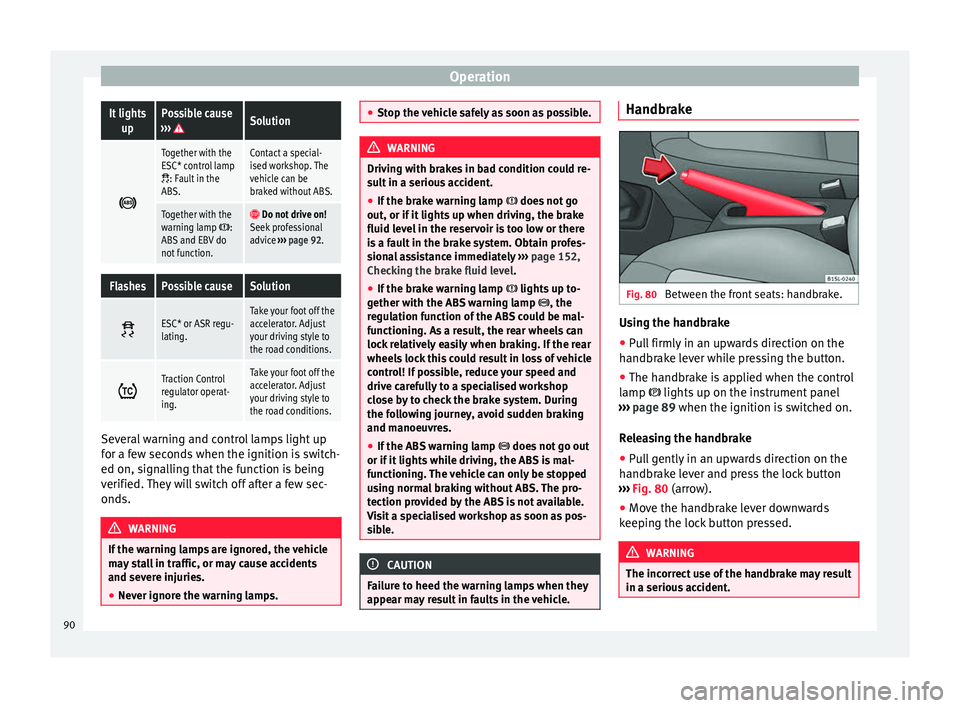
Fig. 80
Between the front seats: handbrake. Using the handbrake
●
Pull firmly in an upwards direction on the
handbrake lever while pressing the button.
● The handbrake is applied when the control
lamp lights up on the instrument panel
››› page 89 when the ignition is switched on.
R el
easing the handbrake
● Pull gently in an upwards direction on the
handbrake lever and press the lock button
››› Fig. 80 (arrow).
● Mov
e the handbrake lever downwards
keeping the lock button pressed. WARNING
The incorrect use of the handbrake may result
in a serious accident. 90
Page 96 of 219

Operation
(yellow)It lights up
The automatic
gearbox over-
heats temporari-
ly.Let the transmission cool with the
gearbox lever in the position .
When the control lamp does not
light up, find the nearest special-
ised workshop and have the auto-
matic gearbox checked.
It lights up
Place the automatic
gearbox lever in the
position
and do not
press the brake pedal.
Press the brake pedal to select
a gear range.
Together with the yel-
low control lamp for
the temperature of the
transmission
: the
automatic gearbox
overheats.
Press brake pedal and let the
transmission cool. Avoid
pressing the accelerator. When
the control lamp does not light
up, find the nearest special-
ised workshop and have the
automatic gearbox checked.
Together with the turn
signal display in the
instrument panel dis-
play: the automatic
gearbox lever is not in
the position
, indica-
tion to start the en-
gine.
Move the gearbox lever to the
position and start the en-
gine.
Flashes
An automatic gearbox
in the vehicle does
not guarantee that the
vehicle will not roll
away.Apply the handbrake.
Flashes
In the instrument pan-
el display, in addition
to the control lamp re-
questing the brake
pedal to be pressed
: indicated for start-
ing the engine.
Move the gearbox lever to the
position and start the en-
gine.
On the instrument
panel display: Whilst
driving in a forward di-
rection, try to move
the automatic gearbox
lever to the position
.
Stop the vehicle and move the
gearbox lever to the position in order to subsequently
change to the position .
On the instrument
panel display: The au-
tomatic gearbox lever
was placed in the po-
sition
or , but the
brake pedal was not
pressed.
Press the brake pedal, move
the gearbox lever to the posi-
tion
, and subsequently to
the required position or . When switching on the ignition some warn-
ing and control lamps light up for a short
time to check the operations. They will switch
off after a few seconds.Manual gearbox: engaging gears
Fig. 81
Gear shift pattern of a 5-speed man-
ual gearbox The position of each of the gears is shown on
the gear stick
››› Fig. 81 .
● Keep the c
lutch pedal pushed all the way
down.
● Move the gearbox lever to the required po-
sition ››› .
● Release the clutch pedal to engage clutch.
In some countries, it is necessary to press the
clutch pedal to the floor to start the engine.
Selecting reverse gear
● Engage reverse gear only when the vehicle
is stopped.
● Keep the clutch pedal pushed all the way
down ››› .
94
Page 97 of 219

Driving
● Place the gearbox lever into neutral and
push the lever downwards.
● Slide the gearbox lever to the right, and
then backward as shown on the lever.
● Release the clutch pedal to engage clutch.
Shifting down a gear
Shifting down a gear while driving must be
carried out gear by gear, i.e. to the gear im-
mediately preceding the current gear and at
an engine speed that is not excessive ››› .
At high speeds, or high engine speeds, skip-
ping one or various gears when shifting
down a gear can cause damage to the clutch
and the gearbox, even if the clutch is not en-
gaged during the process ››› .
WARNING
When the engine is running, the vehicle will
start to move as soon as a gear is engaged
and the clutch released.
● Never engage the reverse gear when a vehi-
cle is moving forward. WARNING
As a consequence of shifting down a gear in-
correctly, you may lose control of the vehicle
and cause an accident with serious conse-
quences. CAUTION
If, at high speeds or high engine speeds, the
gear lever is shifted down to a gear that is too
low, serious damage can be caused to the
clutch and gearbox. This may also happen if
you press the clutch pedal and it does not en-
gage. CAUTION
To prevent damage and avoid premature
wear, please observe the following:
● While driving, do not leave your hand rest-
ing on the gear stick. The pressure applied by
your hand is transmitted to the gearbox se-
lector forks.
● Always ensure that the vehicle is complete-
ly stopped before engaging the reverse gear.
● When changing gear, always make sure the
clutch pedal is pushed right to the floor.
● Never hold the vehicle “on the clutch” on
hills with the engine on. Automatic gearbox: engaging a gear
Fig. 82
Automatic gearbox diagram of gears To move the gear selector lever from the posi-
tion
N
to D or to R, first press and hold the
brake pedal.
In the instrument panel display, with the igni-
tion switched on, the selected gear range or
the gear engaged in the gearbox is shown.
Posi-
tionsDenomi- nationMeaning ›››
Reverse
gearReverse gear is selected. En-
gage only when the vehicle is
stopped.
Neutral
The gear box is in neutral. No
movement is transmitted to
the wheels and the engine
does not act as a brake.
»
95
Technical specifications
Advice
Operation
Safety
Page 99 of 219

Driving
Driving down hills
The steeper the gradient, the lower the gear
you will need to select. The lowest gears in-
crease the engine braking work. Never go
down hills with the selector lever in neutral
N .
● You shou
ld reduce speed accordingly.
● Place the lever in the position D to the left
on the Tiptronic shift gate M
››› page 96.
● Gently pull the selector lever back – to
change down a gear.
Starting when going up a slope
The steeper the gradient, the lower the gear
you will need.
When stopping on a slope with a gear range
engaged, the vehicle must be prevented from
rolling backwards by always pressing the
brake pedal or pulling the handbrake lever
up. When starting, release the brake pedal or
the handbrake ››› .
Kick-down
The kickdown system provides maximum ac-
celeration when the gear selector lever is in
the position D
, or in the Tiptronic position M
.
When the accelerator pedal is pressed right
down, the automatic gearbox will shift down
to a lower gear, depending on road speed
and engine speed. This takes advantage of the maximum acceleration of the vehicle
››› .
When the accelerator is pressed to the floor,
the automatic gearbox shifts to the next gear
only after the engine reaches the specified
maximum engine speed. WARNING
Rapid acceleration can cause loss of traction
and skidding, especially on slippery ground.
This could cause loss of control of the vehicle
resulting in an accident and serious injury.
● Always adapt your driving style to suit the
flow of traffic.
● Only use the kick-down function or rapid
acceleration if visibility, weather, road and
traffic conditions so permit.
● Never put other road users in danger by ac-
celerating or with your driving style. CAUTION
If you stop on a hill with a gear range engag-
ed, do not try to prevent the vehicle from roll-
ing back by pressing on the accelerator. Oth-
erwise, the automatic gearbox may overheat
causing damage. Automatic gearbox malfunction
Back-up programme
When automatic gearbox warning and control
lamps light up on the instrument panel, there
may be a system malfunction
››› page 93. In
the event of some faults the automatic gear-
box functions using a backup programme.
When the programme is activated, it is possi-
ble to drive the vehicle, however, at low
speeds and within a selected range of gears.
With the manual gearbox, in some cases it is
not possible to drive with all the gears .
In all cases the automatic gearbox must be
checked at a specialised workshop.
Automatic gearbox overheating
The automatic gearbox can overheat with a
prolonged start up, or when stopping and
starting continuously. This overheating is dis-
played with a warning lamp in the instru-
ment panel. Additionally, an audible warning
can be heard. Stop and let the gearbox cool
››› .
The vehicle moves forward or back despite
having selected a gear range
When the vehicle does not move in the re-
quired direction, the system may not have
the gear range correctly engaged. Press the
brake pedal and engage the gear range
again. If the vehicle still does not move in the »
97
Technical specifications
Advice
Operation
Safety
Page 100 of 219
Operation
required direction, there is a system malfunc-
tion. Seek specialist assistance and have the
system checked. CAUTION
● When the gearbox is displayed as overheat-
ing for the first time, the vehicle must be
parked safely or must be driven at a speed of
more than 20 km/h (12 mph).
● When the warning lamp lights up and the
audible warning is heard, the vehicle must be
parked safely and the engine switched off.
Let the gearbox cool down.
● To prevent damage to the gearbox, driving
must only be continued when the warning
lamps are no longer lit up. While the gearbox
is overheated, starting up and driving, even
at a slow speed should be avoided. Recommended gear display
In some vehicles, the recommended gear for
reducing fuel consumption is displayed on
the instrument panel:DisplayMeaning
Optimum gear.
Recommendation to change up a gear.
Recommendation to change down a
gear. WARNING
The recommended gear display is intended as
a guideline only; it should never replace the
driver's attention to driving carefully.
● Responsibility for selecting the correct gear
for each situation continues to lie with the
driver, for example when overtaking or climb-
ing a hill. For the sake of the environment
Selecting the most appropriate gear for the
situation will help you to save fuel. Note
● The recommended gear display is switched
off when the clutch pedal is pressed.
● On the display of the Portable Navigation
System (supplied by SEAT) ››› page 123 the
recommended gear can also be seen. Run-in and economical driving
Running-in Please observe the instructions for running-in
new components.
Running-in the engine
The engine needs to be run in over the first
1,500 km. During its first few hours of run-ning, the internal friction in the engine is
greater than later on when all the moving
parts have bedded down.
How the vehicle is driven for the first 1,500
km influences the future engine perform-
ance. Throughout the life of the vehicle, it
should be driven at a moderate speed, espe-
cially when the engine is cold, as this will re-
duce engine wear and increase its useful life.
Never drive at extremely low engine speeds.
Change down to a lower gear when the en-
gine no longer runs “smoothly”.
Up to 1,000
k i
lometres the following instructions apply:
● Do not use full throttle.
● Do not force the engine above two thirds of
its maximum speed.
Between 1,000 and 1,500 kilometres, gradu-
ally increase power until reaching the maxi-
mum speed and high en
gine speeds.
Running in new tyres and brake pads
● Replacement of wheel rims and new tyres
››› page 158
● Notes on the brakes ››› page 89 For the sake of the environment
If the engine is run in gently, the life of the
engine will be increased and the engine oil
consumption reduced. 98
Page 117 of 219

Driver assistance systems
WARNING
● If you do not start the vehicle immediately
after taking your foot off the brake pedal, the
vehicle may start to roll back under certain
conditions. Depress the brake pedal or use
the hand brake immediately.
● If the engine stalls, depress the brake ped-
al or use the hand brake immediately.
● When following a line of traffic uphill, if you
want to prevent the vehicle from rolling back
accidentally when starting off, hold the brake
pedal down for a few seconds before starting
off. Note
The Official Service or a specialist workshop
can tell you if your vehicle is equipped with
this system. Start-Stop system
Warning lampsIt
lights upPossible causeSolution
The Start-Stop system
is enabled.
It
lights upPossible causeSolution
The Start-Stop system
is enabled but the en-
gine cannot be auto-
matically stopped.Contact a special-
ised workshop.
The Start-Stop system
cannot start the en-
gine.Start the engine by
hand using the ve-
hicle's key
››› page 86.
There is a fault in the
alternator.››› page 154
Flash-
esPossible causeSolution
The Start-Stop system
is not available.Contact a special-
ised workshop.
Some warning and control lamps will light up
briefly when the ignition is switched on to
check certain functions. They will switch off
after a few seconds.
WARNING
Observe the safety warnings ››› in Control
and warning lamps on page 40. Start-Stop system
Fig. 93
At the top of the centre console: Start-
Stop system button With the Start-Stop system enabled, the en-
gine is automatically stopped when the vehi-
cle is at a standstill. It will start again auto-
matically as required.
This function remains enabled while the igni-
tion is switched on. The instrument panel dis-
play shows information on the current status
››› page 115 .
Di s
connect the Start-Stop system by hand
whenever crossing water.
Vehicles with a manual gearbox
● When the vehicle is stopped, put it into
neutral and release the clutch pedal. The en-
gine will stop.
● To restart, simply engage the clutch. »
115
Technical specifications
Advice
Operation
Safety
Page 123 of 219

Care and maintenance
Check first with a specialised workshop that
understands the technical possibilities of in-
stallation if you wish to use a two-way radio
with a transmitting power of over 10 watts.
SEAT recommends taking your car in for tech-
nical service.
All legal requirements, together with the in-
structions for the use of two-way radios must
be observed. WARNING
If the two-way radio is not securely fastened
in position, it could be sent flying around the
vehicle in the event of sharp braking, sudden
manoeuvres or accident, causing injury.
● While driving, two-way radios must be se-
curely fastened in position, outside the air-
bags deployment zones, or safely stowed
away. WARNING
When using a two-way radio without a con-
nection to an exterior aerial, the maximum
permitted levels of electromagnetic radiation
may be exceeded. This is also the case if the
aerial has not been correctly installed.
● You should only use a two-way radio inside
the vehicle if it has first been correctly con-
nected to an exterior aerial. Information stored by the control
units
Your vehicle is fitted at the factory with a ser-
ies of electronic control units responsible for
the engine and gearbox management. In ad-
dition, the control units supervise the per-
formance of the exhaust gas system and the
airbag systems.
Therefore, while the vehicle is being driven,
these electronic control units are continuous-
ly analysing the vehicle data. In the event of
faults or deviations from the theoretical val-
ues, only this data is stored. Normally, the
warning lamps on the instrument panel light
up in the event of faults.
This data can only be read and analysed us-
ing special equipment.
The storing of the data allows specialised
workshops to detect and repair faults. Stored
data may include:
● Data relating to the engine or the gearbox
● Speed
● Direction of travel
● Braking force
● Detection of seat belt
The vehicle control units never record conver-
sations held by passengers in the vehicle.
In vehicles equipped with an emergency call
function via the mobile phone or other appli- ances connected in the vehicle, it is possible
to send the vehicle position. If the control
unit records an accident with airbag activa-
tion, the system may automatically send a
signal. This will depend on the network oper-
ator. Normally, transmission is only possible
in areas with good coverage.
Event Data Recorder
The vehicle is
not
fitted with an event data re-
c or
der.
An event data recorder temporarily stores the
vehicle information. Therefore, in the event of
an accident, it is possible to obtain detailed
information about how the accident occur-
red. Vehicles with airbag systems can store
data relating to impact speed, seat belt sta-
tus, seat positions and airbag activation
times may be stored, etc. The volume of data
depends on the manufacturer.
Event data recorders can only be mounted
with authorisation from the vehicle owner
and, in some countries, they are governed by
local legislation.
Reprogramming control units
On the whole, all the data required for the
component management is stored in the con-
trol units. The programming of certain con-
venience functions, such as the turn signals,
individual door opening and instructions on
the display can be modified using special »
121
Technical specifications
Advice
Operation
Safety
Page 124 of 219

Advice
equipment at the workshop. If the comfort
functions are reprogrammed, the information
and Instruction Manual descriptions will not
coincide with the modified functions. There-
fore, SEAT recommends that any modifica-
tions be recorded in the section “Other work-
shop notes” in the Maintenance Programme.
The SEAT Official Service must have a record
of any modification to the programming.
Reading the vehicle fault memory
There is a diagnostics connector in the vehi-
cle interior for reading the vehicle fault mem-
ory. The fault memory documents errors and
deviations from the theoretical values of the
electronic control units.
The diagnostics connector is in the driver
side footwell area, next to the lever for open-
ing the bonnet, below a cover.
The fault memory should only be read and re-
set by a specialised workshop.
Using a mobile telephone in a vehicle
without connection to an exterior
aerial Mobile telephones transmit and receive radio
waves also called high-frequency energy,
both when in use and when on stand-by. Sci-
entific studies state that radio waves exceed-
ing certain values may be harmful to the hu- man body. International committees and au-
thorities have established limits and direc-
tives in order to ensure electromagnetic radi-
ation from mobile phones remains within cer-
tain limits that do not endanger health. Nev-
ertheless, there is no conclusive scientific
evidence that wireless telephones are totally
safe.
That is why some experts recommend moder-
ate use of the mobile telephone, and the ap-
pliance of measures to reduce radiation on
the human body.
When a mobile phone not connected to an
exterior aerial is used inside the vehicle, the
electromagnetic radiation may be greater
than if the mobile phone were connected to a
built-in aerial or to another exterior aerial.
If the vehicle is fitted with a suitable hands-
free device that allows the employment of
numerous additional mobile telephone func-
tions with compatible Bluetooth technolo-
gy
®
, it will comply with the legislation in
many countries which only permits the use of
mobile phones inside vehicles using a
hands-free device.
The hands-free system of the Portable Navi-
gation System (supplied by SEAT) has been
designed for use with conventional mobile
phones and phones with Bluetooth technolo-
gy ®
››› page 123 . Mobile telephones must be
p l
aced in a suitable telephone support or
stored safely in the vehicle. If a support is used for the telephone, it must be securely
fastened to the base plate. The mobile will be
secure on the instrument panel and always
within reach of the driver only by following
these procedures. Mobile telephone connec-
tion with an external aerial is carried out sub-
ject to the hands-free device, via the tele-
phone support or by the Bluetooth
®
connec-
tions present in the mobile telephone and
the vehicle.
If the mobile phone is connected to an aerial
incorporated into the vehicle or an exterior
aerial connected to the vehicle, it will help re-
duce the electromagnetic radiation transmit-
ted and the risk to human health. It will also
improve the quality of the connection.
If the phone is used inside the vehicle with-
out the hands-free system, it will not be se-
curely fastened and will not be connected to
the exterior aerial of the vehicle telephone.
Nor will the telephone charge if it is not on
the support. In addition, some calls may
break off and the quality of the connection
will be affected.
Mobile telephones should only be used in-
side the vehicle if they are connected to a
hands-free system. SEAT recommends using
an external aerial should you wish to use a
mobile telephone inside the vehicle.
Bluetooth ®
is a registered trademark of Blue-
tooth ®
SIG, Inc.
122