warning lights Seat Mii 2015 Owner's Guide
[x] Cancel search | Manufacturer: SEAT, Model Year: 2015, Model line: Mii, Model: Seat Mii 2015Pages: 232, PDF Size: 4.23 MB
Page 106 of 232

Operation
If the hazard warning lights are not working,
y ou mu
s
t use an alternative method of draw-
ing attention to your vehicle. This method
must comply with traffic legislation. WARNING
A faulty vehicle in traffic represents a risk of
acc ident
for the driver and for other road
users.
● Stop the vehicle safely as soon as possible.
Park the
vehicle a safe distance from sur-
rounding traffic to lock all the doors in case of
an emergency. Turn on the hazard warning
lights to warn other road users.
● Never leave children or disabled people
alone in the v
ehicle if the doors are to be
locked. In case of an emergency, passengers
will be trapped inside the vehicle. Individuals
locked in the vehicle can be exposed to very
high or very low temperatures. WARNING
The components of the exhaust system reach
ver y
high temperatures. This could cause a
fire and considerable damage.
● Always park your vehicle so that no part of
the exhau
st system can come in contact with
flammable materials (such as dried grass or
fuel). Note
● The v ehic
le battery will discharge and run
down if the hazard warning lights remain on for too long (even with the ignition turned
off).
● In some vehicles, the brake lights will flash
when brak in
g abruptly at speeds of approxi-
mately 80 km/h (50 mph) to warn vehicles
travelling behind. If braking continues, the
hazard warning lights system will automati-
cally be turned on at a speed of less than ap-
proximately 10 km/h (6 mph). The brake
lights remain lit. Upon accelerating, the haz-
ard warning lights will be automatically
turned off. Adjusting the headlights
In those countries where vehicles drive on
the other s
ide of
the r
oad to the home coun-
try, the asymmetric dipped beam may dazzle
drivers of oncoming vehicles.
For this reason, stickers may be needed to
cover the headlights when driving abroad.
For further information, please refer to a spe-
cialised workshop. SEAT recommends visiting
a technical service. Note
The use of stickers to cover headlights is only
permitted o v
er a short period. To modify the
direction of the headlamps more permanent-
ly, please take the vehicle to a specialised
workshop. SEAT recommends taking your car
in for technical service. Headlight range control, lighting of
the in
s
trument
panel and controls Fig. 111
Next to the steering wheel: Head-
light r
an
ge control Headlamp height adjustment
The he
a
dlight
range control ››› Fig. 111 is
modified according to the value of the head-
light beam and the vehicle load status. This
offers the driver optimum visibility and the
headlights do not dazzle oncoming drivers
››› .
The he a
dlights
can only be adjusted when
the dipped beam is switched on.
To reset, turn switch ››› Fig. 111:
ValueVehicle load status a)
–Two front occupants, luggage compart-
ment empty104
Page 107 of 232

Lights and visibilityTo reset, turn switch
››› Fig. 111:
ValueVehicle load status a)
1All seats occupied, luggage compartment
empty
2All seats occupied, luggage compartment
full
3Driver only, luggage compartment full
a)
If the vehicle load does not correspond to those shown in the
table, it is possible to select intermediary positions.
Instrument and switch lighting
When the side lights or dipped beam head-
lights are switched on, the lighting for instru-
ments and controls lights up at a constant
brightness. WARNING
Heavy objects in the back of vehicle may
cau se he
adlight dazzle and distract other
drivers. This could result in a serious acci-
dent.
● Adjust the light beam to the vehicle load
stat
us so that it does not blind other drivers. Luggage compartment light
The light is activated when the rear lid is
open, ev
en when the ignition and lights
ar
e
turned off. For this reason, ensure that the
rear lid is always closed. Visibility
Sun
visors Fig. 112
Sun visor Options for adjusting driver and front pas-
sen
g
er s
un visors:
● Lower the sun visor towards the wind-
scr
een.
● The sun visor can be pulled out of its
mounting and t
urned towards the door.
● Swing the sun visor towards the door, lon-
gitudinal
ly backwards.
Vanity mirror*
There may be a vanity mirror in the folded
sun visor on the passenger side and a card-
holder in the driver sun visor. WARNING
Folded sun blinds can reduce visibility.
● Always roll or fold sun blinds and visors
aw a
y when not in use. Heat-insulating glass windscreen
Fig. 113
Windscreen with reflective infrared
and met al
c
oating and small window (red sur-
face) The heat-insulating windscreens include a re-
fl
ectiv
e infr
ared coating. The section above
the rear vision mirror has been left uncoated
(communication window) to allow electric
components from the accessories shop to
operate correctly ›››
Fig. 113. »
105
Technical data
Advice
Operation
Emergencies
Safety
Page 109 of 232
Lights and visibility
Rear vision mirror Int erior r
e
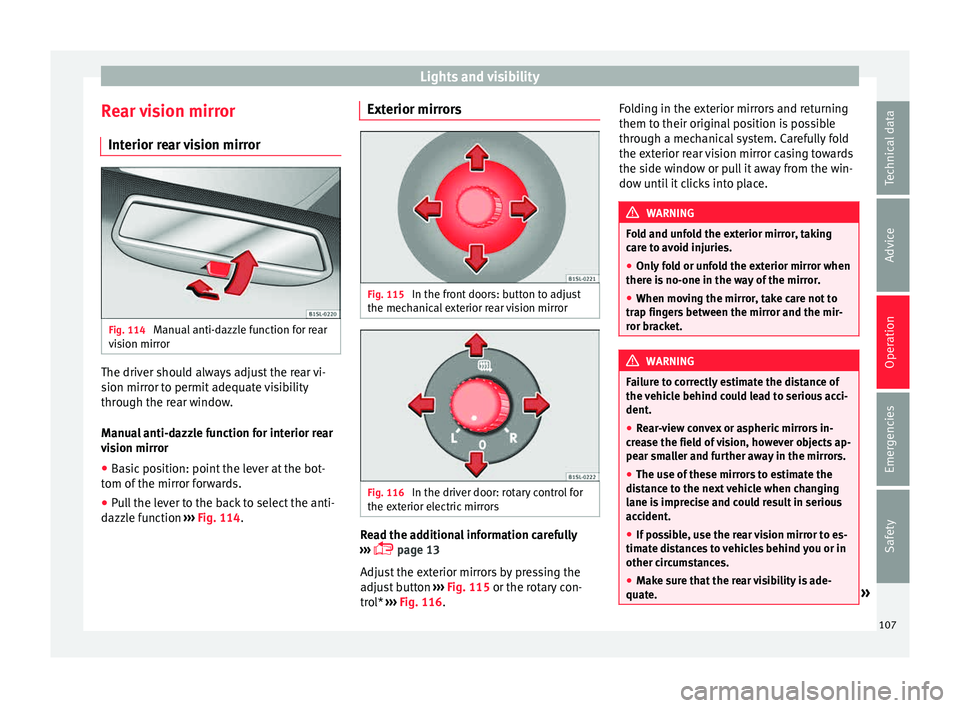
ar vision mirrorFig. 114
Manual anti-dazzle function for rear
v i
s
ion mirror The driver should always adjust the rear vi-
s
ion mirr
or t
o permit adequate visibility
through the rear window.
Manual anti-dazzle function for interior rear
vision mirror
● Basic position: point the lever at the bot-
tom of the mirr
or forwards.
● Pull the lever to the back to select the anti-
dazzl
e function ››› Fig. 114. Exterior mirrors
Fig. 115
In the front doors: button to adjust
the mec h
anic
al exterior rear vision mirror Fig. 116
In the driver door: rotary control for
the e xt
erior el
ectric mirrors Read the additional information carefully
› ›
›
page 13
Adjust the exterior mirrors by pressing the
adjust button ››› Fig. 115 or the rotary con-
trol* ››› Fig. 116. Folding in the exterior mirrors and returning
them to their original
position is possible
through a mechanical system. Carefully fold
the exterior rear vision mirror casing towards
the side window or pull it away from the win-
dow until it clicks into place. WARNING
Fold and unfold the exterior mirror, taking
car e t
o avoid injuries.
● Only fold or unfold the exterior mirror when
there is
no-one in the way of the mirror.
● When moving the mirror, take care not to
trap fing
ers between the mirror and the mir-
ror bracket. WARNING
Failure to correctly estimate the distance of
the v ehic
le behind could lead to serious acci-
dent.
● Rear-view convex or aspheric mirrors in-
cre
ase the field of vision, however objects ap-
pear smaller and further away in the mirrors.
● The use of these mirrors to estimate the
dist
ance to the next vehicle when changing
lane is imprecise and could result in serious
accident.
● If possible, use the rear vision mirror to es-
timate di
stances to vehicles behind you or in
other circumstances.
● Make sure that the rear visibility is ade-
quate. » 107
Technical data
Advice
Operation
Emergencies
Safety
Page 111 of 232
Seats and head restraints
● Inser
t
the head restraint into the guides on
the seat backrest.
● Push the head restraint down as far as it
wil
l go while pressing button 1 .
● Fold the backrest of the rear seat backward
ag ain u
nti
l it is engaged.
● Adjust the head restraint to the correct po-
sition ››
› page 50. WARNING
Travelling with the head restraints removed
or improperly a
djusted increases the risk of
severe or fatal injuries in the event of acci-
dents and sudden braking or manoeuvres.
● Always fit and adjust the head restraint
properly whenev
er a person is occupying a
seat.
● Refit any removed head restraints immedi-
ately so th
at passengers are properly protec-
ted. CAUTION
When removing and fitting the head restraint,
mak e s
ure it does not hit the headliner of the
vehicle or the front seat backrest. Otherwise,
the interior roof and other parts of the vehicle
could be damaged. Seat functions
Se at
he
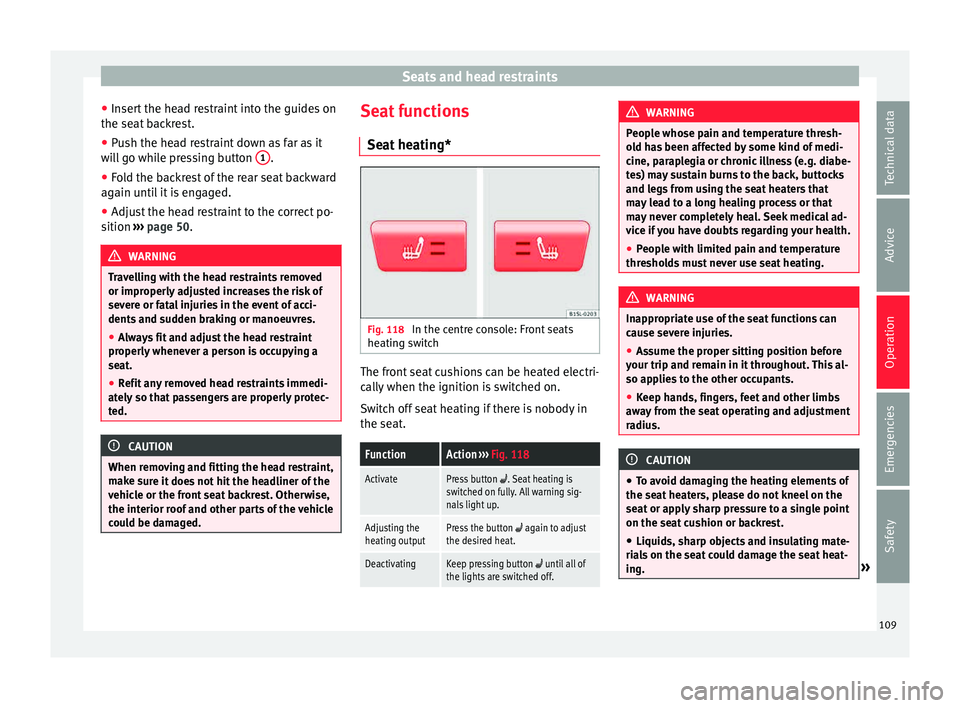
ating* Fig. 118
In the centre console: Front seats
he atin
g sw
itch The front seat cushions can be heated electri-
c
al
ly
when the ignition is switched on.
Switch off seat heating if there is nobody in
the seat.
FunctionAction ››› Fig. 118
ActivatePress button . Seat heating is
switched on fully. All warning sig-
nals light up.
Adjusting the
heating outputPress the button again to adjust
the desired heat.
DeactivatingKeep pressing button until all of
the lights are switched off. WARNING
People whose pain and temperature thresh-
ol d h
as been affected by some kind of medi-
cine, paraplegia or chronic illness (e.g. diabe-
tes) may sustain burns to the back, buttocks
and legs from using the seat heaters that
may lead to a long healing process or that
may never completely heal. Seek medical ad-
vice if you have doubts regarding your health.
● People with limited pain and temperature
thresho
lds must never use seat heating. WARNING
Inappropriate use of the seat functions can
cau se sev
ere injuries.
● Assume the proper sitting position before
your trip and rem
ain in it throughout. This al-
so applies to the other occupants.
● Keep hands, fingers, feet and other limbs
awa
y from the seat operating and adjustment
radius. CAUTION
● To av oid d
amaging the heating elements of
the seat heaters, please do not kneel on the
seat or apply sharp pressure to a single point
on the seat cushion or backrest.
● Liquids, sharp objects and insulating mate-
rial
s on the seat could damage the seat heat-
ing. » 109
Technical data
Advice
Operation
Emergencies
Safety
Page 131 of 232

Driving
lock and it will not be possible to turn the
st
eerin
g wheel. Warning and indication lamps
It lights up red
Power steer-
ing faulty.The steering system should be checked
by a specialised workshop as soon as
possible.
It lights up yellow
Power steer-
ing opera-
tion re-
duced.
The steering system should be checked
by a specialised workshop as soon as
possible.
If, after restarting the engine and driv-
ing for a short distance, the yellow
warning lamp no longer comes on, it will
not be necessary to take the vehicle to a
specialised workshop.
Flashes red
Fault in the
steering col-
umn elec-
tronic lock.
Do not drive on!
Seek professional advice.
It flashes yellow
Steering col-
umn devia-
tion.Gently turn the steering wheel to and
fro.
It flashes yellow
Steering
wheel not
unlocked or
locked.
Remove the key from the ignition and
then switch the ignition back on. If nec-
essary, check the messages displayed
on the instrument panel display.
Do not drive on, if
the steering column
remains locked after the ignition has
been switched on. Seek specialist assis-
tance. Several warning and indication lamps light
up for a f
ew sec
onds when the ignition is
switched on, signalling that the function is
being verified. They will switch off after a few
seconds. WARNING
If the warning lamps are ignored, the vehicle
ma y
stall in traffic, or may cause accidents
and severe injuries.
● Never ignore the warning lamps.
● Stop the vehicle safely as soon as possible. CAUTION
Failure to heed the warning lamps when they
appe ar m
ay result in faults in the vehicle. Information on the steering
To prevent theft, we recommend you lock the
s
t
eerin
g before leaving the vehicle. Steering column mechanical lock
Lock
the steering column by removing the
key from the ignition when the vehicle is
stopped.
Please engage steer-
ing lockUnlocking the steering
Parking the vehicle
››› page 132.Insert the key in the igni-
tion lock.
Remove the key from the
ignition.Turn the steering wheel
slightly to release the
steering lock.
Turn the steering wheel
slightly until you hear the
steering lock.Hold the steering wheel in
this position and switch
on the ignition. Electromechanical power steering
W
ith the po
w
er steering system, the assisted
steering function automatically adjusts ac-
cording to the vehicle speed, the steering tor-
que and the wheel turning angle. The power
steering only works when the engine is run-
ning.
You should remember that you will need con-
siderably more power than normal to steer
the vehicle if the power steering is not work-
ing correctly or not at all.
129
Technical data
Advice
Operation
Emergencies
Safety
Page 135 of 232

Driving
CAUTION
● Spec i
al care should be taken when parking
in areas with high kerbs or fixed barriers.
Objects protruding from the ground may
damage the bumper or other parts of the ve-
hicle during manoeuvres. To avoid damage,
stop before the wheels touch the barrier or
kerb.
● Special attention is required when driving
through entranc
es, over ramps, kerbs or oth-
er objects. The vehicle underbody, bumpers,
mudguards and running gear, and the engine
and exhaust system could be damaged as
you drive over these objects. Control and warning lamps
It lights up
›››
Handbrake applied.››› page 134.
It lights up
›››
Fault in the brake
system Do not drive on!
Seek professional advice
››› page 135.
Brake fluid level in-
adequate. Do not drive on!
Check brake fluid level
››› page 192.
Together with the
ABS control lamp
: ABS and EBV do
not function.
Do not drive on!
Seek professional advice
››› page 135.
It lights up
›››
ESC* disconnected
by system.Switching the ignition on and off
If necessary, drive for a short dis-
tance.
Fault in ESC*.Contact a specialised workshop.
Together with the
ABS control lamp
: Fault in the ABS.
Contact a specialised workshop.
The vehicle can be braked with-
out ABS.
The battery has
been reconnected.››› page 193.
It lights up
›››
Traction Control*
faulty or switched
off by the system.Contact a specialised workshop.
It lights up
›››
Together with the
ESC* control lamp
: Fault in the ABS.
Contact a specialised workshop.
The vehicle can be braked with-
out ABS.
Together with the
warning lamp :
ABS and EBV do not
function. Do not drive on!
Seek professional advice
››› page 135.
Flashes
ESC* or ASR regulat-
ing.Take your foot off the accelera-
tor. Adjust your driving style to
the road conditions.
Flashes
Traction Control*
regulator operating.Take your foot off the accelera-
tor. Adjust your driving style to
the road conditions. Several warning and indication lamps light
up for a f
ew sec
onds when the ignition is
switched on, signalling that the function is
being verified. They will switch off after a few
seconds. WARNING
If the warning lamps are ignored, the vehicle
ma y
stall in traffic, or may cause accidents
and severe injuries.
● Never ignore the warning lamps.
● Stop the vehicle safely as soon as possible. WARNING
Driving with brakes in bad condition could re-
su lt
in a serious accident.
● If the brake warning lamp does not
go
out, or if it lights up when driving, the brake
fluid level in the reservoir is too low or there
is a fault in the brake system. Obtain profes-
sional assistance immediately ››› page 191,
Checking the brake fluid level.
● If the brake warning lamp lights up t
o-
gether with the ABS warning lamp , the
regulation function of the ABS could be mal-
functioning. As a result, the rear wheels can
lock relatively easily when braking. If the rear » 133
Technical data
Advice
Operation
Emergencies
Safety
Page 136 of 232

Operation
wheels lock this could result in loss of vehicle
contr
o
l! If possible, reduce your speed and
drive carefully to a specialised workshop
close by to check the brake system. During
the following journey, avoid sudden braking
and manoeuvres.
● If the ABS warning lamp does not
go out
or if it lights while driving, the ABS is mal-
functioning. The vehicle can only be stopped
using normal braking without ABS. The pro-
tection provided by the ABS is not available.
Visit a specialised workshop as soon as pos-
sible. CAUTION
Failure to heed the warning lamps when they
appe ar m
ay result in faults in the vehicle. Handbrake
Fig. 143
Between the front seats: handbrake. Using the handbrake
●
Pull firmly in an upwards direction on the
h andbr ak
e lever while pressing the button.
● The handbrake is applied when the control
lamp
lights up on the instrument panel
››› page 133 when the ignition is switched
on.
Releasing the handbrake
● Pull gently in an upwards direction on the
handbrak
e lever and press the lock button
››› Fig. 143 (arrow).
● Move the handbrake lever downwards
keeping the loc
k button pressed. WARNING
The incorrect use of the handbrake may result
in a serious ac
cident.
● Never use the handbrake to brake the vehi-
cle e
xcept in an emergency. The braking dis-
tance is considerably longer, because braking
is only applied to the rear wheels. Always use
the foot brake.
● Never drive with the handbrake gently ap-
plied. Thi
s can overheat the brake, affecting
the brakes system. This also causes prema-
ture wear on the rear brake pads.
● Never accelerate from the engine compart-
ment with the en
gine running and a gear en-
gaged. The vehicle could move, even if the
handbrake is applied. Note
If the vehicle moves at a speed superior to
6 km/h (4 mph) with the h andbr
ake applied,
an audible warning is sounded. Parking
When parking your vehicle, all legal require-
ments shou
l
d be observed.
To park the vehicle
Complete operations only in the sequence
given. ● Park the vehicle on a suitable surface ››
›
.
● Press and hold the brake pedal until the ve-
hic l
e c
omes to a standstill.
● Apply the handbrake firmly ›››
page 134.
● For an automatic gearbox, move the selec-
tor lev
er to position P.
● Switch off the engine and release the brake
pedal.
● R
emove the key from the ignition.
● If necessary, turn the steering wheel slight-
ly to loc
k the steering.
● With a manual gearbox, engage 1st gear on
flat gr
ound and slopes, or even reverse gear
on hills, and release the clutch pedal.
● Ensure that all passengers leave the vehi-
cle, e
specially children.
134
Page 139 of 232

Driving
Changing gear Intr oduction When reverse gear is engaged and the igni-
tion is
sw
itched on the following takes place:
● Reverse lights light up.
● The rear wiper blade performs one move-
ment when the wind
screen wiper is activa-
ted.
● If necessary, connect the parking distance
warning sy
stem. WARNING
Rapid acceleration can cause loss of traction
and skid din
g, especially on slippery ground.
This could cause loss of control of the vehicle
resulting in an accident and considerable
damage.
● Use rapid acceleration only when visibility,
weather
, road conditions and traffic permit. WARNING
Do not allow the brakes to “rub” for a pro-
long ed period of
time, or brake frequently or
for long periods of time. Continuous braking
heats up the brakes. This could significantly
reduce braking power, increase braking dis-
tance or even result in the total failure of the
brake system. Control and warning lamps
It lights up red
Fault in the auto-
matic gearbox.
Do not drive on!
Seek professional advice. Failure to
do so could result in considerable
damage to the transmission
››› page 141.
It lights up yellow
In the automatic
gearbox the
gears can en-
gage incorrectly.Switch the ignition on and off.
When the control lamp does not
light up, find the nearest special-
ised workshop and have the auto-
matic gearbox checked.
The automatic
gearbox over-
heats temporari-
ly.Let the transmission cool with the
gearbox lever in the position .
When the control lamp does not
light up, find the nearest special-
ised workshop and have the auto-
matic gearbox checked.
It lights up
Place the automatic
gearbox lever in the
position
and do not
press the brake pedal.
Press the brake pedal to select
a gear range.
It lights up
Together with the yel-
low control lamp for
the temperature of the
transmission
: the
automatic gearbox
overheats.
Press brake pedal and let the
transmission cool. Avoid
pressing the accelerator. When
the control lamp does not light
up, find the nearest special-
ised workshop and have the
automatic gearbox checked.
Together with the turn
signal display in the
instrument panel dis-
play: the automatic
gearbox lever is not in
the position
, indica-
tion to start the en-
gine.
Move the gearbox lever to the
position and start the en-
gine.
Flashes
An automatic gearbox
in the vehicle does
not guarantee that the
vehicle will not roll
away.Apply the handbrake.
Flashes
In the instrument pan-
el display, in addition
to the control lamp re-
questing the brake
pedal to be pressed
: indicated for start-
ing the engine.
Move the gearbox lever to the
position and start the en-
gine.» 137
Technical data
Advice
Operation
Emergencies
Safety
Page 143 of 232

Driving
Automatic gearbox malfunction Back-up programme
When autom
atic
gearbox warning and indica-
tion lamps light up on the instrument panel,
there may be a system malfunction
››› page 137. In the event of some faults the
automatic gearbox functions using a backup
programme. When the programme is activa-
ted, it is possible to drive the vehicle, howev-
er, at low speeds and within a selected range
of gears.
With the manual gearbox, in some cases it is
not possible to drive with all the gears .
In all cases the automatic gearbox must be
checked at a specialised workshop.
Automatic gearbox overheating
The automatic gearbox can overheat with a
prolonged start up, or when stopping and
starting continuously. This overheating is dis-
played with a warning lamp in the instru-
ment panel. Additionally, an audible warning
can be heard. Stop and let the gearbox cool
››› .
The v
ehic
le moves forward or back despite
having selected a gear range
When the vehicle does not move in the re-
quired direction, the system may not have
the gear range correctly engaged. Press the
brake pedal and engage the gear range again. If the vehicle still does not move in the
required dir
ection, there is a system malfunc-
tion. Seek specialist assistance and have the
system checked. CAUTION
● When the ge arbo
x is displayed as overheat-
ing for the first time, the vehicle must be
parked safely or must be driven at a speed of
more than 20 km/h (12 mph).
● When the warning lamp lights up and the
audible w
arning is heard, the vehicle must be
parked safely and the engine switched off.
Let the gearbox cool down.
● To prevent damage to the gearbox, driving
must
only be continued when the warning
lamps are no longer lit up. While the gearbox
is overheated, starting up and driving, even
at a slow speed should be avoided. Recommended gear display
In some vehicles, the recommended gear for
r
educ
in
g fuel consumption is displayed on
the instrument panel:
DisplayMeaning
Optimum gear.
Recommendation to change up a gear.
Recommendation to change down a
gear. WARNING
The recommended gear display is intended as
a guideline only; it shou
ld never replace the
driver's attention to driving carefully.
● Responsibility for selecting the correct gear
for eac
h situation continues to lie with the
driver, for example when overtaking or climb-
ing a hill. For the sake of the environment
Selecting the most appropriate gear for the
sit uation w
ill help you to save fuel. Note
● The rec ommended g
ear display is switched
off when the clutch pedal is pressed.
● On the display of the Portable Navigation
Sys
tem (supplied by SEAT) ››› page 164 the
recommended gear can also be seen. Run-in and economical driving
R u
nnin
g in Please observe the instructions for running-in
new c
omponents.
R u
nning-in the engine
The engine needs to be run in over the first
1,500 km. During its first few hours of »
141
Technical data
Advice
Operation
Emergencies
Safety
Page 147 of 232

Driving
WARNING
Always adapt your speed and the distance to
the v ehic
les ahead in line with visibility,
weather conditions, the condition of the road
and the traffic situation. Engine management and ex-
hau
s
t gas purification system
Introduction WARNING
The components of the exhaust system reach
ver y
high temperatures. This could cause a
fire.
● Always park your vehicle so that no part of
the exhau
st system can come in contact with
flammable materials (such as dried grass).
● Never apply additional underseal or anti-
corro
sion coatings to the exhaust pipes, cata-
lytic converter or the heat shields on the ex-
haust system. Control and warning lamps
It lights up
Fault in engine
management
(Electronic Pow-
er Control).Take the vehicle to a specialised
workshop as soon as possible and
have the engine checked.
It lights up
Fault in catalytic
converter.You should reduce speed according-
ly. Drive carefully until you reach the
next specialised workshop. Have
the engine checked there.
Flashes
Combustion
fault which could
damage the cat-
alytic converter.You should reduce speed according-
ly. Drive carefully until you reach the
next specialised workshop. Have
the engine checked there.
Several warning and indication lamps light
up f
or a f
ew sec
onds when the ignition is
switched on, signalling that the function is
being verified. They will switch off after a few
seconds. CAUTION
Always pay attention to any lit control lamps
and to the c orr
esponding descriptions and in-
structions to avoid damage to the vehicle. Note
While the control lamps or r
emain lit,
the engine will have faults, there will be high-
er consumption of fuel and a loss of engine
power. Catalytic converter
The catalytic converter permits the subse-
quent tr
e
atment of the exhaust gases thus
reducing contaminating gas emissions. To
ensure a longer working life for the exhaust
system and catalytic converter in a petrol en-
gine:
● Always use unleaded petrol.
● Never run the fuel tank completely dry.
● Do not top up with too much engine oil
›› ›
page 186.
● Do not tow-start the vehicle; use the starter
cabl
es ›››
page 42.
If you should notice misfiring, uneven run-
ning or loss of power when the car is moving,
reduce speed immediately. Have the car in-
spected by a specialised workshop. If this
happens, unburnt fuel can enter the exhaust
system and escape into the atmosphere. The
catalytic converter can also be damaged by
overheating. »
145
Technical data
Advice
Operation
Emergencies
Safety