clutch Seat Mii 2017 User Guide
[x] Cancel search | Manufacturer: SEAT, Model Year: 2017, Model line: Mii, Model: Seat Mii 2017Pages: 232, PDF Size: 4.91 MB
Page 145 of 232

Driving
Flashes
An automatic gearbox
in the vehicle does
not guarantee that the
vehicle will not roll
away.Apply the handbrake.
Flashes
In the instrument pan-
el display, in addition
to the control lamp re-
questing the brake
pedal to be pressed
: indicated for start-
ing the engine.
Move the gearbox lever to the
position and start the en-
gine.
On the instrument
panel display: Whilst
driving in a forward di-
rection, try to move
the automatic gearbox
lever to the position
.
Stop the vehicle and move the
gearbox lever to the position in order to subsequently
change to the position .
On the instrument
panel display: The au-
tomatic gearbox lever
was placed in the po-
sition
or , but the
brake pedal was not
pressed.
Press the brake pedal, move
the gearbox lever to the posi-
tion
, and subsequently to
the required position or . When switching on the ignition some warn-
in
g and indic
ation l
amps light up for a short
time to check the operations. They will switch
off after a few seconds. Manual gear change
Fig. 147
Gear shift pattern of a 5-speed man-
ual g
e
arbox Read the additional information carefully
› ›
›
page 26
Shifting down a gear
Shifting down a gear while driving must be
carried out gear by gear, i.e. to the gear im-
mediately preceding the current gear and at
an engine speed that is not excessive ››› .
At high s
peed
s, or high engine speeds, skip-
ping one or various gears when shifting
down a gear can cause damage to the clutch
and the gearbox, even if the clutch is not en-
gaged during the process ››› .
WARNING
When the engine is running, the vehicle will
st ar
t to move as soon as a gear is engaged
and the clutch released. ●
Never en g
age the reverse gear when a vehi-
cle is moving forward. WARNING
As a consequence of shifting down a gear in-
c orr ectly
, you may lose control of the vehicle
and cause an accident with serious conse-
quences. CAUTION
If, at high speeds or high engine speeds, the
ge ar l
ever is shifted down to a gear that is too
low, serious damage can be caused to the
clutch and gearbox. This may also happen if
you press the clutch pedal and it does not en-
gage. CAUTION
To prevent damage and avoid premature
we ar
, please observe the following:
● While driving, do not leave your hand rest-
ing on the ge
ar stick. The pressure applied by
your hand is transmitted to the gearbox se-
lector forks.
● Always ensure that the vehicle is complete-
ly st
opped before engaging the reverse gear.
● When changing gear, always make sure the
clutc
h pedal is pushed right to the floor.
● Never hold the vehicle “on the clutch” on
hill
s with the engine on. 143
Technical data
Advice
Operation
Emergencies
Safety
Page 151 of 232
Driving
● Use of
c
ompatible plastics in the same part
if its components are not easily separated.
● Use of recycled materials and/or materials
originating fr
om renewable sources.
● Reduction of volatile components, includ-
ing odour, in p
lastic materials.
● Use of CFC-free coolants.
Ban on heavy
metals, with the exceptions
dictated by law (Annex II of ELV Directive
2000/53/EC): cadmium, lead, mercury, hexa-
valent chromium.
Manufacturing methods
● Reduction of the quantity of thinner in the
protectiv
e wax for cavities.
● Use of plastic film as protection during ve-
hicle tr
ansport.
● Use of solvent-free adhesives.
● Use of CFC-free coolants in cooling sys-
tems.
● Recy
cling and energy recovery from resi-
dues (RDF).
● Impr
ovement in the quality of waste water.
● Use of systems for the recovery of residual
heat (therm
al recovery, enthalpy wheels,
etc.).
● The use of water-soluble paints. Economical and environmentally
friendly drivin
g Fig. 150
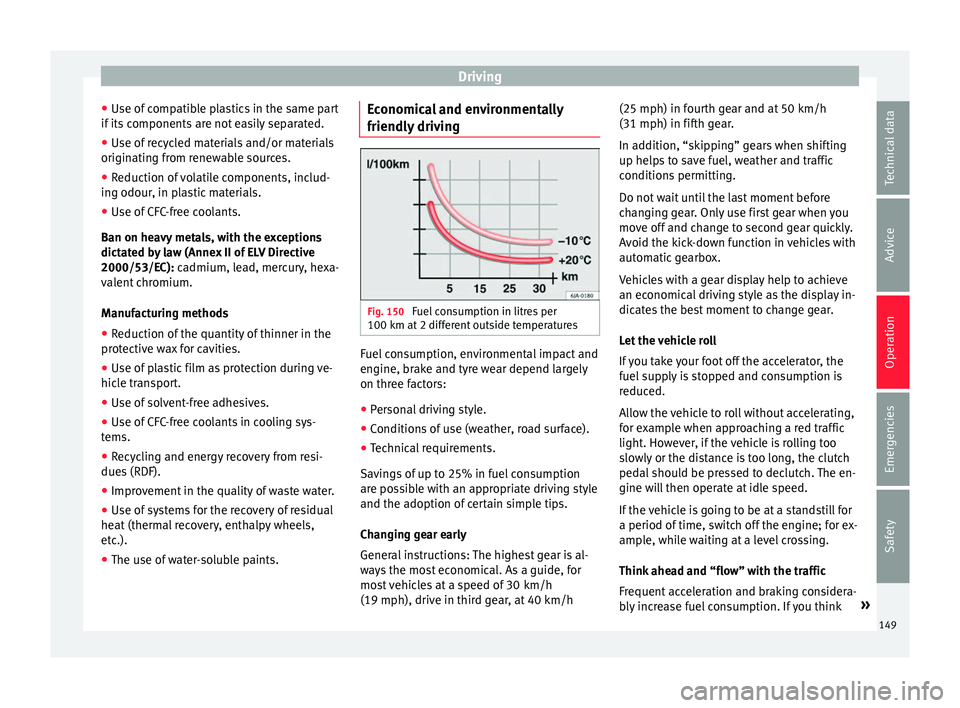
Fuel consumption in litres per
100 km at 2 diff
er
ent outside temperatures Fuel consumption, environmental impact and
en
gine, br
ak
e and tyre wear depend largely
on three factors:
● Personal driving style.
● Conditions of use (weather, road surface).
● Technical requirements.
Saving
s of up to 25% in fuel consumption
are possible with an appropriate driving style
and the adoption of certain simple tips.
Changing gear early
General instructions: The highest gear is al-
ways the most economical. As a guide, for
most vehicles at a speed of 30 km/h
(19 mph), drive in third gear, at 40 km/h (25 mph) in fourth gear and at 50 km/h
(31 mph) in fifth ge
ar.
In addition, “skipping” gears when shifting
up helps to save fuel, weather and traffic
conditions permitting.
Do not wait until the last moment before
changing gear. Only use first gear when you
move off and change to second gear quickly.
Avoid the kick-down function in vehicles with
automatic gearbox.
Vehicles with a gear display help to achieve
an economical driving style as the display in-
dicates the best moment to change gear.
Let the vehicle roll
If you take your foot off the accelerator, the
fuel supply is stopped and consumption is
reduced.
Allow the vehicle to roll without accelerating,
for example when approaching a red traffic
light. However, if the vehicle is rolling too
slowly or the distance is too long, the clutch
pedal should be pressed to declutch. The en-
gine will then operate at idle speed.
If the vehicle is going to be at a standstill for
a period of time, switch off the engine; for ex-
ample, while waiting at a level crossing.
Think ahead and “flow” with the traffic
Frequent acceleration and braking considera-
bly increase fuel consumption. If you think »
149
Technical data
Advice
Operation
Emergencies
Safety
Page 159 of 232

Driver assistance systems
●
Any r
eparation of the laser sensor requires
specialist knowledge. SEAT recommends tak-
ing your car in for technical service. Note
● If the C ity
Safety Assist function activates a
brake, the brake pedal range is reduced. This
makes the brake pedal seem “harder”.
● Automatic brake intervention by the City
Safety As
sist function can be cancelled by
pressing the clutch pedal, the accelerator
pedal or by a corrective intervention.
● During automatic braking by the City Safety
Assi
st function you may hear unusual noises.
This is normal and is produced in the brake
system. Warning and control lamp
The City Safety Assist function is switched on
ev
er
y
time the ignition is switched on. No
special indication is produced.
If the City Safety Assist function is switched
off or on, or if there is an error in the system,
it will be shown by a control lamp on the in-
strument panel display.
It lights up
The City Safety Assist
function has been
switched on manual-
ly using the
button ››› Fig. 155.
The control lamp turns off after
about 5 seconds.
Flashes
Fast: The City Safety
Assist system func-
tion brakes automat-
ically or has braked
automatically.
Control lamp turns off automati-
cally.
Slow: City Safety As-
sist function is not
currently available.
If the vehicle is stopped, switch
off the engine and switch it on
again. If necessary, inspect the
laser sensor (dirt, frost)
›››
in
Laser sensor on page 158. If it
still does not function, refer to a
Specialised workshop to have
the system inspected.
Flashes
Within the operating
area of 5-30 km/h
(3-19 mph): the City
Safety Assist func-
tion has been
switched off manual-
ly using the
button
››› Fig. 155.
Switch on the City Safety Assist
function manually using the
button ››› Fig. 155. Several warning and control lamps should
light
up f
or a f
ew seconds when the ignition is switched on, signalling that the function is
being v
erified. They will switch off after a few
seconds. WARNING
If the warning lamps are ignored, the vehicle
ma y
stall in traffic, or may cause accidents
and severe injuries.
● Never ignore the warning lamps.
● Stop the vehicle safely as soon as possible. CAUTION
Failure to heed the warning lamps when they
appe ar m
ay result in faults in the vehicle. 157
Technical data
Advice
Operation
Emergencies
Safety
Page 161 of 232
Driver assistance systems
Switch off the City Safety Assist function in
the f o
l
lowing situations
Switching off the City Safety Assist function is
recommended in the following situations
››› :
● While the vehicle is being towed.
● If the vehicle has been taken to an auto-
m atic
c
ar wash.
● If the vehicle is above a test bed.
● If the laser sensor is faulty.
● After the laser sensor has been involved in
a col
lision.
● When driving off road (overhanging branch-
es).
● If o
bjects are protruding above the bonnet,
e.g. a loa
d carried on the roof that signifi-
cantly protrudes over the front.
● If the windscreen is damaged in the laser
sensor are
a. WARNING
Failure to switch off the City Safety Assist
fu nction in the abo
ve situations may result in
accidents and serious injury.
● Switch off the City Safety Assist function in
critica
l situations. Special driving situations
Fig. 156
A: Vehicle on a bend. B: Motorcyclist
driv in
g ahe
ad out of range of the laser sen-
sor. Fig. 157
Other vehicles changing lanes The City Safety Assist function is limited by
the l
a
w
s of physics and by the nature of the
system itself. For this reason, this may pro-
duce reactions from the City Safety Assist
system in certain circumstances that are late
or unexpected by the driver. For this reason,
always pay due attention and if necessary, in-
tervene.
For example, the following driving situations
require special attention:
Driving through a bend
When entering or leaving a “long” bend, the
vehicle may decelerate when the laser sensor
detects a vehicle travelling in the opposite
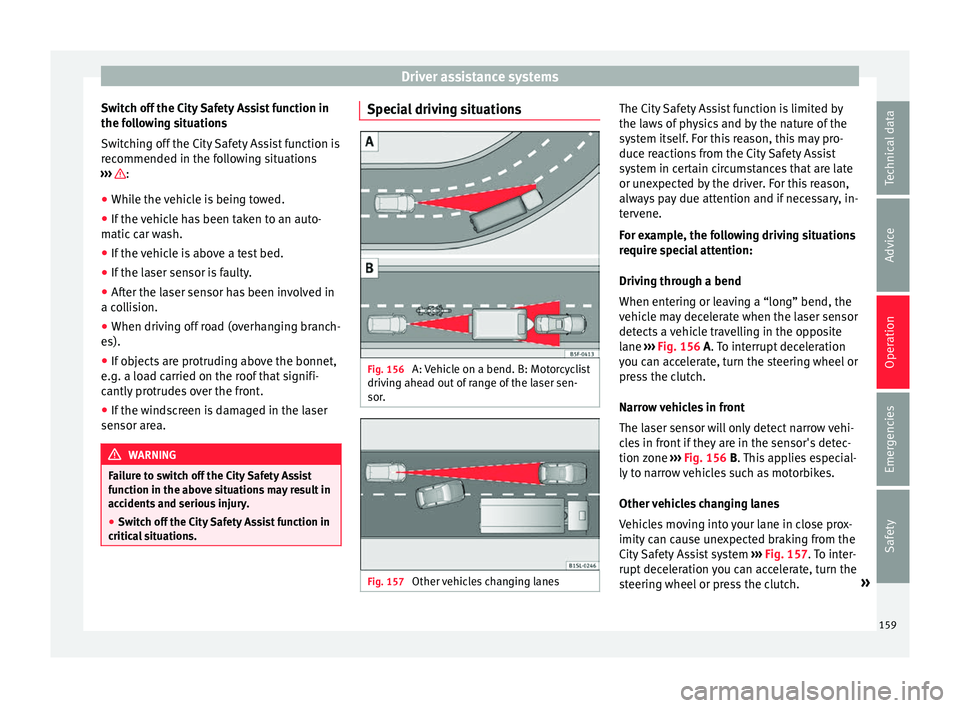
lane ››› Fig. 156 A. To interrupt deceleration
you can accelerate, turn the steering wheel or
press the clutch.
Narrow vehicles in front
The laser sensor will only detect narrow vehi-
cles in front if they are in the sensor's detec-
tion zone ››› Fig. 156 B. This applies especial-
ly to narrow vehicles such as motorbikes.
Other vehicles changing lanes
Vehicles moving into your lane in close prox-
imity can cause unexpected braking from the
City Safety Assist system ›››
Fig. 157. To inter-
rupt deceleration you can accelerate, turn the
steering wheel or press the clutch. »
159
Technical data
Advice
Operation
Emergencies
Safety
Page 162 of 232

Operation
Possible malfunction in the laser sensor
If l
a
ser sensor operation is impaired, for ex-
ample due to heavy rain, mist, snow or dirt,
the City Safety Assist system function is tem-
porarily switched off. On the instrument pan-
el display the control lamp flashes.
When the fault in the laser sensor has been
rectified, the City Safety Assist system func-
tion automatically becomes available again.
The control lamp switches off.
The following conditions could prevent the
City Safety Assist system from functioning:
● Tight bends.
● Accelerator pressed all the way down to the
floor.
● If the C
ity Safety Assist system is switched
off or there i
s a fault ››› page 157.
● If the laser sensor is dirty, covered or over-
heated ›
›› page 158.
● In the event of snow, heavy rain or dense
fog.
● If ther
e are vehicles in front.
● Vehicles changing lanes.
● Vehicles moving in the opposite direction
in the same lane.
● V
ery dirty vehicles with a low degree of re-
flection.
● Pre
sence of thick dust. Hill driving assistant*
Operation This function is only included in vehicles with
ESC.
The hi
l
l driving assistant helps the driver to
move off and upward on a hill when the vehi-
cle is stationary.
The system maintains brake pressure for ap-
proximately two seconds after the driver
takes his foot off the brake pedal to prevent
the vehicle from lurching backward when it is
started. During these 2 seconds, the driver
has enough time to release the clutch pedal
and accelerate without the vehicle moving
and without having to use the handbrake,
making start-up easier, more comfortable
and safer.
These are the basic operation conditions:
● being on a ramp or hill/slope,
● doors closed,
● vehicle completely stationary,
● engine running and foot on the brake,
● besides having a gear engaged or being in
neutral f
or manual gear change and with the
selector lever at positions S, D or R in vehi-
cles with an automatic gearbox.
This system is also active when reversing up-
hill. WARNING
● If y
ou do not start the vehicle immediately
after taking your foot off the brake pedal, the
vehicle may start to roll back under certain
conditions. Depress the brake pedal or use
the hand brake immediately.
● If the engine stalls, depress the brake ped-
al or u
se the hand brake immediately.
● When following a line of traffic uphill, if you
want t
o prevent the vehicle from rolling back
accidentally when starting off, hold the brake
pedal down for a few seconds before starting
off. Note
The Official Service or a specialist workshop
can t el
l you if your vehicle is equipped with
this system. Start-Stop System
C ontr
o
l lamps
It lights up
The Start-Stop system is enabled.
160
Page 163 of 232
Driver assistance systems
It lights up
The Start-Stop sys-
tem is enabled but
the engine cannot
be automatically
stopped.
Contact a specialised workshop.
It lights up
The Start-Stop sys-
tem cannot start the
engine.Start the engine by hand using
the vehicle's key
››› page 133.
There is a fault in the
alternator.››› page 196
Flashes
The Start-Stop sys-
tem is not available.Contact a specialised workshop.
Some warning and control lamps will light up
briefly
when the ignition i
s
switched on to
check certain functions. They will switch off
after a few seconds. WARNING
Observe the safety warnings ›››
in On the
ins trument
panel on page 26. Start-Stop system
Fig. 158
At the top of the centre console:
St ar
t
-Stop system button. With the Start-Stop system enabled, the en-
gine i
s
aut
omatically stopped when the vehi-
cle is at a standstill. It will start again auto-
matically as required.
This function remains enabled while the igni-
tion is switched on. The instrument panel dis-
play shows information on the current status
››› page 160.
Disconnect the Start-Stop system by hand
whenever crossing water.
Vehicles with a manual gearbox
● When the vehicle is stopped, put it into
neutral and r
elease the clutch pedal. The en-
gine will stop.
● To restart, simply engage the clutch. Vehicles with an automatic gearbox
●
When the vehicle is at a standstill, depress
the brake or k
eep it pressed down. The en-
gine switches off.
● The engine will start again as soon as you
rele
ase the brake pedal.
● With the selector lever set to position N,
the engine wi
ll not start until a range of gears
is selected or the accelerator pedal is de-
pressed.
Important conditions for the engine to stop
automatically
● The driver's seat belt must be fastened.
● The driver door must be closed.
● The bonnet must be closed.
● The engine must have reached a minimum
temperat
ure.
● The vehicle must have moved since the last
time the engine wa
s stopped.
● The vehicle's battery must be sufficiently
char
ged.
● The battery temperature must not be too
low or too high.
● The
vehicle must not be on a very steep
slope. »
161
Technical data
Advice
Operation
Emergencies
Safety