turn signal Seat Mii 2017 User Guide
[x] Cancel search | Manufacturer: SEAT, Model Year: 2017, Model line: Mii, Model: Seat Mii 2017Pages: 232, PDF Size: 4.91 MB
Page 105 of 232
Lights and visibility
Closing the sliding/tilting electric panoramic
s u
nr
oof without the anti-trap function
● Within about 5 seconds of activating the
anti-trap fu
nction, pull knob ›››
Fig. 12
5 until the sliding/tilting sunroof is fully
c lo
sed.
● As
such, the sliding/tilting sunroof will
close w
ithout the anti-trap function!
● If the sunroof still cannot be closed, visit a
speci
alised workshop.
If the knob is released during the closing op-
eration, the sliding/tilting electric panoramic
sunroof opens automatically. WARNING
Closing the sliding/tilting electric panoramic
su nr
oof without the anti-trap function can re-
sult in serious injury.
● The sliding/tilting sunroof should always
be closed c
arefully.
● No person should ever remain in the way of
the sliding/ti
lting sunroof, especially when
closing without the anti-trap function.
● The anti-trap function does not prevent fin-
gers
or other parts of the body from becom-
ing trapped against the roof frame and inju-
ries occurring. Lights and visibility
Light s
C ontr
ol lamps
It lights up
Rear fog light switched on
››› page 21.
It lights up
Front fog lights switched on
››› page 21.
It lights up
Left or right turn signal.
The control lamp flashes twice as fast when a vehicle
turn signal is faulty. If necessary, check the vehicle's
lights.
It lights up
Main beam on or flasher on
››› page 105. Several warning and control lamps light up
f
or a f
ew sec
onds when the ignition is switch-
ed on, signalling that the function is being
verified. They will switch off after a few sec-
onds. WARNING
Observe the safety warnings ›››
in On the
ins trument
panel on page 26. Switching lights on and off
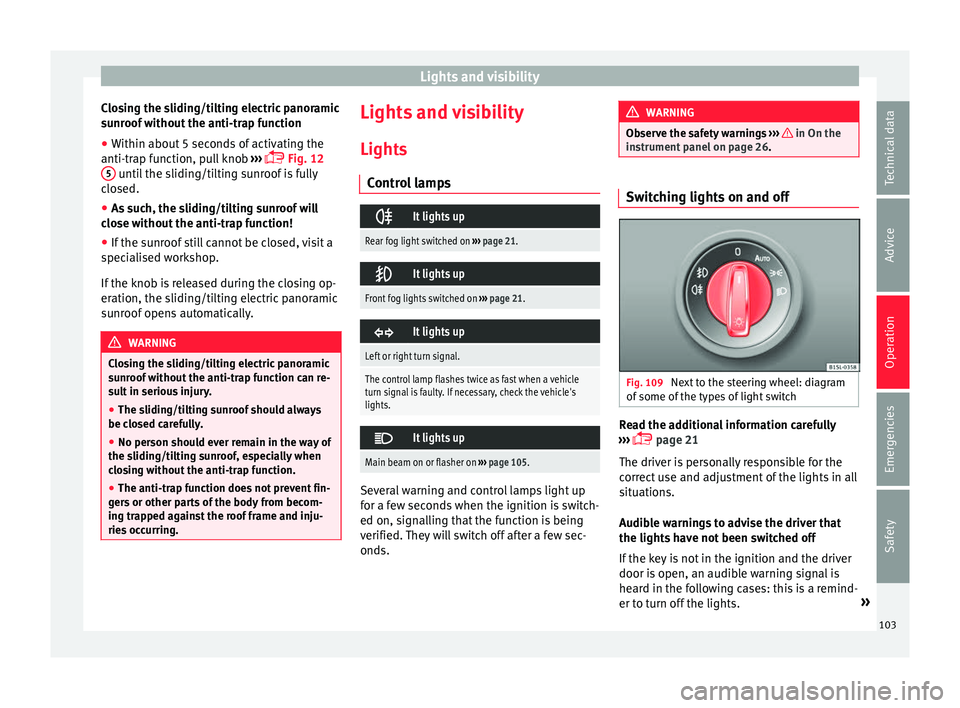
Fig. 109
Next to the steering wheel: diagram
of some of
the type
s of light switch Read the additional information carefully
› ›
›
page 21
The driver is personally responsible for the
correct use and adjustment of the lights in all
situations.
Audible warnings to advise the driver that
the lights have not been switched off
If the key is not in the ignition and the driver
door is open, an audible warning signal is
heard in the following cases: this is a remind-
er to turn off the lights. »
103
Technical data
Advice
Operation
Emergencies
Safety
Page 106 of 232
Operation
● When the light sw
it
ch is in position .
● When the light switch is in position .WARNING
The side lights or daytime running lights are
not bright enough t
o illuminate the road
ahead and to ensure that other road users are
able to see you.
● Always use your dipped beam head lights if
it is
raining or if visibility is poor. WARNING
If the headlights are set too high and not
used c orr
ectly, there is a risk of dazzling or
distracting other road users. This could result
in a serious accident.
● Always make sure that the headlights are
correctly
adjusted. Note
The legal requirements regarding the use of
vehic l
e lights in each country must be ob-
served. Lights and visibility: functions
Parking light remains on both sides
If
when sw
it
ching off the ignition, the light
control remains in the position and the ve-
hicle is closed from outside, both headlights, in addition to the side lights and the rear
lights wi
ll light up.
Daytime running lights
The daytime driving light consists of individu-
al lights in the front headlamps.
When the daytime driving light is switched
on, only the individual lights come on ››› .
The d a
ytime lights
are switched on each time
the ignition is turned on if the light setting is
in position or in position . WARNING
If the road is not well-lit and the vehicle is
not c l
early visible to other drivers, an acci-
dent may occur.
● Never use the daytime driving light if the
roa
d is not well-lit as a result of the weather
conditions and poor visibility. The daytime
driving lights are not bright enough to illumi-
nate the road ahead and to ensure that other
road users are able to see you.
● The rear lights do not come on with the
daytime driv
ing light. A vehicle which does
not have the rear lights on may not be visible
to other drivers in the darkness, if it is rain-
ing or in conditions of poor visibility. Note
The headlights, rear lights and turn signals
ma y
mist up temporarily on the inside in cool
or damp weather. This is normal and in no way effects the useful life of the vehicle light-
ing sy
s
tem. Automatic dipped beam control
* The automatic dipped beam control is merely
intended a
s
an aid and is not able to recog-
nise all driving situations.
When the light switch is in position , the
vehicle lights and the instrument panel and
switch lighting switch on and off automatical-
ly in the following situations ››› in Lights
and v
i
sibility: functions on page 104:
Automatic switching
onAutomatic switching
off
The photo sensor detects
darkness, for example,
when driving through a
tunnel.When adequate lighting is
detected.
The rain sensor detects
rain and activates the
windscreen wipers.When the windscreen wip-
ers have been inactive for
a few minutes. WARNING
If the road is not well lit and other road users
cannot see the
vehicle well enough or at all,
accidents may occur.
● The automatic dipped beam control ( )
only sw
itches on the dipped beam when104
Page 107 of 232
Lights and visibility
there are no changes in brightness, and not,
for e
x
ample when it is foggy. “Coming home” and “Leaving home”
fu
nction (guid
ance lights)The “Coming Home” and “Leaving Home”
fu
nction lights
up the vehicle’s immediate
proximity when getting into and out of it in
the dark.
The “Coming home” function is switched on
manually. However, the “Leaving home”
function is automatically controlled by a rain
and light sensor.
Activating the “Coming Home” function
● Switch the ignition off.
● Activates the headlight flasher for approx.
1 second ››
› page 21.
When the driver door is opened, the “Coming
Home” lighting comes on. The delay in
switching off the headlights is counted from
when the last door or rear lid of the vehicle is
closed.
Deactivating the “Coming Home” function
● It is automatically deactivated once the
time set for the light
switch-off delay has
elapsed. ●
OR: it is
automatically deactivated if, 30
seconds after the function has been activa-
ted, any vehicle door or the rear lid is still
open.
● OR: turn the light switch to the po
sition.
● OR: switch on the ignition.
Activ
ating the “Leaving Home” function
● Unlock the vehicle (the light switch must be
at the po
sition and the rain and light
sensor must detect darkness).
Deactivating the “Leaving Home” function
● It is automatically deactivated once the
light swit
ch-off delay time has elapsed.
● OR: lock the vehicle.
● OR: t
urn the light switch to the pos
ition.
● OR: switch on the ignition.
Turn s
ignal and main beam lever Read the additional information carefully
› ›
›
page 21
Convenience turn signals
For the convenience turn signals, move the
lever as far as possible upwards or down-
wards and release the lever. The turn signal
will flash 3 times. The convenience indicators can be deactiva-
ted at a
Specialised workshop. WARNING
Improper or lack of use of the turn signals, or
for g
etting to deactivate them can confuse
other road users. This could result in a seri-
ous accident.
● Always give warning when you are going to
chan
ge lane, overtake or when turning, acti-
vating the turn signal in good time.
● As soon as you have finished changing
lane, ov
ertaking or turning, switch the turn
signal off. WARNING
Incorrect use of the headlights may cause ac-
cident s
and serious injury, as the main beam
may distract or dazzle other drivers. Note
● If the c on
venience turn signals are operat-
ing (three flashes) and the other convenience
turn signals are switched on, the active part
stops flashing and only flashes once in the
new part selected.
● The turn signal only works when the igni-
tion is sw
itched on. The hazard warning
lights also work when the ignition is switch-
ed off ››› page 70. » 105
Technical data
Advice
Operation
Emergencies
Safety
Page 108 of 232
Operation
●
If an y
of both turn signals fails, the warning
lamp will start flashing twice faster than nor-
mal.
● The main beam headligh
ts can only be
switched on if the dipped beam headlights
are already on. Hazard warning lights
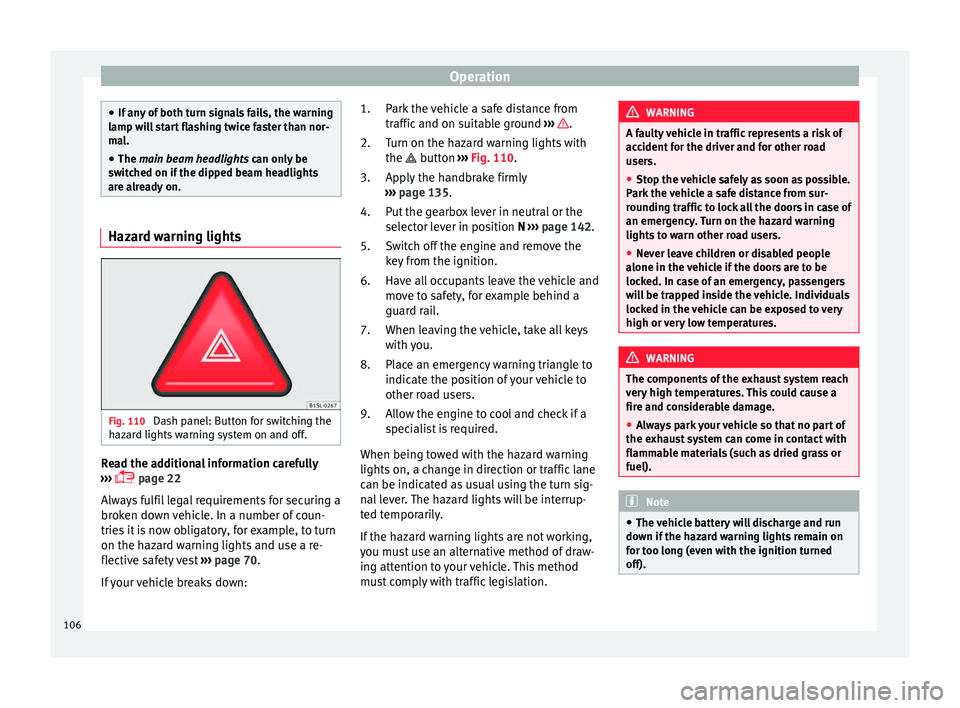
Fig. 110
Dash panel: Button for switching the
h az
ar
d lights warning system on and off. Read the additional information carefully
› ›
›
page 22
Always fulfil legal requirements for securing a
broken down vehicle. In a number of coun-
tries it is now obligatory, for example, to turn
on the hazard warning lights and use a re-
flective safety vest ››› page 70.
If your vehicle breaks down: Park the vehicle a safe distance from
traffic and on s
uitable ground ››› .
T urn on the h
az
ard warning lights with
the button ››› Fig. 110.
Apply the handbrake firmly
››› page 135.
Put the gearbox lever in neutral or the
selector lever in position N ››› page 142.
Switch off the engine and remove the
key from the ignition.
Have all occupants leave the vehicle and
move to safety, for example behind a
guard rail.
When leaving the vehicle, take all keys
with you.
Place an emergency warning triangle to
indicate the position of your vehicle to
other road users.
Allow the engine to cool and check if a
specialist is required.
When being towed with the hazard warning
lights on, a change in direction or traffic lane
can be indicated as usual using the turn sig-
nal lever. The hazard lights will be interrup-
ted temporarily.
If the hazard warning lights are not working,
you must use an alternative method of draw-
ing attention to your vehicle. This method
must comply with traffic legislation. 1.
2.
3.
4.
5.
6.
7.
8.
9. WARNING
A faulty vehicle in traffic represents a risk of
acc ident
for the driver and for other road
users.
● Stop the vehicle safely as soon as possible.
Park the
vehicle a safe distance from sur-
rounding traffic to lock all the doors in case of
an emergency. Turn on the hazard warning
lights to warn other road users.
● Never leave children or disabled people
alone in the v
ehicle if the doors are to be
locked. In case of an emergency, passengers
will be trapped inside the vehicle. Individuals
locked in the vehicle can be exposed to very
high or very low temperatures. WARNING
The components of the exhaust system reach
ver y
high temperatures. This could cause a
fire and considerable damage.
● Always park your vehicle so that no part of
the exhau
st system can come in contact with
flammable materials (such as dried grass or
fuel). Note
● The v ehic
le battery will discharge and run
down if the hazard warning lights remain on
for too long (even with the ignition turned
off). 106
Page 137 of 232
Driving
Engaging the steering wheel lock
In v
ehic
les with automatic gearbox, the igni-
tion key can only be removed when the selec-
tor lever is in position N.
– Remove the key from the ignition in posi-
tion 1
› ››
Fig. 145
›
›› .
– Turn the steering wheel until you hear it en-
gag
e.
P
ossible vehicle theft is prevented with the
steering lock engaged. WARNING
Never switch off the engine while the vehicle
is mo
ving. You may lose control of the vehicle
and there is a risk of serious accident.
● The airbags and belt tensioners do not
work when the ignition i
s switched off.
● The brake servo does not work with the en-
gine off. T
o stop, the brake pedal must be
pressed with more force.
● As the power steering does not work if the
engine is
not running, you will need more
strength to steer than normally.
● If the key is removed from the ignition, the
steerin
g may lock and it will not be possible
to steer the vehicle. CAUTION
If the engine has been driven at high speed
for a pr o
longed period of time, it may over-
heat when turned off. To avoid engine dam- age, allow the engine to run for approximate-
ly 2 minut
e
s in neutral before switching it off. Note
After stopping the engine, the engine com-
p ar tment
fan may continue running for a few
minutes, even when the ignition has been
switched off or the key removed. The radiator
fan is automatically switched off. Electronic immobiliser
The gear lock prevents the engine from being
s
t
ar
ted with an unauthorised key and the ve-
hicle being moved.
The vehicle key has a built-in chip. It auto-
matically deactivates the electronic immobil-
iser when the key is inserted into the ignition
lock.
The electronic immobilizer will be activated
again automatically as soon as you remove
the key from the ignition lock.
For this reason, the vehicle can only be used
with a genuine SEAT key with the correct
code. Coded keys can be obtained from SEAT
dealerships ››› page 92.
If an unauthorised key is used, the signal
appears on the instrument panel display. The
vehicle cannot be started in this case Note
The correct operation of the vehicle is only
guarant eed when origin
al SEAT keys are
used. Braking and parking
Introduction The assisted brake systems are the electron-
ic di
stribution of braking force (EBV), the an-
ti-lock brake system (ABS), the brake assist
system (BAS), the electronic differential lock
(EDL), traction control (TC)*, the traction con-
trol system (ASR) and the electronic stability
control (ESC*). WARNING
Driving with worn brake pads or a faulty
brak e sy
stem may lead to serious accident.
● If you believe the brake pads to be worn or
the brake sy
stem to be faulty, immediately
refer to a specialised workshop to check the
brake pads and replace the worn ones. WARNING
Careless parking can cause serious injury.
● Never remove the key from the ignition if
the v ehic
le is in motion. The steering lock » 135
Technical data
Advice
Operation
Emergencies
Safety
Page 144 of 232
Operation
braking distance or even result in the total
fai
lur
e of the brake system.
● Reduce speed or change down a gear when
faced w
ith steep and long slopes. This allows
you to use the engine braking effect and to
reduce the strain on the brake system. Other-
wise, the brakes may overheat and fail. Only
use the brakes to reduce speed or to stop. Note
Make use, when having the front brake pads
c hec k
ed, and have the rear pads checked al-
so. The thickness of the brake pads should be
checked visually and regularly, by looking
through the openings in the wheel rims or
from underneath the vehicle. If necessary, re-
move the wheels to check them thoroughly.
SEAT recommends taking your car in for tech-
nical service. Changing gear
Intr oduction When reverse gear is engaged and the igni-
tion i
s
sw
itched on the following takes place:
● Reverse lights light up.
● The rear wiper blade performs one move-
ment when the wind
screen wiper is activa-
ted. ●
If nece
ssary, connect the parking distance
warning system. WARNING
Rapid acceleration can cause loss of traction
and skid din
g, especially on slippery ground.
This could cause loss of control of the vehicle
resulting in an accident and considerable
damage.
● Use rapid acceleration only when visibility,
weather
, road conditions and traffic permit. WARNING
Do not allow the brakes to “rub” for a pro-
long ed period of
time, or brake frequently or
for long periods of time. Continuous braking
heats up the brakes. This could significantly
reduce braking power, increase braking dis-
tance or even result in the total failure of the
brake system. Control and warning lamps
It lights up red
Fault in the auto-
matic gearbox.
Do not drive on!
Seek professional advice. Failure to
do so could result in considerable
damage to the transmission
››› page 146.
It lights up yellow
In the automatic
gearbox the
gears can en-
gage incorrectly.Switch the ignition on and off.
When the control lamp does not
light up, find the nearest special-
ised workshop and have the auto-
matic gearbox checked.
The automatic
gearbox over-
heats temporari-
ly.Let the transmission cool with the
gearbox lever in the position .
When the control lamp does not
light up, find the nearest special-
ised workshop and have the auto-
matic gearbox checked.
It lights up
Place the automatic
gearbox lever in the
position
and do not
press the brake pedal.
Press the brake pedal to select
a gear range.
Together with the yel-
low control lamp for
the temperature of the
transmission
: the
automatic gearbox
overheats.
Press brake pedal and let the
transmission cool. Avoid
pressing the accelerator. When
the control lamp does not light
up, find the nearest special-
ised workshop and have the
automatic gearbox checked.
Together with the turn
signal display in the
instrument panel dis-
play: the automatic
gearbox lever is not in
the position
, indica-
tion to start the en-
gine.
Move the gearbox lever to the
position and start the en-
gine. 142
Page 149 of 232
Driving
Note
The recommended gear display is switched
off when the c lut
ch pedal is pressed.Steering
Introduction The power steering* is not hydraulic but elec-
tromec
h
anical. The advantage of this steer-
ing system is that it disposes of hydraulic
tubes, hydraulic oil, the pump, filter and oth-
er components. The electromechanical sys-
tem saves fuel. While a hydraulic system re-
quires oil pressure to be maintained, electro-
mechanical steering only requires energy
when the steering wheel is turned.
With the power steering system, the assisted
steering function automatically adjusts ac-
cording to the vehicle speed, the steering tor-
que and the wheel turning angle. The power
steering only works when the engine is run-
ning. WARNING
If the power steering is not working then the
st eerin
g wheel is much more difficult to turn
and the vehicle more difficult to control.
● The power steering only works when the
engine is
running. ●
Never a l
low the vehicle to move when the
engine is switched off.
● Never remove the key from the ignition if
the vehic
le is in motion. The steering may
lock and it will not be possible to turn the
steering wheel. Control and warning lamps
It lights up red
Power steer-
ing faulty.The steering system should be checked
by a specialised workshop as soon as
possible.
It lights up yellow
Power steer-
ing opera-
tion re-
duced.
The steering system should be checked
by a specialised workshop as soon as
possible.
If, after restarting the engine and driv-
ing for a short distance, the yellow
warning lamp no longer comes on, it will
not be necessary to take the vehicle to a
specialised workshop.
Flashes red
Fault in the
steering col-
umn elec-
tronic lock.
Do not drive on!
Seek professional advice.
It flashes yellow
Steering col-
umn devia-
tion.Gently turn the steering wheel to and
fro.
Steering
wheel not
unlocked or
locked.
Remove the key from the ignition and
then switch the ignition back on. If nec-
essary, check the messages displayed
on the instrument panel display.
Do not drive on, if
the steering column
remains locked after the ignition has
been switched on. Seek specialist assis-
tance. Several warning and control lamps light up
f
or a f
ew sec
onds when the ignition is switch-
ed on, signalling that the function is being
verified. They will switch off after a few sec-
onds. WARNING
If the warning lamps are ignored, the vehicle
ma y
stall in traffic, or may cause accidents
and severe injuries.
● Never ignore the warning lamps.
● Stop the vehicle safely as soon as possible. CAUTION
Failure to heed the warning lamps when they
appe ar m
ay result in faults in the vehicle. 147
Technical data
Advice
Operation
Emergencies
Safety
Page 159 of 232

Driver assistance systems
●
Any r
eparation of the laser sensor requires
specialist knowledge. SEAT recommends tak-
ing your car in for technical service. Note
● If the C ity
Safety Assist function activates a
brake, the brake pedal range is reduced. This
makes the brake pedal seem “harder”.
● Automatic brake intervention by the City
Safety As
sist function can be cancelled by
pressing the clutch pedal, the accelerator
pedal or by a corrective intervention.
● During automatic braking by the City Safety
Assi
st function you may hear unusual noises.
This is normal and is produced in the brake
system. Warning and control lamp
The City Safety Assist function is switched on
ev
er
y
time the ignition is switched on. No
special indication is produced.
If the City Safety Assist function is switched
off or on, or if there is an error in the system,
it will be shown by a control lamp on the in-
strument panel display.
It lights up
The City Safety Assist
function has been
switched on manual-
ly using the
button ››› Fig. 155.
The control lamp turns off after
about 5 seconds.
Flashes
Fast: The City Safety
Assist system func-
tion brakes automat-
ically or has braked
automatically.
Control lamp turns off automati-
cally.
Slow: City Safety As-
sist function is not
currently available.
If the vehicle is stopped, switch
off the engine and switch it on
again. If necessary, inspect the
laser sensor (dirt, frost)
›››
in
Laser sensor on page 158. If it
still does not function, refer to a
Specialised workshop to have
the system inspected.
Flashes
Within the operating
area of 5-30 km/h
(3-19 mph): the City
Safety Assist func-
tion has been
switched off manual-
ly using the
button
››› Fig. 155.
Switch on the City Safety Assist
function manually using the
button ››› Fig. 155. Several warning and control lamps should
light
up f
or a f
ew seconds when the ignition is switched on, signalling that the function is
being v
erified. They will switch off after a few
seconds. WARNING
If the warning lamps are ignored, the vehicle
ma y
stall in traffic, or may cause accidents
and severe injuries.
● Never ignore the warning lamps.
● Stop the vehicle safely as soon as possible. CAUTION
Failure to heed the warning lamps when they
appe ar m
ay result in faults in the vehicle. 157
Technical data
Advice
Operation
Emergencies
Safety
Page 169 of 232
Care and maintenance
The optimal reach of the equipment is only
ac hiev
ed w
ith an external aerial.
Check first with a specialised workshop that
understands the technical possibilities of in-
stallation if you wish to use a two-way radio
with a transmitting power of over 10 watts.
SEAT recommends taking your car in for tech-
nical service.
All legal requirements, together with the in-
structions for the use of two-way radios must
be observed. WARNING
If the two-way radio is not securely fastened
in pos ition, it
could be sent flying around the
vehicle in the event of sharp braking, sudden
manoeuvres or accident, causing injury.
● While driving, two-way radios must be se-
curely
fastened in position, outside the air-
bags deployment zones, or safely stowed
away. WARNING
When using a two-way radio without a con-
nection to an e xt
erior aerial, the maximum
permitted levels of electromagnetic radiation
may be exceeded. This is also the case if the
aerial has not been correctly installed.
● You should only use a two-way radio inside
the vehic
le if it has first been correctly con-
nected to an exterior aerial. Information stored by the control
u
nit
s Your vehicle is fitted at the factory with a ser-
ies
of
electronic control units responsible for
the engine and gearbox management. In ad-
dition, the control units supervise the per-
formance of the exhaust gas system and the
airbag systems.
Therefore, while the vehicle is being driven,
these electronic control units are continuous-
ly analysing the vehicle data. In the event of
faults or deviations from the theoretical val-
ues, only this data is stored. Normally, the
warning lamps on the instrument panel light
up in the event of faults.
This data can only be read and analysed us-
ing special equipment.
The storing of the data allows specialised
workshops to detect and repair faults. Stored
data may include:
● Data relating to the engine or the gearbox
● Speed
● Direction of travel
● Braking force
● Detection of seat belt
The v ehic
le control units never record conver-
sations held by passengers in the vehicle.
In vehicles equipped with an emergency call
function via the mobile phone or other appli- ances connected in the vehicle, it is possible
to send the v
ehicle position. If the control
unit records an accident with airbag activa-
tion, the system may automatically send a
signal. This will depend on the network oper-
ator. Normally, transmission is only possible
in areas with good coverage.
Event Data Recorder
The vehicle is not fitted with an event data re-
corder.
An event data recorder temporarily stores the
vehicle information. Therefore, in the event of
an accident, it is possible to obtain detailed
information about how the accident occur-
red. Vehicles with airbag systems can store
data relating to impact speed, seat belt sta-
tus, seat positions and airbag activation
times may be stored, etc. The volume of data
depends on the manufacturer.
Event data recorders can only be mounted
with authorisation from the vehicle owner
and, in some countries, they are governed by
local legislation.
Reprogramming control units
On the whole, all the data required for the
component management is stored in the con-
trol units. The programming of certain con-
venience functions, such as the turn signals,
individual door opening and instructions on
the display can be modified using special »
167
Technical data
Advice
Operation
Emergencies
Safety
Page 208 of 232
Advice
tyres wear too quickly, have the wheel align-
ment c
hec
ked at a specialised workshop. WARNING
If you notice unusual vibration or the car pulls
to one s ide whi
le driving, this may indicate
that one of the tyres is damaged.
● Reduce speed immediately and stop, while
obser
ving the highway code.
● Check the wheels and tyres for damage.
● Never carry on driving on worn tyres or
wheels. Reque
st qualified assistance immedi-
ately.
● If there is no visible exterior damage, drive
slowly
and carefully to the nearest special-
ised workshop and have the vehicle checked. Tyre monitor system*
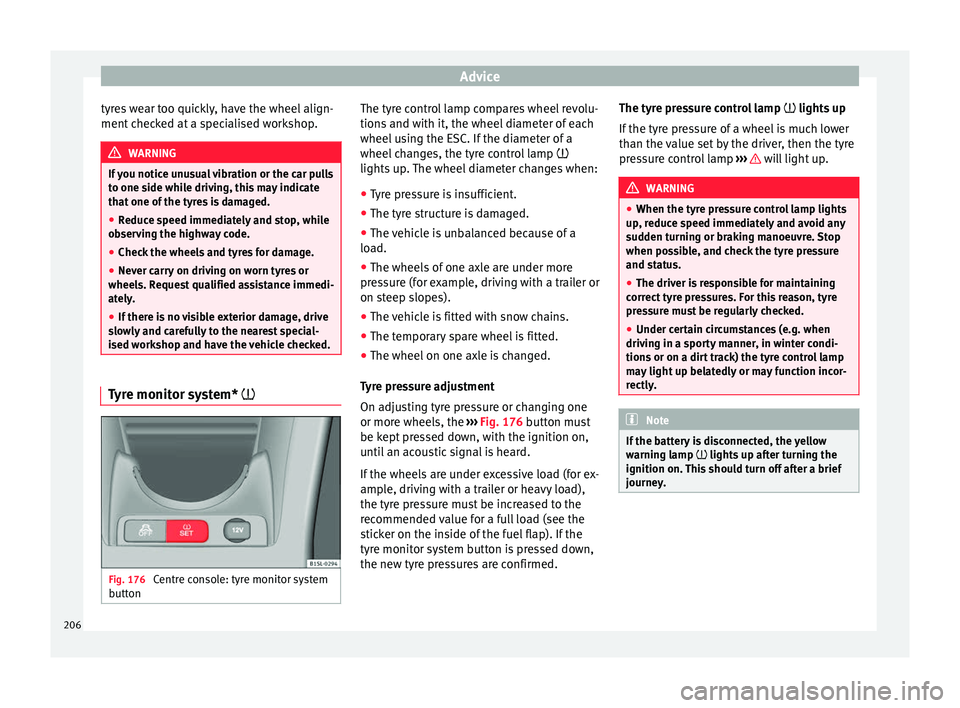
Fig. 176
Centre console: tyre monitor system
b utt
on The tyre control lamp compares wheel revolu-
tion
s
and w
ith it, the wheel diameter of each
wheel using the ESC. If the diameter of a
wheel changes, the tyre control lamp
lights up. The wheel diameter changes when:
● Tyre pressure is insufficient.
● The tyre structure is damaged.
● The vehicle is unbalanced because of a
load.
● The wheel
s of one axle are under more
pres
sure (for example, driving with a trailer or
on steep slopes).
● The vehicle is fitted with snow chains.
● The temporary spare wheel is fitted.
● The wheel on one axle is changed.
Tyr
e pressure adjustment
On adjusting tyre pressure or changing one
or more wheels, the ››› Fig. 176 button must
be kept pressed down, with the ignition on,
until an acoustic signal is heard.
If the wheels are under excessive load (for ex-
ample, driving with a trailer or heavy load),
the tyre pressure must be increased to the
recommended value for a full load (see the
sticker on the inside of the fuel flap). If the
tyre monitor system button is pressed down,
the new tyre pressures are confirmed. The tyre pressure control lamp
lights up
If
the tyre pressure of a wheel is much lower
than the value set by the driver, then the tyre
pressure control lamp ››› will light up.
WARNING
● When the tyr e pr
essure control lamp lights
up, reduce speed immediately and avoid any
sudden turning or braking manoeuvre. Stop
when possible, and check the tyre pressure
and status.
● The driver is responsible for maintaining
correct
tyre pressures. For this reason, tyre
pressure must be regularly checked.
● Under certain circumstances (e.g. when
driving in a s
porty manner, in winter condi-
tions or on a dirt track) the tyre control lamp
may light up belatedly or may function incor-
rectly. Note
If the battery is disconnected, the yellow
warnin g l
amp lights up after turning the
ignition on. This should turn off after a brief
journey. 206