change time Seat Mii 2017 Owner's Guide
[x] Cancel search | Manufacturer: SEAT, Model Year: 2017, Model line: Mii, Model: Seat Mii 2017Pages: 232, PDF Size: 4.91 MB
Page 151 of 232
Driving
● Use of
c
ompatible plastics in the same part
if its components are not easily separated.
● Use of recycled materials and/or materials
originating fr
om renewable sources.
● Reduction of volatile components, includ-
ing odour, in p
lastic materials.
● Use of CFC-free coolants.
Ban on heavy
metals, with the exceptions
dictated by law (Annex II of ELV Directive
2000/53/EC): cadmium, lead, mercury, hexa-
valent chromium.
Manufacturing methods
● Reduction of the quantity of thinner in the
protectiv
e wax for cavities.
● Use of plastic film as protection during ve-
hicle tr
ansport.
● Use of solvent-free adhesives.
● Use of CFC-free coolants in cooling sys-
tems.
● Recy
cling and energy recovery from resi-
dues (RDF).
● Impr
ovement in the quality of waste water.
● Use of systems for the recovery of residual
heat (therm
al recovery, enthalpy wheels,
etc.).
● The use of water-soluble paints. Economical and environmentally
friendly drivin
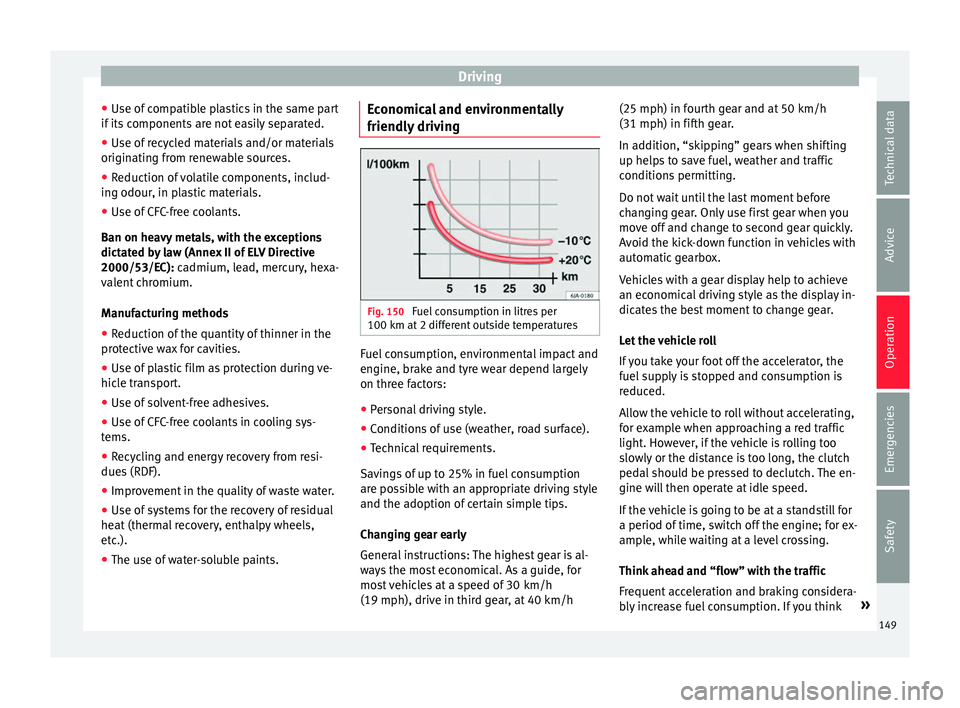
g Fig. 150
Fuel consumption in litres per
100 km at 2 diff
er
ent outside temperatures Fuel consumption, environmental impact and
en
gine, br
ak
e and tyre wear depend largely
on three factors:
● Personal driving style.
● Conditions of use (weather, road surface).
● Technical requirements.
Saving
s of up to 25% in fuel consumption
are possible with an appropriate driving style
and the adoption of certain simple tips.
Changing gear early
General instructions: The highest gear is al-
ways the most economical. As a guide, for
most vehicles at a speed of 30 km/h
(19 mph), drive in third gear, at 40 km/h (25 mph) in fourth gear and at 50 km/h
(31 mph) in fifth ge
ar.
In addition, “skipping” gears when shifting
up helps to save fuel, weather and traffic
conditions permitting.
Do not wait until the last moment before
changing gear. Only use first gear when you
move off and change to second gear quickly.
Avoid the kick-down function in vehicles with
automatic gearbox.
Vehicles with a gear display help to achieve
an economical driving style as the display in-
dicates the best moment to change gear.
Let the vehicle roll
If you take your foot off the accelerator, the
fuel supply is stopped and consumption is
reduced.
Allow the vehicle to roll without accelerating,
for example when approaching a red traffic
light. However, if the vehicle is rolling too
slowly or the distance is too long, the clutch
pedal should be pressed to declutch. The en-
gine will then operate at idle speed.
If the vehicle is going to be at a standstill for
a period of time, switch off the engine; for ex-
ample, while waiting at a level crossing.
Think ahead and “flow” with the traffic
Frequent acceleration and braking considera-
bly increase fuel consumption. If you think »
149
Technical data
Advice
Operation
Emergencies
Safety
Page 152 of 232
Operation
ahead as you drive and keep a safe distance
fr om the
v
ehicle in front, it is possible to slow
down by simply lifting your foot off the accel-
erator. This eliminates the need for constant
braking and acceleration.
Calm and steady driving
Constancy is more important than speed: The
more you drive at a constant speed, the lower
the fuel consumption.
When driving on the motorway, it is more effi-
cient to drive at a constant and more moder-
ate speed than to be continuously accelerat-
ing and braking. As a general rule, you will
reach your destination just as quickly when
you drive at a constant speed.
The cruise control function helps you to ach-
ieve a constant style of driving.
Moderate use of additional devices
It is important to travel in comfort, but con-
venience systems should be used ecological-
ly.
Some equipment, when connected, increase
fuel consumption considerably, for example:
● Air conditioning cooling system: If the air
conditioning sy
stem is required to cool to
significantly lower temperatures than the true
outside temperature, it will require a large
amount of energy from the engine. Therefore,
we recommend that the selected temperature for the vehicle is not too different to the out-
side temper
ature. It is a good idea to air the
vehicle before starting your journey and to
drive a short distance with the windows
open. Then you can close the windows and
switch on the air conditioning. Keep windows
closed when travelling at high speeds. Driv-
ing with the windows open increases fuel
consumption.
● Switch off the seat heating when the seats
have w
armed up.
● Switch off the heated rear window when it
is not
moist or covered in ice.
Avoid short journeys
Fuel consumption is much higher when the
engine is cold, immediately after it has been
started. It takes a few kilometres of driving
for the engine to warm up and to normalise
consumption.
The engine and catalytic converter need to
reach their proper working temperature in or-
der to minimise fuel consumption and emis-
sions. The ambient temperature has a deci-
sive influence.
Fig. 150 shows the difference in consump-
tion for the same journey at +20°C (+68°F)
and at -10°C (+14°F).
Therefore, unnecessary short journeys
should be avoided. Try to combine trips. The vehicle uses more fuel in winter than in
summer, ev
en when other conditions are the
same.
The engine takes a long time to warm up
when it is idling. In addition, mechanical
wear and pollutant emissions are also espe-
cially high during this initial warm-up phase.
It is therefore best to drive off immediately af-
ter starting the engine. Doing this avoids run-
ning the engine at a high speed.
Adjusting type pressures.
Having the correct pressure in your tyres
helps to reduce rolling resistance and, as a
result reduces fuel consumption. Increasing
the tyre pressure slightly (+0.2
bar/+3 psi/+200 kPa) can help to save fuel.
When you buy new tyres, make sure they are
optimised for minimum rolling resistance.
Use low friction engine oil
The use of low viscosity totally synthetic oils,
known as low friction engine oil, helps to re-
duce fuel consumption. These oils reduce the
resistance caused by friction in the engine,
they flow around the engine more quickly
and efficiently, particularly in cold starts. The
effect is particularly noticeable in vehicles
frequently used for short journeys.
Always check the engine oil level and ob-
serve service intervals (engine oil change in-
tervals).
150
Page 156 of 232
Operation
●
When cl e
aning the sensors with high-pres-
sure or steam cleaning equipment, spray the
sensors briefly at a distance of no less than
10 cm.
● Different sources of noise can produce er-
rors
in the parking distance warning system,
e.g. parking distance warning systems from
other vehicles, inductive loops or construc-
tion works machines.
● Retrofitting of components to the vehicle,
such a
s a bicycle carrier, may interfere with
the function of the parking distance warning
system. Parking distance warning system
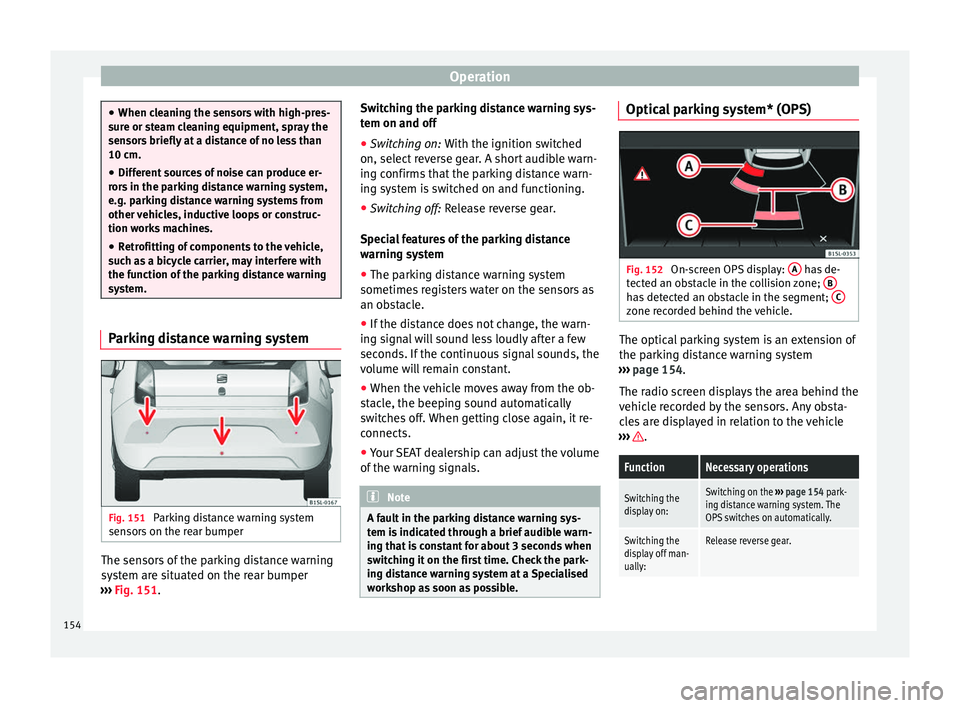
Fig. 151
Parking distance warning system
sen sor
s
on the rear bumper The sensors of the parking distance warning
sy
s
t
em are situated on the rear bumper
››› Fig. 151. Switching the parking distance warning sys-
tem on and off
●
Swit
ching on: With the ignition swit
ched
on, select reverse gear. A short audible warn-
ing confirms that the parking distance warn-
ing system is switched on and functioning.
● Switching off: Rele
ase reverse gear.
Special features of the parking distance
warning system
● The parking distance warning system
sometimes r
egisters water on the sensors as
an obstacle.
● If the distance does not change, the warn-
ing sign
al will sound less loudly after a few
seconds. If the continuous signal sounds, the
volume will remain constant.
● When the vehicle moves away from the ob-
stac
le, the beeping sound automatically
switches off. When getting close again, it re-
connects.
● Your SEAT dealership can adjust the volume
of the warnin
g signals. Note
A fault in the parking distance warning sys-
tem i s
indicated through a brief audible warn-
ing that is constant for about 3 seconds when
switching it on the first time. Check the park-
ing distance warning system at a Specialised
workshop as soon as possible. Optical parking system* (OPS)
Fig. 152
On-screen OPS display: A has de-
tect ed an o
bstacle in the collision zone; B has detected an obstacle in the segment;
C zone recorded behind the vehicle.
The optical parking system is an extension of
the p
ark
in
g distance warning system
››› page 154.
The radio screen displays the area behind the
vehicle recorded by the sensors. Any obsta-
cles are displayed in relation to the vehicle
››› .
FunctionNecessary operations
Switching the
display on:Switching on the
››› page 154 park-
ing distance warning system. The
OPS switches on automatically.
Switching the
display off man-
ually:Release reverse gear. 154
Page 158 of 232
Operation
● If the g
e
ar is changed with the manual
gearbox.
● If the airbag is triggered. WARNING
Use of the cruise control could cause acci-
dents and sev
ere injuries if it is not possible
to drive at a constant speed maintaining the
safety distance.
● Do not use the cruise control in heavy traf-
fic, if the dis
tance from the vehicle in front is
insufficient, on steep roads, with several
bends or in slippery circumstances (snow,
ice, rain or loose gravel), or on flooded roads.
● Never use the CCS when driving off-road or
on unpav
ed roads.
● Always adapt your speed and the distance
to the v
ehicles ahead in line with visibility,
weather conditions, the condition of the road
and the traffic situation.
● To avoid unexpected operation of the cruise
contro
l system, turn it off every time you fin-
ish using it.
● It is dangerous to use a set speed which is
too high for the pr
evailing road, traffic or
weather conditions.
● When travelling down hills, the CCS cannot
maintain a c
onstant speed. The vehicle tends
to accelerate under its own weight. Select a
lower gear or use the foot brake to slow the
vehicle. Safety Assist* (City Safety As-
s
i
s
t function)
Introduction The City Safety Assist function covers driving
sit
uation
s at a distance of about 10 metres in
front of the vehicle, in a speed range of ap-
proximately 5-30 km/h (3-19 mph).
When the system detects a possible collision
with a vehicle in front, the vehicle prepares
for a possible emergency braking ››› .
If the driv
er doe
s not react to an imminent
collision, the system can automatically brake
the vehicle in order to reduce speed faced
with a possible collision. The system can
help to reduce the consequences of an acci-
dent.
If the City Safety Assist function determines
that the driver has braked insufficiently when
faced with an imminent collision, the system
can increase the brake force in order to re-
duce speed. The system can help to reduce
the consequences of an accident. WARNING
The smart technology in the City Safety As-
si s
t system cannot change the limits imposed
by the laws of physics and by the system it-
self. The increased convenience offered by
the City Safety Assist system should never
prompt you to take risks. The driver always assumes the responsibility of braking in
time.
●
The City Safety Assist function cannot pre-
vent ac
cidents or serious injury by itself.
● The City Safety Assist system may carry out
unw
anted brake interventions in complex
driving situations e.g. when a vehicle crosses
at a short distance. WARNING
Relying on the City Safety Assist system in
c ity driv
ing as part of one's driving behaviour
may cause accidents and serious injury. The
system is not a replacement for driver aware-
ness.
● Always adapt your speed and the distance
to the v
ehicles ahead in line with visibility,
weather conditions, the condition of the road
and the traffic situation.
● The City Safety Assist function does not re-
act to peop
le, animals or vehicles that cross
or move in the opposite direction in the same
lane.
● If after switching on the City Safety Assist
function the
vehicle begins to move, slow the
vehicle with the foot brake. CAUTION
If you suspect that the City Safety Assist la-
ser sensor i s
damaged, switch it off. This will
avoid additional damage. 156
Page 162 of 232

Operation
Possible malfunction in the laser sensor
If l
a
ser sensor operation is impaired, for ex-
ample due to heavy rain, mist, snow or dirt,
the City Safety Assist system function is tem-
porarily switched off. On the instrument pan-
el display the control lamp flashes.
When the fault in the laser sensor has been
rectified, the City Safety Assist system func-
tion automatically becomes available again.
The control lamp switches off.
The following conditions could prevent the
City Safety Assist system from functioning:
● Tight bends.
● Accelerator pressed all the way down to the
floor.
● If the C
ity Safety Assist system is switched
off or there i
s a fault ››› page 157.
● If the laser sensor is dirty, covered or over-
heated ›
›› page 158.
● In the event of snow, heavy rain or dense
fog.
● If ther
e are vehicles in front.
● Vehicles changing lanes.
● Vehicles moving in the opposite direction
in the same lane.
● V
ery dirty vehicles with a low degree of re-
flection.
● Pre
sence of thick dust. Hill driving assistant*
Operation This function is only included in vehicles with
ESC.
The hi
l
l driving assistant helps the driver to
move off and upward on a hill when the vehi-
cle is stationary.
The system maintains brake pressure for ap-
proximately two seconds after the driver
takes his foot off the brake pedal to prevent
the vehicle from lurching backward when it is
started. During these 2 seconds, the driver
has enough time to release the clutch pedal
and accelerate without the vehicle moving
and without having to use the handbrake,
making start-up easier, more comfortable
and safer.
These are the basic operation conditions:
● being on a ramp or hill/slope,
● doors closed,
● vehicle completely stationary,
● engine running and foot on the brake,
● besides having a gear engaged or being in
neutral f
or manual gear change and with the
selector lever at positions S, D or R in vehi-
cles with an automatic gearbox.
This system is also active when reversing up-
hill. WARNING
● If y
ou do not start the vehicle immediately
after taking your foot off the brake pedal, the
vehicle may start to roll back under certain
conditions. Depress the brake pedal or use
the hand brake immediately.
● If the engine stalls, depress the brake ped-
al or u
se the hand brake immediately.
● When following a line of traffic uphill, if you
want t
o prevent the vehicle from rolling back
accidentally when starting off, hold the brake
pedal down for a few seconds before starting
off. Note
The Official Service or a specialist workshop
can t el
l you if your vehicle is equipped with
this system. Start-Stop System
C ontr
o
l lamps
It lights up
The Start-Stop system is enabled.
160
Page 187 of 232
Checking and refilling levels
driving. Whenever the ignition is switched
on, the needl e c
h
anges first for a few sec-
onds to the petrol area in order to display the
current level of fuel. The needle then moves
to the natural gas area. After the engine is
started, the needle changes to the area corre-
sponding to the current operating mode.
Problem: if the vehicle is left parked for a
long time just after refuelling, the gas level
indicator does not accurately indicate the
same level shown after refuelling when the
vehicle is started up again. This is not due to
a leak in the system, but to a drop in pres-
sure in the gas tank for technical reasons af-
ter a cooling phase immediately after refuel-
ling. WARNING
Driving with insufficient fuel reserve could re-
su lt
in the vehicle breaking down in traffic
and a serious accident.
● If the fuel level is too low then the fuel sup-
ply t
o the engine can become irregular espe-
cially on slopes.
● If the engine “is choked” or stalls due to
lack
of or irregularity of the fuel supply, the
power steering as well as all of the driver as-
sistance systems including braking assis-
tance will stop working.
● Always refuel when there is only one quar-
ter of the f
uel tank left to avoid running out of
fuel. CAUTION
● Alw a
ys pay attention to any lit control
lamps and to the corresponding descriptions
and instructions to avoid damage to the vehi-
cle.
● Never run the fuel tank completely dry. An
irregu
lar fuel supply may lead to ignition
faults and unburnt fuel could enter the ex-
haust system. This could damage the catalyt-
ic converter. Note
The arrow next to the fuel pump symbol on
the ins trument
panel ››› Fig. 164 indicates the
side of the vehicle on which the fuel tank flap
is located. Refuelling with petrol
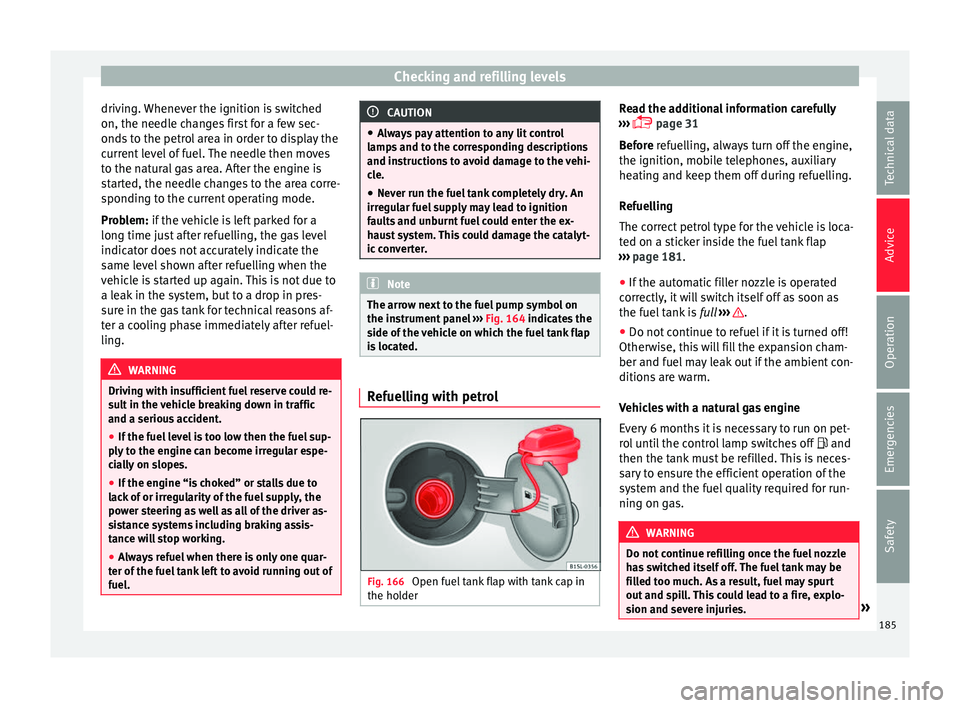
Fig. 166
Open fuel tank flap with tank cap in
the ho l
der Read the additional information carefully
› ›
›
page 31
Before refuelling, always turn off the engine,
the ignition, mobile telephones, auxiliary
heating and keep them off during refuelling.
Refuelling
The correct petrol type for the vehicle is loca-
ted on a sticker inside the fuel tank flap
››› page 181.
● If the automatic filler nozzle is operated
correctly
, it will switch itself off as soon as
the fuel tank is full ››› .
● Do not continue to refuel if it is turned off!
Other w
i
se, this will fill the expansion cham-
ber and fuel may leak out if the ambient con-
ditions are warm.
Vehicles with a natural gas engine
Every 6 months it is necessary to run on pet-
rol until the control lamp switches off and
then the tank must be refilled. This is neces-
sary to ensure the efficient operation of the
system and the fuel quality required for run-
ning on gas. WARNING
Do not continue refilling once the fuel nozzle
ha s
switched itself off. The fuel tank may be
filled too much. As a result, fuel may spurt
out and spill. This could lead to a fire, explo-
sion and severe injuries. » 185
Technical data
Advice
Operation
Emergencies
Safety
Page 196 of 232
Advice
●
When refi l
ling liquids, avoid spilling them
on parts of the engine and the exhaust sys-
tem. Spilled liquids could cause a fire. Under
specific circumstances, the ethylene glycol
can catch fire. WARNING
If there is not enough anti-freeze in the cool-
ant sys
tem, the engine may fail leading to se-
rious damage.
● Please make sure that the percentage of
additiv
e is correct with respect to the lowest
expected ambient temperature in the zone in
which the vehicle is to be used.
● When the outside temperature is very low,
the cool
ant could freeze and the vehicle
would be immobilised. In this case, the heat-
ing would not work either and inadequately
dressed passengers could die of cold. CAUTION
● If ther e i
s no appropriate coolant liquid
available, fill it using distilled water, and
nothing else. Any other type of water may
lead to considerable rusting in the engine
due to its chemical components. This could
consequently damage the engine. If you have
not used distilled water but another type of
water to top up the coolant, a specialised
workshop must immediately replace all of the
fluid in the engine cooling system.
● Only top up coolant to the top level of the
marked ar
ea ››› Fig. 170. Otherwise the ex- cess coolant will be forced out of the cooling
sys
t
em when the engine is hot, causing dam-
age.
● If a lot of liquid coolant has been lost, wait
for the engine t
o cool down completely before
adding coolant. Extensive coolant loss is an
indication of leaks in the engine cooling sys-
tem. Have the engine cooling system inspec-
ted immediately by a specialised workshop.
Otherwise engine damage may occur.
● When refilling service liquids, ensure that
you put
the liquids into the right tank. Mak-
ing a mistake when refilling could cause seri-
ous malfunctions and damage the engine! CAUTION
The original additives should never be mixed
with c oo
lants which are not approved by
SEAT. Otherwise, you run the risk of causing
severe damage to the engine and the engine
cooling system.
● If the fluid in the expansion tank is not pur-
ple b
ut is, for example, brown, this indicates
that the G13 additive has been mixed with an
inadequate coolant. The coolant must be
changed as soon as possible if this is the
case! This could result in serious faults and
engine damage. Brake fluid
Chec k
in
g the brake fluid level Read the additional information carefully
›› ›
page 33
In the course of time, the brake fluid absorbs
water from the ambient air. If there is too
much water in the brake fluid, the brake sys-
tem could be damaged. In addition, the boil-
ing point of the brake fluid is significantly
lowered. When the brake fluid contains too
much water and the brakes are subject to
considerable forces, bubbles of water vapour
can form in the system. These bubbles can
significantly reduce braking power, notably
increasing braking distance, and could even
result in the total failure of the brake system.
Ensuring that the brake system is always
functioning correctly is essential for your own
safety and the safety of other road users
››› .
Br ak
e fluid s
pecifications
SEAT have developed a special brake fluid
optimised for the brake systems of their vehi-
cles. To ensure the optimum working of the
brake system, SEAT recommends the use of
brake fluid in accordance with the VW 501 14
standard. If this brake fluid is not available or
another brake fluid is used for different rea-
sons, use a brake fluid that complies with the
United States standard FMVSS 116 DOT 4 or
194
Page 200 of 232
Advice
Checking the battery electrolyte level
● Make sure there is sufficient lighting to
c l
e
arly recognise the colours. Never use
flames or shiny objects as a light source.
● Depending on the level of acid, the Magic
eye on the top of
the battery will change col-
our.
Colour indica-
torNecessary operations
Light yellow or
colourlessThe electrolyte level of the vehicle's
battery is too low. Have the battery
checked and, where applicable, re-
placed by a specialised workshop.
BlackThe electrolyte level of the vehicle's
battery is correct. WARNING
Working with the vehicle battery involves a
risk of
corrosion, explosions and electric
shock.
● Never tilt the vehicle battery. Battery acid
coul
d spill out of the openings for the release
of gases and cause corrosion damage.
● Never open the vehicle battery.
● If battery acid splashes on you, immediate-
ly rinse
your eyes and skin abundantly with
water for several minutes. Then seek medical
care immediately.
● If acid is swallowed by mistake, consult a
doctor immediat
ely. Charging, replacing and connecting or
di
s
c
onnecting the battery Charging the battery
The v
ehic
le battery should be charged by a
specialised workshop only, as batteries us-
ing special technology have been installed
and they must be charged in a controlled en-
vironment ››› . SEAT recommends taking
your c ar in f
or technical service.
Replacing a vehicle battery
The battery has been developed to suit the
conditions of its location and has special
safety features. If the battery must be re-
placed, consult a technical service for infor-
mation on electromagnetic compatibility, the
size and maintenance, performance and
safety requirements of the new battery in
your vehicle before you purchase one. SEAT
recommends you have the battery replaced
by a technical service.
Use only maintenance-free genuine batteries
conforming to TL 825 06 and VW 7 50 73
Standards. These standards must be dated
April 2008 or later.
Vehicles fitted with the Start-Stop system are
equipped with a special battery. Therefore,
this battery must only be replaced by another
with the same specifications. Disconnecting the vehicle's battery
If
y
ou must disconnect the battery from the
electrical system, please note the following:
● Switch off the ignition and all electrical
equipment.
● The v
ehicle must be unlocked before dis-
connecting the b
attery, otherwise the alarm
will be triggered.
● First disconnect the negative cable and
then the positiv
e ››› .
C onnectin
g the
vehicle's battery
● Before reconnecting the battery, switch off
the engine and all
electrical devices.
● First reconnect the positive cable and then
the negativ
e ››› .
Diff er
ent
control lamps may light up after
connecting the battery and switching the ig-
nition on. They will be turned off after a short
trip at a speed of between 15-20 km/h
(10-12 mph). If the warning indicators remain
lit, please visit a specialised workshop to
have the vehicle checked.
If the battery has been disconnected for a
long time, it is possible that the next service
date is not displayed or calculated correctly
››› page 88. Respect the maximum service in-
tervals permitted ››› Booklet Maintenance
Programme.
198
Page 203 of 232
Wheels and tyres
The service life of tyres is dependent on tyre
pr e
s
sure, driving style, the care they receive
and the correct fitting.
The tyres and wheel rims are an essential
part of the vehicle's design. The tyres and
rims approved by SEAT are specially matched
to the characteristics of the vehicle and our
critical to good road holding and safe han-
dling.
Avoiding damage to tyres and wheels
● If you have to drive over a kerb or similar
obs
tacle, drive very slowly and as near as
possible at a right angle to the kerb.
● Inspect the tyres regularly for damage
(punct
ures, cuts, cracks, dents).
● Remove any foreign bodies found on the
outside of the ty
re tread and ensure that they
have not passed through the wall of the tyre
››› page 205.
● In addition, the instructions for tyre control
syst
ems should always be observed.
● Replace damaged or worn tyres as soon as
poss
ible ››› page 205.
● Regularly check tyres for non-visible dam-
age ››
› page 205.
● Never exceed the maximum permitted
speed or loa
ds specified for the type of tyre
fitted on your vehicle ››› page 208.
● Do not allow tyres (including the spare
wheel) to come int
o contact with aggressive substances, grease, oil, fuel or brake fluid
›››
.
● Lost valve caps should be replaced imme-
di at
ely
.
Tyres with directional tread pattern
Tyres with directional tread pattern have
been designed to operate best when rotating
in only one direction. An arrow on the tyre
sidewall indicates the direction of rotation on
tyres with directional tread ››› page 208. Al-
ways observe the direction of rotation indica-
ted when mounting the wheel. This guaran-
tees optimum grip and helps to avoid aqua-
planing, excessive noise and wear.
If the tyre is mounted in the opposite direc-
tion of rotation, drive with extreme caution,
as the tyre is no longer being used correctly.
This is of particular importance when the
road surface is wet. Change the tyre as soon
as possible or remount it with the correct di-
rection of rotation.
Interchanging tyres
To ensure that the wear is equal on all tyres
the wheels should be changed round from
time to time according to the system
››› Fig. 173. The useful life of all the tyres will
then be about the same time.
SEAT recommends you take the vehicle to a
specialised workshop to have the tyres
changed. Tyres over 6 years old
Tyr
es are subject to an ageing process as a
result of physical and chemical processes.
This may affect their performance. Tyres
which are stored for long periods of time
without being used, harden and become
more fragile than tyres which are in constant
use.
SEAT recommends that tyres over six years
old are replaced with new tyres. This also ap-
plies to tyres (including the spare wheel)
which appear to be in perfect condition on
the outside and which have a tread depth
within the values stipulated by the Law ››› .
The d at
e of
manufacture, part of the tyre
identification number (TIN), indicates the age
of the tyre ( ) ››› page 208.
Storing tyres
Mark tyres when you remove them to indicate
the direction of rotation (left, right, forwards,
backwards). This ensures you will be able to
mount them correctly when you replace
them. When removed, the wheels and/or
tyres should be stored in a cool, dry and pref-
erably dark location. Do not place tyres
mounted on the wheel in a vertical position.
Protect tyres not mounted on wheels from
dirt by storing them in suitable bags and
standing them on the ground on their tread. »
201
Technical data
Advice
Operation
Emergencies
Safety
Page 231 of 232

SEAT S.A. is permanently concerned about continuous development of its t\
ypes and models. For this reason we ask you to under-
stand, that at any given time, changes regarding shape, equipment and te\
chnique may take place on the car delivered. For this reason
no right at all may derive based on the data, drawings and descriptions \
in this current handbook.
All texts, illustrations and standards in this handbook are based on the\
status of information at the time of printing. Except for error
or omission, the information included in the current handbook is valid a\
s of the date of closing print.
Re-printing, copying or translating, whether total or partial is not all\
owed unless SEAT allows it in written form.
SEAT reserves all rights in accordance with the “Copyright” Act.
All rights on changes are reserved.
❀This paper has been manufactured using bleached non-chlorine cellulose.
© SEAT S.A. - Reprint: 15.11.17
About this manual
This manual contains a description of the
equipment supplied with the vehicle at the
time this manual was published. Some of the
units described herein will not be available
until a later date or are only available in cer -
tain markets.
Because this is a general manual for the Mii,
some of the equipment and functions that are
described in this manual are not included in
all types or variants of the model; they may
vary or be modied depending on the techni -
cal requirements and on the market; this is in
no way deceptive advertising.
The illustrations are intended as a general
guide and may vary from the equipment tted
in your vehicle in some details.
The steering indications (left, right, forward,
reverse) appearing in this manual refer to the
normal driving movements of the vehicle ex -
cept when otherwise indicated.
The equipment marked with an aster -
isk* is tted as standard only in certain
versions, and is only supplied as op -
tional extras for some versions, or are
only offered in certain countries.
® All registered marks are indicated with
®. Although the copyright symbol does
not appear, it is a copyrighted mark.
>> The section is continued on the follow -
ing page.
Important warnings on a given page
Detailed contents on a given page
General information on a given page
Emergency information on a given page
WARNING
Texts preceded by this symbol contain infor -
mation on safety. They warn you about possi -
ble dangers of accident or injury.
CAUTION
Texts with this symbol draw your attention to
potential sources of damage to your vehicle.
For the sake of the environment
Texts preceded by this symbol contain rele-
vant information concerning environmental
protection.
Note
Texts preceded by this symbol contain additio -
nal information.
This manual is divided into six large parts,
which are:
1. The essentials
2. Safety
3. Emergencies
4. Operation
5. Tips
6. Technical data
At the end of this manual, there is a detailed
alphabetical index that will help you quickly
nd the information you require.