Page 90 Seat Mii 2017 Repair Manual
[x] Cancel search | Manufacturer: SEAT, Model Year: 2017, Model line: Mii, Model: Seat Mii 2017Pages: 232, PDF Size: 4.91 MB
Page 77 of 232
Self-help
WARNING
Driving with an unsealed tyre is dangerous
and can c au
se accidents and serious injury.
● Do not continue driving if the tyre pressure
is 1.3
bar (19 psi / 130 kPa) and lower.
● Seek specialist assistance. Changing the windscreen wiper
bl
a
des
Changing the windscreen and rear
window wiper blades Read the additional information carefully
› ›
›
page 46.
The windscreen wiper blades are supplied as
standard with a layer of graphite. This layer is
responsible for ensuring that the wipe is si-
lent. If the graphite layer is damaged, the
noise of the water as it is wiped across the
windscreen will be louder.
Check the condition of the wiper blades regu-
larly. If the wipers scrape across the glass
they should be changed if they are damaged,
or cleaned if they are dirty ››› .
Dam ag
ed w
iper blades should be replaced
immediately. These are available from quali-
fied workshops. WARNING
Worn or dirty windscreen wiper blades reduce
vi s
ibility and increase the risk of accident
and serious injury.
● Always replace damaged or worn wind-
scr
een wiper blades or blades that no longer
clean the windscreen properly. CAUTION
● Damag ed or dir
ty windscreen wipers could
scratch the glass.
● If products containing solvents, rough
spong
es or sharp objects are used to clean
the blades, the graphite layer will be dam-
aged.
● Never use fuel, nail varnish remover, paint
thinner or simil
ar products to clean the win-
dows. CAUTION
● To pr ev
ent damage to the bonnet and the
wiper arms, only leave them in the service
position.
● Before driving, always lower the wiper
arms. Note
If wax deposits, other cleaning products from
the autom atic
car wash, or other care prod-
ucts, are left on the windscreen and the rear
window, the blades can scratch the glass. Re- move wax deposits with a special product or
cl
e
aning cloths. Tow-starting and towing
Ins truction
s for tow-starting Read the additional information carefully
›› ›
page 42.
When towing or tow starting, respect the le-
gal requirements.
For technical reasons, it is not possible to
tow a vehicle if the battery is flat.
In general, the vehicle should not be started
by towing. Jump-starting is much more pref-
erable ›››
page 43.
For technical reasons, the following vehicles
can not be tow started:
● Vehicles with an automatic gearbox.
● If the vehicle battery is flat, it is possible
that the en
gine control unit does not operate
correctly.
However, if your vehicle must absolutely be
tow-started (manual gearbox):
● Put it into second or third gear.
● Keep the clutch pressed down. »
75
Technical data
Advice
Operation
Emergencies
Safety
Page 79 of 232
Self-help
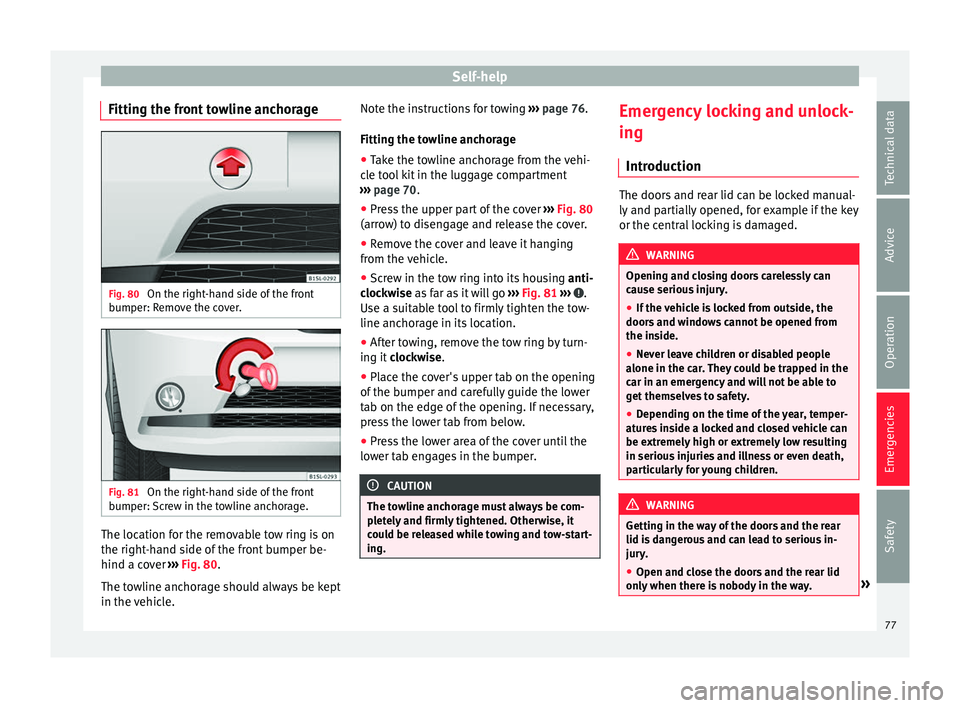
Fitting the front towline anchorage Fig. 80
On the right-hand side of the front
b umper: R
emo
ve the cover. Fig. 81
On the right-hand side of the front
b umper: Sc
rew in the towline anchorage. The location for the removable tow ring is on
the right
-h
and s
ide of the front bumper be-
hind a cover ››› Fig. 80.
The towline anchorage should always be kept
in the vehicle. Note the instructions for towing
›››
page 76.
Fitting the towline anchorage
● Take the towline anchorage from the vehi-
cle t
ool kit in the luggage compartment
››› page 70.
● Press the upper part of the cover ›››
Fig. 80
(arrow) to disengage and release the cover.
● Remove the cover and leave it hanging
from the v
ehicle.
● Screw in the tow ring into its housing anti-
clock
wise as far as it will go ››› Fig. 81 ››› .
U se a s
uit
able tool to firmly tighten the tow-
line anchorage in its location.
● After towing, remove the tow ring by turn-
ing it c
lockwise.
● Place the cover's upper tab on the opening
of the bumper and c
arefully guide the lower
tab on the edge of the opening. If necessary,
press the lower tab from below.
● Press the lower area of the cover until the
lower t
ab engages in the bumper. CAUTION
The towline anchorage must always be com-
pl et
ely and firmly tightened. Otherwise, it
could be released while towing and tow-start-
ing. Emergency locking and unlock-
in
g
Intr oduction The doors and rear lid can be locked manual-
ly and p
ar
tially opened, for example if the key
or the central locking is damaged. WARNING
Opening and closing doors carelessly can
cau se seriou
s injury.
● If the vehicle is locked from outside, the
doors and w
indows cannot be opened from
the inside.
● Never leave children or disabled people
alone in the car
. They could be trapped in the
car in an emergency and will not be able to
get themselves to safety.
● Depending on the time of the year, temper-
ature
s inside a locked and closed vehicle can
be extremely high or extremely low resulting
in serious injuries and illness or even death,
particularly for young children. WARNING
Getting in the way of the doors and the rear
lid is d
angerous and can lead to serious in-
jury.
● Open and close the doors and the rear lid
only when ther
e is nobody in the way. » 77
Technical data
Advice
Operation
Emergencies
Safety
Page 81 of 232
Fuses and bulbs
●
Sever a
l components may run on a single
fuse. Vehicle fuses
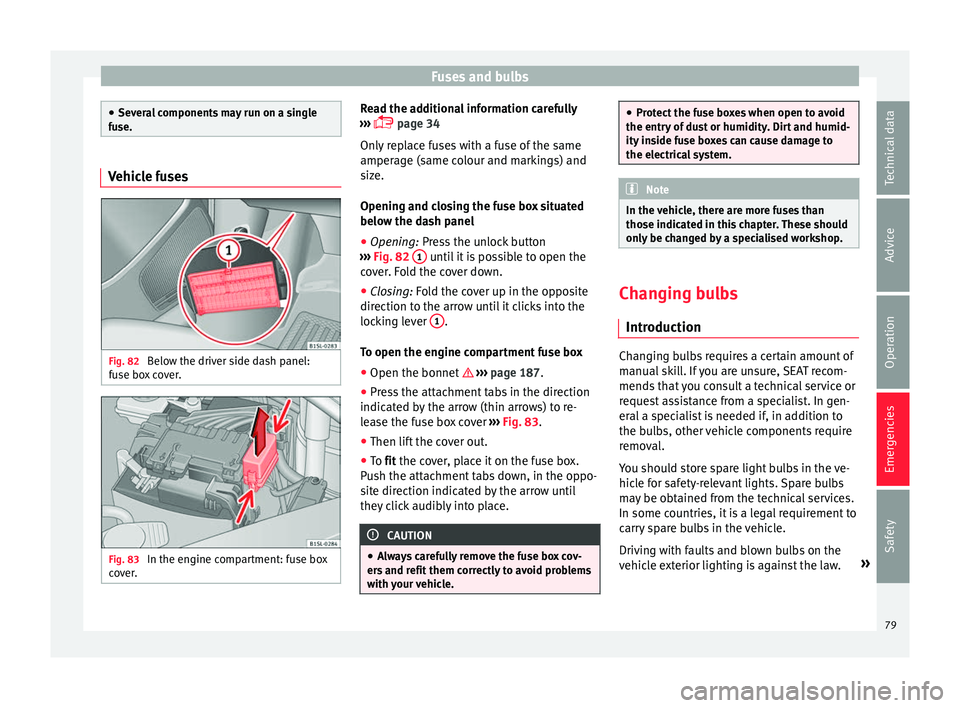
Fig. 82
Below the driver side dash panel:
f u
se bo
x cover. Fig. 83
In the engine compartment: fuse box
c o
v
er. Read the additional information carefully
› ›
›
page 34
Only replace fuses with a fuse of the same
amperage (same colour and markings) and
size.
Opening and closing the fuse box situated
below the dash panel
● Opening: Pres
s the unlock button
››› Fig. 82 1 until it is possible to open the
c o
v
er. Fold the cover down.
● Closing: Fold the cover up in the opposite
direction t
o the arrow until it clicks into the
locking lever 1 .
T o open the en
gine c
ompartment fuse box
● Open the bonnet ›››
page 187.
● Press the attachment tabs in the direction
indicated b
y the arrow (thin arrows) to re-
lease the fuse box cover ››› Fig. 83.
● Then lift the cover out.
● To fit the cover, place it on the fuse box.
Pu
sh the attachment tabs down, in the oppo-
site direction indicated by the arrow until
they click audibly into place. CAUTION
● Alw a
ys carefully remove the fuse box cov-
ers and refit them correctly to avoid problems
with your vehicle. ●
Prot ect
the fuse boxes when open to avoid
the entry of dust or humidity. Dirt and humid-
ity inside fuse boxes can cause damage to
the electrical system. Note
In the vehicle, there are more fuses than
tho se indic at
ed in this chapter. These should
only be changed by a specialised workshop. Changing bulbs
Intr oduction Changing bulbs requires a certain amount of
m
anual
sk
ill. If you are unsure, SEAT recom-
mends that you consult a technical service or
request assistance from a specialist. In gen-
eral a specialist is needed if, in addition to
the bulbs, other vehicle components require
removal.
You should store spare light bulbs in the ve-
hicle for safety-relevant lights. Spare bulbs
may be obtained from the technical services.
In some countries, it is a legal requirement to
carry spare bulbs in the vehicle.
Driving with faults and blown bulbs on the
vehicle exterior lighting is against the law. »
79
Technical data
Advice
Operation
Emergencies
Safety
Page 82 of 232
Emergencies
Additional bulb specifications
The s pec
ific
ations of some headlamp bulbs
and bulbs for the rear lamps fitted at the fac-
tory may be different to those of conventional
bulbs. Bulb information is displayed on the
bulb socket or on the bulb itself. WARNING
If the road is not well-lit and the vehicle is
not c l
early visible to other drivers, there is a
risk of accident. WARNING
Failure to replace bulbs correctly may cause
serious ac
cidents.
● Before carrying out any work in the engine
compar
tment please read and observe the
warnings ››› page 187. In any vehicle, the en-
gine compartment is a hazardous area and
could cause severe injury.
● The bulbs H4, HB4 and H7 are pressurised
and might exp
lode on changing them.
● Only replace the bulbs concerned when
they hav
e cooled.
● Never replace bulbs alone if you are not fa-
miliar w
ith the operations necessary. If you
are not sure about procedures then visit a
specialised workshop to carry out the neces-
sary work.
● Never touch the bulb glass directly. Finger-
prints w
ill be evaporated by the heat of the operating bulb thus “fogging” up the reflec-
tor
.
● The he
adlamp frameworks in the engine
compar
tment and the rear lamps contain
sharp elements. Always protect your hands
when changing bulbs. CAUTION
● Af ter c
hanging a bulb, if the rubber covers
are not replaced correctly on the headlamp
framework, the electrical installation may be
damaged, especially if water is allowed to en-
ter.
● Remove the ignition key before working on
the electric sy
stem. Otherwise, a short circuit
could occur.
● Switch off the lights and the parking light
before c
hanging a bulb.
● Take good care to avoid damaging any com-
ponents. Replacing the bulbs in the headlights
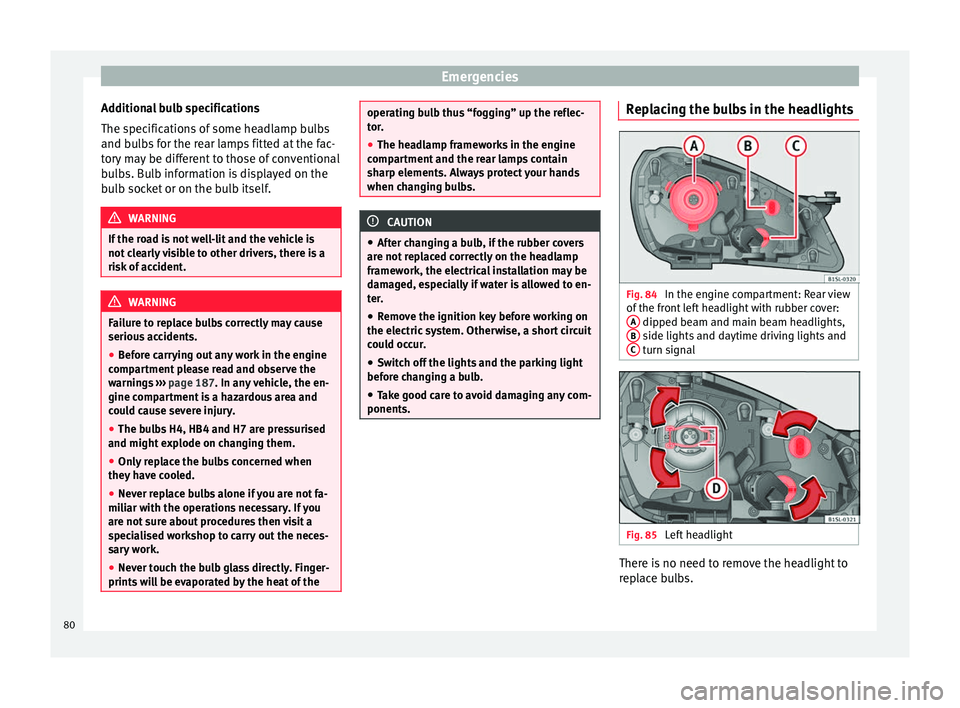
Fig. 84
In the engine compartment: Rear view
of the fr
ont
left headlight with rubber cover:
A dipped beam and main beam headlights,
B side lights and daytime driving lights and
C turn signal
Fig. 85
Left headlight There is no need to remove the headlight to
r
ep l
ace bulbs.
80
Page 83 of 232
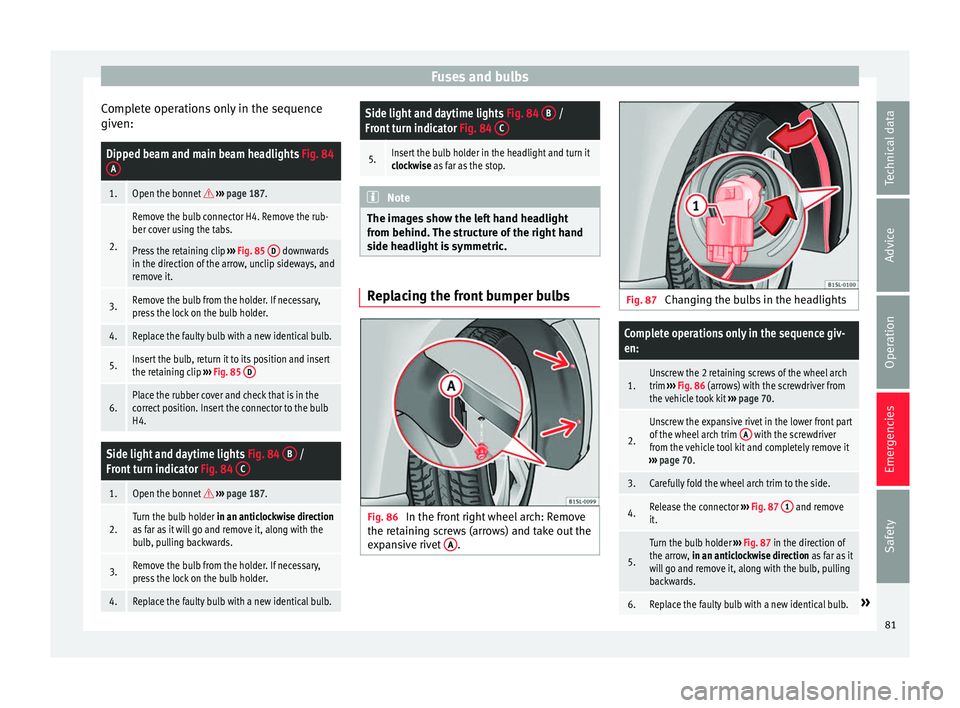
Fuses and bulbs
Complete operations only in the sequence
giv en:Dipped beam and main beam headlights
Fig. 84
A
1.Open the bonnet ››› page 187.
2.
Remove the bulb connector H4. Remove the rub-
ber cover using the tabs.
Press the retaining clip ››› Fig. 85 D downwards
in the direction of the arrow, unclip sideways, and
remove it.
3.Remove the bulb from the holder. If necessary,
press the lock on the bulb holder.
4.Replace the faulty bulb with a new identical bulb.
5.Insert the bulb, return it to its position and insert
the retaining clip ››› Fig. 85 D
6.Place the rubber cover and check that is in the
correct position. Insert the connector to the bulb
H4.
Side light and daytime lights
Fig. 84 B /
Front turn indicator Fig. 84 C
1.Open the bonnet
››› page 187.
2.Turn the bulb holder in an anticlockwise direction
as far as it will go and remove it, along with the
bulb, pulling backwards.
3.Remove the bulb from the holder. If necessary,
press the lock on the bulb holder.
4.Replace the faulty bulb with a new identical bulb.
Side light and daytime lights Fig. 84 B /
Front turn indicator Fig. 84 C
5.Insert the bulb holder in the headlight and turn it
clockwise as far as the stop. Note
The images show the left hand headlight
from behind. The s
tructure of the right hand
side headlight is symmetric. Replacing the front bumper bulbs
Fig. 86
In the front right wheel arch: Remove
the r et
ainin
g screws (arrows) and take out the
expansive rivet A . Fig. 87
Changing the bulbs in the headlights
Complete operations only in the sequence giv-
en:
1.Unscrew the 2 retaining screws of the wheel arch
trim ››› Fig. 86 (arrows) with the screwdriver from
the vehicle took kit ››› page 70.
2.
Unscrew the expansive rivet in the lower front part
of the wheel arch trim A with the screwdriver
from the vehicle tool kit and completely remove it
››› page 70.
3.Carefully fold the wheel arch trim to the side.
4.Release the connector ››› Fig. 87 1 and remove
it.
5.
Turn the bulb holder ››› Fig. 87 in the direction of
the arrow, in an anticlockwise direction as far as it
will go and remove it, along with the bulb, pulling
backwards.
6.Replace the faulty bulb with a new identical bulb.» 81
Technical data
Advice
Operation
Emergencies
Safety
Page 84 of 232
EmergenciesComplete operations only in the sequence giv-
en:
7.Insert the bulb holder in the headlight and turn it
clockwise as far as the stop.
8.Plug the connector
1 into the bulb holder. The
connector must audibly click into place.
9.Replace the wheel arch trim into its position.
10.Place the expansive rivet in the wheel arch trim
and bumper and press it completely inwards
››› Fig. 86 A
.
11.Securely screw the 2 retaining screws
››› Fig. 86
(arrows) with a screwdriver. Changing the bulbs in the rear lights
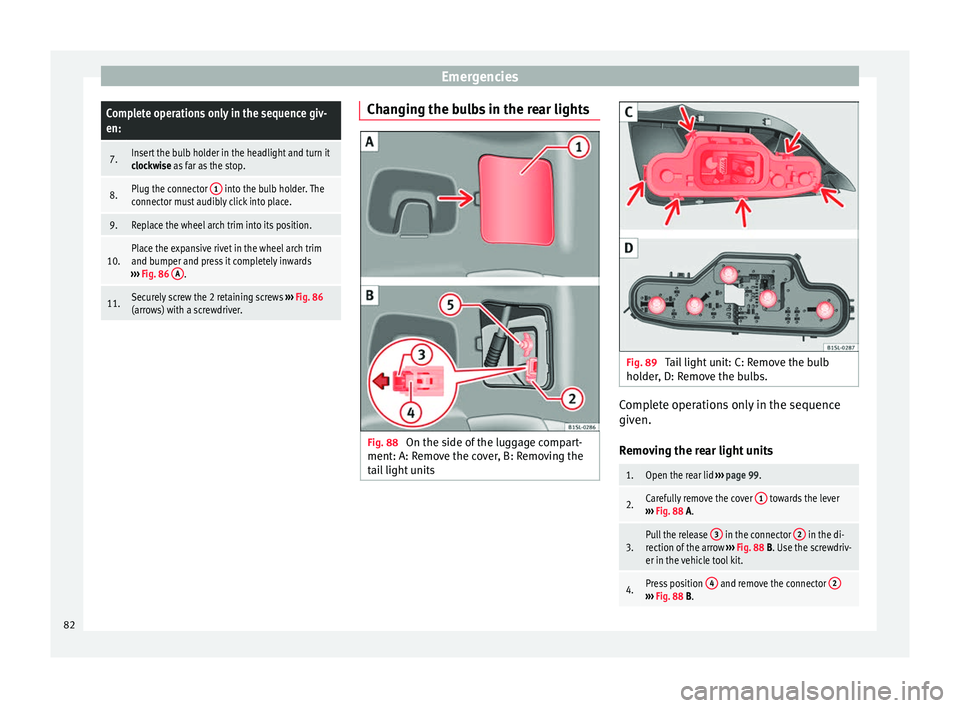
Fig. 88
On the side of the luggage compart-
ment: A: R emo
v
e the cover, B: Removing the
tail light units Fig. 89
Tail light unit: C: Remove the bulb
ho l
der
, D: Remove the bulbs. Complete operations only in the sequence
giv
en.
R emo
ving the rear light units
1.Open the rear lid ››› page 99.
2.Carefully remove the cover 1 towards the lever
››› Fig. 88 A.
3.Pull the release 3 in the connector 2 in the di-
rection of the arrow ››› Fig. 88 B. Use the screwdriv-
er in the vehicle tool kit.
4.Press position 4 and remove the connector 2›››
Fig. 88 B. 82
Page 85 of 232
Fuses and bulbs5.Unscrew the wing nut
5
››› Fig. 88 B.
6.Remove the tail light from the bodywork by careful-
ly pulling backwards.
7.Disassemble the tail light unit and place it on a
flat, clean surface. To change the bulb
8.Unlock the bulb holder locking tab (arrow)
››› Fig. 89 C and remove the bulb holder from the
tail light.
9.Replace the faulty bulb by a new identical bulb
››› Fig. 89 D.
10.Place the bulb holder in the tail light unit. The at-
tachment tabs (arrow) should audibly click into
place ››› Fig. 89 C. Assembling the rear light units
11.Carefully insert the tail light unit into the opening
in the bodywork.
12.Support the tail light with one hand in the assem-
bly position and securely screw the wing nut with
the other
5
››› Fig. 88 B.
13.Ensure that the tail light unit has been correctly
fitted and is firmly secured.
14.Insert the connector 2 into the bulb holder and
press the lock 3 on the connector in the oppo-
site direction to the arrow ››› Fig. 88 B.
15.Insert the cover. The cover should lock into place.
16.Close the rear lid ››› page 99. Changing the number plate light
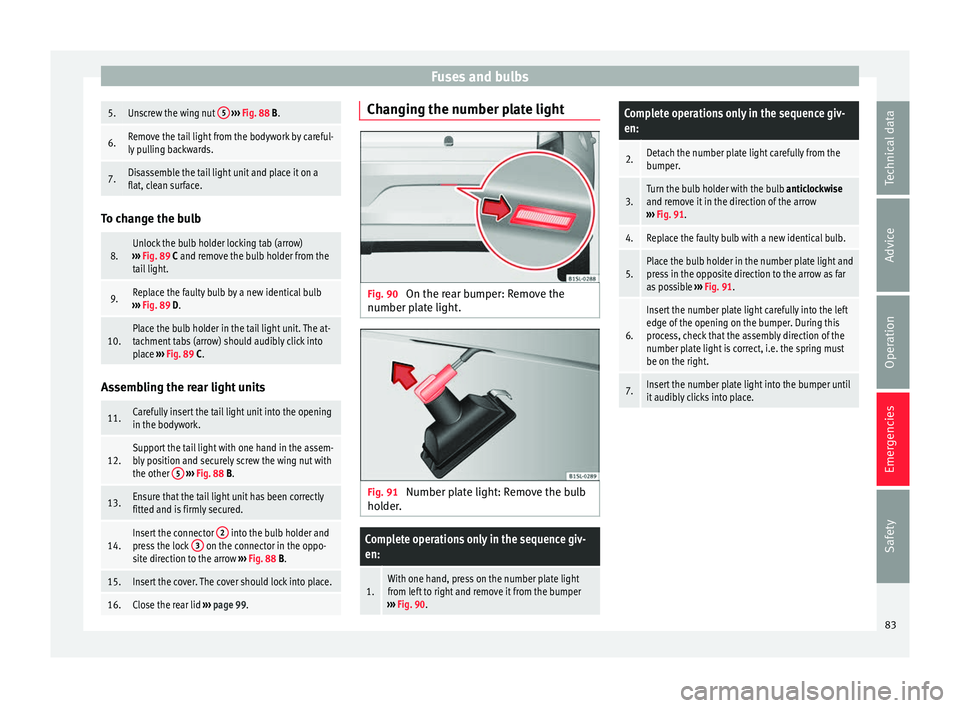
Fig. 90
On the rear bumper: Remove the
number p l
at
e light. Fig. 91
Number plate light: Remove the bulb
ho lder
.
Complete operations only in the sequence giv-
en:
1.With one hand, press on the number plate light
from left to right and remove it from the bumper
››› Fig. 90.
Complete operations only in the sequence giv-
en:
2.Detach the number plate light carefully from the
bumper.
3.Turn the bulb holder with the bulb anticlockwise
and remove it in the direction of the arrow
››› Fig. 91.
4.Replace the faulty bulb with a new identical bulb.
5.Place the bulb holder in the number plate light and
press in the opposite direction to the arrow as far
as possible ››› Fig. 91.
6.
Insert the number plate light carefully into the left
edge of the opening on the bumper. During this
process, check that the assembly direction of the
number plate light is correct, i.e. the spring must
be on the right.
7.Insert the number plate light into the bumper until
it audibly clicks into place. 83
Technical data
Advice
Operation
Emergencies
Safety
Page 91 of 232
General instrument panel
bottom buttons of the rocker
sw it
c
h ›››
Fig. 33
B .
– Pr e
s
s the button to change the
hour, so that it is flashing.
– To continue setting the time,
press button 0.0/SET . Hold button
do wn t
o s
croll through the num-
bers quickly.
– Press the button again to
change the minutes, so that it
flashes.
– To continue setting the time,
press button 0.0/SET . Hold button
do wn t
o s
croll through the num-
bers quickly.
– Press the button again to end
the clock setting. CAUTION
● When the engine i s
cold, avoid high revs
and heavy acceleration and do not make the
engine work hard.
● To prevent damage to the engine, the rev
count
er needle should only remain in the red
zone for a short period of time. For the sake of the environment
Changing up a gear in time reduces fuel con-
sumption and noi se. Indications on the display
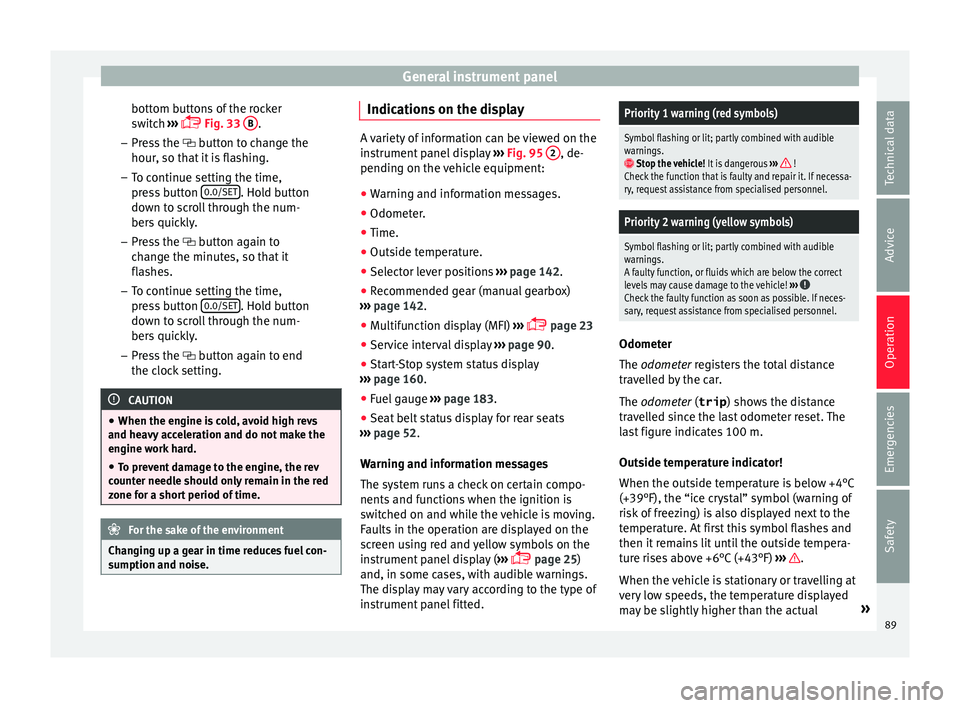
A variety of information can be viewed on the
ins
trument
panel display ››› Fig. 95 2 , de-
pending on the v
ehicle equipment:
● Warning and information messages.
● Odometer.
● Time.
● Outside temperature.
● Selector lever positions ›››
page 142.
● Recommended gear (manual gearbox)
›› ›
page 142.
● Multifunction display (MFI) ›››
page 23
● Service interval display ›››
page 90 .
● Start-Stop system status display
›››
page 160.
● Fuel gauge ›››
page 183.
● Seat belt status display for rear seats
›››
page 52.
Warning and information messages
The system runs a check on certain compo-
nents and functions when the ignition is
switched on and while the vehicle is moving.
Faults in the operation are displayed on the
screen using red and yellow symbols on the
instrument panel display ( ›››
page 25)
and, in some cases, with audible warnings.
The display may vary according to the type of
instrument panel fitted.
Priority 1 warning (red symbols)
Symbol flashing or lit; partly combined with audible
warnings.
Stop the vehicle! It is dangerous ››› !
Check the function that is faulty and repair it. If necessa-
ry, request assistance from specialised personnel.
Priority 2 warning (yellow symbols)
Symbol flashing or lit; partly combined with audible
warnings.
A faulty function, or fluids which are below the correct
levels may cause damage to the vehicle! ›››
Check the faulty function as soon as possible. If neces-
sary, request assistance from specialised personnel. Odometer
The odomet
er
r
egisters the total distance
travelled by the car.
The odometer (trip ) shows the distance
travelled since the last odometer reset. The
last figure indicates 100 m.
Outside temperature indicator!
When the outside temperature is below +4°C
(+39°F), the “ice crystal” symbol (warning of
risk of freezing) is also displayed next to the
temperature. At first this symbol flashes and
then it remains lit until the outside tempera-
ture rises above +6°C (+43°F) ››› .
When the v
ehic
le is stationary or travelling at
very low speeds, the temperature displayed
may be slightly higher than the actual »
89
Technical data
Advice
Operation
Emergencies
Safety
Page 92 of 232

Operation
outside temperature as a result of heat com-
in g fr
om the en
gine.
The temperatures measured range from
-40°C to +50°C (-40°F to +122°F).
Selector lever position
The range of engaged gears of the selector
lever is shown on the side of the lever, and
on the instrument panel display. In positions
D and M, and with the Tiptronic, the corre-
sponding gear is also indicated on the dis-
play.
Recommended gear* (manual gearbox)
The recommended gear to save fuel can be
displayed on the instrument panel display
while you are driving ››› page 142.
Seat belt status display for the rear seats*
The seat belt status display on the instru-
ment panel display informs the driver, when
the ignition is switched on, whether any pas-
sengers in the rear seats have fastened their
seat belts ››› page 52.
Start-Stop system status display
The instrument panel display shows informa-
tion on the current status ››› page 160. WARNING
If the warning lamps are ignored, the vehicle
ma y
stall in traffic, or may cause accidents
and severe injuries.
● Never ignore the warning lamps.
● Stop the vehicle safely as soon as possible.
● A faulty vehicle represents a risk of acci-
dent for the driv
er and for other road users. If
necessary, switch on the hazard warning
lamps and put out the warning triangle to ad-
vise other drivers.
● Park the vehicle away from traffic and en-
sure th
at no highly flammable materials are
under the vehicle that could come into con-
tact with the exhaust system (e.g. dry grass,
fuel). WARNING
Even though outside temperatures are above
freez in
g, some roads and bridges may be icy.
● At outside temperatures above +4°C
(+39°F), even when the “ice c
rystal” symbol
is not visible, there may still be patches of ice
on the road.
● Do not rely on the outside temperature in-
dicator! CAUTION
Failure to heed the warning lamps when they
appe ar m
ay result in faults in the vehicle. Note
● Differ ent
versions of the instrument panel
are available and therefore the versions and
instructions on the display may vary.
● When several warnings are active at the
same time, the symbol
s are shown succes-
sively for a few seconds and will stay on until
the fault is rectified. Service interval display
The inspection message appears on the in-
s
trument
p
anel display ›››
Fig. 95 2 .
S EA
T di
stinguishes between services with en-
gine oil change (Oil Change Service) and
services without engine oil change (Inspec-
tion Service). The service interval display only
gives information for service dates which in-
volve an engine oil change. The dates of the
remaining services (e.g. the next Inspection
Service or change of brake fluid) are listed on
the label attached to the door strut, or in the
Maintenance Programme.
The set service intervals have been specified
with the service dependent on time/distance
travelled.
Inspection reminder
If the inspection period is due to expire
shortly, Inspection reminder appears when
starting the ignition abbreviated to
and a
90
Page 94 of 232
Operation
Opening and closing V ehic
l
e key set
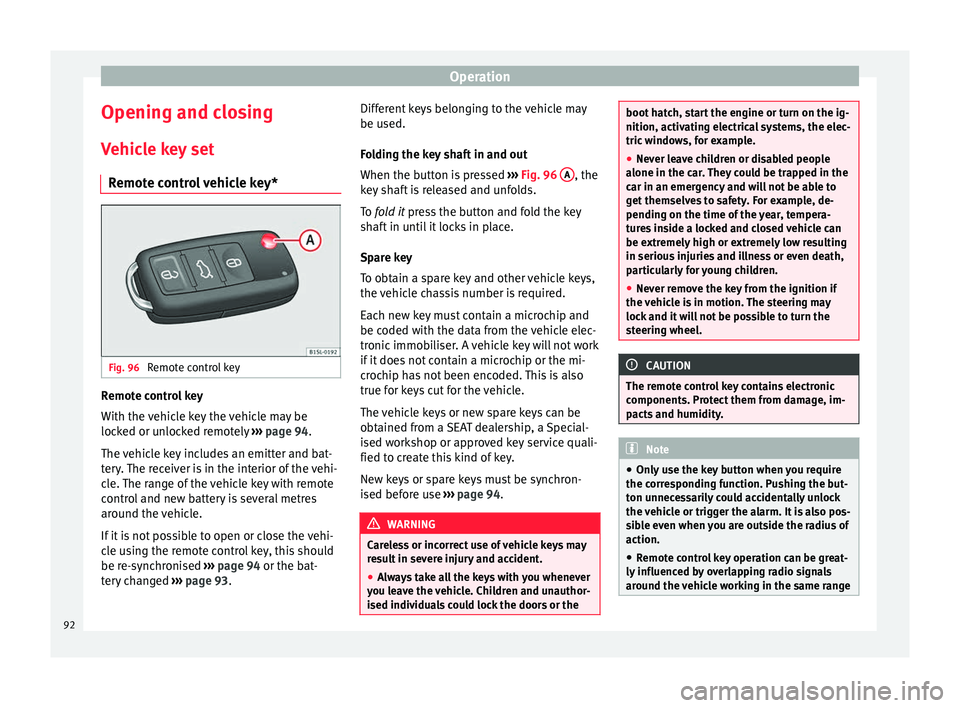
Remote control vehicle key* Fig. 96
Remote control key Remote control key
W
ith the
v
ehicle key the vehicle may be
locked or unlocked remotely ››› page 94.
The vehicle key includes an emitter and bat-
tery. The receiver is in the interior of the vehi-
cle. The range of the vehicle key with remote
control and new battery is several metres
around the vehicle.
If it is not possible to open or close the vehi-
cle using the remote control key, this should
be re-synchronised ››› page 94 or the bat-
tery changed ››› page 93. Different keys belonging to the vehicle may
be used.
Fo
lding the key shaft in and out
When the button is pressed ››› Fig. 96 A , the
k ey
sh
aft is released and unfolds.
To fold it press the button and fold the key
shaft in until it locks in place.
Spare key
To obtain a spare key and other vehicle keys,
the vehicle chassis number is required.
Each new key must contain a microchip and
be coded with the data from the vehicle elec-
tronic immobiliser. A vehicle key will not work
if it does not contain a microchip or the mi-
crochip has not been encoded. This is also
true for keys cut for the vehicle.
The vehicle keys or new spare keys can be
obtained from a SEAT dealership, a Special-
ised workshop or approved key service quali-
fied to create this kind of key.
New keys or spare keys must be synchron-
ised before use ››› page 94. WARNING
Careless or incorrect use of vehicle keys may
re s
ult in severe injury and accident.
● Always take all the keys with you whenever
you le
ave the vehicle. Children and unauthor-
ised individuals could lock the doors or the boot hatch, start the engine or turn on the ig-
nition, activatin
g el
ectrical systems, the elec-
tric windows, for example.
● Never leave children or disabled people
alone in the car
. They could be trapped in the
car in an emergency and will not be able to
get themselves to safety. For example, de-
pending on the time of the year, tempera-
tures inside a locked and closed vehicle can
be extremely high or extremely low resulting
in serious injuries and illness or even death,
particularly for young children.
● Never remove the key from the ignition if
the vehic
le is in motion. The steering may
lock and it will not be possible to turn the
steering wheel. CAUTION
The remote control key contains electronic
component s. Pr
otect them from damage, im-
pacts and humidity. Note
● Only u
se the key button when you require
the corresponding function. Pushing the but-
ton unnecessarily could accidentally unlock
the vehicle or trigger the alarm. It is also pos-
sible even when you are outside the radius of
action.
● Remote control key operation can be great-
ly influenced b
y overlapping radio signals
around the vehicle working in the same range 92