clock Seat Toledo 2013 Owner's manual
[x] Cancel search | Manufacturer: SEAT, Model Year: 2013, Model line: Toledo, Model: Seat Toledo 2013Pages: 258, PDF Size: 3.94 MB
Page 12 of 258
10Safe driving
Sitting position for vehicle occupants
Introduction
WARNING
● The front seats, head restraints and seat belts must always be adjus-
ted to the size of the vehicle occupant to provide you and your passen-
gers with the greatest possible protection.
● Ensure your correct sitting position before setting off, and do not
change this during the journey. Also advise your passengers to ensure
their correct sitting positions not to be changed.
● A vehicle occupant sitting in an incorrect position is at risk of serious
injury in the event that an airbag is activated.
● If the passengers in the rear seats are not sitting in an upright posi-
tion, they are more likely to be injured due to the incorrect position of the
seat belts.
● It is important that the driver keeps at a minimum of 25 cm from the
steering wheel. It is important that the passenger keeps at a minimum of
25 cm from the dash panel. The airbag system will not be able to give the
required protection if the minimum distance is not observed. This can
cause a risk of fatal injury!
● When driving, always hold the steering wheel with both hands on the
outside part at the 9 o'clock and 3 o'clock positions. Never hold the
steering wheel at the 12 o'clock position, or in any other manner (e.g. in
the centre of the steering wheel or along its interior edge). In such cases,
if the airbag is triggered, you may sustain injuries to the arms, hands
and head.
● The backrests must not be reclined too far back while driving. This
could limit the effect of the seat belts and the airbag system. Risk of in-
jury!
WARNING (Continued)
● Objects must not be placed in the footwell, as they could move to the
area of the pedals in the event of a braking manoeuvre or change of direc-
tion. This would prevent the clutch, brake or accelerator from being
pressed.
● Always keep your feet on the footwell when the vehicle is moving;
never rest them on the dash panel, on the window or on the seat! An in-
correct sitting position exposes you to an increased risk of injury in case
of a sudden braking or an accident. If the airbag is triggered, you could
sustain severe injuries due to an incorrect sitting position!
Page 14 of 258
12Safe driving
WARNING
● An incorrect sitting position of the driver can lead to severe injuries.
● Adjust the driver seat so that there is at least 25 cm distance between
the centre of the chest and the centre of the steering wheel ⇒ Fig. 1. If
you are sitting closer than 25 cm, the airbag system cannot protect you
properly.
● If your physical constitution prevents you from maintaining the mini-
mum distance of 25 cm, contact a specialised workshop. The workshop
will help you decide if special specific modifications are necessary.
● When driving, always hold the steering wheel with both hands on the
outside of the ring at the 9 o'clock and 3 o'clock positions. This reduces
the risk of injury when the driver airbag is triggered.
● Never hold the steering wheel at the 12 o'clock position, or in any
other manner (e.g. in the centre of the steering wheel). In such cases, if
the airbag is triggered, you may sustain injuries to the arms, hands and
head.
● To reduce the risk of injury to the driver during sudden braking ma-
noeuvres or an accident, never drive with the backrest tilted far back! The
airbag system and seat belts can only provide optimal protection when
the backrest is in an upright position and the driver is wearing his or her
seat belt correctly. The further the seat backrests are tilted to the rear,
the greater the risk of injury due to incorrect positioning of the belt web
or to the incorrect sitting position!
● Adjust the head restraint properly to achieve optimal protection.
Correct sitting position for front passenger
The front passenger must sit at least 25 cm away from the
dash panel so that the airbag can provide the greatest pos-
sible protection in the event that it is triggered.
For your own safety and to reduce the risk of injury in the event of
an accident, we recommend the following adjustments for the front
passenger:
– Move the front passenger seat back as far as possible ⇒
.
– Move the seat backrest to an upright position so that your back
rests completely against it.
– Adjust the head restraint so that its upper edge is at the same
level as the top of your head, or as close as possible to the
same level as the top of your head ⇒ page 14.
– Always keep both feet in the footwell in front of the front pas-
senger seat.
– Fasten your seat belt securely ⇒ page 20.
It is possible to deactivate the front passenger airbag in exceptional circum-
stances ⇒ page 27.
Adjusting the front passenger seat ⇒ page 111.
Page 59 of 258
57
Controls and displays
Instruments and warning lamps
General instrument panel – summary
Fig. 31 General instrument panel Rev counter ⇒ page 57
Digital display:
– with trip counter
⇒ page 59
– with service interval display
⇒ page 59
– with digital clock
⇒ page 60
– with multifunction display
⇒ page 61
– with informative digital display
⇒ page 66
– with outside temperature indicator
⇒ page 63
Speedometer ⇒ page 58
Coolant temperature indicator ⇒ page 58
1
2
34
Control for selecting the mode:
–
adjust hours/minutes
– activate/deactivate according to speed in mph or km/h respectively
– service intervals – show the days and kilometres (miles) remaining
Switch for:
– delete trip counter
– reset the service intervals
– adjust hours/minutes
– activate/deactivate the selected mode
Fuel reserve indicator ⇒ page 58
WARNING
● Always keep your attention on driving! As the driver, you have the full
responsibility for the safety of traffic.
● Never use the instrument panel controls when the vehicle is in mo-
tion. Do so only when the vehicle is stopped!
Rev counter
The red part of the rev counter scale 1 ⇒ Fig. 31 ⇒
page 57 marks the zone
where the engine control unit begins to limit the engine speed. The engine
control unit is responsible for reducing the revs to a safe limit.
Before the needle reaches the red zone change up into a higher gear, or
move the selector lever of the automatic gearbox to D.
In order to drive at an optimum RPM, respect the gear change indications
⇒ page 60.
5
6
7
Safety FirstOperating instructionsPractical TipsTechnical specifications
Page 62 of 258
60Controls and displays
In vehicles equipped with an informative display the service interval display
can be reset from the menu, Settings ⇒ page 67.
CAUTION
We advise against resetting the service interval display yourself, given that
this action could cause an imbalance in the service intervals, and as a re-
sult, faults in the vehicle.
Note
● Never reset the display between service intervals as this could lead to
erroneous indications.
● After disconnecting the battery of the vehicle, the service interval dis-
play values remain stored.
● If the general instrument panel is changed after a repair, the correct val-
ues must be input in the service interval display. This operation is carried
out by a specialised service.
● After resetting the display with flexible service intervals, the information
will be indicated in the same way as vehicles with fixed service intervals.
Therefore, we recommend that a SEAT Authorised Service resets the service
interval display, who will do so correctly using diagnostics equipment.
● For more detailed information please consult the Maintenance Pro-
gramme.
Digital clock
The clock is set using the buttons 5 to 6
⇒ Fig. 31
⇒ page 57.
Select the indication you want to change with button 5
and make the ad-
justment with button 6.
In vehicles equipped with an informative display this can be reset from the
menu, Time ⇒ page 67. Recommended gear display
Fig. 32 Recommended
gear display
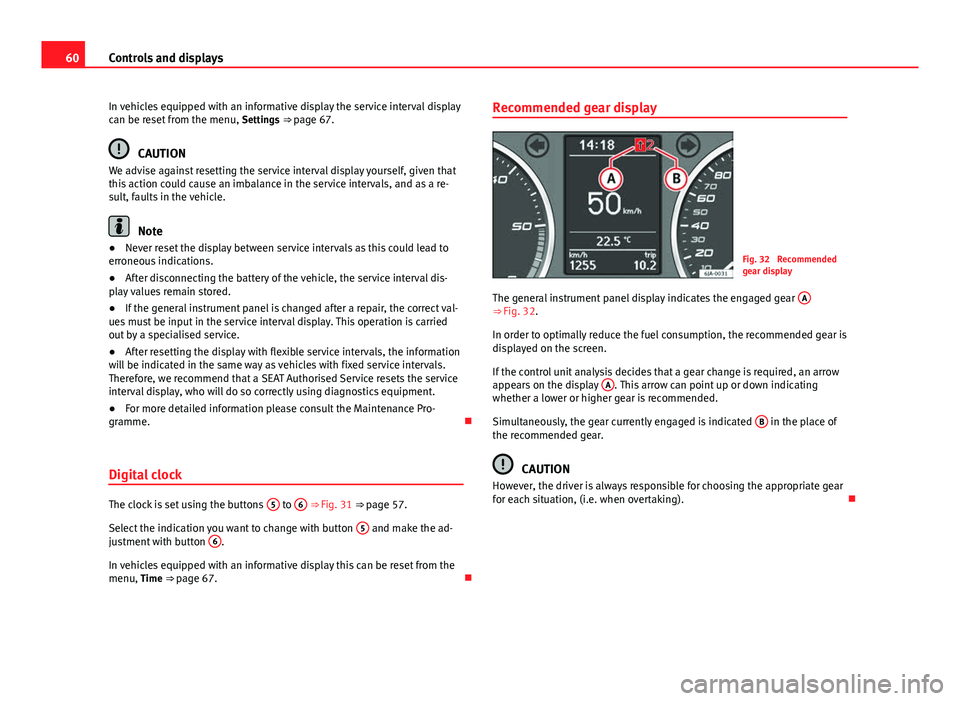
The general instrument panel display indicates the engaged gear A
⇒ Fig. 32.
In order to optimally reduce the fuel consumption, the recommended gear is
displayed on the screen.
If the control unit analysis decides that a gear change is required, an arrow
appears on the display A
. This arrow can point up or down indicating
whether a lower or higher gear is recommended.
Simultaneously, the gear currently engaged is indicated B
in the place of
the recommended gear.
CAUTION
However, the driver is always responsible for choosing the appropriate gear
for each situation, (i.e. when overtaking).
Page 132 of 258
130Heating and air conditioning
Heating
Operation
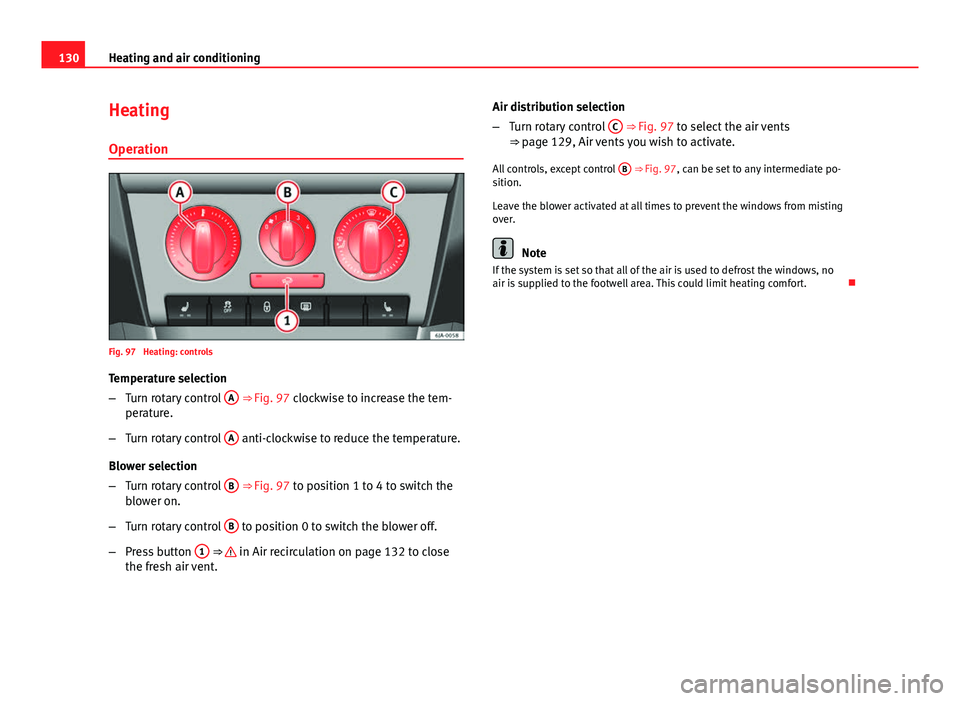
Fig. 97 Heating: controls
Temperature selection
– Turn rotary control A
⇒ Fig. 97 clockwise to increase the tem-
perature.
– Turn rotary control A
anti-clockwise to reduce the temperature.
Blower selection
– Turn rotary control B
⇒ Fig. 97 to position 1 to 4 to switch the
blower on.
– Turn rotary control B
to position 0 to switch the blower off.
– Press button 1
⇒ in Air recirculation on page 132 to close
the fresh air vent. Air distribution selection
–
Turn rotary control C
⇒ Fig. 97 to select the air vents
⇒ page 129, Air vents you wish to activate.
All controls, except control B
⇒ Fig. 97, can be set to any intermediate po-
sition.
Leave the blower activated at all times to prevent the windows from misting
over.
Note
If the system is set so that all of the air is used to defrost the windows, no
air is supplied to the footwell area. This could limit heating comfort.
Page 133 of 258
131
Heating and air conditioning
Heating selection
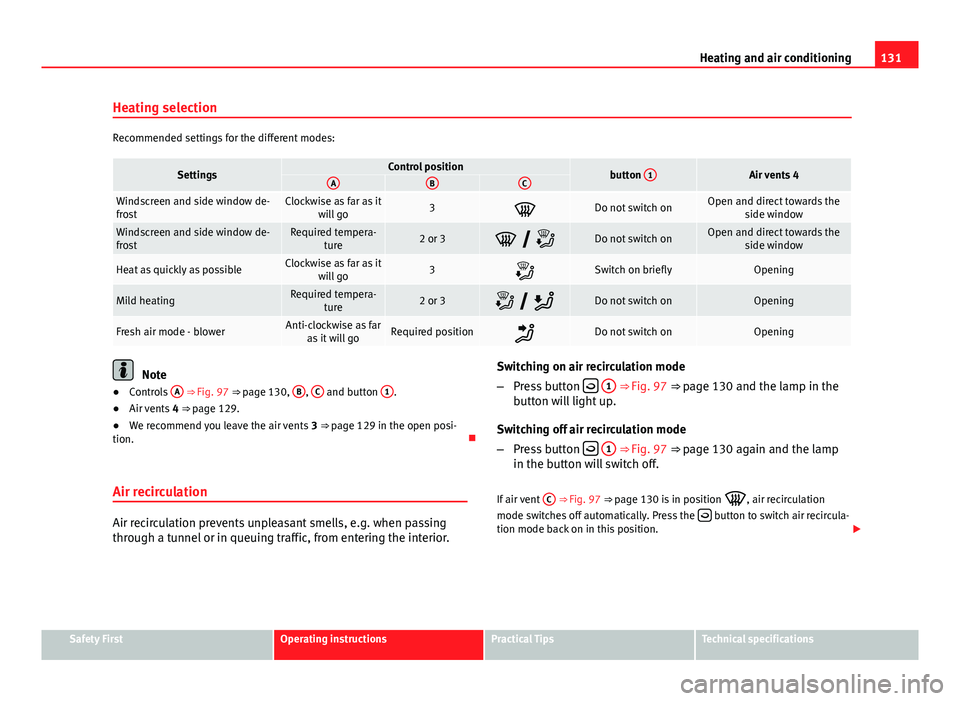
Recommended settings for the different modes:
SettingsControl positionbutton 1Air vents 4ABC
Windscreen and side window de-
frostClockwise as far as it
will go3Do not switch onOpen and direct towards the side window
Windscreen and side window de-
frostRequired tempera-ture2 or 3 Do not switch onOpen and direct towards the side window
Heat as quickly as possibleClockwise as far as itwill go3Switch on brieflyOpening
Mild heatingRequired tempera- ture2 or 3 Do not switch onOpening
Fresh air mode - blowerAnti-clockwise as faras it will goRequired positionDo not switch onOpening
Note
● Controls A ⇒ Fig. 97 ⇒ page 130, B, C and button 1.
● Air vents 4 ⇒ page 129.
● We recommend you leave the air vents 3 ⇒ page 129 in the open posi-
tion.
Air recirculation
Air recirculation prevents unpleasant smells, e.g. when passing
through a tunnel or in queuing traffic, from entering the interior. Switching on air recirculation mode
–
Press button
1 ⇒ Fig. 97 ⇒ page 130 and the lamp in the
button will light up.
Switching off air recirculation mode
– Press button
1 ⇒ Fig. 97 ⇒ page 130 again and the lamp
in the button will switch off.
If air vent C
⇒ Fig. 97 ⇒
page 130 is in position
, air recirculation
mode switches off automatically. Press the button to switch air recircula-
tion mode back on in this position.
Safety FirstOperating instructionsPractical TipsTechnical specifications
Page 134 of 258
132Heating and air conditioning
WARNING
Never use the air recirculation system for too long, as it prevents fresh air
from entering the vehicle and “used” air can cause tiredness, reduce your
attention span and cause the windows to mist over. This increases the
risk of an accident. Switch off the air recirculation system as soon as the
windows begin to mist over.
Air conditioning (manual)* General notes
The air cooling system only works if the AC button
2 ⇒ Fig. 98
⇒ page 132 is pressed and under following conditions:
● The engine is running
● the outside temperature is above +2 °C (+36 °F)
● The blower control is in position 1 – 4
When the cooling system is on and under certain conditions, air can be
blown from the vents at a temperature of approx. +5 °C (+41 °F). In the
event of prolonged, irregular distribution of the air flow from the outlets and
significant differences in temperature, e.g. on leaving the vehicle, sensitive
people may catch a cold.
Note
A visit to the specialised service once a year is recommended to clean the
air conditioning system. Operation
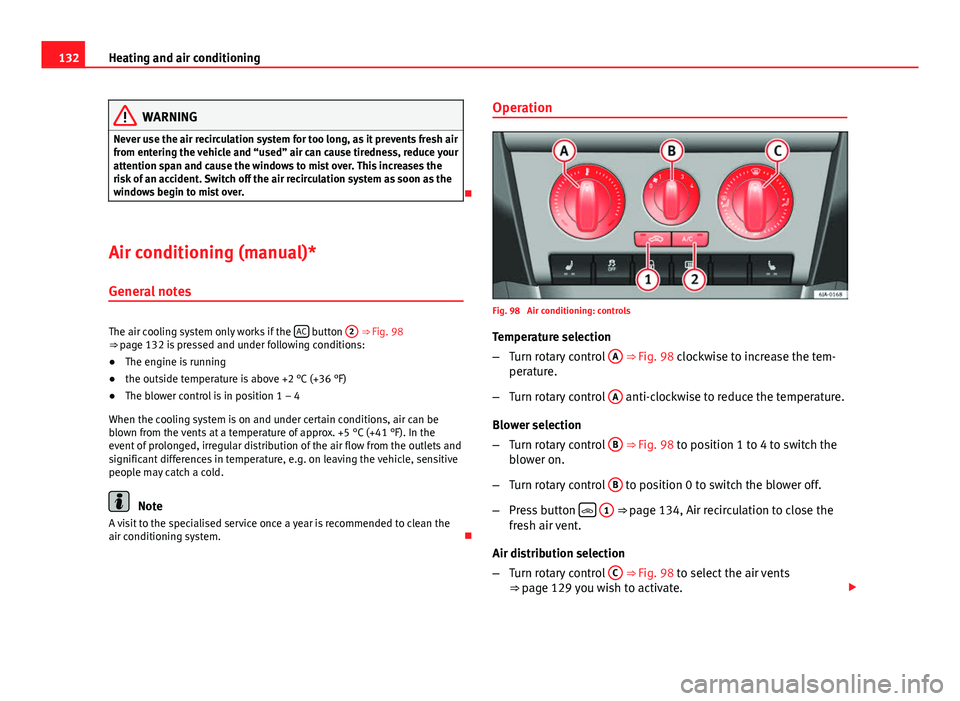
Fig. 98 Air conditioning: controls
Temperature selection
– Turn rotary control A
⇒ Fig. 98 clockwise to increase the tem-
perature.
– Turn rotary control A
anti-clockwise to reduce the temperature.
Blower selection
– Turn rotary control B
⇒ Fig. 98 to position 1 to 4 to switch the
blower on.
– Turn rotary control B
to position 0 to switch the blower off.
– Press button
1 ⇒ page 134, Air recirculation to close the
fresh air vent.
Air distribution selection
– Turn rotary control C
⇒ Fig. 98 to select the air vents
⇒ page 129 you wish to activate.
Page 136 of 258
134Heating and air conditioning
Air conditioning selection
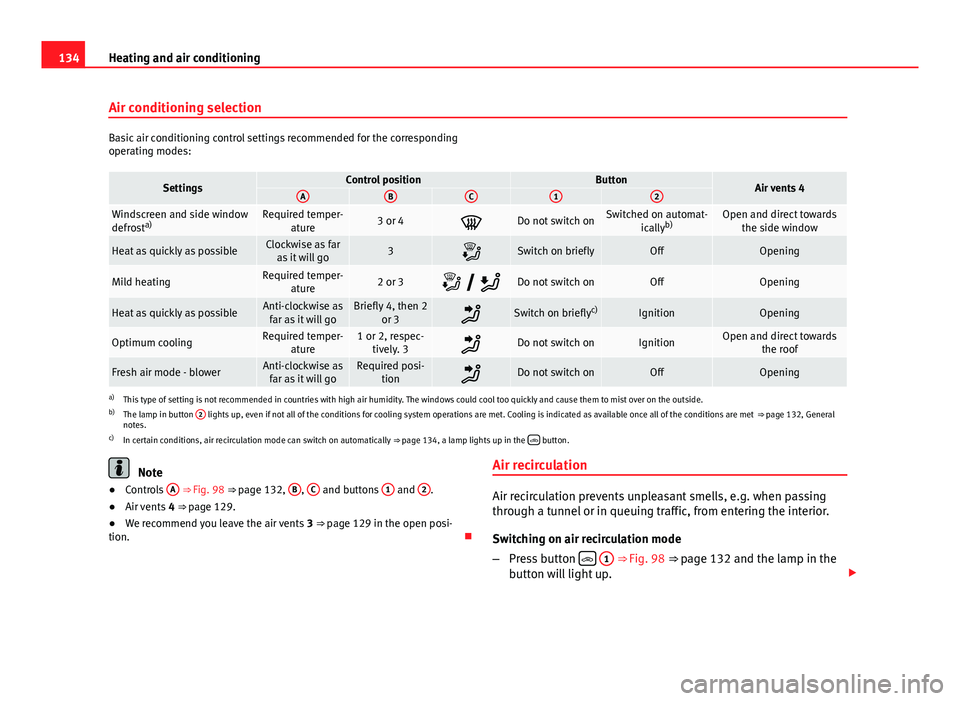
Basic air conditioning control settings recommended for the corresponding
operating modes:
SettingsControl positionButtonAir vents 4ABC12
Windscreen and side window
defrosta)Required temper-
ature3 or 4Do not switch onSwitched on automat- icallyb)Open and direct towards
the side window
Heat as quickly as possibleClockwise as faras it will go3Switch on brieflyOffOpening
Mild heatingRequired temper- ature2 or 3 Do not switch onOffOpening
Heat as quickly as possibleAnti-clockwise as
far as it will goBriefly 4, then 2 or 3Switch on briefly c)IgnitionOpening
Optimum coolingRequired temper-
ature1 or 2, respec-tively. 3Do not switch onIgnitionOpen and direct towards the roof
Fresh air mode - blowerAnti-clockwise asfar as it will goRequired posi- tionDo not switch onOffOpening
a)This type of setting is not recommended in countries with high air humidity. The windows could cool too quickly and cause them to mist over on the outside.
b) The lamp in button 2 lights up, even if not all of the conditions for cooling system operations are met. Cooling is indicated as available once all of the conditions are met
⇒ page 132, General
notes.
c) In certain conditions, air recirculation mode can switch on automatically ⇒ page 134, a lamp lights up in the
button.
Note
● Controls A ⇒ Fig. 98 ⇒ page 132, B, C and buttons 1 and 2.
● Air vents 4 ⇒ page 129.
● We recommend you leave the air vents 3 ⇒ page 129 in the open posi-
tion. Air recirculationAir recirculation prevents unpleasant smells, e.g. when passing
through a tunnel or in queuing traffic, from entering the interior.
Switching on air recirculation mode
–
Press button
1 ⇒ Fig. 98 ⇒ page 132 and the lamp in the
button will light up.
Page 139 of 258
137
Heating and air conditioning
Temperature selection
– When you switch on the ignition, control 1 ⇒ Fig. 99
⇒ page 136 can be used to set the required interior tempera-
ture.
The interior temperature can be adjusted between +18 °C (+64 °F) and
+29 °C (+84 °F). The temperature is regulated automatically within this
range. If a temperature below +18 °C (+64 °F) is selected, “LO” is displayed
on the screen. If a temperature above +29 °C (+84 °F) is selected, “HI” is
displayed on the screen. At both extremes, Climatronic works at maximum
cooling or heating power, respectively. The temperature is not regulated.
In the event of prolonged, irregular distribution of the air flow from the out-
lets (particularly the footwells) and significant differences in temperature,
e.g. on leaving the vehicle, sensitive people may catch a cold.
Air recirculation
Air recirculation prevents unpleasant smells, e.g. when passing
through a tunnel or in queuing traffic, from entering the interior.
Switching on air recirculation mode
– Press button
17 ⇒ Fig. 99 ⇒ page 136 and the
symbol
is displayed on the screen.
Switching off air recirculation mode
– Press button
17 ⇒ Fig. 99 ⇒ page 136 and the
symbol
disappears from the screen.
WARNING
Never use the air recirculation system for too long, as it prevents fresh air
from entering the vehicle and “used” air can cause tiredness, reduce your
attention span and cause the windows to mist over. This increases the
risk of an accident. Switch off the air recirculation system as soon as the
windows begin to mist over.
Note
If air recirculation mode remains on for 15 minutes, the symbol will
start to flash on the screen to indicate prolonged air recirculation. If air recir-
culation is not switched off, the symbol will continue to flash for 5 minutes.
Blower selection
Climatronic automatically regulates the blower speed according to
the interior temperature. It is possible, however, to set the blower
speed to suit requirements.
– Turn rotary control 10
⇒ Fig. 99 ⇒
page 136 anti-clockwise (de-
crease speed) or clockwise (increase speed).
Climatronic will switch off when the blower switches off.
WARNING
● “Used air” can cause tiredness, reduce attention spans and cause the
windows to mist over. This increases the risk of an accident.
● Do not switch off Climatronic for longer than necessary.
● Switch Climatronic back on as soon as the windows begin to mist
over.
Safety FirstOperating instructionsPractical TipsTechnical specifications
Page 141 of 258
139
Driving
Driving Starting and stopping the engine
Introduction
WARNING
● Never adjust the steering wheel while the vehicle is moving!
● Maintain at least 25 cm distance between the steering wheel and the
upper part of your body 1
⇒ Fig. 100
⇒ page 140. The airbag system
will not be able to give the required protection if the minimum distance is
not observed. This can cause a risk of fatal injury!
● For safety reasons, the steering wheel adjustment lever must always
be pushed securely against the steering column to prevent the steering
wheel from accidentally changing position while driving. Risk of acci-
dent!
● If the steering wheel is adjusted closer to your face, the protective ef-
fect of the driver airbag will be decreased in the event of an accident.
Check that the steering wheel is pointing towards the upper part of your
body.
● When driving, always hold the steering wheel with both hands on the
outside part at the 9 o'clock and 3 o'clock positions. Never hold the
steering wheel at the 12 o'clock position, or in any other manner (e.g. in
the centre of the steering wheel). In such cases, if the airbag is triggered,
you may sustain injuries to the arms, hands and head.
● When moving with the engine switched off, the ignition key must al-
ways remain in position 2
⇒ Fig. 101 ⇒
page 141 (ignition on). The
control lamps will light up in this position. Otherwise, the steering lock
could engage suddenly. Risk of accident!
WARNING (Continued)
● Do not remove the key from the ignition until the vehicle has come to
a standstill and is secure (e.g. the handbrake is engaged). Otherwise, the
steering lock could suddenly engage. Risk of accident!
● Always take the ignition key with you when you leave the vehicle.
This is particularly important if you leave children in the vehicle. Children
could start the engine, for example, with the subsequent risk of accident.
● Never leave the engine running in unventilated or closed rooms. The
exhaust gases contain carbon monoxide, an odourless and colourless
poisonous gas. Risk of fatal accidents! Carbon monoxide can cause peo-
ple to lose consciousness and can cause death.
● Never leave the vehicle unattended if the engine is running.
● Never switch the engine off until the vehicle is stationary. Risk of ac-
cident!
CAUTION
● Turning the steering wheel fully in either direction when the vehicle is
stationary and the engine in gear puts the power steering under great
stress. This could lead to noise. Never leave the steering wheel turned fully
in either direction for more than 15 seconds. Risk of damage to the power
steering system!
● The starter motor may only be used (key position 3
⇒ Fig. 101
⇒ page 141 in the ignition) if the engine is off. Using the starter motor
when the engine is running could cause damage.
● Immediately release the ignition key when the engine starts, otherwise
damage could be caused to the starter motor.
● When the engine is cold, you should avoid high engine speeds, driving
at full throttle and over-loading the engine before it reaches operating tem-
perature. Risk of engine damage!
Safety FirstOperating instructionsPractical TipsTechnical specifications