bonnet Seat Toledo 2015 Owner's manual
[x] Cancel search | Manufacturer: SEAT, Model Year: 2015, Model line: Toledo, Model: Seat Toledo 2015Pages: 248, PDF Size: 5.06 MB
Page 13 of 248
The essentials
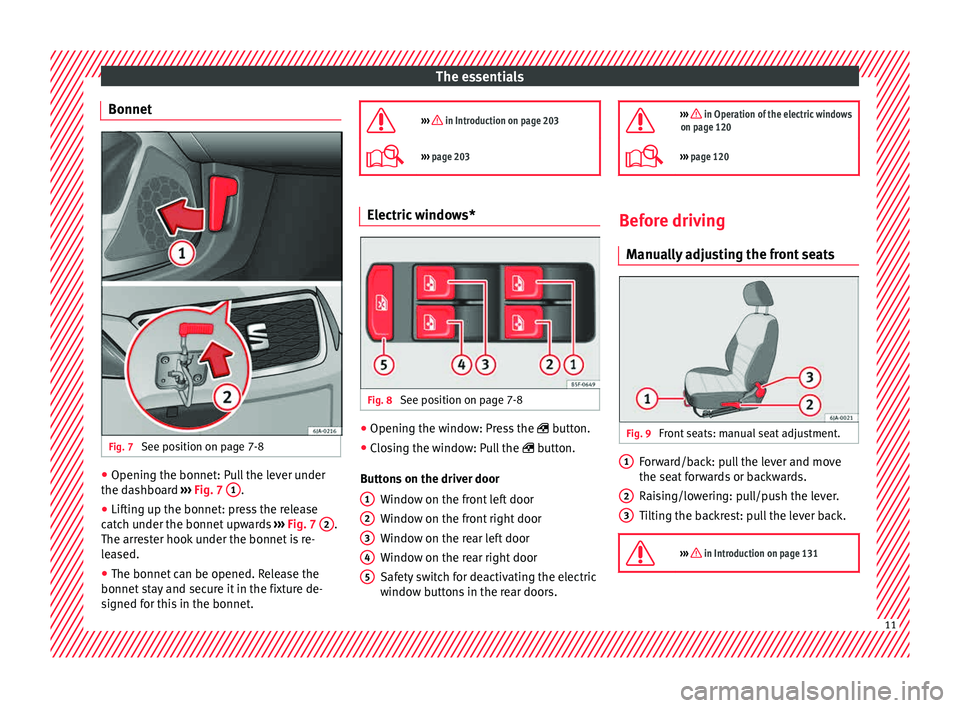
Bonnet Fig. 7
See position on page 7-8 ●
Opening the bonnet: Pull the lever under
the d a
shbo
ard ››› Fig. 7 1 .
● Lifting up the bonnet: press the release
c at
c
h under the bonnet upwards ››› Fig. 7 2 .
The arr e
s
ter hook under the bonnet is re-
leased.
● The bonnet can be opened. Release the
bonnet st
ay and secure it in the fixture de-
signed for this in the bonnet.
››› in Introduction on page 203
›››
page 203 Electric windows*
Fig. 8
See position on page 7-8 ●
Opening the window: Press the butt
on.
● C
losing the window: Pull the button.
B
uttons on the driver door Window on the front left door
Window on the front right door
Window on the rear left door
Window on the rear right door
Safety switch for deactivating the electric
window buttons in the rear doors.
1 2
3
4
5
››› in Operation of the electric windows
on page 120
››› page 120 Before driving
M anua
l
ly adjusting the front seats Fig. 9
Front seats: manual seat adjustment. Forward/back: pull the lever and move
the se
at
f
orwards or backwards.
Raising/lowering: pull/push the lever.
Tilting the backrest: pull the lever back.
››› in Introduction on page 131 1
2
3
11
Page 27 of 248
The essentials
Vehicles with an automatic gearbox*
The di s
p
lay is only visible in tiptronic mode
››› page 161.
The following display symbols mean:
● Shiftin g up a gear
●
Shifting down a gear CAUTION
The gear-change indicator is intended to help
sav e f
uel, but it is not intended to recom-
mend the right gear for all driving situations.
In certain situations, only the driver can
choose the correct gear (for instance when
overtaking, driving up a steep gradient or
towing a trailer). Note
The display disappears from the instrument
panel when
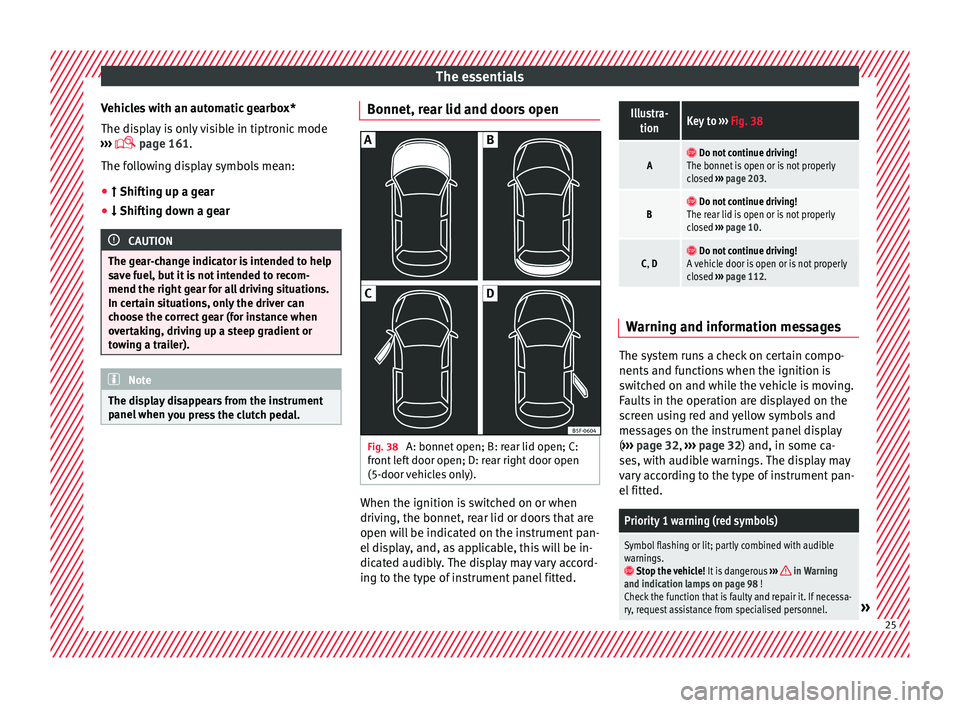
you press the clutch pedal. Bonnet, rear lid and doors open
Fig. 38
A: bonnet open; B: rear lid open; C:
fr ont
l
eft door open; D: rear right door open
(5-door vehicles only). When the ignition is switched on or when
driv
in
g, the bonnet, r
ear lid or doors that are
open will be indicated on the instrument pan-
el display, and, as applicable, this will be in-
dicated audibly. The display may vary accord-
ing to the type of instrument panel fitted.
Illustra- tionKey to ››› Fig. 38
A Do not continue driving!
The bonnet is open or is not properly
closed ››› page 203.
B Do not continue driving!
The rear lid is open or is not properly
closed ››› page 10.
C, D Do not continue driving!
A vehicle door is open or is not properly
closed ››› page 112. Warning and information messages
The system runs a check on certain compo-
nents
and f
u
nctions when the ignition is
switched on and while the vehicle is moving.
Faults in the operation are displayed on the
screen using red and yellow symbols and
messages on the instrument panel display
( ››› page 32, ››› page 32) and, in some ca-
ses, with audible warnings. The display may
vary according to the type of instrument pan-
el fitted.
Priority 1 warning (red symbols)
Symbol flashing or lit; partly combined with audible
warnings.
Stop the vehicle! It is dangerous ››› in Warning
and indication lamps on page 98 !
Check the function that is faulty and repair it. If necessa-
ry, request assistance from specialised personnel.
» 25
Page 35 of 248
The essentials
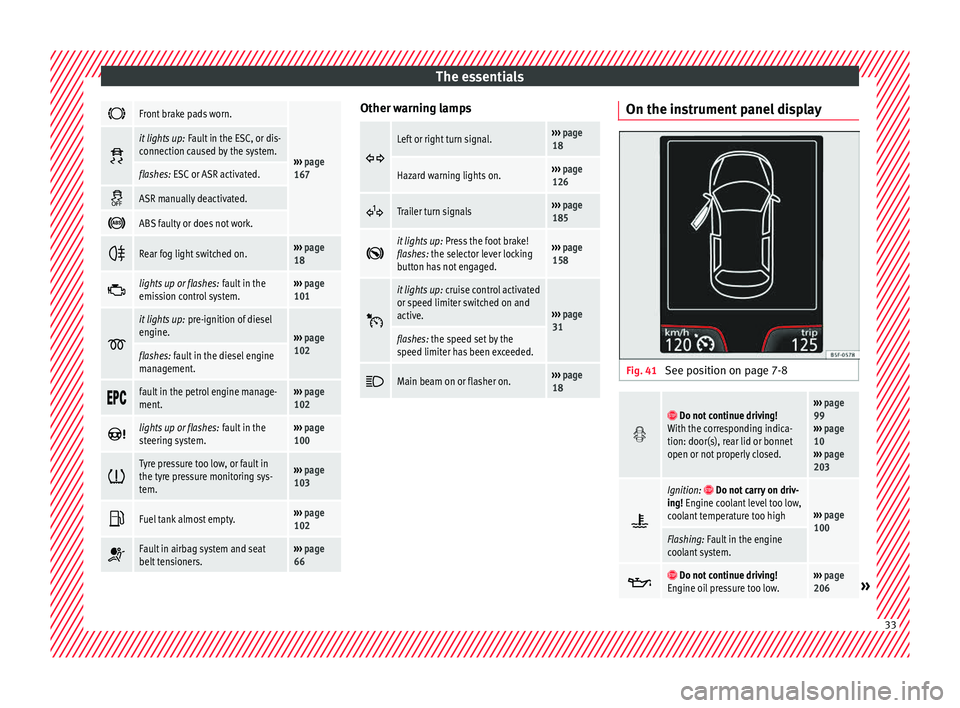
Front brake pads worn.
›››
page
167
it lights up:
Fault in the ESC, or dis-
connection caused by the system.
flashes: ESC or ASR activated.
ASR manually deactivated.
ABS faulty or does not work.
Rear fog light switched on.›››
page
18
lights up or flashes:
fault in the
emission control system.››› page
101
it lights up:
pre-ignition of diesel
engine.
››› page
102
flashes: fault in the diesel engine
management.
fault in the petrol engine manage-
ment.›››
page
102
lights up or flashes:
fault in the
steering system.››› page
100
Tyre pressure too low, or fault in
the tyre pressure monitoring sys-
tem.›››
page
103
Fuel tank almost empty.›››
page
102
Fault in airbag system and seat
belt tensioners.›››
page
66 Other warning lamps
Left or right turn signal.›››
page
18
Hazard warning lights on.››› page
126
Trailer turn signals›››
page
185
it lights up:
Press the foot brake!
flashes: the selector lever locking
button has not engaged.››› page
158
it lights up:
cruise control activated
or speed limiter switched on and
active.
››› page
31
flashes: the speed set by the
speed limiter has been exceeded.
Main beam on or flasher on.›››
page
18 On the instrument panel display
Fig. 41
See position on page 7-8
Do not continue driving!
With the corresponding indica-
tion: door(s), rear lid or bonnet
open or not properly closed.››› page
99
››› page
10
››› page
203
Ignition: Do not carry on driv-
ing! Engine coolant level too low,
coolant temperature too high
››› page
100
Flashing: Fault in the engine
coolant system.
Do not continue driving!
Engine oil pressure too low.››› page
206» 33
Page 56 of 248
The essentials
Service position
● Close the bonnet.
● Switch the ignition on and off.
● Press the lever to position 4›››
Fig. 140
››
›
page 129, the wind-
screen wiper arms are set to the service posi-
tion.
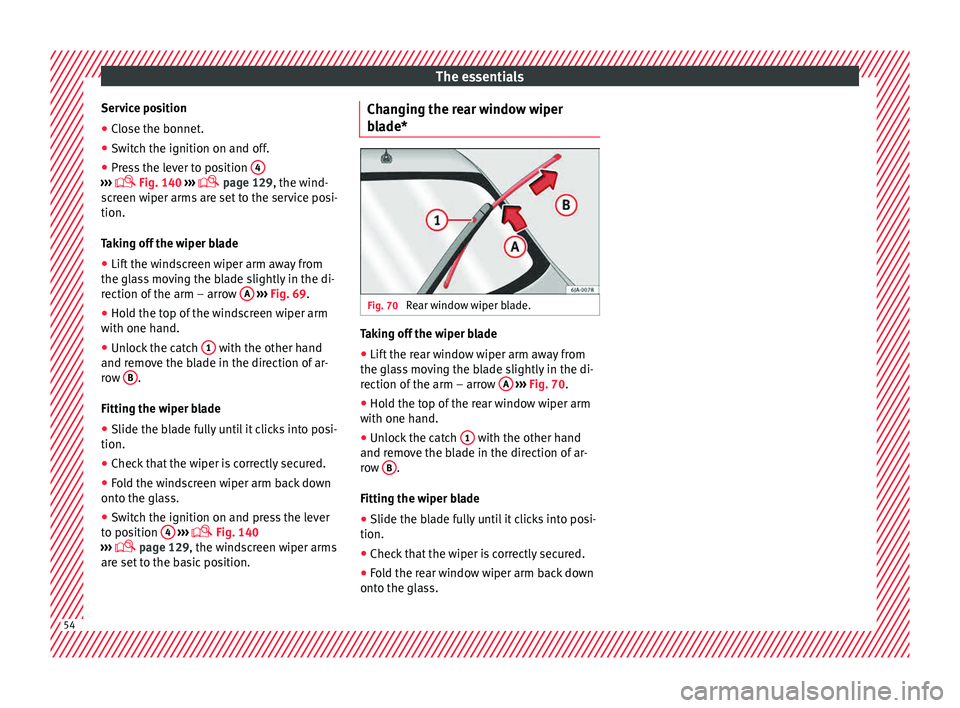
Taking off the wiper blade
● Lift the windscreen wiper arm away from
the glas
s moving the blade slightly in the di-
rection of the arm – arrow A
› ›
› Fig. 69
.
● Hold the top of the windscreen wiper arm
with one hand.
● Un
lock the catch 1 with the other hand
and r emo
v
e the blade in the direction of ar-
row B .
Fittin g the w
iper b
lade
● Slide the blade fully until it clicks into posi-
tion.
● Check that the wiper is correctly secured.
● Fold the windscreen wiper arm back down
onto the gla
ss.
● Switch the ignition on and press the lever
to pos
ition 4
› ›
›
Fig. 140
›
›› page 129, the windscreen wiper arms
are set to the basic position. Changing the rear window wiper
bla
de* Fig. 70
Rear window wiper blade. Taking off the wiper blade
● Lift the rear window wiper arm away from
the gl a
s
s moving the blade slightly in the di-
rection of the arm – arrow A
› ›
› Fig. 70
.
● Hold the top of the rear window wiper arm
with one hand.
● Un
lock the catch 1 with the other hand
and r emo
v
e the blade in the direction of ar-
row B .
Fittin g the w
iper b
lade
● Slide the blade fully until it clicks into posi-
tion.
● Check that the wiper is correctly secured.
● Fold the rear window wiper arm back down
onto the gla
ss.54
Page 85 of 248
Fuses and bulbs
Fig. 87
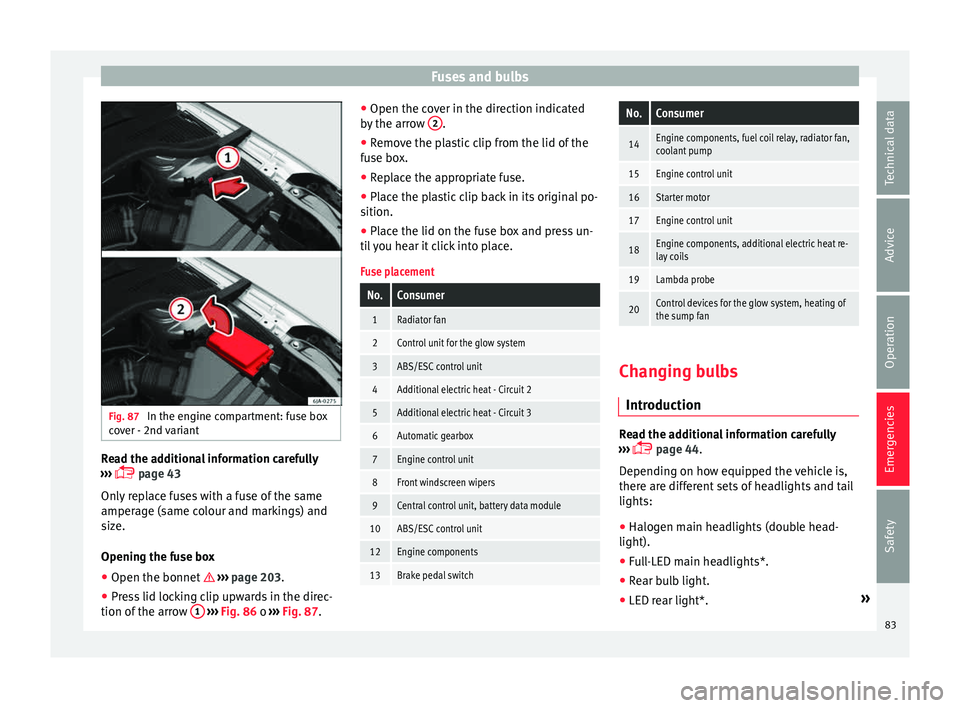
In the engine compartment: fuse box
c o
v
er - 2nd variant Read the additional information carefully
› ›
›
page 43
Only replace fuses with a fuse of the same
amperage (same colour and markings) and
size.
Opening the fuse box ● Open the bonnet ›››
page 203.
● Press lid locking clip upwards in the direc-
tion of the arro
w 1
› ›
› Fig. 86 o ››› Fig. 87. ●
Open the cov
er in the direction indicated
by the arrow 2 .
● Remove the plastic clip from the lid of the
f u
se bo
x.
● Replace the appropriate fuse.
● Place the plastic clip back in its original po-
sition.
● Plac
e the lid on the fuse box and press un-
til
you hear it click into place.
Fuse placement
No.Consumer
1Radiator fan
2Control unit for the glow system
3ABS/ESC control unit
4Additional electric heat - Circuit 2
5Additional electric heat - Circuit 3
6Automatic gearbox
7Engine control unit
8Front windscreen wipers
9Central control unit, battery data module
10ABS/ESC control unit
12Engine components
13Brake pedal switch
No.Consumer
14Engine components, fuel coil relay, radiator fan,
coolant pump
15Engine control unit
16Starter motor
17Engine control unit
18Engine components, additional electric heat re-
lay coils
19Lambda probe
20Control devices for the glow system, heating of
the sump fan Changing bulbs
Intr oduction Read the additional information carefully
› ›
›
page 44.
Depending on how equipped the vehicle is,
there are different sets of headlights and tail
lights:
● Halogen main headlights (double head-
light).
● Full-LED main headlights*.
● Rear bulb light.
● LED rear light*. »
83
Technical data
Advice
Operation
Emergencies
Safety
Page 87 of 248
Fuses and bulbs
Dipped beam headlights
T urn s
ign
al lights
Daylight
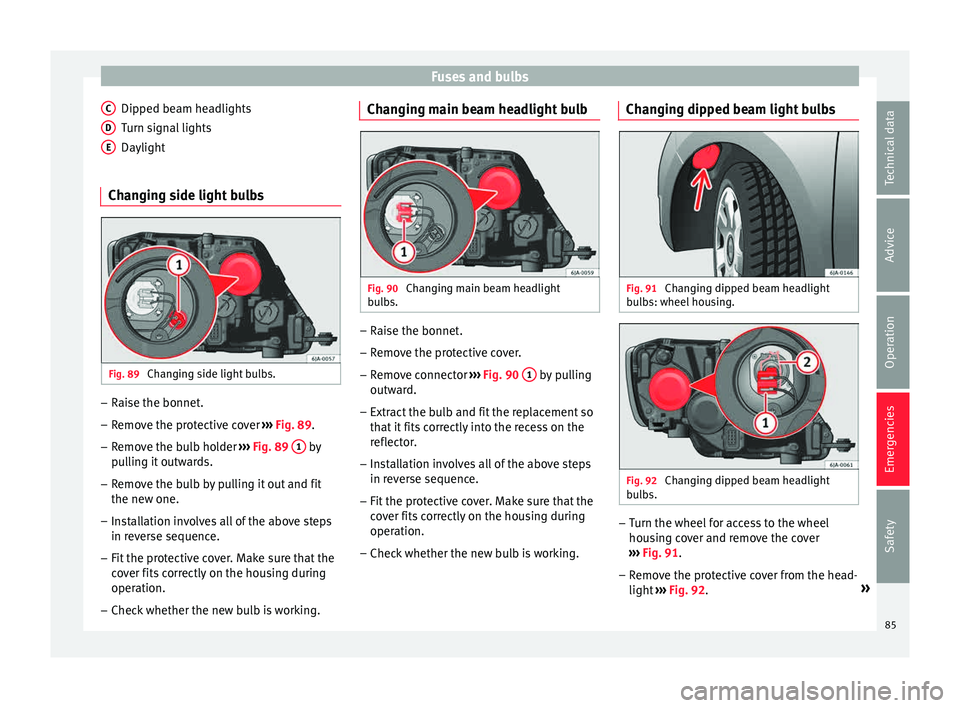
Changing side light bulbs Fig. 89
Changing side light bulbs. –
Raise the bonnet.
– Remove the protective cover ›
› ›
Fig. 89.
– Remove the bulb holder ›››
Fig. 89 1 by
p u
l
ling it outwards.
– Remove the bulb by pulling it out and fit
the new one.
– Installation involves all of the above steps
in rever
se sequence.
– Fit the protective cover. Make sure that the
cov
er fits correctly on the housing during
operation.
– Check whether the new bulb is working.
C D
E Changing main beam headlight bulb
Fig. 90
Changing main beam headlight
b u
l
bs. –
Raise the bonnet.
– Remove the protective cover.
– Remove connector ››
›
Fig. 90 1 by pulling
outw ar
d.
– Extr
act the bulb and fit the replacement so
that it
fits correctly into the recess on the
reflector.
– Installation involves all of the above steps
in rever
se sequence.
– Fit the protective cover. Make sure that the
cov
er fits correctly on the housing during
operation.
– Check whether the new bulb is working. Changing dipped beam light bulbs
Fig. 91
Changing dipped beam headlight
b u
l
bs: wheel housing. Fig. 92
Changing dipped beam headlight
b u
l
bs. –
Turn the wheel for access to the wheel
hou s
in
g cover and remove the cover
››› Fig. 91.
– Remove the protective cover from the head-
light ››
› Fig. 92. »
85
Technical data
Advice
Operation
Emergencies
Safety
Page 88 of 248
Emergencies
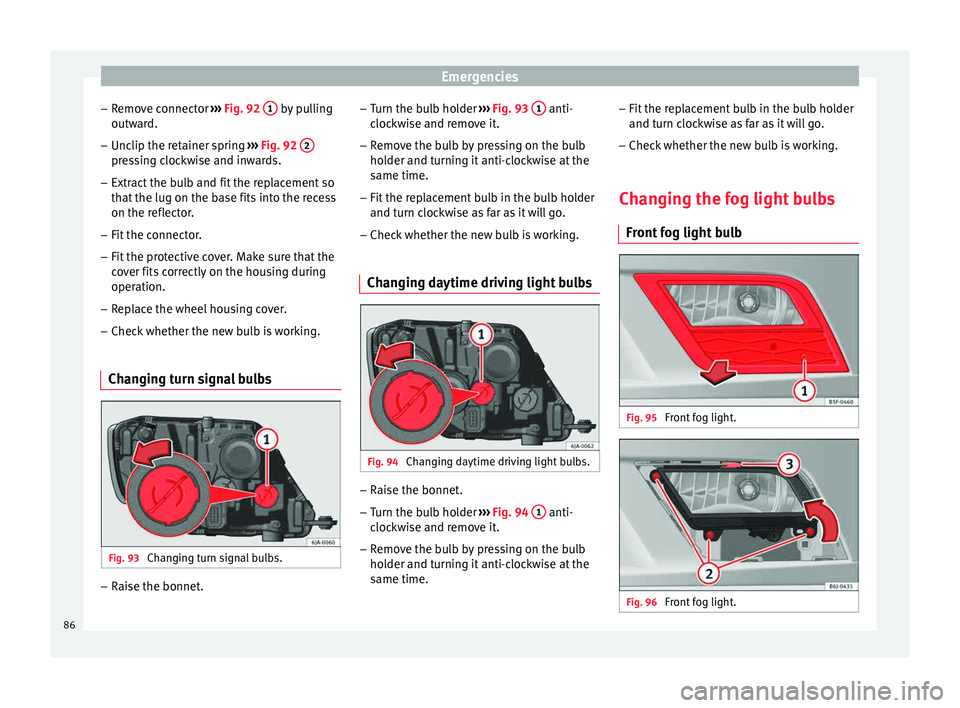
– Remo
v
e connector ››› Fig. 92 1 by pulling
outw ar
d.
– Unc
lip the retainer spring ›››
Fig. 92 2 pressing clockwise and inwards.
– Extract the bulb and fit the replacement so
th at
the lug on the b
ase fits into the recess
on the reflector.
– Fit the connector.
– Fit the protective cover. Make sure that the
cov
er fits correctly on the housing during
operation.
– Replace the wheel housing cover.
– Check whether the new bulb is working.
Changing turn signal bulbs Fig. 93
Changing turn signal bulbs. –
Raise the bonnet. –
Turn the b
u
lb holder ››› Fig. 93 1 anti-
c loc
k
wise and remove it.
– Remove the bulb by pressing on the bulb
holder and t
urning it anti-clockwise at the
same time.
– Fit the replacement bulb in the bulb holder
and turn cloc
kwise as far as it will go.
– Check whether the new bulb is working.
Changing daytime driving light bulbs Fig. 94
Changing daytime driving light bulbs. –
Raise the bonnet.
– Turn the bulb holder ›
››
Fig. 94 1 anti-
c loc
k
wise and remove it.
– Remove the bulb by pressing on the bulb
holder and t
urning it anti-clockwise at the
same time. –
Fit the rep
lacement bulb in the bulb holder
and turn clockwise as far as it will go.
– Check whether the new bulb is working.
Changing the fog light bulbs Front f
og light bulb Fig. 95
Front fog light. Fig. 96
Front fog light.86
Page 95 of 248
Controls and displays
Operation
C ontr
o
ls and displays
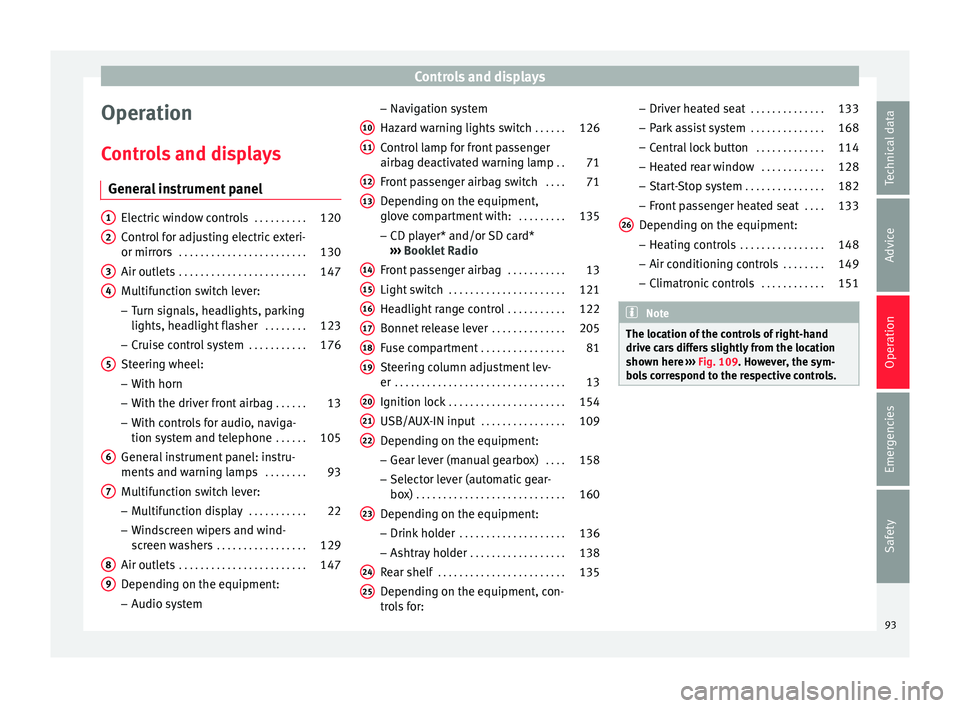
General instrument panel Electric window controls
. . . . . . . . . .120
Control for adjusting electric exteri-
or mirror s . . . . . . . . . . . . . . . . . . . . . . . . 130
Air outl
ets . . . . . . . . . . . . . . . . . . . . . . . . 147
Multifunction switch lever:
– Turn s ign
als, headlights, parking
lights, headlight flasher . . . . . . . .123
– Crui se c
ontrol system . . . . . . . . . . .176
Steering wheel:
– With horn
– With the driv
er front airbag . . . . . .13
– With c ontr
ols for audio, naviga-
tion system and telephone . . . . . .105
General instrument panel: instru-
ments and w arnin
g lamps . . . . . . . . 93
Multifunction switch lever:
– Multif
unction display . . . . . . . . . . .22
– Wind s
creen wipers and wind-
screen washers . . . . . . . . . . . . . . . . . 129
Air outlets . . . . . . . . . . . . . . . . . . . . . . . . 147
Depending on the equipment:
– Audio sy st
em
1 2
3
4
5
6
7
8
9 –
Nav ig
ation sy
stem
Hazard warning lights switch . . . . . .126
Control lamp for front passenger
airbag deactiv
ated warning lamp . .71
Front passenger airbag switch . . . .71
Depending on the equipment,
glove c
ompartment with: . . . . . . . . .135
– CD pla
yer* and/or SD card*
››› Booklet Radio
Front passenger airbag . . . . . . . . . . .13
Light switch . . . . . . . . . . . . . . . . . . . . . . 121
Headlight range control . . . . . . . . . . .122
Bonnet release lever . . . . . . . . . . . . . .205
Fuse compartment . . . . . . . . . . . . . . . . 81
Steering column adjustment lev-
er . . . . . . . . . . . . . . . . . . . . . . . . . . . . . . . . 13
Ignition lock . . . . . . . . . . . . . . . . . . . . . . 154
USB/AUX-IN input . . . . . . . . . . . . . . . . 109
Depending on the equipment: – Gear lev
er (manual gearbox) . . . .158
– Select or l
ever (automatic gear-
box) . . . . . . . . . . . . . . . . . . . . . . . . . . . . 160
Depending on the equipment:
– Drink ho l
der . . . . . . . . . . . . . . . . . . . . 136
– Ashtra y
holder . . . . . . . . . . . . . . . . . . 138
Rear shelf . . . . . . . . . . . . . . . . . . . . . . . . 135
Depending on the equipment, con-
tro l
s for:
10 11
12
13
14
15
16
17
18
19
20
21
22
23
24
25 –
Driv er he
at
ed seat . . . . . . . . . . . . . . 133
– Park a
ssist system . . . . . . . . . . . . . . 168
– Central
lock button . . . . . . . . . . . . . 114
– Heated r
ear window . . . . . . . . . . . . 128
– Start
-Stop system . . . . . . . . . . . . . . . 182
– Front p
assenger heated seat . . . .133
Depending on the equipment: – Heating c
ontrols . . . . . . . . . . . . . . . . 148
– Air conditioning c
ontrols . . . . . . . . 149
– Climatr
onic controls . . . . . . . . . . . . 151 Note
The location of the controls of right-hand
drive c ar
s differs slightly from the location
shown here ››› Fig. 109. However, the sym-
bols correspond to the respective controls. 26
93
Technical data
Advice
Operation
Emergencies
Safety
Page 97 of 248
Instruments and warning lamps
CAUTION
● To pr ev
ent damage to the engine, the rev
counter needle should only remain in the red
zone for a short period of time.
● When the engine is cold, avoid high revs
and heavy ac
celeration and do not make the
engine work hard. For the sake of the environment
Changing up a gear in time reduces fuel con-
sumption and noi se.Rev counter
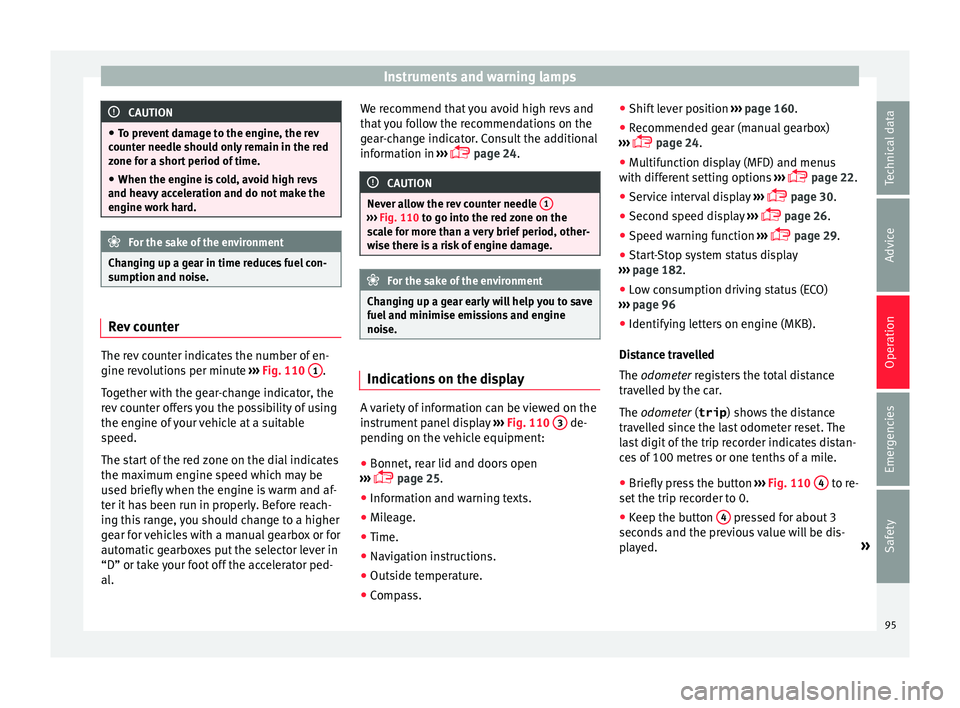
The rev counter indicates the number of en-
gine r
ev
o
lutions per minute ›››
Fig. 110 1 .
T og
ether w
ith the gear-change indicator, the
rev counter offers you the possibility of using
the engine of your vehicle at a suitable
speed.
The start of the red zone on the dial indicates
the maximum engine speed which may be
used briefly when the engine is warm and af-
ter it has been run in properly. Before reach-
ing this range, you should change to a higher
gear for vehicles with a manual gearbox or for
automatic gearboxes put the selector lever in
“D” or take your foot off the accelerator ped-
al. We recommend that you avoid high revs and
that
you follow the recommendations on the
gear-change indicator. Consult the additional
information in ›››
page 24. CAUTION
Never allow the rev counter needle 1 ›››
Fig. 110 to g o int
o the red zone on the
scale for more than a very brief period, other-
wise there is a risk of engine damage. For the sake of the environment
Changing up a gear early will help you to save
fuel and minimi
se emissions and engine
noise. Indications on the display
A variety of information can be viewed on the
in
s
trument
panel display ›››
Fig. 110 3 de-
pendin g on the
v
ehicle equipment:
● Bonnet, rear lid and doors open
›››
page 25.
● Information and warning texts.
● Mileage.
● Time.
● Navigation instructions.
● Outside temperature.
● Compass. ●
Shift l
ever position ››› page 160.
● Recommended gear (manual gearbox)
›››
page 24.
● Multifunction display (MFD) and menus
with differ
ent setting options ›››
page 22.
● Service interval display ›››
page 30.
● Second speed display ›››
page 26.
● Speed warning function ›››
page 29.
● Start-Stop system status display
›››
page 182.
● Low consumption driving status (ECO)
›››
page 96
● Identifying letters on engine (MKB).
Dist
ance travelled
The odometer registers the total distance
travelled by the car.
The odometer (trip ) shows the distance
travelled since the last odometer reset. The
last digit of the trip recorder indicates distan-
ces of 100 metres or one tenths of a mile.
● Briefly press the button ›››
Fig. 110 4 to re-
set the trip r
ec
order to 0.
● Keep the button 4 pressed for about 3
sec ond
s
and the previous value will be dis-
played. »
95
Technical data
Advice
Operation
Emergencies
Safety
Page 100 of 248
Operation
●
Addition a
l lights and other accessories in
front of the air inlet reduce the cooling effect
of the coolant. At high outside temperatures
and high engine loads, there is a risk of the
engine overheating.
● The front spoiler also ensures proper distri-
bution of the c
ooling air when the vehicle is
moving. If the spoiler is damaged this can re-
duce the cooling effect, which could cause
the engine to overheat. Seek specialist assis-
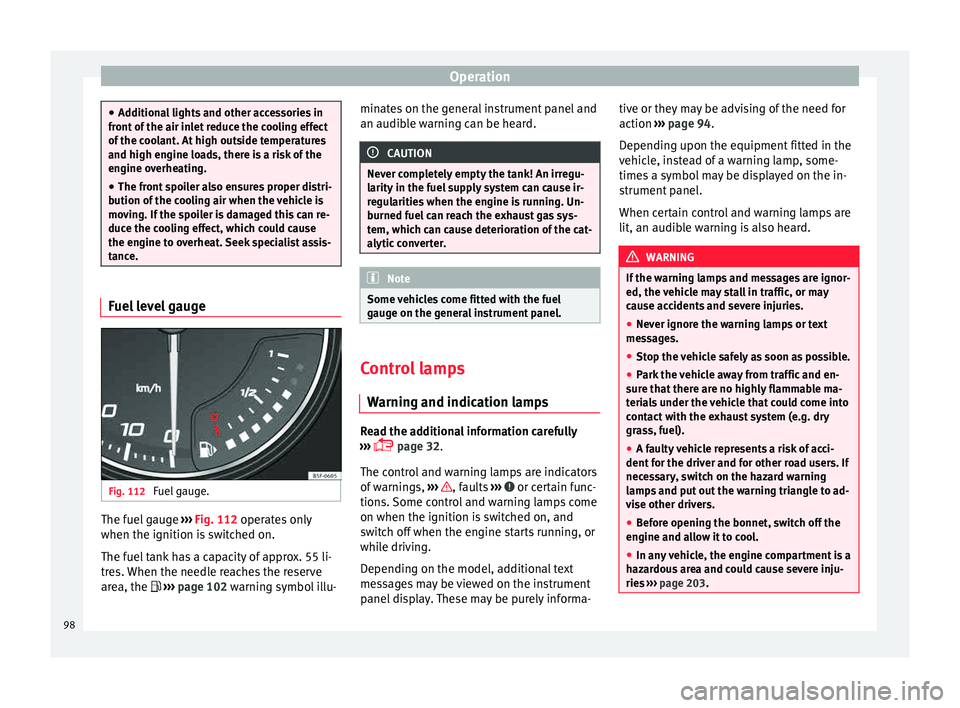
tance. Fuel level gauge
Fig. 112
Fuel gauge. The fuel gauge
››
›
Fig. 112 operates only
when the ignition is switched on.
The fuel tank has a capacity of approx. 55 li-
tres. When the needle reaches the reserve
area, the ››› page 102 warning symbol illu- minates on the general instrument panel and
an audible w
arning can be heard. CAUTION
Never completely empty the tank! An irregu-
larity in the f
uel supply system can cause ir-
regularities when the engine is running. Un-
burned fuel can reach the exhaust gas sys-
tem, which can cause deterioration of the cat-
alytic converter. Note
Some vehicles come fitted with the fuel
gaug e on the g
eneral instrument panel. Control lamps
W arnin g and indic
ation lamps Read the additional information carefully
› ›
›
page 32.
The control and warning lamps are indicators
of warnings, ››› , faults
››
›
or certain func-
tion s.
Some c
ontrol and warning lamps come
on when the ignition is switched on, and
switch off when the engine starts running, or
while driving.
Depending on the model, additional text
messages may be viewed on the instrument
panel display. These may be purely informa- tive or they may be advising of the need for
action
›››
page 94.
Depending upon the equipment fitted in the
vehicle, instead of a warning lamp, some-
times a symbol may be displayed on the in-
strument panel.
When certain control and warning lamps are
lit, an audible warning is also heard. WARNING
If the warning lamps and messages are ignor-
ed, the v ehic
le may stall in traffic, or may
cause accidents and severe injuries.
● Never ignore the warning lamps or text
mess
ages.
● Stop the vehicle safely as soon as possible.
● Park the vehicle away from traffic and en-
sure th
at there are no highly flammable ma-
terials under the vehicle that could come into
contact with the exhaust system (e.g. dry
grass, fuel).
● A faulty vehicle represents a risk of acci-
dent for the driv
er and for other road users. If
necessary, switch on the hazard warning
lamps and put out the warning triangle to ad-
vise other drivers.
● Before opening the bonnet, switch off the
engine and al
low it to cool.
● In any vehicle, the engine compartment is a
hazar
dous area and could cause severe inju-
ries ››› page 203.98