key Seat Toledo 2015 Owner's manual
[x] Cancel search | Manufacturer: SEAT, Model Year: 2015, Model line: Toledo, Model: Seat Toledo 2015Pages: 248, PDF Size: 5.06 MB
Page 5 of 248
Table of Contents
Table of Contents
The e s
senti
als . . . . . . . . . . . . . . . . . . . . . . . . 5
Exterior view . . . . . . . . . . . . . . . . . . . . . . . . . . . . 5
Exterior view . . . . . . . . . . . . . . . . . . . . . . . . . . . . 6
Interior view (left guide) . . . . . . . . . . . . . . . . . . 7
Interior view (right-hand drive) . . . . . . . . . . . . . 8
How it works . . . . . . . . . . . . . . . . . . . . . . . . . . . . 9
Unlocking and locking . . . . . . . . . . . . . . . . . . . . 9
Before driving . . . . . . . . . . . . . . . . . . . . . . . . . . . 11
Airbags . . . . . . . . . . . . . . . . . . . . . . . . . . . . . . . . 13
Child seats . . . . . . . . . . . . . . . . . . . . . . . . . . . . . 16
Starting the vehicle . . . . . . . . . . . . . . . . . . . . . . 17
Lights and visibility . . . . . . . . . . . . . . . . . . . . . . 18
Easy Connect . . . . . . . . . . . . . . . . . . . . . . . . . . . 20
Driver information system . . . . . . . . . . . . . . . . . 22
Journey data . . . . . . . . . . . . . . . . . . . . . . . . . . . . 26
Cruise control . . . . . . . . . . . . . . . . . . . . . . . . . . . 31
Warning lamps . . . . . . . . . . . . . . . . . . . . . . . . . . 32
Gearbox lever . . . . . . . . . . . . . . . . . . . . . . . . . . . 34
Air conditioning . . . . . . . . . . . . . . . . . . . . . . . . . 36
Level control . . . . . . . . . . . . . . . . . . . . . . . . . . . . 39
Emergencies . . . . . . . . . . . . . . . . . . . . . . . . . . . . 43
Fuses . . . . . . . . . . . . . . . . . . . . . . . . . . . . . . . . . . 43
Bulbs . . . . . . . . . . . . . . . . . . . . . . . . . . . . . . . . . . 44
Action in the event of a puncture . . . . . . . . . . . 44
Changing a wheel . . . . . . . . . . . . . . . . . . . . . . . 46
Snow chains . . . . . . . . . . . . . . . . . . . . . . . . . . . . 49
Emergency towing of the vehicle . . . . . . . . . . . 50
How to jump start . . . . . . . . . . . . . . . . . . . . . . . . 51
Changing the windscreen wiper blades . . . . . . 53
Safety . . . . . . . . . . . . . . . . . . . . . . . . . . . . . . . . 55
Safe driving . . . . . . . . . . . . . . . . . . . . . . . . . . . . 55
Safety first! . . . . . . . . . . . . . . . . . . . . . . . . . . . . . 55
Advice about driving . . . . . . . . . . . . . . . . . . . . . 55 Correct position for passengers . . . . . . . . . . . . 56
Pedal area . . . . . . . . . . . . . . . . . . . . . . . . . . . . . . 60
Seat belts
. . . . . . . . . . . . . . . . . . . . . . . . . . . . . . 61
The whys and wherefores of seat belts . . . . . . . 61
How to properly adjust your seatbelt . . . . . . . . 64
Seat belt tensioners . . . . . . . . . . . . . . . . . . . . . . 65
Airbag system . . . . . . . . . . . . . . . . . . . . . . . . . . 66
Brief introduction . . . . . . . . . . . . . . . . . . . . . . . . 66
Airbag safety instructions . . . . . . . . . . . . . . . . . 69
Deactivating airbags . . . . . . . . . . . . . . . . . . . . . 71
Transporting children safely . . . . . . . . . . . . . . . 72
Safety for children . . . . . . . . . . . . . . . . . . . . . . . 72
Child seats . . . . . . . . . . . . . . . . . . . . . . . . . . . . . 74
Emergencies . . . . . . . . . . . . . . . . . . . . . . . . . . 75
Self-help . . . . . . . . . . . . . . . . . . . . . . . . . . . . . . . 75
Emergency equipment . . . . . . . . . . . . . . . . . . . . 75
Changing a wheel . . . . . . . . . . . . . . . . . . . . . . . 75
Tyre repairs . . . . . . . . . . . . . . . . . . . . . . . . . . . . . 76
Towing the vehicle . . . . . . . . . . . . . . . . . . . . . . . 78
Fuses and bulbs . . . . . . . . . . . . . . . . . . . . . . . . . 80
Fuses . . . . . . . . . . . . . . . . . . . . . . . . . . . . . . . . . . 80
Changing bulbs . . . . . . . . . . . . . . . . . . . . . . . . . 83
Changing the fog light bulbs . . . . . . . . . . . . . . . 86
Changing the rear lights (on the side panel) . . 87
Changing tail lights (on the rear lid) . . . . . . . . . 89
Changing the bulb on the number plate . . . . . . 91
Operation . . . . . . . . . . . . . . . . . . . . . . . . . . . . . 93
Controls and displays . . . . . . . . . . . . . . . . . . . . 93
General instrument panel . . . . . . . . . . . . . . . . . 92
Instruments and warning lamps . . . . . . . . . . . . 94
Instruments . . . . . . . . . . . . . . . . . . . . . . . . . . . . 94
Control lamps . . . . . . . . . . . . . . . . . . . . . . . . . . . 98
Introduction to the Easy Connect system* . . . . 104
System settings (CAR)* . . . . . . . . . . . . . . . . . . . 104 Communications and multimedia
. . . . . . . . . . . 105
Steering wheel controls* . . . . . . . . . . . . . . . . . . 105
Multimedia . . . . . . . . . . . . . . . . . . . . . . . . . . . . . 109
Opening and closing . . . . . . . . . . . . . . . . . . . . . 109
Remote control . . . . . . . . . . . . . . . . . . . . . . . . . . 109
Keys . . . . . . . . . . . . . . . . . . . . . . . . . . . . . . . . . . . 110
Central locking system . . . . . . . . . . . . . . . . . . . . 112
Anti-theft alarm system* . . . . . . . . . . . . . . . . . . 117
Rear lid . . . . . . . . . . . . . . . . . . . . . . . . . . . . . . . . 118
Opening and closing of electric windows . . . . . 120
Lights and visibility . . . . . . . . . . . . . . . . . . . . . . 121
Lights . . . . . . . . . . . . . . . . . . . . . . . . . . . . . . . . . 121
Interior lights . . . . . . . . . . . . . . . . . . . . . . . . . . . 127
Visibility . . . . . . . . . . . . . . . . . . . . . . . . . . . . . . . 128
Windscreen wipers and windscreen wash-
ers . . . . . . . . . . . . . . . . . . . . . . . . . . . . . . . . . . . . 129
R
ear vision mirrors . . . . . . . . . . . . . . . . . . . . . . . 130
Seats and head restraints . . . . . . . . . . . . . . . . . 131
Adjusting seats and head restraints . . . . . . . . . 131
Seat functions . . . . . . . . . . . . . . . . . . . . . . . . . . 133
Transport and practical equipment . . . . . . . . . 135
Practical equipment . . . . . . . . . . . . . . . . . . . . . . 135
Storing objects . . . . . . . . . . . . . . . . . . . . . . . . . . 141
Luggage compartment . . . . . . . . . . . . . . . . . . . . 142
Roof rack* . . . . . . . . . . . . . . . . . . . . . . . . . . . . . . 145
Air conditioning . . . . . . . . . . . . . . . . . . . . . . . . . 146
Heating and air conditioning . . . . . . . . . . . . . . . 146
Heating and fresh air . . . . . . . . . . . . . . . . . . . . . 148
Air conditioning (manual)* . . . . . . . . . . . . . . . . 149
Climatronic* (automatic air conditioning) . . . . 151
Driving . . . . . . . . . . . . . . . . . . . . . . . . . . . . . . . . 153
Starting and stopping the engine . . . . . . . . . . . 153
Brakes and brake servo systems . . . . . . . . . . . . 156
Manual gearbox . . . . . . . . . . . . . . . . . . . . . . . . . 158
Automatic gearbox . . . . . . . . . . . . . . . . . . . . . . . 158
Run-in and economical driving . . . . . . . . . . . . . 163
Wading and driving off-road . . . . . . . . . . . . . . . 166
3
Page 11 of 248
The essentials
How it works
Un loc
k
ing and locking
Doors Fig. 1
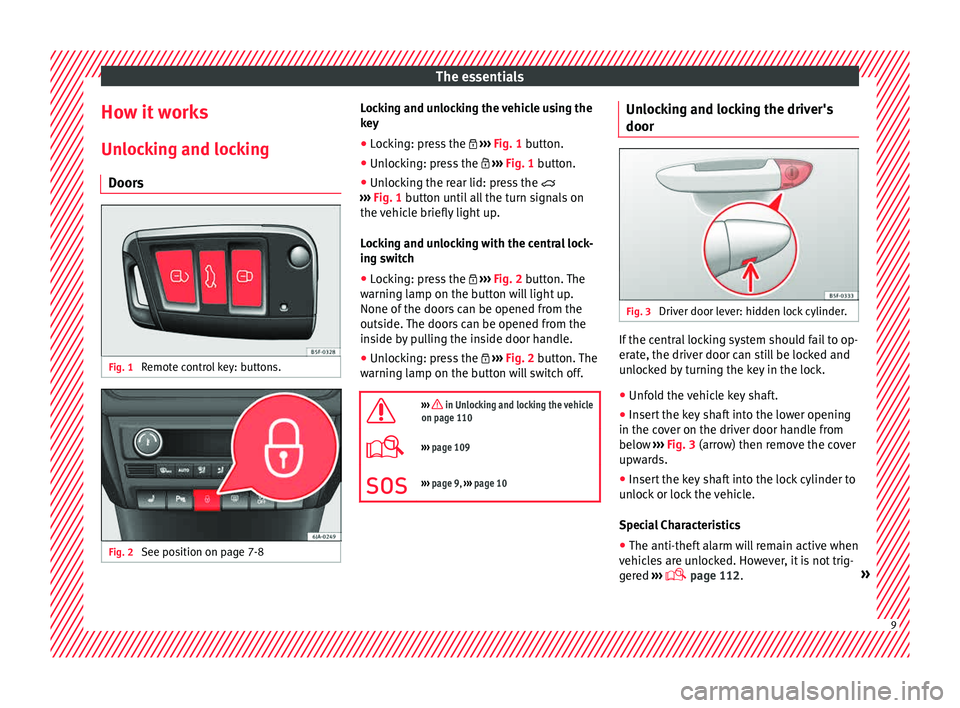
Remote control key: buttons. Fig. 2
See position on page 7-8 Locking and unlocking the vehicle using the
k
ey
● Loc
king: press the ›››
Fig. 1 button.
● Unlocking: press the ›››
Fig. 1 button.
● Unlocking the rear lid: press the
›››
Fig. 1 button until all the turn signals on
the vehicle briefly light up.
Locking and unlocking with the central lock-
ing switch
● Locking: press the ›››
Fig. 2 button. The
warning lamp on the button will light up.
None of the doors can be opened from the
outside. The doors can be opened from the
inside by pulling the inside door handle.
● Unlocking: press the ›››
Fig. 2 button. The
warning lamp on the button will switch off.
››› in Unlocking and locking the vehicle
on page 110
››› page 109
››› page 9, ››› page 10 Unlocking and locking the driver's
door
Fig. 3
Driver door lever: hidden lock cylinder. If the central locking system should fail to op-
er
at
e, the driv
er door can still be locked and
unlocked by turning the key in the lock.
● Unfold the vehicle key shaft.
● Insert the key shaft into the lower opening
in the cov
er on the driver door handle from
below ››› Fig. 3 (arrow) then remove the cover
upwards.
● Insert the key shaft into the lock cylinder to
unloc
k or lock the vehicle.
Special Characteristics
● The anti-theft alarm will remain active when
vehicl
es are unlocked. However, it is not trig-
gered ›››
page 112. » 9
Page 12 of 248
The essentials
● Af t
er the driv
er door is opened, you have
15 seconds to switch on the ignition. Once
this time has elapsed, the alarm is triggered.
● Switch the ignition on. The electronic im-
mobi
lizer recognises a valid vehicle key and
deactivates the anti-theft alarm system. Note
The anti-theft alarm is not activated when the
vehic l
e is locked manually using the key
shaft ›››
page 112. Locking manually
Fig. 4
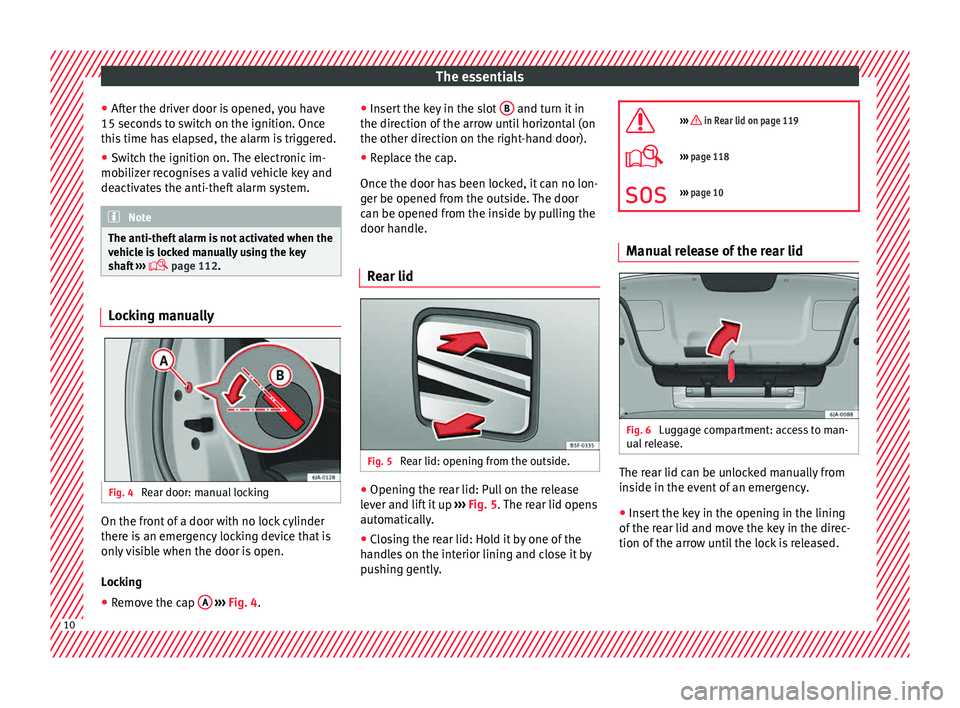
Rear door: manual locking On the front of a door with no lock cylinder
ther
e i
s
an emergency locking device that is
only visible when the door is open.
Locking
● Remove the cap A
› ›
› Fig. 4
. ●
Insert
the key in the slot B and turn it in
the dir ection of
the arr
ow until horizontal (on
the other direction on the right-hand door).
● Replace the cap.
Once the door ha
s been locked, it can no lon-
ger be opened from the outside. The door
can be opened from the inside by pulling the
door handle.
Rear lid Fig. 5
Rear lid: opening from the outside. ●
Opening the rear lid: Pull on the release
l ev
er and lif
t it up ››› Fig. 5. The rear lid opens
automatically.
● Closing the rear lid: Hold it by one of the
handle
s on the interior lining and close it by
pushing gently.
››› in Rear lid on page 119
›››
page 118
››› page 10 Manual release of the rear lid
Fig. 6
Luggage compartment: access to man-
ual r
el
ease. The rear lid can be unlocked manually from
in
s
ide in the ev
ent of an emergency.
● Insert the key in the opening in the lining
of the re
ar lid and move the key in the direc-
tion of the arrow until the lock is released. 10
Page 16 of 248
The essentials
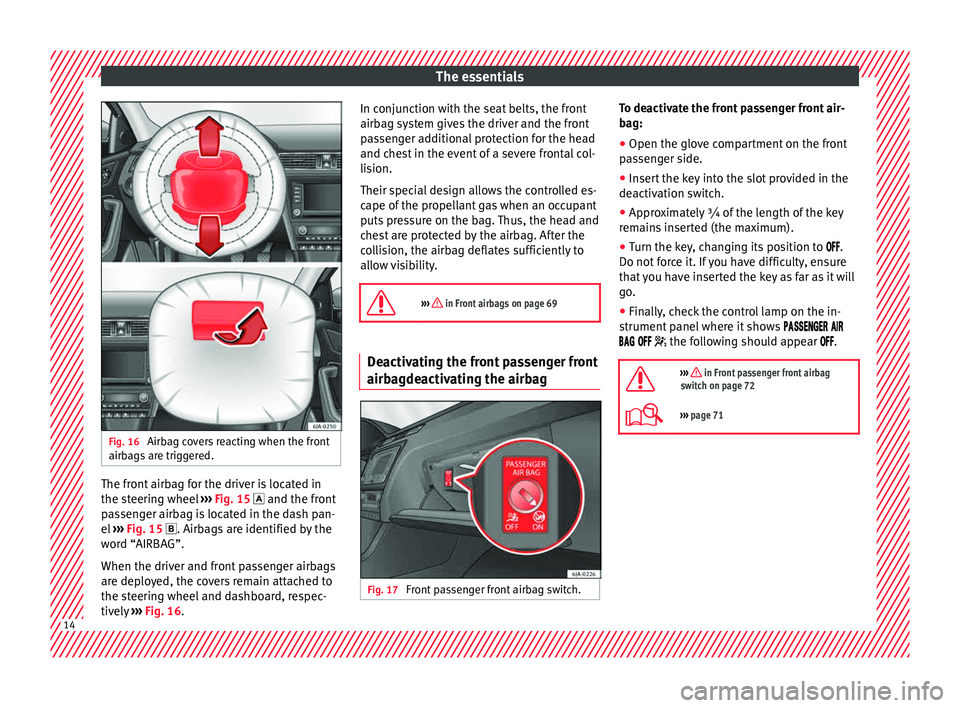
Fig. 16
Airbag covers reacting when the front
airb ag
s
are triggered. The front airbag for the driver is located in
the s
t
eerin
g wheel ›››
Fig. 15 and the front
passenger airbag is located in the dash pan-
el ›››
Fig. 15 . Airbags are identified by the
word “AIRBAG”.
When the driver and front passenger airbags
are deployed, the covers remain attached to
the steering wheel and dashboard, respec-
tively ›››
Fig. 16. In conjunction with the seat belts, the front
airbag sys
tem gives the driver and the front
passenger additional protection for the head
and chest in the event of a severe frontal col-
lision.
Their special design allows the controlled es-
cape of the propellant gas when an occupant
puts pressure on the bag. Thus, the head and
chest are protected by the airbag. After the
collision, the airbag deflates sufficiently to
allow visibility.
››› in Front airbags on page 69 Deactivating the front passenger front
airb
agde
activ
ating the airbag Fig. 17
Front passenger front airbag switch. To deactivate the front passenger front air-
b
ag:
● Open the glo v
e compartment on the front
pas
senger side.
● Insert the key into the slot provided in the
deactivation sw
itch.
● Approximately ¾ of the length of the key
remain
s inserted (the maximum).
● Turn the key, changing its position to .
Do not for
ce it. If you have difficulty, ensure
that you have inserted the key as far as it will
go.
● Finally, check the control lamp on the in-
strument p
anel where it shows
the following should appear .
››› in Front passenger front airbag
switch on page 72
››› page 71 14
Page 19 of 248
The essentials
“ISOFIX” and Top Tether child seat
mou ntin
g sy
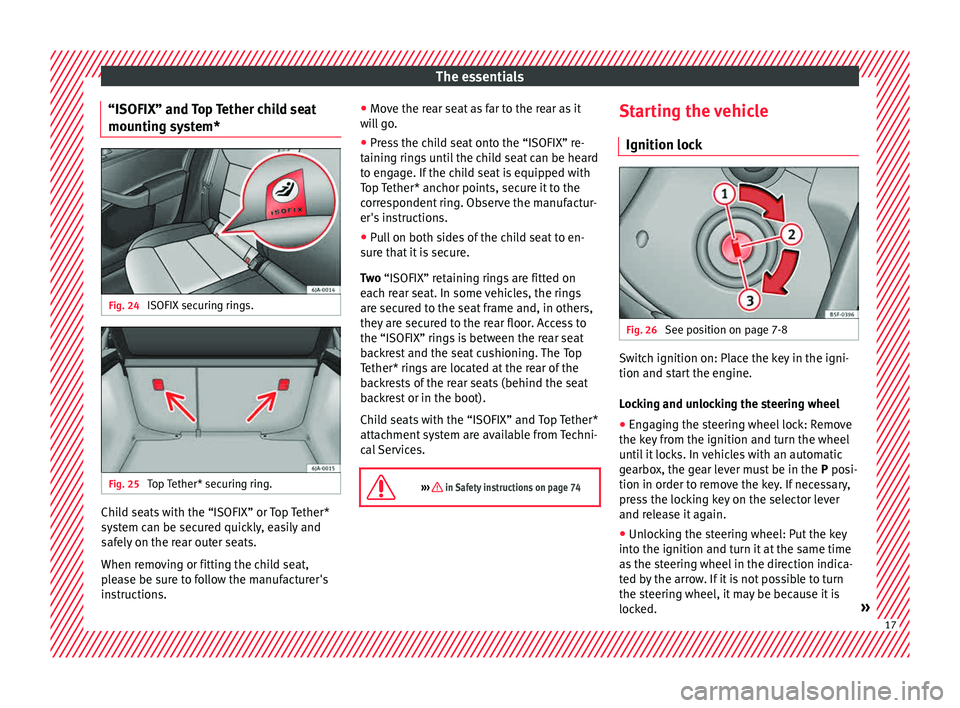
stem*Fig. 24
ISOFIX securing rings. Fig. 25
Top Tether* securing ring. Child seats with the “ISOFIX” or Top Tether*
sy
s
t
em can be secured quickly, easily and
safely on the rear outer seats.
When removing or fitting the child seat,
please be sure to follow the manufacturer's
instructions. ●
Move the r
ear seat as far to the rear as it
will go.
● Press the child seat onto the “ISOFIX” re-
taining rin
gs until the child seat can be heard
to engage. If the child seat is equipped with
Top Tether* anchor points, secure it to the
correspondent ring. Observe the manufactur-
er's instructions.
● Pull on both sides of the child seat to en-
sure th
at it is secure.
Two “ISOFIX” retaining rings are fitted on
each rear seat. In some vehicles, the rings
are secured to the seat frame and, in others,
they are secured to the rear floor. Access to
the “ISOFIX” rings is between the rear seat
backrest and the seat cushioning. The Top
Tether* rings are located at the rear of the
backrests of the rear seats (behind the seat
backrest or in the boot).
Child seats with the “ISOFIX” and Top Tether*
attachment system are available from Techni-
cal Services.
››› in Safety instructions on page 74 Starting the vehicle
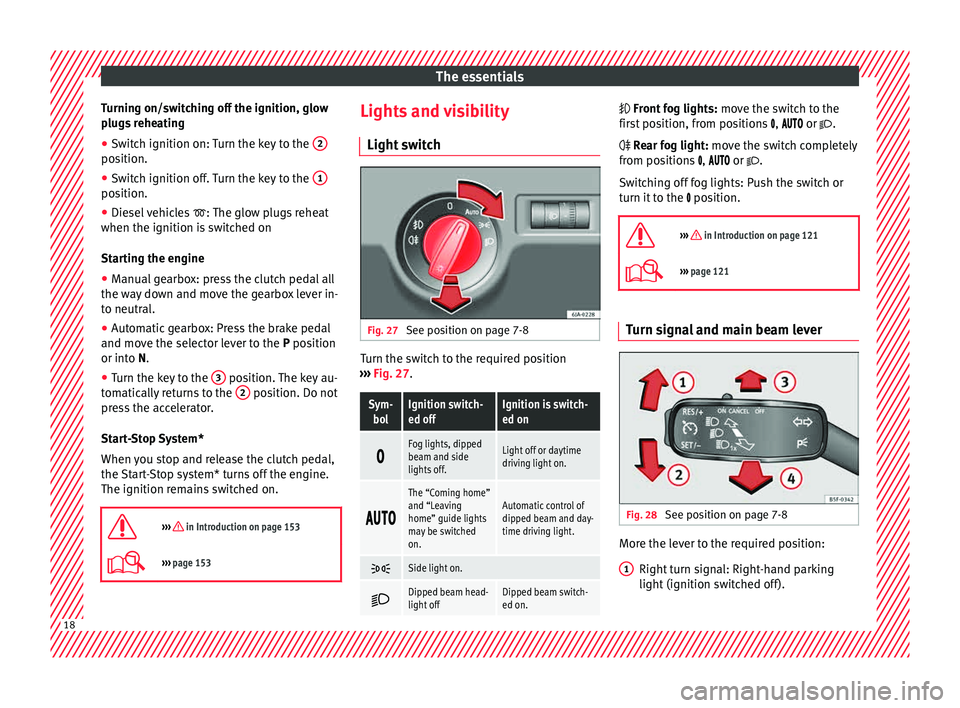
Ignition loc k Fig. 26
See position on page 7-8 Switch ignition on: Place the key in the igni-
tion and s
t
ar
t the engine.
Locking and unlocking the steering wheel
● Engaging the steering wheel lock: Remove
the key fr
om the ignition and turn the wheel
until it locks. In vehicles with an automatic
gearbox, the gear lever must be in the P posi-
tion in order to remove the key. If necessary,
press the locking key on the selector lever
and release it again.
● Unlocking the steering wheel: Put the key
into the ignition and turn it
at the same time
as the steering wheel in the direction indica-
ted by the arrow. If it is not possible to turn
the steering wheel, it may be because it is
locked. » 17
Page 20 of 248
The essentials
Turning on/switching off the ignition, glow
p lug
s
reheating
● Switch ignition on: Turn the key to the 2position.
●
Switch ignition off. Turn the key to the 1position.
●
Diesel vehicles : The glo
w p
lugs reheat
when the ignition is switched on
Starting the engine
● Manual gearbox: press the clutch pedal all
the way
down and move the gearbox lever in-
to neutral.
● Automatic gearbox: Press the brake pedal
and move the sel
ector lever to the P position
or into N.
● Turn the key to the 3 position. The key au-
t om
atic
ally returns to the 2 position. Do not
pr e
s
s the accelerator.
Start-Stop System*
When you stop and release the clutch pedal,
the Start-Stop system* turns off the engine.
The ignition remains switched on.
››› in Introduction on page 153
››› page 153 Lights and visibility
Light sw
it
ch Fig. 27
See position on page 7-8 Turn the switch to the required position
› ›
›
Fig. 27.
Sym-
bolIgnition switch-
ed offIgnition is switch-
ed on
Fog lights, dipped
beam and side
lights off.Light off or daytime
driving light on.
The “Coming home”
and “Leaving
home” guide lights
may be switched
on.Automatic control of
dipped beam and day-
time driving light.
Side light on.
Dipped beam head-
light offDipped beam switch-
ed on. Fr
ont fog lights:
mo
v
e the switch to the
first position, from positions , or .
Rear fog light: move the switch completely
from positions , or .
Switching off fog lights: Push the switch or
turn it to the position.
››› in Introduction on page 121
››› page 121 Turn signal and main beam lever
Fig. 28
See position on page 7-8 More the lever to the required position:
Right t
urn s
ignal: Right-hand parking
light (ignition switched off).
1 18
Page 21 of 248
The essentials
Left turn signal: Left-hand parking light
(ignition sw it
c
hed off).
Main beam switched on: Control lamp
lit up on the instrument panel.
Headlight flasher: lit up when the lever is
pushed. Control lamp lit up.
Lever all the way down to switch it off.
››› page 123 Hazard warning lights
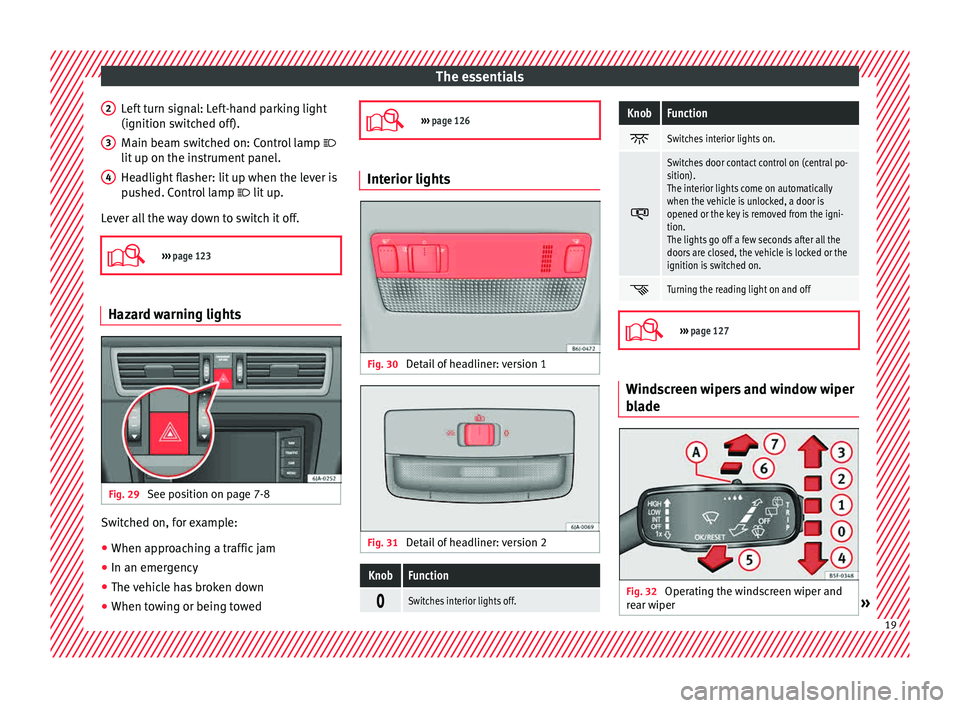
Fig. 29
See position on page 7-8 Switched on, for example:
● When approaching a traffic jam
● In an emergency
● The vehicle has broken down
● When towing or being towed
2 3
4
›››
page 126 Interior lights
Fig. 30
Detail of headliner: version 1 Fig. 31
Detail of headliner: version 2
KnobFunction
Switches interior lights off.
KnobFunction
Switches interior lights on.
Switches door contact control on (central po-
sition).
The interior lights come on automatically
when the vehicle is unlocked, a door is
opened or the key is removed from the igni-
tion.
The lights go off a few seconds after all the
doors are closed, the vehicle is locked or the
ignition is switched on.
Turning the reading light on and off
›››
page 127 Windscreen wipers and window wiper
b
l
a
de Fig. 32
Operating the windscreen wiper and
r e
ar w
iper » 19
Page 27 of 248
The essentials
Vehicles with an automatic gearbox*
The di s
p
lay is only visible in tiptronic mode
››› page 161.
The following display symbols mean:
● Shiftin g up a gear
●
Shifting down a gear CAUTION
The gear-change indicator is intended to help
sav e f
uel, but it is not intended to recom-
mend the right gear for all driving situations.
In certain situations, only the driver can
choose the correct gear (for instance when
overtaking, driving up a steep gradient or
towing a trailer). Note
The display disappears from the instrument
panel when
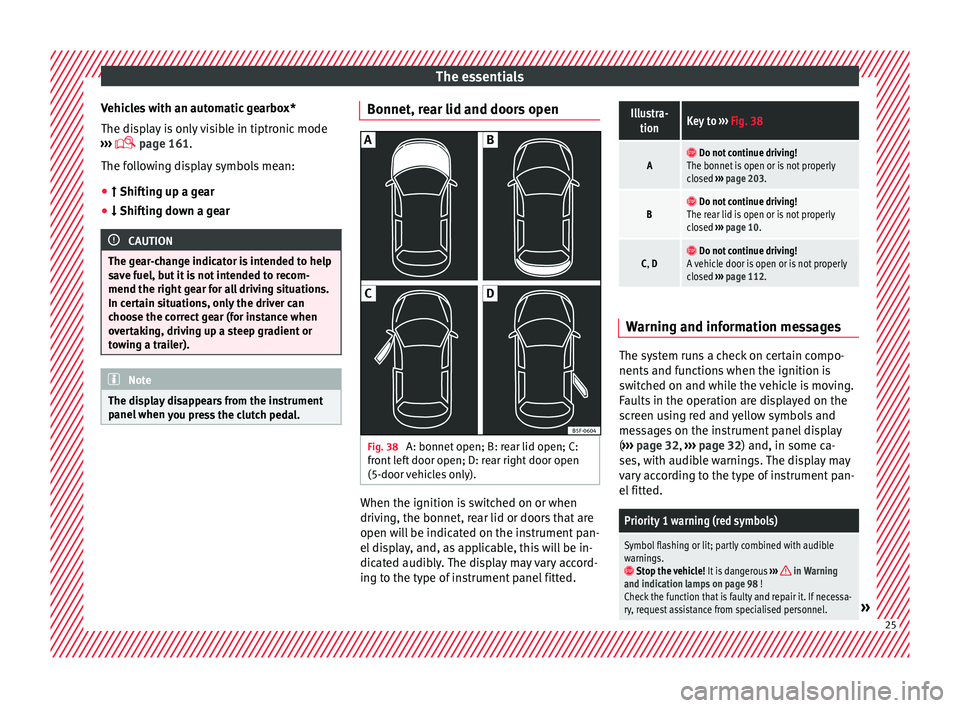
you press the clutch pedal. Bonnet, rear lid and doors open
Fig. 38
A: bonnet open; B: rear lid open; C:
fr ont
l
eft door open; D: rear right door open
(5-door vehicles only). When the ignition is switched on or when
driv
in
g, the bonnet, r
ear lid or doors that are
open will be indicated on the instrument pan-
el display, and, as applicable, this will be in-
dicated audibly. The display may vary accord-
ing to the type of instrument panel fitted.
Illustra- tionKey to ››› Fig. 38
A Do not continue driving!
The bonnet is open or is not properly
closed ››› page 203.
B Do not continue driving!
The rear lid is open or is not properly
closed ››› page 10.
C, D Do not continue driving!
A vehicle door is open or is not properly
closed ››› page 112. Warning and information messages
The system runs a check on certain compo-
nents
and f
u
nctions when the ignition is
switched on and while the vehicle is moving.
Faults in the operation are displayed on the
screen using red and yellow symbols and
messages on the instrument panel display
( ››› page 32, ››› page 32) and, in some ca-
ses, with audible warnings. The display may
vary according to the type of instrument pan-
el fitted.
Priority 1 warning (red symbols)
Symbol flashing or lit; partly combined with audible
warnings.
Stop the vehicle! It is dangerous ››› in Warning
and indication lamps on page 98 !
Check the function that is faulty and repair it. If necessa-
ry, request assistance from specialised personnel.
» 25
Page 32 of 248
The essentials
speed of 120 km/h (80 mph). This is a facto-
ry
-
set speed limit. Service intervals
The service interval indication appears on the
ins
trument
panel display ›››
Fig. 110
4 .
SEA T di
stinguishes between services with en-
gine oil change (e.g. Oil change service) and
services without engine oil change (e.g. In-
spection).
In vehicles with Services established by time
or mileage, the service intervals are already
pre-defined.
In vehicles with LongLife Service , the inter-
vals are determined individually. Thanks to
technological progress, maintenance work
has been greatly reduced. Because of the
technology used by SEAT, with this service
you only need to change the oil when the ve-
hicle so requires. To calculate this change
(max. 2 years), the vehicle's conditions of
use and individual driving styles are consid-
ered. The pre-warning first appears 20 days
before the date established for the corre-
sponding service. The kilometres (miles) re-
maining until the next service are always
rounded up to the nearest 100 km (miles)
and the time is given in complete days. The
current service message cannot be viewed until 500 km after the last service. Prior to
this, on
ly
lines are visible on the display.
Inspection reminder
When the Service date is approaching, when
the ignition is switched on a Service remind-
er is displayed.
Vehicles without text messages : a span-
ner will be displayed on the instrument
panel plus an indication in km.
The kilometres indicated are the maximum
number of kilometres that can be travelled
until the next service. After a few seconds,
the display mode changes. A clock symbol
appears and the number of days until the
next service is due.
Vehicles with text messages : Service in
--- km or --- days will be shown on the
instrument panel display.
Service due
When the service date is due , an audible
warning is given when the ignition is switch-
ed on and the spanner displayed on the
screen flashes for a few seconds .
Vehicles with text messages : Service now
will be shown on the instrument panel dis-
play. Reading a service notification
With the ignition swit
ched on, the engine off
and the vehicle at a standstill, the current
service notification can be read:
Press and hold the button 4 for more than 5
sec ond
s
to consult the service message.
When the service date has passed , a minus
sign is displayed in front of the number of kil-
ometres or days.
Vehicles with text messages : Service
since --- km or --- days ago .will be
shown on the display.
The time can also be set via the key and
Set up function button in the Easy Connect
sy s
t
em ›››
page 104.
Resetting service interval display
If the service was not carried out by a SEAT
dealership, the display can be reset as fol-
lows:
● Switch off the ignition, press and hold but-
ton ››
› Fig. 110
4 .
● Switch ignition back on.
● Release THE 4
› ›
›
Fig. 110
button and
press it again for the next 20 seconds. Note
● The serv ic
e message disappears after a few
seconds, when the engine is started or when 30
Page 69 of 248
Airbag system
airbag. In this case, the inflating airbag may
inflict c
ritic
al or fatal injuries on the occu-
pant. This also applies to children.
Always maintain the greatest possible dis-
tance between yourself and the front airbag.
This way, the front airbags can completely
deploy when triggered, providing their maxi-
mum protection.
The most important factors that will trigger
an airbag are: the type of accident, the angle
of collision and the speed of the vehicle.
Whether or not the airbags are triggered de-
pends primarily on the vehicle deceleration
rate resulting from the collision and detected
by the control unit. If the vehicle deceleration
occurring during the collision and measured
by the control unit remains below the speci-
fied reference values, the front, side and/or
curtain airbags will not be triggered. Take in-
to account that the visible damage in a vehi-
cle involved in an accident, no matter how
serious, is not a determining factor for the
airbags to have been triggered. WARNING
● We arin
g the seat belt incorrectly or assum-
ing an incorrect sitting position can lead to
critical or fatal injuries.
● All vehicle occupants, including children,
who are not pr
operly belted can sustain criti-
cal or fatal injuries if the airbag is triggered.
Children up to 12 years old should always travel on the rear seat. Never transport chil-
dren in the
v
ehicle if they are not restrained
or the restraint system is not appropriate for
their age, size or weight.
● If you are not wearing a seat belt, or if you
lean f
orward or to the side while travelling or
assume an incorrect sitting position, there is
a substantially increased risk of injury. This
increased risk of injury will be further in-
creased if you are struck by an inflating air-
bag.
● To reduce the risk of injury from an inflating
airbag, alw
ays wear the seat belt properly
››› page 61.
● Always adjust the front seats properly. Description of airbag system
The airbag system mainly comprises (as per
v
ehic
l
e equipment):
● an electronic control and monitoring sys-
tem (contr
ol unit)
● frontal airbags for driver and passenger,
● side airbags,
● curtain airbags,
● a control lamp on the dash p
anel
››› page 68.
● key-operated switch for front passenger air-
bag,
● a contr
ol lamp for disabling/enabling the
front p
assenger airbag. The airbag system operation is monitored
electronic
ally. The airbag control lamp will il-
luminate for a few seconds every time the ig-
nition is switched on (self-diagnosis).
There is a fault in the system if the control
lamp :
● does not light up when the ignition is
switc
hed on ››› page 68,
● turns off after 4 seconds after the ignition
is sw
itched on
● turns off and then lights up again after the
ignition is sw
itched on
● illuminates or flashes while the vehicle is
movin
g.
The airbag system is not triggered if:
● the ignition is switched off
● there is a minor frontal collision
● there is a minor side collision
● there is a rear-end collision
● the vehicle turns over. WARNING
● The seat belt
s and airbags can only provide
maximum protection if the occupants are
seated correctly ››› page 56, Correct position
for passengers.
● If a fault has occurred in the airbag system,
have the sy
stem checked immediately by a
specialised workshop. Otherwise, during a » 67
Technical data
Advice
Operation
Emergencies
Safety