ESP Seat Toledo 2016 Owner's Guide
[x] Cancel search | Manufacturer: SEAT, Model Year: 2016, Model line: Toledo, Model: Seat Toledo 2016Pages: 248, PDF Size: 5.82 MB
Page 86 of 248

Emergencies
Full-LED headlight system*
F u
l
l-LED headlights handle all light functions
(daylight, side light, turn signal, dipped
beam and route light) with light emitting di-
odes (LEDs) as a light source.
Full-LED headlights are designed to last the
lifetime of the car and light bulbs cannot be
replaced. In case of headlight failure, go to
an authorised workshop to have it replaced.
Double headlight bulb change
Changing bulbs requires a certain degree of
practical skill. If in doubt, we recommend you
have defective bulbs changed by a special-
ised service or, in case of an emergency,
seek professional assistance.
● Switch off the ignition and all of the lights
before c
hanging a bulb.
● Do not touch the glass part of the bulb with
your bar
e hands. The fingerprints left on the
glass will vaporise as a result of the heat gen-
erated by the bulb, reducing bulb life and
causing condensation on the reflector sur-
face, thus reducing effectiveness.
● A bulb must only be replaced by one of the
same type. The type i
s indicated on the bulb,
either on the glass part or on the base.
● There is a storage area for the bulb box in
the spar
e wheel well or below the carpet in
the luggage compartment. WARNING
● Tak e p
articular care when working on com-
ponents in the engine compartment if the en-
gine is warm. Risk of burns.
● Bulbs are highly sensitive to pressure. The
glas
s can break when you touch the bulb,
causing injury.
● When changing bulbs, please take care not
to injure
yourself on sharp parts in the head-
light housing. CAUTION
● Remo v
e the ignition key before working on
the electric system. Otherwise, a short circuit
could occur.
● Switch off the lights and the parking light
before c
hanging a bulb. For the sake of the environment
Please ask your specialist retailer how to dis-
pose of u
sed bulbs in the proper manner. Note
● Dependin g on w
eather conditions (cold or
wet), the front lights, the fog lights, the rear
lights and the turn signals may be temporari-
ly misted. This has no influence on the useful
life of the lighting system. By switching on
the lights, the area through which the beam
of light is projected will quickly be demisted.
However, the edges may continue to be mis-
ted. ●
Ple a
se check at regular intervals that all
lighting (especially the exterior lighting) on
your vehicle is functioning properly. This is
not only in the interest of your own safety,
but also that of all other road users.
● Before changing a bulb, make sure you
have the c
orrect new bulb.
● Do not touch the glass part of the bulb with
your bar
e hands, use a cloth or paper towel
instead. Otherwise, the fingerprints left on
the glass will vaporise as a result of the heat
generated by the bulb, they will be deposited
on the reflector and damage its surface. Double headlight bulbs
Fig. 88
Main headlight bulbs. Installation position of double headlight
b
u
l
bs
Side lights
Main beam headlights
A B
84
Page 89 of 248
Fuses and bulbs
– Remo
v
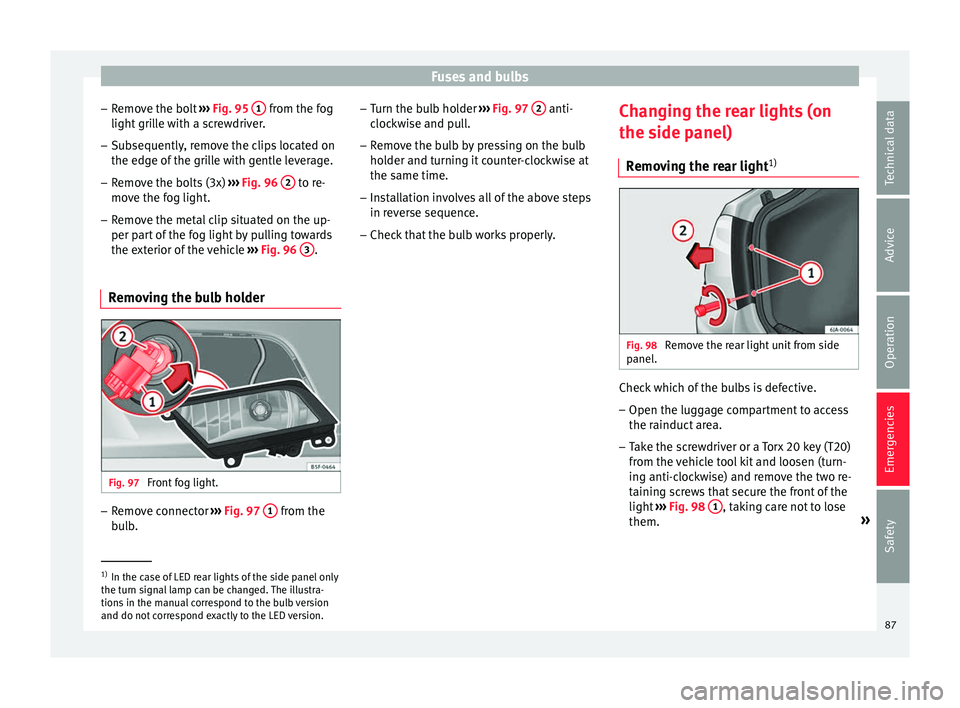
e the bolt ››› Fig. 95 1 from the fog
light gri
l
le with a screwdriver.
– Subsequently, remove the clips located on
the edge of the gri
lle with gentle leverage.
– Remove the bolts (3x) ›››
Fig. 96 2 to re-
mo v
e the f
og light.
– Remove the metal clip situated on the up-
per part
of the fog light by pulling towards
the exterior of the vehicle ››› Fig. 96 3 .
Removing the bulb holder Fig. 97
Front fog light. –
Remove connector ››
›
Fig. 97 1 from the
b u
l
b. –
Turn the bu
lb holder ››› Fig. 97 2 anti-
c loc
k
wise and pull.
– Remove the bulb by pressing on the bulb
holder and t
urning it counter-clockwise at
the same time.
– Installation involves all of the above steps
in rever
se sequence.
– Check that the bulb works properly. Changing the rear lights (on
the side panel)
R
emoving the rear light 1) Fig. 98
Remove the rear light unit from side
p anel
. Check which of the bulbs is defective.
– Open the luggage compartment to access
the r ainduct
ar
ea.
– Take the screwdriver or a Torx 20 key (T20)
from the v
ehicle tool kit and loosen (turn-
ing anti-clockwise) and remove the two re-
taining screws that secure the front of the
light ›››
Fig. 98 1 , taking care not to lose
them. »1)
In the case of LED rear lights of the side panel only
the turn s ign
al lamp can be changed. The illustra-
tions in the manual correspond to the bulb version
and do not correspond exactly to the LED version. 87
Technical data
Advice
Operation
Emergencies
Safety
Page 91 of 248
Fuses and bulbs
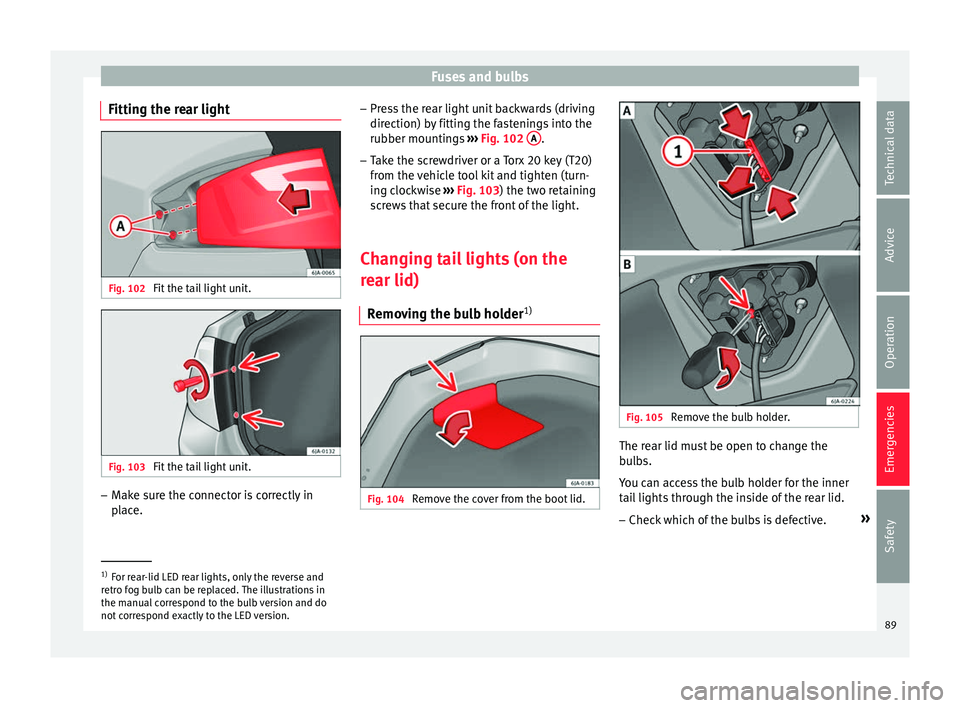
Fitting the rear light Fig. 102
Fit the tail light unit. Fig. 103
Fit the tail light unit. –
Make sure the connector is correctly in
pl
ac
e. –
Pres
s the rear light unit backwards (driving
direction) by fitting the fastenings into the
rubber mountings ››› Fig. 102 A .
– Take the screwdriver or a Torx 20 key (T20)
from the
v
ehicle tool kit and tighten (turn-
ing clockwise ››› Fig. 103) the two retaining
screws that secure the front of the light.
Changing tail lights (on the
rear lid) R
emoving the bulb holder 1) Fig. 104
Remove the cover from the boot lid. Fig. 105
Remove the bulb holder. The rear lid must be open to change the
b
u
l
bs.
You can access the bulb holder for the inner
tail lights through the inside of the rear lid.
– Check which of the bulbs is defective. »1)
For rear-lid LED rear lights, only the reverse and
retr o f
og bulb can be replaced. The illustrations in
the manual correspond to the bulb version and do
not correspond exactly to the LED version. 89
Technical data
Advice
Operation
Emergencies
Safety
Page 95 of 248
Controls and displays
Operation
C ontr
o
ls and displays
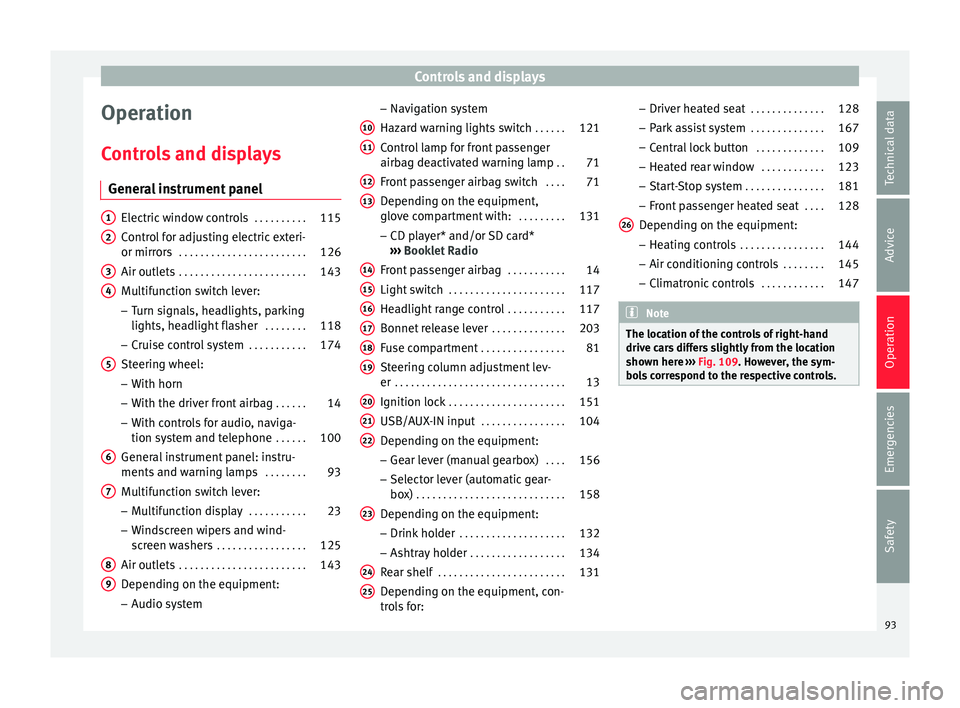
General instrument panel Electric window controls
. . . . . . . . . .115
Control for adjusting electric exteri-
or mirror s . . . . . . . . . . . . . . . . . . . . . . . . 126
Air outl
ets . . . . . . . . . . . . . . . . . . . . . . . . 143
Multifunction switch lever:
– Turn s ign
als, headlights, parking
lights, headlight flasher . . . . . . . .118
– Crui se c
ontrol system . . . . . . . . . . .174
Steering wheel:
– With horn
– With the driv
er front airbag . . . . . .14
– With c ontr
ols for audio, naviga-
tion system and telephone . . . . . .100
General instrument panel: instru-
ments and w arnin
g lamps . . . . . . . . 93
Multifunction switch lever:
– Multif
unction display . . . . . . . . . . .23
– Wind s
creen wipers and wind-
screen washers . . . . . . . . . . . . . . . . . 125
Air outlets . . . . . . . . . . . . . . . . . . . . . . . . 143
Depending on the equipment:
– Audio sy st
em
1 2
3
4
5
6
7
8
9 –
Nav ig
ation sy
stem
Hazard warning lights switch . . . . . .121
Control lamp for front passenger
airbag deactiv
ated warning lamp . .71
Front passenger airbag switch . . . .71
Depending on the equipment,
glove c
ompartment with: . . . . . . . . .131
– CD pla
yer* and/or SD card*
››› Booklet Radio
Front passenger airbag . . . . . . . . . . .14
Light switch . . . . . . . . . . . . . . . . . . . . . . 117
Headlight range control . . . . . . . . . . .117
Bonnet release lever . . . . . . . . . . . . . .203
Fuse compartment . . . . . . . . . . . . . . . . 81
Steering column adjustment lev-
er . . . . . . . . . . . . . . . . . . . . . . . . . . . . . . . . 13
Ignition lock . . . . . . . . . . . . . . . . . . . . . . 151
USB/AUX-IN input . . . . . . . . . . . . . . . . 104
Depending on the equipment: – Gear lev
er (manual gearbox) . . . .156
– Select or l
ever (automatic gear-
box) . . . . . . . . . . . . . . . . . . . . . . . . . . . . 158
Depending on the equipment:
– Drink ho l
der . . . . . . . . . . . . . . . . . . . . 132
– Ashtra y
holder . . . . . . . . . . . . . . . . . . 134
Rear shelf . . . . . . . . . . . . . . . . . . . . . . . . 131
Depending on the equipment, con-
tro l
s for:
10 11
12
13
14
15
16
17
18
19
20
21
22
23
24
25 –
Driv er he
at
ed seat . . . . . . . . . . . . . . 128
– Park a
ssist system . . . . . . . . . . . . . . 167
– Central
lock button . . . . . . . . . . . . . 109
– Heated r
ear window . . . . . . . . . . . . 123
– Start
-Stop system . . . . . . . . . . . . . . . 181
– Front p
assenger heated seat . . . .128
Depending on the equipment: – Heating c
ontrols . . . . . . . . . . . . . . . . 144
– Air conditioning c
ontrols . . . . . . . . 145
– Climatr
onic controls . . . . . . . . . . . . 147 Note
The location of the controls of right-hand
drive c ar
s differs slightly from the location
shown here ››› Fig. 109. However, the sym-
bols correspond to the respective controls. 26
93
Technical data
Advice
Operation
Emergencies
Safety
Page 98 of 248
Operation
Time
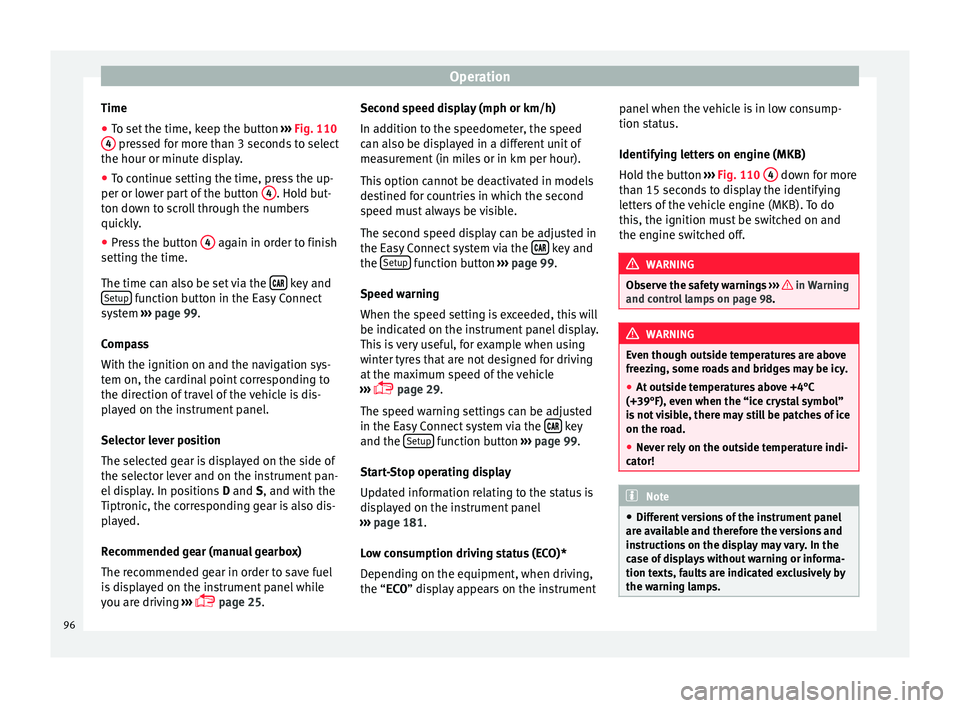
● To set the time, keep the button ››
› Fig. 110
4 pressed for more than 3 seconds to select
the hour or minut e di
s
play.
● To continue setting the time, press the up-
per or lower p
art of the button 4 . Hold but-
t on do
wn t
o scroll through the numbers
quickly.
● Press the button 4 again in order to finish
settin g the time.
The time c an al
so be set via the key and
Set up function button in the Easy Connect
sy s
t
em ››› page 99.
Compass
With the ignition on and the navigation sys-
tem on, the cardinal point corresponding to
the direction of travel of the vehicle is dis-
played on the instrument panel.
Selector lever position
The selected gear is displayed on the side of
the selector lever and on the instrument pan-
el display. In positions D and S, and with the
Tiptronic, the corresponding gear is also dis-
played.
Recommended gear (manual gearbox)
The recommended gear in order to save fuel
is displayed on the instrument panel while
you are driving ›››
page 25. Second speed display (mph or km/h)
In addition t
o the speedometer, the speed
can also be displayed in a different unit of
measurement (in miles or in km per hour).
This option cannot be deactivated in models
destined for countries in which the second
speed must always be visible.
The second speed display can be adjusted in
the Easy Connect system via the key and
the Set
up function button
››
›
page 99.
Speed warning
When the speed setting is exceeded, this will
be indicated on the instrument panel display.
This is very useful, for example when using
winter tyres that are not designed for driving
at the maximum speed of the vehicle
››› page 29.
The speed warning settings can be adjusted
in the Easy Connect system via the key
and the Set
up function button
››
›
page 99.
Start-Stop operating display
Updated information relating to the status is
displayed on the instrument panel
››› page 181.
Low consumption driving status (ECO)*
Depending on the equipment, when driving,
the “ECO ” display appears on the instrument panel when the vehicle is in low consump-
tion stat
us.
Identifying letters on engine (MKB)
Hold the button ››› Fig. 110 4 down for more
th an 15 sec
ond
s to display the identifying
letters of the vehicle engine (MKB). To do
this, the ignition must be switched on and
the engine switched off. WARNING
Observe the safety warnings ›››
in Warning
and contr o
l lamps on page 98. WARNING
Even though outside temperatures are above
freez in
g, some roads and bridges may be icy.
● At outside temperatures above +4°C
(+39°F), even when the “ice c
rystal symbol”
is not visible, there may still be patches of ice
on the road.
● Never rely on the outside temperature indi-
cator! Note
● Differ ent
versions of the instrument panel
are available and therefore the versions and
instructions on the display may vary. In the
case of displays without warning or informa-
tion texts, faults are indicated exclusively by
the warning lamps. 96
Page 106 of 248
Operation
Multimedia USB/A UX
-IN inp
utFig. 115
USB/AUX-IN input. Depending on the features and the country,
the
v
ehic
le may have a USB/AUX-IN connec-
tion.
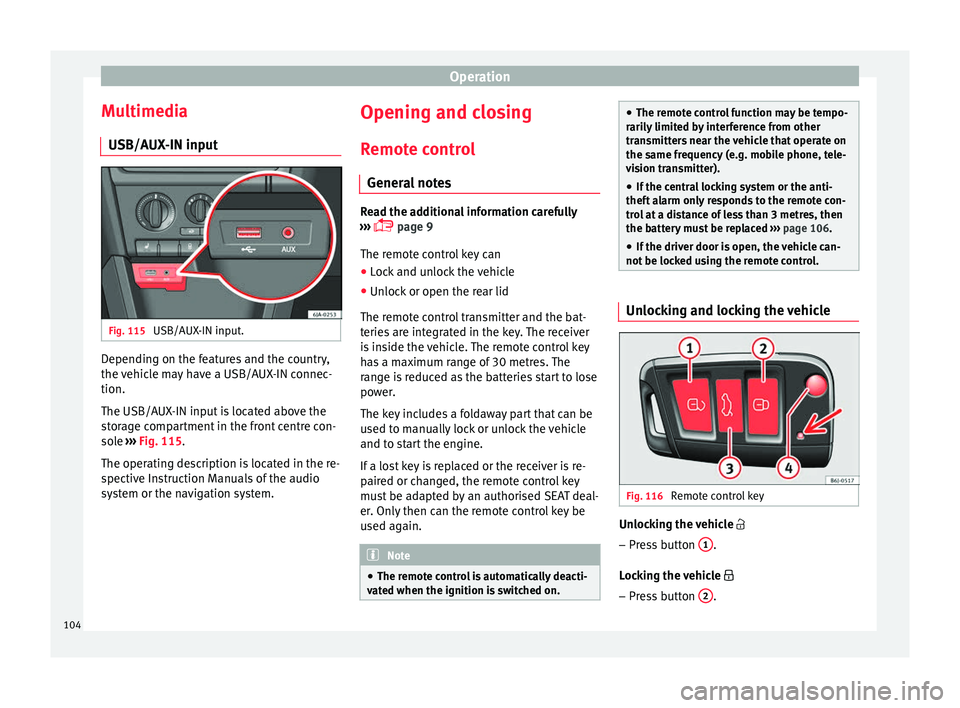
The USB/AUX-IN input is located above the
storage compartment in the front centre con-
sole ››› Fig. 115.
The operating description is located in the re-
spective Instruction Manuals of the audio
system or the navigation system. Opening and closing
R emot
e c
ontrol
General notes Read the additional information carefully
›› ›
page 9
The remote control key can
● Lock and unlock the vehicle
● Unlock or open the rear lid
The remot e c
ontrol transmitter and the bat-
teries are integrated in the key. The receiver
is inside the vehicle. The remote control key
has a maximum range of 30 metres. The
range is reduced as the batteries start to lose
power.
The key includes a foldaway part that can be
used to manually lock or unlock the vehicle
and to start the engine.
If a lost key is replaced or the receiver is re-
paired or changed, the remote control key
must be adapted by an authorised SEAT deal-
er. Only then can the remote control key be
used again. Note
● The remot e c
ontrol is automatically deacti-
vated when the ignition is switched on. ●
The remot e c
ontrol function may be tempo-
rarily limited by interference from other
transmitters near the vehicle that operate on
the same frequency (e.g. mobile phone, tele-
vision transmitter).
● If the central locking system or the anti-
theft a
larm only responds to the remote con-
trol at a distance of less than 3 metres, then
the battery must be replaced ››› page 106.
● If the driver door is open, the vehicle can-
not be lock
ed using the remote control. Unlocking and locking the vehicle
Fig. 116
Remote control key Unlocking the vehicle
– Press button 1 .
L oc
k
ing the vehicle
– Press button 2 .
104
Page 108 of 248
Operation
WARNING
● Never l e
ave the key inside whenever you
leave the vehicle - even if only for a moment.
This is particularly important if children are
to remain in the vehicle. Children might start
the engine or some other electrical compo-
nent, e.g. electric windows. Risk of injury!
● Wait until the vehicle has completely stop-
ped before t
aking the key out of the ignition.
Otherwise the steering wheel may lock sud-
denly. Risk of accident! CAUTION
● Eac h k
ey contains electronic components
and must, therefore, be protected from damp-
ness and strong vibrations.
● Keep the grooves in the key shaft clean.
Any dir
t (fibre from clothing, dust, etc.) has a
negative impact on locks, ignition, etc. Note
Should a key be lost, request a duplicate key
from an Authori sed S
EAT dealer. Replacing the battery in the remote
c
ontr
o
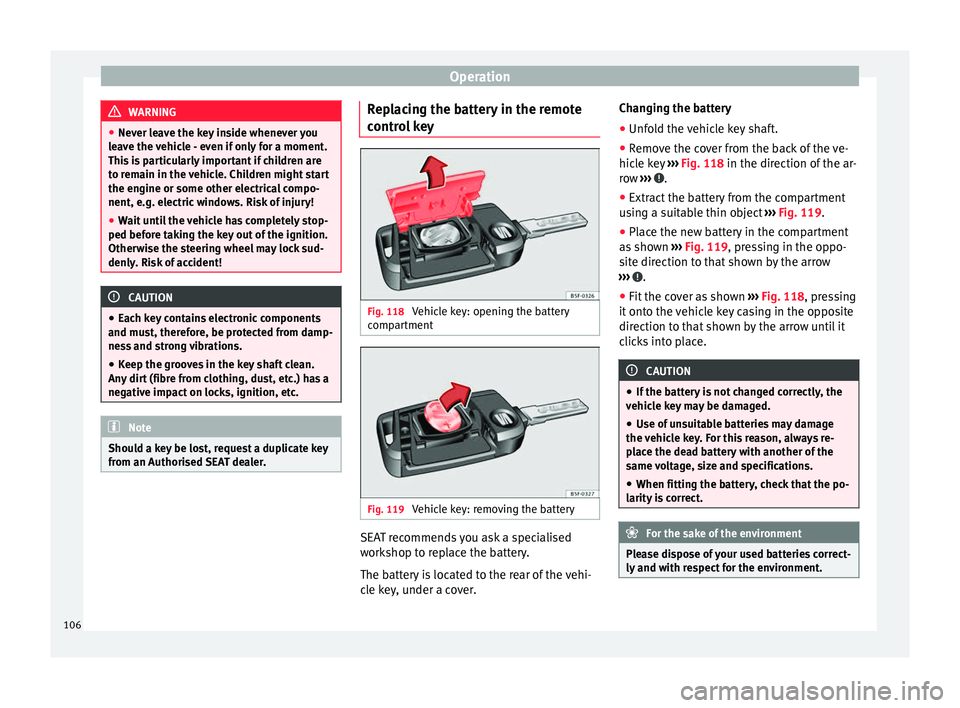
l key Fig. 118
Vehicle key: opening the battery
c omp
ar
tment Fig. 119
Vehicle key: removing the battery SEAT recommends you ask a specialised
w
ork
shop t
o replace the battery.
The battery is located to the rear of the vehi-
cle key, under a cover. Changing the battery
● Unfold the vehicle key shaft.
● Remove the cover from the back of the ve-
hicle k
ey ››› Fig. 118 in the direction of the ar-
row ››› .
● Extract the battery from the compartment
u s
in
g a suitable thin object ››› Fig. 119.
● Place the new battery in the compartment
as sho
wn ››› Fig. 119, pressing in the oppo-
site direction to that shown by the arrow
››› .
● Fit the cover as shown ››
›
Fig. 118 , pressing
it onto the vehicle key casing in the opposite
direction to that shown by the arrow until it
clicks into place. CAUTION
● If the b att
ery is not changed correctly, the
vehicle key may be damaged.
● Use of unsuitable batteries may damage
the vehic
le key. For this reason, always re-
place the dead battery with another of the
same voltage, size and specifications.
● When fitting the battery, check that the po-
larity i
s correct. For the sake of the environment
Please dispose of your used batteries correct-
ly and w ith r
espect for the environment.106
Page 117 of 248
Opening and closing
Opening and closing of electric
w indo
w
s
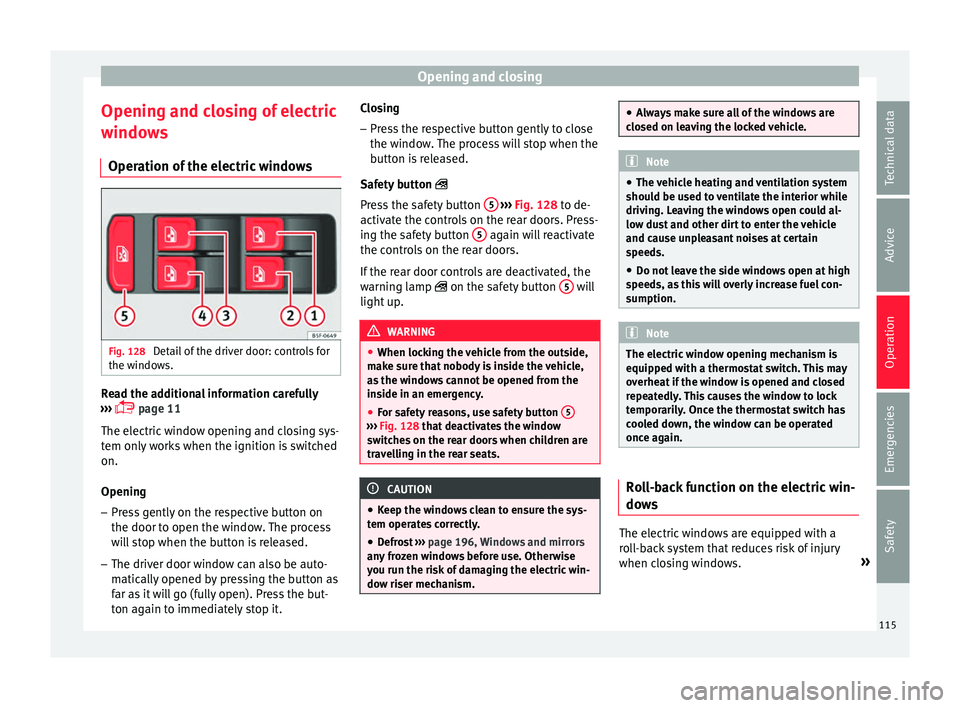
Operation of the electric windows Fig. 128
Detail of the driver door: controls for
the w indo
w
s. Read the additional information carefully
› ›
›
page 11
The electric window opening and closing sys-
tem only works when the ignition is switched
on.
Opening
– Press gently on the respective button on
the door to open the windo
w. The process
will stop when the button is released.
– The driver door window can also be auto-
matical
ly opened by pressing the button as
far as it will go (fully open). Press the but-
ton again to immediately stop it. Closing
– Press the respective button gently to close
the window
. The process will stop when the
button is released.
Safety button
Press the safety button 5
› ››
Fig. 128
t
o de-
activate the controls on the rear doors. Press-
ing the safety button 5 again will reactivate
the c ontr
o
ls on the rear doors.
If the rear door controls are deactivated, the
warning lamp on the safety button 5 will
light up
. WARNING
● When lock in
g the vehicle from the outside,
make sure that nobody is inside the vehicle,
as the windows cannot be opened from the
inside in an emergency.
● For safety reasons, use safety button 5 ›››
Fig. 128 that de
activates the window
switches on the rear doors when children are
travelling in the rear seats. CAUTION
● Keep the w indo
ws clean to ensure the sys-
tem operates correctly.
● Defrost ››› page 196, Windows and mirrors
an
y frozen windows before use. Otherwise
you run the risk of damaging the electric win-
dow riser mechanism. ●
Alw a
ys make sure all of the windows are
closed on leaving the locked vehicle. Note
● The vehic
le heating and ventilation system
should be used to ventilate the interior while
driving. Leaving the windows open could al-
low dust and other dirt to enter the vehicle
and cause unpleasant noises at certain
speeds.
● Do not leave the side windows open at high
speeds, a
s this will overly increase fuel con-
sumption. Note
The electric window opening mechanism is
equipped w ith a thermo
stat switch. This may
overheat if the window is opened and closed
repeatedly. This causes the window to lock
temporarily. Once the thermostat switch has
cooled down, the window can be operated
once again. Roll-back function on the electric win-
do
w
s The electric windows are equipped with a
r
o
l
l-back system that reduces risk of injury
when closing windows. »
115
Technical data
Advice
Operation
Emergencies
Safety
Page 118 of 248
Operation
If an obstacle is present, the closing mecha-
ni sm w
i
ll stop and the window will roll back a
few centimetres.
If an obstacle prevents closing for the next
10 seconds, the closing mechanism will once
again stop and the window will roll back an-
other few centimetres.
If in the next 10 seconds you attempt to close
the window after it has rolled back the sec-
ond time, only the closing mechanism will be
stopped even if the obstacle is still present.
The roll-back function is still connected.
The roll-back function will only be disconnec-
ted if you once again attempt to close the
window in the following 10 seconds. In this
case, the window will close at full force .
If you wait for a further 10 seconds, the roll-
back function will be once again connected. Lights and visibility
Light s
Intr oduction Read the additional information carefully
›› ›
page 18
The location of the controls of right-hand
drive cars differs slightly from the location
shown here ››› Fig. 129 ››› page 117. Howev-
er, the symbols indicating the respective po-
sitions of the controls remain the same. WARNING
Never drive with only the side lights on! The
side light s
are not bright enough to illumi-
nate the road ahead and to ensure that other
road users are able to see you. Always use
your dipped beam headlights if it is dark or if
visibility is poor. CAUTION
● Use the light s
in line with local law.
● However, drivers always remain responsi-
ble f
or correctly adjusting and using the
lights. Note
● An audibl e w
arning will be heard when the
light control is set to and you remove the ignition key and open the door. Once the
driver door i
s
closed (ignition off), the audi-
ble warning will stop, whereas the side lights
will remain on to light up the stationary vehi-
cle in case this is necessary.
● Depending on weather conditions (cold or
wet), the lights
may mist up temporarily on
the inside. This is particularly the case in the
event of a difference in temperature between
the inside and in front of the light. By switch-
ing on the lights, the area through which the
beam of light is projected will quickly be
demisted, although the edges may remain
misted. The real lights and turn signals can
mist up. This has no influence on the useful
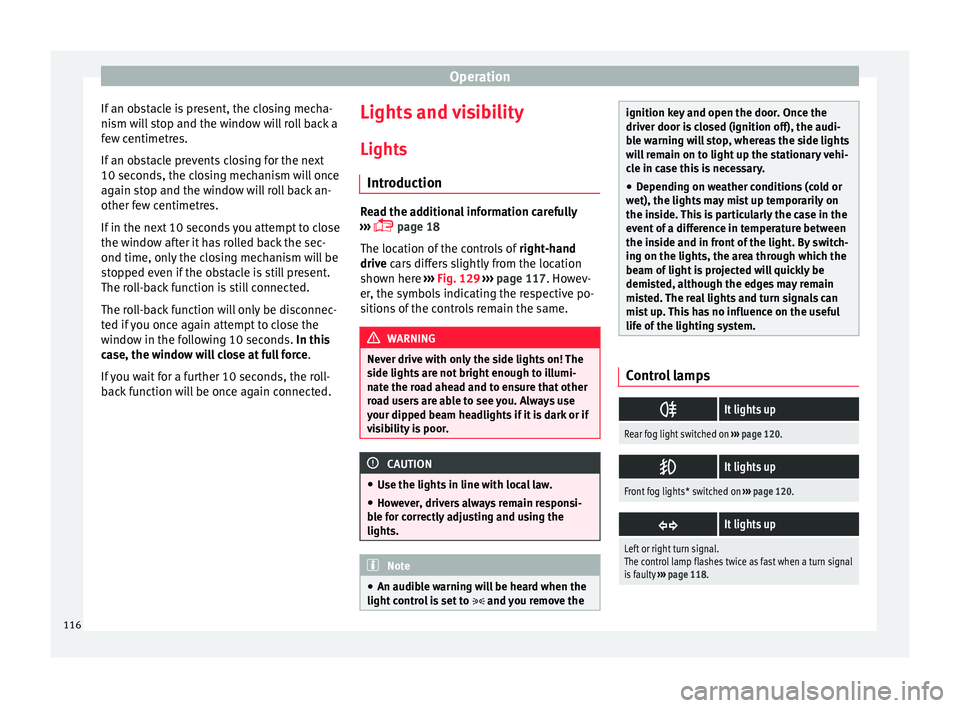
life of the lighting system. Control lamps
It lights up
Rear fog light switched on
››› page 120.
It lights up
Front fog lights* switched on
››› page 120.
It lights up
Left or right turn signal.
The control lamp flashes twice as fast when a turn signal
is faulty
››› page 118. 116
Page 119 of 248
Lights and visibility
It lights up
Main beam on or flasher on
››› page 118.
It lights up
Bulb failure
››› page 83
For example, the information display indicates:
Check front right dipped headlight! Several warning and control lamps light up
for a f
ew sec
onds when the ignition is switch-
ed on, signalling that the function is being
verified. They will switch off after a few sec-
onds. WARNING
Observe the safety warnings ›››
in Warning
and contr o
l lamps on page 98. Note
The rear side lights and number plate light
cont ain sev
eral bulbs. The control lamp
lights up only when there is a fault in all the
number plate bulbs or side light bulbs (of a
combined tail light). Therefore it is advisable
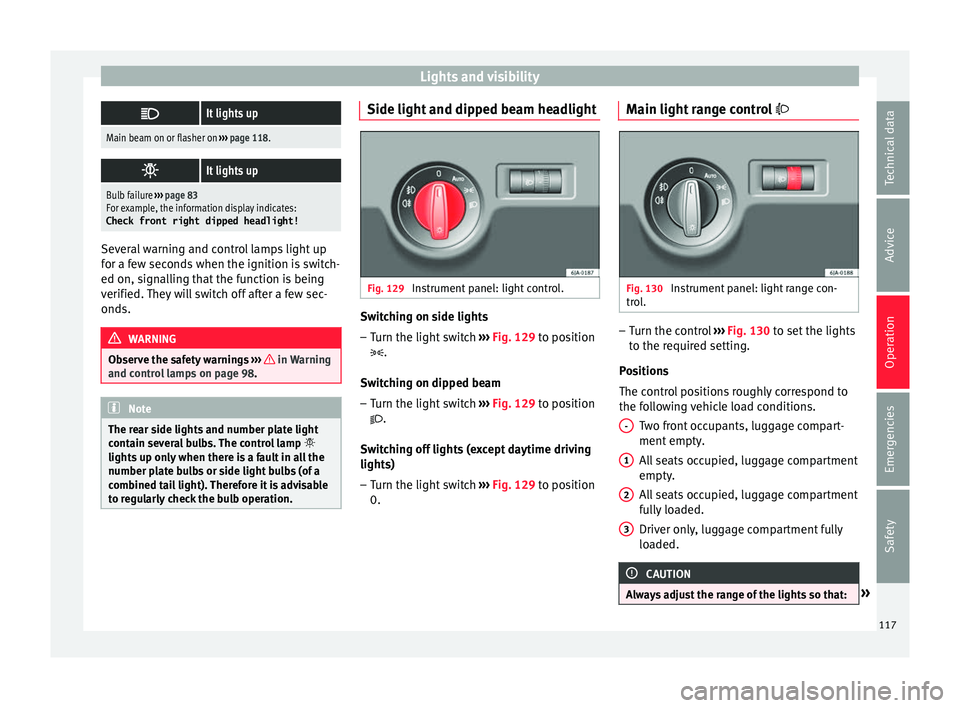
to regularly check the bulb operation. Side light and dipped beam headlight
Fig. 129
Instrument panel: light control. Switching on side lights
– Turn the light switch ››
›
Fig. 129 to position
.
Switching on dipped beam
– Turn the light switch ›››
Fig. 129 to position
.
Switching off lights (except daytime driving
lights) – Turn the light switch ›››
Fig. 129 to position
0. Main light range control
Fig. 130
Instrument panel: light range con-
tr o
l
. –
Turn the control ››
›
Fig. 130 to set the lights
to the required setting.
Positions
The control positions roughly correspond to
the following vehicle load conditions. Two front occupants, luggage compart-
ment empty.
All seats occupied, luggage compartment
empty.
All seats occupied, luggage compartment
fully loaded.
Driver only, luggage compartment fully
loaded. CAUTION
Always adjust the range of the lights so that: » -
1
2
3
117
Technical data
Advice
Operation
Emergencies
Safety