key Seat Toledo 2016 Owner's manual
[x] Cancel search | Manufacturer: SEAT, Model Year: 2016, Model line: Toledo, Model: Seat Toledo 2016Pages: 248, PDF Size: 5.82 MB
Page 5 of 248
Table of Contents
Table of Contents
The e s
senti
als . . . . . . . . . . . . . . . . . . . . . . . . 5
Exterior view . . . . . . . . . . . . . . . . . . . . . . . . . . . . 5
Exterior view . . . . . . . . . . . . . . . . . . . . . . . . . . . . 6
Interior view (left-hand drive) . . . . . . . . . . . . . . 7
Interior view (right-hand drive) . . . . . . . . . . . . . 8
How it works . . . . . . . . . . . . . . . . . . . . . . . . . . . . 9
Unlocking and locking . . . . . . . . . . . . . . . . . . . . 9
Before driving . . . . . . . . . . . . . . . . . . . . . . . . . . . 11
Airbags . . . . . . . . . . . . . . . . . . . . . . . . . . . . . . . . 14
Child seats . . . . . . . . . . . . . . . . . . . . . . . . . . . . . 16
Starting the vehicle . . . . . . . . . . . . . . . . . . . . . . 18
Lights and visibility . . . . . . . . . . . . . . . . . . . . . . 18
Easy Connect . . . . . . . . . . . . . . . . . . . . . . . . . . . 21
Driver information system . . . . . . . . . . . . . . . . . 23
Driving data . . . . . . . . . . . . . . . . . . . . . . . . . . . . 26
Cruise control . . . . . . . . . . . . . . . . . . . . . . . . . . . 31
Warning lamps . . . . . . . . . . . . . . . . . . . . . . . . . . 32
Gearbox lever . . . . . . . . . . . . . . . . . . . . . . . . . . . 34
Air conditioning . . . . . . . . . . . . . . . . . . . . . . . . . 36
Fluid Level control . . . . . . . . . . . . . . . . . . . . . . . 39
Emergencies . . . . . . . . . . . . . . . . . . . . . . . . . . . . 43
Fuses . . . . . . . . . . . . . . . . . . . . . . . . . . . . . . . . . . 43
Bulbs . . . . . . . . . . . . . . . . . . . . . . . . . . . . . . . . . . 44
Action in the event of a puncture . . . . . . . . . . . 44
Changing a wheel . . . . . . . . . . . . . . . . . . . . . . . 46
Snow chains . . . . . . . . . . . . . . . . . . . . . . . . . . . . 49
Emergency towing of the vehicle . . . . . . . . . . . 50
How to jump start . . . . . . . . . . . . . . . . . . . . . . . . 51
Changing the windscreen wiper blades . . . . . . 53
Safety . . . . . . . . . . . . . . . . . . . . . . . . . . . . . . . . 55
Safe driving . . . . . . . . . . . . . . . . . . . . . . . . . . . . 55
Safety first! . . . . . . . . . . . . . . . . . . . . . . . . . . . . . 55
Advice about driving . . . . . . . . . . . . . . . . . . . . . 55 Correct position for passengers . . . . . . . . . . . . 56
Pedal area . . . . . . . . . . . . . . . . . . . . . . . . . . . . . . 60
Seat belts
. . . . . . . . . . . . . . . . . . . . . . . . . . . . . . 61
The whys and wherefores of seat belts . . . . . . . 61
How to properly adjust your seatbelt . . . . . . . . 64
Seat belt tensioners . . . . . . . . . . . . . . . . . . . . . . 65
Airbag system . . . . . . . . . . . . . . . . . . . . . . . . . . 66
Brief introduction . . . . . . . . . . . . . . . . . . . . . . . . 66
Airbag safety instructions . . . . . . . . . . . . . . . . . 69
Deactivating airbags . . . . . . . . . . . . . . . . . . . . . 71
Transporting children safely . . . . . . . . . . . . . . . 72
Safety for children . . . . . . . . . . . . . . . . . . . . . . . 72
Child seats . . . . . . . . . . . . . . . . . . . . . . . . . . . . . 74
Emergencies . . . . . . . . . . . . . . . . . . . . . . . . . . 75
Self-help . . . . . . . . . . . . . . . . . . . . . . . . . . . . . . . 75
Emergency equipment . . . . . . . . . . . . . . . . . . . . 75
Changing a wheel . . . . . . . . . . . . . . . . . . . . . . . 75
Tyre repairs . . . . . . . . . . . . . . . . . . . . . . . . . . . . . 76
Towing the vehicle . . . . . . . . . . . . . . . . . . . . . . . 78
Fuses and bulbs . . . . . . . . . . . . . . . . . . . . . . . . . 80
Fuses . . . . . . . . . . . . . . . . . . . . . . . . . . . . . . . . . . 80
Changing bulbs . . . . . . . . . . . . . . . . . . . . . . . . . 83
Changing the fog light bulbs . . . . . . . . . . . . . . . 86
Changing the rear lights (on the side panel) . . 87
Changing tail lights (on the rear lid) . . . . . . . . . 89
Changing the bulb on the number plate . . . . . . 91
Operation . . . . . . . . . . . . . . . . . . . . . . . . . . . . . 93
Controls and displays . . . . . . . . . . . . . . . . . . . . 93
General instrument panel . . . . . . . . . . . . . . . . . 92
Instruments and warning lamps . . . . . . . . . . . . 94
Instruments . . . . . . . . . . . . . . . . . . . . . . . . . . . . 94
Control lamps . . . . . . . . . . . . . . . . . . . . . . . . . . . 98
Introduction to the Easy Connect system* . . . . 99
System settings (CAR)* . . . . . . . . . . . . . . . . . . . 99 Communications and multimedia
. . . . . . . . . . . 100
Steering wheel controls* . . . . . . . . . . . . . . . . . . 100
Multimedia . . . . . . . . . . . . . . . . . . . . . . . . . . . . . 104
Opening and closing . . . . . . . . . . . . . . . . . . . . . 104
Remote control . . . . . . . . . . . . . . . . . . . . . . . . . . 104
Keys . . . . . . . . . . . . . . . . . . . . . . . . . . . . . . . . . . . 105
Central locking system . . . . . . . . . . . . . . . . . . . . 107
Anti-theft alarm system* . . . . . . . . . . . . . . . . . . 112
Rear lid . . . . . . . . . . . . . . . . . . . . . . . . . . . . . . . . 113
Opening and closing of electric windows . . . . . 115
Lights and visibility . . . . . . . . . . . . . . . . . . . . . . 116
Lights . . . . . . . . . . . . . . . . . . . . . . . . . . . . . . . . . 116
Interior lights . . . . . . . . . . . . . . . . . . . . . . . . . . . 122
Visibility . . . . . . . . . . . . . . . . . . . . . . . . . . . . . . . 123
Windscreen wipers and windscreen wash-
ers . . . . . . . . . . . . . . . . . . . . . . . . . . . . . . . . . . . . 124
Mirr
ors . . . . . . . . . . . . . . . . . . . . . . . . . . . . . . . . . 126
Seats and head restraints . . . . . . . . . . . . . . . . . 127
Adjusting seats and head restraints . . . . . . . . . 127
Seat functions . . . . . . . . . . . . . . . . . . . . . . . . . . 128
Transport and practical equipment . . . . . . . . . 131
Practical equipment . . . . . . . . . . . . . . . . . . . . . . 131
Storing objects . . . . . . . . . . . . . . . . . . . . . . . . . . 137
Luggage compartment . . . . . . . . . . . . . . . . . . . . 138
Roof rack* . . . . . . . . . . . . . . . . . . . . . . . . . . . . . . 141
Air conditioning . . . . . . . . . . . . . . . . . . . . . . . . . 142
Heating and air conditioning . . . . . . . . . . . . . . . 142
Heating and fresh air . . . . . . . . . . . . . . . . . . . . . 144
Air conditioning (manual)* . . . . . . . . . . . . . . . . 145
Climatronic* (automatic air conditioning) . . . . 147
Driving . . . . . . . . . . . . . . . . . . . . . . . . . . . . . . . . 149
Starting and stopping the engine . . . . . . . . . . . 149
Brakes and brake servo systems . . . . . . . . . . . . 152
Braking and stability systems . . . . . . . . . . . . . . 154
Manual gearbox . . . . . . . . . . . . . . . . . . . . . . . . . 156
Automatic gearbox . . . . . . . . . . . . . . . . . . . . . . . 157
Run-in and economical driving . . . . . . . . . . . . . 161
3
Page 11 of 248
The essentials
How it works
Un loc
k
ing and locking
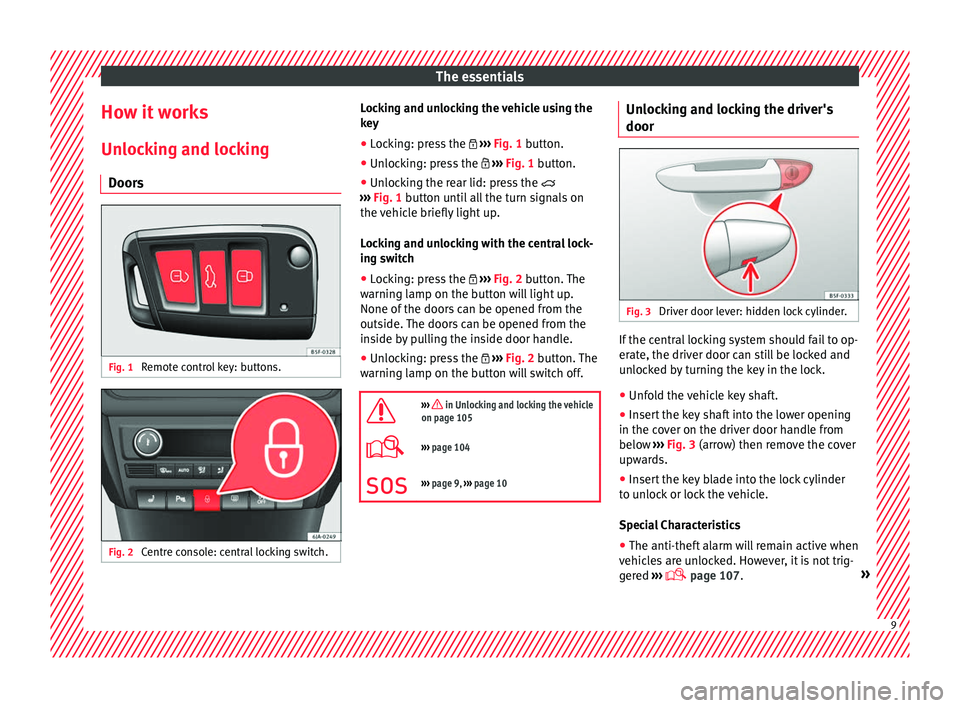
Doors Fig. 1
Remote control key: buttons. Fig. 2
Centre console: central locking switch. Locking and unlocking the vehicle using the
k
ey
● Loc
king: press the ›››
Fig. 1 button.
● Unlocking: press the ›››
Fig. 1 button.
● Unlocking the rear lid: press the
›››
Fig. 1 button until all the turn signals on
the vehicle briefly light up.
Locking and unlocking with the central lock-
ing switch
● Locking: press the ›››
Fig. 2 button. The
warning lamp on the button will light up.
None of the doors can be opened from the
outside. The doors can be opened from the
inside by pulling the inside door handle.
● Unlocking: press the ›››
Fig. 2 button. The
warning lamp on the button will switch off.
››› in Unlocking and locking the vehicle
on page 105
››› page 104
››› page 9, ››› page 10 Unlocking and locking the driver's
door
Fig. 3
Driver door lever: hidden lock cylinder. If the central locking system should fail to op-
er
at
e, the driv
er door can still be locked and
unlocked by turning the key in the lock.
● Unfold the vehicle key shaft.
● Insert the key shaft into the lower opening
in the cov
er on the driver door handle from
below ››› Fig. 3 (arrow) then remove the cover
upwards.
● Insert the key blade into the lock cylinder
to un
lock or lock the vehicle.
Special Characteristics
● The anti-theft alarm will remain active when
vehicl
es are unlocked. However, it is not trig-
gered ›››
page 107. » 9
Page 12 of 248
The essentials
● Af t
er the driv
er door is opened, you have
15 seconds to switch on the ignition. Once
this time has elapsed, the alarm is triggered.
● Switch the ignition on. The electronic im-
mobi
lizer recognises a valid vehicle key and
deactivates the anti-theft alarm system. Note
The anti-theft alarm is not activated when the
vehic l
e is locked manually using the key
shaft ›››
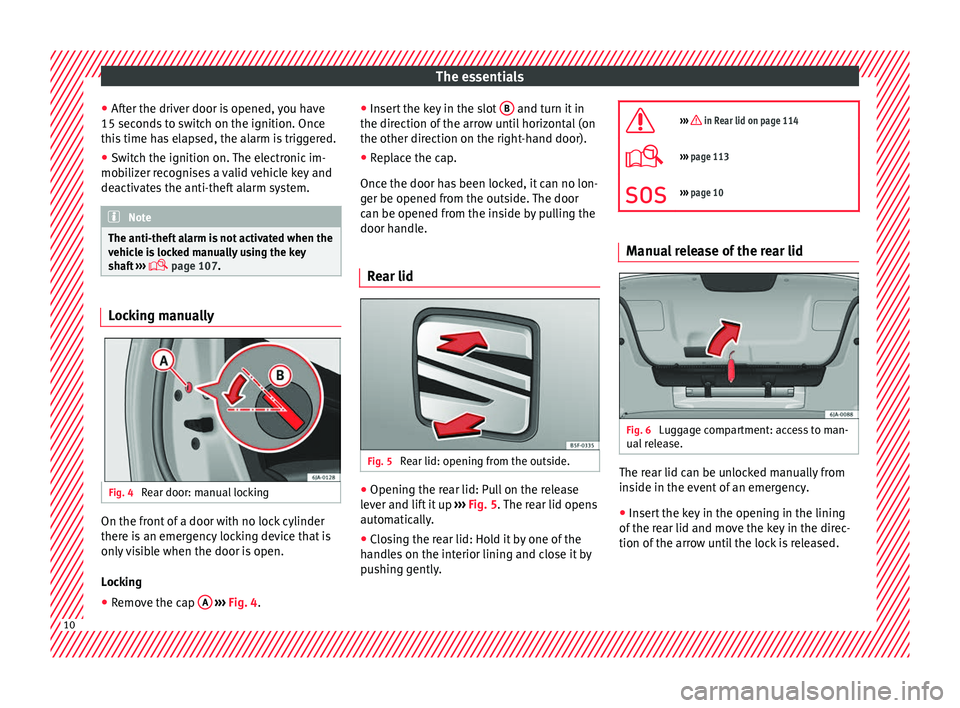
page 107. Locking manually
Fig. 4
Rear door: manual locking On the front of a door with no lock cylinder
ther
e i
s
an emergency locking device that is
only visible when the door is open.
Locking
● Remove the cap A
› ›
› Fig. 4
. ●
Insert
the key in the slot B and turn it in
the dir ection of
the arr
ow until horizontal (on
the other direction on the right-hand door).
● Replace the cap.
Once the door ha
s been locked, it can no lon-
ger be opened from the outside. The door
can be opened from the inside by pulling the
door handle.
Rear lid Fig. 5
Rear lid: opening from the outside. ●
Opening the rear lid: Pull on the release
l ev
er and lif
t it up ››› Fig. 5. The rear lid opens
automatically.
● Closing the rear lid: Hold it by one of the
handle
s on the interior lining and close it by
pushing gently.
››› in Rear lid on page 114
›››
page 113
››› page 10 Manual release of the rear lid
Fig. 6
Luggage compartment: access to man-
ual r
el
ease. The rear lid can be unlocked manually from
in
s
ide in the ev
ent of an emergency.
● Insert the key in the opening in the lining
of the re
ar lid and move the key in the direc-
tion of the arrow until the lock is released. 10
Page 17 of 248
The essentials
To deactivate the front passenger front air-
b ag:
● Open the glo v
e compartment on the front
pas
senger side.
● Insert the key blade into the slot provided
in the deactivation sw
itch.
● Approximately ¾ of the length of the key
bla
de remains inserted (the maximum).
● Turn the key blade, changing its position to
. Do not for
ce it. If you have difficulty, en-
sure that you have inserted the key as far as
it will go.
● Finally, check the control lamp on the in-
strument p
anel where it shows
the following should appear .
››› in Front passenger front airbag
switch on page 72
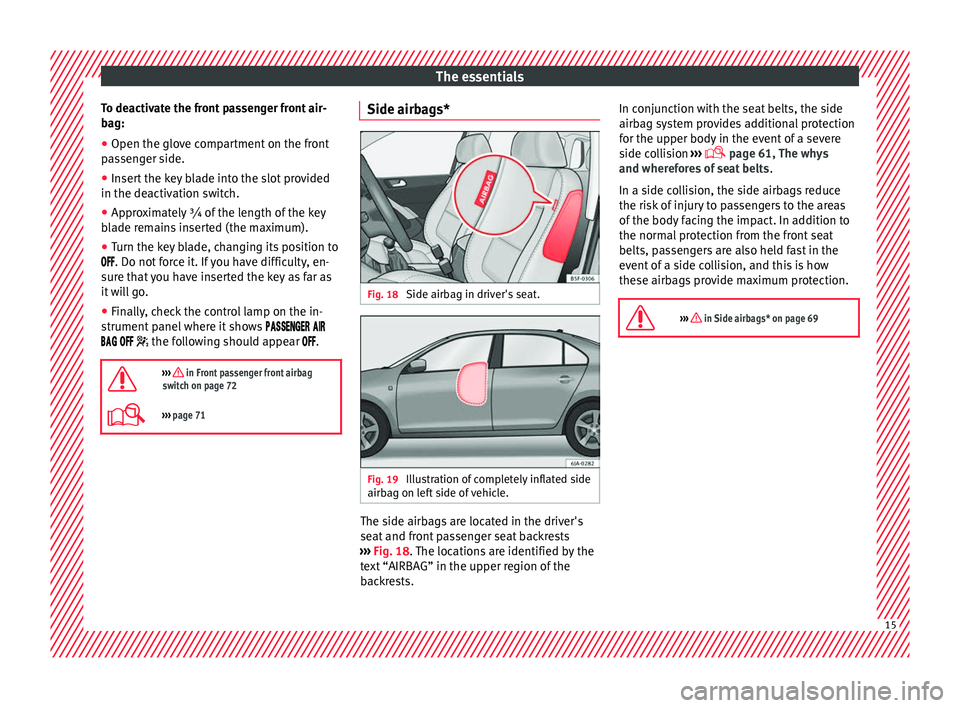
››› page 71 Side airbags*
Fig. 18
Side airbag in driver's seat. Fig. 19
Illustration of completely inflated side
airb ag on l
ef
t side of vehicle. The side airbags are located in the driver's
se
at
and fr
ont passenger seat backrests
››› Fig. 18. The locations are identified by the
text “AIRBAG” in the upper region of the
backrests. In conjunction with the seat belts, the side
airbag sys
tem provides additional protection
for the upper body in the event of a severe
side collision ›››
page 61, The whys
and wherefores of seat belts .
In a side collision, the side airbags reduce
the risk of injury to passengers to the areas
of the body facing the impact. In addition to
the normal protection from the front seat
belts, passengers are also held fast in the
event of a side collision, and this is how
these airbags provide maximum protection.
››› in Side airbags* on page 69 15
Page 20 of 248
The essentials
the “ISOFIX” rings is between the rear seat
b ac
k
rest and the seat cushioning. The Top
Tether* rings are located at the rear of the
backrests of the rear seats (behind the seat
backrest or in the boot).
Child seats with the “ISOFIX” and Top Tether*
attachment system are available from Techni-
cal Services.
››› in Safety instructions on page 74 Starting the vehicle
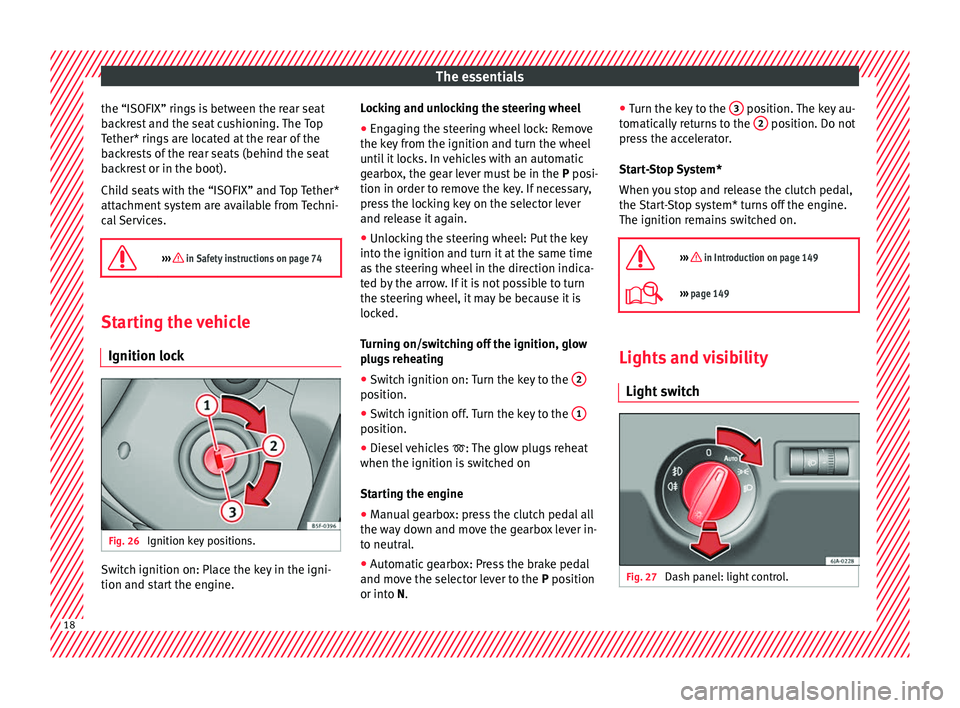
Ignition loc kFig. 26
Ignition key positions. Switch ignition on: Place the key in the igni-
tion and s
t
ar
t the engine. Locking and unlocking the steering wheel
● Engaging the steering wheel lock: Remove
the key fr
om the ignition and turn the wheel
until it locks. In vehicles with an automatic
gearbox, the gear lever must be in the P posi-
tion in order to remove the key. If necessary,
press the locking key on the selector lever
and release it again.
● Unlocking the steering wheel: Put the key
into the ignition and turn it
at the same time
as the steering wheel in the direction indica-
ted by the arrow. If it is not possible to turn
the steering wheel, it may be because it is
locked.
Turning on/switching off the ignition, glow
plugs reheating
● Switch ignition on: Turn the key to the 2 position.
●
Switch ignition off. Turn the key to the 1 position.
●
Diesel vehicles : The glo
w p
lugs reheat
when the ignition is switched on
Starting the engine
● Manual gearbox: press the clutch pedal all
the way
down and move the gearbox lever in-
to neutral.
● Automatic gearbox: Press the brake pedal
and mov e the sel
ector lever to the P position
or into N. ●
Turn the k ey
to the 3 position. The key au-
t om
atic
ally returns to the 2 position. Do not
pr e
s
s the accelerator.
Start-Stop System*
When you stop and release the clutch pedal,
the Start-Stop system* turns off the engine.
The ignition remains switched on.
››› in Introduction on page 149
››› page 149 Lights and visibility
Light sw
it
ch Fig. 27
Dash panel: light control.18
Page 22 of 248
The essentials
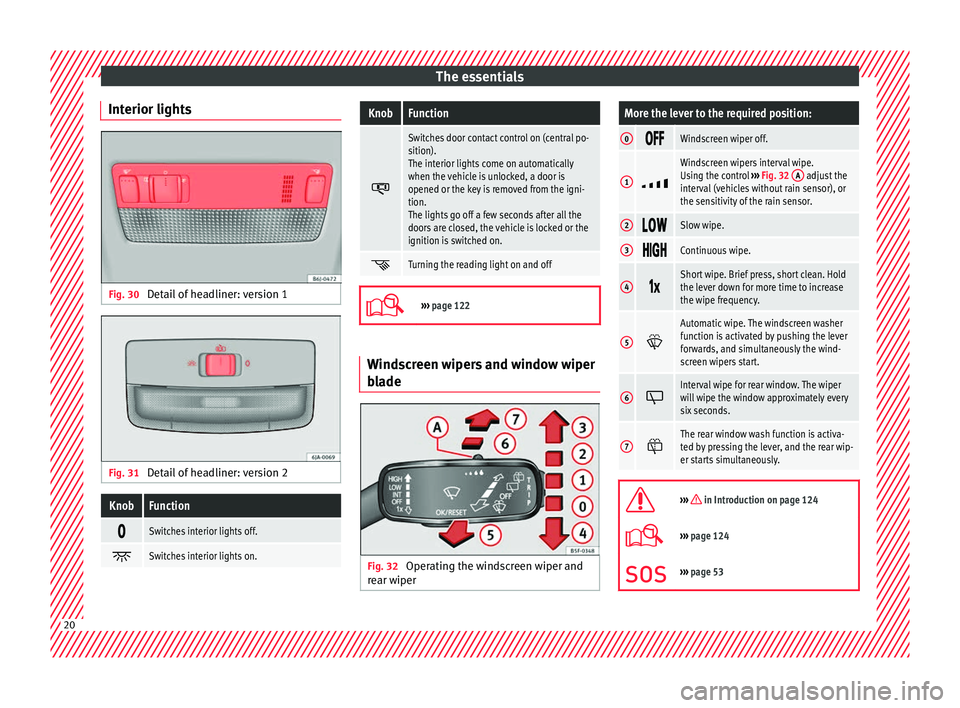
Interior lights Fig. 30
Detail of headliner: version 1 Fig. 31
Detail of headliner: version 2KnobFunction
Switches interior lights off.
Switches interior lights on.
KnobFunction
Switches door contact control on (central po-
sition).
The interior lights come on automatically
when the vehicle is unlocked, a door is
opened or the key is removed from the igni-
tion.
The lights go off a few seconds after all the
doors are closed, the vehicle is locked or the
ignition is switched on.
Turning the reading light on and off
›››
page 122 Windscreen wipers and window wiper
b
l
a
de Fig. 32
Operating the windscreen wiper and
r e ar w
iper
More the lever to the required position:
0 Windscreen wiper off.
1
Windscreen wipers interval wipe.
Using the control
››› Fig. 32 A adjust the
interval (vehicles without rain sensor), or
the sensitivity of the rain sensor.
2 Slow wipe.
3
Continuous wipe.
4
Short wipe. Brief press, short clean. Hold
the lever down for more time to increase
the wipe frequency.
5
Automatic wipe. The windscreen washer
function is activated by pushing the lever
forwards, and simultaneously the wind-
screen wipers start.
6
Interval wipe for rear window. The wiper
will wipe the window approximately every
six seconds.
7
The rear window wash function is activa-
ted by pressing the lever, and the rear wip-
er starts simultaneously.
››› in Introduction on page 124
›››
page 124
››› page 53 20
Page 28 of 248
The essentialsIllustra-
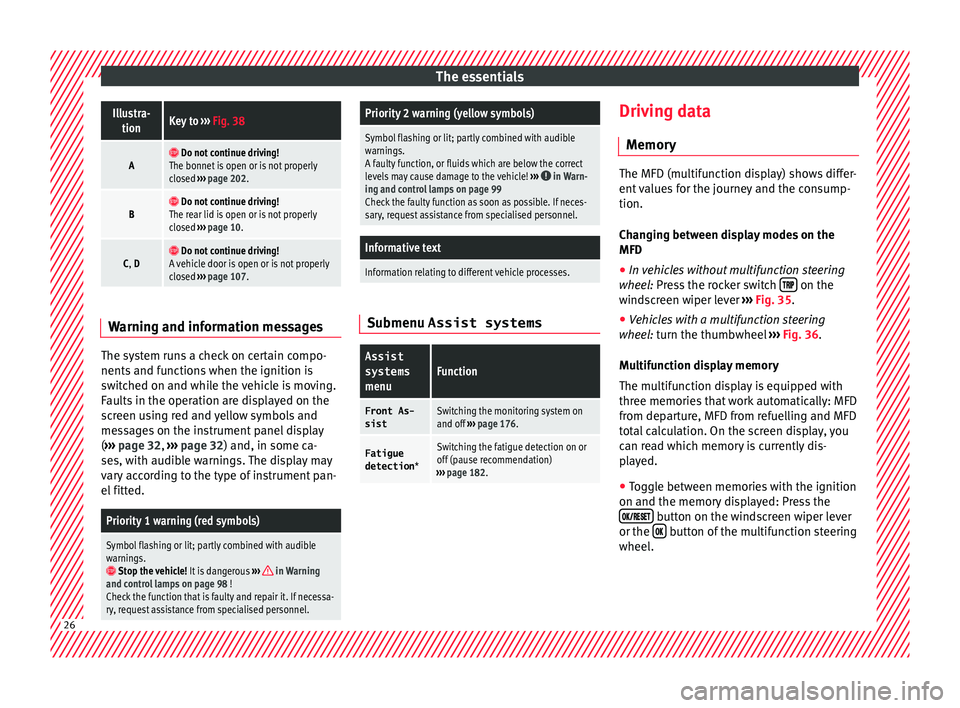
tionKey to ››› Fig. 38
A Do not continue driving!
The bonnet is open or is not properly
closed ››› page 202.
B Do not continue driving!
The rear lid is open or is not properly
closed ››› page 10.
C, D Do not continue driving!
A vehicle door is open or is not properly
closed ››› page 107. Warning and information messages
The system runs a check on certain compo-
nents
and f
u
nctions when the ignition is
switched on and while the vehicle is moving.
Faults in the operation are displayed on the
screen using red and yellow symbols and
messages on the instrument panel display
( ››› page 32, ››› page 32) and, in some ca-
ses, with audible warnings. The display may
vary according to the type of instrument pan-
el fitted.
Priority 1 warning (red symbols)
Symbol flashing or lit; partly combined with audible
warnings.
Stop the vehicle! It is dangerous ››› in Warning
and control lamps on page 98 !
Check the function that is faulty and repair it. If necessa-
ry, request assistance from specialised personnel.
Priority 2 warning (yellow symbols)
Symbol flashing or lit; partly combined with audible
warnings.
A faulty function, or fluids which are below the correct
levels may cause damage to the vehicle! ›››
in Warn-
ing and control lamps on page 99
Check the faulty function as soon as possible. If neces-
sary, request assistance from specialised personnel.
Informative text
Information relating to different vehicle processes. Submenu Assist systems
Assist
systems
menuFunction
Front As-
sistSwitching the monitoring system on
and off ››› page 176.
Fatigue
detection *Switching the fatigue detection on or
off (pause recommendation)
››› page 182. Driving data
M emor
y The MFD (multifunction display) shows differ-
ent
v
alues for the journey and the consump-
tion.
Changing between display modes on the
MFD
● In vehicles without multifunction steering
wheel:
Press the rocker switch on the
wind s
creen wiper lever ›››
Fig. 35.
● Vehicles with a multifunction steering
whee l:
turn the thumbwheel ›››
Fig. 36.
Multifunction display memory
The multifunction display is equipped with
three memories that work automatically: MFD
from departure, MFD from refuelling and MFD
total calculation. On the screen display, you
can read which memory is currently dis-
played. ● Toggle between memories with the ignition
on and the memory di
splayed: Press the
button on the windscreen wiper lever
or the button of the multifunction steering
wheel .26
Page 33 of 248
The essentials
Reading a service notification
W ith the ignition sw
it
ched on, the engine off
and the vehicle at a standstill, the current
service notification can be read:
Press and hold the button 4 for more than 5
sec ond
s
to consult the service message.
When the service date has passed , a minus
sign is displayed in front of the number of kil-
ometres or days.
Vehicles with text messages : Service
since --- km or --- days ago will be
shown on the display.
The time can also be set via the key and
Set up function button in the Easy Connect
sy s
t
em ›››
page 99.
Resetting service interval display
If the service was not carried out by a SEAT
dealership, the display can be reset as fol-
lows:
● Switch off the ignition, press and hold but-
ton ››
› Fig. 110
4 .
● Switch ignition back on.
● Release the 4
› ›
›
Fig. 110
button and
press it again for the next 20 seconds. Note
● The serv ic
e message disappears after a few
seconds, when the engine is started or when OK/RESET
is pressed on the windscreen wiper
lev er
, or OK on the multifunction steering
wheel.
● In v
ehicles with the LongLife system in
which the batt
ery has been disconnected for
a long period of time, it is not possible to cal-
culate the date of the next service. Therefore
the service interval display may not be cor-
rect. In this case, bear in mind the maximum
service intervals permitted in the ››› Book-
let Maintenance Programme. Cruise control
Oper atin
g the c
ruise control system
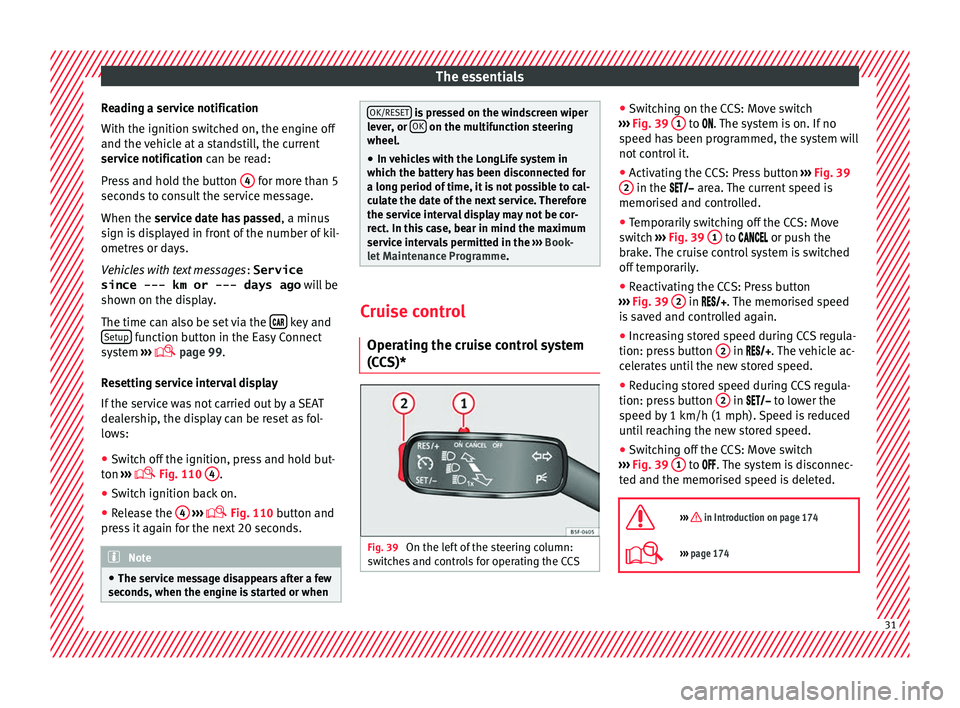
(CCS)* Fig. 39
On the left of the steering column:
sw it
c
hes and controls for operating the CCS ●
Sw it
c
hing on the CCS: Move switch
››› Fig. 39 1 to .
The system is on. If no
s peed h
as been programmed, the system will
not control it.
● Activating the CCS: Press button ›››
Fig. 39
2 in the ar
e
a. The current speed is
memorised and controlled.
● Temporarily switching off the CCS: Move
switc
h ››› Fig. 39 1 to
or push the
br ak
e. The cruise control system is switched
off temporarily.
● Reactivating the CCS: Press button
›››
Fig. 39 2 in
. The memorised speed
i
s saved and controlled again.
● Increasing stored speed during CCS regula-
tion: pres
s button 2 in
. The vehicle ac-
c
elerates until the new stored speed.
● Reducing stored speed during CCS regula-
tion: pres
s button 2 in t
o lower the
s peed b
y 1 km/h (1 mph). Speed is reduced
until reaching the new stored speed.
● Switching off the CCS: Move switch
›››
Fig. 39 1 to .
The system is disconnec-
t ed and the memori
sed speed is deleted.
››› in Introduction on page 174
››› page 174 31
Page 69 of 248
Airbag system
airbag. In this case, the inflating airbag may
inflict c
ritic
al or fatal injuries on the occu-
pant. This also applies to children.
Always maintain the greatest possible dis-
tance between yourself and the front airbag.
This way, the front airbags can completely
deploy when triggered, providing their maxi-
mum protection.
The most important factors that will trigger
an airbag are: the type of accident, the angle
of collision and the speed of the vehicle.
Whether or not the airbags are triggered de-
pends primarily on the vehicle deceleration
rate resulting from the collision and detected
by the control unit. If the vehicle deceleration
occurring during the collision and measured
by the control unit remains below the speci-
fied reference values, the front, side and/or
curtain airbags will not be triggered. Take in-
to account that the visible damage in a vehi-
cle involved in an accident, no matter how
serious, is not a determining factor for the
airbags to have been triggered. WARNING
● We arin
g the seat belt incorrectly or assum-
ing an incorrect sitting position can lead to
critical or fatal injuries.
● All vehicle occupants, including children,
who are not pr
operly belted can sustain criti-
cal or fatal injuries if the airbag is triggered.
Children up to 12 years old should always travel on the rear seat. Never transport chil-
dren in the
v
ehicle if they are not restrained
or the restraint system is not appropriate for
their age, size or weight.
● If you are not wearing a seat belt, or if you
lean f
orward or to the side while travelling or
assume an incorrect sitting position, there is
a substantially increased risk of injury. This
increased risk of injury will be further in-
creased if you are struck by an inflating air-
bag.
● To reduce the risk of injury from an inflating
airbag, alw
ays wear the seat belt properly
››› page 61.
● Always adjust the front seats properly. Description of airbag system
The airbag system mainly comprises (as per
v
ehic
l
e equipment):
● an electronic control and monitoring sys-
tem (contr
ol unit)
● frontal airbags for driver and passenger,
● side airbags,
● curtain airbags,
● a control lamp on the dash p
anel
››› page 68.
● key-operated switch for front passenger air-
bag,
● a contr
ol lamp for disabling/enabling the
front p
assenger airbag. The airbag system operation is monitored
electronic
ally. The airbag control lamp will il-
luminate for a few seconds every time the ig-
nition is switched on (self-diagnosis).
There is a fault in the system if the control
lamp :
● does not light up when the ignition is
switc
hed on ››› page 68,
● turns off after 4 seconds after the ignition
is sw
itched on
● turns off and then lights up again after the
ignition is sw
itched on
● illuminates or flashes while the vehicle is
movin
g.
The airbag system is not triggered if:
● the ignition is switched off
● there is a minor frontal collision
● there is a minor side collision
● there is a rear-end collision
● the vehicle turns over. WARNING
● The seat belt
s and airbags can only provide
maximum protection if the occupants are
seated correctly ››› page 56, Correct position
for passengers.
● If a fault has occurred in the airbag system,
have the sy
stem checked immediately by a
specialised workshop. Otherwise, during a » 67
Technical data
Advice
Operation
Emergencies
Safety
Page 70 of 248
Safety
frontal collision the system might not trigger
corr
ectly
or may fail to trigger at all. Airbag activation
The airbags deploy extremely rapidly, within
thous
andths
of a second, to provide addi-
tional protection in the event of an accident.
A fine dust may develop when the airbag de-
ploys. This is normal and it is not an indica-
tion of fire in the vehicle.
The airbag system is only ready to function
when the ignition is on.
In special accidents instances, several air-
bags may activate at the same time.
In the event of minor head-on and side colli-
sions, rear-end collisions, overturning or roll-
over of the vehicle, airbags do not activate.
Activation factors
The conditions that lead to the airbag system
activating in each situation cannot be gener-
alised. Some factors play an important role,
such as the properties of the object the vehi-
cle hits (hard/soft), angle of impact, vehicle
speed, etc.
Deceleration trajectory is key for airbag acti-
vation. The control unit analyses the collision trajec-
tor
y
and activates the respective restraint
system.
If the deceleration rate is below the prede-
fined reference value in the control unit the
airbags will not be triggered, even though
the accident may cause extensive damage to
the car.
The following airbags are triggered in seri-
ous head-on collisions
● Driver airbag.
● Front passenger front airbag
The fol
lowing airbags are triggered in seri-
ous side-on collisions
● Front side airbag on the side of the acci-
dent.
● Re
ar side airbag on the side of the acci-
dent.
● Cur
tain (head) airbag on the side of the ac-
cident.
In an ac
cident with airbag activation:
● the interior lights switch on (if the interior
light swit
ch is in the courtesy light position);
● the hazard warning lights switch on;
● all doors are unlocked;
● the fuel supply to the engine is cut. Airbag and seat belt tensioner control
lamp The control lamp monitors all airbags and
seat
belt
tensioners in the vehicle, including
control units and wiring connections.
Monitoring of airbag and belt tensioner sys-
tem
Both the airbag and belt tensioner systems
operation is constantly monitored electroni-
cally. Each time the ignition is switched on,
the control lamp illuminates for several
seconds (self-diagnosis) and the instrument
panel display* shows AIRBAG/TENSIONER.
The system must be checked when the con-
trol lamp :
● does not light up when the ignition is
swit c
hed on,
● turns off after 4 seconds after the ignition
is sw
itched on
● turns off and then lights up again after the
ignition is sw
itched on
● illuminates or flashes while the vehicle is
movin
g.
In the event of a malfunction, the warning
lamp stays on continuously. In addition, de-
pending on the malfunction, a fault message
appears on the instrument panel display for
approximately 10 seconds and a short audi-
ble warning is given. In this event, you
68