lock Seat Toledo 2016 Owner's manual
[x] Cancel search | Manufacturer: SEAT, Model Year: 2016, Model line: Toledo, Model: Seat Toledo 2016Pages: 248, PDF Size: 5.82 MB
Page 5 of 248
Table of Contents
Table of Contents
The e s
senti
als . . . . . . . . . . . . . . . . . . . . . . . . 5
Exterior view . . . . . . . . . . . . . . . . . . . . . . . . . . . . 5
Exterior view . . . . . . . . . . . . . . . . . . . . . . . . . . . . 6
Interior view (left-hand drive) . . . . . . . . . . . . . . 7
Interior view (right-hand drive) . . . . . . . . . . . . . 8
How it works . . . . . . . . . . . . . . . . . . . . . . . . . . . . 9
Unlocking and locking . . . . . . . . . . . . . . . . . . . . 9
Before driving . . . . . . . . . . . . . . . . . . . . . . . . . . . 11
Airbags . . . . . . . . . . . . . . . . . . . . . . . . . . . . . . . . 14
Child seats . . . . . . . . . . . . . . . . . . . . . . . . . . . . . 16
Starting the vehicle . . . . . . . . . . . . . . . . . . . . . . 18
Lights and visibility . . . . . . . . . . . . . . . . . . . . . . 18
Easy Connect . . . . . . . . . . . . . . . . . . . . . . . . . . . 21
Driver information system . . . . . . . . . . . . . . . . . 23
Driving data . . . . . . . . . . . . . . . . . . . . . . . . . . . . 26
Cruise control . . . . . . . . . . . . . . . . . . . . . . . . . . . 31
Warning lamps . . . . . . . . . . . . . . . . . . . . . . . . . . 32
Gearbox lever . . . . . . . . . . . . . . . . . . . . . . . . . . . 34
Air conditioning . . . . . . . . . . . . . . . . . . . . . . . . . 36
Fluid Level control . . . . . . . . . . . . . . . . . . . . . . . 39
Emergencies . . . . . . . . . . . . . . . . . . . . . . . . . . . . 43
Fuses . . . . . . . . . . . . . . . . . . . . . . . . . . . . . . . . . . 43
Bulbs . . . . . . . . . . . . . . . . . . . . . . . . . . . . . . . . . . 44
Action in the event of a puncture . . . . . . . . . . . 44
Changing a wheel . . . . . . . . . . . . . . . . . . . . . . . 46
Snow chains . . . . . . . . . . . . . . . . . . . . . . . . . . . . 49
Emergency towing of the vehicle . . . . . . . . . . . 50
How to jump start . . . . . . . . . . . . . . . . . . . . . . . . 51
Changing the windscreen wiper blades . . . . . . 53
Safety . . . . . . . . . . . . . . . . . . . . . . . . . . . . . . . . 55
Safe driving . . . . . . . . . . . . . . . . . . . . . . . . . . . . 55
Safety first! . . . . . . . . . . . . . . . . . . . . . . . . . . . . . 55
Advice about driving . . . . . . . . . . . . . . . . . . . . . 55 Correct position for passengers . . . . . . . . . . . . 56
Pedal area . . . . . . . . . . . . . . . . . . . . . . . . . . . . . . 60
Seat belts
. . . . . . . . . . . . . . . . . . . . . . . . . . . . . . 61
The whys and wherefores of seat belts . . . . . . . 61
How to properly adjust your seatbelt . . . . . . . . 64
Seat belt tensioners . . . . . . . . . . . . . . . . . . . . . . 65
Airbag system . . . . . . . . . . . . . . . . . . . . . . . . . . 66
Brief introduction . . . . . . . . . . . . . . . . . . . . . . . . 66
Airbag safety instructions . . . . . . . . . . . . . . . . . 69
Deactivating airbags . . . . . . . . . . . . . . . . . . . . . 71
Transporting children safely . . . . . . . . . . . . . . . 72
Safety for children . . . . . . . . . . . . . . . . . . . . . . . 72
Child seats . . . . . . . . . . . . . . . . . . . . . . . . . . . . . 74
Emergencies . . . . . . . . . . . . . . . . . . . . . . . . . . 75
Self-help . . . . . . . . . . . . . . . . . . . . . . . . . . . . . . . 75
Emergency equipment . . . . . . . . . . . . . . . . . . . . 75
Changing a wheel . . . . . . . . . . . . . . . . . . . . . . . 75
Tyre repairs . . . . . . . . . . . . . . . . . . . . . . . . . . . . . 76
Towing the vehicle . . . . . . . . . . . . . . . . . . . . . . . 78
Fuses and bulbs . . . . . . . . . . . . . . . . . . . . . . . . . 80
Fuses . . . . . . . . . . . . . . . . . . . . . . . . . . . . . . . . . . 80
Changing bulbs . . . . . . . . . . . . . . . . . . . . . . . . . 83
Changing the fog light bulbs . . . . . . . . . . . . . . . 86
Changing the rear lights (on the side panel) . . 87
Changing tail lights (on the rear lid) . . . . . . . . . 89
Changing the bulb on the number plate . . . . . . 91
Operation . . . . . . . . . . . . . . . . . . . . . . . . . . . . . 93
Controls and displays . . . . . . . . . . . . . . . . . . . . 93
General instrument panel . . . . . . . . . . . . . . . . . 92
Instruments and warning lamps . . . . . . . . . . . . 94
Instruments . . . . . . . . . . . . . . . . . . . . . . . . . . . . 94
Control lamps . . . . . . . . . . . . . . . . . . . . . . . . . . . 98
Introduction to the Easy Connect system* . . . . 99
System settings (CAR)* . . . . . . . . . . . . . . . . . . . 99 Communications and multimedia
. . . . . . . . . . . 100
Steering wheel controls* . . . . . . . . . . . . . . . . . . 100
Multimedia . . . . . . . . . . . . . . . . . . . . . . . . . . . . . 104
Opening and closing . . . . . . . . . . . . . . . . . . . . . 104
Remote control . . . . . . . . . . . . . . . . . . . . . . . . . . 104
Keys . . . . . . . . . . . . . . . . . . . . . . . . . . . . . . . . . . . 105
Central locking system . . . . . . . . . . . . . . . . . . . . 107
Anti-theft alarm system* . . . . . . . . . . . . . . . . . . 112
Rear lid . . . . . . . . . . . . . . . . . . . . . . . . . . . . . . . . 113
Opening and closing of electric windows . . . . . 115
Lights and visibility . . . . . . . . . . . . . . . . . . . . . . 116
Lights . . . . . . . . . . . . . . . . . . . . . . . . . . . . . . . . . 116
Interior lights . . . . . . . . . . . . . . . . . . . . . . . . . . . 122
Visibility . . . . . . . . . . . . . . . . . . . . . . . . . . . . . . . 123
Windscreen wipers and windscreen wash-
ers . . . . . . . . . . . . . . . . . . . . . . . . . . . . . . . . . . . . 124
Mirr
ors . . . . . . . . . . . . . . . . . . . . . . . . . . . . . . . . . 126
Seats and head restraints . . . . . . . . . . . . . . . . . 127
Adjusting seats and head restraints . . . . . . . . . 127
Seat functions . . . . . . . . . . . . . . . . . . . . . . . . . . 128
Transport and practical equipment . . . . . . . . . 131
Practical equipment . . . . . . . . . . . . . . . . . . . . . . 131
Storing objects . . . . . . . . . . . . . . . . . . . . . . . . . . 137
Luggage compartment . . . . . . . . . . . . . . . . . . . . 138
Roof rack* . . . . . . . . . . . . . . . . . . . . . . . . . . . . . . 141
Air conditioning . . . . . . . . . . . . . . . . . . . . . . . . . 142
Heating and air conditioning . . . . . . . . . . . . . . . 142
Heating and fresh air . . . . . . . . . . . . . . . . . . . . . 144
Air conditioning (manual)* . . . . . . . . . . . . . . . . 145
Climatronic* (automatic air conditioning) . . . . 147
Driving . . . . . . . . . . . . . . . . . . . . . . . . . . . . . . . . 149
Starting and stopping the engine . . . . . . . . . . . 149
Brakes and brake servo systems . . . . . . . . . . . . 152
Braking and stability systems . . . . . . . . . . . . . . 154
Manual gearbox . . . . . . . . . . . . . . . . . . . . . . . . . 156
Automatic gearbox . . . . . . . . . . . . . . . . . . . . . . . 157
Run-in and economical driving . . . . . . . . . . . . . 161
3
Page 11 of 248
The essentials
How it works
Un loc
k
ing and locking
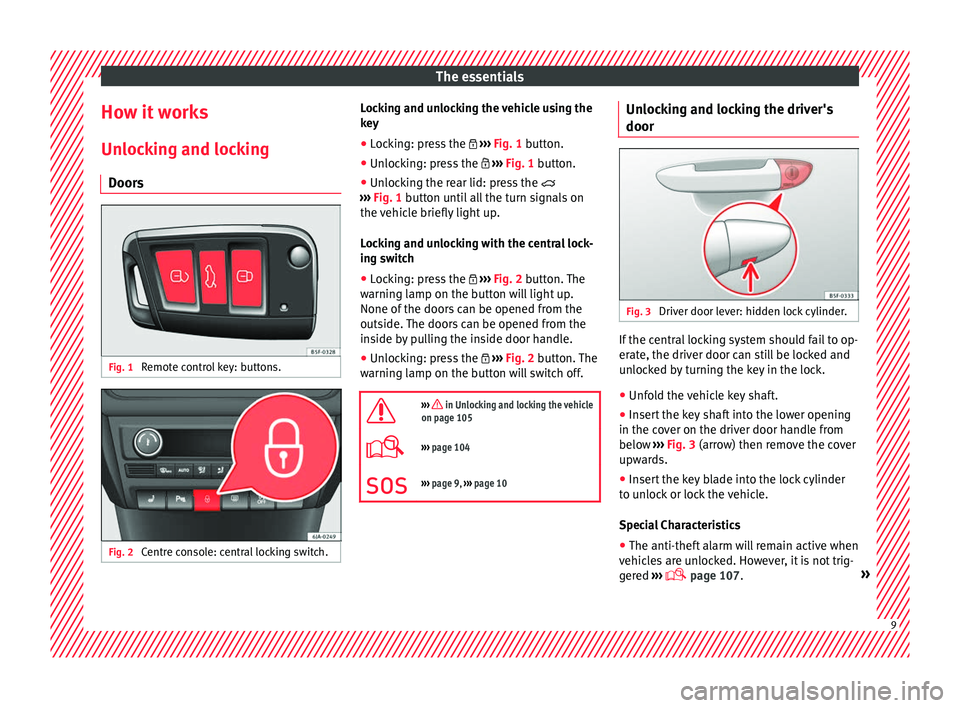
Doors Fig. 1
Remote control key: buttons. Fig. 2
Centre console: central locking switch. Locking and unlocking the vehicle using the
k
ey
● Loc
king: press the ›››
Fig. 1 button.
● Unlocking: press the ›››
Fig. 1 button.
● Unlocking the rear lid: press the
›››
Fig. 1 button until all the turn signals on
the vehicle briefly light up.
Locking and unlocking with the central lock-
ing switch
● Locking: press the ›››
Fig. 2 button. The
warning lamp on the button will light up.
None of the doors can be opened from the
outside. The doors can be opened from the
inside by pulling the inside door handle.
● Unlocking: press the ›››
Fig. 2 button. The
warning lamp on the button will switch off.
››› in Unlocking and locking the vehicle
on page 105
››› page 104
››› page 9, ››› page 10 Unlocking and locking the driver's
door
Fig. 3
Driver door lever: hidden lock cylinder. If the central locking system should fail to op-
er
at
e, the driv
er door can still be locked and
unlocked by turning the key in the lock.
● Unfold the vehicle key shaft.
● Insert the key shaft into the lower opening
in the cov
er on the driver door handle from
below ››› Fig. 3 (arrow) then remove the cover
upwards.
● Insert the key blade into the lock cylinder
to un
lock or lock the vehicle.
Special Characteristics
● The anti-theft alarm will remain active when
vehicl
es are unlocked. However, it is not trig-
gered ›››
page 107. » 9
Page 12 of 248
The essentials
● Af t
er the driv
er door is opened, you have
15 seconds to switch on the ignition. Once
this time has elapsed, the alarm is triggered.
● Switch the ignition on. The electronic im-
mobi
lizer recognises a valid vehicle key and
deactivates the anti-theft alarm system. Note
The anti-theft alarm is not activated when the
vehic l
e is locked manually using the key
shaft ›››
page 107. Locking manually
Fig. 4
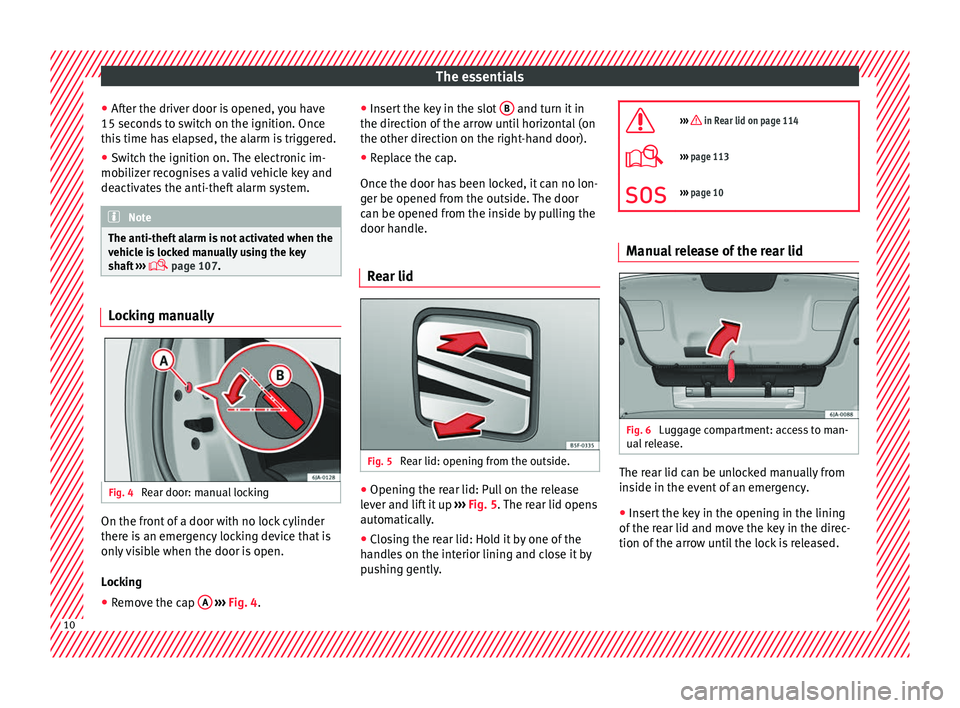
Rear door: manual locking On the front of a door with no lock cylinder
ther
e i
s
an emergency locking device that is
only visible when the door is open.
Locking
● Remove the cap A
› ›
› Fig. 4
. ●
Insert
the key in the slot B and turn it in
the dir ection of
the arr
ow until horizontal (on
the other direction on the right-hand door).
● Replace the cap.
Once the door ha
s been locked, it can no lon-
ger be opened from the outside. The door
can be opened from the inside by pulling the
door handle.
Rear lid Fig. 5
Rear lid: opening from the outside. ●
Opening the rear lid: Pull on the release
l ev
er and lif
t it up ››› Fig. 5. The rear lid opens
automatically.
● Closing the rear lid: Hold it by one of the
handle
s on the interior lining and close it by
pushing gently.
››› in Rear lid on page 114
›››
page 113
››› page 10 Manual release of the rear lid
Fig. 6
Luggage compartment: access to man-
ual r
el
ease. The rear lid can be unlocked manually from
in
s
ide in the ev
ent of an emergency.
● Insert the key in the opening in the lining
of the re
ar lid and move the key in the direc-
tion of the arrow until the lock is released. 10
Page 13 of 248
The essentials
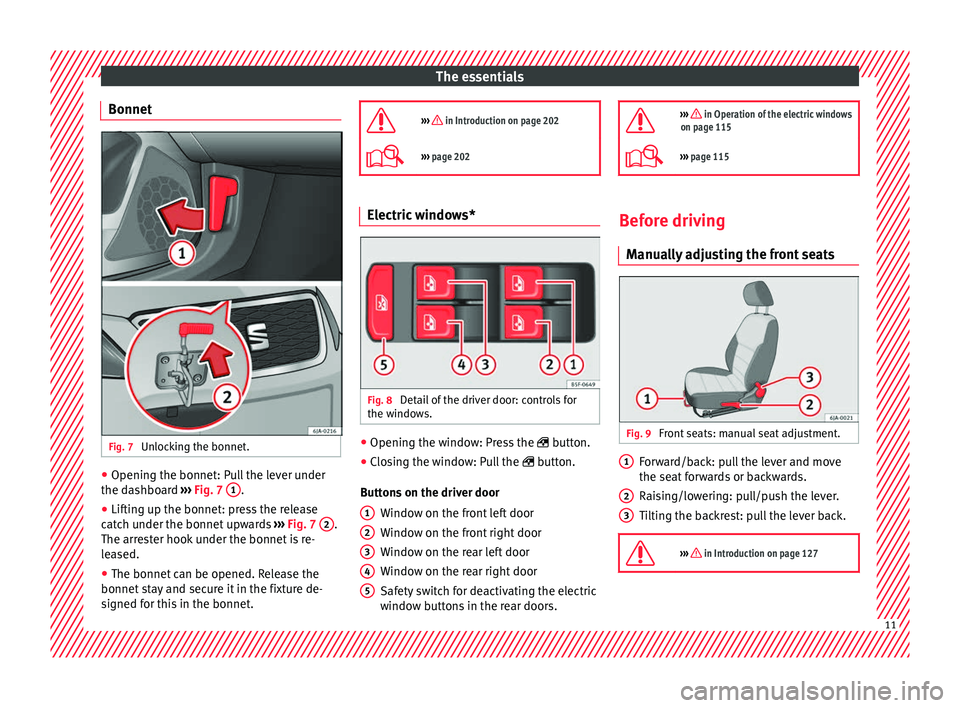
Bonnet Fig. 7
Unlocking the bonnet. ●
Opening the bonnet: Pull the lever under
the d a
shbo
ard ››› Fig. 7 1 .
● Lifting up the bonnet: press the release
c at
c
h under the bonnet upwards ››› Fig. 7 2 .
The arr e
s
ter hook under the bonnet is re-
leased.
● The bonnet can be opened. Release the
bonnet st
ay and secure it in the fixture de-
signed for this in the bonnet.
››› in Introduction on page 202
›››
page 202 Electric windows*
Fig. 8
Detail of the driver door: controls for
the w indo
w
s. ●
Opening the window: Press the butt
on.
● C
losing the window: Pull the button.
B
uttons on the driver door Window on the front left door
Window on the front right door
Window on the rear left door
Window on the rear right door
Safety switch for deactivating the electric
window buttons in the rear doors.
1 2
3
4
5
››› in Operation of the electric windows
on page 115
››› page 115 Before driving
M anua
l
ly adjusting the front seats Fig. 9
Front seats: manual seat adjustment. Forward/back: pull the lever and move
the se
at
f
orwards or backwards.
Raising/lowering: pull/push the lever.
Tilting the backrest: pull the lever back.
››› in Introduction on page 127 1
2
3
11
Page 15 of 248
The essentials
Seat belt tensioners During a collision, the seat belts on the front
seats
ar
e retracted automatically.
The tensioner can be triggered only once.
››› in Service and disposal of belt ten-
sioners on page 66
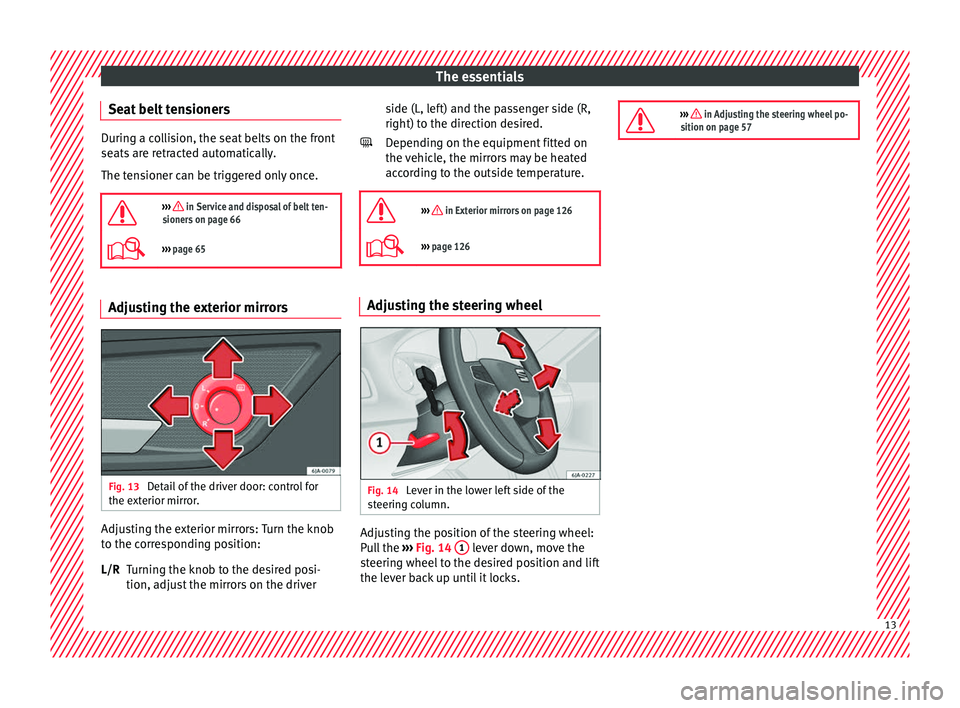
››› page 65 Adjusting the exterior mirrors
Fig. 13
Detail of the driver door: control for
the e xt
erior mirr
or. Adjusting the exterior mirrors: Turn the knob
t
o the c
orr
esponding position:
Turning the knob to the desired posi-
tion, adjust the mirrors on the driver
L/R side (L, left) and the passenger side (R,
right) to the direction de
sired.
Depending on the equipment fitted on
the vehicle, the mirrors may be heated
according to the outside temperature.
››› in Exterior mirrors on page 126
››› page 126 Adjusting the steering wheel
Fig. 14
Lever in the lower left side of the
s t
eerin
g column. Adjusting the position of the steering wheel:
P
u
l
l the ››› Fig. 14 1 lever down, move the
s t
eerin
g wheel to the desired position and lift
the lever back up until it locks.
››› in Adjusting the steering wheel po-
sition on page 57 13
Page 20 of 248
The essentials
the “ISOFIX” rings is between the rear seat
b ac
k
rest and the seat cushioning. The Top
Tether* rings are located at the rear of the
backrests of the rear seats (behind the seat
backrest or in the boot).
Child seats with the “ISOFIX” and Top Tether*
attachment system are available from Techni-
cal Services.
››› in Safety instructions on page 74 Starting the vehicle
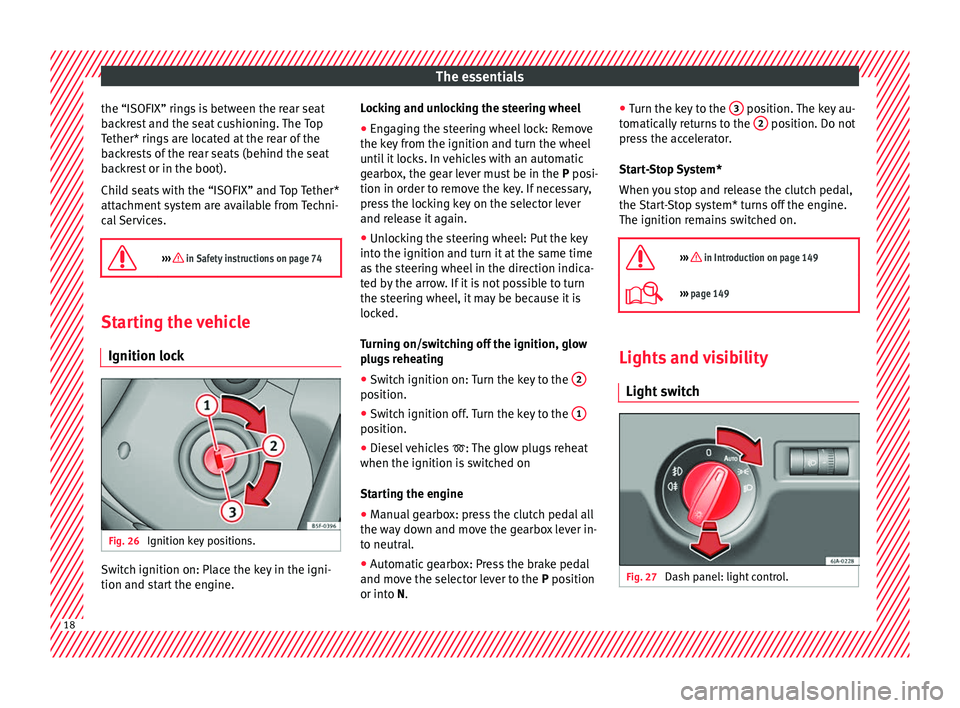
Ignition loc kFig. 26
Ignition key positions. Switch ignition on: Place the key in the igni-
tion and s
t
ar
t the engine. Locking and unlocking the steering wheel
● Engaging the steering wheel lock: Remove
the key fr
om the ignition and turn the wheel
until it locks. In vehicles with an automatic
gearbox, the gear lever must be in the P posi-
tion in order to remove the key. If necessary,
press the locking key on the selector lever
and release it again.
● Unlocking the steering wheel: Put the key
into the ignition and turn it
at the same time
as the steering wheel in the direction indica-
ted by the arrow. If it is not possible to turn
the steering wheel, it may be because it is
locked.
Turning on/switching off the ignition, glow
plugs reheating
● Switch ignition on: Turn the key to the 2 position.
●
Switch ignition off. Turn the key to the 1 position.
●
Diesel vehicles : The glo
w p
lugs reheat
when the ignition is switched on
Starting the engine
● Manual gearbox: press the clutch pedal all
the way
down and move the gearbox lever in-
to neutral.
● Automatic gearbox: Press the brake pedal
and mov e the sel
ector lever to the P position
or into N. ●
Turn the k ey
to the 3 position. The key au-
t om
atic
ally returns to the 2 position. Do not
pr e
s
s the accelerator.
Start-Stop System*
When you stop and release the clutch pedal,
the Start-Stop system* turns off the engine.
The ignition remains switched on.
››› in Introduction on page 149
››› page 149 Lights and visibility
Light sw
it
ch Fig. 27
Dash panel: light control.18
Page 22 of 248
The essentials
Interior lights Fig. 30
Detail of headliner: version 1 Fig. 31
Detail of headliner: version 2KnobFunction
Switches interior lights off.
Switches interior lights on.
KnobFunction
Switches door contact control on (central po-
sition).
The interior lights come on automatically
when the vehicle is unlocked, a door is
opened or the key is removed from the igni-
tion.
The lights go off a few seconds after all the
doors are closed, the vehicle is locked or the
ignition is switched on.
Turning the reading light on and off
›››
page 122 Windscreen wipers and window wiper
b
l
a
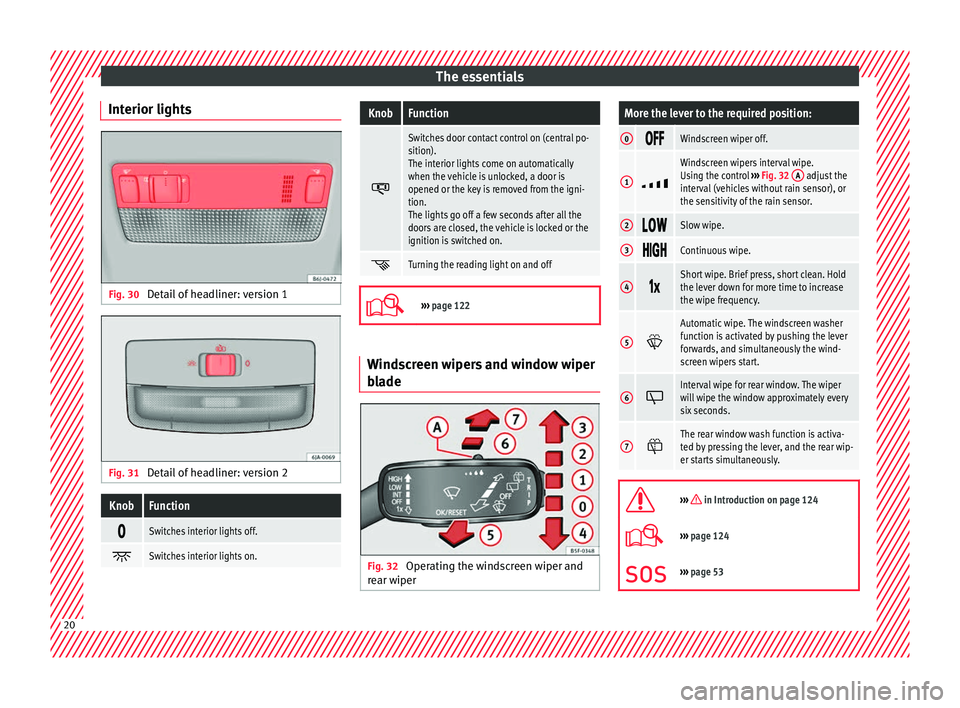
de Fig. 32
Operating the windscreen wiper and
r e ar w
iper
More the lever to the required position:
0 Windscreen wiper off.
1
Windscreen wipers interval wipe.
Using the control
››› Fig. 32 A adjust the
interval (vehicles without rain sensor), or
the sensitivity of the rain sensor.
2 Slow wipe.
3
Continuous wipe.
4
Short wipe. Brief press, short clean. Hold
the lever down for more time to increase
the wipe frequency.
5
Automatic wipe. The windscreen washer
function is activated by pushing the lever
forwards, and simultaneously the wind-
screen wipers start.
6
Interval wipe for rear window. The wiper
will wipe the window approximately every
six seconds.
7
The rear window wash function is activa-
ted by pressing the lever, and the rear wip-
er starts simultaneously.
››› in Introduction on page 124
›››
page 124
››› page 53 20
Page 24 of 248
The essentialsMenuSubmenuPossible settingDescription
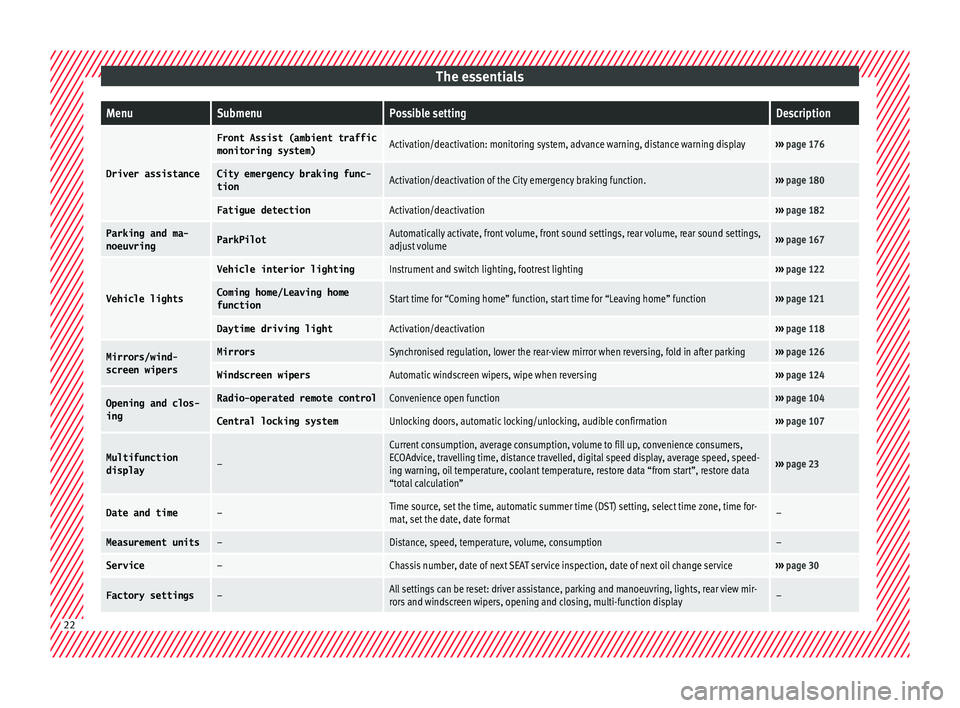
Driver assistance
Front Assist (ambient traffic
monitoring system)Activation/deactivation: monitoring system, advance warning, distance warning display›››
page 176
City emergency braking func-
tionActivation/deactivation of the City emergency braking function.››› page 180
Fatigue detectionActivation/deactivation››› page 182
Parking and ma-
noeuvringParkPilotAutomatically activate, front volume, front sound settings, rear volume, rear sound settings,
adjust volume››› page 167
Vehicle lights
Vehicle interior lightingInstrument and switch lighting, footrest lighting››› page 122
Coming home/Leaving home
functionStart time for “Coming home” function, start time for “Leaving home” function››› page 121
Daytime driving lightActivation/deactivation››› page 118
Mirrors/wind‐
screen wipersMirrorsSynchronised regulation, lower the rear-view mirror when reversing, fold in after parking››› page 126
Windscreen wipersAutomatic windscreen wipers, wipe when reversing››› page 124
Opening and clos-
ingRadio-operated remote controlConvenience open function››› page 104
Central locking systemUnlocking doors, automatic locking/unlocking, audible confirmation››› page 107
Multifunction
display–
Current consumption, average consumption, volume to fill up, convenience consumers,
ECOAdvice, travelling time, distance travelled, digital speed display, average speed, speed-
ing warning, oil temperature, coolant temperature, restore data “from start”, restore data
“total calculation”
››› page 23
Date and time–Time source, set the time, automatic summer time (DST) setting, select time zone, time for-
mat, set the date, date format–
Measurement units–Distance, speed, temperature, volume, consumption–
Service–Chassis number, date of next SEAT service inspection, date of next oil change service››› page 30
Factory settings–All settings can be reset: driver assistance, parking and manoeuvring, lights, rear view mir-
rors and windscreen wipers, opening and closing, multi-function display– 22
Page 32 of 248
The essentials
the driver message Speed limit excee-
ded! wi
l
l be displayed simultaneously on the
instrument panel. The warning lamp
switches off when reducing speed below the
stored maximum limit.
Speed warning programming is recommen-
ded if you wish to be reminded of a maxi-
mum speed, such as when travelling in a
country with different speed limits or for a
maximum speed for winter tyres.
Setting speed limit warning
You can use the radio or the Easy Connect* to
set, alter or cancel the speed limit warning.
● Vehicles with radio : pres
s the button SETUP> control button Driver Assistant
>
Speed warning .
● Vehicles with Easy Connect : pre
s
s the but-
ton Systems or else Vehicle systems >
Driver assistant > Speed warning.
The warning limit can be set from 30 to
240 km/h (20 to 149 mph). The adjustment
is made at 10 km/h (5 mph) intervals. Note
● Ple a
se bear in mind that, even with the
speed warning function, it is still important
to keep an eye on the vehicle speed with the
speedometer and to observe the legal speed
limits. ●
The speed limit w
arning function in the ver-
sion for some countries warns you at a speed
of 120 km/h (75 mph). This is a factory-set
speed limit. Service intervals
The service interval indication appears on the
ins
trument
panel display ›››
Fig. 110
3 .
SEA T di
stinguishes between services with en-
gine oil change (e.g. Oil change service) and
services without engine oil change (e.g. In-
spection).
In vehicles with Services established by time
or mileage, the service intervals are already
pre-defined.
In vehicles with LongLife Service , the inter-
vals are determined individually. Thanks to
technological progress, maintenance work
has been greatly reduced. Because of the
technology used by SEAT, with this service
you only need to change the oil when the ve-
hicle so requires. To calculate this change
(max. 2 years), the vehicle's conditions of
use and individual driving styles are consid-
ered. The advance warning first appears 20
days before the date established for the cor-
responding service. The kilometres (miles)
remaining until the next service are always
rounded up to the nearest 100 km (miles)
and the time is given in complete days. The
current service message cannot be viewed until 500 km after the last service. Prior to
this, on
ly
lines are visible on the display.
Inspection reminder
When the Service date is approaching, when
the ignition is switched on a Service remind-
er is displayed.
Vehicles without text messages : a span-
ner will be displayed on the instrument
panel plus an indication in km.
The kilometres indicated are the maximum
number of kilometres that can be travelled
until the next service. After a few seconds,
the display mode changes. A clock symbol
appears and the number of days until the
next service is due.
Vehicles with text messages : Service in
--- km or --- days will be shown on the
instrument panel display.
Service due
When the service date is due , an audible
warning is given when the ignition is switch-
ed on and the spanner displayed on the
screen flashes for a few seconds .
Vehicles with text messages : Service now
will be shown on the instrument panel dis-
play. 30
Page 35 of 248
The essentials
Front brake pads worn.
›››
page
154
it lights up:
Fault in the ESC, or dis-
connection caused by the system.
flashes: ESC or ASR activated.
ASR manually deactivated.
ABS faulty or does not work.
Rear fog light switched on.›››
page
18
lights up or flashes:
fault in the
emission control system.››› page
164
it lights up:
pre-heating of diesel
engine.
››› page
165
flashes: fault in the diesel engine
management.
fault in the petrol engine manage-
ment.›››
page
165
lights up or flashes:
fault in the
steering system.››› page
150
Tyre pressure too low, or fault in
the tyre pressure monitoring sys-
tem.›››
page
219
Fuel tank almost empty.›››
page
98
Fault in airbag system and seat
belt tensioners.›››
page
66 Other warning lamps
Left or right turn signal.›››
page
19
Hazard warning lights on.››› page
121
Trailer turn signals›››
page
184
it lights up:
Press the foot brake!
flashes: the selector lever locking
button has not engaged.››› page
157
it lights up:
cruise control activated
or speed limiter switched on and
active.
››› page
31
flashes: the speed set by the
speed limiter has been exceeded.
Main beam on or flasher on.›››
page
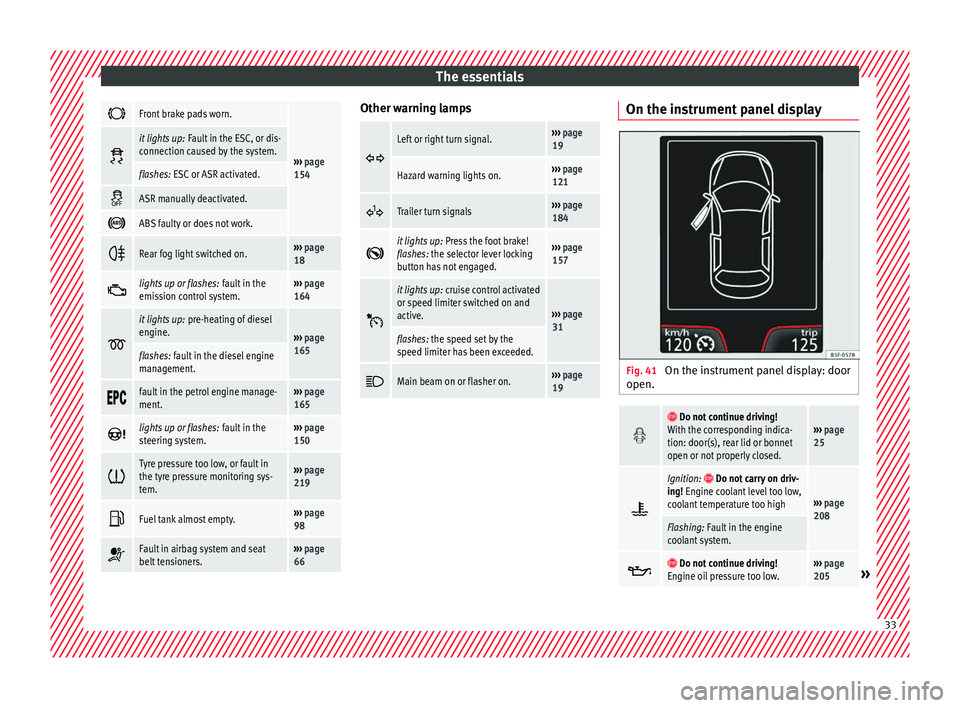
19 On the instrument panel display
Fig. 41
On the instrument panel display: door
open.
Do not continue driving!
With the corresponding indica-
tion: door(s), rear lid or bonnet
open or not properly closed.››› page
25
Ignition: Do not carry on driv-
ing! Engine coolant level too low,
coolant temperature too high
››› page
208
Flashing: Fault in the engine
coolant system.
Do not continue driving!
Engine oil pressure too low.››› page
205» 33