maintenance Seat Toledo 2016 Owner's manual
[x] Cancel search | Manufacturer: SEAT, Model Year: 2016, Model line: Toledo, Model: Seat Toledo 2016Pages: 248, PDF Size: 5.82 MB
Page 3 of 248
Foreword
Thi s
In
struction Manual and its correspond-
ing supplements should be read carefully to
familiarise yourself with your vehicle.
Besides the regular care and maintenance of
the vehicle, its correct handling will help pre-
serve its value.
For safety reasons, always note the informa-
tion concerning accessories, modifications
and part replacements. If selling the vehicle, give all of the on-board
documentation t
o the new owner, as it
should be kept with the vehicle.
You can access the information in this man-
ual using:
● Thematic table of contents that follows the
manual’s g
eneral chapter structure.
● Visual table of contents that uses graphics
to indicat
e the pages containing “essential” information, which is detailed in the corre-
sponding c
hapters.
● Alphabetical index with many terms and
synonyms
to help you find information. WARNING
Read and always observe safety informa-
tion conc ernin
g the passenger's front air-
bag ››› page 73, Important information
regarding the front passenger's airbag .
Page 6 of 248
Table of Contents
Engine management and exhaust gas purifica-
tion sy s
t
em . . . . . . . . . . . . . . . . . . . . . . . . . . . . . 164
Driving tips . . . . . . . . . . . . . . . . . . . . . . . . . . . . . 166
Driver assistance systems . . . . . . . . . . . . . . . . . 167
Parking aid . . . . . . . . . . . . . . . . . . . . . . . . . . . . . 167
Rear Assist “Rear View Camera”* . . . . . . . . . . . 171
cruise speed (Cruise control)* . . . . . . . . . . . . . . 174
Monitoring system Front Assist* . . . . . . . . . . . . 176
Start-Stop System* . . . . . . . . . . . . . . . . . . . . . . . 181
Tiredness detection (break recommenda-
tion)* . . . . . . . . . . . . . . . . . . . . . . . . . . . . . . . . . . 182
To
wing bracket device . . . . . . . . . . . . . . . . . . . . 184
Driving with a trailer . . . . . . . . . . . . . . . . . . . . . . 184
Towing bracket device for trailer . . . . . . . . . . . . 186
Advice . . . . . . . . . . . . . . . . . . . . . . . . . . . . . . . . 192
Care and maintenance . . . . . . . . . . . . . . . . . . . . 192
Accessories and modifications to the vehi-
cle
. . . . . . . . . . . . . . . . . . . . . . . . . . . . . . . . . . . . 192
Care and cleaning . . . . . . . . . . . . . . . . . . . . . . . 193
Checking and refilling levels . . . . . . . . . . . . . . . 199
Fuel . . . . . . . . . . . . . . . . . . . . . . . . . . . . . . . . . . . 199
Engine compartment . . . . . . . . . . . . . . . . . . . . . 202
Engine oil . . . . . . . . . . . . . . . . . . . . . . . . . . . . . . 205
Coolant . . . . . . . . . . . . . . . . . . . . . . . . . . . . . . . . 208
Brake fluid . . . . . . . . . . . . . . . . . . . . . . . . . . . . . 209
Windscreen washer . . . . . . . . . . . . . . . . . . . . . . 210
Battery . . . . . . . . . . . . . . . . . . . . . . . . . . . . . . . . . 211
Wheels and tyres . . . . . . . . . . . . . . . . . . . . . . . . 215
Wheels . . . . . . . . . . . . . . . . . . . . . . . . . . . . . . . . 215
Spare wheel . . . . . . . . . . . . . . . . . . . . . . . . . . . . 218
Tyre monitoring systems . . . . . . . . . . . . . . . . . . 219
Winter service . . . . . . . . . . . . . . . . . . . . . . . . . . . 220
Technical data . . . . . . . . . . . . . . . . . . . . . . . . 221
Technical specifications . . . . . . . . . . . . . . . . . . 221
Important information . . . . . . . . . . . . . . . . . . . . 221
Information on fuel consumption . . . . . . . . . . . 222 Driving with a trailer . . . . . . . . . . . . . . . . . . . . . . 223
Wheels . . . . . . . . . . . . . . . . . . . . . . . . . . . . . . . . 224
Engine data . . . . . . . . . . . . . . . . . . . . . . . . . . . . . 225
Dimensions . . . . . . . . . . . . . . . . . . . . . . . . . . . . . 231
Index . . . . . . . . . . . . . . . . . . . . . . . . . . . . . . . . . 233
4
Page 32 of 248
The essentials
the driver message Speed limit excee-
ded! wi
l
l be displayed simultaneously on the
instrument panel. The warning lamp
switches off when reducing speed below the
stored maximum limit.
Speed warning programming is recommen-
ded if you wish to be reminded of a maxi-
mum speed, such as when travelling in a
country with different speed limits or for a
maximum speed for winter tyres.
Setting speed limit warning
You can use the radio or the Easy Connect* to
set, alter or cancel the speed limit warning.
● Vehicles with radio : pres
s the button SETUP> control button Driver Assistant
>
Speed warning .
● Vehicles with Easy Connect : pre
s
s the but-
ton Systems or else Vehicle systems >
Driver assistant > Speed warning.
The warning limit can be set from 30 to
240 km/h (20 to 149 mph). The adjustment
is made at 10 km/h (5 mph) intervals. Note
● Ple a
se bear in mind that, even with the
speed warning function, it is still important
to keep an eye on the vehicle speed with the
speedometer and to observe the legal speed
limits. ●
The speed limit w
arning function in the ver-
sion for some countries warns you at a speed
of 120 km/h (75 mph). This is a factory-set
speed limit. Service intervals
The service interval indication appears on the
ins
trument
panel display ›››
Fig. 110
3 .
SEA T di
stinguishes between services with en-
gine oil change (e.g. Oil change service) and
services without engine oil change (e.g. In-
spection).
In vehicles with Services established by time
or mileage, the service intervals are already
pre-defined.
In vehicles with LongLife Service , the inter-
vals are determined individually. Thanks to
technological progress, maintenance work
has been greatly reduced. Because of the
technology used by SEAT, with this service
you only need to change the oil when the ve-
hicle so requires. To calculate this change
(max. 2 years), the vehicle's conditions of
use and individual driving styles are consid-
ered. The advance warning first appears 20
days before the date established for the cor-
responding service. The kilometres (miles)
remaining until the next service are always
rounded up to the nearest 100 km (miles)
and the time is given in complete days. The
current service message cannot be viewed until 500 km after the last service. Prior to
this, on
ly
lines are visible on the display.
Inspection reminder
When the Service date is approaching, when
the ignition is switched on a Service remind-
er is displayed.
Vehicles without text messages : a span-
ner will be displayed on the instrument
panel plus an indication in km.
The kilometres indicated are the maximum
number of kilometres that can be travelled
until the next service. After a few seconds,
the display mode changes. A clock symbol
appears and the number of days until the
next service is due.
Vehicles with text messages : Service in
--- km or --- days will be shown on the
instrument panel display.
Service due
When the service date is due , an audible
warning is given when the ignition is switch-
ed on and the spanner displayed on the
screen flashes for a few seconds .
Vehicles with text messages : Service now
will be shown on the instrument panel dis-
play. 30
Page 33 of 248
The essentials
Reading a service notification
W ith the ignition sw
it
ched on, the engine off
and the vehicle at a standstill, the current
service notification can be read:
Press and hold the button 4 for more than 5
sec ond
s
to consult the service message.
When the service date has passed , a minus
sign is displayed in front of the number of kil-
ometres or days.
Vehicles with text messages : Service
since --- km or --- days ago will be
shown on the display.
The time can also be set via the key and
Set up function button in the Easy Connect
sy s
t
em ›››
page 99.
Resetting service interval display
If the service was not carried out by a SEAT
dealership, the display can be reset as fol-
lows:
● Switch off the ignition, press and hold but-
ton ››
› Fig. 110
4 .
● Switch ignition back on.
● Release the 4
› ›
›
Fig. 110
button and
press it again for the next 20 seconds. Note
● The serv ic
e message disappears after a few
seconds, when the engine is started or when OK/RESET
is pressed on the windscreen wiper
lev er
, or OK on the multifunction steering
wheel.
● In v
ehicles with the LongLife system in
which the batt
ery has been disconnected for
a long period of time, it is not possible to cal-
culate the date of the next service. Therefore
the service interval display may not be cor-
rect. In this case, bear in mind the maximum
service intervals permitted in the ››› Book-
let Maintenance Programme. Cruise control
Oper atin
g the c
ruise control system
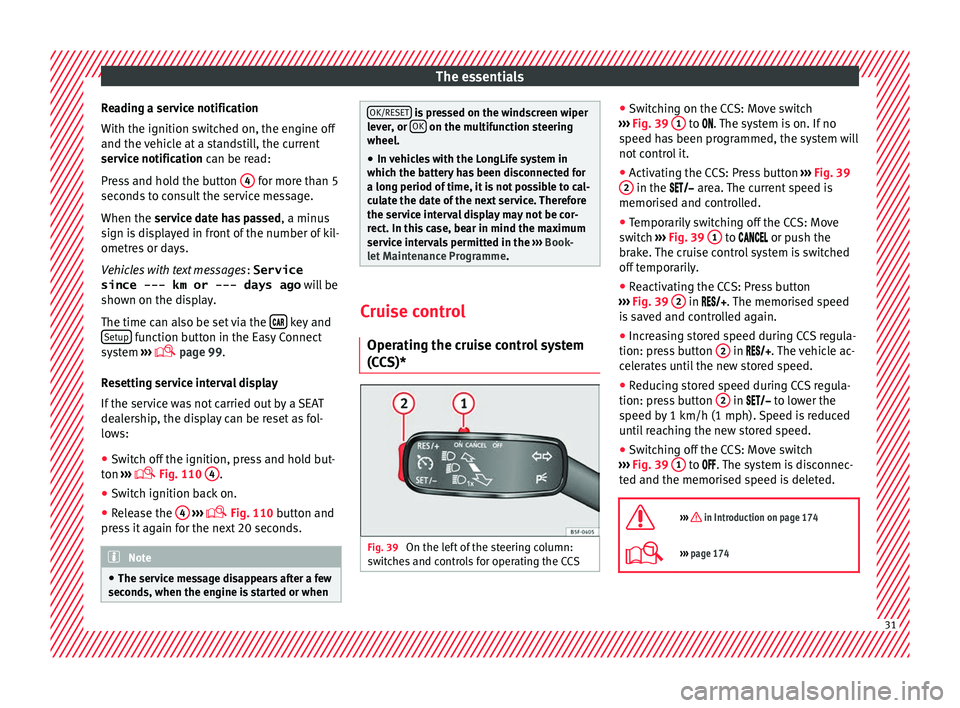
(CCS)* Fig. 39
On the left of the steering column:
sw it
c
hes and controls for operating the CCS ●
Sw it
c
hing on the CCS: Move switch
››› Fig. 39 1 to .
The system is on. If no
s peed h
as been programmed, the system will
not control it.
● Activating the CCS: Press button ›››
Fig. 39
2 in the ar
e
a. The current speed is
memorised and controlled.
● Temporarily switching off the CCS: Move
switc
h ››› Fig. 39 1 to
or push the
br ak
e. The cruise control system is switched
off temporarily.
● Reactivating the CCS: Press button
›››
Fig. 39 2 in
. The memorised speed
i
s saved and controlled again.
● Increasing stored speed during CCS regula-
tion: pres
s button 2 in
. The vehicle ac-
c
elerates until the new stored speed.
● Reducing stored speed during CCS regula-
tion: pres
s button 2 in t
o lower the
s peed b
y 1 km/h (1 mph). Speed is reduced
until reaching the new stored speed.
● Switching off the CCS: Move switch
›››
Fig. 39 1 to .
The system is disconnec-
t ed and the memori
sed speed is deleted.
››› in Introduction on page 174
››› page 174 31
Page 43 of 248

The essentials
water and at least 40 % of the additive G13
(TL -
VW
774 J), purple. This mixture gives the
necessary frost protection down to -25°C
(-13°F) and protects the light alloy parts of
the engine cooling system against corrosion.
It also prevents scaling and considerably rai-
ses the boiling point of the coolant.
To protect the cooling system, the percentage
of additive must always be at least 40 %,
even in warm climates where anti-freeze pro-
tection is not required.
If for weather reasons further protection is
necessary, the proportion of additive may be
increased, but only up to 60 %; otherwise an-
tifreeze protection will diminish and this will
worsen cooling.
When the coolant is topped up, use a mixture
of distilled water and at least 40 % of the
G13 or G12 plus-plus (TL-VW 774 G) additive
(both are purple) to obtain optimal anti-corro-
sion protection. The mixture of G13 with G12
plus (TL-VW 774 F), G12 (red) or G11 (green-
blue) engine coolants will significantly re-
duce anti-corrosion protection and should
therefore be avoided.
››› in Topping up the coolant level on
page 209
››› page 208 Brake fluid
Fig. 52
Engine compartment: brake fluid res-
er v
oir c
ap The brake fluid reservoir is located in the en-
gine c
omp
ar
tment ›››
page 205.
The level should be between the and
marks. If it is below , please visit a Techni-
cal Service.
››› in Checking brake fluid level on
page 210
››› page 209 Windscreen washer
Fig. 53
In the engine compartment: wind-
s c
r
een washer reservoir top. The windscreen washer reservoir is located in
the en
gine c
omp
artment ›››
page 205.
To top up, mix water with a product recom-
mended by SEAT.
In cold temperatures, add anti-freeze.
››› page 210 Battery
The battery is located in the engine compart-
ment
›
›
› page 205. It does not require
maintenance. It is checked as part of the In-
spection Service. » 41
Page 165 of 248

Driving
engine at high rpm in the lower gears uses
an u nnec
e
ssary amount of fuel.
Manual gearbox: shift up from first to second
gear as soon as possible. We recommend
that, whenever possible, you change to a
higher gear upon reaching 2000 rpm. Follow
the “recommended gear” indication that ap-
pears on the instrument panel
››› page 25.
Avoid driving at high speed
We advise you not to drive at the top speed
permitted by the vehicle. Fuel consumption,
exhaust emissions and noise levels all in-
crease very rapidly at higher speeds. Driving
at moderate speeds will help to save fuel.
Avoid idling
It is worthwhile switching off the engine
when waiting in a traffic jam, at level cross-
ings or at traffic lights with a long red phase.
The fuel saved after only 30 - 40 seconds is
greater than the amount of fuel needed to re-
start the engine.
The engine takes a long time to warm up
when it is idling. Mechanical wear and pollu-
tant emissions are also especially high dur-
ing this initial warm-up phase. It is therefore
best to drive off immediately after starting
the engine. Avoid running the engine at high
speed. Periodic maintenance
Periodic m
aintenance work guarantees that,
before beginning a journey, you will not con-
sume more than the required amount of fuel.
A well-serviced engine gives you the benefit
of improved fuel efficiency as well as maxi-
mum reliability and an enhanced resale val-
ue.
A badly serviced engine can consume up to
10% more fuel than necessary.
Avoid short journeys
To reduce the consumption and emission of
polluting exhaust gases, the engine and the
exhaust gas filtration systems should reach
the optimum operating temperature.
With the engine cold, fuel consumption is
proportionally higher. The engine does not
warm up and fuel consumption does not nor-
malise until having driven approximately four
kilometres (2.5 miles). This is why we recom-
mend avoiding short trips whenever possi-
ble.
Maintain the correct tyre pressures
Bear in mind that keeping the tyres at an ad-
equate pressure saves fuel. If the tyre pres-
sure is just one bar (14.5 psi/100 kPa) too
low, fuel consumption can increase by as
much as 5%. Due to the greater rolling resist-
ance, under-inflation also increases tyre wear
wear and impairs handling. The tyre pressures should always be checked
when the tyre
s are cold.
Do not use winter tyres all year round as they
increase fuel consumption by up to 10%.
Avoid unnecessary weight
Given that every kilo of extra weight will in-
crease the fuel consumption, it is advisable
to always check the luggage compartment to
make sure that no unnecessary loads are be-
ing transported.
A roof rack is often left in place for the sake
of convenience, even when it is no longer
needed. At a speed of 100 km/h (62 mph)
and 120 km/h (75 mph) your vehicle will use
about 12% more fuel as a result of the extra
wind resistance caused by the roof rack even
when it is not in use.
Save electricity
The engine activates the alternator, which
produces electricity. With the need for elec-
tricity, fuel consumption also increases. Be-
cause of this, always turn off electrical devi-
ces when you do not need them. Examples of
devices that use a lot of electricity are: the
fan at high speeds, the rear window heating
and the seat heaters*. Note
● If y
ou vehicle has Start-Stop, it is not rec-
ommended to switch this function off. » 163
Technical data
Advice
Operation
Emergencies
Safety
Page 193 of 248
Towing bracket device
●
Cle
an the ball-headed bar thoroughly be-
fore returning it to the on-board toolbox. Use and maintenance
Cover the clamping bush with the cap to pre-
vent
dir
t from entering.
Before hooking on the trailer, check the ball
head and, if necessary, lubricate it with ade-
quate lubricant.
Place the protective cover over the ball head
when storing the bar. This way, you will avoid
getting the boot dirty.
If it gets dirty, clean and dry the clamping
bush thoroughly with an appropriate prod-
uct. CAUTION
The top part of the clamping bush opening is
lubricat ed. B
e careful not to remove this lu-
brication. 191
Technical data
Advice
Operation
Emergencies
Safety
Page 195 of 248
Care and maintenance
●
The modification of the s
uspension of the
vehicle wheels, including the use of non-per-
mitted combinations of tyres and rims can al-
ter the operation of the airbag system and in-
crease the risk of serious or fatal injuries in
an accident.
● During all jobs on the airbag system, in ad-
dition to the remo
val and fitting of parts of
the system in the course of other repair jobs,
parts of the airbag system can be damaged.
Therefore in the event of an accident, this
may cause the airbags to activate incorrectly
or not activate at all. Radio and aerial reception
In vehicles factory-fitted with an audio or
n
av
ig
ation system, the aerial may be instal-
led in different places:
● inside the rear window next to the heating
elements,
● on the roof
of the vehicle.
Care and cleaning Introduction Regular and suitable care helps to
m
aint ain
the u
seful life of your vehicle. This may also
be one of the requirements for upholding any warranty claims in the event of corrosion or
paint def
ects.
We recommend you use cleaning products
from the SEAT Original Accessories pro-
gramme available in SEAT dealers. Please fol-
low the instructions for use on the packag-
ing. WARNING
● Cle
aning products and other materials used
for car care can damage the health if mis-
used.
● Always keep car care materials in a safe
plac
e out of the reach of children. Risk of poi-
soning!
● When washing the car during the winter
season: Moi
sture and ice on the brakes may
affect braking efficiency. Risk of accident!
● The ignition must always be switched off
when the car is
washed. Risk of accident!
● Do not clean the underside of the car or in-
side the wheel ar
ches without protecting your
hands and arms. You may cut yourself on
sharp metal parts!
● Perfumes and air fresheners inside the ve-
hicle m
ay be harmful to health at high tem-
peratures in the interior. CAUTION
● Check the c
olour-fastness of your clothing
to avoid damaging or visibly staining the fab-
ric (leather), upholstery and fabric trim. ●
Cle
aning products containing solvents may
damage the material being cleaned.
● Do not wash the vehicle in direct sunlight.
Risk of
damage to paintwork.
● If washing the vehicle with a hose in win-
ter, do not
direct the jet of water directly at
the locks or at the door seals or bonnet. Risk
of freezing.
● Do not use sponges for removing insects or
abras
ive household sponges, etc. on painted
surfaces. Risk of damage to the painted sur-
face!
● Do not put stickers on the inner side of the
rear w
indow in areas where heating elements
or the aerial are located. This could cause
damage and, in the case of the aerial, radio
and navigation system reception faults.
● Do not clean the inside of the window with
sharp ob
jects or corrosive or acidic cleaning
products. Risk of damaging the heating ele-
ments or the aerial.
● Do not attach any fragrance or air freshener
to the da
sh panel. Risk of damage to the
dash panel!
● To avoid damaging the parking aid system
sensors, s
pray them only briefly at a mini-
mum distance of 10 cm when cleaning the ve-
hicle with a high-pressure or steam cleaner.
● Do not clean the roof panel with a brush.
Risk of
damage to the panel surface! » 193
Technical data
Advice
Operation
Emergencies
Safety
Page 197 of 248
Care and maintenance
WARNING
Do no use a nozzle that sprays the water out
in a direct s
tream or one that has a “rotating
jet”! CAUTION
Do not use water hotter than +60°C (140°F).
Risk of
damage to the vehicle! Stickers attached by the factory
Follow these directions to avoid damaging
the s
tic
k
ers:
● Do not use high pressure cleaners.
● To remove ice or snow from the stickers do
not use w
indow scrapers or ice scrapers.
● Do not polish the stickers.
● Do not use dirty cloths or sponges.
● Preferably wash using a soft sponge and
soft neutr
al soap.
Sensors and camera lenses ●
Use a small brush to remove snow and a
de-ic er s
pr
ay to remove ice.
● Clean the sensors with a solvent-free prod-
uct and a sof t, dr
y cloth. ●
Mois t
en the camera lens using a standard
alcohol-based glass cleaning agent and
clean the lens with a dry cloth. CAUTION
● When y ou c
lean the vehicle with a pressure
washer:
–Stay a suitable distance from the sensors
on the front and rear bumpers.
– Do not clean the camera lenses or sur-
rounding area with the pressure washer.
● Never use warm or hot water to remove
snow and ic
e from the reverse camera lens,
as it could crack the lens.
● Never use abrasive cleaning agents on the
lens. Vehicle paint waxing and polishing
Care
T
o a gr
e
at extent, good waxing protects the
vehicle surface from the harmful effects of
the environment.
The vehicle must be treated with a high qual-
ity, hard wax when water no longer forms
droplets on clean paintwork.
A new coat of high quality, hard wax can be
applied to the clean, painted surface only
when it has fully dried. Even if a wax solution
is used regularly in the car wash, it is advisa- ble to protect the paint with a coat of wax at
lea
st twice a year.
Polishing
Polishing is only necessary if the paint has
lost its shine, and the gloss cannot be
brought back by applying wax.
The vehicle must be waxed after polishing if
the polish used does not contain wax com-
pounds to seal the paint. CAUTION
● Never w ax
the windows.
● Do not use polishes and hard wax on pain-
ted par
ts with a matt finish or on plastic
parts.
● Do not polish your vehicle in a sandy or
dusty
environment. Cleaning of chromed parts
Clean the chrome first with a clean cloth and
then b
uff
up w
ith a soft, dry cloth. If this does
not clean the chrome properly, use a special
chrome cleaner. CAUTION
Do not polish the chrome in a dusty environ-
ment or it c
ould be scratched. 195
Technical data
Advice
Operation
Emergencies
Safety
Page 199 of 248

Care and maintenance
Wheels Wheel trims
If
y
ou wash the vehicle regularly, you should
also thoroughly wash the wheel trim. Regu-
larly remove any brake dust and road salt
from the wheels, otherwise the wheel materi-
al could be damaged. Repair any damage to
the wheel paintwork immediately.
Alloy wheels
After thorough washing, treat the wheels
with a protective product for alloy wheels. Do
not use abrasive products to care for the
wheels. WARNING
Moisture, ice and road salt may affect braking
efficiency . Ri
sk of accident! CAUTION
Heavy dirt on the wheels could lead to their
mis a
lignment. This could result in vibrations
being transmitted to the steering wheel that
under certain conditions may cause prema-
ture steering wear. This dirt must be re-
moved. Note
We recommend you leave paint damage re-
pair s
to a SEAT Authorised Service. Vehicle underbody protection
The underside of the vehicle is coated to per-
manently
pr
otect it from chemical and me-
chanical agents.
Given that damage to the protective coating
during driving cannot be completely ruled
out, we recommend you check the condition
of the protective coating on the underbody
and suspension at regular intervals, prefera-
bly before the start and end of the coldest
season of the year.
Authorised SEAT dealers have suitable spe-
cial products and the necessary facilities and
are aware of the techniques required for their
application. We therefore recommend all
touch-up work or additional anti-corrosion
measures be performed by an authorised
SEAT dealer. WARNING
Do not apply underseal or anti-corrosion
co atin
gs to the exhaust pipes, catalytic con-
verter, particulate filter or heat shields on the
exhaust system. Once the engine has
reached operating temperature, these sub-
stances could catch fire. Risk of fire! Cavity waxing
All cavities on the vehicle exposed to corro-
sion ar
e perm
anently factory-protected by a
wax solution .
This wax solution does not need to be
checked or touched up. Should wax run out
of the cavities at high ambient temperatures,
remove it using a plastic scraper and clean
away any stains using lighter fluid. WARNING
Note the regulations concerning safety and
env ir
onmental protection if you use lighter
fluid to remove the wax. Risk of fire! Leatherette and upholstery
Leatherette can be cleaned with a damp
c
loth. If
thi
s is not sufficient, these parts
should only be cleaned with solvent-free
plastic care and cleaning products .
Textile covers and trim parts on doors, boot
lid, etc. can be cleaned with special deter-
gents, e.g. dry foam. A soft sponge or brush
or a micro-fibre cloth for normal cleaning can
be used. Use special products to clean the
headliner. »
197
Technical data
Advice
Operation
Emergencies
Safety