display SKODA CITIGO 2013 1.G User Guide
[x] Cancel search | Manufacturer: SKODA, Model Year: 2013, Model line: CITIGO, Model: SKODA CITIGO 2013 1.GPages: 176, PDF Size: 10.54 MB
Page 20 of 176
WARNING■If you have to stop for technical reasons, then park the vehicle at a safe dis-
tance from the traffic, switch off the engine and activate the hazard warning
light system » page 36.■
The following guidelines should be observed when opening the bonnet and
checking the brake fluid level » page 127, Engine compartment .
■
If the warning light is displayed simultaneously with warning light
» page 19 , Antilock brake system (ABS) , do not continue your jour-
ney! Seek help from a specialist garage.
■
A fault to the braking system can increase the vehicle's braking distance!
Seat belt warning light
First read and observe the introductory information and safety warn-ings
on page 16.
The warning light
comes on after the ignition is switched on as a reminder for
the driver and front passenger to fasten the seat belt. The warning light only goes out if the driver or front passenger has fastened his seat belt.
If the seat belt has not been fastened by the driver or front passenger, a perma-
nent warning signal sounds at vehicle speeds greater than 25 km/h and simulta-
neously the warning light
flashes.
If the seat belt is not fastened by the driver or front passenger during the next
90 seconds, the warning signal is deactivated and the warning light
lights up
permanently.
Further information » page 94, Seat belts .
Generator
First read and observe the introductory information and safety warn-ings
on page 16.
If the warning light lights up
when the engine is running, the vehicle battery is
not being charged.
Seek help from a specialist garage. The electrical system requires checking.
WARNINGIf you have to stop for technical reasons, then park the vehicle at a safe dis-
tance from the traffic, switch off the engine and activate the hazard warning
lights » page 36 .
CAUTION
If the warning light (cooling system fault) comes on in addition to the warning
light in the display when driving, stop the vehicle immediately and switch the
engine off – risk of engine damage!
Engine oil
First read and observe the introductory information and safety warn-
ings
on page 16.
When the indicator light is flashing
, the engine oil pressure is too low.
The warning light comes on for a few seconds when the ignition is switched on.
Stop the vehicle and switch the engine off if the warning light does not go off
after the engine has started or flashes while driving. Check the oil level and top up with engine oil if necessary » page 131, Checking the oil level .
An audible signal sounds as a warning signal.
Do not continue your journey if for some reason it is not possible to top up the
engine oil under the prevailing conditions. This can cause serious engine damage.
Therefore, switch the engine off and seek help from a specialist garage.
Even if the oil level is correct,
do not drive any further if the warning light is
flashing. Also do not leave the engine running at an idling speed.
Seek help from a specialist garage.
WARNINGIf you have to stop for technical reasons, then park the vehicle at a safe dis-
tance from the traffic, switch off the engine and activate the hazard warning
light system » page 36, Hazard warning light system .17warning lights and instruments
Page 22 of 176
NoteIf the vehicle's battery has been disconnected and reconnected, the warning light comes on after switching on the ignition. The warning light should go out after
driving a short distance.
Traction Control System (TC)
First read and observe the introductory information and safety warn-ings
on page 16.
The warning light
comes on for a few seconds when the ignition is switched
on.
The warning light comes on when driving when a control cycle is activated. The warning light illuminates permanently if there is a fault in the TCS.
The fact that the TCS operates together with the ABS means that the TCS warn-ing light will also come on if the ABS system is not operating properly.
If the warning light comes on immediately after starting the engine, the TCS
can be switched off for technical reasons. In this case, the TCS can be switched
on again by switching the ignition on and off. If the warning light goes out, the
TCS is fully functional again.
Further information » page 81, Traction Control System (TCS) .
Note
If the vehicle's battery has been disconnected and reconnected, the warning light
comes on after switching on the ignition. The warning light should go out after
driving a short distance.
Antilock brake system (ABS)
First read and observe the introductory information and safety warn-ings
on page 16.
If the warning light
lights up, there is a fault in the ABS.
The vehicle will only be braked by the normal brake system without the ABS. Seek help from a specialist garage.
Further information » page 81, Antilock Braking System (ABS) .WARNING■
If you have to stop for technical reasons, then park the vehicle at a safe dis-
tance from the traffic, switch off the engine and activate the hazard warning
light system » page 36.■
If the warning light » page 16 is displayed simultaneously with the ABS
warning light , do not continue your journey! Seek help from a specialist
garage.
■
The following guidelines should be observed when opening the bonnet and
checking the brake fluid level » page 127, Engine compartment .
■
A fault to the ABS system or the braking system can increase the vehicle's
braking distance – risk of accident!
The rear fog light
First read and observe the introductory information and safety warn-ings
on page 16.
The warning light
comes on when the rear fog lights are operating » page 35.
Exhaust inspection system
First read and observe the introductory information and safety warn-
ings
on page 16.
If the warning light
lights up, there is a fault in the exhaust inspection system.
The engine control unit allows the vehicle to run in emergency mode.
Seek help from a specialist garage.
EPC fault light
First read and observe the introductory information and safety warn-ings
on page 16.
If the warning light
lights up, there is a fault in the engine control. The engine
control unit allows the vehicle to run in emergency mode.
Seek help from a specialist garage.
19warning lights and instruments
Page 24 of 176
Cruise control systemFirst read and observe the introductory information and safety warn-
ings
on page 16.
The warning light comes on when the cruise control is operating » page 83.
Main beam
First read and observe the introductory information and safety warn-ings
on page 16.
The warning light
comes on when the main beam or headlight flasher are se-
lected » page 33 .
/ Safety belt (belt status display) - rear seat
First read and observe the introductory information and safety warn-ings
on page 16.
After switching on the ignition, the belt status warning lights up for the rear
seats in the instrument panel display for 30 seconds and indicates whether any
rear seat passengers have fastened their seat belts. The belt status indicator will
then light up when the passenger on the rear seat fastens or unfastens the seat
belt (when the ignition is switched on or during the journey).
If the warning light
, is switched on, the passenger on the rear seat has their
seat belt on.
If the warning light ,
is switched on, the passenger on the rear seat does not
have their seat belt on.
If a seat belt is unfastened on the rear seat during the journey at a speed of more than 25 km/h, an acoustic signal will sound, and the belt status indicator for the
rear seats will flash for around 30 seconds.
Further information » page 94, Seat belts .
City Safe Drive
First read and observe the introductory information and safety warn-
ings
on page 16.
If the City Safe Drive system is currently slowing the vehicle down automatically,
the warning light will flash quickly .
If the City Safe Drive system is not currently available, or if there is a system fault, the warning light will flash slowly .
When the City Safe Drive system is switched off while the vehicle is travelling at a
speed between 5–30 km/h (3-19 mph), the warning light will light up in the
instrument cluster display.
If the City Safe Drive system is switched on, the warning light in the instrument
cluster display
will light up for around 5 seconds.
Further information » page 86, City Safe Drive .
START STOP
First read and observe the introductory information and safety warn-
ings
on page 16.
If the START STOP system is active, the warning light will light up
.
If the START STOP system is active, but automatic engine shut down is not possi-
ble, the warning light will light up
.
When the warning light flashes
the START STOP system will not be available.
Further information » page 85, START-STOP .
21warning lights and instruments
Page 29 of 176
Safe securing systemFirst read and observe the introductory information and safety warn-
ings
on page 25.
The central locking system is equipped with a safe securing system. The door
locks are blocked automatically if the vehicle is locked from the outside. The warning light flashes for around 2 seconds in quick succession, afterwards it be-gins to flash evenly at longer intervals. It is not possible to open the doors withthe door handle either from the inside or from the outside. This acts as an effec-
tive deterrent against attempts to break into your vehicle.
The safe securing system can be deactivated within 2 seconds by double locking
the vehicle.
If the safe securing system is not operating, the warning light in the driver door flashes for about 2 seconds fast, goes out and starts to flash evenly at longer in-
tervals after about 30 seconds.
The safe securing system is activated again the next time the vehicle is unlocked and locked.
If the vehicle is locked and the safe securing system is deactivated, the door can
be opened from the inside by a single pull on opening lever of the respective
door.
WARNINGIf the vehicle is locked from the outside and the safe securing system is acti-
vated, there must not be any person in the vehicle as it is then no longer pos-
sible to open either a door or a window from the inside. The locked doors
make it more difficult for rescuers to get into the vehicle in an emergency – risk to life!
Note
You will be informed that the safe securing system has been activated after the
vehicle has been locked by means of the message on the instrument clus-
ter display.
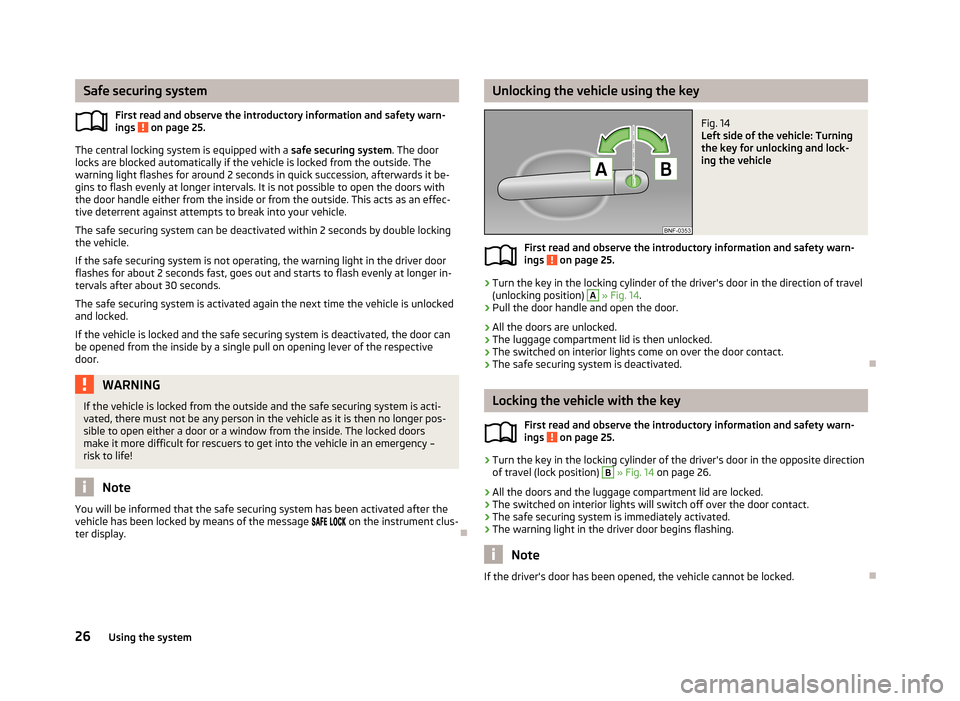
Unlocking the vehicle using the keyFig. 14
Left side of the vehicle: Turning
the key for unlocking and lock-
ing the vehicle
First read and observe the introductory information and safety warn- ings on page 25.
›
Turn the key in the locking cylinder of the driver's door in the direction of travel
(unlocking position)
A
» Fig. 14 .
›
Pull the door handle and open the door.
› All the doors are unlocked.
› The luggage compartment lid is then unlocked.
› The switched on interior lights come on over the door contact.
› The safe securing system is deactivated.
Locking the vehicle with the key
First read and observe the introductory information and safety warn-
ings
on page 25.
›
Turn the key in the locking cylinder of the driver's door in the opposite direction
of travel (lock position)
B
» Fig. 14 on page 26.
› All the doors and the luggage compartment lid are locked.
› The switched on interior lights will switch off over the door contact.
› The safe securing system is immediately activated.
› The warning light in the driver door begins flashing.
Note
If the driver's door has been opened, the vehicle cannot be locked.
26Using the system
Page 67 of 176
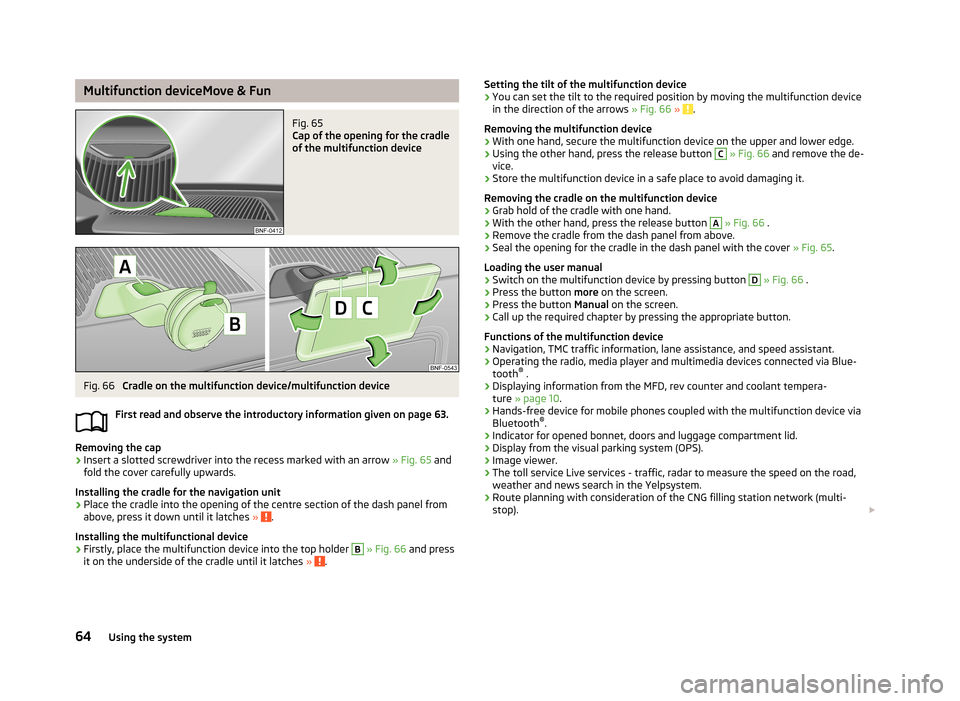
Multifunction deviceMove & FunFig. 65
Cap of the opening for the cradle
of the multifunction device
Fig. 66
Cradle on the multifunction device/multifunction device
First read and observe the introductory information given on page 63.
Removing the cap
›
Insert a slotted screwdriver into the recess marked with an arrow » Fig. 65 and
fold the cover carefully upwards.
Installing the cradle for the navigation unit
›
Place the cradle into the opening of the centre section of the dash panel from above, press it down until it latches » .
Installing the multifunctional device
›
Firstly, place the multifunction device into the top holder
B
» Fig. 66 and press
it on the underside of the cradle until it latches » .
Setting the tilt of the multifunction device›You can set the tilt to the required position by moving the multifunction device
in the direction of the arrows » Fig. 66 » .
Removing the multifunction device
›
With one hand, secure the multifunction device on the upper and lower edge.
›
Using the other hand, press the release button
C
» Fig. 66 and remove the de-
vice.
›
Store the multifunction device in a safe place to avoid damaging it.
Removing the cradle on the multifunction device
›
Grab hold of the cradle with one hand.
›
With the other hand, press the release button
A
» Fig. 66 .
›
Remove the cradle from the dash panel from above.
›
Seal the opening for the cradle in the dash panel with the cover » Fig. 65.
Loading the user manual
›
Switch on the multifunction device by pressing button
D
» Fig. 66 .
›
Press the button more on the screen.
›
Press the button Manual on the screen.
›
Call up the required chapter by pressing the appropriate button.
Functions of the multifunction device
› Navigation, TMC traffic information, lane assistance, and speed assistant.
› Operating the radio, media player and multimedia devices connected via Blue-
tooth ®
.
› Displaying information from the MFD, rev counter and coolant tempera-
ture » page 10 .
› Hands-free device for mobile phones coupled with the multifunction device via
Bluetooth ®
.
› Indicator for opened bonnet, doors and luggage compartment lid.
› Display from the visual parking system (OPS).
› Image viewer.
› The toll service Live services - traffic, radar to measure the speed on the road,
weather and news search in the Yelpsystem.
› Route planning with consideration of the CNG filling station network (multi-
stop).
64Using the system
Page 75 of 176
D - Mode for forwards travel (normal programme)
In mode D, the forward gears are automatically changed according to the engine
load, accelerator pedal actuation and driving speed.
The brake pedal must be depressed before setting into position D from position
N .M
- Manual gearshift (Tiptronic)
Further information » page 72.
Manual gearshift (Tiptronic)
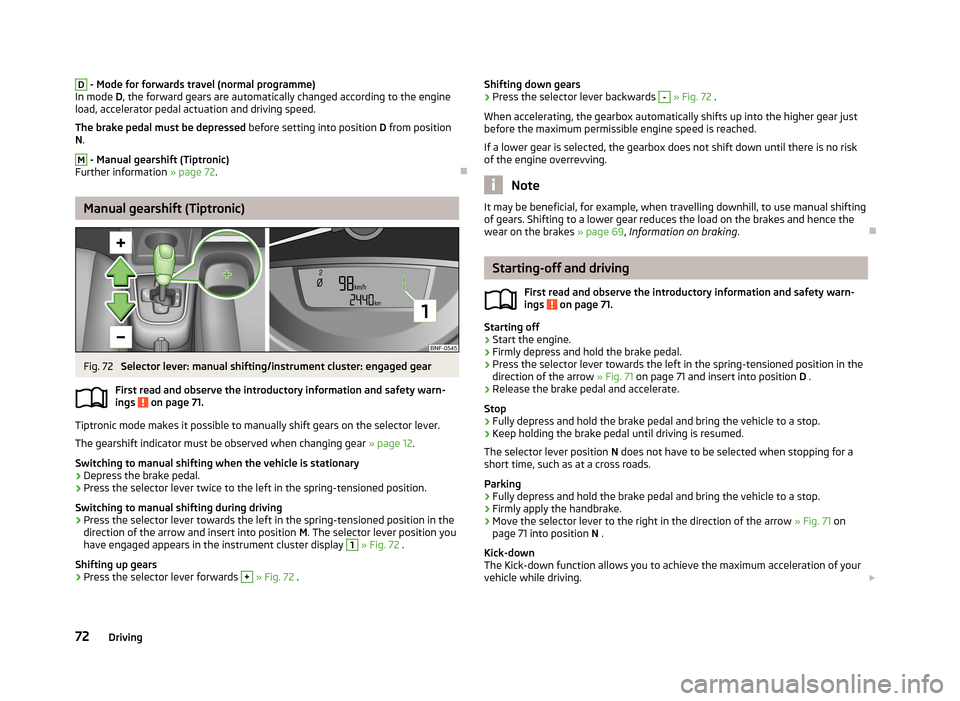
Fig. 72
Selector lever: manual shifting/instrument cluster: engaged gear
First read and observe the introductory information and safety warn- ings
on page 71.
Tiptronic mode makes it possible to manually shift gears on the selector lever.
The gearshift indicator must be observed when changing gear » page 12.
Switching to manual shifting when the vehicle is stationary
›
Depress the brake pedal.
›
Press the selector lever twice to the left in the spring-tensioned position.
Switching to manual shifting during driving
›
Press the selector lever towards the left in the spring-tensioned position in the
direction of the arrow and insert into position M. The selector lever position you
have engaged appears in the instrument cluster display
1
» Fig. 72 .
Shifting up gears
›
Press the selector lever forwards
+
» Fig. 72 .
Shifting down gears›Press the selector lever backwards - » Fig. 72 .
When accelerating, the gearbox automatically shifts up into the higher gear just
before the maximum permissible engine speed is reached.
If a lower gear is selected, the gearbox does not shift down until there is no riskof the engine overrevving.
Note
It may be beneficial, for example, when travelling downhill, to use manual shifting
of gears. Shifting to a lower gear reduces the load on the brakes and hence the
wear on the brakes » page 69, Information on braking .
Starting-off and driving
First read and observe the introductory information and safety warn-
ings
on page 71.
Starting off
›
Start the engine.
›
Firmly depress and hold the brake pedal.
›
Press the selector lever towards the left in the spring-tensioned position in the
direction of the arrow » Fig. 71 on page 71 and insert into position D .
›
Release the brake pedal and accelerate.
Stop
›
Fully depress and hold the brake pedal and bring the vehicle to a stop.
›
Keep holding the brake pedal until driving is resumed.
The selector lever position N does not have to be selected when stopping for a
short time, such as at a cross roads.
Parking
›
Fully depress and hold the brake pedal and bring the vehicle to a stop.
›
Firmly apply the handbrake.
›
Move the selector lever to the right in the direction of the arrow » Fig. 71 on
page 71 into position N .
Kick-down
The Kick-down function allows you to achieve the maximum acceleration of your
vehicle while driving.
72Driving
Page 85 of 176
CAUTION■If a warning signal sounds for about 3 seconds after activating the system and
there is no obstacle close to your car, this indicates a system fault. Have the fault
rectified by a specialist garage.■
The sensors must be kept clean (free of ice, etc.) to enable the parking aid to
operate properly.
■
Additionally installed modules such as bicycle carriers can impair the function of
the parking aid.
Function
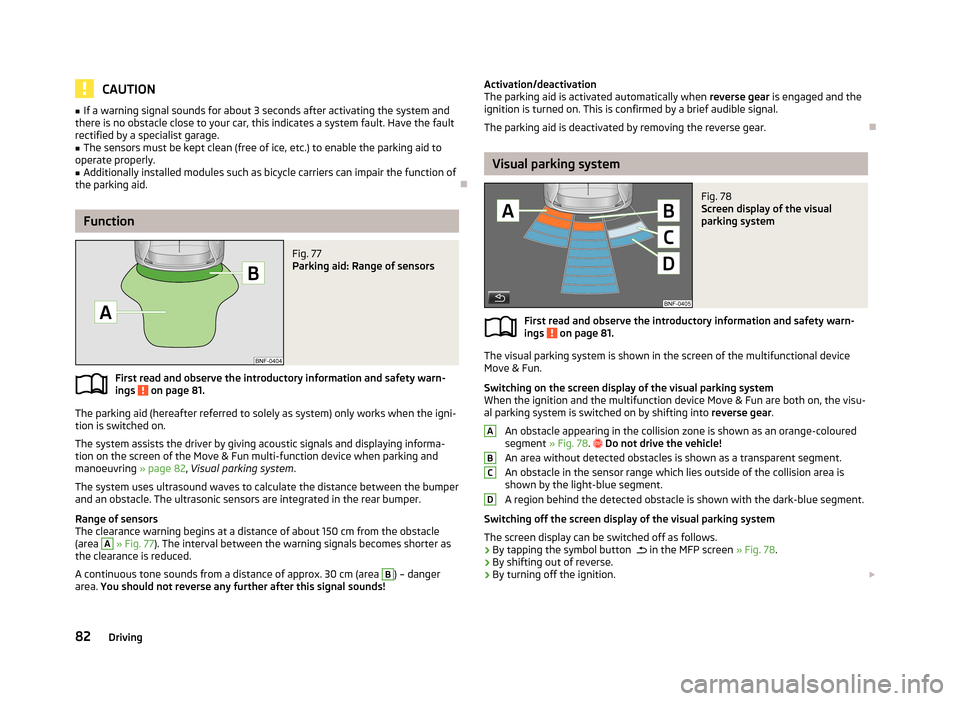
Fig. 77
Parking aid: Range of sensors
First read and observe the introductory information and safety warn- ings on page 81.
The parking aid (hereafter referred to solely as system) only works when the igni-tion is switched on.
The system assists the driver by giving acoustic signals and displaying informa-
tion on the screen of the Move & Fun multi-function device when parking and
manoeuvring » page 82, Visual parking system .
The system uses ultrasound waves to calculate the distance between the bumper
and an obstacle. The ultrasonic sensors are integrated in the rear bumper.
Range of sensors
The clearance warning begins at a distance of about 150 cm from the obstacle
(area
A
» Fig. 77 ). The interval between the warning signals becomes shorter as
the clearance is reduced.
A continuous tone sounds from a distance of approx. 30 cm (area
B
) – danger
area. You should not reverse any further after this signal sounds!
Activation/deactivation
The parking aid is activated automatically when reverse gear is engaged and the
ignition is turned on. This is confirmed by a brief audible signal.
The parking aid is deactivated by removing the reverse gear.
Visual parking system
Fig. 78
Screen display of the visual
parking system
First read and observe the introductory information and safety warn-
ings on page 81.
The visual parking system is shown in the screen of the multifunctional device
Move & Fun.
Switching on the screen display of the visual parking system
When the ignition and the multifunction device Move & Fun are both on, the visu-
al parking system is switched on by shifting into reverse gear.
An obstacle appearing in the collision zone is shown as an orange-coloured segment » Fig. 78.
Do not drive the vehicle!
An area without detected obstacles is shown as a transparent segment. An obstacle in the sensor range which lies outside of the collision area isshown by the light-blue segment.
A region behind the detected obstacle is shown with the dark-blue segment.
Switching off the screen display of the visual parking system The screen display can be switched off as follows.
› By tapping the symbol button
in the MFP screen
» Fig. 78.
› By shifting out of reverse.
› By turning off the ignition.
ABCD82Driving
Page 88 of 176
START-STOP
Introduction
This chapter contains information on the following subjects:
Starting/shutting down the engine
85
Operating conditions of the system
85
Manually activating/deactivating the system
86
The START-STOP system helps you to save fuel while at the same time reducing
harmful exhaust emissions and CO 2 emissions.
The function is automatically activated each time the ignition is switched on. In the start-stop mode, the engine automatically switches to the vehicle's idle phase, e.g. when stopped at traffic lights. The engine restarts automatically
where necessary.
The system can work only if the following basic conditions are met.
The driver's door is closed.
The driver has fastened the seat belt.
The bonnet is closed.The driving speed was higher than 4 km/h after the last stop.
WARNING■ The brake servo unit and power steering only operate if the engine is run-
ning.■
Never let the vehicle roll with the engine switched off.
CAUTION
Always deactivate the START-STOP system before driving through wa-
ter » page 78 .Note■
If the driver's seat belt is removed for more than 30 seconds or the driver's door
is opened during stop mode, the engine must be started manually with the key.■
After manually starting the engine on vehicles with manual transmission, auto-
matic engine shut down is not possible until the vehicle has travelled the re- quired minimum distance for START-STOPmode.
■
Changes to the outdoor temperature can have an effect on the internal temper-
ature of the vehicle battery even after several hours. If the vehicle remains out-
doors for a long time in minus temperatures or in direct sunlight, it can take sev-
eral hours until the internal temperature of the vehicle battery reaches a suitable temperature for proper operation of the START STOP system.
Starting/shutting down the engine
First read and observe the introductory information and safety warn-ings
on page 85.
›
Stop the vehicle (where necessary, apply the handbrake).
›
Put the gear stick into Neutral.
›
Release the clutch pedal.
Automatic engine shut down (STOP phase) takes place. The warning symbol
appears in the instrument cluster display.
›
Depress the clutch pedal.
The automatic start procedure takes place again (START phase). The warning
symbol
goes out.
Operating conditions of the system
First read and observe the introductory information and safety warn-ings
on page 85.
The START-STOP system is very complex. Some of the procedures are hard tocheck without servicing.
No engine shut down is carried out
Before each STOP phase, the system checks whether certain conditions have
been met. No engine shut down takes place in the following situations.
85Assist systems
Page 89 of 176
›The engine has not reached the minimum temperature for the START STOP
mode.
› The temperature inside the vehicle has not reached the desired temperature
set in the air-conditioning system/heating.
› The external temperature is very low/high.
› The windscreen defroster / ventilation is switched on at the maximum air tem-
perature (air conditioning) setting.
› The parking aid is activated.
› The charge state of the vehicle battery is too low.
› The stationary vehicle is on a steep slope or a steep downhill section.
› The idling speed is too high.
› The steering angle is too large (manoeuvring).
The warning symbol
appears in the instrument cluster display.
The automatic start procedure takes place again
During the STOP phase, the engine fires up without any active driver intervention, e.g. in the following situations.
› The vehicle begins to roll, e.g. on a slope.
› The difference between the temperature setting of the air-conditioning sys-
tem/heating and the temperature of the interior is too large.
› The windscreen defroster / ventilation is switched on at the maximum air tem-
perature (air conditioning) setting.
› The brake pedal was pressed several times (the pressure in the braking system
is too low).
› The charge state of the vehicle battery is too low.
› The current consumption is too high.
Manually activating/deactivating the system
Fig. 80
Button for the START-STOP sys-
tem
First read and observe the introductory information and safety warn-
ings on page 85.
Activation/deactivation
›
Press the symbol button » Fig. 80 .
When start-stop mode is deactivated, the warning light in the button lights up.
Note
If the system is deactivated during the STOP phase, the automatic start proce-
dure takes place.
City Safe Drive
Introduction
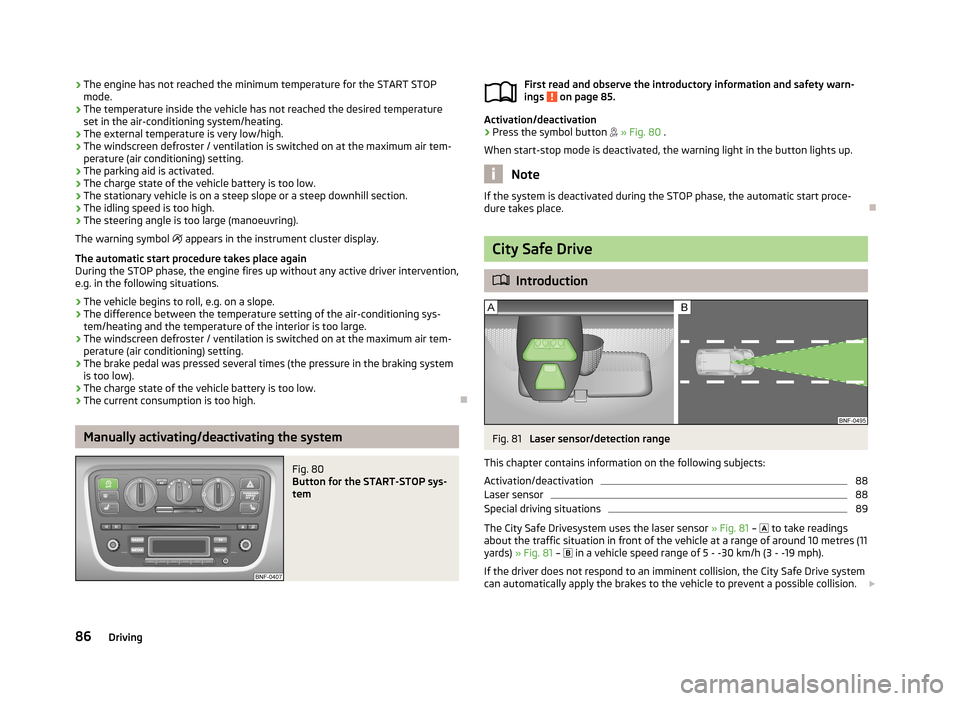
Fig. 81
Laser sensor/detection range
This chapter contains information on the following subjects:
Activation/deactivation
88
Laser sensor
88
Special driving situations
89
The City Safe Drivesystem uses the laser sensor » Fig. 81 –
to take readings
about the traffic situation in front of the vehicle at a range of around 10 metres (11
yards) » Fig. 81 –
in a vehicle speed range of 5 - -30 km/h (3 - -19 mph).
If the driver does not respond to an imminent collision, the City Safe Drive system
can automatically apply the brakes to the vehicle to prevent a possible collision.
86Driving
Page 91 of 176
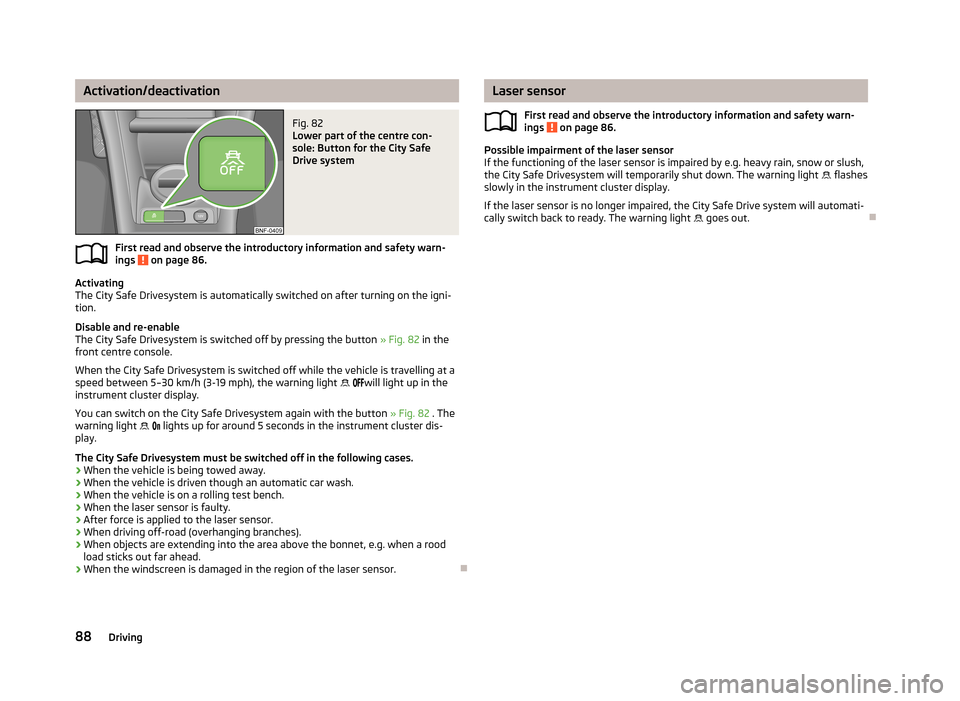
Activation/deactivationFig. 82
Lower part of the centre con-
sole: Button for the City Safe
Drive system
First read and observe the introductory information and safety warn-
ings on page 86.
Activating
The City Safe Drivesystem is automatically switched on after turning on the igni- tion.
Disable and re-enable
The City Safe Drivesystem is switched off by pressing the button » Fig. 82 in the
front centre console.
When the City Safe Drivesystem is switched off while the vehicle is travelling at a
speed between 5–30 km/h (3-19 mph), the warning light
will light up in the
instrument cluster display.
You can switch on the City Safe Drivesystem again with the button » Fig. 82 . The
warning light
lights up for around 5 seconds in the instrument cluster dis-
play.
The City Safe Drivesystem must be switched off in the following cases.
› When the vehicle is being towed away.
› When the vehicle is driven though an automatic car wash.
› When the vehicle is on a rolling test bench.
› When the laser sensor is faulty.
› After force is applied to the laser sensor.
› When driving off-road (overhanging branches).
› When objects are extending into the area above the bonnet, e.g. when a rood
load sticks out far ahead.
› When the windscreen is damaged in the region of the laser sensor.
Laser sensor
First read and observe the introductory information and safety warn-
ings
on page 86.
Possible impairment of the laser sensor
If the functioning of the laser sensor is impaired by e.g. heavy rain, snow or slush,
the City Safe Drivesystem will temporarily shut down. The warning light flashes
slowly in the instrument cluster display.
If the laser sensor is no longer impaired, the City Safe Drive system will automati-
cally switch back to ready. The warning light goes out.
88Driving