ESP SKODA CITIGO 2014 1.G User Guide
[x] Cancel search | Manufacturer: SKODA, Model Year: 2014, Model line: CITIGO, Model: SKODA CITIGO 2014 1.GPages: 164, PDF Size: 12.08 MB
Page 48 of 164
CAUTION■Keep the windows clean to ensure the correct functionality of the electric
windows.■
If windows are frozen, always remove ice » page 99, Windows and external
mirrors before operating the electrical power windows. The window seals and
the electrical power window mechanism can otherwise be damaged.
■
Always make sure that the windows are closed when you leave the locked
vehicle.
For the sake of the environment
At high speeds you should keep the windows closed to prevent unnecessarily high fuel consumption.
Note
When driving always use the existing heating, air conditioning and ventilation
system for ventilating the interior of the vehicle. With the windows open, dust
and other dirt can get into the vehicle. In addition, wind noises can occur at
certain speeds.
Open / close windows
Fig. 31
Power window buttons
Read and observe and on page 44 first.
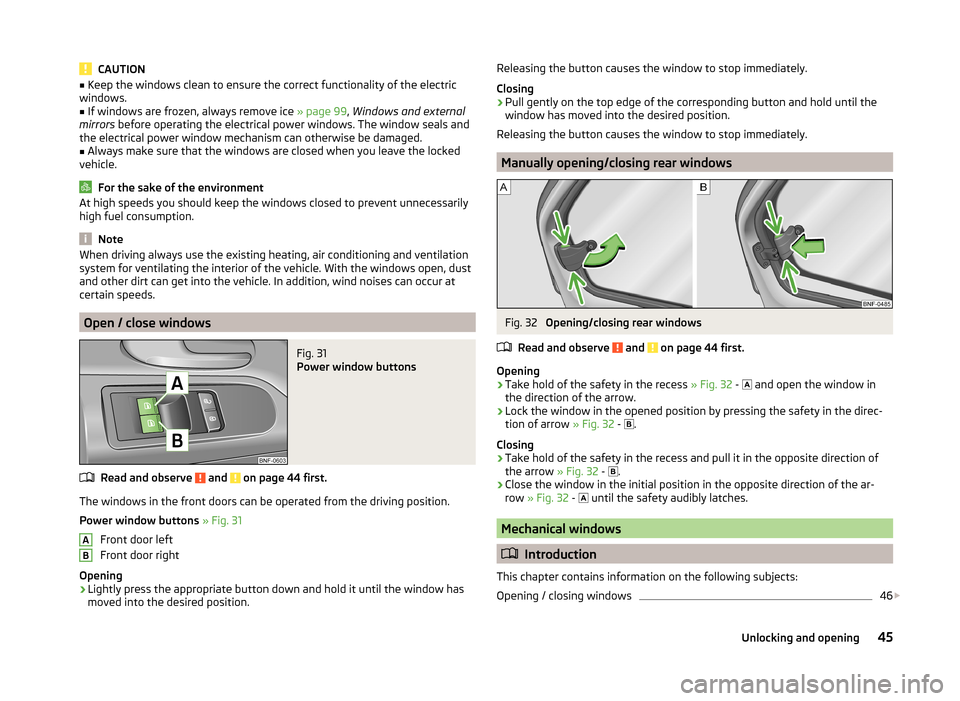
The windows in the front doors can be operated from the driving position.
Power window buttons » Fig. 31
Front door left
Front door right
Opening
›
Lightly press the appropriate button down and hold it until the window has
moved into the desired position.
ABReleasing the button causes the window to stop immediately.
Closing›
Pull gently on the top edge of the corresponding button and hold until the
window has moved into the desired position.
Releasing the button causes the window to stop immediately.
Manually opening/closing rear windows
Fig. 32
Opening/closing rear windows
Read and observe
and on page 44 first.
Opening
›
Take hold of the safety in the recess » Fig. 32 -
and open the window in
the direction of the arrow.
›
Lock the window in the opened position by pressing the safety in the direc-
tion of arrow » Fig. 32 -
.
Closing
›
Take hold of the safety in the recess and pull it in the opposite direction of
the arrow » Fig. 32 -
.
›
Close the window in the initial position in the opposite direction of the ar-
row » Fig. 32 -
until the safety audibly latches.
Mechanical windows
Introduction
This chapter contains information on the following subjects:
Opening / closing windows
46
45Unlocking and opening
Page 51 of 164
Lights and visibility
Lights
Introduction
This chapter contains information on the following subjects:
Operation of the light function
48
Daylight running lights (DAY LIGHT)
49
Turn signal and main beam
49
Fog lights
50
Rear fog light
50
Hazard warning light system
50
Parking light
51
Driving abroad
51
Unless otherwise stated, the lights only work when the ignition is on.
The arrangement of the controls right-hand drive models may differ from the layout shown in » Fig. 35 on page 48 . The symbols which mark the positions
of the controls are identical.
WARNING■ The activation of the lights should only be undertaken in accordance with
national legal requirements.■
The driver is always responsible for the correct settings and use of the
lights.
■
Never drive with only the side lights on! The side lights are not bright
enough to light up the road sufficiently in front of you or to be seen by oth-
er oncoming traffic. Therefore always switch on the low beam when it is
dark or if visibility is poor.
Note
■ The instruments are also illuminated when the side light or low beam light is
switched on.■
The headlights may mist up temporarily. When the driving lights are switched
on, the light outlet surfaces are free from mist after a short period, although
the headlight lenses may still be misted up in the peripheral areas. This mist
has no influence on the life of the lighting system.
Operation of the light functionFig. 35
Light switch / Knob for headlamp beam adjustment
Read and observe
on page 48 first.
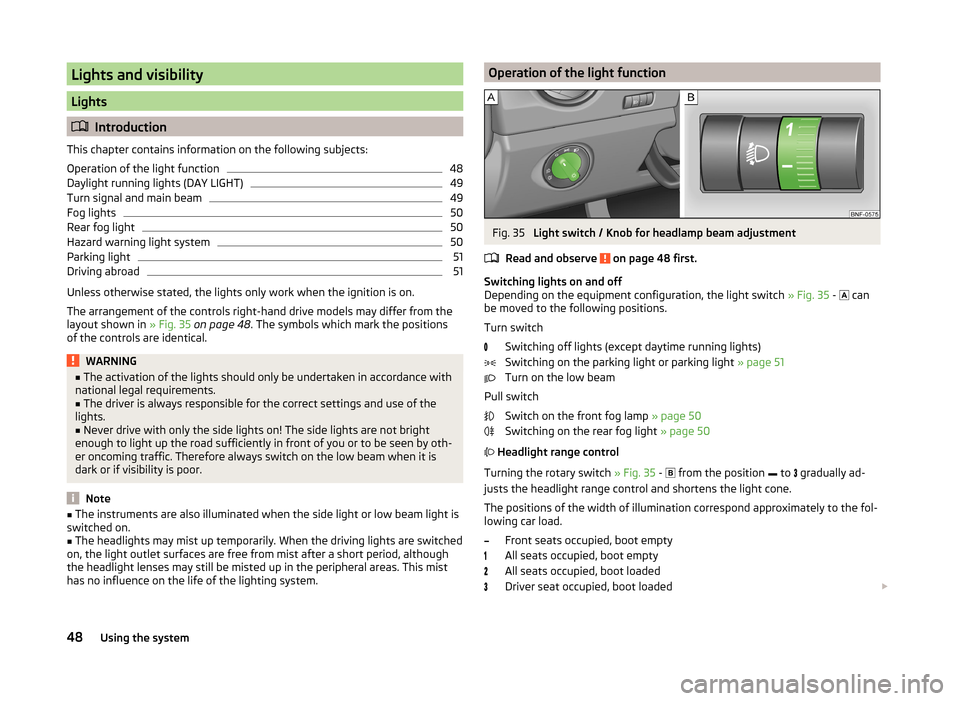
Switching lights on and off
Depending on the equipment configuration, the light switch » Fig. 35 -
can
be moved to the following positions.
Turn switch Switching off lights (except daytime running lights)
Switching on the parking light or parking light » page 51
Turn on the low beam
Pull switch Switch on the front fog lamp » page 50
Switching on the rear fog light » page 50
Headlight range control
Turning the rotary switch » Fig. 35 -
from the position
to
gradually ad-
justs the headlight range control and shortens the light cone.
The positions of the width of illumination correspond approximately to the fol- lowing car load.
Front seats occupied, boot empty
All seats occupied, boot empty
All seats occupied, boot loaded
Driver seat occupied, boot loaded
48Using the system
Page 52 of 164
We recommend you adjust the headlight beam when the low beam is switched
on.WARNINGAlways adjust the headlight beam to meet the following conditions.■The vehicle does not dazzle other road users, especially oncoming vehi-
cles.■
The beam range is sufficient for safe driving.
CAUTION
If leaving the vehicle without wanting to use the parking lights, always turn
the light switch to position .
Note
If the light switch is in the position , the ignition key is removed and the
driver's door is open, an audible warning signal will sound. The audible warning
signal is switched off by means of the door contact when the driver's door is
closed, however the side lights remain on to illuminate the parked vehicle if
necessary.
Daylight running lights (DAY LIGHT)
Read and observe
on page 48 first.
The daytime running lights function provides the lighting of the front area ofthe vehicle.
The daytime running lights are switched on automatically if the following
conditions are met.
The ignition is switched on.
The light switch is in position
» Fig. 35 on page 48 .
When the daytime running lights are switched on, the lighting of the instru-
ment cluster is switched on.
WARNINGWhen the daytime running light is switched on, the side lights (neither at
the front or rear) and the number plate lights are not illuminated. Therefore
always switch on the low beam when the visibility is poor.Turn signal and main beamFig. 36
Operating lever: Turn signal and
main beam operation
Read and observe on page 48 first.
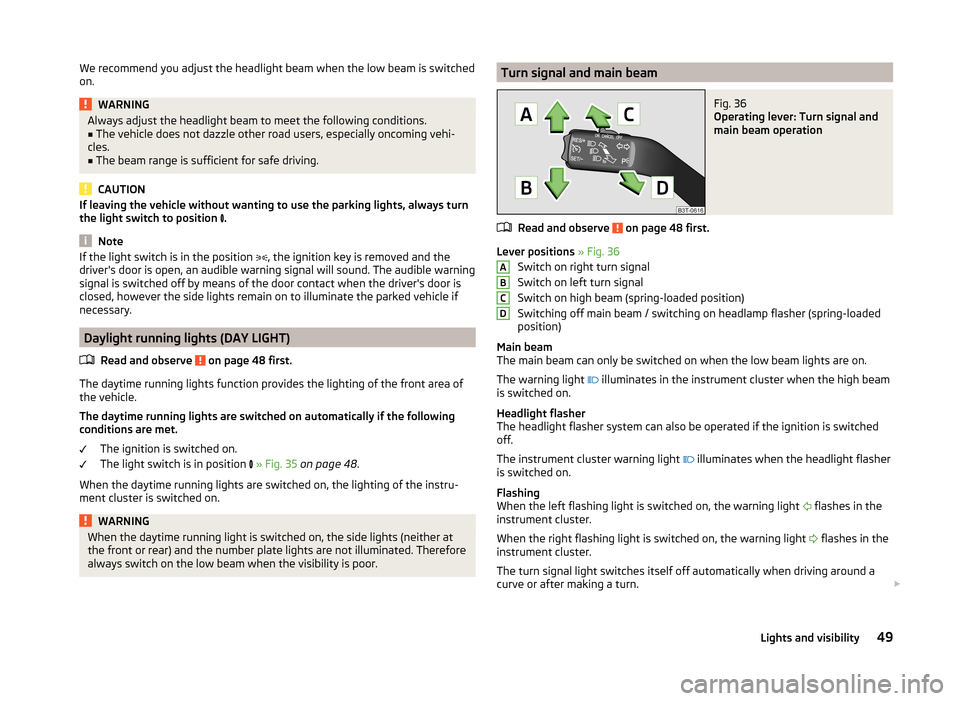
Lever positions » Fig. 36
Switch on right turn signal
Switch on left turn signal
Switch on high beam (spring-loaded position)
Switching off main beam / switching on headlamp flasher (spring-loaded
position)
Main beam
The main beam can only be switched on when the low beam lights are on.
The warning light illuminates in the instrument cluster when the high beam
is switched on.
Headlight flasher
The headlight flasher system can also be operated if the ignition is switched
off.
The instrument cluster warning light illuminates when the headlight flasher
is switched on.
Flashing
When the left flashing light is switched on, the warning light flashes in the
instrument cluster.
When the right flashing light is switched on, the warning light flashes in the
instrument cluster.
The turn signal light switches itself off automatically when driving around a
curve or after making a turn.
ABCD49Lights and visibility
Page 54 of 164
Parking lightRead and observe
on page 48 first.
Switching on the side light on one side
›
Switch off the ignition.
›
Place the control lever into position
A
or
B
as far as it can go » Fig. 36 on
page 49 - the parking light on the right/left-hand side of the vehicle is
switched on.
Switching on the side light on both sides
›
Turn the light switch
» Fig. 37 on page 50 to position
and lock the vehicle.
After pulling out the ignition key and opening the driver's door, an audible
warning sounds. After a few seconds or after closing the driver's door, the au-
dible alarm is turned off, but the parking lights will remain switched on.
CAUTION
Turning on the parking light means the battery is heavily loaded, especially
over short distances.
Driving abroad
Read and observe
on page 48 first.
The low beam is set asymmetrically. It illuminates the side of the road on
which the vehicle is being driven to a greater extent.
When driving in countries with opposing traffic system (traffic on the left/
right), asymmetric headlight adjustment can dazzle oncoming traffic. In order
to avoid this, the headlights must be adjusted at a specialist garage.
Note
You can find out more information on adjusting the headlights at a specialist
garage.
Indoor Lighting
Introduction
This chapter contains information on the following subjects:
Interior light
51NoteWith the ignition off, the light turns off automatically after about 10 minutes.
Interior light
Fig. 39
Interior lighting: Version 1/version 2
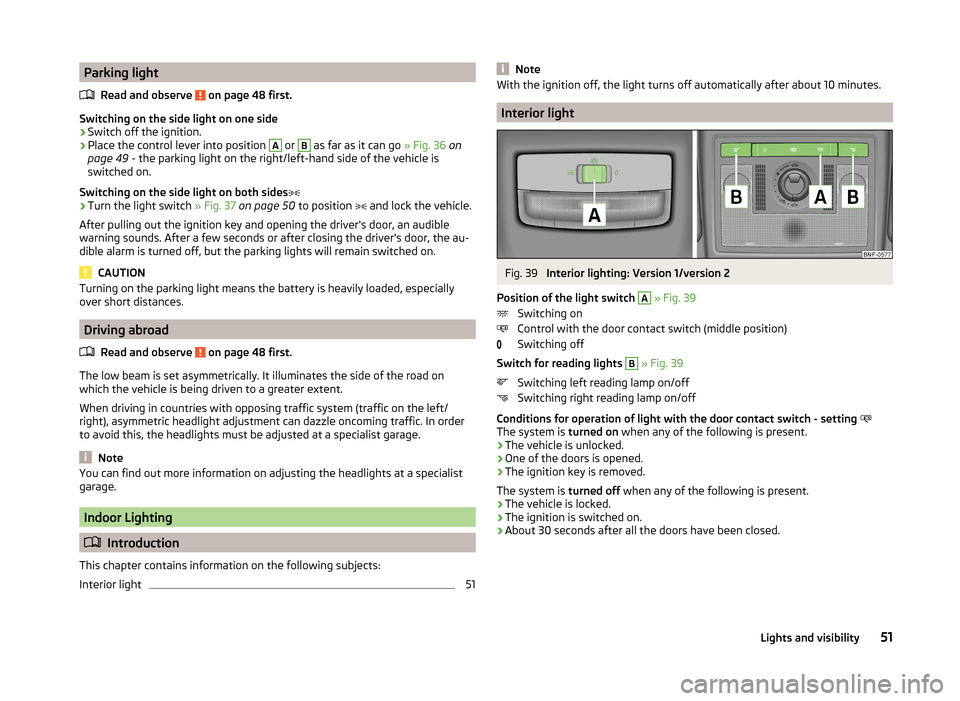
Position of the light switch
A
» Fig. 39
Switching on
Control with the door contact switch (middle position)
Switching off
Switch for reading lights
B
» Fig. 39
Switching left reading lamp on/off
Switching right reading lamp on/off
Conditions for operation of light with the door contact switch - setting
The system is turned on when any of the following is present.
› The vehicle is unlocked.
› One of the doors is opened.
› The ignition key is removed.
The system is turned off when any of the following is present.
› The vehicle is locked.
› The ignition is switched on.
› About 30 seconds after all the doors have been closed.
51Lights and visibility
Page 59 of 164
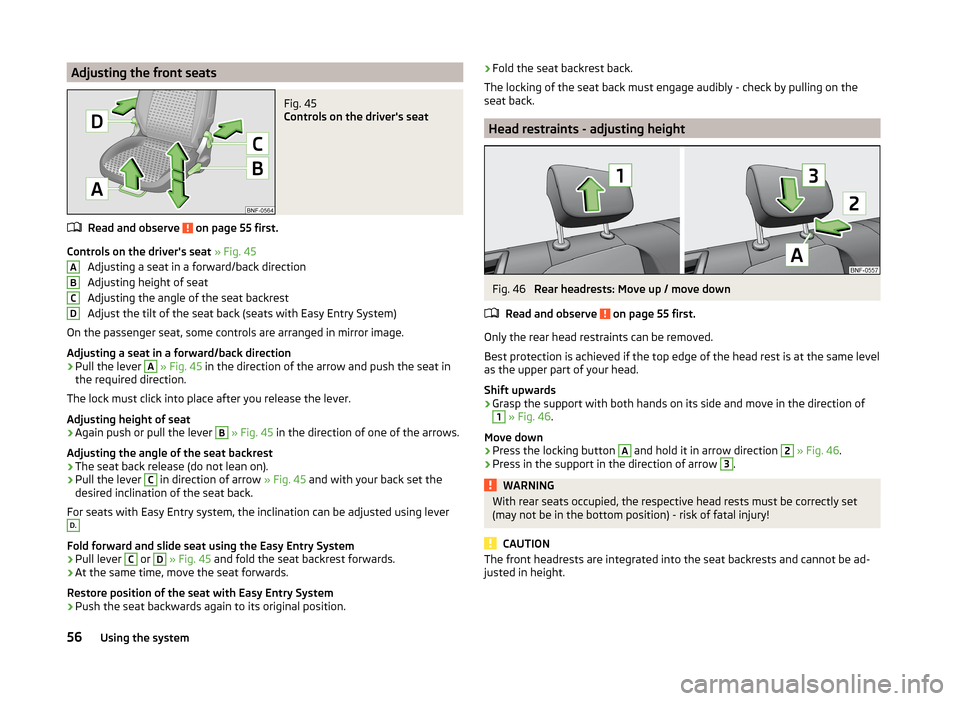
Adjusting the front seatsFig. 45
Controls on the driver's seat
Read and observe on page 55 first.
Controls on the driver's seat » Fig. 45
Adjusting a seat in a forward/back direction
Adjusting height of seat
Adjusting the angle of the seat backrest
Adjust the tilt of the seat back (seats with Easy Entry System)
On the passenger seat, some controls are arranged in mirror image.
Adjusting a seat in a forward/back direction
›
Pull the lever
A
» Fig. 45 in the direction of the arrow and push the seat in
the required direction.
The lock must click into place after you release the lever.
Adjusting height of seat
›
Again push or pull the lever
B
» Fig. 45 in the direction of one of the arrows.
Adjusting the angle of the seat backrest
›
The seat back release (do not lean on).
›
Pull the lever
C
in direction of arrow » Fig. 45 and with your back set the
desired inclination of the seat back.
For seats with Easy Entry system, the inclination can be adjusted using lever
D.
Fold forward and slide seat using the Easy Entry System
›
Pull lever
C
or
D
» Fig. 45 and fold the seat backrest forwards.
›
At the same time, move the seat forwards.
Restore position of the seat with Easy Entry System
›
Push the seat backwards again to its original position.
ABCD› Fold the seat backrest back.
The locking of the seat back must engage audibly - check by pulling on the
seat back.
Head restraints - adjusting height
Fig. 46
Rear headrests: Move up / move down
Read and observe
on page 55 first.
Only the rear head restraints can be removed.
Best protection is achieved if the top edge of the head rest is at the same level
as the upper part of your head.
Shift upwards
›
Grasp the support with both hands on its side and move in the direction of
1
» Fig. 46 .
Move down
›
Press the locking button
A
and hold it in arrow direction
2
» Fig. 46 .
›
Press in the support in the direction of arrow
3
.
WARNINGWith rear seats occupied, the respective head rests must be correctly set
(may not be in the bottom position) - risk of fatal injury!
CAUTION
The front headrests are integrated into the seat backrests and cannot be ad-
justed in height.56Using the system
Page 60 of 164
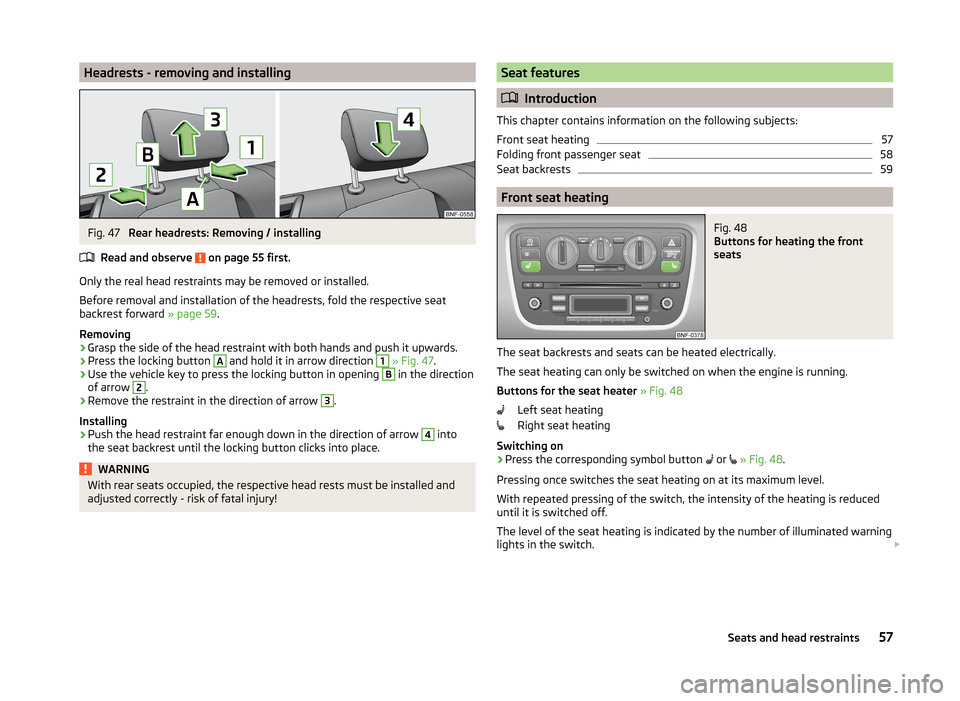
Headrests - removing and installingFig. 47
Rear headrests: Removing / installing
Read and observe
on page 55 first.
Only the real head restraints may be removed or installed.
Before removal and installation of the headrests, fold the respective seat
backrest forward » page 59.
Removing
›
Grasp the side of the head restraint with both hands and push it upwards.
›
Press the locking button
A
and hold it in arrow direction
1
» Fig. 47 .
›
Use the vehicle key to press the locking button in opening
B
in the direction
of arrow
2
.
›
Remove the restraint in the direction of arrow
3
.
Installing
›
Push the head restraint far enough down in the direction of arrow
4
into
the seat backrest until the locking button clicks into place.
WARNINGWith rear seats occupied, the respective head rests must be installed and
adjusted correctly - risk of fatal injury!Seat features
Introduction
This chapter contains information on the following subjects:
Front seat heating
57
Folding front passenger seat
58
Seat backrests
59
Front seat heating
Fig. 48
Buttons for heating the front
seats
The seat backrests and seats can be heated electrically.
The seat heating can only be switched on when the engine is running.
Buttons for the seat heater » Fig. 48
Left seat heating
Right seat heating
Switching on
›
Press the corresponding symbol button or
» Fig. 48 .
Pressing once switches the seat heating on at its maximum level.
With repeated pressing of the switch, the intensity of the heating is reduced
until it is switched off.
The level of the seat heating is indicated by the number of illuminated warning
lights in the switch.
57Seats and head restraints
Page 62 of 164
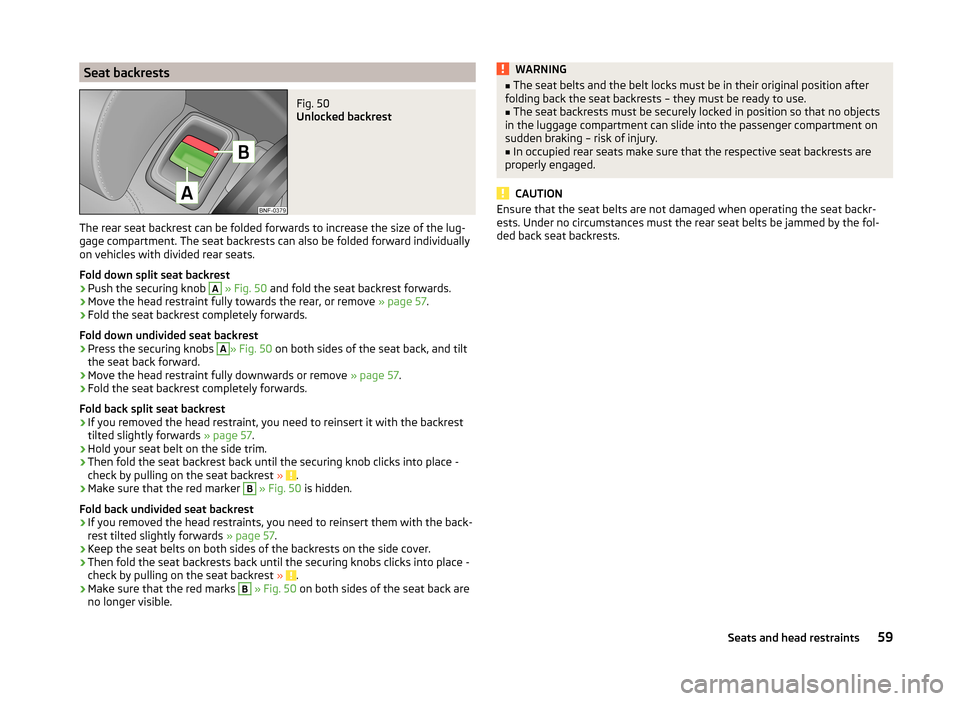
Seat backrestsFig. 50
Unlocked backrest
The rear seat backrest can be folded forwards to increase the size of the lug-
gage compartment. The seat backrests can also be folded forward individually
on vehicles with divided rear seats.
Fold down split seat backrest
›
Push the securing knob
A
» Fig. 50 and fold the seat backrest forwards.
›
Move the head restraint fully towards the rear, or remove » page 57.
›
Fold the seat backrest completely forwards.
Fold down undivided seat backrest
›
Press the securing knobs
A
» Fig. 50 on both sides of the seat back, and tilt
the seat back forward.
›
Move the head restraint fully downwards or remove » page 57.
›
Fold the seat backrest completely forwards.
Fold back split seat backrest
›
If you removed the head restraint, you need to reinsert it with the backrest
tilted slightly forwards » page 57.
›
Hold your seat belt on the side trim.
›
Then fold the seat backrest back until the securing knob clicks into place -
check by pulling on the seat backrest » .
›
Make sure that the red marker
B
» Fig. 50 is hidden.
Fold back undivided seat backrest
›
If you removed the head restraints, you need to reinsert them with the back-
rest tilted slightly forwards » page 57.
›
Keep the seat belts on both sides of the backrests on the side cover.
›
Then fold the seat backrests back until the securing knobs clicks into place -
check by pulling on the seat backrest » .
›
Make sure that the red marks
B
» Fig. 50 on both sides of the seat back are
no longer visible.
WARNING■ The seat belts and the belt locks must be in their original position after
folding back the seat backrests – they must be ready to use.■
The seat backrests must be securely locked in position so that no objects
in the luggage compartment can slide into the passenger compartment on
sudden braking – risk of injury.
■
In occupied rear seats make sure that the respective seat backrests are
properly engaged.
CAUTION
Ensure that the seat belts are not damaged when operating the seat backr-
ests. Under no circumstances must the rear seat belts be jammed by the fol-
ded back seat backrests.59Seats and head restraints
Page 69 of 164
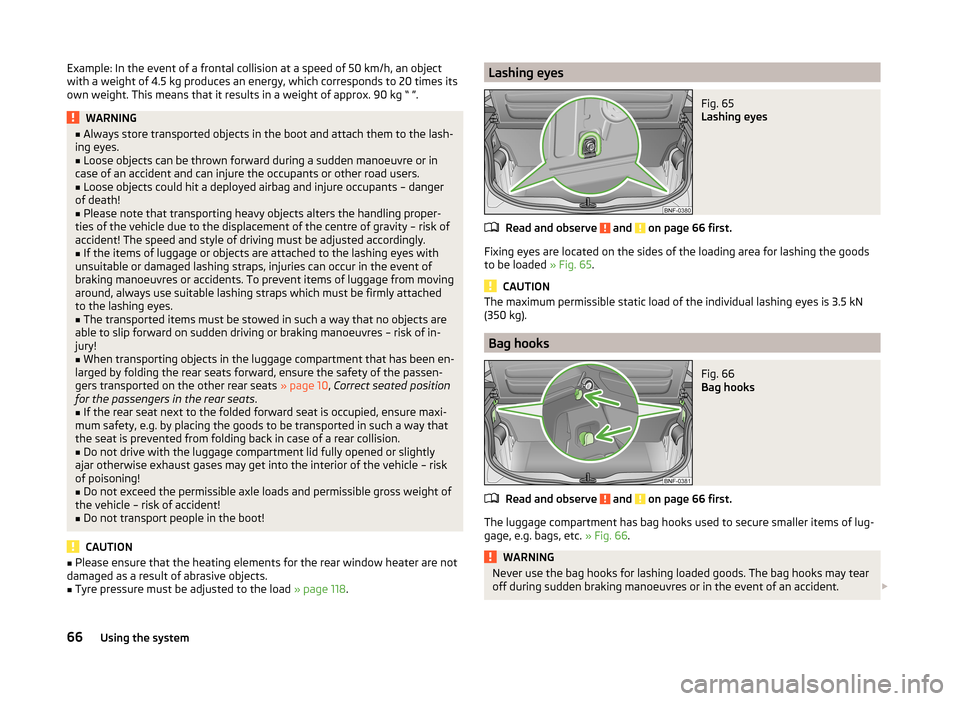
Example: In the event of a frontal collision at a speed of 50 km/h, an object
with a weight of 4.5 kg produces an energy, which corresponds to 20 times its
own weight. This means that it results in a weight of approx. 90 kg “ ”.WARNING■ Always store transported objects in the boot and attach them to the lash-
ing eyes.■
Loose objects can be thrown forward during a sudden manoeuvre or in
case of an accident and can injure the occupants or other road users.
■
Loose objects could hit a deployed airbag and injure occupants – danger
of death!
■
Please note that transporting heavy objects alters the handling proper-
ties of the vehicle due to the displacement of the centre of gravity – risk of
accident! The speed and style of driving must be adjusted accordingly.
■
If the items of luggage or objects are attached to the lashing eyes with
unsuitable or damaged lashing straps, injuries can occur in the event of
braking manoeuvres or accidents. To prevent items of luggage from moving
around, always use suitable lashing straps which must be firmly attached
to the lashing eyes.
■
The transported items must be stowed in such a way that no objects are
able to slip forward on sudden driving or braking manoeuvres – risk of in-
jury!
■
When transporting objects in the luggage compartment that has been en-
larged by folding the rear seats forward, ensure the safety of the passen-
gers transported on the other rear seats » page 10, Correct seated position
for the passengers in the rear seats .
■
If the rear seat next to the folded forward seat is occupied, ensure maxi-
mum safety, e.g. by placing the goods to be transported in such a way that
the seat is prevented from folding back in case of a rear collision.
■
Do not drive with the luggage compartment lid fully opened or slightly
ajar otherwise exhaust gases may get into the interior of the vehicle – risk
of poisoning!
■
Do not exceed the permissible axle loads and permissible gross weight of
the vehicle – risk of accident!
■
Do not transport people in the boot!
CAUTION
■ Please ensure that the heating elements for the rear window heater are not
damaged as a result of abrasive objects.■
Tyre pressure must be adjusted to the load » page 118.
Lashing eyesFig. 65
Lashing eyes
Read and observe and on page 66 first.
Fixing eyes are located on the sides of the loading area for lashing the goods
to be loaded » Fig. 65.
CAUTION
The maximum permissible static load of the individual lashing eyes is 3.5 kN
(350 kg).
Bag hooks
Fig. 66
Bag hooks
Read and observe and on page 66 first.
The luggage compartment has bag hooks used to secure smaller items of lug- gage, e.g. bags, etc. » Fig. 66.
WARNINGNever use the bag hooks for lashing loaded goods. The bag hooks may tear
off during sudden braking manoeuvres or in the event of an accident. 66Using the system
Page 76 of 164
Communication and multimedia
Telephone and Move & Fun
Introduction
This chapter contains information on the following subjects:
Mobile phones and two-way radio systems
73
Multifunction deviceMove & Fun
73
Mobile phones and two-way radio systems
ŠKODA permits the operation of mobile phones and two-way radio systems
with a professionally installed external aerial and a maximum transmission
power of up to 10 watts.
Please consult a ŠKODA Partner for information about the possibility of instal- ling and operating mobile phones and two-way radio systems with a transmis-
sion power of more than 10 W.
Operating mobile phones or two-way radio systems may interfere with the
functionality of the electronic systems in your vehicle.
The possible reasons for this are.
› no external aerial.
› external aerial incorrectly installed.
› transmission power greater than 10 watts.
WARNING■
Concentrate fully at all times on your driving! As the driver you are fully
responsible for the operation of your vehicle. Use the telephone system on-
ly to such an extent that you are in full control of your vehicle at any time.■
The national regulations for using a mobile phone in a vehicle must be
observed.
■
If a mobile phone or a two-way radio system is operated in a vehicle with-
out an external aerial or an external aerial which has been installed incor-
rectly, this can increase the strength of the electromagnetic field inside the
vehicle.
WARNING (Continued)■ Two-way radio systems, mobile phones or mounts must not be installed
on airbag covers or within the immediate deployment range of the airbags.■
Never leave a mobile phone on a seat, on the dash panel or in another
area from which it can be thrown during a sudden braking manoeuvre, an
accident or a collision — risk of injury.
Note
■ We recommend that the installation of mobile phones and two-way radio
systems in a vehicle be carried out by a specialist garage.■
The range of the Bluetooth ®
connection to the hands-free system is restric-
ted to the vehicle interior. The range is dependent on local factors, e.g. obsta-
cles between the devices and mutual interferences with other devices. If your
mobile phone is in a jacket pocket, for example, this can lead to difficulties
when establishing a connection with the hands-free-system or transferring
data.
Multifunction deviceMove & Fun
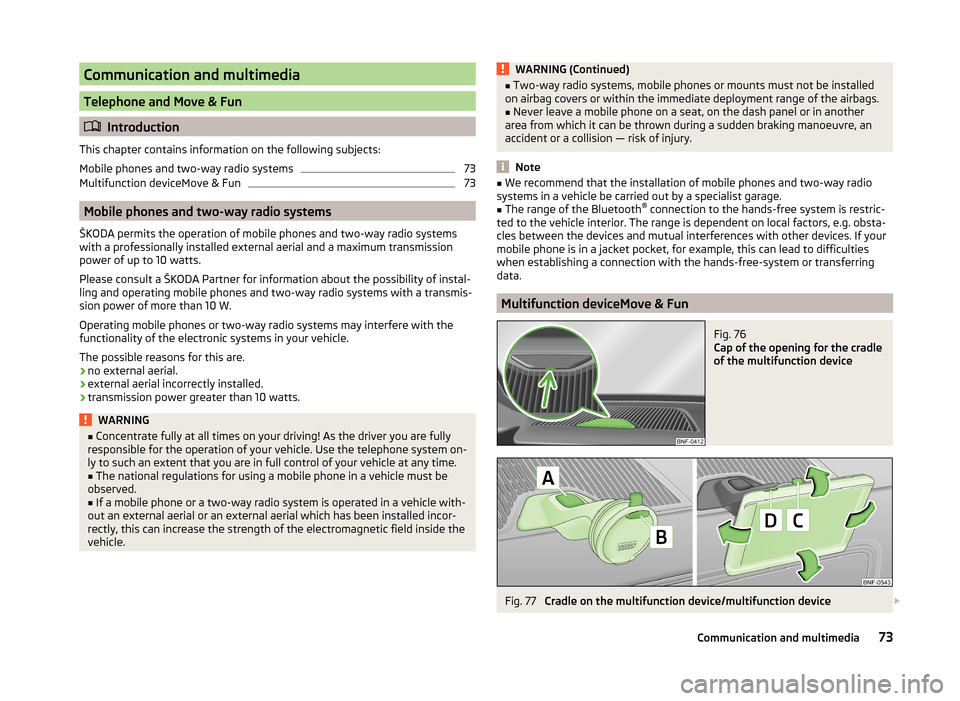
Fig. 76
Cap of the opening for the cradle
of the multifunction device
Fig. 77
Cradle on the multifunction device/multifunction device
73Communication and multimedia
Page 77 of 164
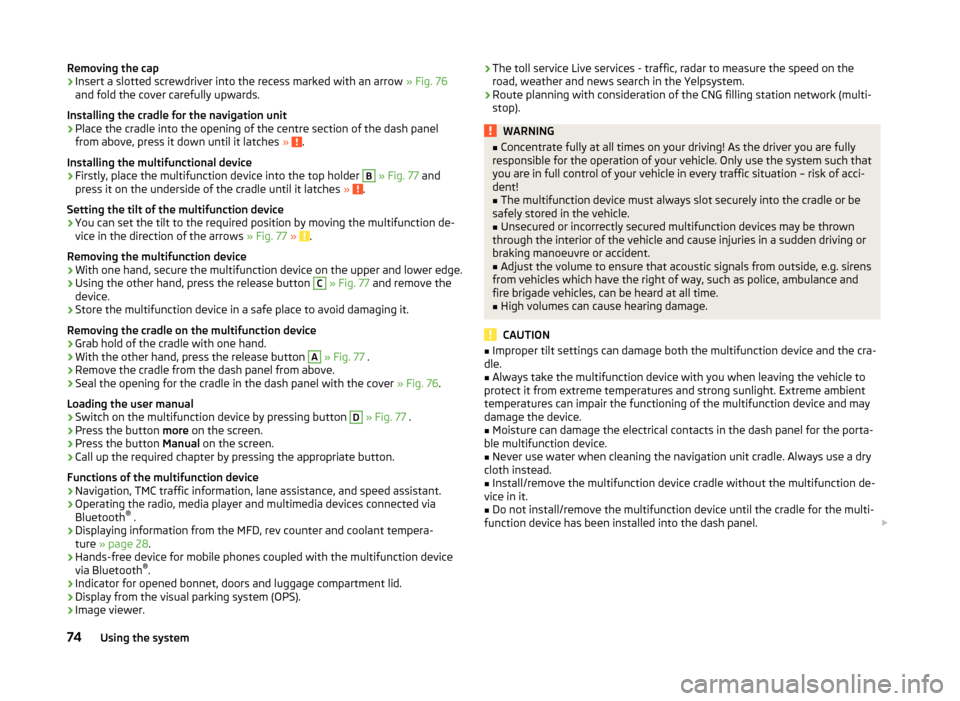
Removing the cap›Insert a slotted screwdriver into the recess marked with an arrow » Fig. 76
and fold the cover carefully upwards.
Installing the cradle for the navigation unit›
Place the cradle into the opening of the centre section of the dash panel
from above, press it down until it latches » .
Installing the multifunctional device
›
Firstly, place the multifunction device into the top holder
B
» Fig. 77 and
press it on the underside of the cradle until it latches » .
Setting the tilt of the multifunction device
›
You can set the tilt to the required position by moving the multifunction de-
vice in the direction of the arrows » Fig. 77 » .
Removing the multifunction device
›
With one hand, secure the multifunction device on the upper and lower edge.
›
Using the other hand, press the release button
C
» Fig. 77 and remove the
device.
›
Store the multifunction device in a safe place to avoid damaging it.
Removing the cradle on the multifunction device
›
Grab hold of the cradle with one hand.
›
With the other hand, press the release button
A
» Fig. 77 .
›
Remove the cradle from the dash panel from above.
›
Seal the opening for the cradle in the dash panel with the cover » Fig. 76.
Loading the user manual
›
Switch on the multifunction device by pressing button
D
» Fig. 77 .
›
Press the button more on the screen.
›
Press the button Manual on the screen.
›
Call up the required chapter by pressing the appropriate button.
Functions of the multifunction device
› Navigation, TMC traffic information, lane assistance, and speed assistant.
› Operating the radio, media player and multimedia devices connected via
Bluetooth ®
.
› Displaying information from the MFD, rev counter and coolant tempera-
ture » page 28 .
› Hands-free device for mobile phones coupled with the multifunction device
via Bluetooth ®
.
› Indicator for opened bonnet, doors and luggage compartment lid.
› Display from the visual parking system (OPS).
› Image viewer.
›The toll service Live services - traffic, radar to measure the speed on the
road, weather and news search in the Yelpsystem.
› Route planning with consideration of the CNG filling station network (multi-
stop).WARNING■ Concentrate fully at all times on your driving! As the driver you are fully
responsible for the operation of your vehicle. Only use the system such that
you are in full control of your vehicle in every traffic situation – risk of acci-
dent!■
The multifunction device must always slot securely into the cradle or be
safely stored in the vehicle.
■
Unsecured or incorrectly secured multifunction devices may be thrown
through the interior of the vehicle and cause injuries in a sudden driving or
braking manoeuvre or accident.
■
Adjust the volume to ensure that acoustic signals from outside, e.g. sirens
from vehicles which have the right of way, such as police, ambulance and
fire brigade vehicles, can be heard at all time.
■
High volumes can cause hearing damage.
CAUTION
■ Improper tilt settings can damage both the multifunction device and the cra-
dle.■
Always take the multifunction device with you when leaving the vehicle to
protect it from extreme temperatures and strong sunlight. Extreme ambient
temperatures can impair the functioning of the multifunction device and may
damage the device.
■
Moisture can damage the electrical contacts in the dash panel for the porta-
ble multifunction device.
■
Never use water when cleaning the navigation unit cradle. Always use a dry
cloth instead.
■
Install/remove the multifunction device cradle without the multifunction de-
vice in it.
■
Do not install/remove the multifunction device until the cradle for the multi-
function device has been installed into the dash panel.
74Using the system