display SKODA CITIGO 2015 1.G User Guide
[x] Cancel search | Manufacturer: SKODA, Model Year: 2015, Model line: CITIGO, Model: SKODA CITIGO 2015 1.GPages: 160, PDF Size: 23.1 MB
Page 34 of 160
Outside temperature
If the outside temperature drops below +4 °C, the temperature indicator ap-
pears and a snow flake symbol
(display for low temperature) flashes for a
few seconds, then remains displayed together with the outside temperature.
Driving time
The time travelled since the memory was last erased is displayed.
The maximum time displayed is 19 hours and 59 minutes. The indicator is auto-
matically set back to zero if this value is exceeded.
Current fuel consumption
You can use this information to adapt your driving style to the desired fuel
consumption.
When the vehicle is stationary or moving slowly the fuel consumption is dis-
played in l/h (on models for some countries the following appears --,- km/l).
Average fuel consumption
The value is calculated continuously from the point the memory was last de-
leted.
After erasing the memory, no data will appear for the first 300 m driven.
Range
The detail provides information about the distance in km that can be travelled on the current tank, and with the same driving style.
If you drive more efficiently this value can increase.
Distance travelled
The distance travelled since the memory was last erased is displayed.
The maximum distance that can be displayed is 1999 km. The indicator is auto-
matically set back to zero if this value is exceeded.
Average speed
The value is calculated continuously from the point the memory was last de-
leted.
After erasing the memory, no data will appear for the first 300 m driven.
Current driving speed
The display is identical to the display on the speedometer.
Coolant temperature
If the coolant temperature is in the range 80-110 °C the engine operating tem-
perature has been reached.If the coolant temperature is below 80 °C or above 110 °C, avoid high engine
revs, full throttle and overloading the engine.
Warning against excessive speeds
Set the speed limit, for example, for the maximum permissible speed in town
» page 32 , Warning at excessive speeds .
Warning at excessive speeds
Read and observe
on page 31 first.
The system allows you to set a speed limit and when this is reached, an acous-
tic warning signal sounds. At the same time the message (warning against
excessive speed) appears on the display with the set limit value.
Adjust the speed limit while the vehicle is stationary
›
Select and confirm the menu item (warning when speed limit is exceeded).
›
Set the desired speed limit.
›
Confirm the set value, or wait several seconds; your settings will be saved
automatically.
The speed limit can be set in 5 km/h intervals.
Adjusting the speed limit while the vehicle is moving
›
Select and confirm the menu item (warning when speed limit is exceeded).
›
Drive at the desired speed.
›
Confirm the current speed as the speed limit.
The set speed limit can be manually adjusted later if needed.
Deactivate speed limit
›
Select and confirm the menu item (warning when speed limit is exceeded).
›
Confirm the speed limit entered.
The speed limit will be deactivated.
The set driving mode remains stored even after switching the ignition on and
off.
32Using the system
Page 35 of 160
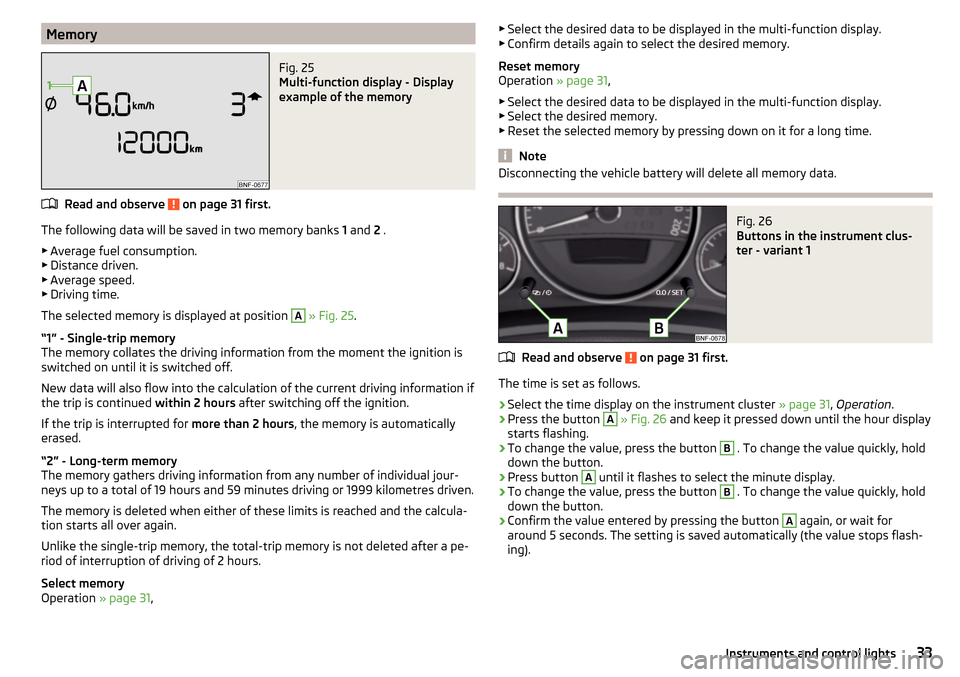
MemoryFig. 25
Multi-function display - Display
example of the memory
Read and observe on page 31 first.
The following data will be saved in two memory banks 1 and 2 .
▶ Average fuel consumption.
▶ Distance driven.
▶ Average speed.
▶ Driving time.
The selected memory is displayed at position
A
» Fig. 25 .
“1” - Single-trip memory
The memory collates the driving information from the moment the ignition is
switched on until it is switched off.
New data will also flow into the calculation of the current driving information if
the trip is continued within 2 hours after switching off the ignition.
If the trip is interrupted for more than 2 hours, the memory is automatically
erased.
“2” - Long-term memory
The memory gathers driving information from any number of individual jour-
neys up to a total of 19 hours and 59 minutes driving or 1999 kilometres driven.
The memory is deleted when either of these limits is reached and the calcula-
tion starts all over again.
Unlike the single-trip memory, the total-trip memory is not deleted after a pe-
riod of interruption of driving of 2 hours.
Select memory
Operation » page 31,
▶
Select the desired data to be displayed in the multi-function display.
▶ Confirm details again to select the desired memory.
Reset memory
Operation » page 31,
▶ Select the desired data to be displayed in the multi-function display.
▶ Select the desired memory.
▶ Reset the selected memory by pressing down on it for a long time.
Note
Disconnecting the vehicle battery will delete all memory data.Fig. 26
Buttons in the instrument clus-
ter - variant 1
Read and observe on page 31 first.
The time is set as follows.
›
Select the time display on the instrument cluster » page 31, Operation .
›
Press the button
A
» Fig. 26 and keep it pressed down until the hour display
starts flashing.
›
To change the value, press the button
B
. To change the value quickly, hold
down the button.
›
Press button
A
until it flashes to select the minute display.
›
To change the value, press the button
B
. To change the value quickly, hold
down the button.
›
Confirm the value entered by pressing the button
A
again, or wait for
around 5 seconds. The setting is saved automatically (the value stops flash-
ing).
33Instruments and control lights
Page 36 of 160
Warning lights
Introduction
This chapter contains information on the following subjects:
Handbrake
34
Braking system
34
Seat belt warning light
34
Alternator
35
Engine oil pressure too low
35
Coolant
35
Automated transmission
35
Power steering
36
Stability Control (ESC) / traction control (ASR)
36
Antilock brake system (ABS)
36
Tyre pressure
36
Rear fog light
37
Exhaust inspection system
37
Checking the engine electronics
37
Airbag system
37
Handbrake - automatic transmission
38
Brake pedal (automatic transmission)
38
Turn signal system
38
Cruise control system
38
Main beam
38
/
Rear seat belt warning light
38
City Safe Drive
38
/
START-STOP
38
The warning lights indicate certain functions or faults.
The lighting up of some warning lights may be accompanied by acoustic sig-
nals.
After switching on the ignition, some warning lights light up briefly as a func-
tion test.
If the tested systems are OK, the corresponding warning lights extinguishes
for a few seconds after switching on the ignition or after starting the engine.
WARNING■ Ignoring light-up indicator lamps in the instrument cluster and the control
symbols in the display may cause serious injury or damage to the vehicle.■
If you have to stop for technical reasons, then park the vehicle at a safe
distance from the traffic, switch off the engine and activate the hazard
warning light system » page 49. Place the warning triangle at the prescri-
bed distance.
■
The engine compartment of your car is a hazardous area. The following
warning instructions must be followed at all times when working in the en-
gine compartment » page 106, Engine compartment .
Handbrake
Read and observe
on page 34 first.
lights up - the hand brake is engaged.
An audible warning is also given if you drive the vehicle for at least 3 seconds
at a speed of more than 6 km/h.
Braking system
Read and observe
on page 34 first.
lights up - the brake fluid level in the brake system is too low or there is an
ABS fault.
›
Stop the vehicle, switch off the engine, and check the level of the brake fluid
» page 112 .
WARNING■
If the warning light illuminates together with the warning light
» page 36 , Antilock brake system (ABS) , stop driving! Seek help from
a specialist garage.■
A fault to the ABS system or the braking system can increase the vehi-
cle's braking distance – risk of accident!
Seat belt warning light
Read and observe
on page 34 first.
lights up - the driver or front passenger has not fastened their seat belt.
34Using the system
Page 40 of 160
the lettering in the middle of the dash panel lights up
after switching on the ignition » page 18, Deactivating the front passenger air-
bag .WARNINGWhen a fault in the airbag system occurs, there is a risk of the system not
being triggered in the event of an accident. Therefore, this must be
checked immediately by a specialized garage.
Handbrake - automatic transmission
Read and observe
on page 34 first.
lights up or flashes - engage the parking brake.
Further information » page 81, Automated transmission .
Brake pedal (automatic transmission)
Read and observe
on page 34 first.
lights up - apply the brake.
Further information » page 81, Automated transmission .
Turn signal system
Read and observe
on page 34 first.
flashes - the left turn signal is turned on.
flashes - the right turn signal is turned on.
If there is a fault in the turn signal system, the warning light flashes at twice
its normal rate.
When the hazard warning light system is switched on, this will cause all of the
turn signal lights as well as both warning lights to flash.
Cruise control system
Read and observe
on page 34 first.
lights up - the vehicle is regulated by the cruise control.
Main beam
Read and observe
on page 34 first.
illuminates - the main beam or the headlight flasher is switched on.
/ Rear seat belt warning light
Read and observe
on page 34 first.
illuminates - a rear seat belt is not fastened.
illuminates - a rear seat belt is fastened.
When the seat belt is fastened/unfastened, the particular light lights up briefly
and indicates the current belt status!
City Safe Drive
Read and observe
on page 34 first.
flashes quickly - City Safe Drivesystem is braking the vehicle automatically.
flashes slowly - the system is not available or there is a system malfunction.
If the system is turned off and the vehicle is moving at a speed of about 5 - 30
km/h, the warning light
illuminates on the instrument cluster display.
If the system is activated again, the warning light
illuminates in the in-
strument cluster display for about 5 s.
Further information » page 89, City Safe Drive .
/ START-STOP
Read and observe
on page 34 first.
illuminates - the START-STOPsystem is active.
illuminates - the START-STOPsystem is active, but the automatic cut off is
not possible.
flashes - the START-STOPsystem is not available.
Further information » page 77, START-STOPsystem .
38Using the system
Page 43 of 160
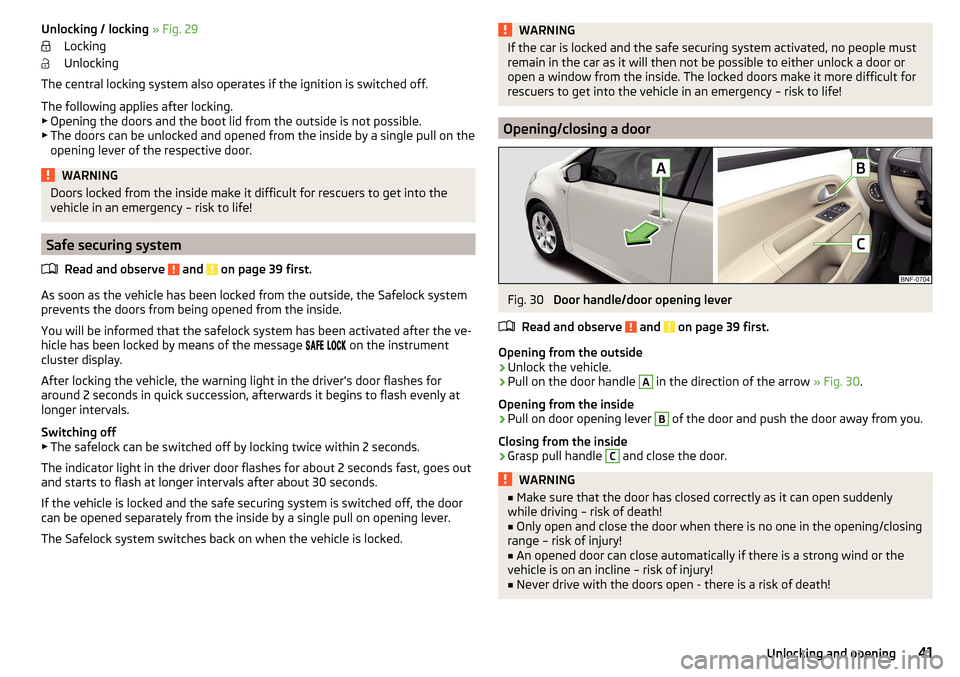
Unlocking / locking » Fig. 29
Locking
Unlocking
The central locking system also operates if the ignition is switched off.
The following applies after locking. ▶ Opening the doors and the boot lid from the outside is not possible.
▶ The doors can be unlocked and opened from the inside by a single pull on the
opening lever of the respective door.WARNINGDoors locked from the inside make it difficult for rescuers to get into the
vehicle in an emergency – risk to life!
Safe securing system
Read and observe
and on page 39 first.
As soon as the vehicle has been locked from the outside, the Safelock systemprevents the doors from being opened from the inside.
You will be informed that the safelock system has been activated after the ve-
hicle has been locked by means of the message
on the instrument
cluster display.
After locking the vehicle, the warning light in the driver's door flashes for
around 2 seconds in quick succession, afterwards it begins to flash evenly at
longer intervals.
Switching off
▶ The safelock can be switched off by locking twice within 2 seconds.
The indicator light in the driver door flashes for about 2 seconds fast, goes out
and starts to flash at longer intervals after about 30 seconds.
If the vehicle is locked and the safe securing system is switched off, the door
can be opened separately from the inside by a single pull on opening lever.
The Safelock system switches back on when the vehicle is locked.
WARNINGIf the car is locked and the safe securing system activated, no people must
remain in the car as it will then not be possible to either unlock a door or
open a window from the inside. The locked doors make it more difficult for
rescuers to get into the vehicle in an emergency – risk to life!
Opening/closing a door
Fig. 30
Door handle/door opening lever
Read and observe
and on page 39 first.
Opening from the outside
›
Unlock the vehicle.
›
Pull on the door handle
A
in the direction of the arrow » Fig. 30.
Opening from the inside
›
Pull on door opening lever
B
of the door and push the door away from you.
Closing from the inside
›
Grasp pull handle
C
and close the door.
WARNING■ Make sure that the door has closed correctly as it can open suddenly
while driving – risk of death!■
Only open and close the door when there is no one in the opening/closing
range – risk of injury!
■
An opened door can close automatically if there is a strong wind or the
vehicle is on an incline – risk of injury!
■
Never drive with the doors open - there is a risk of death!
41Unlocking and opening
Page 76 of 160
Functions of the device
▶ Navigation, TMC traffic information, lane assistance, and speed assistant.
▶ Operating the radio, media player and multimedia devices connected via
Bluetooth ®
.
▶ Displaying information from the MFD, rev counter and coolant temperature
» page 28 .
▶ Hands-free device for mobile phones linked to the device via Bluetooth ®
.
▶ Indicator for opened bonnet, doors and luggage compartment lid.
▶ Display from the visual parking system (OPS).
▶ Image viewer.
▶ The toll service Live services - traffic, radar to measure the speed on the
road, weather and news search in the Yelpsystem.
▶ Route planning with consideration of the CNG filling station network (multi-
stop).WARNING■ Adjust the volume to ensure that acoustic signals from outside, e.g. sirens
from vehicles which have the right of way, such as police, ambulance and
fire brigade vehicles, can be heard at all time.■
An audio volume set too high may damage your hearing!
CAUTION
Improper adjustment of the tilt may damage the unit as well as the fixture.
Note
The range of the Bluetooth ®
connection to the hands-free system is restricted
to the vehicle interior. The range is dependent on local factors, e.g. obstacles
between the devices and mutual interferences with other devices. If your mo-
bile phone is e.g. in a jacket pocket, this can lead to difficulties when establish-
ing the Bluetooth ®
connection with the hands-free system or the data trans-
fer.74Using the system
Page 79 of 160
START-STOPsystem
Introduction
This chapter contains information on the following subjects:
Operation
77
Manually deactivating/activating the system
78
The START-STOPsystem (hereinafter referred to as: the system) reduces CO 2emissions and harmful emissions, and saves fuel.
If the system determine that the engine is not needed when the vehicle stops
(e.g. at the traffic lights), it turns off the engine and starts it again when mov-
ing off.
The system function depends on many factors. Some of them are down to the
driver, the others are systemic and can neither be influenced nor identified.
Therefore the system may react differently in situations which seem identi-
cal from the driver's perspective.
The system is automatically activated every time the ignition is switched on
(even where this has previously been manually deactivated with the button
).
Note
If the engine has stopped due to the system, the ignition remains on.
Operation
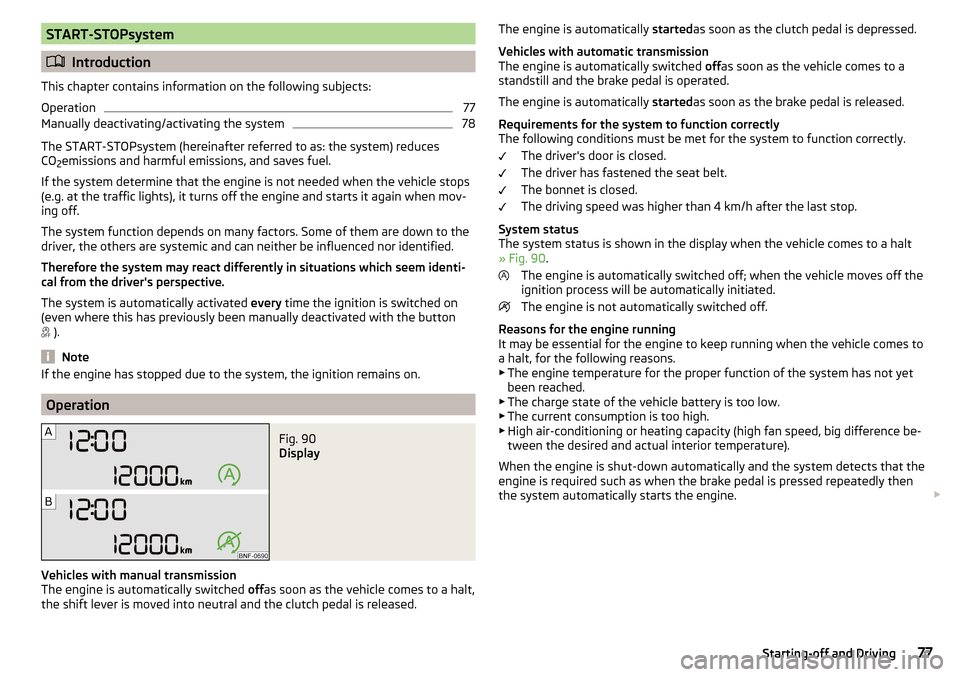
Fig. 90
Display
Vehicles with manual transmission
The engine is automatically switched offas soon as the vehicle comes to a halt,
the shift lever is moved into neutral and the clutch pedal is released.
The engine is automatically startedas soon as the clutch pedal is depressed.
Vehicles with automatic transmission
The engine is automatically switched offas soon as the vehicle comes to a
standstill and the brake pedal is operated.
The engine is automatically startedas soon as the brake pedal is released.
Requirements for the system to function correctly
The following conditions must be met for the system to function correctly.
The driver's door is closed.
The driver has fastened the seat belt.
The bonnet is closed.
The driving speed was higher than 4 km/h after the last stop.
System status
The system status is shown in the display when the vehicle comes to a halt
» Fig. 90 .
The engine is automatically switched off; when the vehicle moves off the
ignition process will be automatically initiated.
The engine is not automatically switched off.
Reasons for the engine running
It may be essential for the engine to keep running when the vehicle comes to
a halt, for the following reasons. ▶ The engine temperature for the proper function of the system has not yet
been reached.
▶ The charge state of the vehicle battery is too low.
▶ The current consumption is too high.
▶ High air-conditioning or heating capacity (high fan speed, big difference be-
tween the desired and actual interior temperature).
When the engine is shut-down automatically and the system detects that the
engine is required such as when the brake pedal is pressed repeatedly then
the system automatically starts the engine. 77Starting-off and Driving
Page 81 of 160
Wet roads or road salt
The performance of the brakes can be delayed as the brake discs and brake
pads may be moist or have a coating of ice or layer of salt on them in winter.
The brakes are cleaned and dried by applying the brakes several times »
.
Corrosion
Corrosion on the brake discs and dirt on the brake pads occur if the vehicle has
been parked for a long period and if you do not make much use of the braking
system. The brakes are cleaned by applying the brakes several times »
.
Long or steep slopes
Before travelling a long distance with a steep gradient, reduce speed and shift
into the next lowest gear. As a result, the braking effect of the engine will be
used, reducing the load on the brakes. Any additional braking should be com-
pleted intermittently, not continuously.
Emergency brake display
If the brakes are applied in full and the vehicle systems evaluate the situation
as dangerous for the traffic following behind, the brake light flashes automati-
cally.
After the speed was reduced below around 10 km/h or the vehicle was stop-
ped, the brake light stops flashing and the hazard warning light system
switches on. The hazard warning light system is switched off automatically af-
ter accelerating or driving off again.
Faults in the brake surface
If it is found that the braking distance has suddenly become longer and that
the brake pedal can be depressed further, the brake system may be faulty.
Visit a specialist garage immediately and adjust your style of driving appropri-
ately as you will not know the exact extent of the damage.
Low brake fluid level
An insufficient level of brake fluid may result in problems in the brake system.
The level of the brake fluid is monitored electronically » page 34,
Braking
system .
Brake booster
The brake booster increases the pressure generated with the brake pedal. The
brake booster only operates when the engine is running.
WARNINGOnly apply the brakes for the purpose of drying and cleaning the brake
discs if the traffic conditions permit this. Do not place any other road users
in jeopardy.
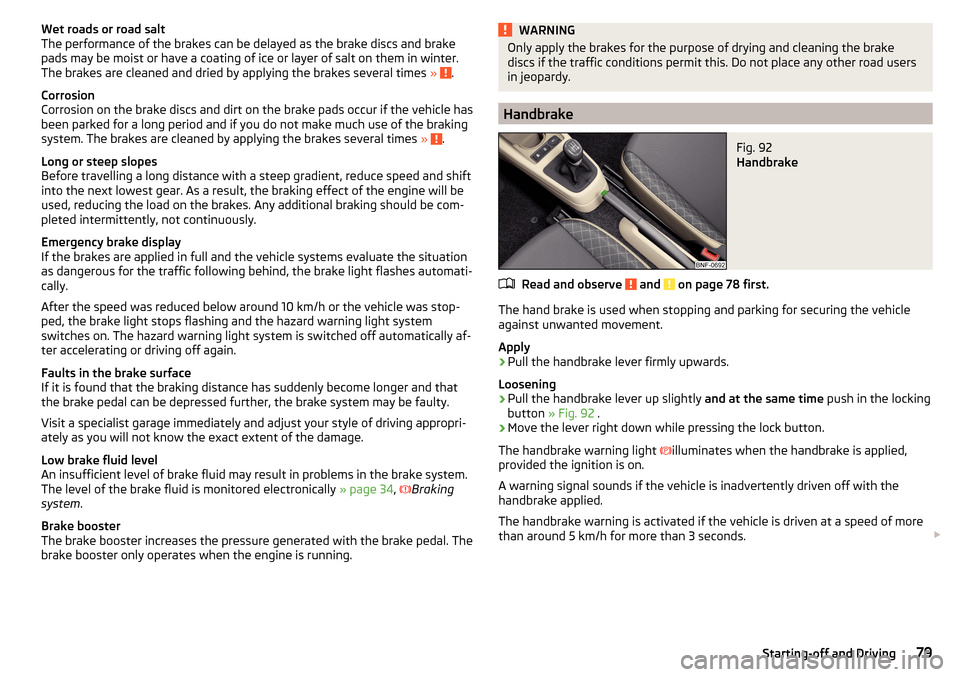
Handbrake
Fig. 92
Handbrake
Read and observe and on page 78 first.
The hand brake is used when stopping and parking for securing the vehicle
against unwanted movement.
Apply
›
Pull the handbrake lever firmly upwards.
Loosening
›
Pull the handbrake lever up slightly and at the same time push in the locking
button » Fig. 92 .
›
Move the lever right down while pressing the lock button.
The handbrake warning light
illuminates when the handbrake is applied,
provided the ignition is on.
A warning signal sounds if the vehicle is inadvertently driven off with the
handbrake applied.
The handbrake warning is activated if the vehicle is driven at a speed of more
than around 5 km/h for more than 3 seconds.
79Starting-off and Driving
Page 84 of 160
M - Manual gearshift (Tiptronic)
Further information » page 82.
With driving mode set, the vehicle will not start up
If the vehicle does not start off, the problem may be that the selector lever is not completely in the selected position. In such an instance, press the brake
pedal and put the selector lever into the required position.
Faults in the automatic gearbox
In the event of a fault in the automatic gearbox, warning lights may light up in
the instrument panel » page 35,
Automated transmission .
An error on the automated manual transmission can become noticed, for ex- ample, by the following.
▶ Only certain gears are selected.
▶ The reverse gear R cannot be used.
Manual gearshift (Tiptronic)
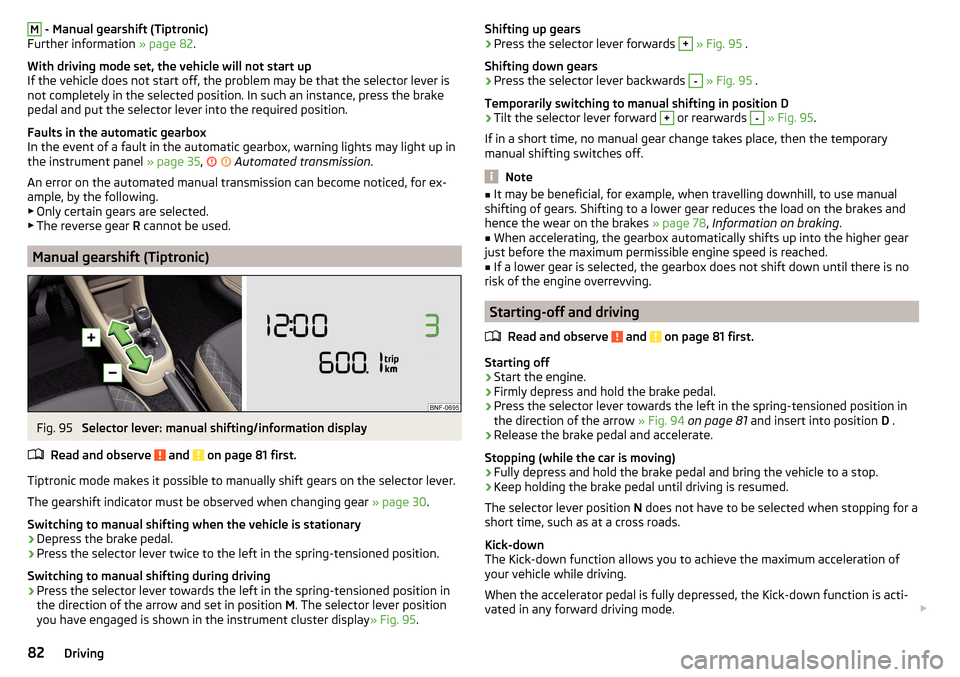
Fig. 95
Selector lever: manual shifting/information display
Read and observe
and on page 81 first.
Tiptronic mode makes it possible to manually shift gears on the selector lever. The gearshift indicator must be observed when changing gear » page 30.
Switching to manual shifting when the vehicle is stationary
›
Depress the brake pedal.
›
Press the selector lever twice to the left in the spring-tensioned position.
Switching to manual shifting during driving
›
Press the selector lever towards the left in the spring-tensioned position in
the direction of the arrow and set in position M. The selector lever position
you have engaged is shown in the instrument cluster display » Fig. 95.
Shifting up gears›Press the selector lever forwards + » Fig. 95 .
Shifting down gears›
Press the selector lever backwards
-
» Fig. 95 .
Temporarily switching to manual shifting in position D
›
Tilt the selector lever forward
+
or rearwards
-
» Fig. 95 .
If in a short time, no manual gear change takes place, then the temporary
manual shifting switches off.
Note
■ It may be beneficial, for example, when travelling downhill, to use manual
shifting of gears. Shifting to a lower gear reduces the load on the brakes and
hence the wear on the brakes » page 78, Information on braking .■
When accelerating, the gearbox automatically shifts up into the higher gear
just before the maximum permissible engine speed is reached.
■
If a lower gear is selected, the gearbox does not shift down until there is no
risk of the engine overrevving.
Starting-off and driving
Read and observe
and on page 81 first.
Starting off
›
Start the engine.
›
Firmly depress and hold the brake pedal.
›
Press the selector lever towards the left in the spring-tensioned position in
the direction of the arrow » Fig. 94 on page 81 and insert into position D .
›
Release the brake pedal and accelerate.
Stopping (while the car is moving)
›
Fully depress and hold the brake pedal and bring the vehicle to a stop.
›
Keep holding the brake pedal until driving is resumed.
The selector lever position N does not have to be selected when stopping for a
short time, such as at a cross roads.
Kick-down
The Kick-down function allows you to achieve the maximum acceleration of
your vehicle while driving.
When the accelerator pedal is fully depressed, the Kick-down function is acti-
vated in any forward driving mode.
82Driving
Page 87 of 160
Assist systems
General information
Introduction
WARNINGThe following general instructions regarding the use of assistance systems
must be observed.■
The assistance systems serve merely to support the driver and do not re-
lieve the driver of responsibility for the operation of the vehicle.
■
The increased safety as well as the increased occupant protection offered
by the assistance systems must not tempt you to take safety risks - there
is a risk of an accident!
■
Adjust the speed and driving style to the current visibility, weather, road
and traffic conditions.
■
The assistance systems have physical and system-related limitations. For
this reason, the driver may experience some undesired or delayed system
responses in certain situations. You should therefore always be alert and
ready to intervene!
■
Only activate, deactivate and set the assistance systems to keep you fully
in control of the vehicle in every traffic situation - otherwise there is a risk
of an accident!
Braking and stabilisation systems
Introduction
This chapter contains information on the following subjects:
Stability Control (ESC)
85
Anti-lock braking system (ABS)
85
Traction control (TCS)
85
Electronic Differential Lock (EDL)
86
Brake Assist (HBA)
86
Hill Start Assist (HHC)
86
This chapter describes the functions of the brake and stabilization systems.
The error display is in Chapter » page 34, Warning lights .
The brake and stabilisation systems are automatically activated each time the
ignition is switched on, unless otherwise indicated.
WARNINGThe general information relating to the use of assistance systems must be
observed » page 85, in section Introduction .
Stability Control (ESC)
Read and observe
on page 85 first.
The ESC improves vehicle stability in dynamic driving situations, such as whenthe vehicle starts to skid.
The ESC monitors whether the desired direction of the current vehicle motion
is occurring. In case of any deviation (e.g. oversteer), the ESC automatically
brakes individual wheels to maintain the desired direction.
During an intervention of the system, the warning light flashes in the instru-
ment cluster.
Anti-lock braking system (ABS)
Read and observe
on page 85 first.
ABS prevents the wheels locking when braking. Thus helping the driver to
maintain control of the vehicle.
The intervention of the ABS is noticeable from the pulsating movements of
the brake pedal which is accompanied by noises.
When the ABS system is active, do not brake periodically or reduce the pres-
sure on the brake pedal.
Traction control (TCS)
Read and observe
on page 85 first.
TCS prevents the spinning of the wheels on the drive axle. TCS reduces the
drive power transmitted to the wheels that are spinning Thus, for example,
driving on road surfaces with low grip is made easier.
If there is a TCS intervention, the warning light flashes in the instrument
cluster.
85Assist systems