lights SKODA CITIGO 2015 1.G User Guide
[x] Cancel search | Manufacturer: SKODA, Model Year: 2015, Model line: CITIGO, Model: SKODA CITIGO 2015 1.GPages: 160, PDF Size: 23.1 MB
Page 38 of 160
›Stop and allow the transmission to cool down or drive more quickly than
20 km/h (12 mph).
If the warning light
lights up again, switch off the vehicle, shut off the en-
gine and allow the gearbox to cool down.
Further information » page 81, Automated transmission .
Power steering
Read and observe
on page 34 first.
lights up - this indicates a complete failure of the power steering and the
steering assist has failed (significantly higher steering forces).
lights up - this indicates a partial failure of the power steering and the
steering forces can be greater.
›
Stop the car, turn the ignition off and on again.
If the indicator light does not illuminate after the engine has been turned on
again, the power steering is fully operational again.
If the warning light illuminates again, then obtain assistance from an author-
ised dealer.
Disconnecting the vehicle battery
If the vehicle's battery has been disconnected and reconnected, the warning
light comes on after switching on the ignition.
The warning light should go out after driving a short distance.
If, after the motor is restarted and a short drive, the indicator light does not go
out, there is a system error.
Seek help from a specialist garage.
Stability Control (ESC) / traction control (ASR)
Read and observe
on page 34 first.
flashes - the ESC or TCS is currently being accessed.
lights up - there is an ESC or TCS fault.
Seek help from a specialist garage.
As the ESC operates in conjunction with the ABS, the ESC warning light will al-
so come on if the ABS system fails.
If the warning light comes on straight after starting the engine, the TCS may
be switched off for technical reasons.›
Switch the ignition off and on again.
If the warning light
does not illuminate after you switch the engine back on,
the ASR is fully functional again.
Disconnecting the vehicle battery
If the vehicle's battery has been disconnected and reconnected, the warning
light comes on after switching on the
ignition.
The warning light should go out after driving a short distance.
If, after a short drive, the indicator light does not go out, there is a system er- ror.
Seek help from a specialist garage.
More information about the ESC system » page 85, Stability Control (ESC) or
TCS system » page 85, Traction control (TCS) .
Antilock brake system (ABS)
Read and observe
on page 34 first.
lights up - there is an ABS fault.
The vehicle will only be braked by the normal brake system without the ABS.
Seek help from a specialist garage.
In the event of an ABS fault, the other braking and stabilization systems are
turned off » page 85, Braking and stabilisation systems .
WARNING■
A fault to the ABS system or the braking system can increase the vehi-
cle's braking distance – risk of accident!■
If the ABS warning light
together with the indicator light
» page 34
lights,
do not continue to drive! Seek help from a specialist garage.
Tyre pressure
Read and observe
on page 34 first.
Change of tyre pressure values
lights up - there was a pressure change in one of the tyres.
36Using the system
Page 39 of 160
An audible signal sounds as a warning.›
Immediately reduce speed and avoid sudden steering and braking manoeu-
vres.
›
Stop the vehicle, turn the ignition off and check the tyres and their inflation
pressures » page 117.
›
Correct the tyre pressure if necessary or replace the affected wheel
» page 123 or use the repair kit » page 127.
›
Save the tyre pressure values in the system » page 91.
System fault
flashes for approximately 1 minute and remains lit - there may be a fault in
the tyre pressure monitoring system.
›
Stop the vehicle, turn the ignition off and start the engine again.
If the warning light flashes again after the engine has started, there is a
system error.
Seek help from a specialist garage.
Disconnecting the vehicle battery
If the vehicle's battery has been disconnected and reconnected, the warning
light comes on after switching on the ignition.
The warning light should go out after driving a short distance.
If, after a short drive, the indicator light does not go out, there is a system er-
ror.
Seek help from a specialist garage.
Other incidents
The following reasons can explain the warning light being illuminated.
▶ The vehicle is loaded on one side. Distribute loads as evenly as possible.
▶ The wheels of one axle are loaded more heavily (e.g. when towing a trailer or
when driving uphill or downhill).
▶ Snow chains are mounted.
▶ A wheel has been changed.
CAUTION
Under certain circumstances (e.g. sporty style of driving, wintry or unpaved
roads) the warning light in the instrument cluster can be delayed or does
not light up at all. Rear fog light
Read and observe
on page 34 first.
lights up - the rear fog light is switched on.
Exhaust inspection system
Read and observe
on page 34 first.
lights up - there is a fault in the emission control system. The system allows
the vehicle to run in emergency mode.
Seek help from a specialist garage.
Checking the engine electronics
Read and observe
on page 34 first.
lights up - there is a fault in the electronic engine management system. The
system allows the vehicle to run in emergency mode.
Seek help from a specialist garage.
Airbag system
Read and observe
on page 34 first.
System fault
lights up - there is a fault in the airbag system.
This also applies if the warning light does not come on when the ignition is
switched on.
The functionality of the airbag system is monitored automatically even if one
of the airbags is switched off.
One of the airbags or a belt tensioner has been disabled by the diagnostic
tool
lights up for approximately 4 seconds after the ignition is switched on and
then flashes for approximately 12 seconds.
The front passenger airbag has been disabled with the key switch
lights up for a few seconds when the ignition is switched on.
37Instruments and control lights
Page 40 of 160
the lettering in the middle of the dash panel lights up
after switching on the ignition » page 18, Deactivating the front passenger air-
bag .WARNINGWhen a fault in the airbag system occurs, there is a risk of the system not
being triggered in the event of an accident. Therefore, this must be
checked immediately by a specialized garage.
Handbrake - automatic transmission
Read and observe
on page 34 first.
lights up or flashes - engage the parking brake.
Further information » page 81, Automated transmission .
Brake pedal (automatic transmission)
Read and observe
on page 34 first.
lights up - apply the brake.
Further information » page 81, Automated transmission .
Turn signal system
Read and observe
on page 34 first.
flashes - the left turn signal is turned on.
flashes - the right turn signal is turned on.
If there is a fault in the turn signal system, the warning light flashes at twice
its normal rate.
When the hazard warning light system is switched on, this will cause all of the
turn signal lights as well as both warning lights to flash.
Cruise control system
Read and observe
on page 34 first.
lights up - the vehicle is regulated by the cruise control.
Main beam
Read and observe
on page 34 first.
illuminates - the main beam or the headlight flasher is switched on.
/ Rear seat belt warning light
Read and observe
on page 34 first.
illuminates - a rear seat belt is not fastened.
illuminates - a rear seat belt is fastened.
When the seat belt is fastened/unfastened, the particular light lights up briefly
and indicates the current belt status!
City Safe Drive
Read and observe
on page 34 first.
flashes quickly - City Safe Drivesystem is braking the vehicle automatically.
flashes slowly - the system is not available or there is a system malfunction.
If the system is turned off and the vehicle is moving at a speed of about 5 - 30
km/h, the warning light
illuminates on the instrument cluster display.
If the system is activated again, the warning light
illuminates in the in-
strument cluster display for about 5 s.
Further information » page 89, City Safe Drive .
/ START-STOP
Read and observe
on page 34 first.
illuminates - the START-STOPsystem is active.
illuminates - the START-STOPsystem is active, but the automatic cut off is
not possible.
flashes - the START-STOPsystem is not available.
Further information » page 77, START-STOPsystem .
38Using the system
Page 41 of 160
Unlocking and opening
Unlocking and locking
Introduction
This chapter contains information on the following subjects:
Unlock / lock using key and lock
40
Unlocking / locking with the remote control key
40
Locking / unlocking the vehicle with the central locking button
40
Safe securing system
41
Opening/closing a door
41
Door opening lever
42
Child safety lock
42
Malfunctions
42
Your car is equipped with a central locking system.
The central locking system allows you to lock and unlock all doors and the lug-
gage compartment lid at the same time.
Depending on the equipment configuration, the following applies after un-
locking.
▶ The turn signal lights flash twice as confirmation that the vehicle has been
unlocked.
▶ All the doors and the boot lid are unlocked.
▶ The interior light comes on.
▶ The Safelock system is switched off.
▶ The indicator light in the driver door stops flashing.
Depending on the equipment configuration, the following applies after lock-
ing.
▶ The turn signal lights flash once as confirmation that the vehicle has been
locked.
▶ All the doors and the luggage compartment lid are locked.
▶ The interior lamp goes out.
▶ The Safelock system is switched on.
▶ The warning light in the driver door begins flashing.
If the doors or the luggage compartment lid remain open after the vehicle has
been locked, the turn signal lights do not flash until they have been closed.
Protection against unintended vehicle unlocking
If you unlock the vehicle and do not open a door or the boot lid within the next
30 seconds, the vehicle will lock again automatically and the Safelock system
will be switched on.
Automatic locking/unlocking
All the doors and the luggage compartment lid are locked automatically once
the car reaches a speed of about 15 km/h.
If the ignition key is withdrawn, the car is then automatically unlocked again. It
is also possible for the driver to unlock the car by pressing the central locking
button.
The vehicle doors can be unlocked and opened at any time by pulling once on
the door opening lever.WARNING■ Never leave the key in the vehicle when you exit the vehicle. Unauthor-
ized persons, such as children, for example, could lock the car, turn on the
ignition or start the engine - there is a danger of injury and accidents!■
When leaving the vehicle, never leave persons who are not completely in-
dependent, such as children, unattended in the vehicle. These individuals
might not be able to exit the vehicle by themselves or to help themselves.
Can be fatal at very high or very low temperatures!
CAUTION
■ Each key contains electronic components; therefore it must be protected
against moisture and severe shocks.■
Keep the groove of the keys absolutely clean. Impurities (textile fibres, dust,
etc.) have a negative effect on the functionality of the locking cylinder and ig-
nition lock.
■
If the driver's door has been opened, the vehicle cannot be locked.
39Unlocking and opening
Page 49 of 160
Lights and visibility
Lights
Introduction
This chapter contains information on the following subjects:
Operation of the light function
47
Daylight running lights (DAY LIGHT)
48
Turn signal and main beam
48
Front and rear fog light
49
Hazard warning light system
49
Parking light
49
Driving abroad
50
Unless otherwise stated, the lights only work when the ignition is on.
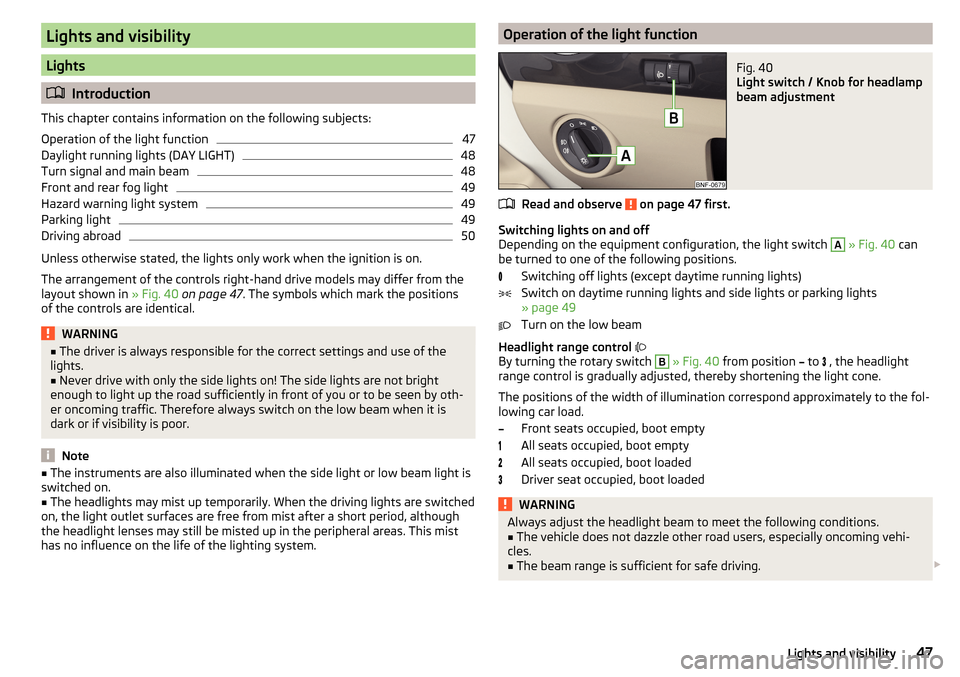
The arrangement of the controls right-hand drive models may differ from the layout shown in » Fig. 40 on page 47 . The symbols which mark the positions
of the controls are identical.
WARNING■ The driver is always responsible for the correct settings and use of the
lights.■
Never drive with only the side lights on! The side lights are not bright
enough to light up the road sufficiently in front of you or to be seen by oth-
er oncoming traffic. Therefore always switch on the low beam when it is
dark or if visibility is poor.
Note
■ The instruments are also illuminated when the side light or low beam light is
switched on.■
The headlights may mist up temporarily. When the driving lights are switched
on, the light outlet surfaces are free from mist after a short period, although
the headlight lenses may still be misted up in the peripheral areas. This mist
has no influence on the life of the lighting system.
Operation of the light functionFig. 40
Light switch / Knob for headlamp
beam adjustment
Read and observe on page 47 first.
Switching lights on and off
Depending on the equipment configuration, the light switch
A
» Fig. 40 can
be turned to one of the following positions.
Switching off lights (except daytime running lights)
Switch on daytime running lights and side lights or parking lights
» page 49
Turn on the low beam
Headlight range control
By turning the rotary switch
B
» Fig. 40 from position
to
, the headlight
range control is gradually adjusted, thereby shortening the light cone.
The positions of the width of illumination correspond approximately to the fol-
lowing car load.
Front seats occupied, boot empty
All seats occupied, boot empty
All seats occupied, boot loaded
Driver seat occupied, boot loaded
WARNINGAlways adjust the headlight beam to meet the following conditions.■The vehicle does not dazzle other road users, especially oncoming vehi-
cles.■
The beam range is sufficient for safe driving.
47Lights and visibility
Page 50 of 160
CAUTIONIf leaving the vehicle without needing the parking lights on, always turn the
light switch to position .
Note
If the light switch is in the position , the ignition key is removed and the
driver's door is open, an audible warning signal will sound. The audible warning
signal is switched off when the driver's door is closed, however the side lights
remain on to illuminate the parked vehicle if necessary.
Daylight running lights (DAY LIGHT)
Read and observe
on page 47 first.
The daytime running lights light up the area in front of and to the rear of the
vehicle (only applicable for some countries).
The daytime running lights are switched on automatically if the following
conditions are met.
The ignition is switched on.
The light switch is in the position
or
.
The light switch is in position
and the fog lights are turned on, the daytime
running lights will turn off.
The light switch is in position
, the lighting of the instrument cluster is switch-
ed off.
WARNINGAlways switch on the low beam when visibility is poor.
Turn signal and main beam
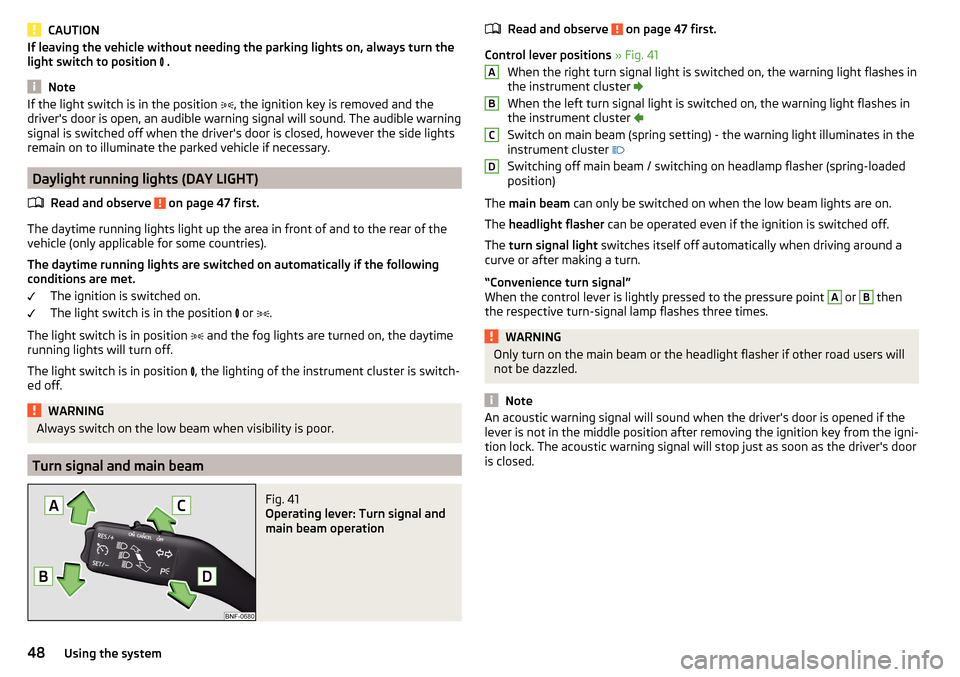
Fig. 41
Operating lever: Turn signal and
main beam operation
Read and observe on page 47 first.
Control lever positions » Fig. 41
When the right turn signal light is switched on, the warning light flashes in
the instrument cluster
When the left turn signal light is switched on, the warning light flashes in
the instrument cluster
Switch on main beam (spring setting) - the warning light illuminates in the
instrument cluster
Switching off main beam / switching on headlamp flasher (spring-loaded position)
The main beam can only be switched on when the low beam lights are on.
The headlight flasher can be operated even if the ignition is switched off.
The turn signal light switches itself off automatically when driving around a
curve or after making a turn.
“Convenience turn signal”
When the control lever is lightly pressed to the pressure point
A
or
B
then
the respective turn-signal lamp flashes three times.
WARNINGOnly turn on the main beam or the headlight flasher if other road users will
not be dazzled.
Note
An acoustic warning signal will sound when the driver's door is opened if the
lever is not in the middle position after removing the ignition key from the igni-
tion lock. The acoustic warning signal will stop just as soon as the driver's door
is closed.ABCD48Using the system
Page 51 of 160
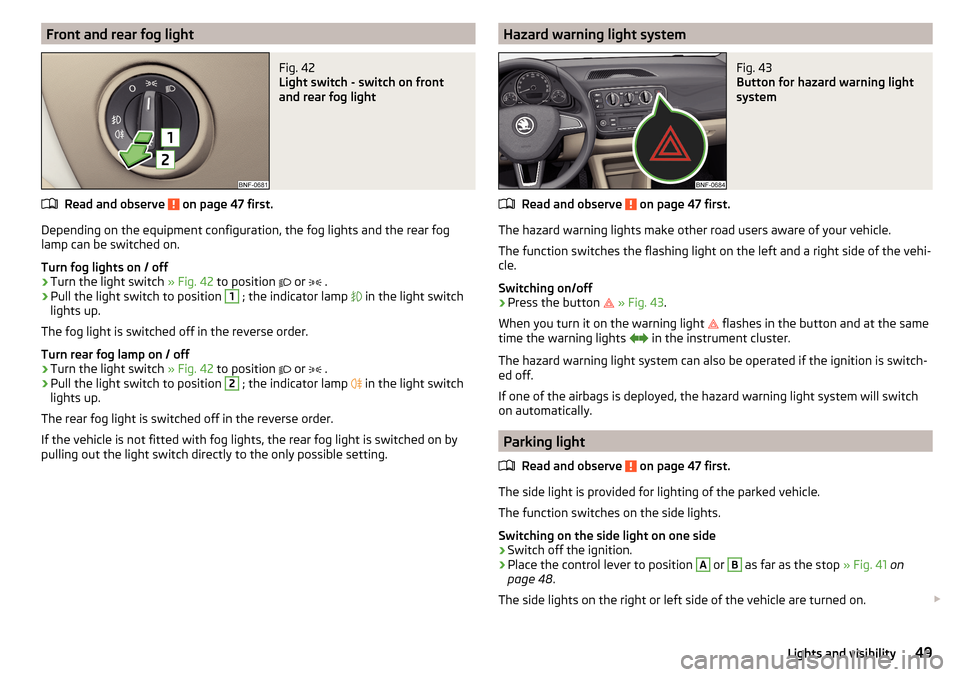
Front and rear fog lightFig. 42
Light switch - switch on front
and rear fog light
Read and observe on page 47 first.
Depending on the equipment configuration, the fog lights and the rear fog
lamp can be switched on.
Turn fog lights on / off
›
Turn the light switch » Fig. 42 to position
or
.
›
Pull the light switch to position
1
; the indicator lamp
in the light switch
lights up.
The fog light is switched off in the reverse order.
Turn rear fog lamp on / off
›
Turn the light switch » Fig. 42 to position
or
.
›
Pull the light switch to position
2
; the indicator lamp
in the light switch
lights up.
The rear fog light is switched off in the reverse order.
If the vehicle is not fitted with fog lights, the rear fog light is switched on by
pulling out the light switch directly to the only possible setting.
Hazard warning light systemFig. 43
Button for hazard warning light
system
Read and observe on page 47 first.
The hazard warning lights make other road users aware of your vehicle.
The function switches the flashing light on the left and a right side of the vehi- cle.
Switching on/off
›
Press the button
» Fig. 43 .
When you turn it on the warning light flashes in the button and at the same
time the warning lights
in the instrument cluster.
The hazard warning light system can also be operated if the ignition is switch-
ed off.
If one of the airbags is deployed, the hazard warning light system will switch
on automatically.
Parking light
Read and observe
on page 47 first.
The side light is provided for lighting of the parked vehicle.
The function switches on the side lights.
Switching on the side light on one side
›
Switch off the ignition.
›
Place the control lever to position
A
or
B
as far as the stop » Fig. 41 on
page 48 .
The side lights on the right or left side of the vehicle are turned on.
49Lights and visibility
Page 52 of 160
Switching on the side light on both sides›Turn the light switch » Fig. 42 on page 49 to position and lock the vehicle.
After pulling out the ignition key and opening the driver's door, an audible
warning sounds. After a few seconds or after closing the driver's door, the au-
dible alarm is turned off, but the parking lights will remain switched on.
CAUTION
Turning on the parking light means the battery is heavily loaded.
Driving abroad
Read and observe
on page 47 first.
When driving in countries with opposing traffic system (traffic on the
left/right), your headlights may dazzle oncoming traffic. In order to avoid this,
the headlights must be adjusted at a specialist garage.
Indoor Lighting
Introduction
This chapter contains information on the following subjects:
Interior light
50
With the ignition off, the light turns off automatically after about 10 minutes.
Interior light
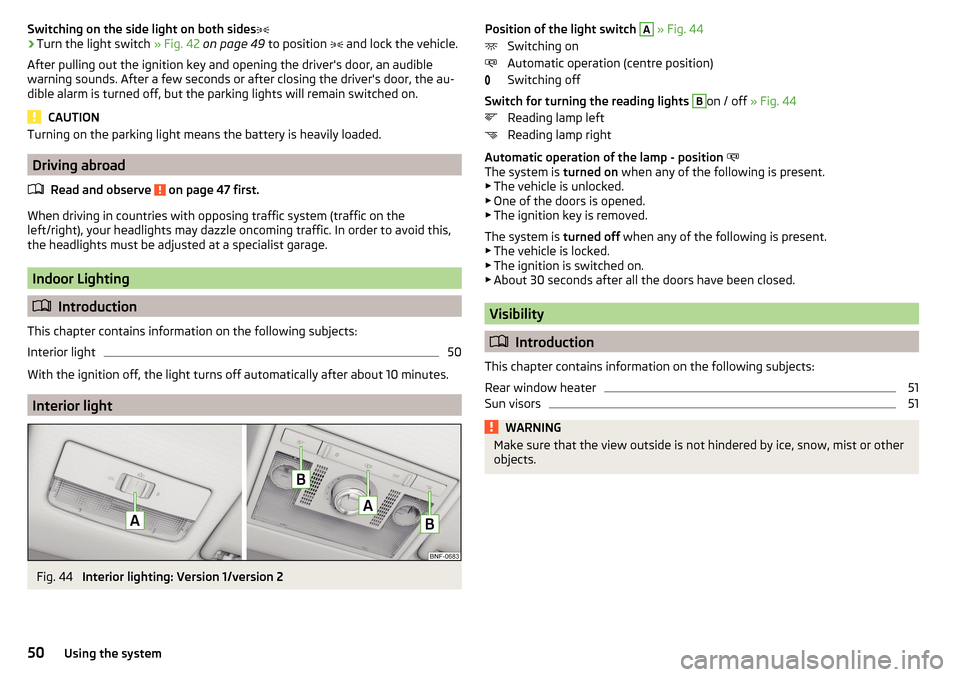
Fig. 44
Interior lighting: Version 1/version 2
Position of the light switch A » Fig. 44
Switching on
Automatic operation (centre position)
Switching off
Switch for turning the reading lights B
on / off » Fig. 44
Reading lamp left
Reading lamp right
Automatic operation of the lamp - position
The system is turned on when any of the following is present.
▶ The vehicle is unlocked.
▶ One of the doors is opened.
▶ The ignition key is removed.
The system is turned off when any of the following is present.
▶ The vehicle is locked.
▶ The ignition is switched on.
▶ About 30 seconds after all the doors have been closed.
Visibility
Introduction
This chapter contains information on the following subjects:
Rear window heater
51
Sun visors
51WARNINGMake sure that the view outside is not hindered by ice, snow, mist or other
objects.50Using the system
Page 53 of 160
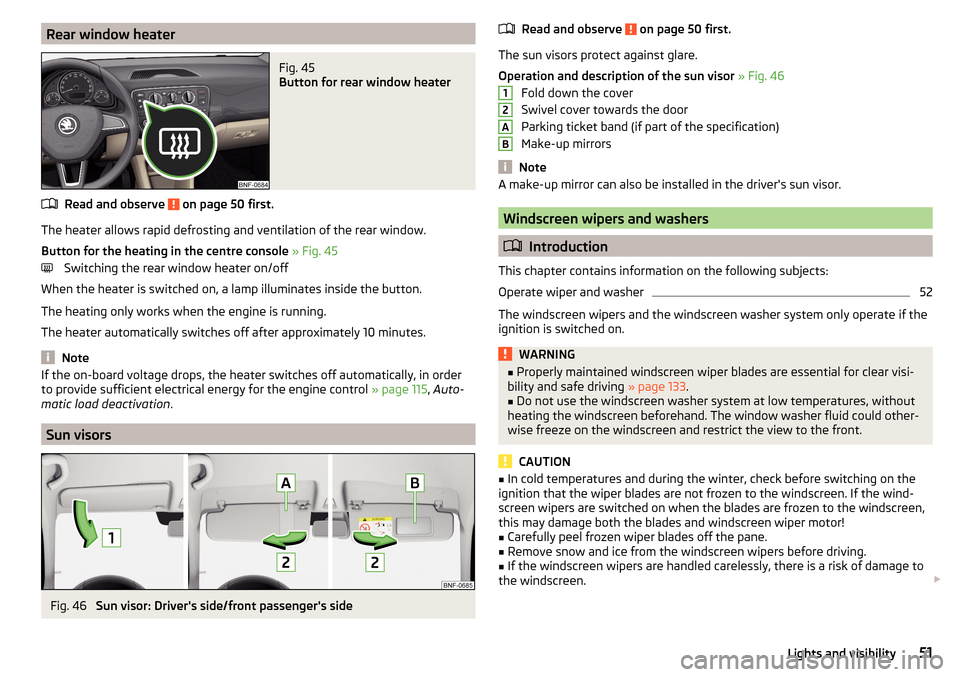
Rear window heaterFig. 45
Button for rear window heater
Read and observe on page 50 first.
The heater allows rapid defrosting and ventilation of the rear window.
Button for the heating in the centre console » Fig. 45
Switching the rear window heater on/off
When the heater is switched on, a lamp illuminates inside the button.
The heating only works when the engine is running.
The heater automatically switches off after approximately 10 minutes.
Note
If the on-board voltage drops, the heater switches off automatically, in order
to provide sufficient electrical energy for the engine control » page 115, Auto-
matic load deactivation .
Sun visors
Fig. 46
Sun visor: Driver's side/front passenger's side
Read and observe on page 50 first.
The sun visors protect against glare.
Operation and description of the sun visor » Fig. 46
Fold down the cover
Swivel cover towards the door
Parking ticket band (if part of the specification)
Make-up mirrors
Note
A make-up mirror can also be installed in the driver's sun visor.
Windscreen wipers and washers
Introduction
This chapter contains information on the following subjects:
Operate wiper and washer
52
The windscreen wipers and the windscreen washer system only operate if the
ignition is switched on.
WARNING■ Properly maintained windscreen wiper blades are essential for clear visi-
bility and safe driving » page 133.■
Do not use the windscreen washer system at low temperatures, without
heating the windscreen beforehand. The window washer fluid could other-
wise freeze on the windscreen and restrict the view to the front.
CAUTION
■ In cold temperatures and during the winter, check before switching on the
ignition that the wiper blades are not frozen to the windscreen. If the wind-
screen wipers are switched on when the blades are frozen to the windscreen,
this may damage both the blades and windscreen wiper motor!■
Carefully peel frozen wiper blades off the pane.
■
Remove snow and ice from the windscreen wipers before driving.
■
If the windscreen wipers are handled carelessly, there is a risk of damage to
the windscreen.
12AB51Lights and visibility
Page 55 of 160
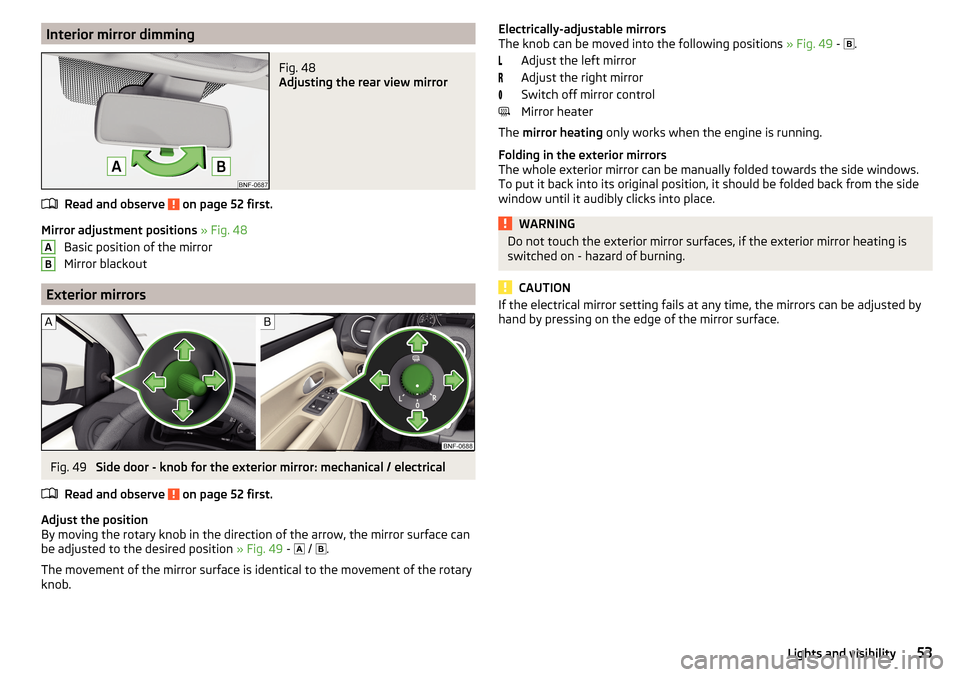
Interior mirror dimmingFig. 48
Adjusting the rear view mirror
Read and observe on page 52 first.
Mirror adjustment positions » Fig. 48
Basic position of the mirror
Mirror blackout
Exterior mirrors
Fig. 49
Side door - knob for the exterior mirror: mechanical / electrical
Read and observe
on page 52 first.
Adjust the position
By moving the rotary knob in the direction of the arrow, the mirror surface can
be adjusted to the desired position » Fig. 49 -
/
.
The movement of the mirror surface is identical to the movement of the rotary
knob.
ABElectrically-adjustable mirrors
The knob can be moved into the following positions » Fig. 49 - .
Adjust the left mirror
Adjust the right mirror
Switch off mirror control
Mirror heater
The mirror heating only works when the engine is running.
Folding in the exterior mirrors
The whole exterior mirror can be manually folded towards the side windows.
To put it back into its original position, it should be folded back from the side
window until it audibly clicks into place.WARNINGDo not touch the exterior mirror surfaces, if the exterior mirror heating is
switched on - hazard of burning.
CAUTION
If the electrical mirror setting fails at any time, the mirrors can be adjusted by
hand by pressing on the edge of the mirror surface.53Lights and visibility