light SKODA CITIGO 2017 User Guide
[x] Cancel search | Manufacturer: SKODA, Model Year: 2017, Model line: CITIGO, Model: SKODA CITIGO 2017Pages: 172, PDF Size: 24.54 MB
Page 31 of 172
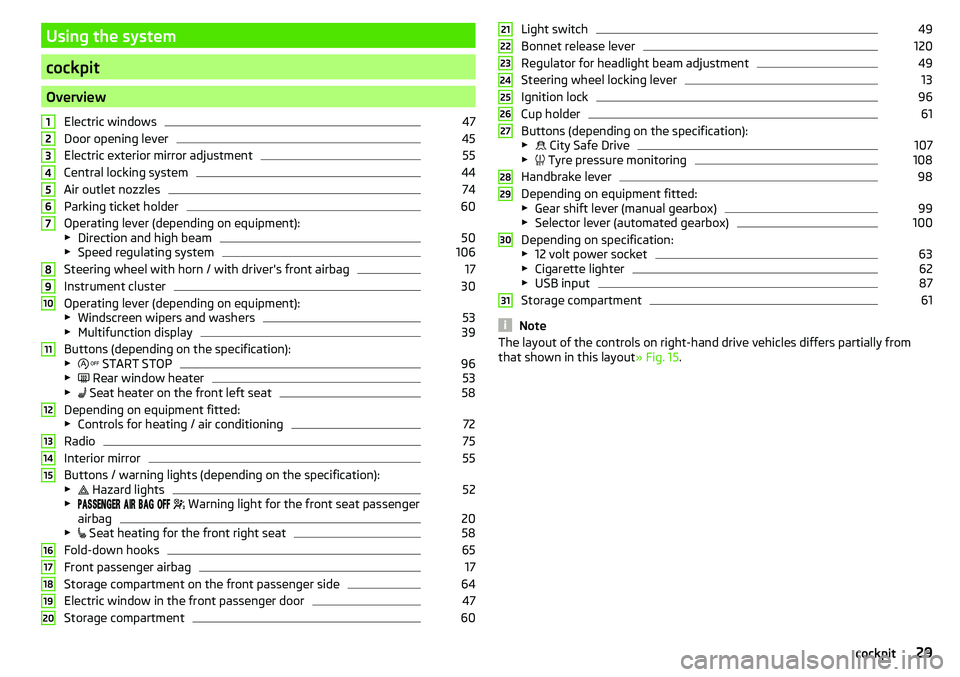
Using the system
cockpit
OverviewElectric windows
47
Door opening lever
45
Electric exterior mirror adjustment
55
Central locking system
44
Air outlet nozzles
74
Parking ticket holder
60
Operating lever (depending on equipment):
▶ Direction and high beam
50
▶Speed regulating system
106
Steering wheel with horn / with driver's front airbag
17
Instrument cluster
30
Operating lever (depending on equipment):
▶ Windscreen wipers and washers
53
▶Multifunction display
39
Buttons (depending on the specification):
▶ START STOP
96
▶
Rear window heater
53
▶
Seat heater on the front left seat
58
Depending on equipment fitted:
▶ Controls for heating / air conditioning
72
Radio
75
Interior mirror
55
Buttons / warning lights (depending on the specification):
▶ Hazard lights
52
▶
Warning light for the front seat passenger
airbag
20
▶ Seat heating for the front right seat
58
Fold-down hooks
65
Front passenger airbag
17
Storage compartment on the front passenger side
64
Electric window in the front passenger door
47
Storage compartment
601234567891011121314151617181920Light switch49
Bonnet release lever
120
Regulator for headlight beam adjustment
49
Steering wheel locking lever
13
Ignition lock
96
Cup holder
61
Buttons (depending on the specification):
▶ City Safe Drive
107
▶
Tyre pressure monitoring
108
Handbrake lever
98
Depending on equipment fitted:
▶ Gear shift lever (manual gearbox)
99
▶Selector lever (automated gearbox)
100
Depending on specification:
▶ 12 volt power socket
63
▶Cigarette lighter
62
▶USB input
87
Storage compartment
61
Note
The layout of the controls on right-hand drive vehicles differs partially from
that shown in this layout » Fig. 15.212223242526272829303129cockpit
Page 32 of 172
Instruments and warning lights
Instrument cluster
Introduction
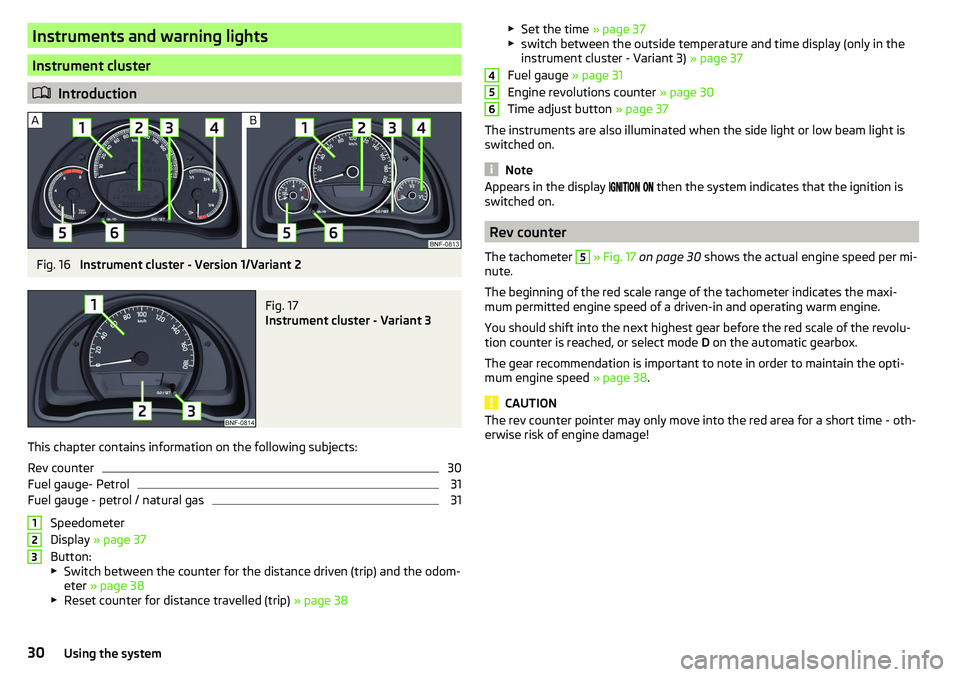
Fig. 16
Instrument cluster - Version 1/Variant 2
Fig. 17
Instrument cluster - Variant 3
This chapter contains information on the following subjects:
Rev counter
30
Fuel gauge- Petrol
31
Fuel gauge - petrol / natural gas
31
Speedometer
Display » page 37
Button:
▶ Switch between the counter for the distance driven (trip) and the odom-
eter » page 38
▶ Reset counter for distance travelled (trip) » page 38
123▶
Set the time » page 37
▶ switch between the outside temperature and time display (only in the
instrument cluster - Variant 3) » page 37
Fuel gauge » page 31
Engine revolutions counter » page 30
Time adjust button » page 37
The instruments are also illuminated when the side light or low beam light is
switched on.
Note
Appears in the display then the system indicates that the ignition is
switched on.
Rev counter
The tachometer
5
» Fig. 17 on page 30 shows the actual engine speed per mi-
nute.
The beginning of the red scale range of the tachometer indicates the maxi-
mum permitted engine speed of a driven-in and operating warm engine.
You should shift into the next highest gear before the red scale of the revolu- tion counter is reached, or select mode D on the automatic gearbox.
The gear recommendation is important to note in order to maintain the opti-
mum engine speed » page 38.
CAUTION
The rev counter pointer may only move into the red area for a short time - oth-
erwise risk of engine damage!45630Using the system
Page 33 of 172
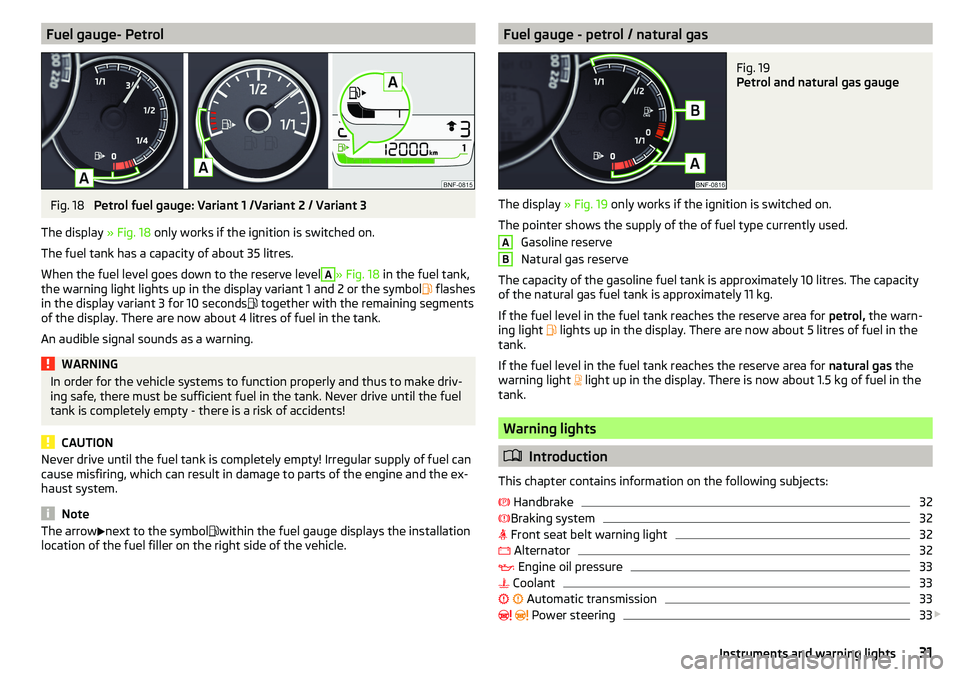
Fuel gauge- PetrolFig. 18
Petrol fuel gauge: Variant 1 /Variant 2 / Variant 3
The display » Fig. 18 only works if the ignition is switched on.
The fuel tank has a capacity of about 35 litres.
When the fuel level goes down to the reserve level
A
» Fig. 18 in the fuel tank,
the warning light lights up in the display variant 1 and 2 or the symbol flashes
in the display variant 3 for 10 seconds together with the remaining segments
of the display. There are now about 4 litres of fuel in the tank.
An audible signal sounds as a warning.
WARNINGIn order for the vehicle systems to function properly and thus to make driv-
ing safe, there must be sufficient fuel in the tank. Never drive until the fuel
tank is completely empty - there is a risk of accidents!
CAUTION
Never drive until the fuel tank is completely empty! Irregular supply of fuel can
cause misfiring, which can result in damage to parts of the engine and the ex-
haust system.
Note
The arrow next to the symbol within the fuel gauge displays the installation
location of the fuel filler on the right side of the vehicle.Fuel gauge - petrol / natural gasFig. 19
Petrol and natural gas gauge
The display » Fig. 19 only works if the ignition is switched on.
The pointer shows the supply of the of fuel type currently used. Gasoline reserve
Natural gas reserve
The capacity of the gasoline fuel tank is approximately 10 litres. The capacity
of the natural gas fuel tank is approximately 11 kg.
If the fuel level in the fuel tank reaches the reserve area for petrol, the warn-
ing light lights up in the display. There are now about 5 litres of fuel in the
tank.
If the fuel level in the fuel tank reaches the reserve area for natural gas the
warning light light up in the display. There is now about 1.5 kg of fuel in the
tank.
Warning lights
Introduction
This chapter contains information on the following subjects:
Handbrake
32
Braking system
32
Front seat belt warning light
32
Alternator
32
Engine oil pressure
33
Coolant
33
Automatic transmission
33
Power steering
33
AB31Instruments and warning lights
Page 34 of 172
Stability control (ESC) / Traction control (TCS)34 Anti-lock braking system (ABS)34
34
Low fuel - petrol
35
Low fuel - natural gas
35
Rear fog light
35
Emission control system
35
Engine electronics check
35
Airbag system
35
Handbrake - automatic transmission
36
Brake pedal (automatic transmission)
36
Turn signal system
36
Cruise control system
36
Main beam
36
/
Rear seat belt warning light
36
City Safe Drive
36
/
START-STOP
36
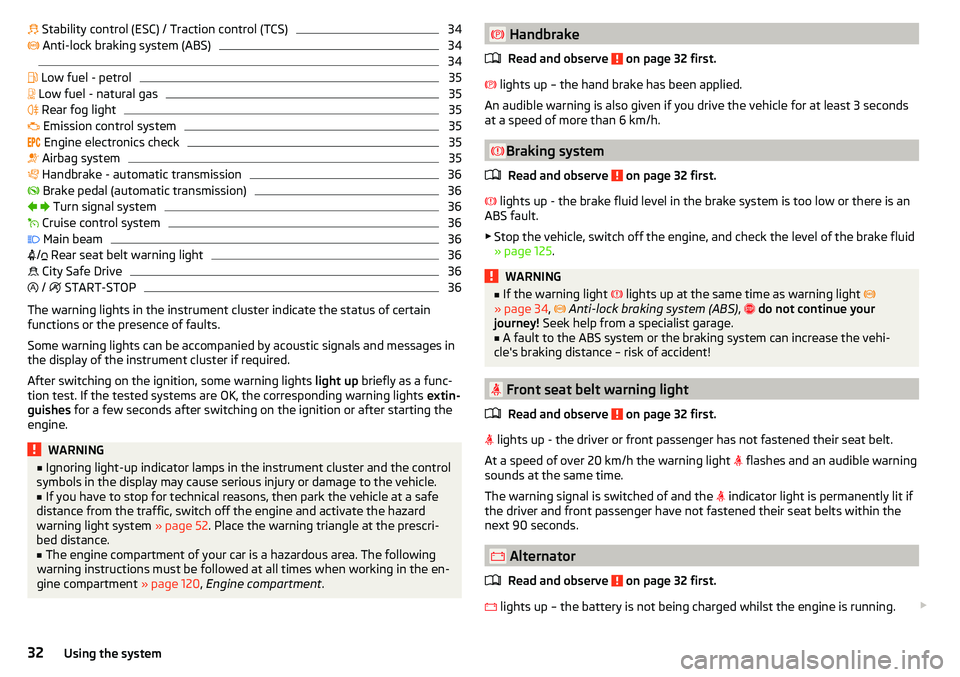
The warning lights in the instrument cluster indicate the status of certain
functions or the presence of faults.
Some warning lights can be accompanied by acoustic signals and messages in
the display of the instrument cluster if required.
After switching on the ignition, some warning lights light up briefly as a func-
tion test. If the tested systems are OK, the corresponding warning lights extin-
guishes for a few seconds after switching on the ignition or after starting the
engine.
WARNING■ Ignoring light-up indicator lamps in the instrument cluster and the control
symbols in the display may cause serious injury or damage to the vehicle.■
If you have to stop for technical reasons, then park the vehicle at a safe
distance from the traffic, switch off the engine and activate the hazard
warning light system » page 52. Place the warning triangle at the prescri-
bed distance.
■
The engine compartment of your car is a hazardous area. The following
warning instructions must be followed at all times when working in the en-
gine compartment » page 120, Engine compartment .
Handbrake
Read and observe
on page 32 first.
lights up – the hand brake has been applied.
An audible warning is also given if you drive the vehicle for at least 3 seconds
at a speed of more than 6 km/h.
Braking system
Read and observe
on page 32 first.
lights up - the brake fluid level in the brake system is too low or there is an
ABS fault.
▶ Stop the vehicle, switch off the engine, and check the level of the brake fluid
» page 125 .
WARNING■
If the warning light lights up at the same time as warning light
» page 34 , Anti-lock braking system (ABS) , do not continue your
journey! Seek help from a specialist garage.■
A fault to the ABS system or the braking system can increase the vehi-
cle's braking distance – risk of accident!
Front seat belt warning light
Read and observe
on page 32 first.
lights up - the driver or front passenger has not fastened their seat belt.
At a speed of over 20 km/h the warning light flashes and an audible warning
sounds at the same time.
The warning signal is switched of and the indicator light is permanently lit if
the driver and front passenger have not fastened their seat belts within the
next 90 seconds.
Alternator
Read and observe
on page 32 first.
lights up – the battery is not being charged whilst the engine is running.
32Using the system
Page 35 of 172
▶Seek help from a specialist garage.
CAUTION
If, while driving, the warning light lights up in addition to the warning
light » page 33 , do not drive any further - risk of damage to the engine!
Switch off the engine and seek assistance from a specialist garage.
Engine oil pressure
Read and observe
on page 32 first.
lights up or flashes - the engine oil pressure is too low.
An audible signal sounds as a warning. ▶ Stop the vehicle, switch off the engine, and check the engine oil level
» page 124 , Check and refill .
▶ If the warning light lights up or flashes, do not drive any further, even if
the oil level is correct! Switch off the engine and seek assistance from a spe-
cialist garage.
CAUTION
■ The oil pressure light is not an oil level indicator! One should therefore
check the oil level at regular intervals, preferably after every refuelling stop.■
If for some reason it is not possible to top up the engine oil under the current
circumstances,
do not continue driving! Switch off the engine and seek as-
sistance from a specialist garage.
Coolant
Read and observe
on page 32 first.
lights up or flashes – the coolant temperature is too high or the coolant lev-
el is too low.
An audible signal sounds as a warning tone. ▶ Stop the vehicle, switch off the engine, and allow the engine to cool down.
▶ Check the coolant level, if necessary top up the coolant.
If the coolant level is within the specified range and the warning light
lights
up or flashes again, then there may be a malfunction of the cooling fan.
▶ Switch off the ignition.
▶ Check the fuse for the cooling fan, replace if necessary.
If the coolant level and fan fuse are both OK but the warning light is still
illuminated , do not drive any further!
▶ Seek help from a specialist garage.
Automatic transmission
Read and observe
on page 32 first.
fault
lights up - there is a fault in the automatic transmission.
An audible signal sounds as a warning tone. ▶
Do not drive the vehicle! Switch off the engine and seek assistance from a
specialist garage.
Functional impairment
lights up and gear change is not possible - for technical reasons there may
be an impairment of the automatic transmission.
▶ Stop the car, turn the ignition off and on again.
If the warning light lights up after you again switch on the ignition, seek as-
sistance from a specialist garage.
Gearbox overheating
May also light up - the automatic transmission is overheating.
An audible signal sounds as a warning tone. ▶ Stop and allow the transmission to cool down or drive more quickly than
20 km/h (12 mph).
If the warning light lights up again, switch off the vehicle, shut off the en-
gine and allow the gearbox to cool down.
Further information » page 100, Automated transmission .
Power steering
Read and observe
on page 32 first.
Fault in the power steering
lights up – this indicates a complete failure of the power steering and the
steering assist is no longer working (significantly higher steering forces).
lights up – this indicates a partial failure of the power steering and the
steering forces can be greater.
33Instruments and warning lights
Page 36 of 172
▶Switch off the ignition, start the engine again and travel a short distance.
▶ If the warning light does not go out, obtain assistance from an authorised
dealer.
Disconnecting the vehicle battery
If the vehicle's battery has been disconnected and reconnected, the warning
light comes on after switching on the
ignition.
The warning light should go out after driving a short distance.
If, after the motor is restarted and a short drive, the indicator light does not go
out, there is a system error.
▶ Seek help from a specialist garage.
Stability control (ESC) / Traction control (TCS)
Read and observe
on page 32 first.
flashes – the ESC or TCS is currently active.
lights up – there is an ESC or TCS fault.
▶ Seek help from a specialist garage.
As the ESC operates in conjunction with the ABS, the ESC warning light will al-
so come on if the ABS system fails.
If the warning light comes on after starting the engine, the ESC or TCS may
have been switched off for technical reasons. ▶ Switch the ignition off and on again.
If the warning light does not illuminate after you switch the engine back on,
the ASR is fully functional again.
Disconnecting the vehicle battery
If the vehicle's battery has been disconnected and reconnected, the warning
light comes on after switching on the ignition.
The warning light should go out after driving a short distance.
If, after a short drive, the indicator light does not go out, there is a system er-
ror.
▶ Seek help from a specialist garage.
More information about the ESC system » page 104, Stability Control (ESC) or
TCS system » page 104, Traction control (TCS) .
Anti-lock braking system (ABS)
Read and observe
on page 32 first.
lights up – there is an ABS fault.
The vehicle will only be braked by the normal brake system without the ABS.
▶ Seek help from a specialist garage.
In the event of an ABS fault, the other braking and stabilization systems are
turned off » page 103 , Braking and stabilisation systems .
WARNING■
If the ABS warning light together with the indicator light » page 32 ,
Braking system lights up, do not continue to drive! Seek help from a
specialist garage.■
A fault to the ABS system or the braking system can increase the vehi-
cle's braking distance – risk of accident!
Read and observe on page 32 first.
Change of tyre pressure values
lights up - there was a pressure change in one of the tyres.
An audible signal sounds as a warning. ▶ Immediately reduce speed and avoid sudden steering and braking manoeu-
vres.
▶ Stop the vehicle, turn the ignition off and check the tyres and their inflation
pressures » page 129 .
▶ Correct the tyre pressure if necessary or replace the affected wheel
» page 134 or use the repair kit » page 137.
▶ Save the tyre pressure values in the system » page 109.
System fault
flashes for approximately 1 minute and remains lit – there may be a fault in
the tyre pressure monitoring system.
▶ Stop the vehicle, turn the ignition off and start the engine again.
If the warning light flashes again after the engine has started, there is a
system error.
34Using the system
Page 37 of 172
▶Seek help from a specialist garage.
Disconnecting the vehicle battery
If the vehicle's battery has been disconnected and reconnected, the warning
light comes on after switching on the
ignition.
The warning light should go out after driving a short distance.
If, after a short drive, the indicator light does not go out, there is a system er-
ror.
▶ Seek help from a specialist garage.
Other incidents
The following reasons can explain the warning light being illuminated.
▶ The vehicle is loaded on one side. Distribute the load evenly.
▶ The wheels of one axle are loaded more heavily (e.g. when driving uphill or
downhill).
▶ Snow chains are mounted.
▶ A wheel has been changed.
CAUTION
Under certain circumstances (e.g. sporty style of driving, wintry or unpaved
roads) the warning light in the instrument cluster can be delayed or does
not light up at all.
Low fuel - petrol
Read and observe
on page 32 first.
illuminates – the petrol level in the fuel tank is at the reserve level (approxi-
mately 4-5 litres).
An audible signal sounds as a warning. ▶ Please refuel » page 118.
Low fuel - natural gas
Read and observe
on page 32 first.
illuminates – the natural level in the fuel tank is at the reserve level (approxi-
mately 1.5 kg litres).
An audible signal sounds as a warning. ▶ Please refuel » page 119.
Rear fog light
Read and observe
on page 32 first.
lights up – the rear fog light is switched on.
Emission control system
Read and observe
on page 32 first.
lights up – there is a fault in the emission control system. The system
makes it possible to drive on in emergency mode - there may be a noticeable
reduction in engine performance.
▶ Seek help from a specialist garage.
Engine electronics check
Read and observe
on page 32 first.
lights up – there is a fault in the engine management system. The system
makes it possible to drive on in emergency mode - there may be a noticeable
reduction in engine performance.
▶ Seek help from a specialist garage.
Airbag system
Read and observe
on page 32 first.
System fault
lights up - there is a fault in the airbag system.
This also applies if the warning light does not come on when the ignition is
switched on.
The functionality of the airbag system is monitored automatically even if one
of the airbags is switched off.
One of the airbags or a belt tensioner has been disabled by the diagnostic
tool
lights up for approximately 4 seconds after the ignition is switched on and
then flashes for approximately 12 seconds.
The front passenger airbag has been disabled with the key switch
lights up for a few seconds when the ignition is switched on.
35Instruments and warning lights
Page 38 of 172
Below the lettering in the middle of the dash panel lights
up after switching on the ignition » page 20, Deactivating the front passenger
airbag .WARNINGWhen a fault in the airbag system occurs, there is a risk of the system not
being triggered in the event of an accident. Therefore, this must be
checked immediately by a specialized garage.
Handbrake - automatic transmission
Read and observe
on page 32 first.
lights up or flashes - engage the parking brake.
Further information » page 100, Automated transmission .
Brake pedal (automatic transmission)
Read and observe
on page 32 first.
lights up – apply the brake.
Further information » page 100, Automated transmission .
Turn signal system
Read and observe
on page 32 first.
flashes – the left turn signal is turned on.
flashes – the right turn signal is turned on.
If there is a fault in the turn signal system, the warning light flashes at twice
its normal rate.
When the hazard warning light system is switched on, this will cause all of the
turn signal lights as well as both warning lights to flash.
Cruise control system
Read and observe
on page 32 first.
lights up – the vehicle speed is regulated by the cruise control system.
Main beam
Read and observe
on page 32 first.
lights up – the main beam or the headlight flasher is switched on.
/ Rear seat belt warning light
Read and observe
on page 32 first.
lights up – a rear seat belt is not fastened.
lights up – a rear seat belt is fastened.
When the seat belt is fastened/unfastened, the particular light lights up briefly
and indicates the current belt status!
City Safe Drive
Read and observe
on page 32 first.
flashes quickly - the City Safe Drivesystem is braking the vehicle automati-
cally.
flashes slowly - the system is not available or there is a system malfunction.
If the system is turned off and the vehicle is moving at a speed of about 5-30
km/h, the warning light
lights up in the instrument cluster display.
If the system is activated again, the warning light
lights up in the instru-
ment cluster display for about 5 s.
Further information » page 107, City Safe Drive .
/ START-STOP
Read and observe
on page 32 first.
lights up - the START-STOPsystem is active.
lights up - the START-STOPsystem is active, but the automatic engine cut-
off is not possible.
flashes - the START-STOPsystem is not available.
Further information » page 96, START-STOPsystem .
36Using the system
Page 39 of 172
Information system
Driver information system
Introduction
This chapter contains information on the following subjects:
Display in the instrument cluster
37
Switching between the time and external temperature display
37
Setting the time in the instrument cluster
37
Trip counter
38
Recommended gear
38
Operating the information system
39
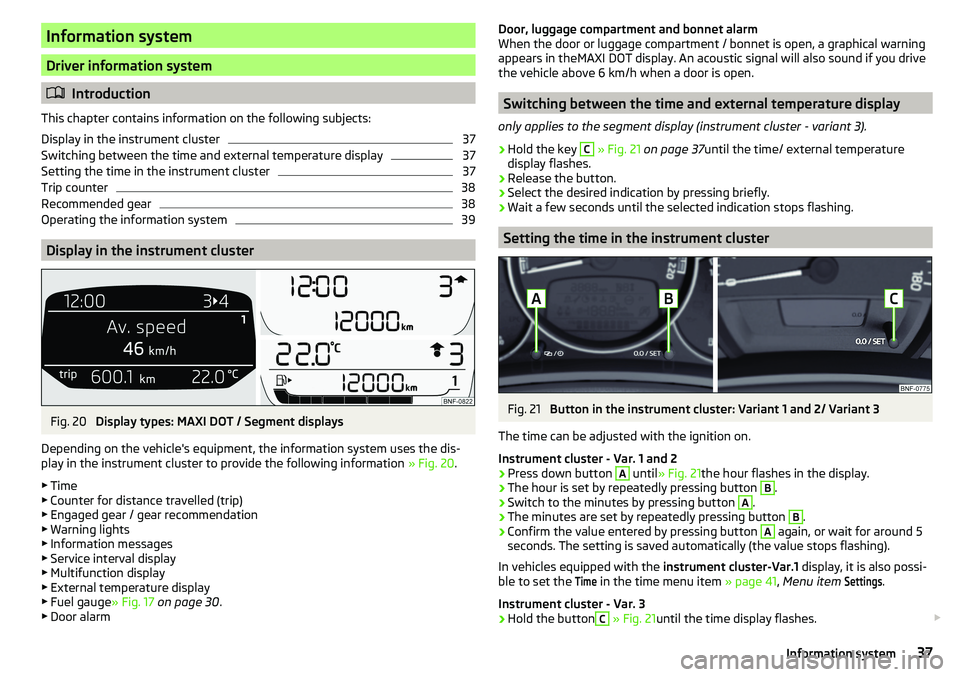
Display in the instrument cluster
Fig. 20
Display types: MAXI DOT / Segment displays
Depending on the vehicle's equipment, the information system uses the dis-
play in the instrument cluster to provide the following information » Fig. 20.
▶ Time
▶ Counter for distance travelled (trip)
▶ Engaged gear / gear recommendation
▶ Warning lights
▶ Information messages
▶ Service interval display
▶ Multifunction display
▶ External temperature display
▶ Fuel gauge » Fig. 17 on page 30 .
▶ Door alarm
Door, luggage compartment and bonnet alarm
When the door or luggage compartment / bonnet is open, a graphical warning appears in theMAXI DOT display. An acoustic signal will also sound if you drive
the vehicle above 6 km/h when a door is open.
Switching between the time and external temperature display
only applies to the segment display (instrument cluster - variant 3).
›
Hold the key
C
» Fig. 21 on page 37 until the time/ external temperature
display flashes.
›
Release the button.
›
Select the desired indication by pressing briefly.
›
Wait a few seconds until the selected indication stops flashing.
Setting the time in the instrument cluster
Fig. 21
Button in the instrument cluster: Variant 1 and 2/ Variant 3
The time can be adjusted with the ignition on.
Instrument cluster - Var. 1 and 2
›
Press down button
A
until » Fig. 21 the hour flashes in the display.
›
The hour is set by repeatedly pressing button
B
.
›
Switch to the minutes by pressing button
A
.
›
The minutes are set by repeatedly pressing button
B
.
›
Confirm the value entered by pressing button
A
again, or wait for around 5
seconds. The setting is saved automatically (the value stops flashing).
In vehicles equipped with the instrument cluster-Var.1 display, it is also possi-
ble to set the
Time
in the time menu item » page 41, Menu item
Settings
.
Instrument cluster - Var. 3
›
Hold the button
C
» Fig. 21 until the time display flashes.
37Information system
Page 41 of 172

Operating the information systemFig. 24
Buttons on the control lever
Operating the multifunction displayPress (up or down) - Select data / Setting values
Press Show / confirm entry
Operating the MAXI DOT display Press (up or down) - move to the selected menu
Hold (up or down) - display main menu
Press - confirm selected menu item
Driving data (multifunction display)
Introduction
This chapter contains information on the following subjects:
Information overview
39
Warning at excessive speeds
40
Memory
40
The driving data is displayed in the multifunction display when is ignition is
switched on.
If vehicles with MAXI DOTdisplay do not show the driving data after switching
on the ignition, select the menu item
MFD
in the main menu and confirm
» page 41 , MAXI DOT display .
On vehicles with a MAXI DOT display, there is an option to fade out the units
and some of the information » page 41, Menu item
Settings
.
ABABInformation overview
Overview of driving data (depending on the vehicle equipment).
Clock - current time is displayed.
Outside temperature - If the outside temperature drops below +4 °C, the tem-
perature indicator appears and a snowflake symbol
(display for low temper-
ature) flashes for a few seconds, then remains displayed together with the
outside temperature.
Driving time - Driving time since last clearing the memory.
Current fuel consumption - When the vehicle is stationary or moving slowly,
the fuel consumption is displayed in l/h (in models in some countries the fol-
lowing appears --,- km/l). With G-TEC vehicles the current consumption of the
fuel currently being used is displayed ( with regards to a stationary or slow
moving vehicle, the natural gas consumption is displayed in kg/h).
Average fuel consumption - Is calculated continuously since the last clearing
of the memory. After erasing the memory, no data will appear for the first 300
m driven. With G-TEC vehicles, the average consumption of fuel currently being
used is displayed.
Natural gas quality The details of the quality of natural gas are displayed as a
percentage of between 70% to 100%. The higher the value of natural gas, the
lower is the consumption.
Range - Drive distance in km which can be covered with the existing tank ca-
pacity and with the same driving style. If you drive more efficiently this value
can increase. With G-TEC vehicles the following details are displayed - Range
with natural gas / petrol.
Distance driven - Distance driven since the memory was last cleared.
Total distance travelled - Odometer
Average speed - Value constantly recalculated, for distance since last clearing
the memory. After erasing the memory, no data will appear for the first 300 m
driven.
Current Speed - Digital speedometer.
Coolant temperature - If the coolant temperature is in the range 70-120 °C,
the engine operating temperature has been reached. If the temperature is be-
low 70 ° C, high engine speeds and straining the engine should be avoided. If
the temperature is over 120 ° C, the warning light lights up the instrument
cluster
» page 33 . 39Information system