mirror SKODA CITIGO 2017 User Guide
[x] Cancel search | Manufacturer: SKODA, Model Year: 2017, Model line: CITIGO, Model: SKODA CITIGO 2017Pages: 172, PDF Size: 24.54 MB
Page 147 of 172
Note■We recommend always carrying replacement fuses in the vehicle.■There can be several power consuming devices for one fuse. Multiple fuses
may exist for a single power consuming device.
Fuses in the dash panel
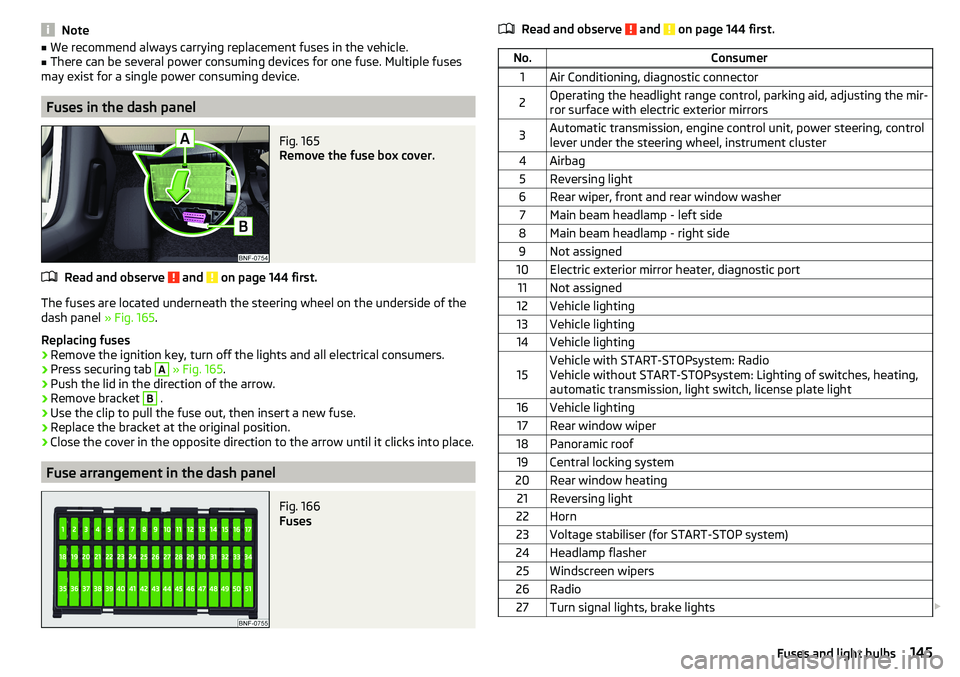
Fig. 165
Remove the fuse box cover.
Read and observe and on page 144 first.
The fuses are located underneath the steering wheel on the underside of the
dash panel » Fig. 165.
Replacing fuses
›
Remove the ignition key, turn off the lights and all electrical consumers.
›
Press securing tab
A
» Fig. 165 .
›
Push the lid in the direction of the arrow.
›
Remove bracket
B
.
›
Use the clip to pull the fuse out, then insert a new fuse.
›
Replace the bracket at the original position.
›
Close the cover in the opposite direction to the arrow until it clicks into place.
Fuse arrangement in the dash panel
Fig. 166
Fuses
Read and observe and on page 144 first.No.Consumer1Air Conditioning, diagnostic connector2Operating the headlight range control, parking aid, adjusting the mir-
ror surface with electric exterior mirrors3Automatic transmission, engine control unit, power steering, control
lever under the steering wheel, instrument cluster4Airbag5Reversing light6Rear wiper, front and rear window washer7Main beam headlamp - left side8Main beam headlamp - right side9Not assigned10Electric exterior mirror heater, diagnostic port11Not assigned12Vehicle lighting13Vehicle lighting14Vehicle lighting15Vehicle with START-STOPsystem: Radio
Vehicle without START-STOPsystem: Lighting of switches, heating,
automatic transmission, light switch, license plate light16Vehicle lighting17Rear window wiper18Panoramic roof19Central locking system20Rear window heating21Reversing light22Horn23Voltage stabiliser (for START-STOP system)24Headlamp flasher25Windscreen wipers26Radio27Turn signal lights, brake lights 145Fuses and light bulbs
Page 156 of 172
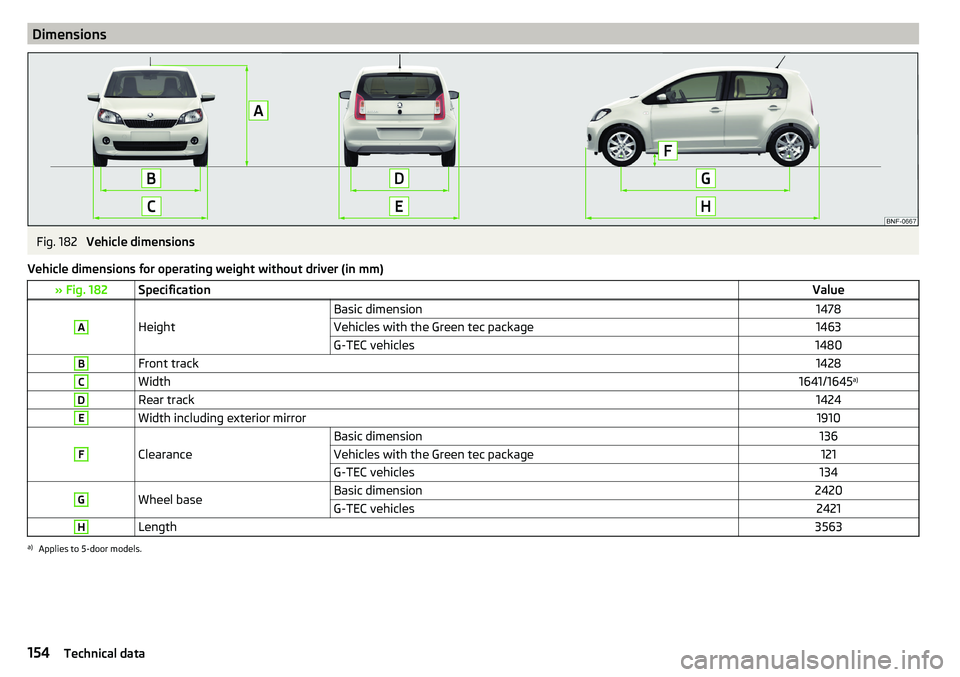
DimensionsFig. 182
Vehicle dimensions
Vehicle dimensions for operating weight without driver (in mm)
» Fig. 182SpecificationValueA
Height
Basic dimension1478Vehicles with the Green tec package1463G-TEC vehicles1480BFront track1428CWidth1641/1645 a)DRear track1424EWidth including exterior mirror1910F
Clearance
Basic dimension136Vehicles with the Green tec package121G-TEC vehicles134GWheel baseBasic dimension2420G-TEC vehicles2421HLength3563a)
Applies to 5-door models.
154Technical data
Page 162 of 172
Hazard warning light system52
HBA104
Headrests57
Heating71, 72
Mirrors55
Rear window53
Seats58
Help in an emergency10
HHC104
Hill Start Assist (HHC)104
Hook68
horn29
I
Ignition lock
96
immobiliser95
Important notes75
Importing phonebook91
In an emergency Changing a wheel
134
Inertia reels16
Information about the towing process140
Information service90
Information system37
Door alarm37
MAXI DOT display41
Service interval display42
Instrument cluster30
See instrument cluster30
Warning lights31
Interior light52
ISOFIX24, 25
J
Jack
133
- fit136
Jump-starting139, 140
K
Key Change battery
142
Lock43
Starting/Stopping the engine95
Unlock43
L
LEAVING HOME
51
lever Turn signal/main beam
50
Lever Cruise control
106
Operating the information system39
Windscreen wipers54
Lever operation100
light Flash
50
Fog lights/rear fog light51
Light Automatic driving light control
51
Cockpit52
COMING HOME / LEAVING HOME51
Dimmed headlights49
Headlight range control49
on and off49
Parking light52
Replacing bulbs147
Sidelights49
Turn signal/main beam50
Light bulbs Replacing
147
Lighting Interior lighting
52
Luggage compartment67
Light on and off49
Lights49
Abroad52
Daylight running50
Hazard warning light system52
Warning lights31
List of available stations
83
of telephone contacts91
With folder / track list84
List of paired Bluetooth devices93
Load153
Loading floor69
Lock Key
43
Locking Central locking button
44
in case of emergency142
Remote control43
locking the steering lock95
Low tyre pressure warning refer to the tyre pressure monitoring
108
Luggage compartment67
Cover69
Fasteners68
Fixing nets68
Hook68
Lighting67
unlock manually142
Unlock the boot lid142
Variable loading floor69
Luggage compartment cover69
Luggage compartment lid46
M
Main beam
50
Warning light36
Main menu Application management
94
Media84
Radio82
Managing paired Bluetooth devices93
160Index
Page 163 of 172
Manual air conditioningControls72
Manual gear changing see gear changing
99
Materials defect liability5
MAXI DOT See MAXI DOT display
41
MAXI DOT display Main menu
41
Menu item Audio41
Service39
Settings41
Mechanical window openers47
media Compatible sources
88
file formats88
Requirements and Restrictions88
Media84
Audio source85
AUX87
Bluetooth® audio87
Browser84
CD86
List84
Main menu84
Playback control85
safe removal of Blues radio data source81
safe removal of the Swing radio data source79
SD-card86
USB87
Memory40
Mirror55
Vanity53
Mobile phone75
mobility warranty6
Modifications and technical alterations110
Trailer operation112
MSR104
Multi-media AUX
87
Multifunction displayData39
Functions39
Memory40
Service39
Multimedia USB
87
Multimedia holder63
N
N1
70
Nameplate152
Nets68
NGVs see CNG
120
O
oil see Engine oil
124
Oil changing Engine oil
123
On-board computer See multifunction display
39
Online Owner's Manual8
Operating weight153
Operation Telephone
90
Operation in winter Vehicle battery
127
Original accessories111
overview cockpit
29
Overview Engine compartment
122
Fuses144
Warning lights31
P
Pairing process
89
Parking99
Parking aid105
Parking aid105
Function105
Parking sensors Display on the radio display
106
Parking the vehicle see Parking
99
Park Pilot105
Parts replacement110
Passive safety Before setting off
12
Driving safety12
Passive Safety12
Pedals100
Footmats100
Petrol118
Phone88
Bluetooth profile93
Breakdown service90
Delete favourite92
Delete paired device93
Dialilng phone number90
Emergency call90
Enter phone number90
Establishing conection89
Establishing connections93
Information service90
Pairing process89
Phone call92
Preferred contacts91
Save favourite91
Select favourites91
Phone bracket66
Phone call92
Phone number90
Pocket holder65
Pockets65
Power limit Tilt / slide sunroof
48
161Index
Page 164 of 172
Power steering33
Practical equipment Pocket holder
65
Practical features Storage compartment for umbrella
64
Waste container61
Preferred contacts91
Principles of Radio Operation76
R
Radio
81
List of available stations83
Main menu82
Preset buttons83
Save channel83
Scan82
Search for stations82
Select station82
Radio operation76
Radio volume77
Raising the vehicle136
Rear fog light51
Warning light35
Rear seats57
Rear view mirror55
Rear window heating53
Rear windows Opening/closing
47
Recirculation73
Refilling Coolant
125
Engine oil124
Windscreen washer fluid123
Reflective vest133
Refuelling118
Fuel118
remote Synchronization process
45
RemoteChange battery142
Remote control Unlocking/locking the vehicle
43
Repairs and technical alterations110
Replacing Bulbs
147
Fuses144
Fuses on the side of the dash panel146
Windscreen wiper blades143
Reproduction Media
85
Restart the radio77
Rev counter30
Rims128
Roof Load
70
Roof rack70
Running in Brake pads
98
Engine102
Tyres128
S
SafeLock
44
SAFE LOCK see SafeLock
44
safety air bag
17
ISOFIX25
Safety12
Child safety21
Child safety seats21
Correct seated position12
Headrests57
ISOFIX24
TOP TETHER26
Saving electrical energy102
Saving fuel102
SD-card86
Seat belt height adjustment
15
Warning light36
Seat belts14
Belt tensioners16
fastening and unfastening16
Inertia reels16
Warning light32
Seats Adjusting the front seats
56
Folding front passenger seat56
front56
Headrests57
Heating58
Rear57
Rear seat backrests57
Setting56
Seats and head restraint56
Select broadcasting range82
Selector lever100
service110
Service Service interval display
42
Service intervals112, 113
Service Plan113
Setting Headrests
57
Mirror55
Seats56
settings Blues Radio System Information
81
Swing radio display79
Swing Radio menu settings78
Settings Blues radio
80
Blues Radio Display81
Blues radio language81
Blues radio menu media81
Blues radio menu settings80
162Index