steering wheel SKODA CITIGO 2017 User Guide
[x] Cancel search | Manufacturer: SKODA, Model Year: 2017, Model line: CITIGO, Model: SKODA CITIGO 2017Pages: 172, PDF Size: 24.54 MB
Page 132 of 172
WARNING■Do not drive with incorrect tyre pressure - risk of accident.■In the event of very rapid pressure loss (e.g. in the event of tyre damage)
an attempt should be made to bring the vehicle carefully to a stop without
sudden steering movements and without any hard braking - risk of acci-
dent.
Note
The declaration of conformity (the so-called COC document), can be obtained
from a ŠKODA 1)
partner.
Tyre wear and wheel change
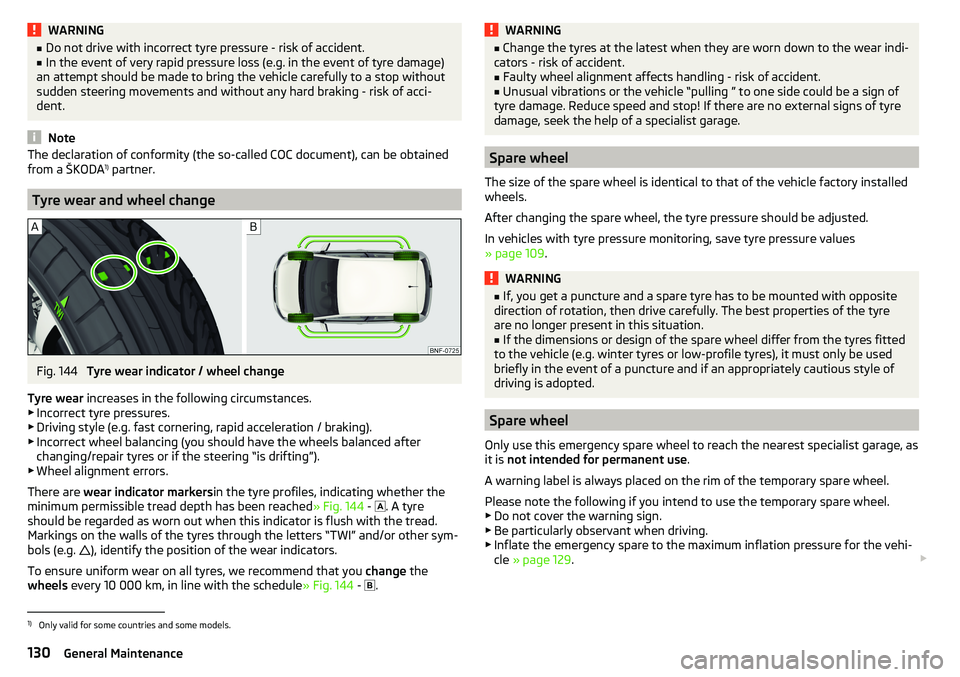
Fig. 144
Tyre wear indicator / wheel change
Tyre wear increases in the following circumstances.
▶ Incorrect tyre pressures.
▶ Driving style (e.g. fast cornering, rapid acceleration / braking).
▶ Incorrect wheel balancing (you should have the wheels balanced after
changing/repair tyres or if the steering “is drifting”).
▶ Wheel alignment errors.
There are wear indicator markers in the tyre profiles, indicating whether the
minimum permissible tread depth has been reached » Fig. 144 -
. A tyre
should be regarded as worn out when this indicator is flush with the tread.
Markings on the walls of the tyres through the letters “TWI” and/or other sym- bols (e.g. ), identify the position of the wear indicators.
To ensure uniform wear on all tyres, we recommend that you change the
wheels every 10 000 km, in line with the schedule » Fig. 144 -
.
WARNING■
Change the tyres at the latest when they are worn down to the wear indi-
cators - risk of accident.■
Faulty wheel alignment affects handling - risk of accident.
■
Unusual vibrations or the vehicle “pulling ” to one side could be a sign of
tyre damage. Reduce speed and stop! If there are no external signs of tyre
damage, seek the help of a specialist garage.
Spare wheel
The size of the spare wheel is identical to that of the vehicle factory installed
wheels.
After changing the spare wheel, the tyre pressure should be adjusted.
In vehicles with tyre pressure monitoring, save tyre pressure values
» page 109 .
WARNING■
If, you get a puncture and a spare tyre has to be mounted with opposite
direction of rotation, then drive carefully. The best properties of the tyre
are no longer present in this situation.■
If the dimensions or design of the spare wheel differ from the tyres fitted
to the vehicle (e.g. winter tyres or low-profile tyres), it must only be used
briefly in the event of a puncture and if an appropriately cautious style of
driving is adopted.
Spare wheel
Only use this emergency spare wheel to reach the nearest specialist garage, as
it is not intended for permanent use .
A warning label is always placed on the rim of the temporary spare wheel.
Please note the following if you intend to use the temporary spare wheel. ▶ Do not cover the warning sign.
▶ Be particularly observant when driving.
▶ Inflate the emergency spare to the maximum inflation pressure for the vehi-
cle » page 129 .
1)
Only valid for some countries and some models.
130General Maintenance
Page 143 of 172
The maximum towing speed is 50 km/h.
The vehicle must be transported on a special breakdown vehicle or trailer
if it is not possible to tow in the vehicle in the way described or if the tow-
ing distance is greater than 50 km.
Driver of the towed vehicle›
If possible, the vehicle should be towed with the engine running. The brake
booster and power steering only operate if the engine is running, otherwise
much greater force has to be applied to the brake pedal and more power has
to be expended for steering.
›
If it is not possible to start the engine, switch on the ignition so that the
steering wheel does not lock and so that the turn signal lights, windscreen
wipers and windscreen washer system can be used.
›
Take the vehicle out of gear or move the selector lever into position N if the
vehicle is fitted with an automated transmission.
›
Keep the tow rope taut at all times during the towing procedure.
WARNING■ Spiral tow ropes must not be used for towing » Fig. 156- , the towing
eye may unscrew out of the vehicle - risk of accident.■
Ensure tow rope is not twisted - risk of accident.
CAUTION
■ Do not tow-start the engine – risk of damaging the engine! The battery from
another vehicle can be used as a jump-start aid » page 139, Jump-starting .■
For off-road towing manoeuvres, there is a risk to both vehicles that the fas-
teners may become overloaded and damaged.
Note
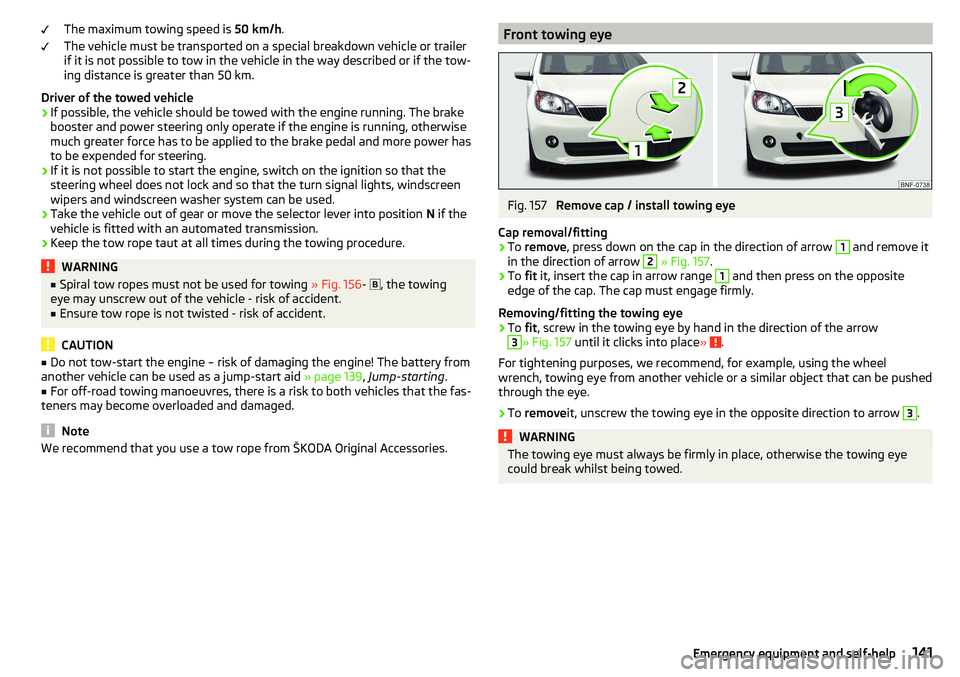
We recommend that you use a tow rope from ŠKODA Original Accessories.Front towing eyeFig. 157
Remove cap / install towing eye
Cap removal/fitting
›
To remove , press down on the cap in the direction of arrow
1
and remove it
in the direction of arrow
2
» Fig. 157 .
›
To fit it, insert the cap in arrow range
1
and then press on the opposite
edge of the cap. The cap must engage firmly.
Removing/fitting the towing eye
›
To fit, screw in the towing eye by hand in the direction of the arrow
3
» Fig. 157 until it clicks into place » .
For tightening purposes, we recommend, for example, using the wheel
wrench, towing eye from another vehicle or a similar object that can be pushed
through the eye.
›
To remove it, unscrew the towing eye in the opposite direction to arrow
3
.
WARNINGThe towing eye must always be firmly in place, otherwise the towing eye
could break whilst being towed.141Emergency equipment and self-help
Page 147 of 172
Note■We recommend always carrying replacement fuses in the vehicle.■There can be several power consuming devices for one fuse. Multiple fuses
may exist for a single power consuming device.
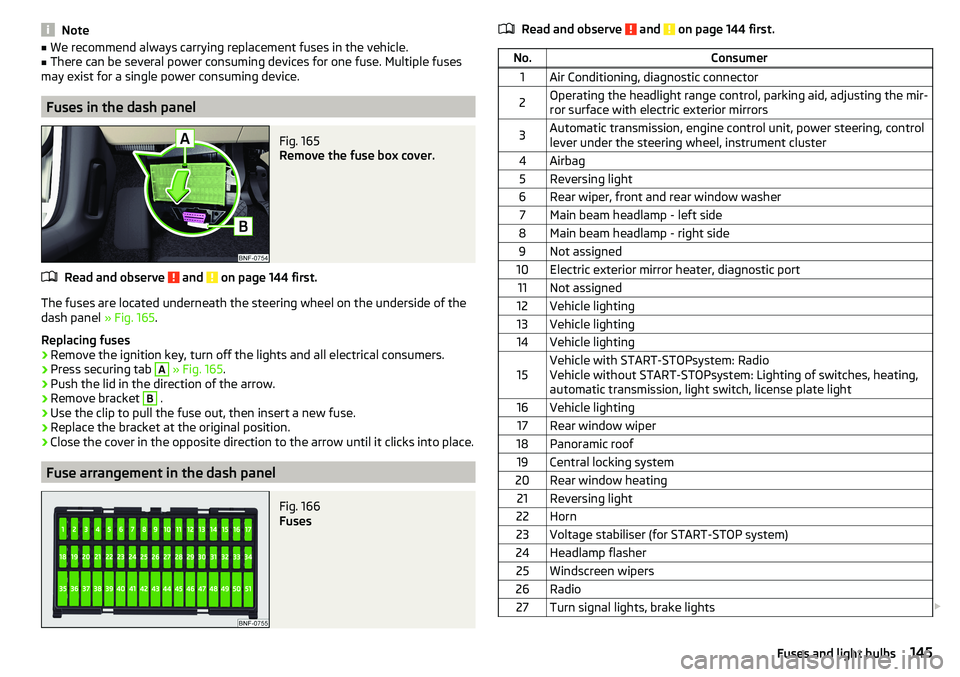
Fuses in the dash panel
Fig. 165
Remove the fuse box cover.
Read and observe and on page 144 first.
The fuses are located underneath the steering wheel on the underside of the
dash panel » Fig. 165.
Replacing fuses
›
Remove the ignition key, turn off the lights and all electrical consumers.
›
Press securing tab
A
» Fig. 165 .
›
Push the lid in the direction of the arrow.
›
Remove bracket
B
.
›
Use the clip to pull the fuse out, then insert a new fuse.
›
Replace the bracket at the original position.
›
Close the cover in the opposite direction to the arrow until it clicks into place.
Fuse arrangement in the dash panel
Fig. 166
Fuses
Read and observe and on page 144 first.No.Consumer1Air Conditioning, diagnostic connector2Operating the headlight range control, parking aid, adjusting the mir-
ror surface with electric exterior mirrors3Automatic transmission, engine control unit, power steering, control
lever under the steering wheel, instrument cluster4Airbag5Reversing light6Rear wiper, front and rear window washer7Main beam headlamp - left side8Main beam headlamp - right side9Not assigned10Electric exterior mirror heater, diagnostic port11Not assigned12Vehicle lighting13Vehicle lighting14Vehicle lighting15Vehicle with START-STOPsystem: Radio
Vehicle without START-STOPsystem: Lighting of switches, heating,
automatic transmission, light switch, license plate light16Vehicle lighting17Rear window wiper18Panoramic roof19Central locking system20Rear window heating21Reversing light22Horn23Voltage stabiliser (for START-STOP system)24Headlamp flasher25Windscreen wipers26Radio27Turn signal lights, brake lights 145Fuses and light bulbs
Page 148 of 172
No.Consumer28Selector lever for the automatic transmission29Fuel pump30Engine control unit, instrument cluster, rain sensor, control lever un-
der the steering wheel31Vehicle lighting32Central control system33Vehicle lighting34Interior lighting35Vehicle lighting36Vehicle lighting37ESC38Key bar39Control lever under the steering wheel, front and rear window wash- er40Lambda probe, radiator fan, gas valve, oil pressure valve, valve for
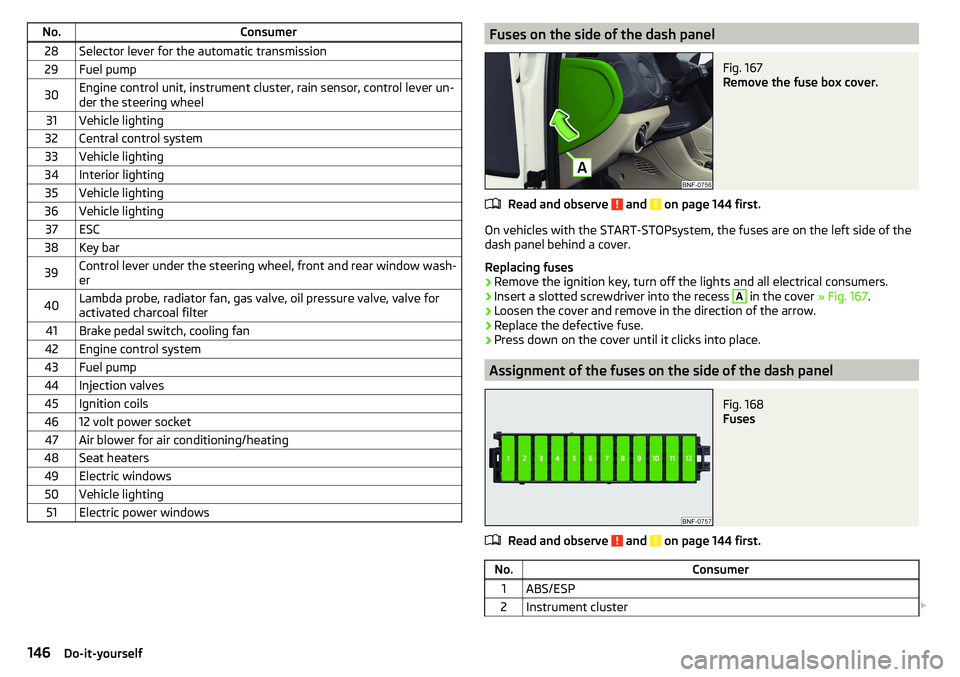
activated charcoal filter41Brake pedal switch, cooling fan42Engine control system43Fuel pump44Injection valves45Ignition coils4612 volt power socket47Air blower for air conditioning/heating48Seat heaters49Electric windows50Vehicle lighting51Electric power windowsFuses on the side of the dash panelFig. 167
Remove the fuse box cover.
Read and observe and on page 144 first.
On vehicles with the START-STOPsystem, the fuses are on the left side of the
dash panel behind a cover.
Replacing fuses
›
Remove the ignition key, turn off the lights and all electrical consumers.
›
Insert a slotted screwdriver into the recess
A
in the cover » Fig. 167.
›
Loosen the cover and remove in the direction of the arrow.
›
Replace the defective fuse.
›
Press down on the cover until it clicks into place.
Assignment of the fuses on the side of the dash panel
Fig. 168
Fuses
Read and observe and on page 144 first.
No.Consumer1ABS/ESP2Instrument cluster 146Do-it-yourself
Page 159 of 172
Index
A
ABS Operation
104
Warning light34
Acceptance and recycling of used vehicles
112
Accessories110
Adjusting Steering wheel
13
Adjusting the seats12
Adjustment Light range
49
Adjust radio volume77
Advice on tyre/wheel usage128
Air-conditioning system Air outlet vents
74
air bag17
Airbag Adjustments and impairments to the airbagsystem
111
Deactivation20
Deployment18
Warning light35
Airbag system17
air conditioning recirculation
73
Air conditioning71
Climatronic73
Manual air conditioning72
Air outlet vents74
All-year tyres131
Alternator Warning light
32
AM82
Anti-lock braking system (ABS)104
Anti-theft wheel bolts136
Application management93
Connection93
Main menu94
Ashtray62
Assist systems103
Audio source85
Auto check control41
Automated manual transmission Kick-down
101
Tiptronic101
Automated transmission100
Automatically turn off the radio77
Automatic driving light control51
Automatic shutdown of consumers126
Automatic transmission Defect
33
Selector lever100
Starting-off and driving101
Warning light33
Automatic transmission modes100
AUX87
Avoiding damage to your vehicle102
B
Battery Change in key
142
Belts14
Belt tensioners16
Blues radio Device language settings
81
Display settings81
Factory settings81
Media menu84
Media menu settings81
menu settings80
Radio menu81
Radio menu settings80
safe removal of the data source81
Settings80
Sound settings80
Status line77
Blues Radio75
Device description76
Information on the device system81
Blues radio display76
Bluetooth profile93
Bluetooth® player87
Bonnet Closing
122
Opening122
Boot Class N1 vehicles
70
see boot lid46
Boot lid Automatic locking
46
Open/Close46
Brake Assist (HBA)104
Brake booster98
Brake fluid125
Check125
specification125
Brake pads new
98
Brake pedal - automatic transmission warning light
36
Brakes Brake booster
98
Brake fluid125
Braking and stabilisation systems103
Handbrake98
Information on braking98
Warning lights32
Brake system103
Braking Running in
102
Breakdown kit137
Breakdown service90
see Help in an emergency10
157Index
Page 162 of 172
Hazard warning light system52
HBA104
Headrests57
Heating71, 72
Mirrors55
Rear window53
Seats58
Help in an emergency10
HHC104
Hill Start Assist (HHC)104
Hook68
horn29
I
Ignition lock
96
immobiliser95
Important notes75
Importing phonebook91
In an emergency Changing a wheel
134
Inertia reels16
Information about the towing process140
Information service90
Information system37
Door alarm37
MAXI DOT display41
Service interval display42
Instrument cluster30
See instrument cluster30
Warning lights31
Interior light52
ISOFIX24, 25
J
Jack
133
- fit136
Jump-starting139, 140
K
Key Change battery
142
Lock43
Starting/Stopping the engine95
Unlock43
L
LEAVING HOME
51
lever Turn signal/main beam
50
Lever Cruise control
106
Operating the information system39
Windscreen wipers54
Lever operation100
light Flash
50
Fog lights/rear fog light51
Light Automatic driving light control
51
Cockpit52
COMING HOME / LEAVING HOME51
Dimmed headlights49
Headlight range control49
on and off49
Parking light52
Replacing bulbs147
Sidelights49
Turn signal/main beam50
Light bulbs Replacing
147
Lighting Interior lighting
52
Luggage compartment67
Light on and off49
Lights49
Abroad52
Daylight running50
Hazard warning light system52
Warning lights31
List of available stations
83
of telephone contacts91
With folder / track list84
List of paired Bluetooth devices93
Load153
Loading floor69
Lock Key
43
Locking Central locking button
44
in case of emergency142
Remote control43
locking the steering lock95
Low tyre pressure warning refer to the tyre pressure monitoring
108
Luggage compartment67
Cover69
Fasteners68
Fixing nets68
Hook68
Lighting67
unlock manually142
Unlock the boot lid142
Variable loading floor69
Luggage compartment cover69
Luggage compartment lid46
M
Main beam
50
Warning light36
Main menu Application management
94
Media84
Radio82
Managing paired Bluetooth devices93
160Index
Page 165 of 172
Blues radio radio menu80
Blues radio sound80
Link the application with Swing radio79
Radio volume77
Reset Blues radio to factory settings81
Reset Swing radio to factory settings79
safe removal of Blues radio data source81
Safe removal of the source from Swing radio79
Swing Bluetooth® radio79
Swing radio78
Swing radio language79
Swing radio menu media80
Swing radio Software update79
Swing radio system information79
Swing radio telephone78
Swing sound radio78
Swing system radio79
the Swing radio radio menu79
Setting the Clock
37
Sidelights49
Snow chains131
Socket 12-volt socket
63
Spare wheel130
Removing / stowing135
Speakerphone on / off92
Speed symbol131
Spoiler111
Stabilisation system103
Stability Control (ESC)104
START-STOP96
Jump-starting140
Manually deactivating/activating the system97
operation97
warning light36
START-STOP system96
Start engine96
Starting engine Jump-starting
139
Starting the engineJump-starting140
Status line Telephone
90
steering wheel Correct posture
13
Steering wheel setting
13
Stop engine96
Stopping see Parking
99
Storage59
Storage compartment in the front centre console
61
on the driver's side60
on the front passenger side64
with cover on the passenger side64
Storage compartments59
Stowage compartments in the doors
60
Stowage compartment on front of the rear seats
66
Sunblind for the tilt / slide sunroof49
Sun visors53
Supported sources media
88
Swing radio application connection
79
Bluetooth® settings79
Display settings79
Factory settings79
Media menu84
Media menu settings80
Menu application operation93
menu settings78
Phone menu88
Phone menu settings78
Radio menu81
Radio menu settings79
Safe removal of the source79
Settings78
Settings the device language79
Software update79
Sound settings78
status line77
System information79
System settings79
Swing Radio75
Device description76
Switch Car battery
127
Switch off the ignition96
Switch on ignition96
Switch telephone conversation To the device
92
To the phone92
T
TCS Operation
104
Warning light34
Technical data152
Telephone Call list
92
Conditions for pairing89
Main menu90
Operation90
Telephone90
Telephone book91
Telephone book91
The swing radio display76
Ticket holder60
Tilt / slide sunroof Activate operation
48
Operation48
Sunblind49
Time37
Tiptronic101
Tools133
163Index
Page 166 of 172
Top speed156
TOP TETHER26
Towing away140
Towing device112
Towing eye141
Towing the vehicle140
Traction control (TCS)34, 104
Transport Luggage compartment
67
Roof rack70
Transporting children21
Triangle133
Trip counter38
Turn off the radio77
Turn on the radio77
Turn signal50
Turn signal system Warning light
36
Tyre load capacity131
Tyre pressure129
Warning light34
Tyre pressure monitoring108
Warning light34
Tyre repair137
Tyres128
damage128
Explanation of the label131
new128
Tyre pressure129
Wear indicator130
Tyre size131
U
Umbrella Tray
64
Unlock Key
43
UnlockingCentral locking button44
In case of emergency142
Remote control43
Unlocking and locking42, 44
Unlocking the steering lock95
Updating phonebook91
USB87
Used vehicles Acceptance and recycling
112
Useful equipment Clothes hook
65
Cup holders61
Multimedia holder63
Useful features Storage compartment
59
Useful Features 12-volt socket
63
Ashtray62
Cigarette lighter62
Pockets65
Reflective vest133
Ticket holder60
V
Vehicle battery Automatic shutdown of consumers
126
charging127
Checking the battery condition127
Operation in winter127
Safety instructions126
Vehicle condition See auto check control
41
Vehicle data sticker152
Vehicle data sticker and nameplate Vehicle data sticker and nameplate
152
Vehicle dimensions154
Vehicle height154
Vehicle Identification Number (VIN)152
Vehicle length154
Vehicle tool kit133
Vehicle width154
Vest133
VIN Vehicle Identification Number
152
Visibility53
Visors53
W
Warning at excessive speeds
40
Warning lights31
Warning symbols See warning lights
31
Warning triangle133
Warranty5
Waste container61
Weather conditions110
Weights152, 153
Wheel bolts Anti-theft wheel bolts
136
Caps135
Loosening and tightening136
Wheels128
Full trim135
Load Index131
Snow chains131
Speed symbol131
Tyre age128
Tyre damage128
Tyre pressure129
Tyre storage128
Unidirectional tyres129
Winter tyres131
Window operation
46
Windscreen washer fluid Refilling
123
Windscreen washer system53
164Index