door lock SKODA CITIGO 2017 Owner's Manual
[x] Cancel search | Manufacturer: SKODA, Model Year: 2017, Model line: CITIGO, Model: SKODA CITIGO 2017Pages: 172, PDF Size: 24.54 MB
Page 124 of 172
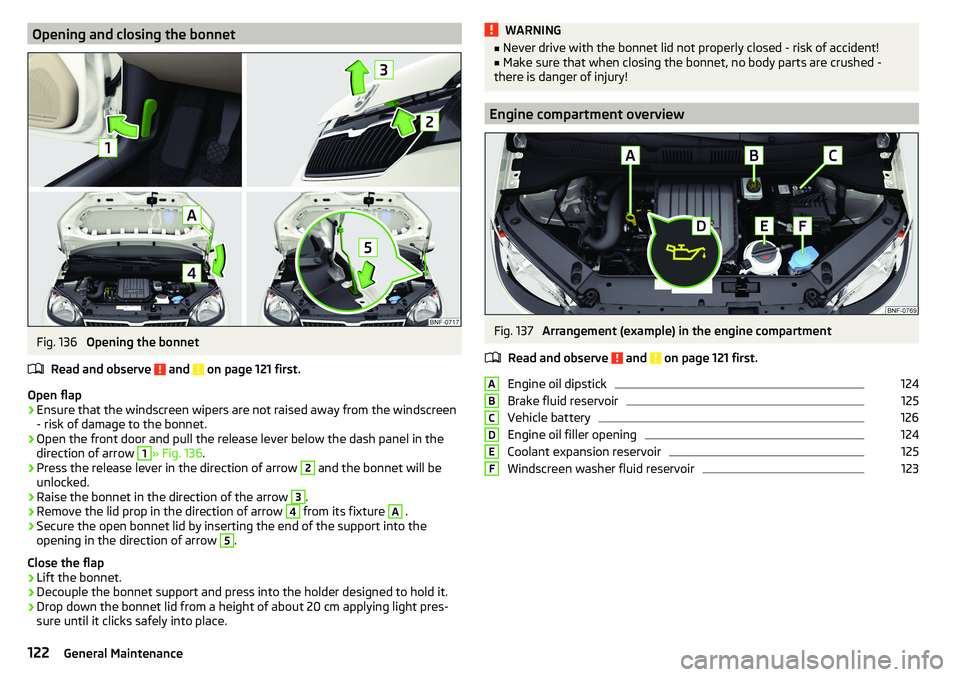
Opening and closing the bonnetFig. 136
Opening the bonnet
Read and observe
and on page 121 first.
Open flap
›
Ensure that the windscreen wipers are not raised away from the windscreen
- risk of damage to the bonnet.
›
Open the front door and pull the release lever below the dash panel in the
direction of arrow
1
» Fig. 136 .
›
Press the release lever in the direction of arrow
2
and the bonnet will be
unlocked.
›
Raise the bonnet in the direction of the arrow
3
.
›
Remove the lid prop in the direction of arrow
4
from its fixture
A
.
›
Secure the open bonnet lid by inserting the end of the support into the
opening in the direction of arrow
5
.
Close the flap
›
Lift the bonnet.
›
Decouple the bonnet support and press into the holder designed to hold it.
›
Drop down the bonnet lid from a height of about 20 cm applying light pres-
sure until it clicks safely into place.
WARNING■ Never drive with the bonnet lid not properly closed - risk of accident!■Make sure that when closing the bonnet, no body parts are crushed -
there is danger of injury!
Engine compartment overview
Fig. 137
Arrangement (example) in the engine compartment
Read and observe
and on page 121 first.
Engine oil dipstick
124
Brake fluid reservoir
125
Vehicle battery
126
Engine oil filler opening
124
Coolant expansion reservoir
125
Windscreen washer fluid reservoir
123ABCDEF122General Maintenance
Page 144 of 172
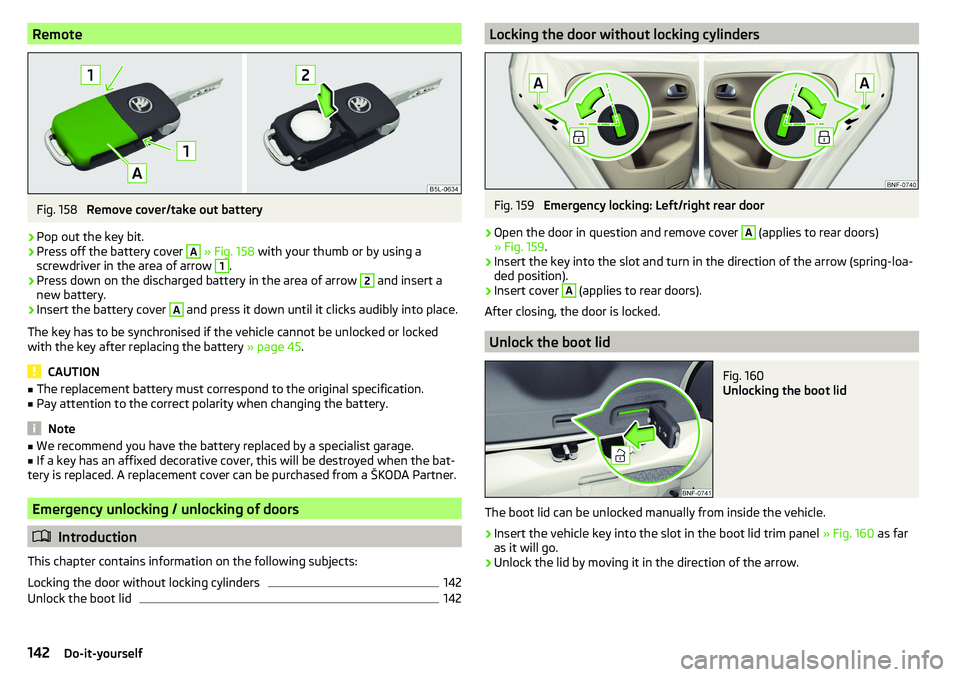
RemoteFig. 158
Remove cover/take out battery
›
Pop out the key bit.
›
Press off the battery cover
A
» Fig. 158 with your thumb or by using a
screwdriver in the area of arrow
1
.
›
Press down on the discharged battery in the area of arrow
2
and insert a
new battery.
›
Insert the battery cover
A
and press it down until it clicks audibly into place.
The key has to be synchronised if the vehicle cannot be unlocked or locked
with the key after replacing the battery » page 45.
CAUTION
■
The replacement battery must correspond to the original specification.■Pay attention to the correct polarity when changing the battery.
Note
■We recommend you have the battery replaced by a specialist garage.■If a key has an affixed decorative cover, this will be destroyed when the bat-
tery is replaced. A replacement cover can be purchased from a ŠKODA Partner.
Emergency unlocking / unlocking of doors
Introduction
This chapter contains information on the following subjects:
Locking the door without locking cylinders
142
Unlock the boot lid
142Locking the door without locking cylindersFig. 159
Emergency locking: Left/right rear door
›
Open the door in question and remove cover
A
(applies to rear doors)
» Fig. 159 .
›
Insert the key into the slot and turn in the direction of the arrow (spring-loa-
ded position).
›
Insert cover
A
(applies to rear doors).
After closing, the door is locked.
Unlock the boot lid
Fig. 160
Unlocking the boot lid
The boot lid can be unlocked manually from inside the vehicle.
›
Insert the vehicle key into the slot in the boot lid trim panel » Fig. 160 as far
as it will go.
›
Unlock the lid by moving it in the direction of the arrow.
142Do-it-yourself
Page 161 of 172
Gear changing38
In the instrument cluster37
Natural gas supply31
Service intervals42
Display MAXI DOT41
Disposal Acceptance and recycling of used vehicles
112
Door Child safety lock
45
Emergency locking142
Opening/Closing45
Door alarm37
Door opening lever Unlock / lock
44
Drive Driving through water
102
Driving Emissions
153
Fuel consumption153
through water102
Top speed156
Trailer operation112
E
Economical driving
102
EDL104
Electric windows46
Buttons in the driver door47
Electronic Differential Lock (EDL)104
Electronic immobiliser95
Emergency Hazard warning light system
52
Jump-starting139, 140
Towing the vehicle140
Tyre repair137
Unlocking / locking the door142
Emergency call90
Emergency equipment Jack133
Reflective vest133
Vehicle tool kit133
Warning triangle133
Emergency spare Removing / stowing
135
Emission control system35
Emissions153
Engine Running in
102
Engine compartment120
Brake fluid125
Coolant124
Engine oil123
Overview122
Vehicle battery126
Windscreen washer fluid123
Engine drag torque control (MSR)104
Engine number152
engine oil specification
123
Engine oil123
Check124
Oil changing123
Refilling124
Warning light33
EPC35
ESC Operation
104
Warning light34
Extended warranty6
External devices75
F
Fasteners
68
file formats media
88
Requirements and Restrictions88
Films115
Flashing50
FM82
Fog lights/rear fog light51
Foldable hook65
Footmats100
see footmats100
Force limiter Sliding/tilting roof
48
Front seats56
fuel Refuelling - natural gas
119
Fuel117
Fuel gauge31
Gas gauge31
refer to Fuel117
Refuelling118
Unleaded petrol118
Warning light35
Fuel consumption153
Fuel reserve35
Fuses144
Assignment of fuses on the side of the dash panel
146
in the dash panel145
in the engine compartment147
G
Gear changing Gear stick
99
Information on the selected gear38
Recommended gear38
Genuine parts111
H
Handbrake
98
Warning light32
Handbrake - automatic transmission Warning light
36
159Index
Page 162 of 172
Hazard warning light system52
HBA104
Headrests57
Heating71, 72
Mirrors55
Rear window53
Seats58
Help in an emergency10
HHC104
Hill Start Assist (HHC)104
Hook68
horn29
I
Ignition lock
96
immobiliser95
Important notes75
Importing phonebook91
In an emergency Changing a wheel
134
Inertia reels16
Information about the towing process140
Information service90
Information system37
Door alarm37
MAXI DOT display41
Service interval display42
Instrument cluster30
See instrument cluster30
Warning lights31
Interior light52
ISOFIX24, 25
J
Jack
133
- fit136
Jump-starting139, 140
K
Key Change battery
142
Lock43
Starting/Stopping the engine95
Unlock43
L
LEAVING HOME
51
lever Turn signal/main beam
50
Lever Cruise control
106
Operating the information system39
Windscreen wipers54
Lever operation100
light Flash
50
Fog lights/rear fog light51
Light Automatic driving light control
51
Cockpit52
COMING HOME / LEAVING HOME51
Dimmed headlights49
Headlight range control49
on and off49
Parking light52
Replacing bulbs147
Sidelights49
Turn signal/main beam50
Light bulbs Replacing
147
Lighting Interior lighting
52
Luggage compartment67
Light on and off49
Lights49
Abroad52
Daylight running50
Hazard warning light system52
Warning lights31
List of available stations
83
of telephone contacts91
With folder / track list84
List of paired Bluetooth devices93
Load153
Loading floor69
Lock Key
43
Locking Central locking button
44
in case of emergency142
Remote control43
locking the steering lock95
Low tyre pressure warning refer to the tyre pressure monitoring
108
Luggage compartment67
Cover69
Fasteners68
Fixing nets68
Hook68
Lighting67
unlock manually142
Unlock the boot lid142
Variable loading floor69
Luggage compartment cover69
Luggage compartment lid46
M
Main beam
50
Warning light36
Main menu Application management
94
Media84
Radio82
Managing paired Bluetooth devices93
160Index
Page 165 of 172
Blues radio radio menu80
Blues radio sound80
Link the application with Swing radio79
Radio volume77
Reset Blues radio to factory settings81
Reset Swing radio to factory settings79
safe removal of Blues radio data source81
Safe removal of the source from Swing radio79
Swing Bluetooth® radio79
Swing radio78
Swing radio language79
Swing radio menu media80
Swing radio Software update79
Swing radio system information79
Swing radio telephone78
Swing sound radio78
Swing system radio79
the Swing radio radio menu79
Setting the Clock
37
Sidelights49
Snow chains131
Socket 12-volt socket
63
Spare wheel130
Removing / stowing135
Speakerphone on / off92
Speed symbol131
Spoiler111
Stabilisation system103
Stability Control (ESC)104
START-STOP96
Jump-starting140
Manually deactivating/activating the system97
operation97
warning light36
START-STOP system96
Start engine96
Starting engine Jump-starting
139
Starting the engineJump-starting140
Status line Telephone
90
steering wheel Correct posture
13
Steering wheel setting
13
Stop engine96
Stopping see Parking
99
Storage59
Storage compartment in the front centre console
61
on the driver's side60
on the front passenger side64
with cover on the passenger side64
Storage compartments59
Stowage compartments in the doors
60
Stowage compartment on front of the rear seats
66
Sunblind for the tilt / slide sunroof49
Sun visors53
Supported sources media
88
Swing radio application connection
79
Bluetooth® settings79
Display settings79
Factory settings79
Media menu84
Media menu settings80
Menu application operation93
menu settings78
Phone menu88
Phone menu settings78
Radio menu81
Radio menu settings79
Safe removal of the source79
Settings78
Settings the device language79
Software update79
Sound settings78
status line77
System information79
System settings79
Swing Radio75
Device description76
Switch Car battery
127
Switch off the ignition96
Switch on ignition96
Switch telephone conversation To the device
92
To the phone92
T
TCS Operation
104
Warning light34
Technical data152
Telephone Call list
92
Conditions for pairing89
Main menu90
Operation90
Telephone90
Telephone book91
Telephone book91
The swing radio display76
Ticket holder60
Tilt / slide sunroof Activate operation
48
Operation48
Sunblind49
Time37
Tiptronic101
Tools133
163Index