lights SKODA CITIGO 2017 Owner's Manual
[x] Cancel search | Manufacturer: SKODA, Model Year: 2017, Model line: CITIGO, Model: SKODA CITIGO 2017Pages: 172, PDF Size: 24.54 MB
Page 54 of 172
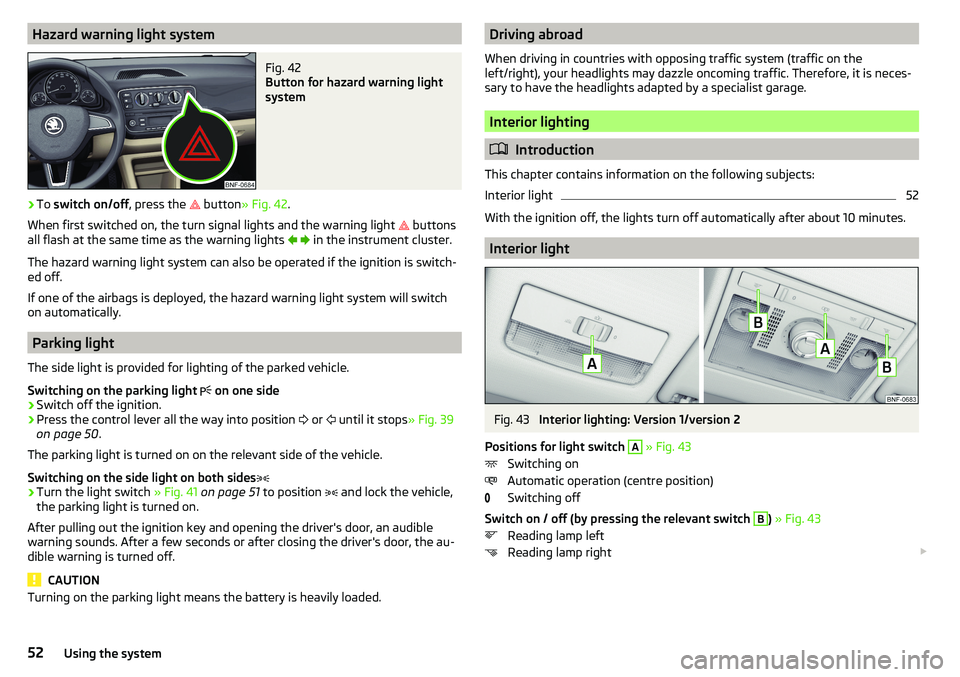
Hazard warning light systemFig. 42
Button for hazard warning light
system
›
To switch on/off , press the
button
» Fig. 42 .
When first switched on, the turn signal lights and the warning light buttons
all flash at the same time as the warning lights
in the instrument cluster.
The hazard warning light system can also be operated if the ignition is switch-
ed off.
If one of the airbags is deployed, the hazard warning light system will switch
on automatically.
Parking light
The side light is provided for lighting of the parked vehicle.
Switching on the parking light on one side
›
Switch off the ignition.
›
Press the control lever all the way into position
or
until it stops
» Fig. 39
on page 50 .
The parking light is turned on on the relevant side of the vehicle.
Switching on the side light on both sides
›
Turn the light switch » Fig. 41 on page 51 to position
and lock the vehicle,
the parking light is turned on.
After pulling out the ignition key and opening the driver's door, an audible
warning sounds. After a few seconds or after closing the driver's door, the au-
dible warning is turned off.
CAUTION
Turning on the parking light means the battery is heavily loaded.Driving abroad
When driving in countries with opposing traffic system (traffic on the
left/right), your headlights may dazzle oncoming traffic. Therefore, it is neces-
sary to have the headlights adapted by a specialist garage.
Interior lighting
Introduction
This chapter contains information on the following subjects:
Interior light
52
With the ignition off, the lights turn off automatically after about 10 minutes.
Interior light
Fig. 43
Interior lighting: Version 1/version 2
Positions for light switch
A
» Fig. 43
Switching on
Automatic operation (centre position)
Switching off
Switch on / off (by pressing the relevant switch
B
) » Fig. 43
Reading lamp left
Reading lamp right
52Using the system
Page 55 of 172
Automatic operation - position
The system is turned on when any of the following is present.
▶ The vehicle is unlocked.
▶ One of the doors is opened.
▶ The ignition key is removed.
The system is turned off when any of the following is present.
▶ The vehicle is locked.
▶ The ignition is switched on.
▶ About 30 seconds after all the doors have been closed.
Visibility
Introduction
This chapter contains information on the following subjects:
Rear window heater
53
Front sun visors
53WARNINGNo objects should be attached to the sun visor that could restrict the view
or endanger the vehicle occupants during sudden braking or in a collision.
Rear window heater
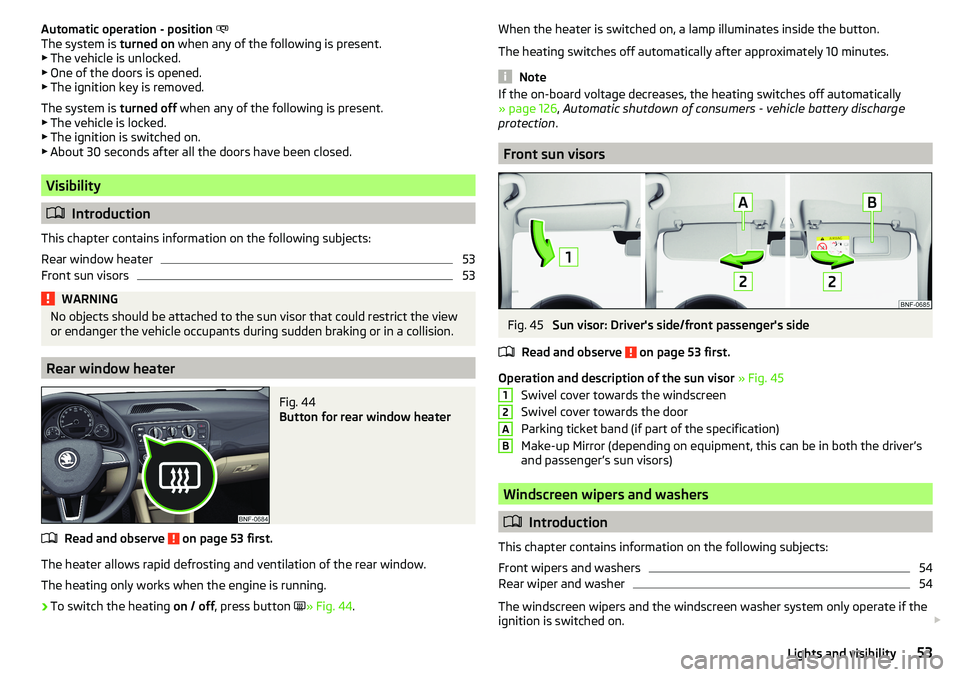
Fig. 44
Button for rear window heater
Read and observe on page 53 first.
The heater allows rapid defrosting and ventilation of the rear window.
The heating only works when the engine is running.
›
To switch the heating on / off, press button
» Fig. 44 .
When the heater is switched on, a lamp illuminates inside the button.
The heating switches off automatically after approximately 10 minutes.
Note
If the on-board voltage decreases, the heating switches off automatically
» page 126 , Automatic shutdown of consumers - vehicle battery discharge
protection .
Front sun visors
Fig. 45
Sun visor: Driver's side/front passenger's side
Read and observe
on page 53 first.
Operation and description of the sun visor » Fig. 45
Swivel cover towards the windscreen
Swivel cover towards the door
Parking ticket band (if part of the specification)
Make-up Mirror (depending on equipment, this can be in both the driver’s
and passenger’s sun visors)
Windscreen wipers and washers
Introduction
This chapter contains information on the following subjects:
Front wipers and washers
54
Rear wiper and washer
54
The windscreen wipers and the windscreen washer system only operate if the
ignition is switched on.
12AB53Lights and visibility
Page 57 of 172
Rear view mirror
Introduction
This chapter contains information on the following subjects:
Interior mirror dimming
55
Mirrors
55WARNINGExterior mirrors increase the field of view, however, they make objects ap-
pear smaller and further away. Therefore use the interior mirror whenever
possible, for assessing the distances to the vehicles following behind.
Interior mirror dimming
Fig. 48
Mirror positions
Read and observe on page 55 first.
Mirror positions » Fig. 48
Basic mirror position (not darkened)
Mirror blackout
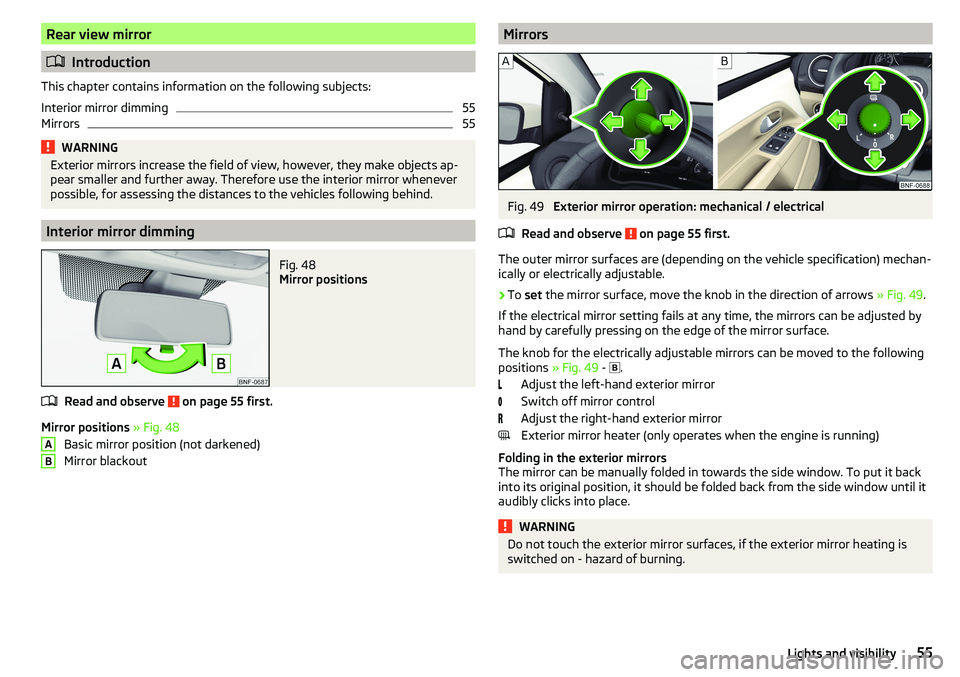
ABMirrorsFig. 49
Exterior mirror operation: mechanical / electrical
Read and observe
on page 55 first.
The outer mirror surfaces are (depending on the vehicle specification) mechan-
ically or electrically adjustable.
›
To set the mirror surface, move the knob in the direction of arrows » Fig. 49.
If the electrical mirror setting fails at any time, the mirrors can be adjusted by
hand by carefully pressing on the edge of the mirror surface.
The knob for the electrically adjustable mirrors can be moved to the following
positions » Fig. 49 -
.
Adjust the left-hand exterior mirror
Switch off mirror control
Adjust the right-hand exterior mirror
Exterior mirror heater (only operates when the engine is running)
Folding in the exterior mirrors
The mirror can be manually folded in towards the side window. To put it back
into its original position, it should be folded back from the side window until it
audibly clicks into place.
WARNINGDo not touch the exterior mirror surfaces, if the exterior mirror heating is
switched on - hazard of burning.55Lights and visibility
Page 60 of 172
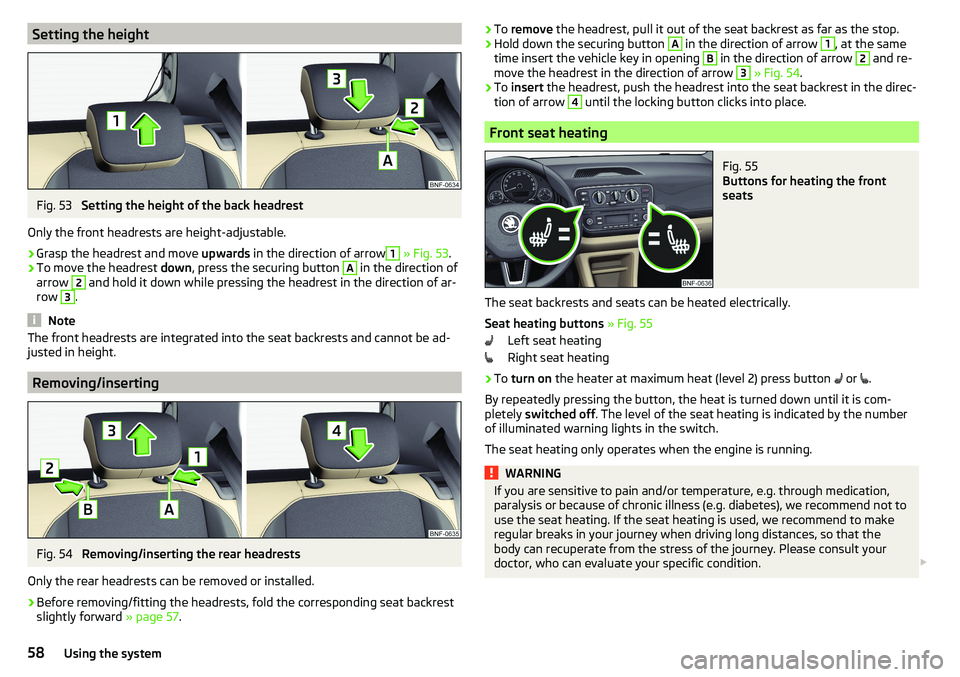
Setting the heightFig. 53
Setting the height of the back headrest
Only the front headrests are height-adjustable.
›
Grasp the headrest and move upwards in the direction of arrow
1
» Fig. 53 .
›
To move the headrest down, press the securing button
A
in the direction of
arrow
2
and hold it down while pressing the headrest in the direction of ar-
row
3
.
Note
The front headrests are integrated into the seat backrests and cannot be ad-
justed in height.
Removing/inserting
Fig. 54
Removing/inserting the rear headrests
Only the rear headrests can be removed or installed.
›
Before removing/fitting the headrests, fold the corresponding seat backrest slightly forward » page 57.
›To
remove the headrest, pull it out of the seat backrest as far as the stop.›Hold down the securing button A in the direction of arrow 1, at the same
time insert the vehicle key in opening B
in the direction of arrow
2
and re-
move the headrest in the direction of arrow
3
» Fig. 54 .
›
To insert the headrest, push the headrest into the seat backrest in the direc-
tion of arrow
4
until the locking button clicks into place.
Front seat heating
Fig. 55
Buttons for heating the front
seats
The seat backrests and seats can be heated electrically.
Seat heating buttons » Fig. 55
Left seat heating
Right seat heating
›
To turn on the heater at maximum heat (level 2) press button
or
.
By repeatedly pressing the button, the heat is turned down until it is com-
pletely switched off . The level of the seat heating is indicated by the number
of illuminated warning lights in the switch.
The seat heating only operates when the engine is running.
WARNINGIf you are sensitive to pain and/or temperature, e.g. through medication,
paralysis or because of chronic illness (e.g. diabetes), we recommend not to
use the seat heating. If the seat heating is used, we recommend to make
regular breaks in your journey when driving long distances, so that the
body can recuperate from the stress of the journey. Please consult your
doctor, who can evaluate your specific condition. 58Using the system
Page 74 of 172
WARNING■The blower should always be on to prevent the windows from misting.
Otherwise there is a risk of accident.■
Under certain circumstances, air at a temperature of about 5 °C can flow
out of the vents when the cooling system is switched on.
Note
■ The air inlet in front of the windscreen must be free of e.g. ice, snow or
leaves to ensure that the heating and cooling system operates properly.■
After switching on the cooling Condensation from the evaporator of the air
conditioning may drip down and form a puddle below the vehicle. This is not a
leak!
■
If the coolant temperature is too high, the cooling system is switched off to
ensure that the engine cools down.
Heating and manual air conditioning
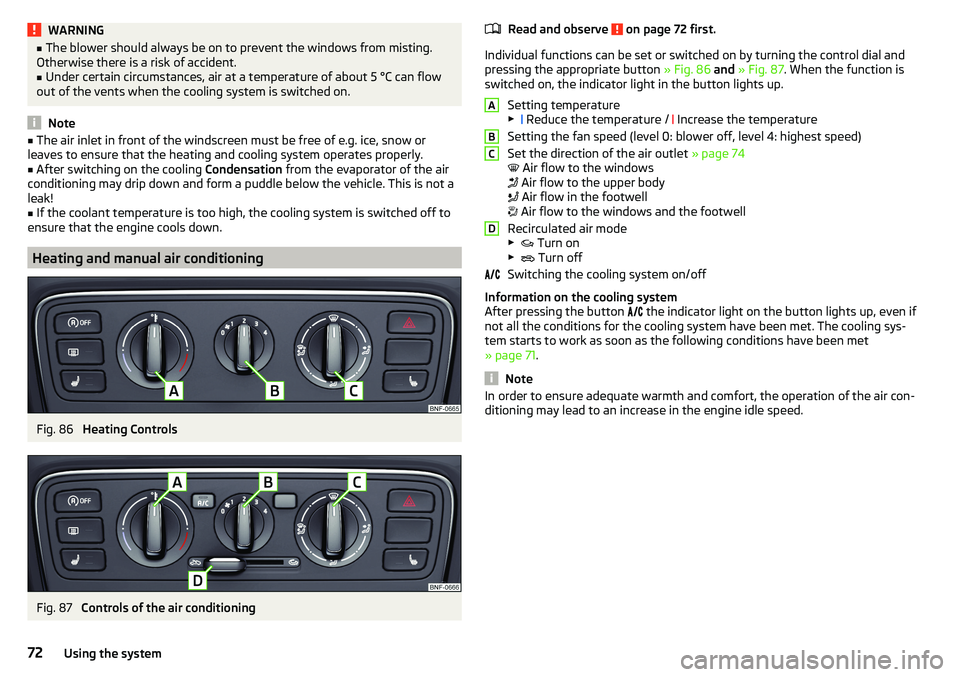
Fig. 86
Heating Controls
Fig. 87
Controls of the air conditioning
Read and observe on page 72 first.
Individual functions can be set or switched on by turning the control dial and
pressing the appropriate button » Fig. 86 and » Fig. 87 . When the function is
switched on, the indicator light in the button lights up.
Setting temperature▶ Reduce the temperature /
Increase the temperature
Setting the fan speed (level 0: blower off, level 4: highest speed)
Set the direction of the air outlet » page 74
Air flow to the windows
Air flow to the upper body
Air flow in the footwell
Air flow to the windows and the footwell
Recirculated air mode
▶ Turn on
▶ Turn off
Switching the cooling system on/off
Information on the cooling system
After pressing the button the indicator light on the button lights up, even if
not all the conditions for the cooling system have been met. The cooling sys-
tem starts to work as soon as the following conditions have been met
» page 71 .
Note
In order to ensure adequate warmth and comfort, the operation of the air con-
ditioning may lead to an increase in the engine idle speed.ABCD72Using the system
Page 75 of 172
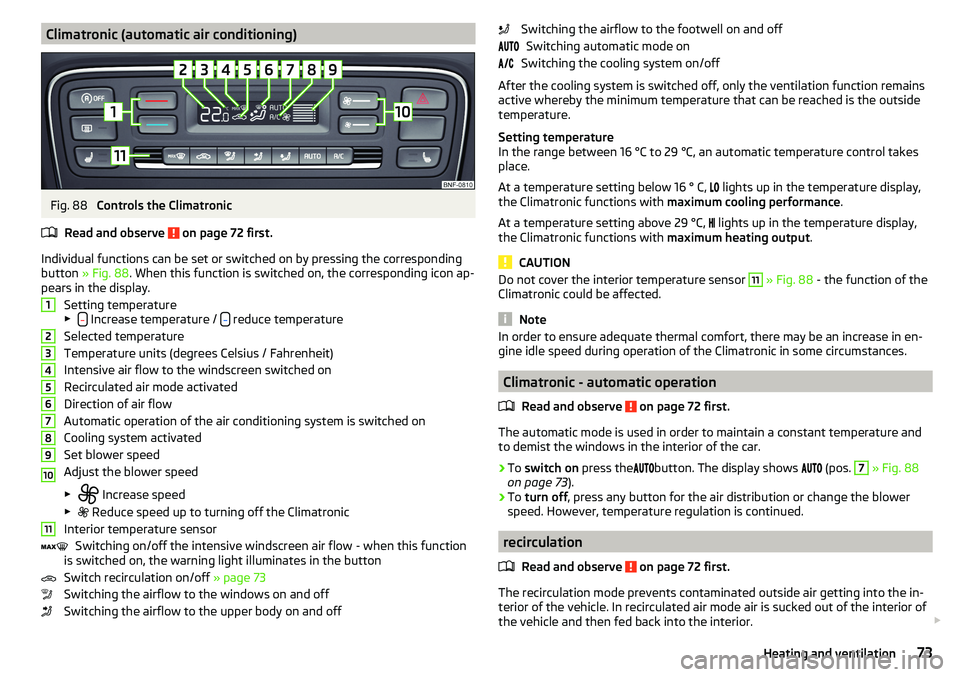
Climatronic (automatic air conditioning)Fig. 88
Controls the Climatronic
Read and observe
on page 72 first.
Individual functions can be set or switched on by pressing the corresponding
button » Fig. 88 . When this function is switched on, the corresponding icon ap-
pears in the display.
Setting temperature
▶
Increase temperature / reduce temperature
Selected temperature
Temperature units (degrees Celsius / Fahrenheit)
Intensive air flow to the windscreen switched on
Recirculated air mode activated
Direction of air flow
Automatic operation of the air conditioning system is switched on
Cooling system activated
Set blower speed
Adjust the blower speed
▶ Increase speed
▶ Reduce speed up to turning off the Climatronic
Interior temperature sensor Switching on/off the intensive windscreen air flow - when this function
is switched on, the warning light illuminates in the button
Switch recirculation on/off » page 73
Switching the airflow to the windows on and off
Switching the airflow to the upper body on and off
1234567891011Switching the airflow to the footwell on and off Switching automatic mode on
Switching the cooling system on/off
After the cooling system is switched off, only the ventilation function remains
active whereby the minimum temperature that can be reached is the outside
temperature.
Setting temperature
In the range between 16 °C to 29 °C, an automatic temperature control takes
place.
At a temperature setting below 16 ° C,
lights up in the temperature display,
the Climatronic functions with maximum cooling performance .
At a temperature setting above 29 °C, lights up in the temperature display,
the Climatronic functions with maximum heating output.
CAUTION
Do not cover the interior temperature sensor 11 » Fig. 88 - the function of the
Climatronic could be affected.
Note
In order to ensure adequate thermal comfort, there may be an increase in en-
gine idle speed during operation of the Climatronic in some circumstances.
Climatronic - automatic operation
Read and observe
on page 72 first.
The automatic mode is used in order to maintain a constant temperature and
to demist the windows in the interior of the car.
›
To switch on press the
button. The display shows
(pos.
7
» Fig. 88
on page 73 ).
›
To turn off , press any button for the air distribution or change the blower
speed. However, temperature regulation is continued.
recirculation
Read and observe
on page 72 first.
The recirculation mode prevents contaminated outside air getting into the in-
terior of the vehicle. In recirculated air mode air is sucked out of the interior of
the vehicle and then fed back into the interior.
73Heating and ventilation
Page 98 of 172
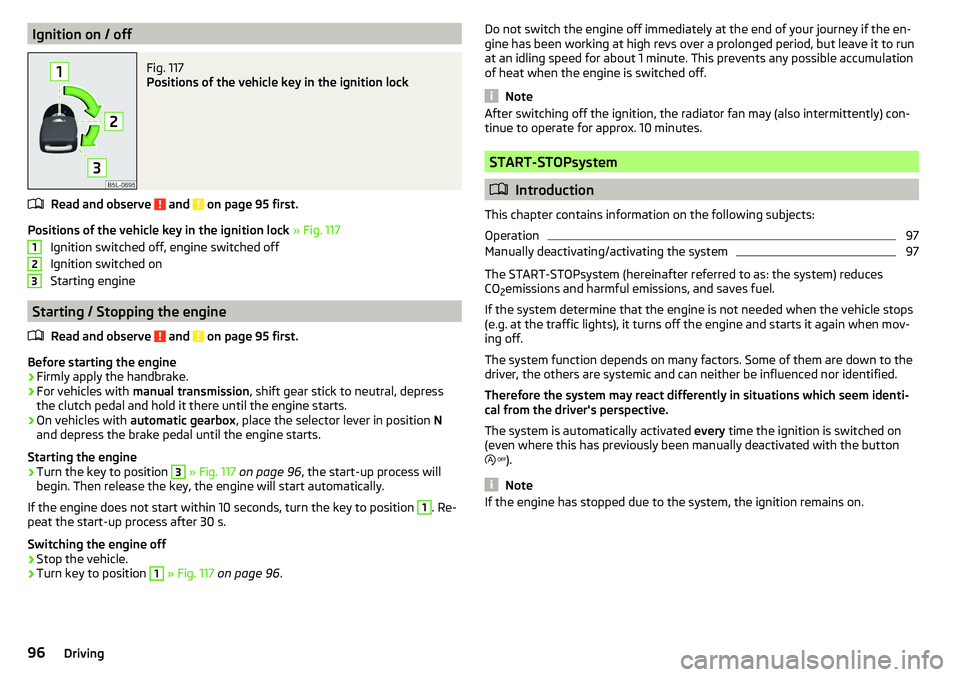
Ignition on / offFig. 117
Positions of the vehicle key in the ignition lock
Read and observe and on page 95 first.
Positions of the vehicle key in the ignition lock » Fig. 117
Ignition switched off, engine switched off
Ignition switched on
Starting engine
Starting / Stopping the engine
Read and observe
and on page 95 first.
Before starting the engine
›
Firmly apply the handbrake.
›
For vehicles with manual transmission , shift gear stick to neutral, depress
the clutch pedal and hold it there until the engine starts.
›
On vehicles with automatic gearbox , place the selector lever in position N
and depress the brake pedal until the engine starts.
Starting the engine
›
Turn the key to position
3
» Fig. 117 on page 96 , the start-up process will
begin. Then release the key, the engine will start automatically.
If the engine does not start within 10 seconds, turn the key to position
1
. Re-
peat the start-up process after 30 s.
Switching the engine off
›
Stop the vehicle.
›
Turn key to position
1
» Fig. 117 on page 96 .
123Do not switch the engine off immediately at the end of your journey if the en-
gine has been working at high revs over a prolonged period, but leave it to run
at an idling speed for about 1 minute. This prevents any possible accumulation
of heat when the engine is switched off.
Note
After switching off the ignition, the radiator fan may (also intermittently) con-
tinue to operate for approx. 10 minutes.
START-STOPsystem
Introduction
This chapter contains information on the following subjects:
Operation
97
Manually deactivating/activating the system
97
The START-STOPsystem (hereinafter referred to as: the system) reduces CO 2emissions and harmful emissions, and saves fuel.
If the system determine that the engine is not needed when the vehicle stops
(e.g. at the traffic lights), it turns off the engine and starts it again when mov-
ing off.
The system function depends on many factors. Some of them are down to the
driver, the others are systemic and can neither be influenced nor identified.
Therefore the system may react differently in situations which seem identi-
cal from the driver's perspective.
The system is automatically activated every time the ignition is switched on
(even where this has previously been manually deactivated with the button
).
Note
If the engine has stopped due to the system, the ignition remains on.96Driving
Page 99 of 172
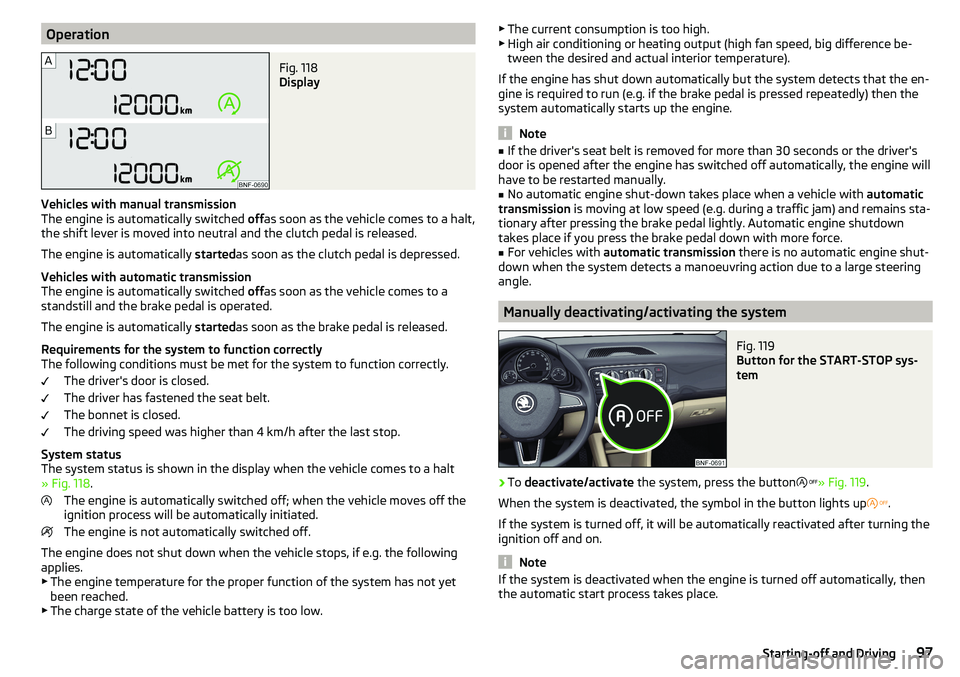
OperationFig. 118
Display
Vehicles with manual transmission
The engine is automatically switched offas soon as the vehicle comes to a halt,
the shift lever is moved into neutral and the clutch pedal is released.
The engine is automatically startedas soon as the clutch pedal is depressed.
Vehicles with automatic transmission
The engine is automatically switched offas soon as the vehicle comes to a
standstill and the brake pedal is operated.
The engine is automatically startedas soon as the brake pedal is released.
Requirements for the system to function correctly
The following conditions must be met for the system to function correctly.
The driver's door is closed.
The driver has fastened the seat belt.
The bonnet is closed.
The driving speed was higher than 4 km/h after the last stop.
System status
The system status is shown in the display when the vehicle comes to a halt
» Fig. 118 .
The engine is automatically switched off; when the vehicle moves off the
ignition process will be automatically initiated.
The engine is not automatically switched off.
The engine does not shut down when the vehicle stops, if e.g. the following
applies.
▶ The engine temperature for the proper function of the system has not yet
been reached.
▶ The charge state of the vehicle battery is too low.
▶
The current consumption is too high.
▶ High air conditioning or heating output (high fan speed, big difference be-
tween the desired and actual interior temperature).
If the engine has shut down automatically but the system detects that the en-
gine is required to run (e.g. if the brake pedal is pressed repeatedly) then the
system automatically starts up the engine.
Note
■ If the driver's seat belt is removed for more than 30 seconds or the driver's
door is opened after the engine has switched off automatically, the engine will
have to be restarted manually.■
No automatic engine shut-down takes place when a vehicle with automatic
transmission is moving at low speed (e.g. during a traffic jam) and remains sta-
tionary after pressing the brake pedal lightly. Automatic engine shutdown
takes place if you press the brake pedal down with more force.
■
For vehicles with automatic transmission there is no automatic engine shut-
down when the system detects a manoeuvring action due to a large steering
angle.
Manually deactivating/activating the system
Fig. 119
Button for the START-STOP sys-
tem
›
To deactivate/activate the system, press the button
» Fig. 119 .
When the system is deactivated, the symbol in the button lights up
.
If the system is turned off, it will be automatically reactivated after turning the
ignition off and on.
Note
If the system is deactivated when the engine is turned off automatically, then
the automatic start process takes place.97Starting-off and Driving
Page 100 of 172
Brakes and Parking
Introduction
This chapter contains information on the following subjects:
Handbrake
98
Parking
99
The wear and tear on the brake pads is dependent on the operating condi-
tions and driving style. In difficult conditions (e.g. urban, sporty driving), the
condition of the brakes should be checked between services by a specialist ga-
rage.
Brake response can be slower if the brakes are covered in moisture or, in win-
ter, have a layer of ice or salt on them . The brakes should be cleaned and
dried by applying the brakes many times over »
.
Corrosion on the brake discs and dirt on the brake pads can occur if the vehicle
has been parked for a long period and if you do not make much use of the
braking system. The brakes are cleaned by applying the brakes several times
over »
.
Before negotiating a long or steep gradient , reduce speed and shift down a
gear. As a result, the braking effect of the engine will be used, reducing the
load on the brakes. If, nevertheless, there is a need for additional braking, it
should be carried out at intervals.
Emergency braking warning - If it is necessary to brake hard, the system may
cause the brake lights to automatically flash, to alert the traffic behind.
New brake pads must first be ““run in”” because these do not initially have the
best possible braking effect. Drive especially carefully for the first 200 km or
so.
If the brake fluid level is too low, it can cause faults in the braking system ;
the warning light will light up in the instrument cluster » page 32
,
Braking
system . If the warning light does not light up, yet the stopping distance is per-
ceived to be longer than before, the driving style should be adapted in view of
the unknown cause of the problem, and braking kept to a minimum - seek the
help of a specialist garage without delay.
The brake booster increases the pressure generated with the brake pedal. The
brake booster only operates when the engine is running.
WARNING■ Greater physical effort is required for braking when the engine is switch-
ed off – risk of accident!■
When braking in a vehicle with manual transmission, when the vehicle is
in gear and at low revs, the clutch pedal must be depressed. Otherwise, the
functionality of the brake system may be impaired – risk of accident!
■
Do not depress the brake pedal, if there is no requirement to slow down.
This causes the brakes to overheat and can also result in a longer braking
distance and excessive wear - risk of accident!
■
Only brake for the purpose of drying and cleaning the brake discs if the
traffic conditions permit this. Do not place any other road users in jeopardy.
■
Recommendations for new brake pads should be followed.
■
When stopping and parking, the parking brake should always be applied
firmly, otherwise the vehicle could move off - risk of accident!
■
If a front spoiler, full wheel trim, etc. is mounted retrospectively, it must
be ensured that the air supply to the front wheel brakes is not reduced.
Otherwise, the front brakes could be in danger of overheating – risk of acci-
dent!
Handbrake
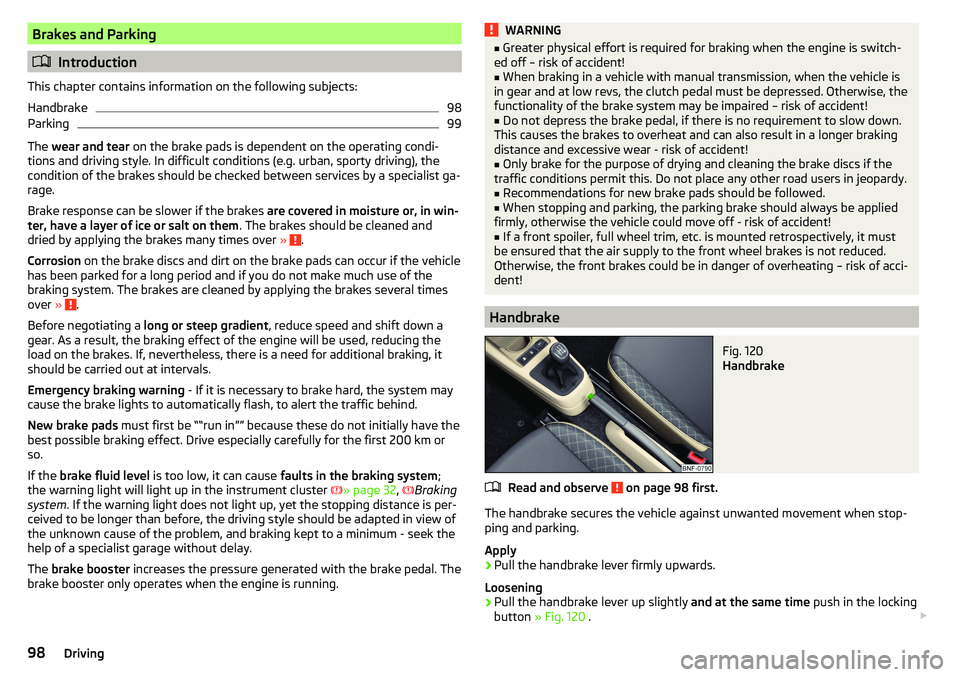
Fig. 120
Handbrake
Read and observe on page 98 first.
The handbrake secures the vehicle against unwanted movement when stop- ping and parking.
Apply
›
Pull the handbrake lever firmly upwards.
Loosening
›
Pull the handbrake lever up slightly and at the same time push in the locking
button » Fig. 120 .
98Driving
Page 101 of 172
›Move the lever right down while pressing the lock button.
The handbrake warning light
lights up when the handbrake is applied, pro-
vided the ignition is on.
A warning signal sounds if the vehicle is inadvertently driven off with the
handbrake applied. The handbrake warning is activated if the vehicle is driven
at a speed of over 5 km/h for more than 3 seconds.WARNINGDisengage the handbrake completely. A handbrake which is only partially
disengaged can result in the rear brakes overheating. This can have a nega-
tive effect on the operation of the brake system – risk of accident!
Parking
Read and observe
on page 98 first.
When stopping and parking, look for a place with a suitable surface » .
Only carry out the activities while parking in the specified order.
›
Bring the vehicle to a stop and depress the brake pedal.
›
Firmly apply the handbrake.
›
For vehicles with automated gearbox shift the lever to position D or R.
›
Switch off the engine.
›
For vehicles with manual transmission , select 1st gear or Reverse gear R .
›
Release the brake pedal.
WARNING■
The parts of the exhaust system can become very hot. Therefore, never
stop the vehicle in places where the underside of your vehicle could come
into contact with flammable materials (e.g. dry grass, leaves, spilled fuel or
the like). - Risk of fire and serious injury can occur!■
When leaving the vehicle never leave people unattended in the car who
could, for example, lock the vehicle or release the brake - risk of accidents
and injury!
Manual gear changing and pedals
Introduction
This chapter contains information on the following subjects:
Manual gear changing
99
Pedals
100
Manual gear changing
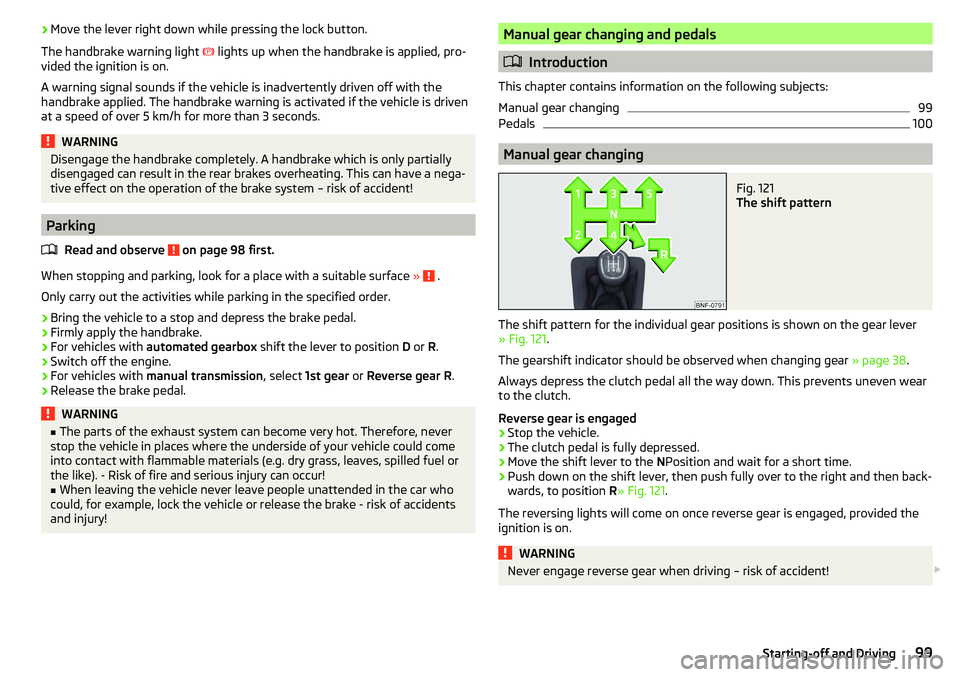
Fig. 121
The shift pattern
The shift pattern for the individual gear positions is shown on the gear lever » Fig. 121 .
The gearshift indicator should be observed when changing gear » page 38.
Always depress the clutch pedal all the way down. This prevents uneven wear
to the clutch.
Reverse gear is engaged
›
Stop the vehicle.
›
The clutch pedal is fully depressed.
›
Move the shift lever to the NPosition and wait for a short time.
›
Push down on the shift lever, then push fully over to the right and then back-
wards, to position R» Fig. 121 .
The reversing lights will come on once reverse gear is engaged, provided the
ignition is on.
WARNINGNever engage reverse gear when driving – risk of accident! 99Starting-off and Driving