radio SKODA CITIGO 2017 Owner's Manual
[x] Cancel search | Manufacturer: SKODA, Model Year: 2017, Model line: CITIGO, Model: SKODA CITIGO 2017Pages: 172, PDF Size: 24.54 MB
Page 95 of 172
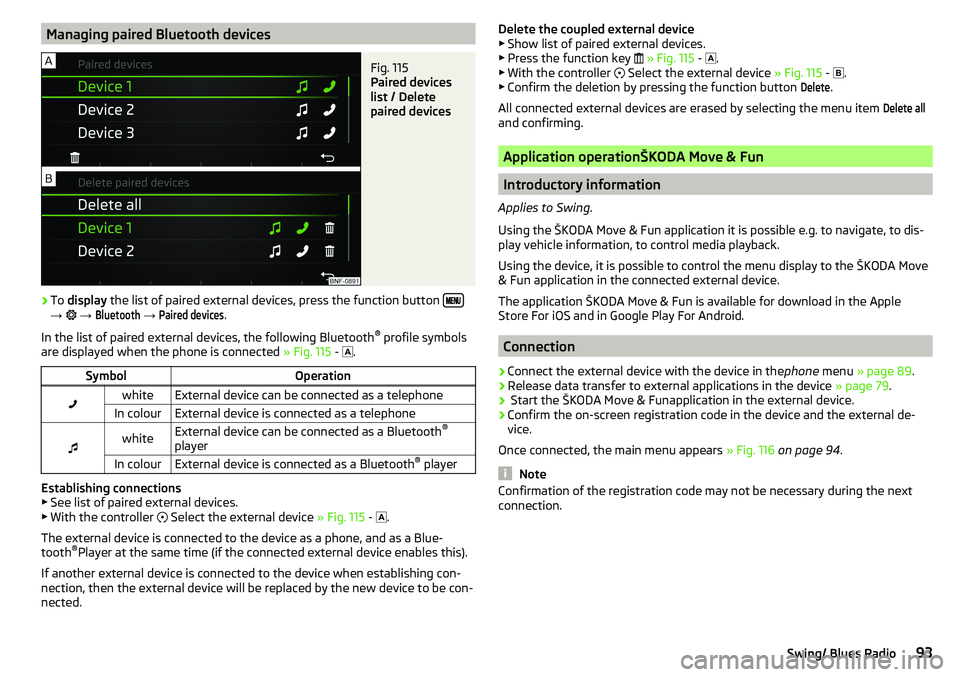
Managing paired Bluetooth devicesFig. 115
Paired devices
list / Delete
paired devices
›
To display the list of paired external devices, press the function button →
→
Bluetooth
→
Paired devices
.
In the list of paired external devices, the following Bluetooth ®
profile symbols
are displayed when the phone is connected » Fig. 115 -
.
SymbolOperationwhiteExternal device can be connected as a telephoneIn colourExternal device is connected as a telephone
whiteExternal device can be connected as a Bluetooth ®
playerIn colourExternal device is connected as a Bluetooth ®
player
Establishing connections
▶ See list of paired external devices.
▶ With the controller
Select the external device » Fig. 115 -
.
The external device is connected to the device as a phone, and as a Blue-
tooth ®
Player at the same time (if the connected external device enables this).
If another external device is connected to the device when establishing con-
nection, then the external device will be replaced by the new device to be con-
nected.
Delete the coupled external device ▶ Show list of paired external devices.
▶ Press the function key
» Fig. 115 -
.
▶ With the controller
Select the external device » Fig. 115 -
.
▶ Confirm the deletion by pressing the function button Delete
.
All connected external devices are erased by selecting the menu item
Delete all
and confirming.
Application operationŠKODA Move & Fun
Introductory information
Applies to Swing.
Using the ŠKODA Move & Fun application it is possible e.g. to navigate, to dis-
play vehicle information, to control media playback.
Using the device, it is possible to control the menu display to the ŠKODA Move
& Fun application in the connected external device.
The application ŠKODA Move & Fun is available for download in the Apple
Store For iOS and in Google Play For Android.
Connection
›
Connect the external device with the device in the phone menu » page 89 .
›
Release data transfer to external applications in the device » page 79.
›
Start the ŠKODA Move & Funapplication in the external device.
›
Confirm the on-screen registration code in the device and the external de-
vice.
Once connected, the main menu appears » Fig. 116 on page 94 .
Note
Confirmation of the registration code may not be necessary during the next
connection.93Swing/ Blues Radio
Page 107 of 172
Parking aid (ParkPilot)
Introduction
This chapter contains information on the following subjects:
Function
105
Display in the swing radio display
106
The parking aid (hereinafter referred to only as a system) draws attention via
acoustic signals and an indication in the swing radio when manoeuvring
around obstacles in the vicinity of the vehicle.
WARNING■ The general information relating to the use of assistance systems must
be observed » page 103, in section Introduction .■
Moving persons or objects may not be recognized by the system sensors.
■
Under certain circumstances, surfaces of certain objects and types of
clothing cannot reflect the system signals. There is a danger that such ob-
jects or people may not be recognised by the system sensors.
■
External noise sources may affect the signals of the system sensors.
There is a danger that obstacles may not be recognised by the system sen-
sors.
■
Before reversing, you should make sure that there are no small obstacles
- such as rocks, small posts or similar - behind your vehicle. Such obstacles
may not be recognised by the system sensors.
CAUTION
■ Keep the system sensors » Fig. 125 on page 105 clean and free from snow
and ice, and do not cover them with any objects of any kind, otherwise the
functioning of the system may be restricted.■
In adverse weather conditions (heavy rain, water vapour, very low or high
temperatures, etc.), the functioning of the system may be impaired - “incorrect
recognition of obstacles”.
■
Accessories additionally installed on the vehicle rear, such as bicycle carriers,
can impair the system function.
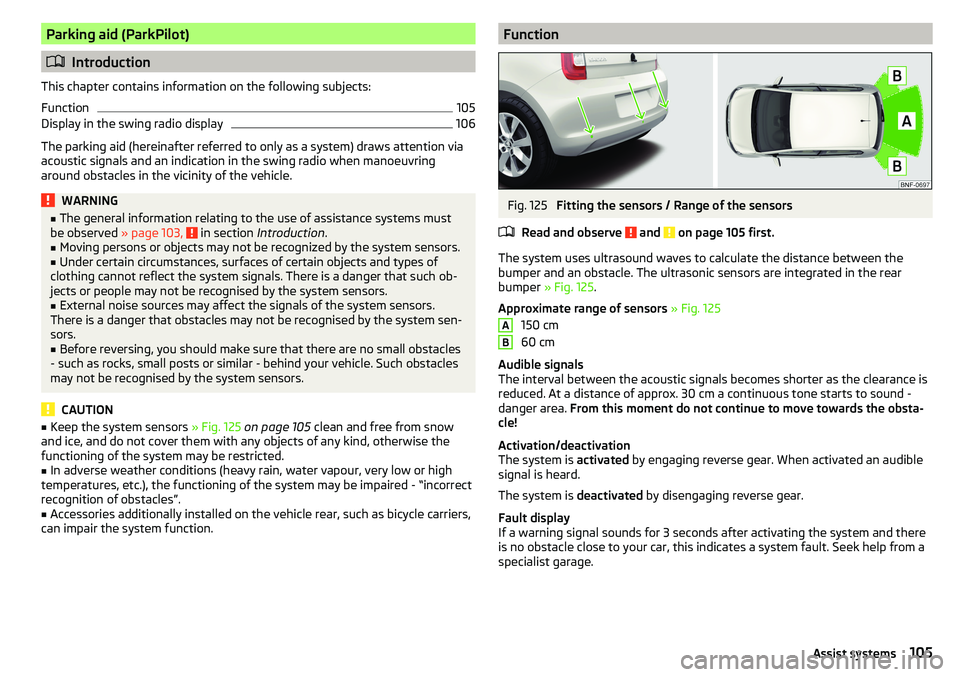
FunctionFig. 125
Fitting the sensors / Range of the sensors
Read and observe
and on page 105 first.
The system uses ultrasound waves to calculate the distance between the
bumper and an obstacle. The ultrasonic sensors are integrated in the rear
bumper » Fig. 125 .
Approximate range of sensors » Fig. 125
150 cm
60 cm
Audible signals
The interval between the acoustic signals becomes shorter as the clearance is
reduced. At a distance of approx. 30 cm a continuous tone starts to sound -
danger area. From this moment do not continue to move towards the obsta-
cle!
Activation/deactivation
The system is activated by engaging reverse gear. When activated an audible
signal is heard.
The system is deactivated by disengaging reverse gear.
Fault display
If a warning signal sounds for 3 seconds after activating the system and there
is no obstacle close to your car, this indicates a system fault. Seek help from a
specialist garage.
AB105Assist systems
Page 108 of 172
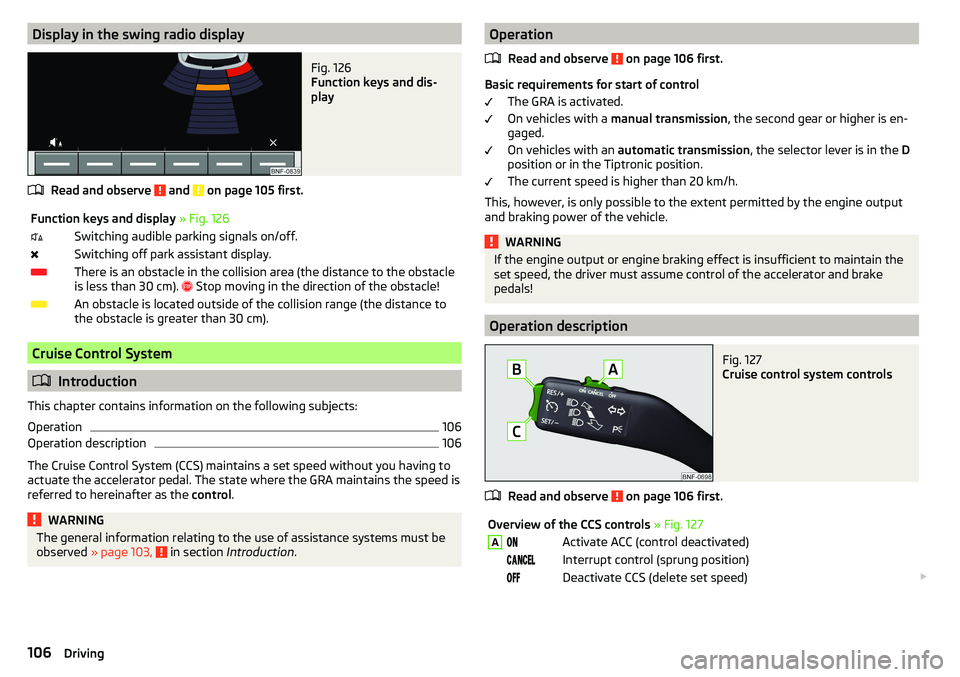
Display in the swing radio displayFig. 126
Function keys and dis-
play
Read and observe and on page 105 first.
Function keys and display » Fig. 126Switching audible parking signals on/off.Switching off park assistant display.There is an obstacle in the collision area (the distance to the obstacle
is less than 30 cm).
Stop moving in the direction of the obstacle!An obstacle is located outside of the collision range (the distance to
the obstacle is greater than 30 cm).
Cruise Control System
Introduction
This chapter contains information on the following subjects:
Operation
106
Operation description
106
The Cruise Control System (CCS) maintains a set speed without you having to
actuate the accelerator pedal. The state where the GRA maintains the speed is
referred to hereinafter as the control.
WARNINGThe general information relating to the use of assistance systems must be
observed » page 103, in section Introduction .Operation
Read and observe
on page 106 first.
Basic requirements for start of control The GRA is activated.
On vehicles with a manual transmission , the second gear or higher is en-
gaged.
On vehicles with an automatic transmission , the selector lever is in the D
position or in the Tiptronic position.
The current speed is higher than 20 km/h.
This, however, is only possible to the extent permitted by the engine output
and braking power of the vehicle.
WARNINGIf the engine output or engine braking effect is insufficient to maintain the
set speed, the driver must assume control of the accelerator and brake
pedals!
Operation description
Fig. 127
Cruise control system controls
Read and observe on page 106 first.
Overview of the CCS controls » Fig. 127AActivate ACC (control deactivated) Interrupt control (sprung position) Deactivate CCS (delete set speed) 106Driving
Page 116 of 172
WARNING■Vehicle care products may be harmful to your health if not used according
to the instructions.■
Always keep the vehicle care products safe from people who are not com-
pletely independent, e.g. children - danger of poisoning!
CAUTION
■ Do not use any insect sponges, rough kitchen sponges or similar cleaning
products – risk of damaging the paintwork surface.■
Do not use aggressive cleaning agents or chemical solvents - danger of dam-
aging the surface to be cleaned.
Note
We recommend that the vehicle is cleaned and maintained at a ŠKODA service
partner.
Car washing
Read and observe
and on page 114 first.
The best way to protect your vehicle against harmful environmental influencesis frequent washing.
The longer insect residues, bird droppings, road salt and other aggressive de-
posits remain on the paintwork of your vehicle, the more detrimental their de-
structive effect can be. High temperatures, such as those caused by intensive
sun's rays, accentuate this caustic effect.
It is also essential to thoroughly clean the underside of the vehicle at the end
of the winter.
Washing by hand
Wash the vehicle from top to bottom, with a soft sponge or a wash mitt and
plenty of water, and, if necessary, with the appropriate detergents. Wash out
the sponge or washing glove thoroughly at short intervals.
For wheels, door sills and lower areas of the vehicle use a different sponge.
Give the vehicle a good rinse after washing it and dry it off using a chamois
leather.
Automatic Car Washes
The usual precautionary measures must be taken before washing the vehicle
(e.g. closing the windows and the tilt/slide roof etc.).
If your vehicle is fitted with any particular attached parts (e.g. spoiler, roof rack
system, two-way radio aerial etc.) it is best to consult the operator of the car
wash system beforehand.
After an automatic wash with wax treatment, the wiper blades should be
cleaned with cleaning agents specially designed for the purpose, and then de-
greased.
Pressure Washers
When washing the vehicle with a high-pressure cleaner, the instructions for
use of the equipment must be observed. This particularly applies to instruc-
tions regarding the pressure and spraying distance from the vehicle surface.
Maintain a sufficiently large spraying distance to the parking aid sensors and
soft materials such as rubber hoses or insulation material »
.
WARNING■
When washing your vehicle in the winter: Water and ice in the braking
system can affect the braking efficiency – risk of accident!■
Take care when cleaning the underbody or the inside of the wheel wells -
there is a risk of injury from sharp metal parts!
CAUTION
■ Do not wash the vehicle in direct sunlight, do not exert pressure on the body
while washing. The temperature of the washing water should be no more than
60 °C max. - otherwise there is a risk of damaging the vehicle paint.■
Before driving through a car wash fold in the exterior mirrors - risk of dam-
age.
■
For vehicles with roof antenna the antenna rod should be unscrewed before
driving through a car wash - there is a risk of damage.
CAUTION
Washing the vehicle with high-pressure cleaners■Films should not be washed with any high-pressure cleaners - risk of dam-
age.■
Do not aim the water jet directly at the lock cylinders or the door or opening
joints when washing the vehicle in the winter – there is a risk of freezing.
■
The sensors of the parking aid can be sprayed only for a short time and there
must be a minimum distance of 10 cm - there is a risk of damage.
114General Maintenance
Page 147 of 172
Note■We recommend always carrying replacement fuses in the vehicle.■There can be several power consuming devices for one fuse. Multiple fuses
may exist for a single power consuming device.
Fuses in the dash panel
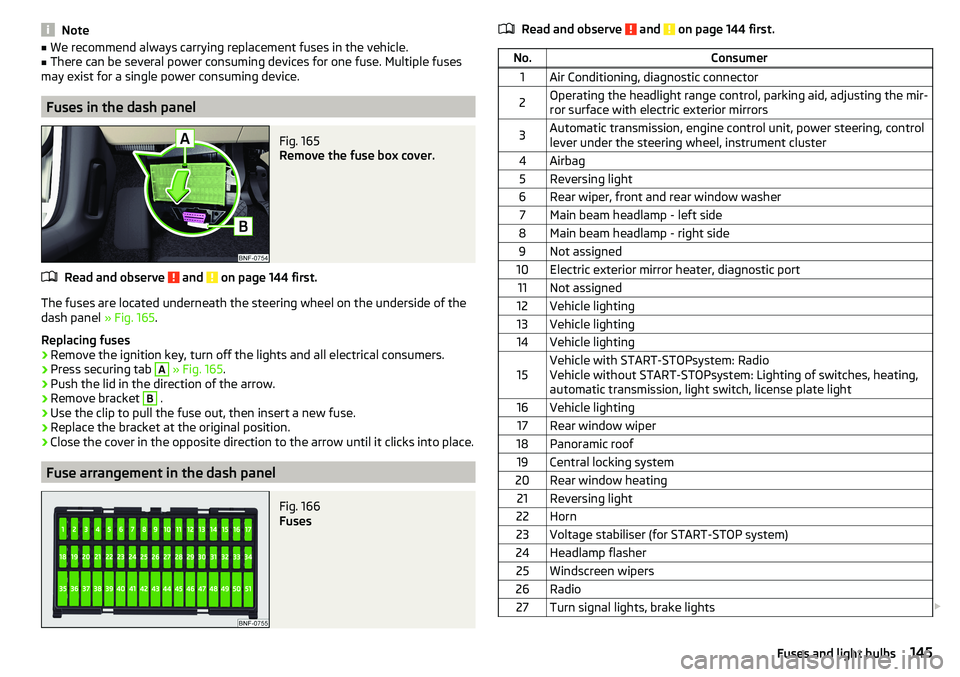
Fig. 165
Remove the fuse box cover.
Read and observe and on page 144 first.
The fuses are located underneath the steering wheel on the underside of the
dash panel » Fig. 165.
Replacing fuses
›
Remove the ignition key, turn off the lights and all electrical consumers.
›
Press securing tab
A
» Fig. 165 .
›
Push the lid in the direction of the arrow.
›
Remove bracket
B
.
›
Use the clip to pull the fuse out, then insert a new fuse.
›
Replace the bracket at the original position.
›
Close the cover in the opposite direction to the arrow until it clicks into place.
Fuse arrangement in the dash panel
Fig. 166
Fuses
Read and observe and on page 144 first.No.Consumer1Air Conditioning, diagnostic connector2Operating the headlight range control, parking aid, adjusting the mir-
ror surface with electric exterior mirrors3Automatic transmission, engine control unit, power steering, control
lever under the steering wheel, instrument cluster4Airbag5Reversing light6Rear wiper, front and rear window washer7Main beam headlamp - left side8Main beam headlamp - right side9Not assigned10Electric exterior mirror heater, diagnostic port11Not assigned12Vehicle lighting13Vehicle lighting14Vehicle lighting15Vehicle with START-STOPsystem: Radio
Vehicle without START-STOPsystem: Lighting of switches, heating,
automatic transmission, light switch, license plate light16Vehicle lighting17Rear window wiper18Panoramic roof19Central locking system20Rear window heating21Reversing light22Horn23Voltage stabiliser (for START-STOP system)24Headlamp flasher25Windscreen wipers26Radio27Turn signal lights, brake lights 145Fuses and light bulbs
Page 149 of 172
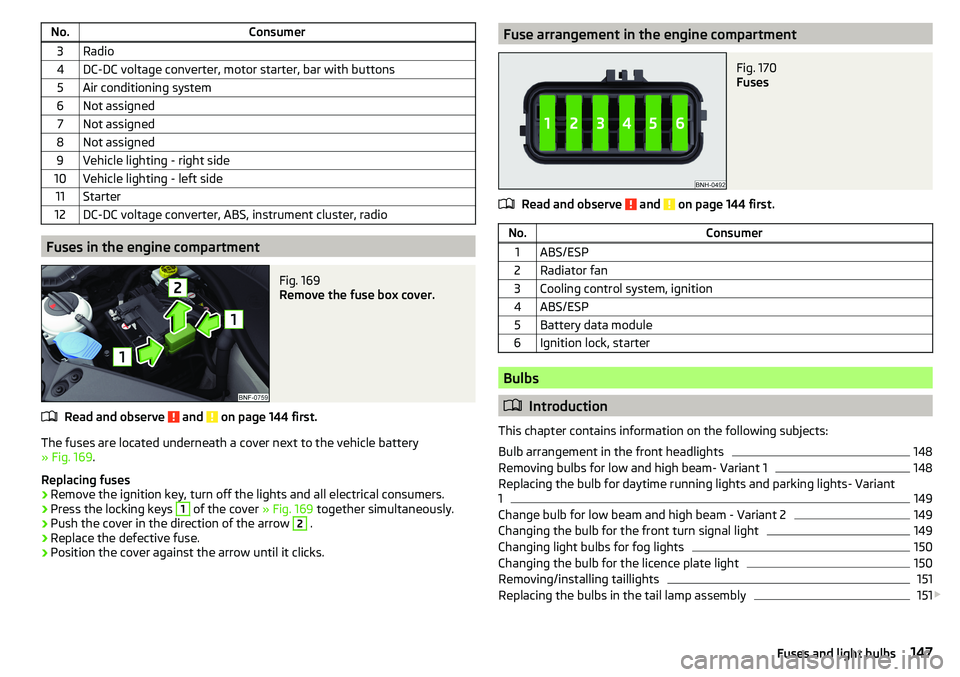
No.Consumer3Radio4DC-DC voltage converter, motor starter, bar with buttons5Air conditioning system6Not assigned7Not assigned8Not assigned9Vehicle lighting - right side10Vehicle lighting - left side11Starter12DC-DC voltage converter, ABS, instrument cluster, radio
Fuses in the engine compartment
Fig. 169
Remove the fuse box cover.
Read and observe and on page 144 first.
The fuses are located underneath a cover next to the vehicle battery
» Fig. 169 .
Replacing fuses
›
Remove the ignition key, turn off the lights and all electrical consumers.
›
Press the locking keys
1
of the cover » Fig. 169 together simultaneously.
›
Push the cover in the direction of the arrow
2
.
›
Replace the defective fuse.
›
Position the cover against the arrow until it clicks.
Fuse arrangement in the engine compartmentFig. 170
Fuses
Read and observe and on page 144 first.
No.Consumer1ABS/ESP2Radiator fan3Cooling control system, ignition4ABS/ESP5Battery data module6Ignition lock, starter
Bulbs
Introduction
This chapter contains information on the following subjects:
Bulb arrangement in the front headlights
148
Removing bulbs for low and high beam- Variant 1
148
Replacing the bulb for daytime running lights and parking lights- Variant
1
149
Change bulb for low beam and high beam - Variant 2
149
Changing the bulb for the front turn signal light
149
Changing light bulbs for fog lights
150
Changing the bulb for the licence plate light
150
Removing/installing taillights
151
Replacing the bulbs in the tail lamp assembly
151
147Fuses and light bulbs
Page 159 of 172
Index
A
ABS Operation
104
Warning light34
Acceptance and recycling of used vehicles
112
Accessories110
Adjusting Steering wheel
13
Adjusting the seats12
Adjustment Light range
49
Adjust radio volume77
Advice on tyre/wheel usage128
Air-conditioning system Air outlet vents
74
air bag17
Airbag Adjustments and impairments to the airbagsystem
111
Deactivation20
Deployment18
Warning light35
Airbag system17
air conditioning recirculation
73
Air conditioning71
Climatronic73
Manual air conditioning72
Air outlet vents74
All-year tyres131
Alternator Warning light
32
AM82
Anti-lock braking system (ABS)104
Anti-theft wheel bolts136
Application management93
Connection93
Main menu94
Ashtray62
Assist systems103
Audio source85
Auto check control41
Automated manual transmission Kick-down
101
Tiptronic101
Automated transmission100
Automatically turn off the radio77
Automatic driving light control51
Automatic shutdown of consumers126
Automatic transmission Defect
33
Selector lever100
Starting-off and driving101
Warning light33
Automatic transmission modes100
AUX87
Avoiding damage to your vehicle102
B
Battery Change in key
142
Belts14
Belt tensioners16
Blues radio Device language settings
81
Display settings81
Factory settings81
Media menu84
Media menu settings81
menu settings80
Radio menu81
Radio menu settings80
safe removal of the data source81
Settings80
Sound settings80
Status line77
Blues Radio75
Device description76
Information on the device system81
Blues radio display76
Bluetooth profile93
Bluetooth® player87
Bonnet Closing
122
Opening122
Boot Class N1 vehicles
70
see boot lid46
Boot lid Automatic locking
46
Open/Close46
Brake Assist (HBA)104
Brake booster98
Brake fluid125
Check125
specification125
Brake pads new
98
Brake pedal - automatic transmission warning light
36
Brakes Brake booster
98
Brake fluid125
Braking and stabilisation systems103
Handbrake98
Information on braking98
Warning lights32
Brake system103
Braking Running in
102
Breakdown kit137
Breakdown service90
see Help in an emergency10
157Index
Page 160 of 172
Broadcasting range82
buttons Swing Radio
76
Buttons Blues radio
76
C
Call list Call list
92
Car battery Disconnecting and reconnecting
127
Replacing127
Car care113
Exterior115
Interior116
Car computer see Multifunction display
39
Care and maintenance110
Carrier70
Car wash113
Car washing114
Exterior115
Interior116
washing114
CD86
Central locking42
problems45
Central locking button44
Change battery
142
Changing Windscreen wiper blades
143
Changing a wheel134
Changing134
Changing gear Selector lever
100
Tiptronic101
Changing wheels Wheels
134
Charging a vehicle battery127
Check Brake fluid
125
Engine oil124
Oil level124
Checking Battery condition
127
Coolant125
Checks Statutory checks
110
Children and safety21
Child safety lock45
Child seat21
Classification23
Installation location24, 25
in the passenger seat23
ISOFIX24, 25
on the front passenger seat22
on the passenger seat23
TOP TETHER26
Cigarette lighter62
City Safe Drive107
Disable/Enable108
Warning light36
Climatronic Automatic operation
73
Operating elements73
Clothes hook65
CNG120
Gas gauge31
Gas leaks120
In an accident120
Refuelling119
Regular checks120
Sticker120
cockpit29
Cockpit Lighting
52
Comfort signalling50
COMING HOME51
Compartments59
Compressed natural gas see CNG
120
Computer see Multifunction display
39
Conditions for pairing89
Coolant124
Checking125
Refilling125
Warning light33
Correct routing of seat belt
15
Correct seated position12
Correct seating position14
Cruise control system Warning light
36
Cruise Control System106
Cup holders61
D
DAB
82
DAY LIGHT see Daylight running lights
50
Daylight running lights50
Deactivation Airbag
20
Defrosting rear window53
Delayed locking of the boot lid See boot lid
46
Departure angle155
Digital Clock37
Digital Service Plan113
Dimmed headlights49
Dipstick124
Disclaimer75
Display Cardinal points
37
Fuel31
Fuel level31
158Index
Page 162 of 172
Hazard warning light system52
HBA104
Headrests57
Heating71, 72
Mirrors55
Rear window53
Seats58
Help in an emergency10
HHC104
Hill Start Assist (HHC)104
Hook68
horn29
I
Ignition lock
96
immobiliser95
Important notes75
Importing phonebook91
In an emergency Changing a wheel
134
Inertia reels16
Information about the towing process140
Information service90
Information system37
Door alarm37
MAXI DOT display41
Service interval display42
Instrument cluster30
See instrument cluster30
Warning lights31
Interior light52
ISOFIX24, 25
J
Jack
133
- fit136
Jump-starting139, 140
K
Key Change battery
142
Lock43
Starting/Stopping the engine95
Unlock43
L
LEAVING HOME
51
lever Turn signal/main beam
50
Lever Cruise control
106
Operating the information system39
Windscreen wipers54
Lever operation100
light Flash
50
Fog lights/rear fog light51
Light Automatic driving light control
51
Cockpit52
COMING HOME / LEAVING HOME51
Dimmed headlights49
Headlight range control49
on and off49
Parking light52
Replacing bulbs147
Sidelights49
Turn signal/main beam50
Light bulbs Replacing
147
Lighting Interior lighting
52
Luggage compartment67
Light on and off49
Lights49
Abroad52
Daylight running50
Hazard warning light system52
Warning lights31
List of available stations
83
of telephone contacts91
With folder / track list84
List of paired Bluetooth devices93
Load153
Loading floor69
Lock Key
43
Locking Central locking button
44
in case of emergency142
Remote control43
locking the steering lock95
Low tyre pressure warning refer to the tyre pressure monitoring
108
Luggage compartment67
Cover69
Fasteners68
Fixing nets68
Hook68
Lighting67
unlock manually142
Unlock the boot lid142
Variable loading floor69
Luggage compartment cover69
Luggage compartment lid46
M
Main beam
50
Warning light36
Main menu Application management
94
Media84
Radio82
Managing paired Bluetooth devices93
160Index
Page 163 of 172
Manual air conditioningControls72
Manual gear changing see gear changing
99
Materials defect liability5
MAXI DOT See MAXI DOT display
41
MAXI DOT display Main menu
41
Menu item Audio41
Service39
Settings41
Mechanical window openers47
media Compatible sources
88
file formats88
Requirements and Restrictions88
Media84
Audio source85
AUX87
Bluetooth® audio87
Browser84
CD86
List84
Main menu84
Playback control85
safe removal of Blues radio data source81
safe removal of the Swing radio data source79
SD-card86
USB87
Memory40
Mirror55
Vanity53
Mobile phone75
mobility warranty6
Modifications and technical alterations110
Trailer operation112
MSR104
Multi-media AUX
87
Multifunction displayData39
Functions39
Memory40
Service39
Multimedia USB
87
Multimedia holder63
N
N1
70
Nameplate152
Nets68
NGVs see CNG
120
O
oil see Engine oil
124
Oil changing Engine oil
123
On-board computer See multifunction display
39
Online Owner's Manual8
Operating weight153
Operation Telephone
90
Operation in winter Vehicle battery
127
Original accessories111
overview cockpit
29
Overview Engine compartment
122
Fuses144
Warning lights31
P
Pairing process
89
Parking99
Parking aid105
Parking aid105
Function105
Parking sensors Display on the radio display
106
Parking the vehicle see Parking
99
Park Pilot105
Parts replacement110
Passive safety Before setting off
12
Driving safety12
Passive Safety12
Pedals100
Footmats100
Petrol118
Phone88
Bluetooth profile93
Breakdown service90
Delete favourite92
Delete paired device93
Dialilng phone number90
Emergency call90
Enter phone number90
Establishing conection89
Establishing connections93
Information service90
Pairing process89
Phone call92
Preferred contacts91
Save favourite91
Select favourites91
Phone bracket66
Phone call92
Phone number90
Pocket holder65
Pockets65
Power limit Tilt / slide sunroof
48
161Index