seats SKODA CITIGO 2017 Owner's Manual
[x] Cancel search | Manufacturer: SKODA, Model Year: 2017, Model line: CITIGO, Model: SKODA CITIGO 2017Pages: 172, PDF Size: 24.54 MB
Page 68 of 172
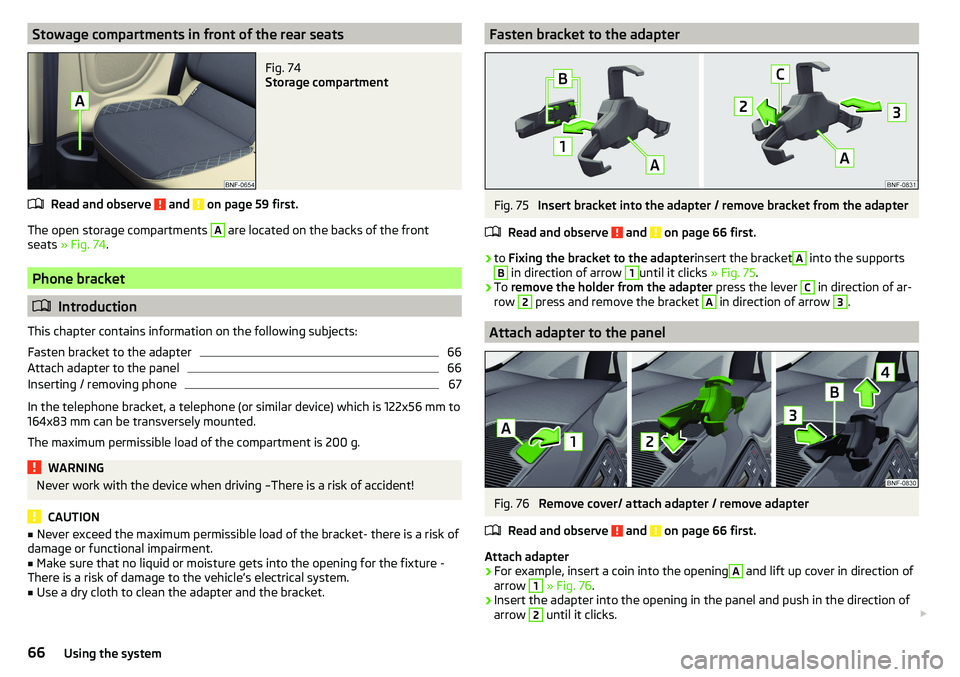
Stowage compartments in front of the rear seatsFig. 74
Storage compartment
Read and observe and on page 59 first.
The open storage compartments
A
are located on the backs of the front
seats » Fig. 74 .
Phone bracket
Introduction
This chapter contains information on the following subjects:
Fasten bracket to the adapter
66
Attach adapter to the panel
66
Inserting / removing phone
67
In the telephone bracket, a telephone (or similar device) which is 122x56 mm to
164x83 mm can be transversely mounted.
The maximum permissible load of the compartment is 200 g.
WARNINGNever work with the device when driving –There is a risk of accident!
CAUTION
■ Never exceed the maximum permissible load of the bracket- there is a risk of
damage or functional impairment.■
Make sure that no liquid or moisture gets into the opening for the fixture -
There is a risk of damage to the vehicle’s electrical system.
■
Use a dry cloth to clean the adapter and the bracket.
Fasten bracket to the adapterFig. 75
Insert bracket into the adapter / remove bracket from the adapter
Read and observe
and on page 66 first.
›
to Fixing the bracket to the adapter insert the bracket
A
into the supports
B
in direction of arrow
1
until it clicks » Fig. 75.
›
To remove the holder from the adapter press the lever
C
in direction of ar-
row
2
press and remove the bracket
A
in direction of arrow
3
.
Attach adapter to the panel
Fig. 76
Remove cover/ attach adapter / remove adapter
Read and observe
and on page 66 first.
Attach adapter
›
For example, insert a coin into the opening
A
and lift up cover in direction of
arrow
1
» Fig. 76 .
›
Insert the adapter into the opening in the panel and push in the direction of
arrow
2
until it clicks.
66Using the system
Page 70 of 172
WARNING■Never exceed the maximum permissible load of the respective fasteners,
nets, hooks etc. If heavy objects have not been suitably secured, there is a
risk of injury!■
Do not exceed the permissible axle loads and permissible gross weight of
the vehicle – risk of accident!
■
An unsecured dirt or improperly attached load could slip during a sudden
manoeuvre or in an accident - danger of injury!
■
Loose cargo could hit a deployed airbag and injure occupants – danger of
death!
■
When transporting loads in the luggage compartment that has been en-
larged by folding one of the rear seats forward, care should be taken to en-
sure the safety of passengers transported on the other rear seat.
CAUTION
■ Never exceed the maximum permissible load for the respective fasteners,
nets, hooks etc. - these could be damaged.■
Please ensure that the heating elements for the rear window heater are not
damaged as a result of abrasive objects.
■
Do not place any sharp objects in the nets in the luggage compartment -
there is a risk of damage to the nets.
Fasteners
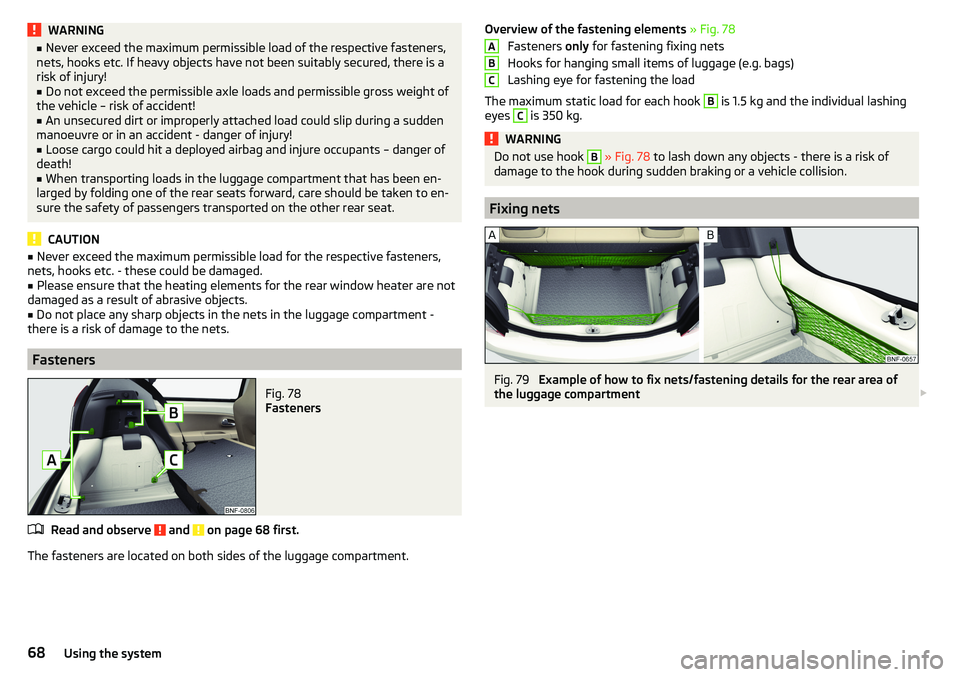
Fig. 78
Fasteners
Read and observe and on page 68 first.
The fasteners are located on both sides of the luggage compartment.
Overview of the fastening elements » Fig. 78
Fasteners only for fastening fixing nets
Hooks for hanging small items of luggage (e.g. bags)
Lashing eye for fastening the load
The maximum static load for each hook B
is 1.5 kg and the individual lashing
eyes
C
is 350 kg.
WARNINGDo not use hook B » Fig. 78 to lash down any objects - there is a risk of
damage to the hook during sudden braking or a vehicle collision.
Fixing nets
Fig. 79
Example of how to fix nets/fastening details for the rear area of
the luggage compartment
ABC68Using the system
Page 71 of 172
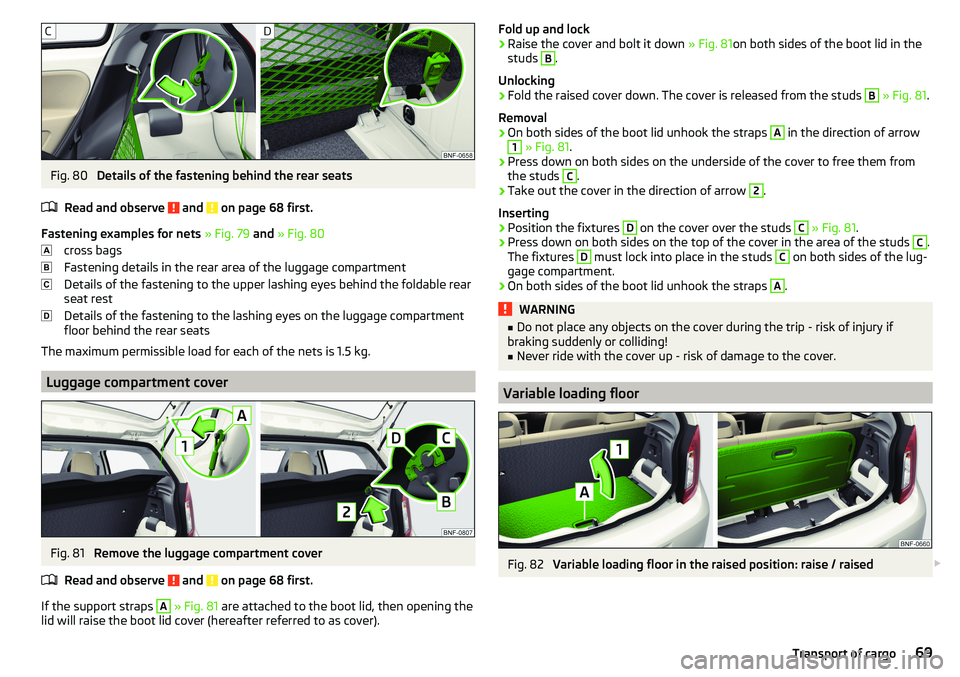
Fig. 80
Details of the fastening behind the rear seats
Read and observe
and on page 68 first.
Fastening examples for nets » Fig. 79 and » Fig. 80
cross bags
Fastening details in the rear area of the luggage compartment
Details of the fastening to the upper lashing eyes behind the foldable rear
seat rest
Details of the fastening to the lashing eyes on the luggage compartment
floor behind the rear seats
The maximum permissible load for each of the nets is 1.5 kg.
Luggage compartment cover
Fig. 81
Remove the luggage compartment cover
Read and observe
and on page 68 first.
If the support straps
A
» Fig. 81 are attached to the boot lid, then opening the
lid will raise the boot lid cover (hereafter referred to as cover).
Fold up and lock›Raise the cover and bolt it down » Fig. 81on both sides of the boot lid in the
studs B
.
Unlocking
›
Fold the raised cover down. The cover is released from the studs
B
» Fig. 81 .
Removal
›
On both sides of the boot lid unhook the straps
A
in the direction of arrow
1
» Fig. 81 .
›
Press down on both sides on the underside of the cover to free them from
the studs
C
.
›
Take out the cover in the direction of arrow
2
.
Inserting
›
Position the fixtures
D
on the cover over the studs
C
» Fig. 81 .
›
Press down on both sides on the top of the cover in the area of the studs
C
.
The fixtures
D
must lock into place in the studs
C
on both sides of the lug-
gage compartment.
›
On both sides of the boot lid unhook the straps
A
.
WARNING■ Do not place any objects on the cover during the trip - risk of injury if
braking suddenly or colliding!■
Never ride with the cover up - risk of damage to the cover.
Variable loading floor
Fig. 82
Variable loading floor in the raised position: raise / raised
69Transport of cargo
Page 118 of 172
■Windows and door mirrors
■ Do not clean the insides of the windows/mirrors with sharp objects - risk of
damage to the filaments or the antenna. ■ Do not use a cloth which has been used to polish the body - this could dirty
the window and impair visibility.■
Head / tail lights
■ Do not wipe head/tail lamps dry, do not use any sharp objects - risk of dam-
age to the protective coating and cracks forming on the headlamp glass cov-
ers.
■
Door lock cylinders ■ Make sure that as little water as possible gets into the locking cylinder
when washing the vehicle - there is a risk of freezing the lock cylinder!
■
Wheels
■ Heavy soiling of the wheels can affect the balance of the wheels - the re-
sult can be a vibration, which can cause premature wear of the steering.
Caring for the interior
Read and observe
and on page 114 first.
Vehicle compo- nentsCircumstancesRemedy
Natural leather /
Artificial leather /
Alcantara ®
/
Material
Dust, surface
soilingVacuum cleanerSoiling (fresh)Water, slightly damp cotton / wool
cloth, if necessary, mild soap solution a)
,
then wipe off with a soft clothStubborn stainsCleaning fluid specifically for this taskCare (natural
leather)Treat the leather periodically with a
leather protecting fluid / use a care
cream with light blocker and impregna-
tion after each cleaningCare (Alcan-
tara ®
/ material)Remove stubborn hair using a “cleaning
glove”.
Remove pills from materials with a
brushPlastic partsSoilingWater, slightly damp cloth or sponge, if
necessary cleaners specifically for this
purposeVehicle compo- nentsCircumstancesRemedyWindowsSoilingWash with clean water and dry with a
wipe specifically for that purposeCovers on electri-
cally heated seatsSoilingCleaners specifically for this purposeSeat belts » Soilingsoft cloth and mild soap solution a)a)
Mild soap solution = 2 tablespoons of natural soap to 1 litre of lukewarm water.
WARNING■
Never clean the seat belts chemically as chemical cleaning products could
destroy the fabric.■
Air fresheners and scents can be hazardous to heath when the tempera-
ture inside the vehicle is high.
CAUTION
■ Natural leather / leather / Alcantara ®
/ material
■ Avoid standing for lengthy periods in bright sunlight, and protect the mate-
rials by covering to prevent them from fading.
■ Remove fresh stains (e.g. from pens, lipstick, shoe polish and similar) as
soon as possible.
■ Ensure that no part of the leather is soaked through during cleaning and
that no water gets into the seams - risk of damaging the leather!
■ Do not clean the roof panelling with a brush – risk of damage to the surface
of the panelling.
■ Do not use leather cleaners, floor wax, shoe cream, stain remover or similar
agents on Alcantara ®
seat upholstery.
■ Some clothing fabrics (e.g. dark denim) do not have sufficient colour fast-
ness - this could lead to clearly visible discolouration on the upholstery. This
is not a defect in the fabric.
■ Sharp objects on garments (e.g. zips, rivets, sharp- edged belts) can dam-
age the upholstery fabrics in the vehicle. Such damage will not be recognised
as a justified complaint.■
Plastic parts
■ Do not attach scents or air fresheners to the dash panel – risk of damage to
the dash panel.
■
Windows
■ Do not attach any stickers to the filaments or glass antenna - there is risk
of damage.
116General Maintenance
Page 119 of 172
■Covers on electrically heated seats
■ Do not clean either with water or with other liquids - risk of damage to the
heating system.
■ Do not dry by switching on the heating.■
Seat belts
■ After cleaning the belts, allow them to dry before retracting them.
Note
During vehicle use, some minor changes may become visible on the leather
and Alcantara ®
(due to e.g. folds, discolouration).Inspecting and replenishing
Fuel
Introduction
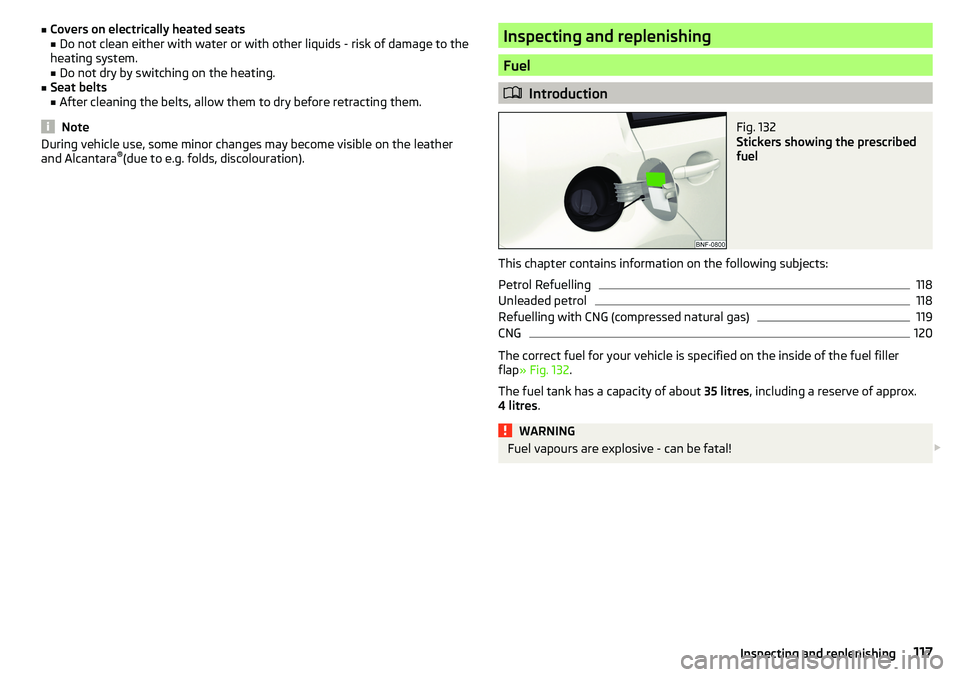
Fig. 132
Stickers showing the prescribed
fuel
This chapter contains information on the following subjects:
Petrol Refuelling
118
Unleaded petrol
118
Refuelling with CNG (compressed natural gas)
119
CNG
120
The correct fuel for your vehicle is specified on the inside of the fuel filler
flap » Fig. 132 .
The fuel tank has a capacity of about 35 litres, including a reserve of approx.
4 litres .
WARNINGFuel vapours are explosive - can be fatal! 117Inspecting and replenishing
Page 128 of 172
Specification - The brake fluid must comply with the standard VW 501 14 (this
standard meets the requirements of FMVSS 116 DOT4).WARNING■ The following instructions must be followed at all times when working on
the engine compartment » page 120.■
If the fluid level drops significantly within a short time or if it drops below
the “MIN” » Fig. 141mark, this may be an indication of a leak in the brake
system.
Stop driving - There is a risk of an accident! Seek help from a
specialist garage.
Note
■ The brake fluid is changed as part of a compulsory inspection service.■A low brake fluid level is indicated by the warning light in the instrument
cluster » page 32 ,
Braking system . We still recommend inspecting the brake
fluid level in the reservoir from time to time.
Vehicle battery
Introduction
This chapter contains information on the following subjects:
Checking the battery condition
127
Charging
127
Disconnect/reconnect and change
127
The vehicle battery represents a power source for the motor to start and for
the supply of electrical consumers in the car.
Automatic shutdown of consumers - vehicle battery discharge protection
The on-board power supply system tries to prevent the vehicle battery from
discharging in the following ways when it is subject to heavy loading. ▶ By increasing the engine idle speed.
▶ Through the power limitation of certain consumers.
▶ By switching off some consumers (heated seats, heated rear window) for as
long as necessary.
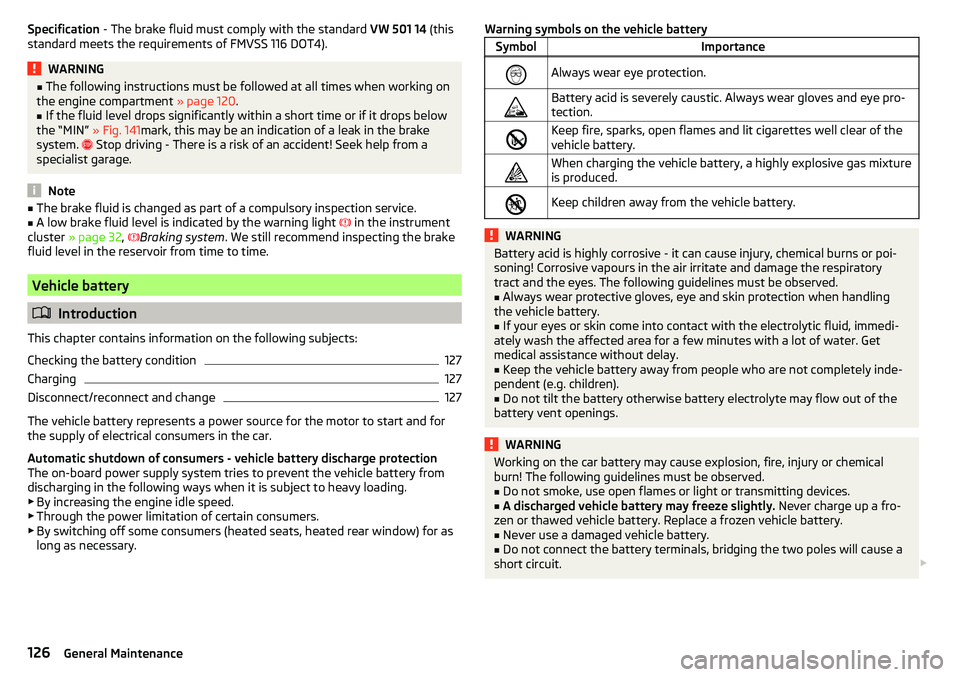
Warning symbols on the vehicle batterySymbolImportanceAlways wear eye protection.Battery acid is severely caustic. Always wear gloves and eye pro-
tection.Keep fire, sparks, open flames and lit cigarettes well clear of the
vehicle battery.When charging the vehicle battery, a highly explosive gas mixture
is produced.Keep children away from the vehicle battery.WARNINGBattery acid is highly corrosive - it can cause injury, chemical burns or poi-
soning! Corrosive vapours in the air irritate and damage the respiratory
tract and the eyes. The following guidelines must be observed.■
Always wear protective gloves, eye and skin protection when handling
the vehicle battery.
■
If your eyes or skin come into contact with the electrolytic fluid, immedi-
ately wash the affected area for a few minutes with a lot of water. Get
medical assistance without delay.
■
Keep the vehicle battery away from people who are not completely inde-
pendent (e.g. children).
■
Do not tilt the battery otherwise battery electrolyte may flow out of the
battery vent openings.
WARNINGWorking on the car battery may cause explosion, fire, injury or chemical
burn! The following guidelines must be observed.■
Do not smoke, use open flames or light or transmitting devices.
■
A discharged vehicle battery may freeze slightly. Never charge up a fro-
zen or thawed vehicle battery. Replace a frozen vehicle battery.
■
Never use a damaged vehicle battery.
■
Do not connect the battery terminals, bridging the two poles will cause a
short circuit.
126General Maintenance
Page 159 of 172
Index
A
ABS Operation
104
Warning light34
Acceptance and recycling of used vehicles
112
Accessories110
Adjusting Steering wheel
13
Adjusting the seats12
Adjustment Light range
49
Adjust radio volume77
Advice on tyre/wheel usage128
Air-conditioning system Air outlet vents
74
air bag17
Airbag Adjustments and impairments to the airbagsystem
111
Deactivation20
Deployment18
Warning light35
Airbag system17
air conditioning recirculation
73
Air conditioning71
Climatronic73
Manual air conditioning72
Air outlet vents74
All-year tyres131
Alternator Warning light
32
AM82
Anti-lock braking system (ABS)104
Anti-theft wheel bolts136
Application management93
Connection93
Main menu94
Ashtray62
Assist systems103
Audio source85
Auto check control41
Automated manual transmission Kick-down
101
Tiptronic101
Automated transmission100
Automatically turn off the radio77
Automatic driving light control51
Automatic shutdown of consumers126
Automatic transmission Defect
33
Selector lever100
Starting-off and driving101
Warning light33
Automatic transmission modes100
AUX87
Avoiding damage to your vehicle102
B
Battery Change in key
142
Belts14
Belt tensioners16
Blues radio Device language settings
81
Display settings81
Factory settings81
Media menu84
Media menu settings81
menu settings80
Radio menu81
Radio menu settings80
safe removal of the data source81
Settings80
Sound settings80
Status line77
Blues Radio75
Device description76
Information on the device system81
Blues radio display76
Bluetooth profile93
Bluetooth® player87
Bonnet Closing
122
Opening122
Boot Class N1 vehicles
70
see boot lid46
Boot lid Automatic locking
46
Open/Close46
Brake Assist (HBA)104
Brake booster98
Brake fluid125
Check125
specification125
Brake pads new
98
Brake pedal - automatic transmission warning light
36
Brakes Brake booster
98
Brake fluid125
Braking and stabilisation systems103
Handbrake98
Information on braking98
Warning lights32
Brake system103
Braking Running in
102
Breakdown kit137
Breakdown service90
see Help in an emergency10
157Index
Page 161 of 172
Gear changing38
In the instrument cluster37
Natural gas supply31
Service intervals42
Display MAXI DOT41
Disposal Acceptance and recycling of used vehicles
112
Door Child safety lock
45
Emergency locking142
Opening/Closing45
Door alarm37
Door opening lever Unlock / lock
44
Drive Driving through water
102
Driving Emissions
153
Fuel consumption153
through water102
Top speed156
Trailer operation112
E
Economical driving
102
EDL104
Electric windows46
Buttons in the driver door47
Electronic Differential Lock (EDL)104
Electronic immobiliser95
Emergency Hazard warning light system
52
Jump-starting139, 140
Towing the vehicle140
Tyre repair137
Unlocking / locking the door142
Emergency call90
Emergency equipment Jack133
Reflective vest133
Vehicle tool kit133
Warning triangle133
Emergency spare Removing / stowing
135
Emission control system35
Emissions153
Engine Running in
102
Engine compartment120
Brake fluid125
Coolant124
Engine oil123
Overview122
Vehicle battery126
Windscreen washer fluid123
Engine drag torque control (MSR)104
Engine number152
engine oil specification
123
Engine oil123
Check124
Oil changing123
Refilling124
Warning light33
EPC35
ESC Operation
104
Warning light34
Extended warranty6
External devices75
F
Fasteners
68
file formats media
88
Requirements and Restrictions88
Films115
Flashing50
FM82
Fog lights/rear fog light51
Foldable hook65
Footmats100
see footmats100
Force limiter Sliding/tilting roof
48
Front seats56
fuel Refuelling - natural gas
119
Fuel117
Fuel gauge31
Gas gauge31
refer to Fuel117
Refuelling118
Unleaded petrol118
Warning light35
Fuel consumption153
Fuel reserve35
Fuses144
Assignment of fuses on the side of the dash panel
146
in the dash panel145
in the engine compartment147
G
Gear changing Gear stick
99
Information on the selected gear38
Recommended gear38
Genuine parts111
H
Handbrake
98
Warning light32
Handbrake - automatic transmission Warning light
36
159Index
Page 162 of 172
Hazard warning light system52
HBA104
Headrests57
Heating71, 72
Mirrors55
Rear window53
Seats58
Help in an emergency10
HHC104
Hill Start Assist (HHC)104
Hook68
horn29
I
Ignition lock
96
immobiliser95
Important notes75
Importing phonebook91
In an emergency Changing a wheel
134
Inertia reels16
Information about the towing process140
Information service90
Information system37
Door alarm37
MAXI DOT display41
Service interval display42
Instrument cluster30
See instrument cluster30
Warning lights31
Interior light52
ISOFIX24, 25
J
Jack
133
- fit136
Jump-starting139, 140
K
Key Change battery
142
Lock43
Starting/Stopping the engine95
Unlock43
L
LEAVING HOME
51
lever Turn signal/main beam
50
Lever Cruise control
106
Operating the information system39
Windscreen wipers54
Lever operation100
light Flash
50
Fog lights/rear fog light51
Light Automatic driving light control
51
Cockpit52
COMING HOME / LEAVING HOME51
Dimmed headlights49
Headlight range control49
on and off49
Parking light52
Replacing bulbs147
Sidelights49
Turn signal/main beam50
Light bulbs Replacing
147
Lighting Interior lighting
52
Luggage compartment67
Light on and off49
Lights49
Abroad52
Daylight running50
Hazard warning light system52
Warning lights31
List of available stations
83
of telephone contacts91
With folder / track list84
List of paired Bluetooth devices93
Load153
Loading floor69
Lock Key
43
Locking Central locking button
44
in case of emergency142
Remote control43
locking the steering lock95
Low tyre pressure warning refer to the tyre pressure monitoring
108
Luggage compartment67
Cover69
Fasteners68
Fixing nets68
Hook68
Lighting67
unlock manually142
Unlock the boot lid142
Variable loading floor69
Luggage compartment cover69
Luggage compartment lid46
M
Main beam
50
Warning light36
Main menu Application management
94
Media84
Radio82
Managing paired Bluetooth devices93
160Index
Page 164 of 172
Power steering33
Practical equipment Pocket holder
65
Practical features Storage compartment for umbrella
64
Waste container61
Preferred contacts91
Principles of Radio Operation76
R
Radio
81
List of available stations83
Main menu82
Preset buttons83
Save channel83
Scan82
Search for stations82
Select station82
Radio operation76
Radio volume77
Raising the vehicle136
Rear fog light51
Warning light35
Rear seats57
Rear view mirror55
Rear window heating53
Rear windows Opening/closing
47
Recirculation73
Refilling Coolant
125
Engine oil124
Windscreen washer fluid123
Reflective vest133
Refuelling118
Fuel118
remote Synchronization process
45
RemoteChange battery142
Remote control Unlocking/locking the vehicle
43
Repairs and technical alterations110
Replacing Bulbs
147
Fuses144
Fuses on the side of the dash panel146
Windscreen wiper blades143
Reproduction Media
85
Restart the radio77
Rev counter30
Rims128
Roof Load
70
Roof rack70
Running in Brake pads
98
Engine102
Tyres128
S
SafeLock
44
SAFE LOCK see SafeLock
44
safety air bag
17
ISOFIX25
Safety12
Child safety21
Child safety seats21
Correct seated position12
Headrests57
ISOFIX24
TOP TETHER26
Saving electrical energy102
Saving fuel102
SD-card86
Seat belt height adjustment
15
Warning light36
Seat belts14
Belt tensioners16
fastening and unfastening16
Inertia reels16
Warning light32
Seats Adjusting the front seats
56
Folding front passenger seat56
front56
Headrests57
Heating58
Rear57
Rear seat backrests57
Setting56
Seats and head restraint56
Select broadcasting range82
Selector lever100
service110
Service Service interval display
42
Service intervals112, 113
Service Plan113
Setting Headrests
57
Mirror55
Seats56
settings Blues Radio System Information
81
Swing radio display79
Swing Radio menu settings78
Settings Blues radio
80
Blues Radio Display81
Blues radio language81
Blues radio menu media81
Blues radio menu settings80
162Index