stop start SKODA FABIA 2013 2.G / 5J Owner's Manual
[x] Cancel search | Manufacturer: SKODA, Model Year: 2013, Model line: FABIA, Model: SKODA FABIA 2013 2.G / 5JPages: 223, PDF Size: 12.77 MB
Page 6 of 223
Table of Contents
Materials defect liability and ŠKODA warranty for
new cars5
Mobility warranty and ŠKODA extended
warranty
6
Abbreviations
Using the system
Cockpit
9
Overview
8
Instruments and Indicator Lights
10
Instrument cluster
10
Multifunction display (MFD)
13
Service Interval Display
16
MAXI DOT display
18
Warning lights
20
Unlocking and locking
28
Unlocking and locking
28
Central locking system
31
Remote control
34
Anti-theft alarm system
35
Tailgate
37
Electrical power windows
38
Electric sliding/tilting roof
40
Lights and visibility
43
Lights
43
Interior lights
48
Visibility
49
Windscreen wipers and washers
50
Rear window
53Seats and storage54Front seats54
Rear seats
56
Head restraints
57
Boot
58
Variable loading floor in the luggage
compartment (Fabia Estate)
62
Net partition (Fabia Estate)
64
Bicycle carrier in the luggage compartment
65
Roof rack system
67
Useful equipment
69
Storage compartments
72
Heating and air conditioning
77
Heating, ventilation, cooling
77
Heating
78
Air conditioning system (manual air conditioning
system)
80
Climatronic (automatic air conditioningsystem)
83
Communication and multimedia
86
Universal telephone preinstallation GSM II
86
Voice control
91
Multimedia
92
Driving
Starting-off and Driving
95
Steering
95
Starting and stopping the engine
96
Brakes
98
Manual gear shifting and pedals
99
Automatic transmission
100
Running in
103
Economical driving and respect the
environment
104
Avoiding damage to your vehicle
108
Driving abroad
109Assist systems111Brake assist systems111
Parking aid
113
Cruise control system
114
START-STOP
116
Towing a trailer
118
Towing device
118
Trailer
121
Safety
Passive Safety
124
General information
124
Correct seated position
125
Seat belts
128
Wearing seat belts
128
Inertia reel and belt pretensioners
131
Airbag system
133
Description of the airbag system
133
Airbag overview
134
Deactivating airbags
137
Transporting children safely
140
Child seat
140
Fastening systems
143
General Maintenance
Car care
145
Service intervals
145
Services, modifications and technical
alterations
147
Washing the car
150
Vehicle exterior care
151
Care of the interior
1553Table of Contents
Page 27 of 223
Antilock brake system (ABS)First read and observe the introductory information and safety warn-
ings
on page 20.
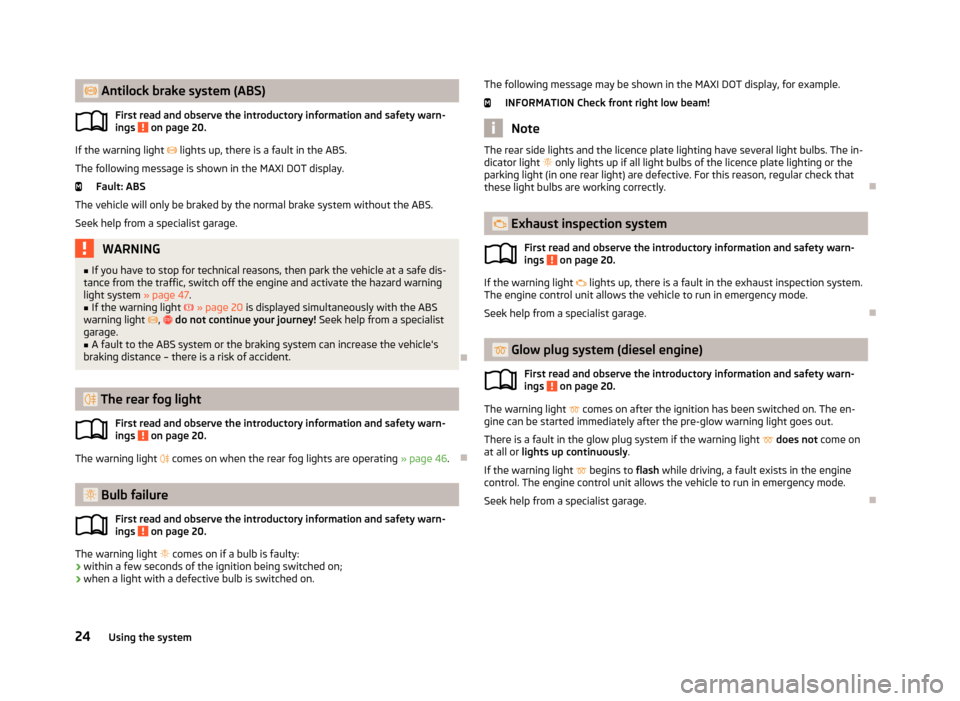
If the warning light lights up, there is a fault in the ABS.
The following message is shown in the MAXI DOT display. Fault: ABS
The vehicle will only be braked by the normal brake system without the ABS.
Seek help from a specialist garage.
WARNING■ If you have to stop for technical reasons, then park the vehicle at a safe dis-
tance from the traffic, switch off the engine and activate the hazard warning
light system » page 47.■
If the warning light » page 20 is displayed simultaneously with the ABS
warning light , do not continue your journey! Seek help from a specialist
garage.
■
A fault to the ABS system or the braking system can increase the vehicle's
braking distance – there is a risk of accident.
The rear fog light
First read and observe the introductory information and safety warn-ings
on page 20.
The warning light
comes on when the rear fog lights are operating » page 46.
Bulb failure
First read and observe the introductory information and safety warn-ings
on page 20.
The warning light
comes on if a bulb is faulty:
› within a few seconds of the ignition being switched on;
› when a light with a defective bulb is switched on.
The following message may be shown in the MAXI DOT display, for example.
INFORMATION Check front right low beam!
Note
The rear side lights and the licence plate lighting have several light bulbs. The in-
dicator light only lights up if all light bulbs of the licence plate lighting or the
parking light (in one rear light) are defective. For this reason, regular check that
these light bulbs are working correctly.
Exhaust inspection system
First read and observe the introductory information and safety warn-
ings
on page 20.
If the warning light
lights up, there is a fault in the exhaust inspection system.
The engine control unit allows the vehicle to run in emergency mode.
Seek help from a specialist garage.
Glow plug system (diesel engine)
First read and observe the introductory information and safety warn-ings
on page 20.
The warning light
comes on after the ignition has been switched on. The en-
gine can be started immediately after the pre-glow warning light goes out.
There is a fault in the glow plug system if the warning light
does not come on
at all or lights up continuously .
If the warning light
begins to flash while driving, a fault exists in the engine
control. The engine control unit allows the vehicle to run in emergency mode.
Seek help from a specialist garage.
24Using the system
Page 31 of 223
Unlocking and locking
Unlocking and locking
Introduction
This chapter contains information on the following subjects:
Vehicle key
28
Replacing the battery in the remote control key
29
Child safety lock
29
Opening/closing the door
30
Locking/unlocking the vehicle without central locking
30
Emergency locking of the doors
31
Vehicle key
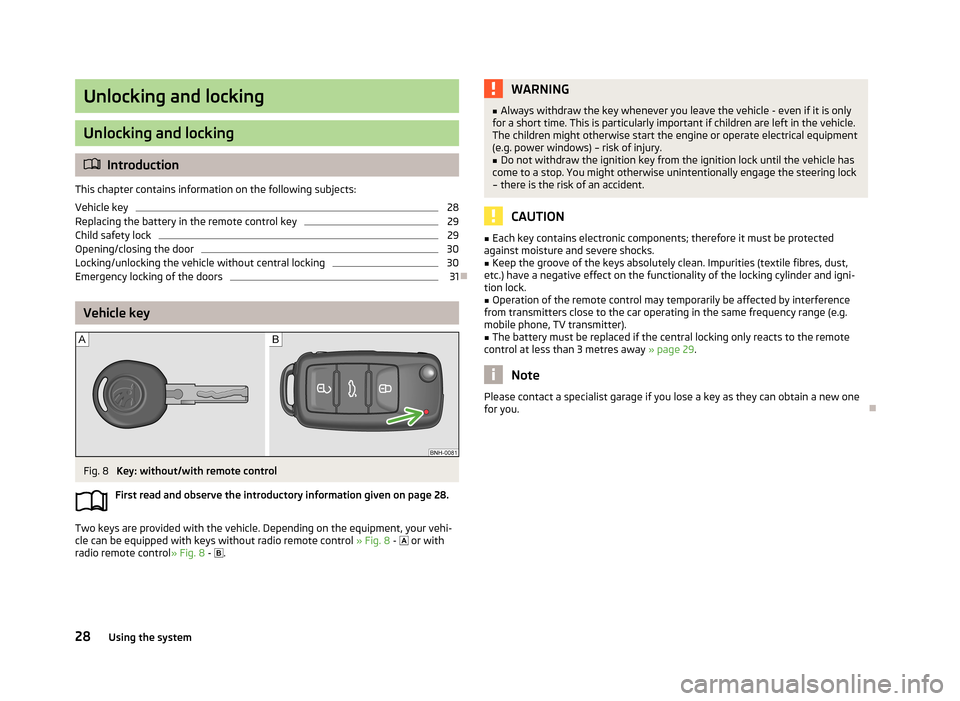
Fig. 8
Key: without/with remote control
First read and observe the introductory information given on page 28.
Two keys are provided with the vehicle. Depending on the equipment, your vehi-
cle can be equipped with keys without radio remote control » Fig. 8 -
or with
radio remote control » Fig. 8 -
.
WARNING■
Always withdraw the key whenever you leave the vehicle - even if it is only
for a short time. This is particularly important if children are left in the vehicle.
The children might otherwise start the engine or operate electrical equipment
(e.g. power windows) – risk of injury.■
Do not withdraw the ignition key from the ignition lock until the vehicle has
come to a stop. You might otherwise unintentionally engage the steering lock
– there is the risk of an accident.
CAUTION
■ Each key contains electronic components; therefore it must be protected
against moisture and severe shocks.■
Keep the groove of the keys absolutely clean. Impurities (textile fibres, dust,
etc.) have a negative effect on the functionality of the locking cylinder and igni-
tion lock.
■
Operation of the remote control may temporarily be affected by interference
from transmitters close to the car operating in the same frequency range (e.g.
mobile phone, TV transmitter).
■
The battery must be replaced if the central locking only reacts to the remote
control at less than 3 metres away » page 29.
Note
Please contact a specialist garage if you lose a key as they can obtain a new one
for you.
28Using the system
Page 37 of 223
Unlocking all doors and the boot lid›Press on the button » Fig. 15. The symbol in the button is no longer illumi-
nated.
The following applies if your vehicle has been locked using the central locking button.
› It is not possible to open the doors or the boot lid from the outside (safety fea-
ture, e.g. when stopping at traffic lights etc.).
› The doors can be unlocked and opened from the inside by a single pull on the
opening lever of the respective door.
› If at least one door has been opened, the vehicle cannot be locked.
› In the event of an accident in which the airbags are deployed, the locked doors
are automatically unlocked from the inside in order to enable rescuers to gain access to the vehicle.
Remote control
Introduction
This chapter contains information on the following subjects:
Unlocking/locking
34
Synchronization
35
You can use the remote control key to:
› unlock and lock the vehicle,
› unlocking boot lid;
› open and close the windows
» page 40, Window convenience operation .
The transmitter with the battery is housed in the handle of the remote control
key. The receiver is located in the interior of the vehicle. The operating range of
the remote control key is approx. 30 m. But this range of the remote control can
be reduced if the batteries are weak.
The key has a fold-open key bit which can be used for unlocking and locking the
car manually and also for starting the engine.
The system must be initialised by a specialist garage if a lost key is replaced or if
the receiver unit has been repaired or replaced. Only then can the remote control
key be used again.
Note■ The remote control is automatically deactivated when the ignition is switched
on.■
Operation of the remote control may temporarily be affected by interference
from transmitters close to the car operating in the same frequency range (e.g.
mobile phone, TV transmitter).
■
The battery must be replaced if the central locking or anti-theft alarm system
does react to the remote control at less than 3 metres away » page 29.
■
If the driver door is open, the vehicle cannot be locked using the remote control
key.
Unlocking/locking
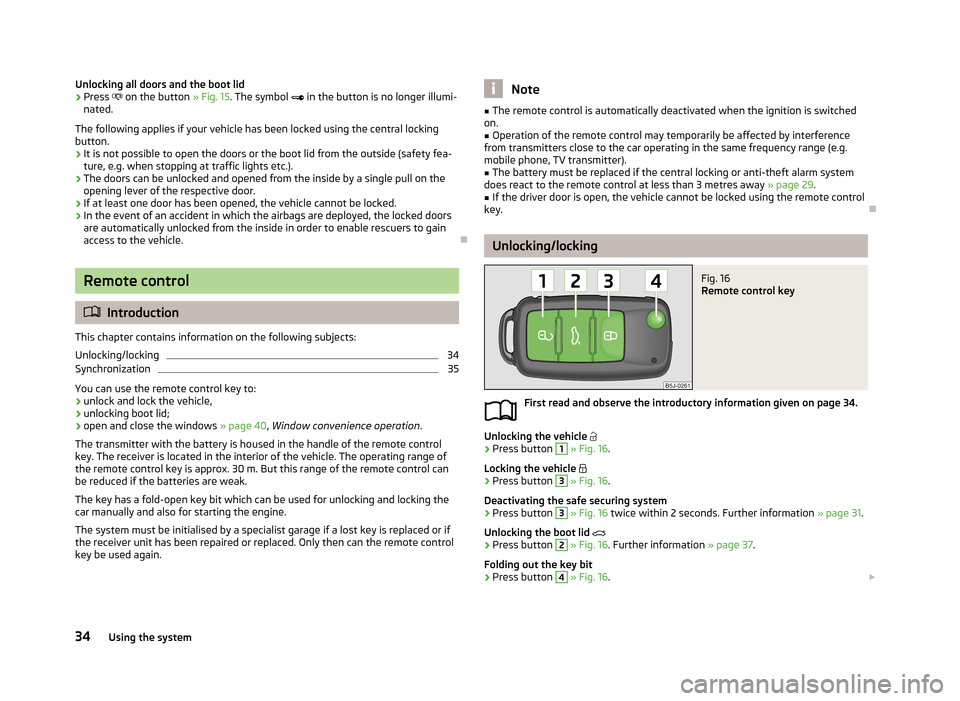
Fig. 16
Remote control key
First read and observe the introductory information given on page 34.
Unlocking the vehicle
›
Press button
1
» Fig. 16 .
Locking the vehicle
›
Press button
3
» Fig. 16 .
Deactivating the safe securing system
›
Press button
3
» Fig. 16 twice within 2 seconds. Further information » page 31.
Unlocking the boot lid
›
Press button
2
» Fig. 16 . Further information » page 37.
Folding out the key bit
›
Press button
4
» Fig. 16 .
34Using the system
Page 40 of 223
Tailgate
Introduction
This chapter contains information on the following subjects: Opening/closing
37
Automatic locking
37
Emergency unlocking
38WARNING■ Ensure that the lock is properly engaged after closing the boot lid. Other-
wise, the tailgate might open suddenly while the vehicle is moving if it was locked – risk of an accident.■
Never drive with the tailgate fully opened or slightly ajar otherwise exhaust
gases may get into the interior of the vehicle – risk of poisoning.
■
Do not press on the rear window when closing the tailgate, as otherwise
this could crack – there is a risk of injury.
Note
■ After closing the boot lid, it is automatically locked within 1 second and the
anti-theft alarm system is activated. This applies only if the vehicle was locked
before closing the boot lid.■
The function of the handle above the licence plate is deactivated when starting
off or at a speed of 5 km/hour or more for vehicles with central locking. The func-
tion of the handle is activated again when the vehicle has stopped and a door is opened.
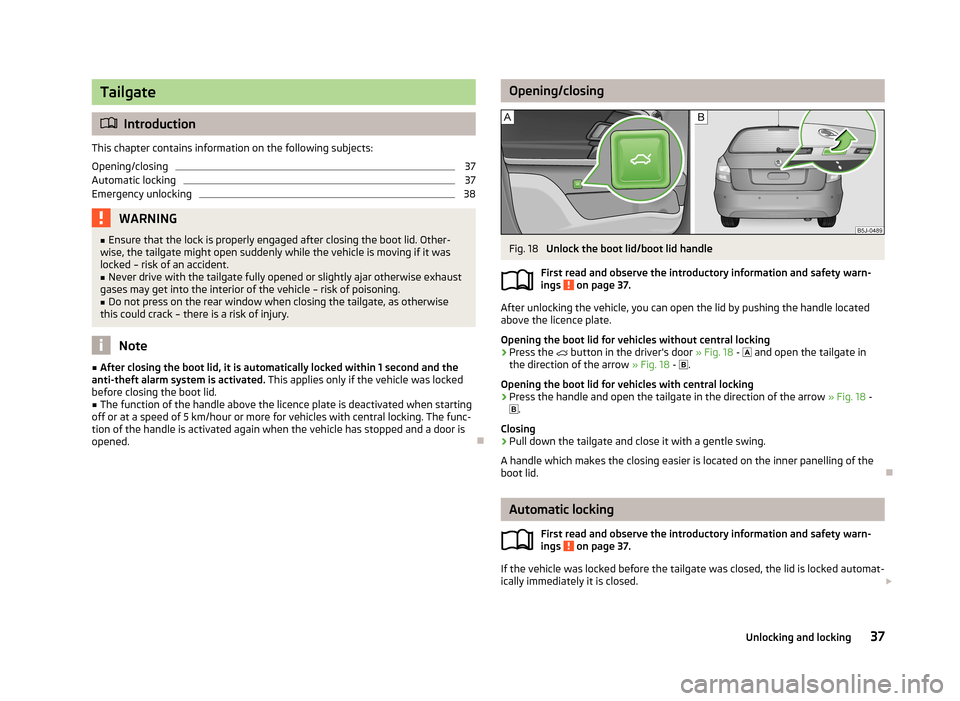
Opening/closingFig. 18
Unlock the boot lid/boot lid handle
First read and observe the introductory information and safety warn- ings
on page 37.
After unlocking the vehicle, you can open the lid by pushing the handle located
above the licence plate.
Opening the boot lid for vehicles without central locking
›
Press the
button in the driver's door » Fig. 18 -
and open the tailgate in
the direction of the arrow » Fig. 18 -
.
Opening the boot lid for vehicles with central locking
›
Press the handle and open the tailgate in the direction of the arrow » Fig. 18 -
.
Closing
›
Pull down the tailgate and close it with a gentle swing.
A handle which makes the closing easier is located on the inner panelling of the
boot lid.
Automatic locking
First read and observe the introductory information and safety warn-
ings
on page 37.
If the vehicle was locked before the tailgate was closed, the lid is locked automat-
ically immediately it is closed.
37Unlocking and locking
Page 47 of 223
Headlight beam adjustmentFig. 24
Dash panel: Lights and visibility
First read and observe the introductory information and safety warn-
ings on page 43.
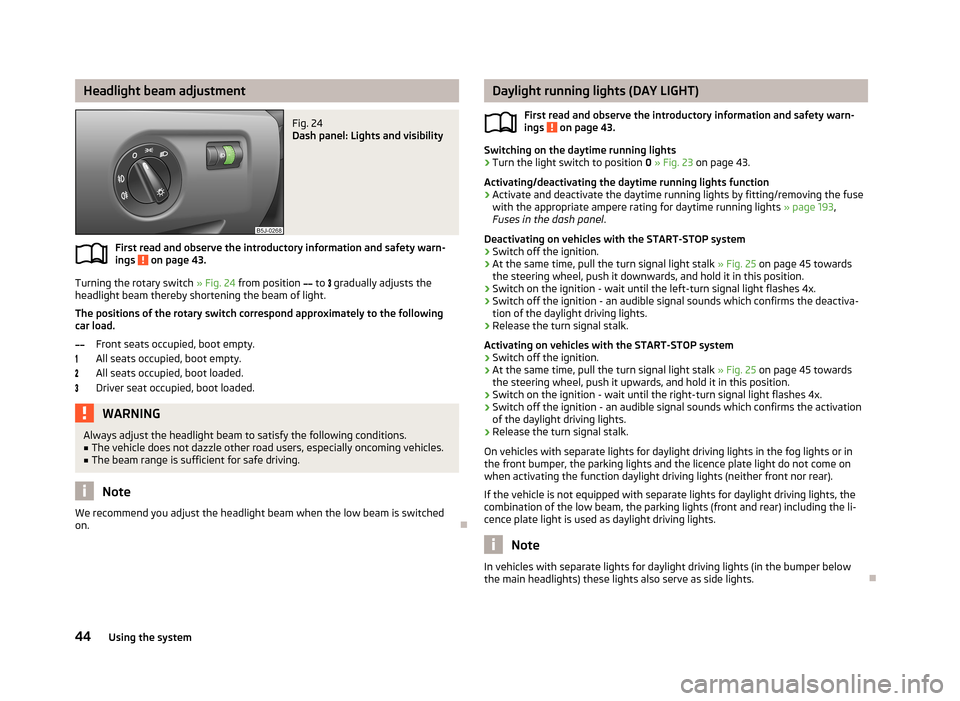
Turning the rotary switch » Fig. 24 from position
to
gradually adjusts the
headlight beam thereby shortening the beam of light.
The positions of the rotary switch correspond approximately to the following
car load.
Front seats occupied, boot empty.
All seats occupied, boot empty.
All seats occupied, boot loaded.
Driver seat occupied, boot loaded.
WARNINGAlways adjust the headlight beam to satisfy the following conditions.■The vehicle does not dazzle other road users, especially oncoming vehicles.■
The beam range is sufficient for safe driving.
Note
We recommend you adjust the headlight beam when the low beam is switched
on.
Daylight running lights (DAY LIGHT)
First read and observe the introductory information and safety warn-
ings
on page 43.
Switching on the daytime running lights
›
Turn the light switch to position 0 » Fig. 23 on page 43.
Activating/deactivating the daytime running lights function
›
Activate and deactivate the daytime running lights by fitting/removing the fuse
with the appropriate ampere rating for daytime running lights » page 193,
Fuses in the dash panel .
Deactivating on vehicles with the START-STOP system
›
Switch off the ignition.
›
At the same time, pull the turn signal light stalk » Fig. 25 on page 45 towards
the steering wheel, push it downwards, and hold it in this position.
›
Switch on the ignition - wait until the left-turn signal light flashes 4x.
›
Switch off the ignition - an audible signal sounds which confirms the deactiva- tion of the daylight driving lights.
›
Release the turn signal stalk.
Activating on vehicles with the START-STOP system
›
Switch off the ignition.
›
At the same time, pull the turn signal light stalk » Fig. 25 on page 45 towards
the steering wheel, push it upwards, and hold it in this position.
›
Switch on the ignition - wait until the right-turn signal light flashes 4x.
›
Switch off the ignition - an audible signal sounds which confirms the activation
of the daylight driving lights.
›
Release the turn signal stalk.
On vehicles with separate lights for daylight driving lights in the fog lights or in
the front bumper, the parking lights and the licence plate light do not come on
when activating the function daylight driving lights (neither front nor rear).
If the vehicle is not equipped with separate lights for daylight driving lights, the
combination of the low beam, the parking lights (front and rear) including the li-
cence plate light is used as daylight driving lights.
Note
In vehicles with separate lights for daylight driving lights (in the bumper below
the main headlights) these lights also serve as side lights.
44Using the system
Page 94 of 223
■Media Player
■ Active device
■ Paired devices
■ Search
■ Phone name - option to change the name of the phone (default SKODA_BT)
Settings
The following menu items can be selected from the Settings menu item.
■ Phone book
■ Update 1)
■ List
■ Surname
■ First name
■ Ring tone
Back
Return in the Start menu of the telephone.
Voice control
Introduction
This chapter contains information on the following subjects:
Dialogue
91
Voice commands
92
Dialogue
First read and observe the introductory information given on page 91.
The period of time during which the system is ready to receive voice commands
and to carry them out is called a dialogue. The system gives audible feedback and
guides you if necessary through the relevant functions.
Optimum understanding of the voice commands depends on several factors.
› Speak with a normal tone of voice without intonation and excessive pauses.
› Avoid a bad pronunciation.
› Close the doors, windows and sliding roof, to reduce or stop disturbing exterior
noise.
› It is recommended to speak louder at higher speeds, so that the tone of your
voice is louder than the increased surrounding noise.
› During the dialogue, limit additional noise in the vehicle, e.g. passengers talking
at the same time.
› Do not speak, if the system makes an announcement.
The microphone for voice control is inserted in the moulded headliner and direc- ted to the driver and front passenger. Therefore the driver and the front passen- ger can operate the equipment.
Entering a phone number
The telephone number can be entered as a continuous series of individually spo-
ken digits (the whole number at once) or in the form of digital blocks (separated
by short pauses). After each order of digits (separation through brief voice pause)
all of the digits detected up to now are repeated by the system.
The digits 0 - 9, symbols +,
, # are permitted. The system detects no continuous
digit combinations such as twenty-three, but only individually spoken digits (two,
three).
Switching on voice control › Press the
button on the adapter
» Fig. 83 on page 89 briefly.
› Press the
1
button on the multifunction steering wheel briefly
» page 87, Op-
erating the phone on the multifunction steering wheel .
Switching off voice control
If the system is currently playing a message, the message that is currently being played will have to be stopped as follows:
› Press the
button on the adapter briefly.
› Press the
1
button on the multifunction steering wheel briefly.
If the system is expecting a voice command, you can end the dialogue yourself as
follows.
› with the
CANCEL voice command.
› Press the
button on the adapter.
› Press the
1
button on the multifunction steering wheel briefly.
1)
On vehicles fitted with the Amundsen+ navigation system, this function can be accessed via the navi-
gation system menu; refer to the » Operating instructions for the Amundsen+ navigation system .
91Communication and multimedia
Page 98 of 223
Driving
Starting-off and Driving
Steering
Introduction
This chapter contains information on the following subjects:
Adjusting the steering wheel position
95
Power steering
95WARNING■ When driving, hold the steering wheel with both hands firmly on the outer
edge in the 9 o'clock and 3 o'clock position. Never hold the steering wheel in
the 12 o'clock position or in any other way (e.g. in the middle or inner edge of
the steering wheel). In such cases, you could severely injure your arms, hands
and head when the driver airbag is deployed.■
Never adjust the steering wheel when the vehicle is moving only when the
vehicle is stationary!
■
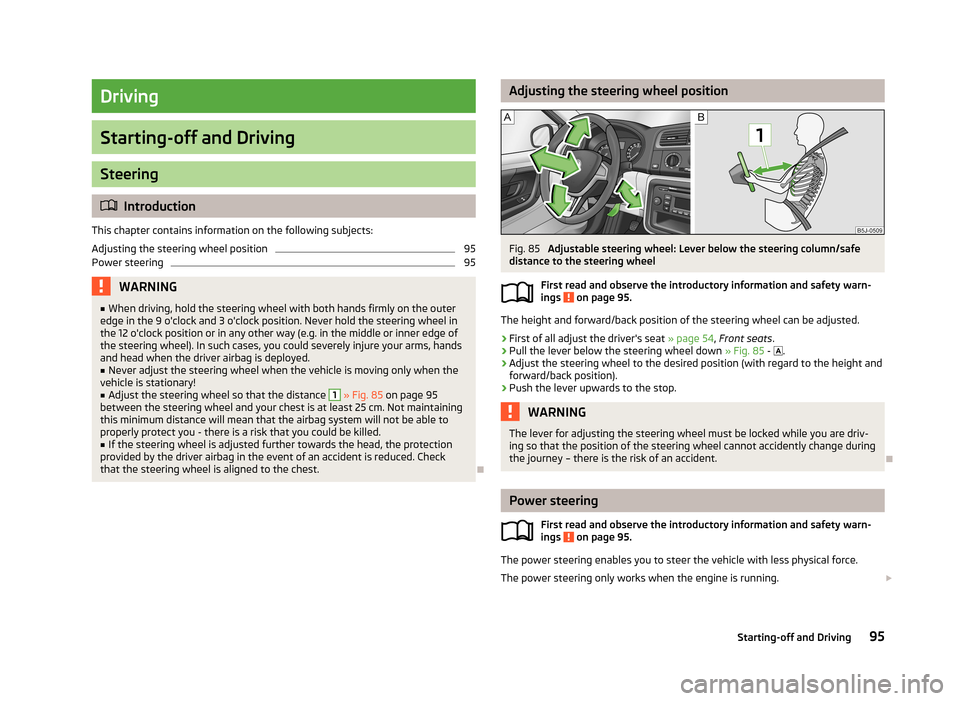
Adjust the steering wheel so that the distance
1
» Fig. 85 on page 95
between the steering wheel and your chest is at least 25 cm. Not maintaining
this minimum distance will mean that the airbag system will not be able to
properly protect you - there is a risk that you could be killed.
■
If the steering wheel is adjusted further towards the head, the protection
provided by the driver airbag in the event of an accident is reduced. Check
that the steering wheel is aligned to the chest.
Adjusting the steering wheel positionFig. 85
Adjustable steering wheel: Lever below the steering column/safe
distance to the steering wheel
First read and observe the introductory information and safety warn-
ings
on page 95.
The height and forward/back position of the steering wheel can be adjusted.
›
First of all adjust the driver's seat » page 54, Front seats .
›
Pull the lever below the steering wheel down » Fig. 85 -
.
›
Adjust the steering wheel to the desired position (with regard to the height and
forward/back position).
›
Push the lever upwards to the stop.
WARNINGThe lever for adjusting the steering wheel must be locked while you are driv- ing so that the position of the steering wheel cannot accidently change duringthe journey – there is the risk of an accident.
Power steering
First read and observe the introductory information and safety warn-ings
on page 95.
The power steering enables you to steer the vehicle with less physical force.
The power steering only works when the engine is running.
95Starting-off and Driving
Page 99 of 223
It is still fully possible to steer the vehicle if the power steering fails or if the en-gine is not running (e.g. when towing). However, greater physical effort is re-
quired to turn the steering wheel.
CAUTION
You will place great stresses on the power steering system if the steering is
turned to full lock when the vehicle is stationary. Turning the steering to full lock
in such a situation will be accompanied by noises. Never leave the steering wheel at full lock for more than 15 seconds when the engine is running - there is a risk of
damaging the power steering.
Starting and stopping the engine
Introduction
This chapter contains information on the following subjects:
Electronic immobilizer
97
Ignition lock
97
Starting the engine
97
Switching off the engine
98
The engine can only be started using a correctly coded original key. The engine running noises may louder at first be louder for a short time afterstarting the cold engine. This is quite normal and is not an operating problem.
WARNING■ When the vehicle is travelling with the engine off, the ignition key must al-
ways be in position 2 » Fig. 86 on page 97 (ignition switched on). This posi-
tion is indicated by the warning lights coming on. If this is not the case, it
could result in unexpected locking of the steering wheel – there is the risk of
an accident.■
Only pull the ignition key from the ignition lock when the vehicle has come
to a complete stop (by applying the handbrake). Otherwise the steering wheel
could lock – there is the risk of an accident.
WARNING (Continued)■ When leaving the vehicle, the ignition must always be removed. This is par-
ticularly important if children are left in the vehicle. Otherwise the children
could, for example, start the engine – there is the risk of an accident or injury.■
Never leave the vehicle unattended with the engine running.
■
Never switch off the engine before the vehicle has come to a halt – there is
the risk of an accident.
WARNING■ Never leave the engine running in unventilated or closed rooms. The en-
gine's exhaust gases also contain the odourless and colourless carbon mon-
oxide, a poisonous gas – risk of death. ■ Carbon monoxide can cause unconsciousness and death.
CAUTION
■The starter must only be operated when the engine is not running and the vehi-
cle is at a standstill. The starter or engine can be damaged if the starter is activa-
ted when the engine is running 3
» Fig. 86 on page 97.
■
If the engine does not start up after a second attempt, the fuse for the fuel
pump may have a fault. Check the fuse and replace, if necessary » page 192 or
seek assistance from a specialist garage.
■
Let go of the ignition key as soon as the engine starts otherwise the starter
could be damaged.
■
Do not tow start the engine – there is a risk of damaging the engine and the
catalytic converter. The battery from another vehicle can be used as a jump-start
aid » page 187 , Jump-starting .
CAUTION
■
Avoid high engine speeds, full throttle and high engine loads until the engine
has yet reached its operating temperature – there is a risk of damaging the en-
gine.■
Do not switch the engine off immediately at the end of your journey after the
engine has been operated over a prolonged period at high loads but leave it to
run at an idling speed for about 1 minute. This prevents any possible accumulation
of heat when the engine is switched off.
96Driving
Page 101 of 223
›Depress and hold the clutch pedal (vehicles with a manual gearbox) or brake
pedal (vehicles with an automatic gearbox) until the engine starts.›
Turn the key to position
3
to the stop and release immediately the engine has
started – do not depress the accelerator.
After letting go, the vehicle key will return to position
2
.
›
Release the handbrake.
If the engine does not start within 10 seconds, turn the key to position
1
. Repeat
the start-up process after approx. half a minute.
Switching off the engine
First read and observe the introductory information and safety warn-ings
on page 96.
Switch off the engine by turning the ignition key to position
1
» Fig. 86 on
page 97.
Brakes
Introduction
This chapter contains information on the following subjects:
Information for braking
98
Handbrake
99WARNING■ Greater physical effort is required for braking when the engine is switched
off – there is the risk of an accident.■
The clutch pedal must be depressed when braking on a vehicle with manual
transmission, when the vehicle is in gear and at low revs. If you fail to do so, the functionality of the brake servo can be impaired – there is the risk of an
accident.WARNING (Continued)■ If a front spoiler, full wheel trim, etc. is mounted retrospectively, it must be
ensured that the air supply to the front wheel brakes is not reduced. The front
brakes may overheat, which can have a negative impact on the functioning of
the braking system – there is a risk of an accident.■
Never leave children unattended in the vehicle. The children might, for ex-
ample, release the handbrake or take the vehicle out of gear. The vehicle might then move off – there is the risk of an accident.
CAUTION
■ Observe the recommendations on the new brake pads » page 104.■Never let the brakes slip with light pressure on the pedal if braking is not neces-
sary. This causes the brakes to overheat and can also result in a longer braking distance and excessive wear.
Information for braking
First read and observe the introductory information and safety warn-
ings
on page 98.
If the brakes are applied in full and the control unit for the braking system consid-
ers the situation to be dangerous for the following traffic, the brake light flashes
automatically.
After the speed was reduced below around 10 km/h or the vehicle was stopped,
the brake light stops flashing and the hazard warning light system switches on.
The hazard warning light system is switched off automatically after accelerating
or driving off again.
Before travelling a long distance down a steep gradient, reduce speed and shift
into the next lowest gear. As a result, the braking effect of the engine will be
used, reducing the load on the brakes. Any additional braking should be comple-
ted intermittently, not continuously.
Wear-and-tear
The wear of the brake pads is dependent on the operating conditions and driving style.
The brake pads wear more quickly if a lot of journeys are completed in towns and
over short distances or if a very sporty style of driving is adopted.
98Driving