Indicator SKODA KODIAQ 2016 1.G Owner's Guide
[x] Cancel search | Manufacturer: SKODA, Model Year: 2016, Model line: KODIAQ, Model: SKODA KODIAQ 2016 1.GPages: 344, PDF Size: 58.96 MB
Page 239 of 344
Leaving a parallel parking spaceRead and observe
and on page 234 first.
The system supports the driver when leaving a parking space of a parallel
parking space.
Leaving a parking space process
›
Press the
» Fig. 289 on page 234 button.
The following message is displayed:
Park Assist: Set indicators and engage reverse gear!›
Activate the turn signal for side of the vehicle where the parking space is out
of which you wish to manoeuvre.
›
Select reverse gear or move the selector lever into position R.
The further procedure is analogous to that for reverse parking.
›
Follow the system instructions shown in the display.
As soon as the parking procedure is complete, an audible signal sounds and
the following message appears in the display.
If the parking space is too small, it is not possible to use the system to leave
the parking space. A corresponding message is shown in the information clus-
ter display.
Automatic brake assist
Read and observe
and on page 234 first.
Automatic brake assist when speeding
If a velocity of 7 km / h is exceeded during the parking manoeuvre for the first
time, the speed will be automatically reduced by the system to less than 7 km /
h. This prevents the parking manoeuvre from aborting.
Automatic emergency braking
If the system detects a risk of collision during parking, automatic emergency
braking takes place to prevent a collision.
The parking is terminated by the emergency braking.
CAUTION
The automatic emergency braking is not triggered by the system when the
parking process stops due to the speed of 7 km / hr being exceeded!Malfunctions
Read and observe
and on page 234 first.
If, for some unknown reason, the system is not available, an appropriate mes-
sage appears in the display of the instrument cluster.
System unavailable
If the system is not available because the vehicle has a fault, a message ap-
pears concerning the unavailability. Seek help from a specialist garage.
System fault
In the case of a system fault, an error message appears. Seek help from a spe-
cialist garage.
Trailer manoeuvring assistant (Trailer Assist)
Introduction
This chapter contains information on the following subjects:
Operating principle
238
Activation / deactivation
238
Manoeuvring trailer
239
Automatic brake intervention
239
The trailer manoeuvring assistant (below only system) helps the driver when
reversing with a trailer.
When manoeuvring, the system only undertakes the steering movement. The
driver operates the brake, accelerator or clutch pedal and the shift / selector
lever.
The state in which the steering wheel is operated by the system, is referred to
as parking operation.
WARNING■
The general information relating to the use of assistance systems must
be observed » page 215, in section Introduction .■
The system is not oriented to the area around the vehicle, there is no ob-
stacle detection.
237Assist systems
Page 264 of 344
Swinging in and out the tow barFig. 319
Tow bar: swing out
Fig. 320
Tow bar: engage
Read and observe
on page 261 first.
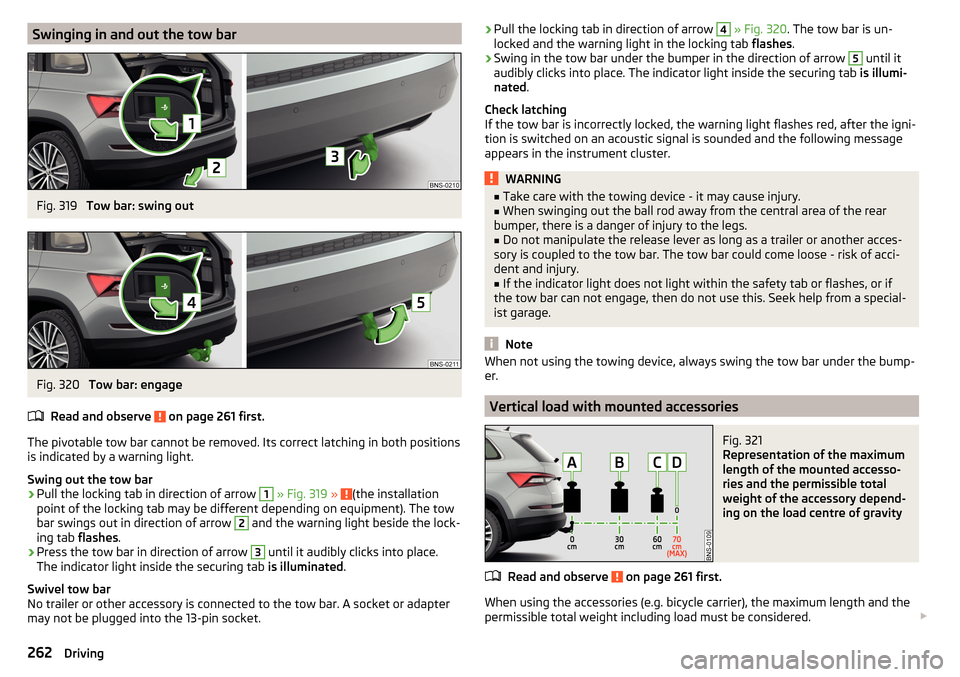
The pivotable tow bar cannot be removed. Its correct latching in both positions is indicated by a warning light.
Swing out the tow bar
›
Pull the locking tab in direction of arrow
1
» Fig. 319 » (the installation
point of the locking tab may be different depending on equipment). The tow
bar swings out in direction of arrow
2
and the warning light beside the lock-
ing tab flashes.
›
Press the tow bar in direction of arrow
3
until it audibly clicks into place.
The indicator light inside the securing tab is illuminated.
Swivel tow bar
No trailer or other accessory is connected to the tow bar. A socket or adapter
may not be plugged into the 13-pin socket.
› Pull the locking tab in direction of arrow 4
» Fig. 320 . The tow bar is un-
locked and the warning light in the locking tab flashes.›
Swing in the tow bar under the bumper in the direction of arrow
5
until it
audibly clicks into place. The indicator light inside the securing tab is illumi-
nated .
Check latching
If the tow bar is incorrectly locked, the warning light flashes red, after the igni-
tion is switched on an acoustic signal is sounded and the following message
appears in the instrument cluster.
WARNING■ Take care with the towing device - it may cause injury.■When swinging out the ball rod away from the central area of the rear
bumper, there is a danger of injury to the legs.■
Do not manipulate the release lever as long as a trailer or another acces-
sory is coupled to the tow bar. The tow bar could come loose - risk of acci-
dent and injury.
■
If the indicator light does not light within the safety tab or flashes, or if
the tow bar can not engage, then do not use this. Seek help from a special-
ist garage.
Note
When not using the towing device, always swing the tow bar under the bump-
er.
Vertical load with mounted accessories
Fig. 321
Representation of the maximum
length of the mounted accesso-
ries and the permissible total
weight of the accessory depend-
ing on the load centre of gravity
Read and observe on page 261 first.
When using the accessories (e.g. bicycle carrier), the maximum length and the
permissible total weight including load must be considered.
262Driving
Page 286 of 344
CAUTIONEnsure that battery acid does not come into contact with the bodywork – risk
of damage to the paintwork.
Note
■ We recommend having all work on the vehicle battery carried out by a spe-
cialist garage.■
You should replace batteries older than 5 years.
Check condition
Fig. 335
Vehicle battery: Open the cover / acid level indicator
Read and observe
and on page 283 first.
The battery condition is checked regularly by a specialist garage as part of the
inspection service.
Check the acid level
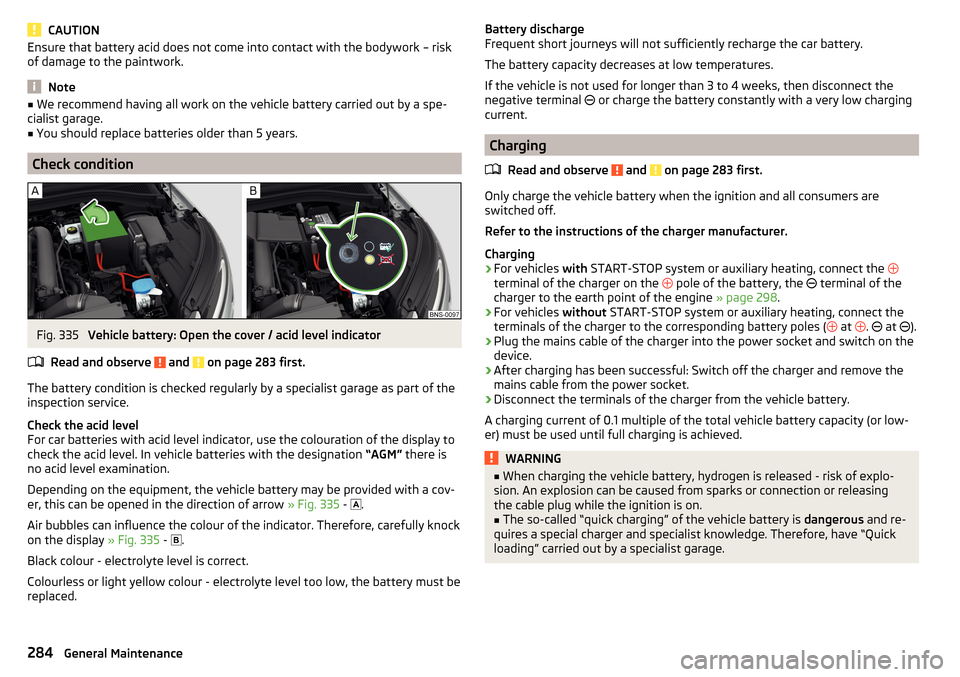
For car batteries with acid level indicator, use the colouration of the display to
check the acid level. In vehicle batteries with the designation “AGM” there is
no acid level examination.
Depending on the equipment, the vehicle battery may be provided with a cov-
er, this can be opened in the direction of arrow » Fig. 335 -
.
Air bubbles can influence the colour of the indicator. Therefore, carefully knock
on the display » Fig. 335 -
.
Black colour - electrolyte level is correct.
Colourless or light yellow colour - electrolyte level too low, the battery must be
replaced.
Battery discharge
Frequent short journeys will not sufficiently recharge the car battery.
The battery capacity decreases at low temperatures.
If the vehicle is not used for longer than 3 to 4 weeks, then disconnect the
negative terminal
or charge the battery constantly with a very low charging
current.
Charging
Read and observe
and on page 283 first.
Only charge the vehicle battery when the ignition and all consumers are
switched off.
Refer to the instructions of the charger manufacturer.
Charging
›
For vehicles with START-STOP system or auxiliary heating, connect the
terminal of the charger on the pole of the battery, the
terminal of the
charger to the earth point of the engine » page 298.
›
For vehicles without START-STOP system or auxiliary heating, connect the
terminals of the charger to the corresponding battery poles ( at
.
at
).
›
Plug the mains cable of the charger into the power socket and switch on the
device.
›
After charging has been successful: Switch off the charger and remove the
mains cable from the power socket.
›
Disconnect the terminals of the charger from the vehicle battery.
A charging current of 0.1 multiple of the total vehicle battery capacity (or low-
er) must be used until full charging is achieved.
WARNING■ When charging the vehicle battery, hydrogen is released - risk of explo-
sion. An explosion can be caused from sparks or connection or releasing
the cable plug while the ignition is on.■
The so-called “quick charging” of the vehicle battery is dangerous and re-
quires a special charger and specialist knowledge. Therefore, have “Quick
loading” carried out by a specialist garage.
284General Maintenance
Page 289 of 344
WARNING■Do not drive with an incorrect tyre pressure - risk of accident.■In the event of very fast pressure loss, e.g. in the event of sudden tyre
damage, an attempt should be made to bring the vehicle carefully to a stop
without sudden steering movements and without any hard braking.
Note
The declaration of conformity (COC document), can be obtained from a ŠKODA 1)
partner.
Tyre wear and wheel change
Fig. 337
Tyre wear indicator / wheel change
The tyre wear increases in the following circumstances.
▶ Incorrect tyre pressure.
▶ Driving style (e.g. fast cornering, rapid acceleration / deceleration).
▶ Incorrect balancing of wheels (have the wheels balanced after changing
tyres / repair or with “restlessness” on the steering).
▶ Wheel alignment error.
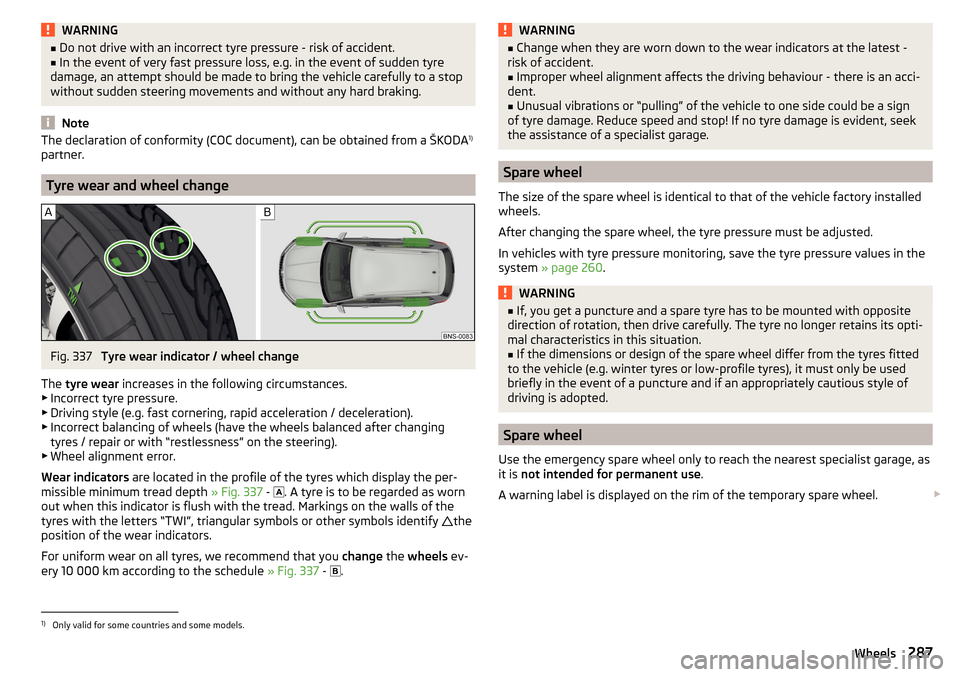
Wear indicators are located in the profile of the tyres which display the per-
missible minimum tread depth » Fig. 337 -
. A tyre is to be regarded as worn
out when this indicator is flush with the tread. Markings on the walls of the
tyres with the letters “TWI”, triangular symbols or other symbols identify the
position of the wear indicators.
For uniform wear on all tyres, we recommend that you change the wheels ev-
ery 10 000 km according to the schedule » Fig. 337 -
.
WARNING■
Change when they are worn down to the wear indicators at the latest -
risk of accident.■
Improper wheel alignment affects the driving behaviour - there is an acci-
dent.
■
Unusual vibrations or “pulling” of the vehicle to one side could be a sign
of tyre damage. Reduce speed and stop! If no tyre damage is evident, seek
the assistance of a specialist garage.
Spare wheel
The size of the spare wheel is identical to that of the vehicle factory installed
wheels.
After changing the spare wheel, the tyre pressure must be adjusted.
In vehicles with tyre pressure monitoring, save the tyre pressure values in the
system » page 260 .
WARNING■
If, you get a puncture and a spare tyre has to be mounted with opposite
direction of rotation, then drive carefully. The tyre no longer retains its opti-
mal characteristics in this situation.■
If the dimensions or design of the spare wheel differ from the tyres fitted
to the vehicle (e.g. winter tyres or low-profile tyres), it must only be used
briefly in the event of a puncture and if an appropriately cautious style of
driving is adopted.
Spare wheel
Use the emergency spare wheel only to reach the nearest specialist garage, as
it is not intended for permanent use .
A warning label is displayed on the rim of the temporary spare wheel.
1)
Only valid for some countries and some models.
287Wheels
Page 298 of 344
Do not use the puncture repair kit in the following instances.
▶ The rim is damaged.
▶ The outdoor temperature is below the minimum temperature indicated in
the instruction manual of the tyre filling bottle with sealant.
▶ Tyre punctures of more than 4 mm.
▶ There is damage to the tyre wall.
▶ The expiration date (see inflation bottle) has passed.WARNING■ If the sealant comes into contact with skin, wash the affected area imme-
diately.■
Observe the manufacturer's usage instructions for the breakdown kit.
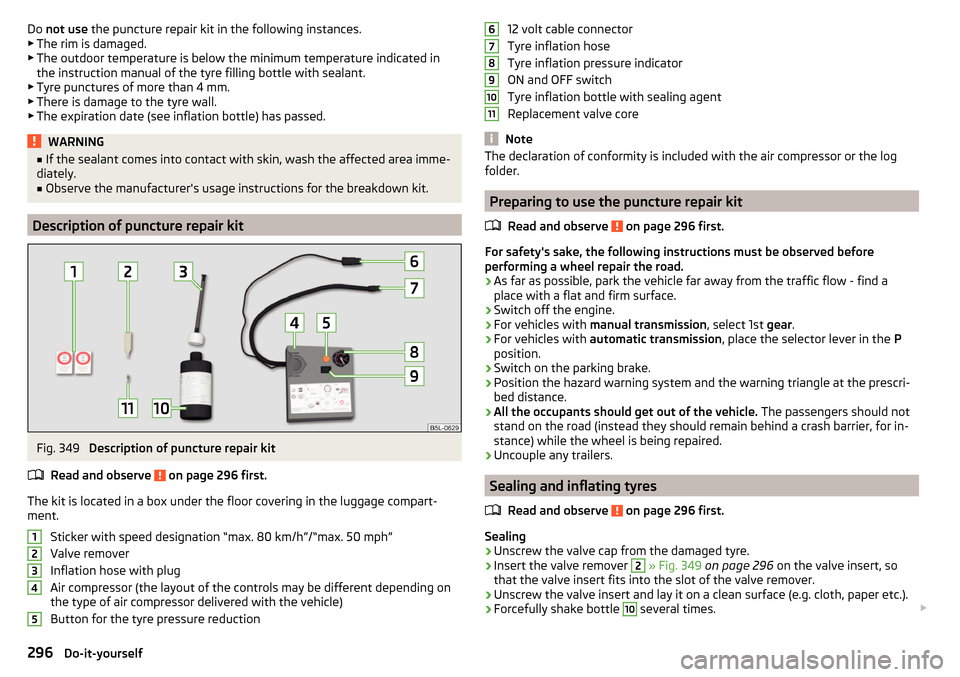
Description of puncture repair kit
Fig. 349
Description of puncture repair kit
Read and observe
on page 296 first.
The kit is located in a box under the floor covering in the luggage compart-
ment.
Sticker with speed designation “max. 80 km/h”/“max. 50 mph”Valve remover
Inflation hose with plug
Air compressor (the layout of the controls may be different depending on
the type of air compressor delivered with the vehicle)
Button for the tyre pressure reduction
1234512 volt cable connector
Tyre inflation hose
Tyre inflation pressure indicator
ON and OFF switch
Tyre inflation bottle with sealing agent
Replacement valve core
Note
The declaration of conformity is included with the air compressor or the log
folder.
Preparing to use the puncture repair kit
Read and observe
on page 296 first.
For safety's sake, the following instructions must be observed before
performing a wheel repair the road.
›
As far as possible, park the vehicle far away from the traffic flow - find a
place with a flat and firm surface.
›
Switch off the engine.
›
For vehicles with manual transmission , select 1st gear.
›
For vehicles with automatic transmission , place the selector lever in the P
position.
›
Switch on the parking brake.
›
Position the hazard warning system and the warning triangle at the prescri-
bed distance.
›
All the occupants should get out of the vehicle. The passengers should not
stand on the road (instead they should remain behind a crash barrier, for in-
stance) while the wheel is being repaired.
›
Uncouple any trailers.
Sealing and inflating tyres
Read and observe
on page 296 first.
Sealing
›
Unscrew the valve cap from the damaged tyre.
›
Insert the valve remover
2
» Fig. 349 on page 296 on the valve insert, so
that the valve insert fits into the slot of the valve remover.
›
Unscrew the valve insert and lay it on a clean surface (e.g. cloth, paper etc.).
›
Forcefully shake bottle
10
several times.
67891011296Do-it-yourself
Page 310 of 344
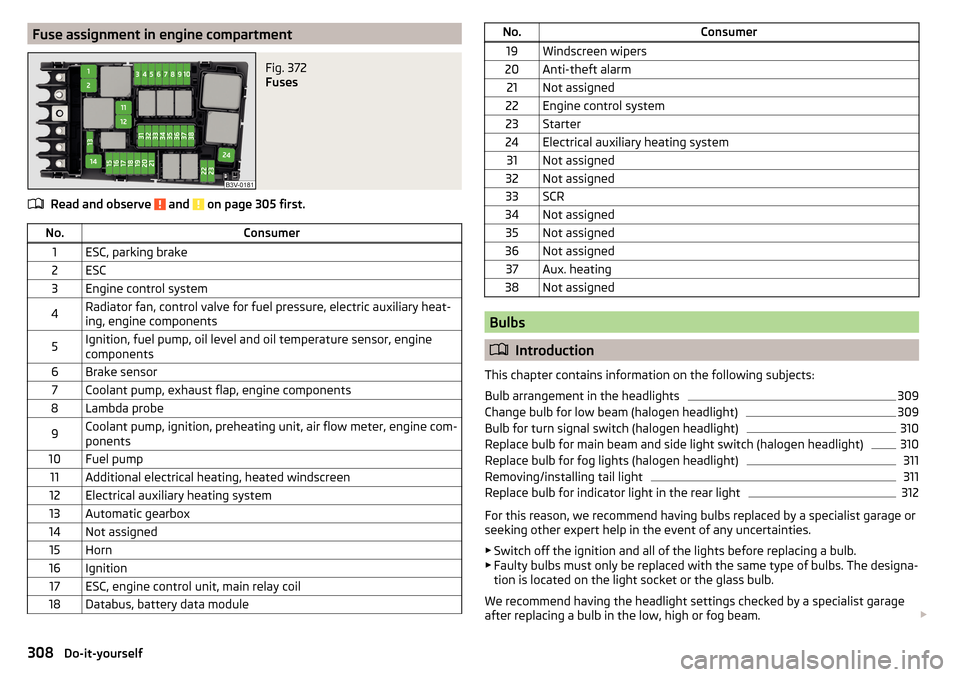
Fuse assignment in engine compartmentFig. 372
Fuses
Read and observe and on page 305 first.
No.Consumer1ESC, parking brake2ESC3Engine control system4Radiator fan, control valve for fuel pressure, electric auxiliary heat-
ing, engine components5Ignition, fuel pump, oil level and oil temperature sensor, engine
components6Brake sensor7Coolant pump, exhaust flap, engine components8Lambda probe9Coolant pump, ignition, preheating unit, air flow meter, engine com-
ponents10Fuel pump11Additional electrical heating, heated windscreen12Electrical auxiliary heating system13Automatic gearbox14Not assigned15Horn16Ignition17ESC, engine control unit, main relay coil18Databus, battery data moduleNo.Consumer19Windscreen wipers20Anti-theft alarm21Not assigned22Engine control system23Starter24Electrical auxiliary heating system31Not assigned32Not assigned33SCR34Not assigned35Not assigned36Not assigned37Aux. heating38Not assigned
Bulbs
Introduction
This chapter contains information on the following subjects:
Bulb arrangement in the headlights
309
Change bulb for low beam (halogen headlight)
309
Bulb for turn signal switch (halogen headlight)
310
Replace bulb for main beam and side light switch (halogen headlight)
310
Replace bulb for fog lights (halogen headlight)
311
Removing/installing tail light
311
Replace bulb for indicator light in the rear light
312
For this reason, we recommend having bulbs replaced by a specialist garage or
seeking other expert help in the event of any uncertainties.
▶ Switch off the ignition and all of the lights before replacing a bulb.
▶ Faulty bulbs must only be replaced with the same type of bulbs. The designa-
tion is located on the light socket or the glass bulb.
We recommend having the headlight settings checked by a specialist garage
after replacing a bulb in the low, high or fog beam.
308Do-it-yourself
Page 314 of 344
›Press the latch in the direction of arrow 5 and pull out the holder in the di-
rection of arrow 6.
Fitting›
Slide the plug into the light in the opposite direction of arrow
6
. The lock on
the plug must be inserted securely.
›
Insert the light with the openings
E
onto the studs
F
» Fig. 381 on
page 312 in the body and carefully press in the light » .
›
Screw in bolt
B
in the opposite direction to arrow
2
» Fig. 380 .
›
Insert the grille
A
in the associated opening in the lower area and press in
against the direction of arrow
1
.
CAUTION
■ When re-inserting the light, ensure that the wiring harness between the
body and the light is not jammed and the seal D » Fig. 381 on page 312 is cor-
rectly inserted - otherwise there is a risk of water ingress and damage to the
electrical installation.■
Ensure that the vehicle paintwork and the tail lamp are not damaged when
removing and installing the lamp.
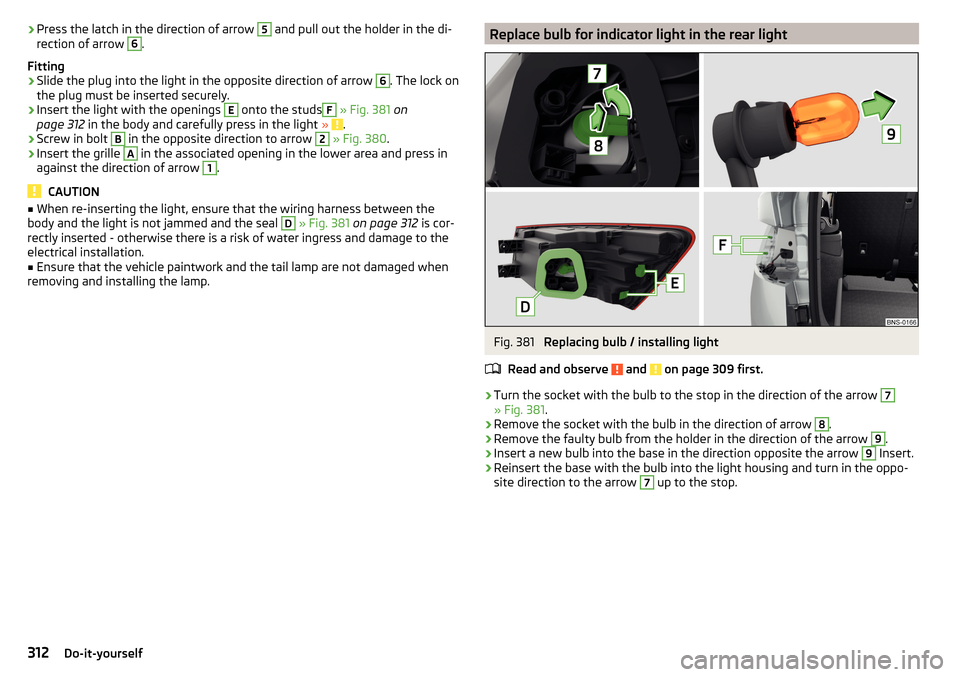
Replace bulb for indicator light in the rear lightFig. 381
Replacing bulb / installing light
Read and observe
and on page 309 first.
›
Turn the socket with the bulb to the stop in the direction of the arrow
7
» Fig. 381 .
›
Remove the socket with the bulb in the direction of arrow
8
.
›
Remove the faulty bulb from the holder in the direction of the arrow
9
.
›
Insert a new bulb into the base in the direction opposite the arrow
9
Insert.
›
Reinsert the base with the bulb into the light housing and turn in the oppo-
site direction to the arrow
7
up to the stop.
312Do-it-yourself
Page 336 of 344
Call list166
Conference call167
Connection types157
Dialling the telephone number164
Emergency call164
Enter telephone number164
Functions164
Import contacts140
Information service164
Main menu158, 159
Main telephone157
Manage favourites140
Operation158, 159
Pairing process160
Preferred contacts166
rSAP157
Set140
SIM card157
Telephone158, 159
Telephone book165
Text messages (SMS)168
User profile140
Voicemail164
Telephone book165
Telephone connection types157
Telephone functions164
Telephone number164
Telephone Premium rSAP
163
Text messages168
Third seat row Fold down
83
Height of headrests84
Third seat seat fold
83
Through-loading bag95
Tilt / slide sunroof Operation
64
Sunblind65
Time44, 131, 138
Tiptronic211
TMC Detail of the traffic report
200
dynamic route200
List of traffic reports199
Tools291
Top speeds137
TOP TETHER28
Touch screen123
Towing298, 300
Towing a trailer265
Towing device Accessories
262
Vertical load261
Towing eye299
Towing protection58
Towing the vehicle298
Traction control (ASR)36, 217
traffic Detail of the traffic report
200
Traffic List of traffic reports
199
Traffic Information (TMC)200
Traffic jam assistant256
Traffic program (TP)144
Traffic reports (TMC)199
Traffic sign recognition257
Traffic Sign Recognition dysfunction
259
Information messages259
Settings in Infotainment258
Traffic signs see Traffic sign recognition
257
Trailer Connect and disconnect
263
Load264
loading264
Towing a trailer265
Trailer Assist237
Trailer manoeuvring assistant237
Activation / deactivation238
Automatic brake intervention239
Manoeuvring239
Operating principle238
Trailer stabilisation system (TSA)218
Trailer towing261
navigation193
Trailer towing device Handling
262
Warning message262
Transit point195
transmitter See main menu
141
Transport Luggage compartment
100
Roof racks108
Towing device and trailer261
Transporting children23
Trays87
Triangle290
TSA218
Turning off Infotainment125
Turning on Infotainment125
Turn signal67
Turn signal system Warning light
38
Type plate313
Tyre Wear indicator
287
Tyre load capacity288
Tyre pressure286
Warning light37
Tyre pressure monitor refer to the tyre pressure monitoring
260
Tyre pressure monitoring260
Warning light37
334Index