SKODA KODIAQ 2020 Owner´s Manual
KODIAQ 2020
SKODA
SKODA
https://www.carmanualsonline.info/img/3/38023/w960_38023-0.png
SKODA KODIAQ 2020 Owner´s Manual
Page 99 of 256
Codec typeFile extensionMax. recordings per second bit rate[Mbit/s]WMV9wmvasf50
Supported playlists
Codec typeFile extensionM3Um3uM3U8m3u8PLSplsWPLwplASXasxImages
Overview
Display menu
Page 113 of 256
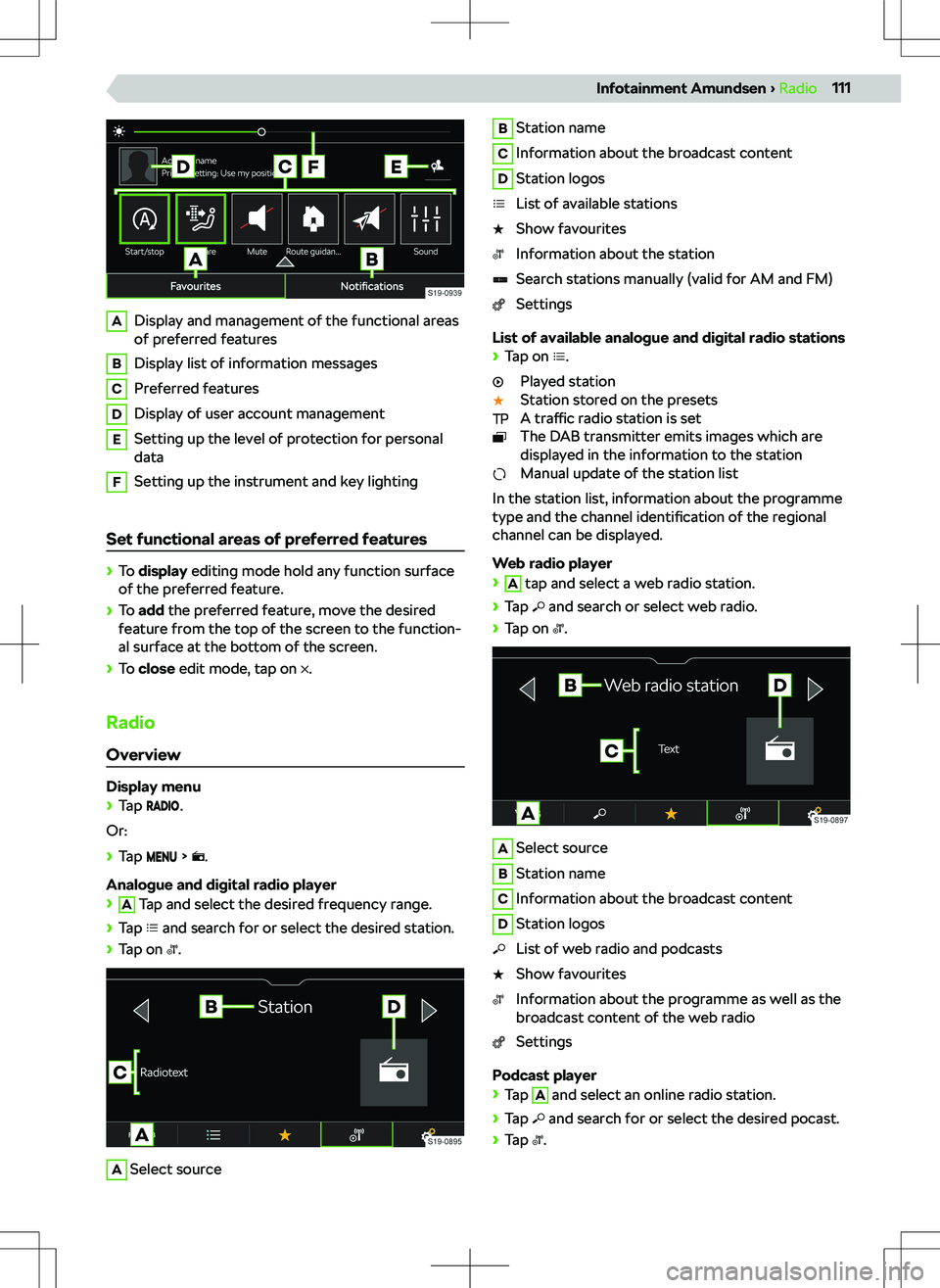
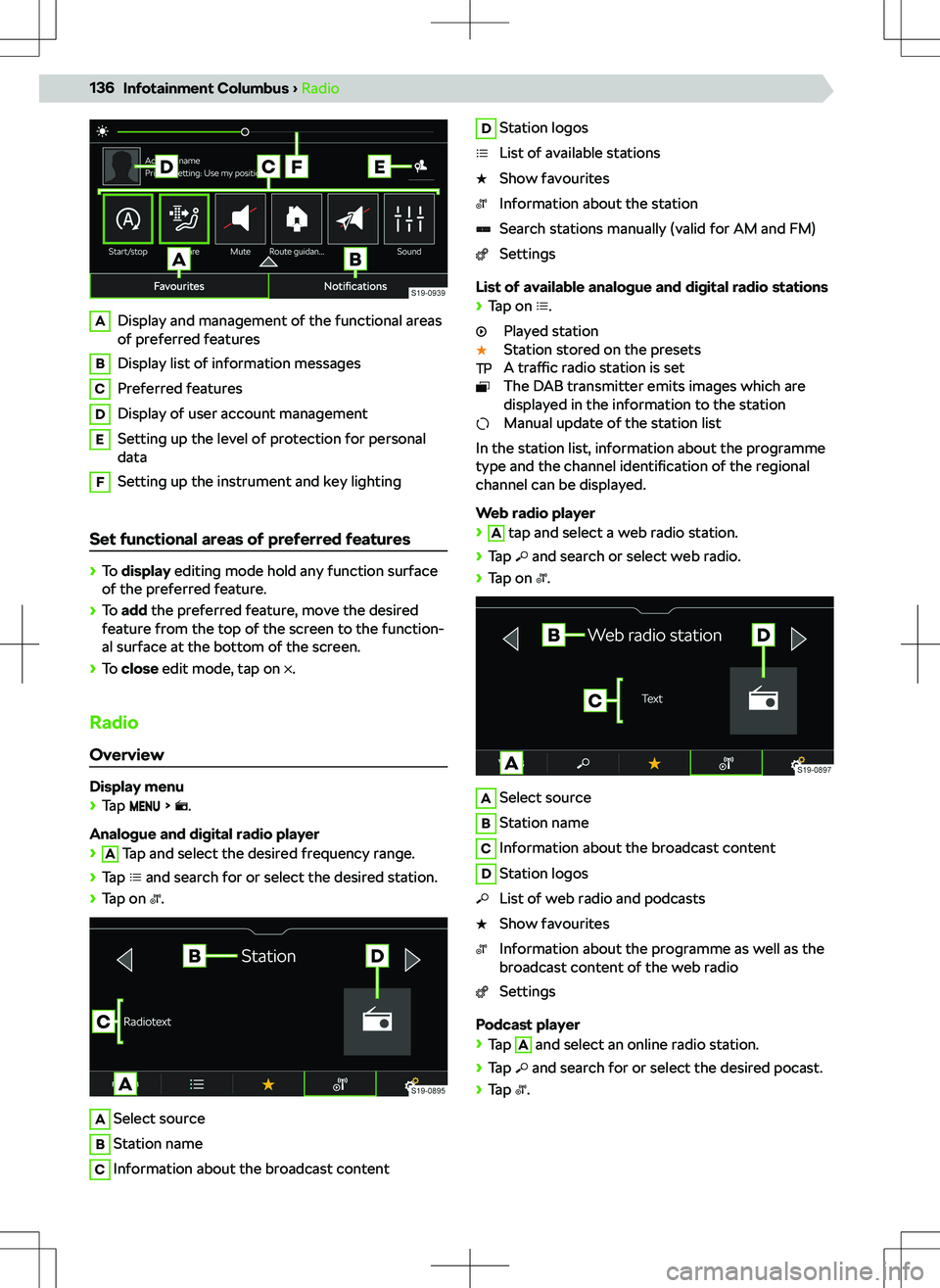
ADisplay and management of the functional areas
of preferred featuresBDisplay list of information messagesCPreferred featuresDDisplay of user account managementESetting up the level of protection for personal
dataFSetting up the instrument and key lighting
Set functional areas of preferred features
Page 117 of 256
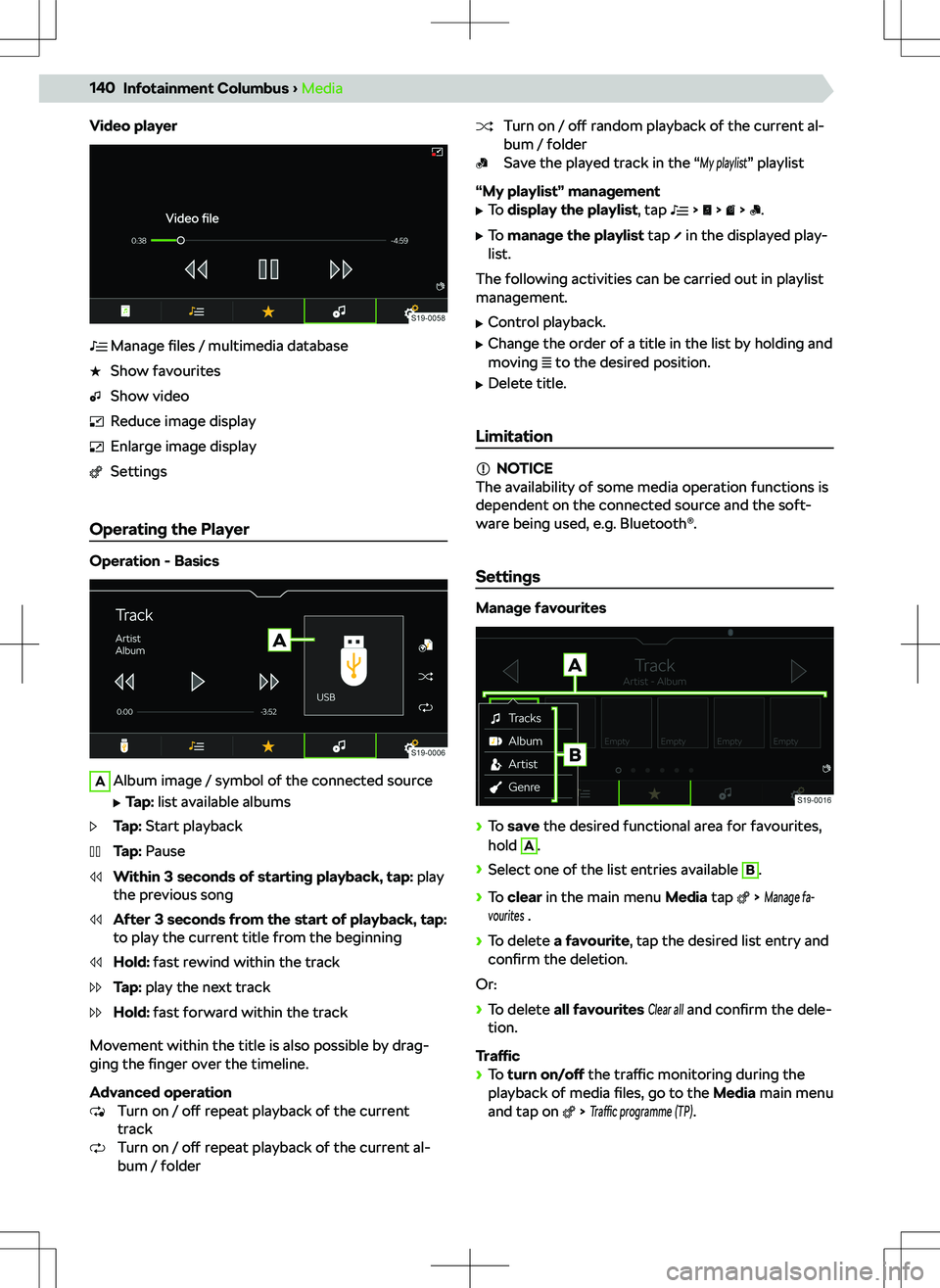
Video playerManage files / multimedia databaseShow favouritesShow videoReduce image displayEnlarge image displaySettings
Operating the Player
Operation - Basics
AAlbum image / symbol of the connected source
Page 120 of 256
Codec typeFile extensionMax. recordings per second bit rate[Mbit/s]WMV9wmvasf50
Supported playlists
Codec typeFile extensionM3Um3uM3U8m3u8PLSplsWPLwplASXasxImages
Overview
Display menu
Page 130 of 256
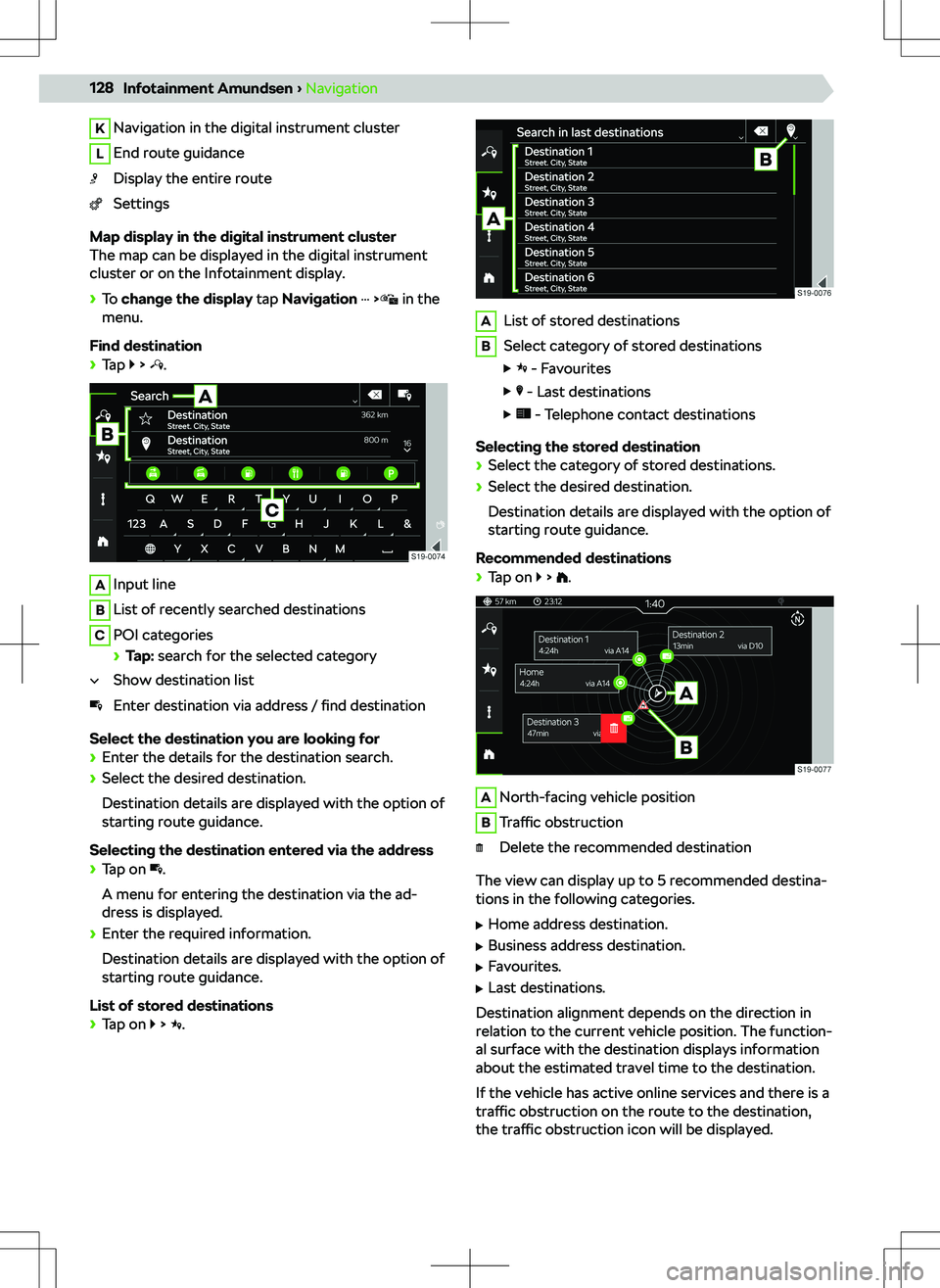
KNavigation in the digital instrument clusterLEnd route guidanceDisplay the entire routeSettings
Map display in the digital instrument cluster
The map can be displayed in the digital instrument
cluster or on the Infotainment display.
Page 138 of 256
ADisplay and management of the functional areas
of preferred featuresBDisplay list of information messagesCPreferred featuresDDisplay of user account managementESetting up the level of protection for personal
dataFSetting up the instrument and key lighting
Set functional areas of preferred features
Page 142 of 256
Video playerManage files / multimedia databaseShow favouritesShow videoReduce image displayEnlarge image displaySettings
Operating the Player
Operation - Basics
AAlbum image / symbol of the connected source
Page 145 of 256
Codec typeFile extensionMax. recordings per second bit rate[Mbit/s]WMV9wmvasf50
Supported playlists
Codec typeFile extensionM3Um3uM3U8m3u8PLSplsWPLwplASXasxImages
Overview
Display menu
Page 161 of 256
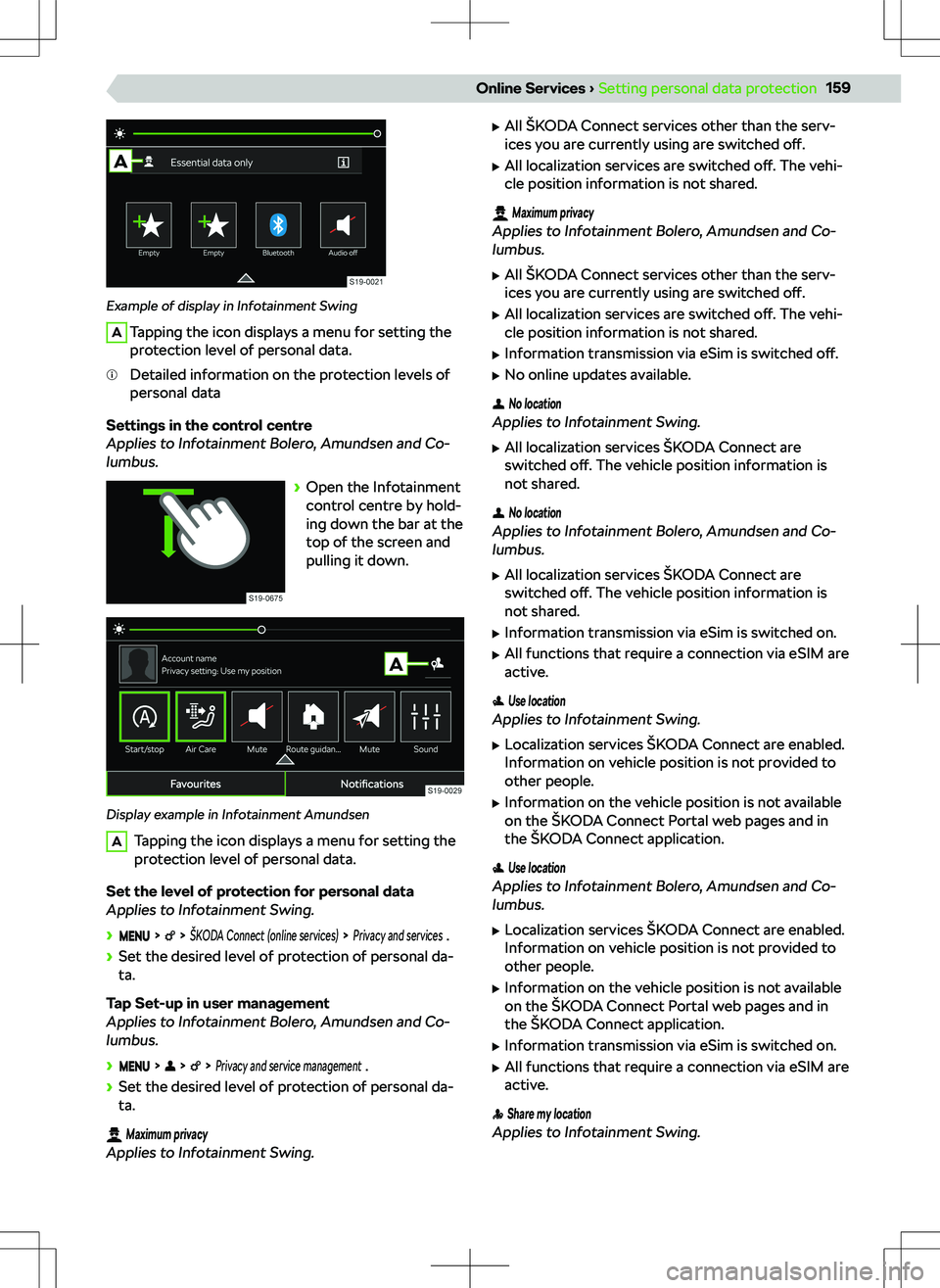
Example of display in Infotainment Swing
ATapping the icon displays a menu for setting the
protection level of personal data.Detailed information on the protection levels of
personal data
Settings in the control centre
Applies to Infotainment Bolero, Amundsen and Co-
lumbus.
Page 163 of 256
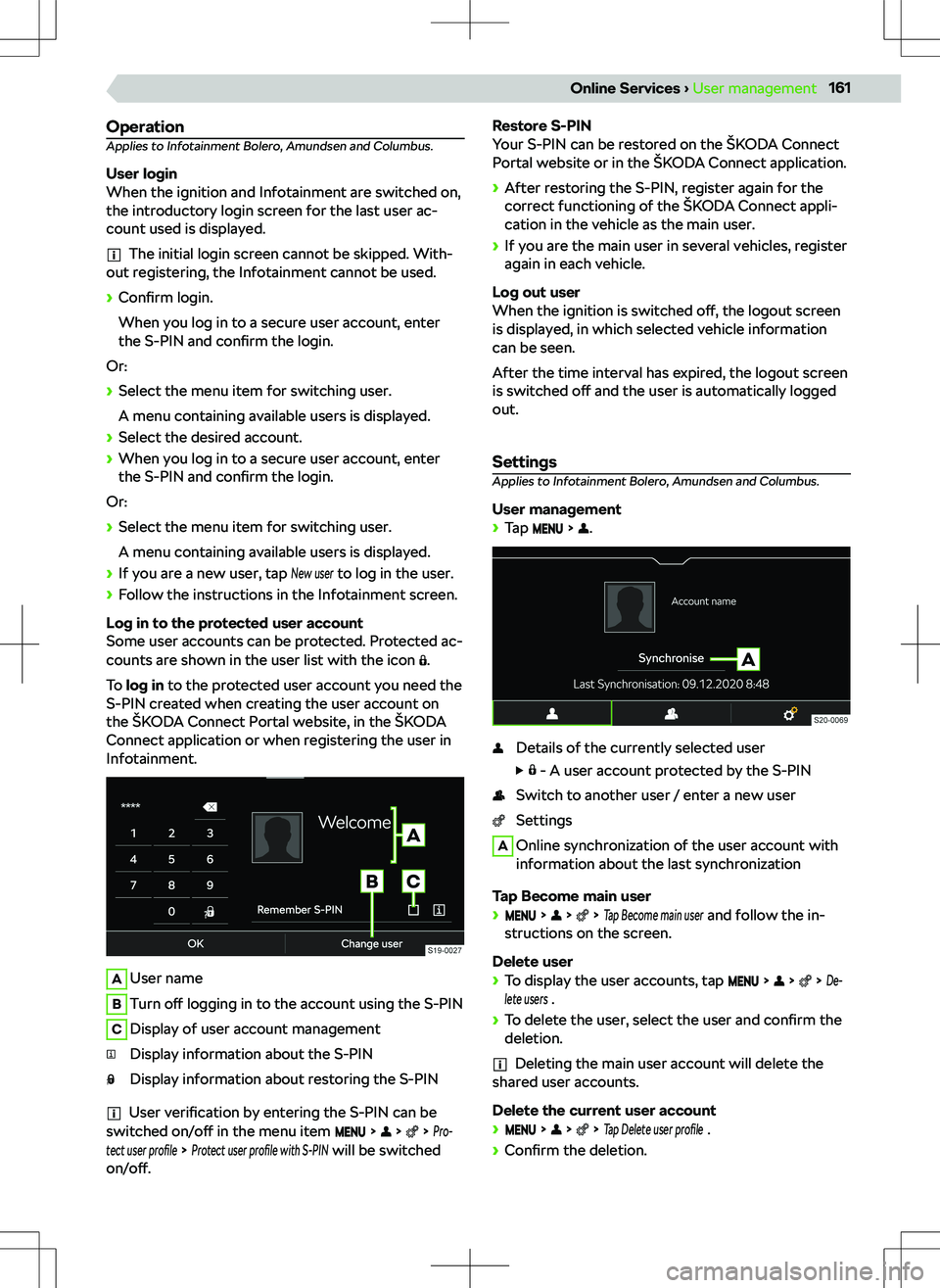
OperationApplies to Infotainment Bolero, Amundsen and Columbus.
User login
When the ignition and Infotainment are switched on,
the introductory login screen for the last user ac-
count used is displayed.
The initial login screen cannot be skipped. With-
out registering, the Infotainment cannot be used.
![SKODA KODIAQ 2020 Owner´s Manual Codec typeFile extensionMax. recordings per second bit rate[Mbit/s]WMV9wmvasf50
Supported playlists
Codec typeFile extensionM3Um3uM3U8m3u8PLSplsWPLwplASXasxImages
Overview
Display menu](/img/3/38023/w960_38023-98.png "SKODA KODIAQ 2020 Owner´s Manual Codec typeFile extensionMax. recordings per second bit rate[Mbit/s]WMV9wmvasf50
Supported playlists
Codec typeFile extensionM3Um3uM3U8m3u8PLSplsWPLwplASXasxImages
Overview
Display menu")

![SKODA KODIAQ 2020 Owner´s Manual Codec typeFile extensionMax. recordings per second bit rate[Mbit/s]WMV9wmvasf50
Supported playlists
Codec typeFile extensionM3Um3uM3U8m3u8PLSplsWPLwplASXasxImages
Overview
Display menu](/img/3/38023/w960_38023-119.png "SKODA KODIAQ 2020 Owner´s Manual Codec typeFile extensionMax. recordings per second bit rate[Mbit/s]WMV9wmvasf50
Supported playlists
Codec typeFile extensionM3Um3uM3U8m3u8PLSplsWPLwplASXasxImages
Overview
Display menu")
![SKODA KODIAQ 2020 Owner´s Manual Codec typeFile extensionMax. recordings per second bit rate[Mbit/s]WMV9wmvasf50
Supported playlists
Codec typeFile extensionM3Um3uM3U8m3u8PLSplsWPLwplASXasxImages
Overview
Display menu](/img/3/38023/w960_38023-144.png "SKODA KODIAQ 2020 Owner´s Manual Codec typeFile extensionMax. recordings per second bit rate[Mbit/s]WMV9wmvasf50
Supported playlists
Codec typeFile extensionM3Um3uM3U8m3u8PLSplsWPLwplASXasxImages
Overview
Display menu")