service interval SKODA OCTAVIA 2005 1.G / (1U) Owner's Manual
[x] Cancel search | Manufacturer: SKODA, Model Year: 2005, Model line: OCTAVIA, Model: SKODA OCTAVIA 2005 1.G / (1U)Pages: 315, PDF Size: 11.8 MB
Page 3 of 315
Introduction
2
On-board literature
The on-board literature for your vehicle consists of this “ Owner's
Manual” as well as the brochures “ Brief instruction”, “Service
schedule ”, “Te c h n i c a l d a t a ” and “Help on the road ”. There can
also be a variety of other additional operating manuals and
instructions on-board (e.g. an operating manual for the radio)
depending on the vehicle model and equipment.
If one of the publications listed above is missing, please contact
a Škoda dealer immediately, where one will be glad to assist you
in such matters.
One should note that the de tails given in the vehicle's
papers always take precedence over those in the Owner's
Manual.
Owner's Manual
This Owner's Manual describes the current scope of equip-
ment . Certain items of equipment listed are only installed later on
and only envisaged for particular markets. The illustrations can
differ in minor details from your vehicle; they are only intended for
general information.
In addition to information regarding all the controls and equip-
ment, the Owner's Manual also contains important information
regarding care and operation for your safety and also to retain the
value of your vehicle. To provide you with valuable tips and aids.
You can learn how you can operate your vehicle safely,
economically and in an environmentally conscious way.
For safety reasons, please also pay attention to the informa-
tion on accessories, modificati ons and replacement of parts
⇒ page 270. The other chapters of the Owner's Manual are also important,
however, for proper treatment of your car - in addition to regular
care and maintenance - helps to retain its value and in many
cases is also one of the conditions for possible warranty claims.
The Brief instruction
includes an overview of the most important controls of your
vehicle.
The Service schedule
contains:
•Vehicle data,
•Service intervals,
•Overview of the service work,
•Service proof,
•Confirmation of mobility warranty,
•important information on the warranty.
The confirmations of the carried out service work are one of the
conditions for possible warranty claims.
Please always present the Service schedule when you take your
car to a Škoda dealer.
If the Service schedule is missing or worn, please contact your
Škoda dealer, where your car is serviced regularly. You will
receive a duplicate, in which the previously carried out service
work are confirmed.
Help on the road
contains the addresses and telephone numbers of Škoda
Importers.
s24s.book Page 2 Thursday, November 24, 2005 12:27 PM
Page 6 of 315
Contents5
Contents
Layout of this Owner's Manual
(explanations)
. . . . . . . . . . . . . . . . . . .
Using the system . . . . . . . . . . . . . . .
Cockpit . . . . . . . . . . . . . . . . . . . . . . . . . . . . . . .
An overview . . . . . . . . . . . . . . . . . . . . . . . . . .
Instruments and Indicator/Warning LightsGeneral view of the instrument cluster . . . . . .
Engine revolutions counter . . . . . . . . . . . . . . .
Coolant temperature gauge . . . . . . . . . . . . . .
Fuel gauge . . . . . . . . . . . . . . . . . . . . . . . . . . .
Speedometer . . . . . . . . . . . . . . . . . . . . . . . . .
Counter for distance driven . . . . . . . . . . . . . .
Service Interval Display . . . . . . . . . . . . . . . . .
Digital clock . . . . . . . . . . . . . . . . . . . . . . . . . .
Multi-functional indicator (onboard computer)*
Information display* . . . . . . . . . . . . . . . . . . . .
Audio . . . . . . . . . . . . . . . . . . . . . . . . . . . . . . .
Navigation system* . . . . . . . . . . . . . . . . . . . .
Auto Check Control . . . . . . . . . . . . . . . . . . . .
Settings . . . . . . . . . . . . . . . . . . . . . . . . . . . . .
Warning lights . . . . . . . . . . . . . . . . . . . . . . . . .
Unlocking and locking . . . . . . . . . . . . . . . . . .
Keys . . . . . . . . . . . . . . . . . . . . . . . . . . . . . . . .
Key with light* . . . . . . . . . . . . . . . . . . . . . . . . .
Changing the battery of the radio remote
control . . . . . . . . . . . . . . . . . . . . . . . . . . . . . .
Electronic immobiliser . . . . . . . . . . . . . . . . . .
Child safety locks . . . . . . . . . . . . . . . . . . . . . .
Central locking system . . . . . . . . . . . . . . . . . .
Remote control* . . . . . . . . . . . . . . . . . . . . . . . Synchonisation of the remote control . . . . . . .
Anti-theft alarm system* . . . . . . . . . . . . . . . . .
Power windows* . . . . . . . . . . . . . . . . . . . . . . .
Electric sliding/tilting roof* . . . . . . . . . . . . . . .
Lights and Visibility . . . . . . . . . . . . . . . . . . . .
Lights . . . . . . . . . . . . . . . . . . . . . . . . . . . . . . .
Interior lighting . . . . . . . . . . . . . . . . . . . . . . . .
Visibility . . . . . . . . . . . . . . . . . . . . . . . . . . . . .
Windshield wiper and wash system . . . . . . . .
Rear-view mirror . . . . . . . . . . . . . . . . . . . . . .
Seats and Stowage . . . . . . . . . . . . . . . . . . . .
Front seats . . . . . . . . . . . . . . . . . . . . . . . . . . .
Adjusting front seats electrically* . . . . . . . . . .
Head restraints . . . . . . . . . . . . . . . . . . . . . . . .
Heating the front seats* . . . . . . . . . . . . . . . . .
Rear seats . . . . . . . . . . . . . . . . . . . . . . . . . . .
Pedals . . . . . . . . . . . . . . . . . . . . . . . . . . . . . .
Luggage compartment . . . . . . . . . . . . . . . . . .
Net partition (Estate)* . . . . . . . . . . . . . . . . . . .
Roof rack* . . . . . . . . . . . . . . . . . . . . . . . . . . .
Cup holder . . . . . . . . . . . . . . . . . . . . . . . . . . .
Note holder . . . . . . . . . . . . . . . . . . . . . . . . . .
Ashtrays . . . . . . . . . . . . . . . . . . . . . . . . . . . . .
Cigarette lighter*, power sockets . . . . . . . . . .
Storage compartments . . . . . . . . . . . . . . . . . .
Heating and air conditioning system . . . . .
Heating . . . . . . . . . . . . . . . . . . . . . . . . . . . . . .
Climatic* (semi-automatic air conditioning
system) . . . . . . . . . . . . . . . . . . . . . . . . . . . . .
Climatronic* (automatic air conditioning) . . . .
Auxiliary heating (auxiliary heating and
ventilation)* . . . . . . . . . . . . . . . . . . . . . . . . . .
Starting-off and Driving. . . . . . . . . . . . . . . . .
Setting steering wheel position . . . . . . . . . . .
Ignition lock . . . . . . . . . . . . . . . . . . . . . . . . . .
Starting engine . . . . . . . . . . . . . . . . . . . . . . . .
Switching the engine off . . . . . . . . . . . . . . . .
Shifting (manual gearbox) . . . . . . . . . . . . . . .
Handbrake . . . . . . . . . . . . . . . . . . . . . . . . . . .
Rear parking aid* . . . . . . . . . . . . . . . . . . . . . .
Front and rear parking aid* . . . . . . . . . . . . . .
Cruise control system (CCS)* . . . . . . . . . . . .
Automatic gearbox. . . . . . . . . . . . . . . . . . . . .
6-speed automatic gearbox* . . . . . . . . . . . . .
Automatic gearbox DSG . . . . . . . . . . . . . . .
Automatic gearbox DSG* . . . . . . . . . . . . . . .
Communication . . . . . . . . . . . . . . . . . . . . . . .
Multifunction steering wheel* . . . . . . . . . . . . .
Universal telephone preinstallation with voice
control* . . . . . . . . . . . . . . . . . . . . . . . . . . . . .
Phone Phonebook* . . . . . . . . . . . . . . . . . . . .
Bluetooth™* . . . . . . . . . . . . . . . . . . . . . . . . .
Mobile phones and two-way radio systems . .
The CD changer* . . . . . . . . . . . . . . . . . . . . . .
Safety. . . . . . . . . . . . . . . . . . . . . . . . . . . . . .
Passive Safety . . . . . . . . . . . . . . . . . . . . . . . .
Basic information . . . . . . . . . . . . . . . . . . . . . .
Correct seated position . . . . . . . . . . . . . . . . .
Seat belts. . . . . . . . . . . . . . . . . . . . . . . . . . . . .
Why seat belts? . . . . . . . . . . . . . . . . . . . . . . .
The physical principle of a frontal collision . .
8
9
11
11
13
13
14
14
14
15
15
16
17
18
23
25
26
26
28
30
42
42
43
44
45
45
46
52 53
54
56
59
63
63
70
72
75
79
82
82
84
87
88
89
91
92
99
102
103
104
105
106
108
11 9
11 9
123
128
134 138
138
139
140
141
142
143
144
145
146
149
149
156
156
163
163
165
171
173
175
176
177
177
177
179
183
183
184
s24s.book Page 5 Thursday, November 24, 2005 12:27 PM
Page 14 of 315
Instruments and Indicator/Warning Lights13
Using the systemSafetyDriving TipsGeneral MaintenanceBreakdown assistanceTechnical Data
Instruments and Indicator/Warning Lights
General view of the instrument cluster
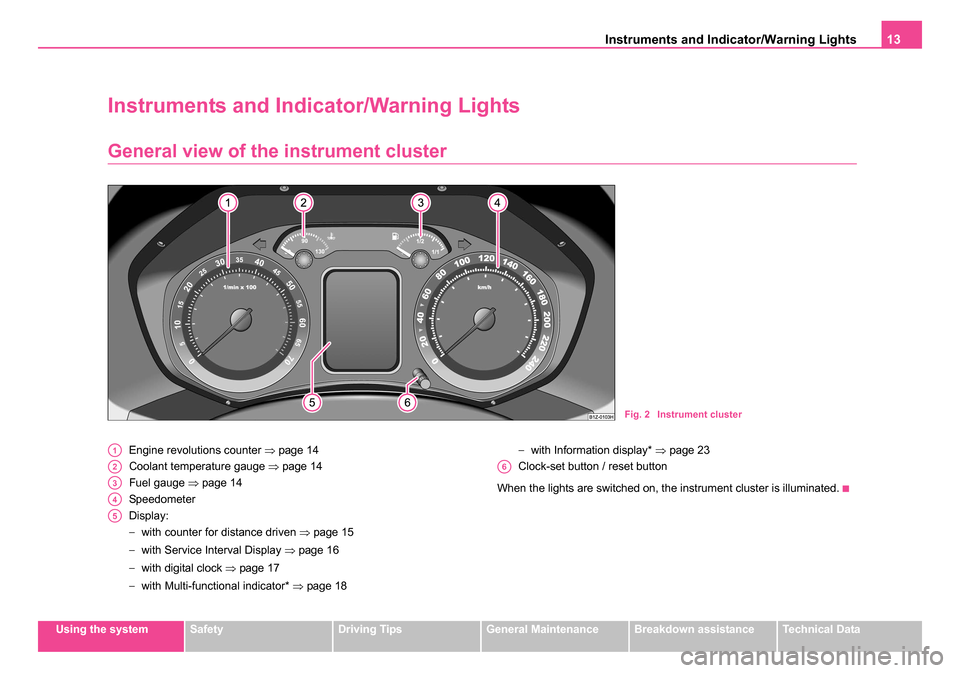
Engine revolutions counter ⇒page 14
Coolant temperature gauge ⇒page 14
Fuel gauge ⇒page 14
Speedometer
Display:
− with counter for distance driven ⇒page 15
− with Service Interval Display ⇒page 16
− with digital clock ⇒page 17
− with Multi-functional indicator* ⇒page 18 −
with Information display* ⇒page 23
Clock-set button / reset button
When the lights are switched on, the instrument cluster is illuminated.
Fig. 2 Instrument cluster
A1
A2
A3
A4
A5
A6
s24s.book Page 13 Thursday, November 24, 2005 12:27 PM
Page 17 of 315
Instruments and Indicator/Warning Lights
16
driven and the days until the following service interval (for this the trip
counter is not set back) appears ⇒page 16.
Counter for distance driven (trip)
The counter for distance driven indicates the total distance in kilometers
or miles which the vehicle has been driven.
Trip counter for distance driven
The trip counter indicates the distance which you have driven since this
counter was last reset - in steps of 100 metres or 1/10 of a mile.
Fault display
dEF will appear as a constant text in the display if there is a fault in the
instrument cluster. Have the fault rectified as soon as possible by a
specialist workshop.
WARNING
Never seek to adjust the trip counter for distance driven while
driving for safety reasons!
Note
On vehicles without multi-functional indicator or information display, both
counts of the counters are shown simultaneously on the display.
Service Interval Display
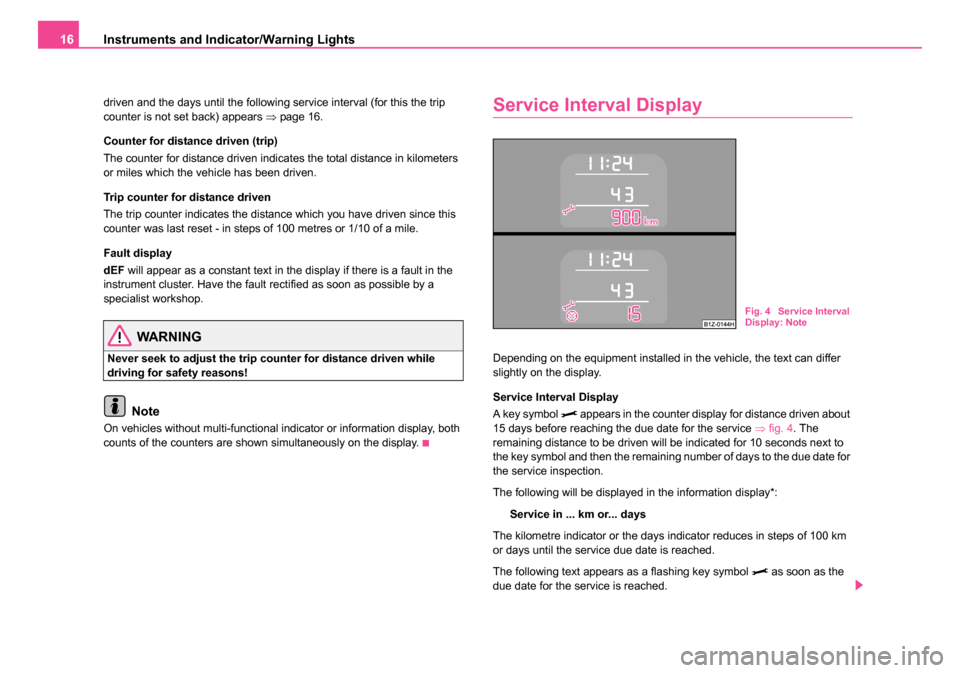
Depending on the equipment installed in the vehicle, the text can differ
slightly on the display.
Service Interval Display
A key symbol
appears in the counter display for distance driven about
15 days before reaching the due date for the service ⇒fig. 4 . The
remaining distance to be driven will be indicated for 10 seconds next to
the key symbol and then the remaining number of days to the due date for
the service inspection.
The following will be displayed in the information display*:
Service in ... km or... days
The kilometre indicator or the days indicator reduces in steps of 100 km
or days until the service due date is reached.
The following text appears as a flashing key symbol
as soon as the
due date for the service is reached.
Fig. 4 Service Interval
Display: Note
s24s.book Page 16 Thursday, November 24, 2005 12:27 PM
Page 18 of 315
Instruments and Indicator/Warning Lights17
Using the systemSafetyDriving TipsGeneral MaintenanceBreakdown assistanceTechnical Data
The following will be displayed in the information display*:
Service now!
The display disappears within 20 seconds after switching on the ignition.
The trip counter is also displayed after pressing the reset button for the trip
counter (for more than 1 second).
Display regarding the distance and days until the following service
interval
You can have the distance still to be driven and the days until the following
service interval displayed at any time as follows:
•Switch on the ignition and press the reset button ⇒page 13, fig. 2
for more than 2 seconds.
A key symbol
is displayed on the display of the counter for the
distance driven. The remaining distance to be driven will be indicated for
10 seconds next to the key symbol and then the remaining number of days
to the due date for the service inspection.
Resetting Service Interval Display
We recommend having this resetting performed by a specialist garage.
Specialist garage:
•resets the memory of the display after the appropriate inspection
•makes an entry in the Service schedule
•affix the sticker with the entry of the following service interval to the
side of the dash panel on the driver's side.
The service interval displays can also be reset as follows by using the
reset button ⇒page 13, fig. 2 on the trip counter:
•Switch off the ignition, press the reset button of the trip counter for
distance driven and hold it down.
•Switch the ignition on and release the reset button. Now turn the reset
button to the right. The service interval displays are reset.
Caution
We recommend that you do not reset the Service Interval Display yourself
otherwise this can result in the service interval display being incorrectly
set, which may also result in problems with operation of your vehicle.
Note
•Never reset the display between service intervals otherwise this may
result in incorrect readouts.
•Information is retained in the Service Interval Display also after the
battery of the vehicle is disconnected.
•It is necessary to re-code the Service Interval Display if a new instru-
ment cluster is installed during repair work. This work is carried out by a
specialist garage.
•The data displayed is the same after resetting the display with flexible
service intervals (QG1) using the reset button as that for a vehicle with
fixed service intervals (QG2). We therefore recommend having the
Service Interval Display reset only by a Škoda dealer who is familiar with
the procedure for resetting the display with a vehicle system tester.
•Please refer to the brochure Service schedule for extensive informa-
tion about the service intervals.
Digital clock
A clock-set button is installed on the bottom left beside the
speedometer for adjusting the clock ⇒page 13, fig. 2 .
Set hours
– Turn the reset button to the left.
A6
A6A6
s24s.book Page 17 Thursday, November 24, 2005 12:27 PM
Page 24 of 315
Instruments and Indicator/Warning Lights23
Using the systemSafetyDriving TipsGeneral MaintenanceBreakdown assistanceTechnical Data
Information display*
Introduction
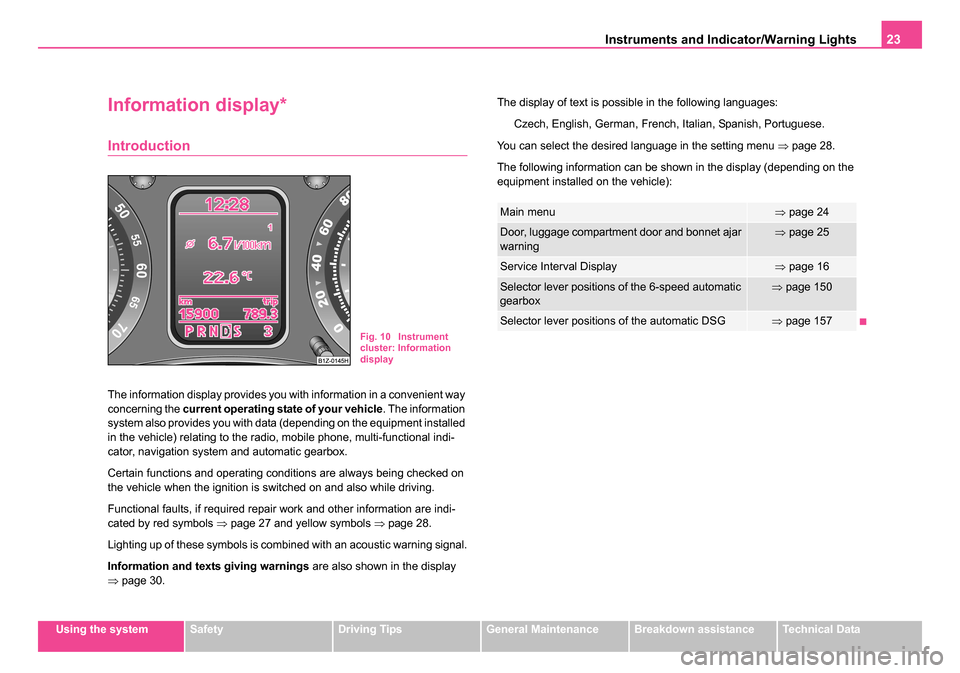
The information display provides you with information in a convenient way
concerning the current operating state of your vehicle . The information
system also provides you with data (depending on the equipment installed
in the vehicle) relating to the radio, mobile phone, multi-functional indi-
cator, navigation system and automatic gearbox.
Certain functions and operating conditions are always being checked on
the vehicle when the ignition is switched on and also while driving.
Functional faults, if required repair work and other information are indi-
cated by red symbols ⇒page 27 and yellow symbols ⇒page 28.
Lighting up of these symbols is combined with an acoustic warning signal.
Information and texts giving warnings are also shown in the display
⇒ page 30. The display of text is possible in the following languages:
Czech, English, German, French, Italian, Spanish, Portuguese.
You can select the desired language in the setting menu ⇒page 28.
The following information can be shown in the display (depending on the
equipment installed on the vehicle):
Fig. 10 Instrument
cluster: Information
display
Main menu⇒ page 24
Door, luggage compartment door and bonnet ajar
warning⇒page 25
Service Interval Display⇒page 16
Selector lever positions of the 6-speed automatic
gearbox⇒page 150
Selector lever positions of the automatic DSG⇒page 157
s24s.book Page 23 Thursday, November 24, 2005 12:27 PM
Page 77 of 315
Lights and Visibility
76
Automatic wipe/wash for the rear window pane*
– Press the lever from the steering wheel forward into the sprung position , the wash system sprays immediately, the
windscreen wiper starts wiping a little later. As long as you
hold the lever in this position, the wiper operates as well as the
wash system.
– Letting go of the lever will cause the windscreen wash system to stop and the wiper to continue for another 2 - 3 wiper
strokes (depending on the period of spraying of the wind-
screen). The lever will stay in position after releasing it .
Switching windscreen wipers off
– Move the lever back into its home position .
After the windscreen wiper switches off for the second time or the ignition
switches off for the fifth time, the rest position of the windscreen wiper
changes - this counteracts an early fatigue of the wiper rubbers.
The windscreen wipers and the wash system only operate if the ignition is
switched on and the bonnet is closed.
If the intermittent wipe is switched on, the intervals are also controlled
depending on speed.
The rain sensor* automatically regulates the break between the individual
wiper strokes depending on the intensity of the rain.
The rear window will be wiped again if the front window wipers are on
when reverse gear is selected.
The windscreen washer nozzles are heated* when the ignition is switched
on.
Top up with wash liquid ⇒page 262. Winter position
If the windscreen wipers are in rest position, they cannot be folded out
from the windscreen. For this reason we recommend adjusting the wind-
screen wipers in winter so that they can be folded out from the windscreen
easily. You can set this rest position as follows:
•Switch on the windscreen wipers.
•Switch off the ignition. The windscreen wipers remain in the position in
which they were when switching off the ignition.
You can also use the service position ⇒page 77 as a winter position.
WARNING
•Properly maintained windscreen wiper blades are essential for
clear visibility and safe driving ⇒page 77, “Replacing wiper blades
for the windscreen wipers”.
•Do not use the windscreen washer system at low temperatures,
without heating the windscreen beforehand. Otherwise the window
cleaner could freeze on the windscreen and restrict the view to the
front.
•The rain sensor only operates as a support. The driver is not
released from the responsibility to set the function of the wind-
screen wipers manually depending on the visibility conditions.
Caution
In frosty weather, please first of all check whether the windscreen wiper
blades are not frozen to the windscreen before switching them on.
Switching on windscreen wipers when the blades are frozen to the wind-
screen may result in damage both to the blades and the motor of the wind-
screen wipers!
A7
A6
A0
s24s.book Page 76 Thursday, November 24, 2005 12:27 PM
Page 78 of 315
Lights and Visibility77
Using the systemSafetyDriving TipsGeneral MaintenanceBreakdown assistanceTechnical Data
Note
•If the slower or the faster wiper setting is switched on ⇒page 75,
fig. 55 and the vehicle speed decreases to below 4 km/h, the next lower
wiper step is switched on automatically. At a speed increase of more than
8 km/h the previous wiper setting is established again.
•If there is an obstacle on the windscreen, the wiper will try to push
away the obstacle. If the obstacle continues to block the wiper, the wiper
stops after 5 cycles, in order to avoid a damage to the wiper. Remove the
obstacle and and switch on the wiper again.
Headlight cleaning system*
The headlights are being cleaned after the windscreen has been sprayed
for the fifth time, the low beam or main beam are switched on and the
windscreen wiper lever was held in the position ⇒page 75, fig. 55 for
about 1 second.
The headlight washer nozzles are moved forward out of the bumper by the
water pressure for cleaning the headlights.
You should remove stubborn dirt (such as insect residues) from the head-
light lenses at regular intervals, for example when refuelling. Please refer
to the following guidelines ⇒page 237, “The headlight lenses”.
You should remove any snow from the fixtures of the washer nozzles and
clear ice in winter with a de-icing spray in order to ensure proper operation
of the cleaning system.
Replacing wiper blades for the windscreen wipers
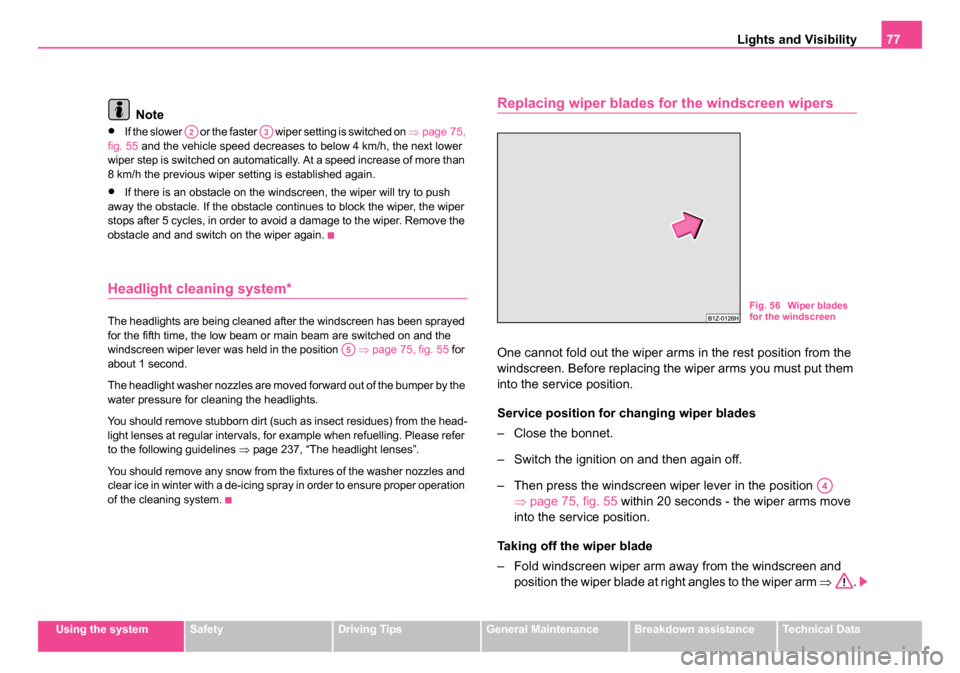
One cannot fold out the wiper arms in the rest position from the
windscreen. Before replacing the wiper arms you must put them
into the service position.
Service position for changing wiper blades
– Close the bonnet.
– Switch the ignition on and then again off.
– Then press the windscreen wiper lever in the position ⇒page 75, fig. 55 within 20 seconds - the wiper arms move
into the service position.
Taking off the wiper blade
– Fold windscreen wiper arm away from the windscreen and position the wiper blade at right angles to the wiper arm ⇒.
A2A3
A5
Fig. 56 Wiper blades
for the windscreen
A4
s24s.book Page 77 Thursday, November 24, 2005 12:27 PM
Page 192 of 315
Airbag system191
Using the systemSafetyDriving TipsGeneral MaintenanceBreakdown assistanceTechnical Data
•The protective function of the airbag system is sufficient for
only one accident. The airbag system must then be replaced if the
airbag has been deployed.
•The airbag system needs no maintenance during its working
life.
•The service life of the airbag system is 15 years from the date of
manufacture of the vehicle. Have the airbag system replaced by a
specialist garage after this period. If the modules of the system are
replaced before the expiry of the term (e.g. because of an accident),
the new change interval has to be entered in the service brochure.
•If you sell your car, please hand over the complete vehicle docu-
mentation to the new owener. Please note that the documents
relating to the possibility of deactivating the front passenger airbag
are also part of the vehicle documents!
•If the vehicle or individual parts of the airbag system are
scrapped, it is essential to observe the relevant safety precautions.
Škoda dealers are familiar with these regulations.
•When disposing of vehicle or parts of the airbag system, it is
important to comply with th e national legal requirements.
When are the airbags deployed?
The airbag system is designed in such a way that the driver airbag and the
front passenger airbag* are deployed in the event of a frontal collision of
major severity.
In the case of a violent side crash , the side airbag* on the side of the car
at which the collision occurs, is deployed together with the head airbag*.
In certain accident situations it is possible that both the front as well as the
side airbags and the relevant head airbag are deployed at the same time. The airbags
are not deployed in the case of minor frontal and side colli-
sions, in the case of rear-end collisions and vehicle rollover.
Deployment factors
It is not possible to state globally which deployment conditions apply to the
airbag system in every situation as the circumstances which exist in the
case of accidents vary greatly. An important role in this case, for example,
is played by factors such as the type of object against which the vehicle
impacts (hard, soft), the angle of impact, the vehicle speed etc.
A decisive factor for the deployment of the airbags is the deceleration
which occurs during a collision. The control unit analyses the nature of the
collision and activates the relevant restraint system. If the vehicle decel-
eration which occurs and is measured during the collision remains below
the prescribed reference values specified in the control unit, the airbags
are not deployed although the vehicle may well suffer severe damage to
the bodywork as a consequence of the accident.
The airbags are not deployed if:
•ignition off,
•a minor frontal collision,
•a minor side collision,
•a rear-end collision,
•rollover.
Note
•A grey white, non harmful gas is released when airbag is inflated. This
is perfectly normal and is not an indication of a fire in the vehicle.
•The dash panel must be replaced after the front passenger airbag has
been deployed.
•In the event of an accident in which the airbags are deployed:
− The interior lighting comes on (if the switch for the interior light is in
the door contact position),
WARNING (continued)
s24s.book Page 191 Thursday, November 24, 2005 12:27 PM
Page 226 of 315
Driving and the Environment225
Using the systemSafetyDriving TipsGeneral MaintenanceBreakdown assistanceTechnical Data
Sensitive use of the accelerator will not only significantly reduce fuel
consumption but also positively influence environmental pollution and
wear of your vehicle.
You should avoid fully exploiting the top speed of your vehicle wherever
possible. Fuel consumption, pollutant emissions and vehicle noises
increase disproportionally at high speeds.
The
⇒page 224, fig. 184 shows the ratio of fuel consumption to the speed
of your vehicle. You will cut your fuel consumption by half if you only make
use three-quarters of the possible top speed of your vehicle.
Reducing idling
Idling also costs fuel.
It is worthwhile switching off the engine in a traffic jam or when waiting at
a level crossing or at traffic lights with a lengthy red phase. Even after just
30 - 40 seconds you will have saved more fuel than that is needed when
you start the engine up again.
If an engine is only idling it takes much longer for it to reach its normal
operating temperature. Wear-and-tear and pollutant emissions, though,
are particularly high in the warming-up phase. This is why you should
drive off right after starting the engine. Do avoid high engine revolutions
at this time, however.
Regular servicing
A poorly tuned engine consumes an unnecessarily high
amount of fuel.
Having your vehicle serviced regularly at a specialist garge enables you
to satisfy one of the requirements for economical motoring even before
you set off on your journey. Keeping your vehicle properly serviced not
only has a positive effect on the safety of your vehicle and maintaining its
value, but also saves on fuel.
A poorly tuned engine can result in a fuel consumption which is 10%
higher than normal.
The foreseen maintenance work should be undertaken exactly according
to the Service schedule by a specialist garage.
Also check the oil level after refueling. Oil consumption is dependent to
a considerable extent on the load and speed of the engine. Oil consump-
tion could be as high as 0.5 litres/1 000 km depending on your style of
driving.
It is quite normal that a new engine has a higher oil consumption at first,
and reaches its lowest level only after a certain running in time. It is there-
fore not possible to correctly assess the oil consumption of a new vehicle
until after you have driven about 5 000 km.
For the sake of the environment
•You can achieve additional improvements in your fuel economy by
using high-lubricity oils.
•Check the ground below your car at regular intervals to detect any
leakages in good time. Please have your vehicle inspected by a specialist
garge if you find any stains caused by oil or other fluids on the floor.
s24s.book Page 225 Thursday, November 24, 2005 12:27 PM