bulb SKODA OCTAVIA 2006 Owner´s Manual
[x] Cancel search | Manufacturer: SKODA, Model Year: 2006, Model line: OCTAVIA, Model: SKODA OCTAVIA 2006Pages: 218, PDF Size: 5.48 MB
Page 194 of 218

Fog lights and daytime running lights 194
Fog lights Octavia RS, Octavia Scout 195
Changing the bulb for the licence plate light 195
Tail lamp assembly 196
Tail light (Combi) 196
Some manual skills are required to change a bulb. For this reason, if uncertain, we
recommend that bulbs are replaced by a ŠKODA specialist garage or other expert
help is sought.
› Switch off the ignition and all of the lights before replacing a bulb.
› Faulty bulbs must only be replaced with the same type of bulbs. The designa-
tion is located on the light socket or the glass bulb.
› A stowage compartment for replacement bulbs is located in a plastic box in the
spare wheel or underneath the floor covering in the boot. WARNING
■ Accidents can be caused if the road in front of the vehicle is not sufficiently
illuminated and the vehicle cannot or can only be seen with difficulty by other
road users.
■ Always read and observe the warnings before completing any work in the
engine compartment »
page 158, Engine compartment .
■ Bulbs H7 and H1 are pressurised and may burst when changing the bulb -
risk of injury! We therefore recommended wearing gloves and safety glasses
when changing a bulb. ■ Gas discharge bulbs (xenon bulbs) operate with a high voltage, professional
knowledge is required - danger to life! CAUTION
■ Do not take hold of the glass bulb with naked fingers (even the smallest
amount of dirt reduces the working life of the light bulb). Use a clean cloth, nap-
kin, or similar. ■ When removing and installing the headlight make sure that the paintwork of
the vehicle and the headlight are not damaged. Note
■ This Owner's Manual only describes the replacement of bulbs where it is possi-
ble to replace the bulbs on your own without any complications arising. Other
light bulbs should be changed by a
ŠKODA specialist garage.
■ We recommend that a box of replacement bulbs be always carried in the vehi-
cle. Replacement bulbs can be purchased from
ŠKODAOriginal Accessories.
■ We recommend that the headlight settings are checked by a ŠKODA specialist
garage after replacing a bulb in the main or low beam.
■ Gas discharge bulbs and LED diodes are replaced by a ŠKODA specialist garage. Ð Headlights
Fig. 160
Headlights: Bulb arrangement/removal
First read and observe the introductory information and safety warn-
ings on page 191.
Overview of the location of the bulbs
» Fig. 160. 1
- front turn signal light
2
- parking lights and low beam
3
- main beam light
The headlight must be removed in order to change the light bulb of the parking
lights, low beam lights and main beam lights as well as the turn signal lights.
Removing the main beam lights
› Open the bonnet
» page 160, Opening and closing the bonnet .
› Unscrew the plastic nuts A
» Fig. 160
.
› Pull the locking button B
upwards.
£
ä
192 Do-it-yourself
Page 195 of 218

›
Pull the locking lever on the headlight as far as the stop in the direction of ar-
row C
.
› Disconnect the plug connection and carefully remove the head light in the di-
rection of arrow D
.
Installation is carried out in the reverse order. ÐChanging the bulb for the front turn signal light
Fig. 161
Removing light bulb for turn sig-
nal light
First read and observe the introductory information and safety warn-
ings on page 191.
›
Remove the head light
» page 192.
› Turn the socket in the direction of arrow
OPEN and remove it together with the
warning light bulb » Fig. 161.
› Push in the bulb into the socket, turn counter-clockwise up to the stop and re-
move.
› Insert a new bulb into the socket and turn
clockwise up to the stop.
› Insert the socket with the new bulb into the headlamp. Secure it by turning it in
the direction of arrow CLOSE. Ð
ä Changing light bulbs for front parking lights and low beam
Fig. 162
Removing light bulbs for front
parking lights and low beam
First read and observe the introductory information and safety warn-
ings on page 191.
In order to facilitate the removal of the socket with the bulb for the parking light,
we recommend to remove first of all the connector for the low beam light bulb.
›
Remove the head light
» page 192.
› Remove the rubber cover 2
» Fig. 160
on page 192.
› To replace the bulb for the
low beam, turn the connector with the bulb B
» Fig. 162 counter-clockwise
up to the stop, and remove.
› Replace the lamp, insert the connector with the new bulb and turn
clockwise
up to the stop.
› To remove the bulb for the
front parking light, remove the holder A
.
› Remove the faulty bulb from the socket, insert a new bulb, and insert the sock-
et containing the bulb.
› Insert the rubber cover. Ð
ä
193
Fuses and light bulbs
Page 196 of 218
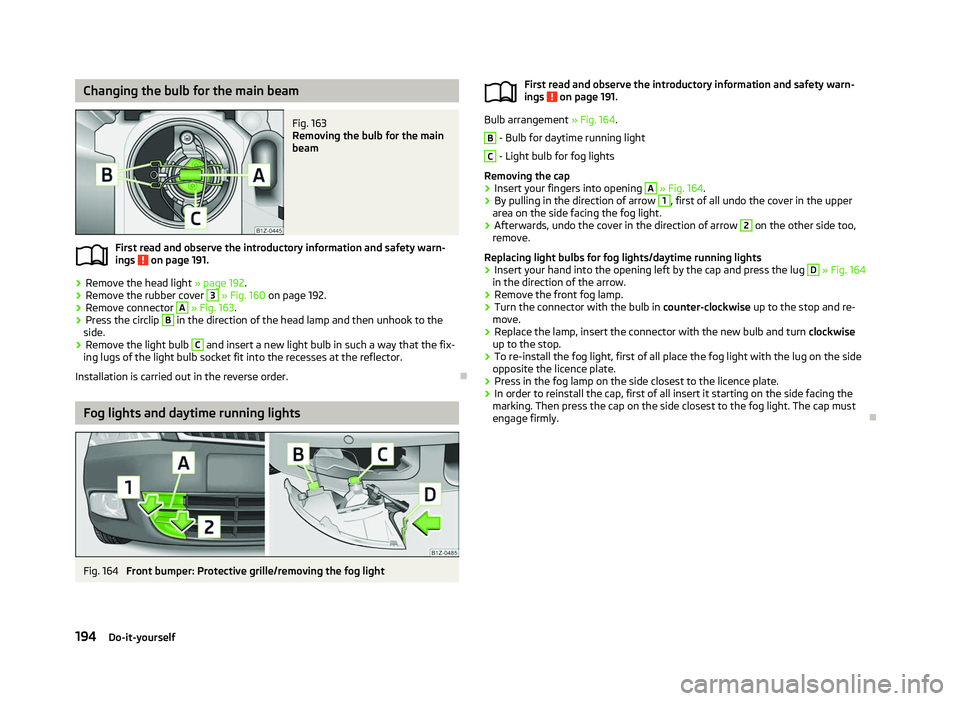
Changing the bulb for the main beam
Fig. 163
Removing the bulb for the main
beam
First read and observe the introductory information and safety warn-
ings on page 191.
›
Remove the head light
» page 192.
› Remove the rubber cover 3
» Fig. 160
on page 192.
› Remove connector A
» Fig. 163.
› Press the circlip B
in the direction of the head lamp and then unhook to the
side.
› Remove the light bulb C
and insert a new light bulb in such a way that the fix-
ing lugs of the light bulb socket fit into the recesses at the reflector.
Installation is carried out in the reverse order. ÐFog lights and daytime running lights
Fig. 164
Front bumper: Protective grille/removing the fog light
ä
First read and observe the introductory information and safety warn-
ings on page 191.
Bulb arrangement
» Fig. 164. B
- Bulb for daytime running light
C
- Light bulb for fog lights
Removing the cap
› Insert your fingers into opening A
» Fig. 164 .
› By pulling in the direction of arrow 1
, first of all undo the cover in the upper
area on the side facing the fog light.
› Afterwards, undo the cover in the direction of arrow 2
on the other side too,
remove.
Replacing light bulbs for fog lights/daytime running lights
› Insert your hand into the opening left by the cap and press the lug D
»
Fig. 164
in the direction of the arrow.
› Remove the front fog lamp.
› Turn the connector with the bulb in
counter-clockwise up to the stop and re-
move.
› Replace the lamp, insert the connector with the new bulb and turn
clockwise
up to the stop.
› To re-install the fog light, first of all place the fog light with the lug on the side
opposite the licence plate.
› Press in the fog lamp on the side closest to the licence plate.
› In order to reinstall the cap, first of all insert it starting on the side facing the
marking. Then press the cap on the side closest to the fog light. The cap must
engage firmly. Ð
ä
194 Do-it-yourself
Page 197 of 218
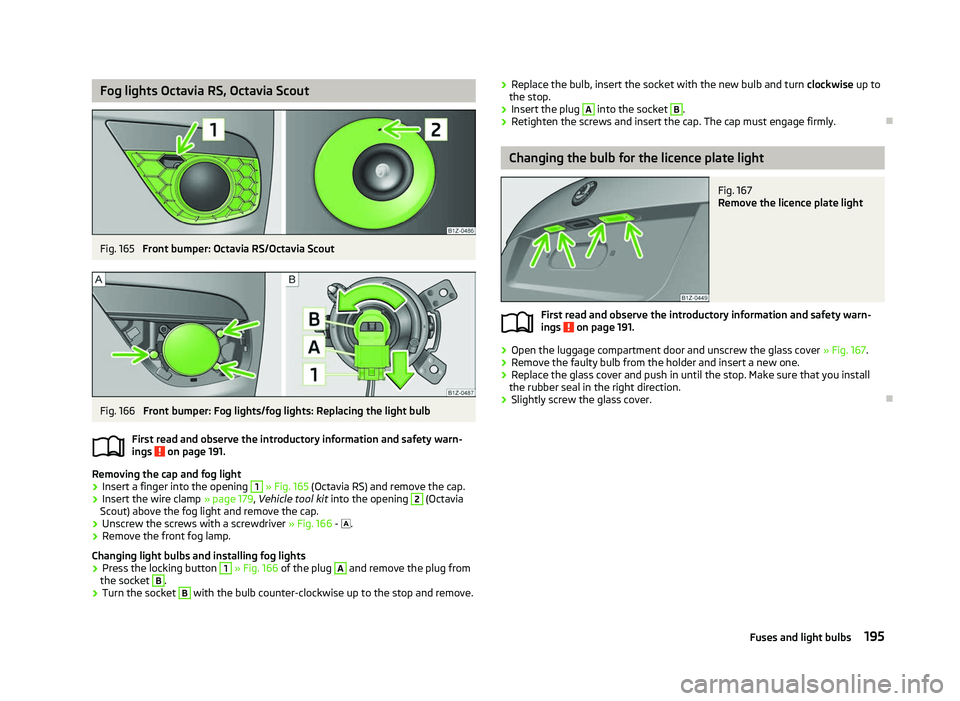
Fog lights Octavia RS, Octavia Scout
Fig. 165
Front bumper: Octavia RS/Octavia Scout Fig. 166
Front bumper: Fog lights/fog lights: Replacing the light bulb
First read and observe the introductory information and safety warn-
ings on page 191.
Removing the cap and fog light
›
Insert a finger into the opening 1
» Fig. 165 (Octavia RS) and remove the cap.
› Insert the wire clamp
» page 179, Vehicle tool kit into the opening 2
(Octavia
Scout) above the fog light and remove the cap.
› Unscrew the screws with a screwdriver
» Fig. 166 - .
› Remove the front fog lamp.
Changing light bulbs and installing fog lights
› Press the locking button 1
» Fig. 166
of the plug A
and remove the plug from
the socket B
.
› Turn the socket B
with the bulb counter-clockwise up to the stop and remove.
ä ›
Replace the bulb, insert the socket with the new bulb and turn
clockwise up to
the stop.
› Insert the plug A
into the socket B
.
› Retighten the screws and insert the cap. The cap must engage firmly. Ð Changing the bulb for the licence plate light
Fig. 167
Remove the licence plate light
First read and observe the introductory information and safety warn-
ings on page 191.
›
Open the luggage compartment door and unscrew the glass cover
» Fig. 167.
› Remove the faulty bulb from the holder and insert a new one.
› Replace the glass cover and push in until the stop. Make sure that you install
the rubber seal in the right direction.
› Slightly screw the glass cover. Ð
ä
195
Fuses and light bulbs
Page 198 of 218
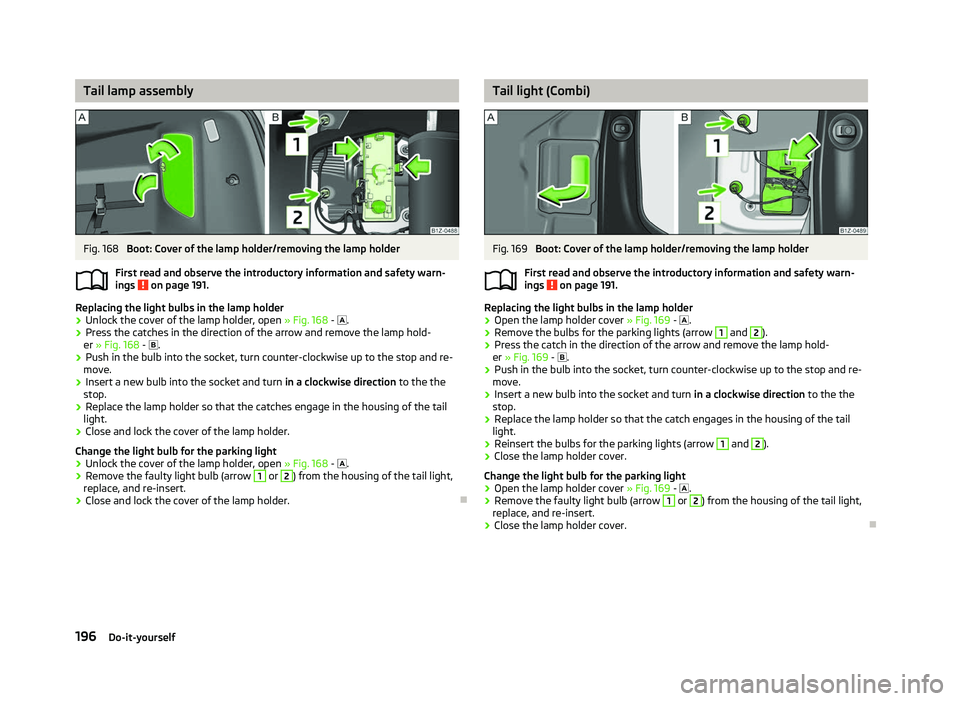
Tail lamp assembly
Fig. 168
Boot: Cover of the lamp holder/removing the lamp holder
First read and observe the introductory information and safety warn-
ings on page 191.
Replacing the light bulbs in the lamp holder
›
Unlock the cover of the lamp holder, open
» Fig. 168 - .
› Press the catches in the direction of the arrow and remove the lamp hold-
er » Fig. 168 - .
› Push in the bulb into the socket, turn counter-clockwise up to the stop and re-
move.
› Insert a new bulb into the socket and turn
in a clockwise direction to the the
stop.
› Replace the lamp holder so that the catches engage in the housing of the tail
light.
› Close and lock the cover of the lamp holder.
Change the light bulb for the parking light
› Unlock the cover of the lamp holder, open
» Fig. 168 - .
› Remove the faulty light bulb (arrow 1
or 2
) from the housing of the tail light,
replace, and re-insert.
› Close and lock the cover of the lamp holder. Ð
ä Tail light (Combi)
Fig. 169
Boot: Cover of the lamp holder/removing the lamp holder
First read and observe the introductory information and safety warn-
ings on page 191.
Replacing the light bulbs in the lamp holder
›
Open the lamp holder cover
» Fig. 169 - .
› Remove the bulbs for the parking lights (arrow 1
and 2
).
› Press the catch in the direction of the arrow and remove the lamp hold-
er » Fig. 169 - .
› Push in the bulb into the socket, turn counter-clockwise up to the stop and re-
move.
› Insert a new bulb into the socket and turn
in a clockwise direction to the the
stop.
› Replace the lamp holder so that the catch engages in the housing of the tail
light.
› Reinsert the bulbs for the parking lights (arrow 1
and 2
).
› Close the lamp holder cover.
Change the light bulb for the parking light
› Open the lamp holder cover
» Fig. 169 - .
› Remove the faulty light bulb (arrow 1
or 2
) from the housing of the tail light,
replace, and re-insert.
› Close the lamp holder cover. Ð
ä
196 Do-it-yourself
Page 210 of 218
Index
A
ABS 96
Warning light 22
Accessories 177
Active steering support 95
Adjusting Exterior mirror 52
Adjusting seats 122
Adjustment Seat 55
Aerial 149
see Radio reception 151
Airbag 129
Deployment 129
Front airbag 130
Head airbag 132
Side airbag 131
Airbag system 129
Air conditioning system Air outlet vents 80
Climatronic 85
Manual air conditioning system 82
Alarm 31
Anti-theft alarm system 31
Antilock brake system 96
Armrest Front 74
rear 60, 75
Ashtray 68
Assistance systems ESC 95
Assist systems ABS 22, 96
Cruise control systems (CCS) 99
EDS and XDS 97
ESC 22Parking aid 98
START/STOP 100
TCS 21, 96
Auto Check Control 17
Automatic driving lamp control 40
Automatic gearbox 102
Dynamic shift programme 105
Emergency programme 106
Information for driving 102
Kickdown 105
Manual shifting of gears on the multifunction steering wheel 104
Parking 103
Selector lever-emergency unlocking 106
Selector lever lock 105
Selector lever positions 103
Starting off 103
Stopping 103
Tiptronic 104
Automatic load deactivation 169
Auxiliary heating (auxiliary heating and ventila- tion) 87
Avoiding damage to your vehicle 143
B
Before setting off 121
Belt tensioners 128
Bonnet Closing 160
Opening 160
Warning light 20
Boot Class
N1 vehicles 61
Cover 63
Emergency unlocking 34
Fastening elements 61
Fixing nets 62
Fixing of the floor covering 63
foldable boot cover (Combi) 64
Light 47see Boot lid 33
Unlocking the boot lid 34
Variable loading floor 64
Boot lid 33
Automatic locking 33
Warning light 21
Brake booster 95
Brake fluid Checking 164
Brakes Brake assist systems 93
Handbrake 95
Running in 139
Warning light 19
Braking Brake fluid 164
Braking assistant 95
Breakdown kit 182
Bulbs Replacing 191
Button in the driver's door Electric power windows 34
C
Car computer see Multifunction display 12
Car jack 179
Carrier 66
Catalytic converter 139
CD changer 119
Central locking button 29
Central locking system 27
lock 29
unlock 28
Changes 177
Changing Engine oil 162
Wheel 179
Charging a vehicle battery 168
208 Index
Page 212 of 218
Environmentally friendly driving 140
ESC Operating principle 95
Warning light 22
Ethanol E85 see fuel 157
F
Fire extinguisher 178
First-aid kit 178
Floor mats 97
Front airbag 130
Front seats 54
Fuel 155
Diesel 158
Ethanol E85 157
Fuel gauge 9
gauge 9
refer to Fuel 155
Refuelling 155
Unleaded petrol 156
Fuel consumption 140
Fuses Assignment 189
Replacing 189
G
Gear Recommended gear 11
General view Cockpit 7
Glow plug system Warning light 23
GSM 109, 112
H
Handbrake 95
Head airbag 132Headlight cleaning system
Headlight cleaning system 50
Headlights Driving abroad 143
Headlight cleaning system 50
Head restraint 58
Heating 80
Defrosting windows 81
Exterior mirror 52
Rear window 47
Recirculated air mode 82
Seats 57
Heating rear window 47
Horn 7
I
Ignition 93
Ignition lock 93
Immobiliser 92
Information display see MAXI DOT 15
Instrument cluster 8
Instrument lighting 43
Interior monitor 32
Internet connection 115
ISOFIX 137
J
Jacking points Raise vehicle 181
Jump-starting 185
L
Lever Main beam 45
Turn signal 45Light
Automatic driving lamp control 40
Cockpit 45
COMING HOME/LEAVING HOME function 41
Daylight driving light 40
Fog lights 42
Fog lights with the function CORNER 42
Hazard warning light system 44
Headlight beam adjustment 44
Headlight flasher 45
Low beam 40
Main beam 45
Parking light 40, 41
Rear fog light 43
Replacing bulbs 191
Tourist light 42
Turn signal 45
Lights Cornering lights 41
switching on and off 40
Warning lights 18
Loads 197
Lock Central locking system 29
Locking Emergency locking 32
Remote control 30
Locking and unlocking from the inside 29
Luggage compartment Folding double hooks 62
Folding hooks 62
M
MAXI DOT 15
Main menu 15
Settings 16
Mirror Automatic dimming interior mirror 52
Exterior mirror 52
210 Index
Page 213 of 218
Manual dimming interior mirror 51
Vanity 47
Mobile phone 107, 109, 112
Connecting to the hands-free system 110, 113
Multifunction display Functions 12
Memory 12
Operation 13
Multimedia 118
AUX-IN 119
MDI 119
N
Net partition 65
O
Oil refer to Engine oil 161
Onboard computer see Multifunction display 12
Operation in winter De-icing windows 151
Diesel fuel 158
Vehicle battery 167
Outside temperature 13
Overview Engine compartment 160
Warning lights 18
P
Paint see Paint damage 150
Paint damage 150
Parking Parking aid 98
Parking ticket holder 77
Passive Safety 121
Periodic wiping 49Petrol
refer to Fuel 156
Polishing the paintwork refer to Taking care of your vehicle 150
Power steering 92
Power windows Button in the driver's door 35
Button in the front passenger door 36
Button in the rear doors 36
Operational faults 37
Preservation refer to Taking care of your vehicle 150
R
Radiator fan 164
Radio reception Aerial 151
Functional fault 151
Raise vehicle 181
Rear mirror Automatic dimming interior mirror 52
Exterior mirror 52
Manual dimming interior mirror 51
Recirculated air mode Climatronic 86
Manual air conditioning system 84
Recommended gear 11
Refuelling 155
Fuel 155
Regulation Headlight beam 44
Remote control 30
Synchronisation process 31
Remote control key Replacing the battery 26
Removable through-loading bag 76
Removing the seats 59
Replacement of parts 177Replacing
Bulbs 191
Fuses 189
Vehicle battery 168
Windscreen wiper blade 51
Replenishing Coolant 163
Engine oil 161
Windscreen washer fluid 165
Roof luggage rack Attachment points 67
Roof rack system Roof load 67
Running in Brake pads 139
Engine 139
The first 1
500 km 139
Tyres 139
S
Safe securing system 28
Safety 121
Child safety 135
Child safety seats 135
Head restraints 58
ISOFIX 137
TOP TETHER 137
Save electrical energy 140
Seat Adjusting 55
Seat belt Warning light 19
Seat belt height adjuster 128
Seat belts Belt tensioners 128
Cleaning 154
fastening and unfastening 127
Height adjustment 128
211
Index