roof SKODA OCTAVIA 2006 Owner´s Manual
[x] Cancel search | Manufacturer: SKODA, Model Year: 2006, Model line: OCTAVIA, Model: SKODA OCTAVIA 2006Pages: 218, PDF Size: 5.48 MB
Page 5 of 218
Table of Contents
Abbreviations
Using the system
Cockpit 7
Overview 6
Instruments and warning lights 8
Instrument cluster 8
Multifunction display (onboard computer) 12
MAXI DOT (information display) 15
Warning lights 18
Unlocking and locking 26
Vehicle key 26
Child safety lock 27
Central locking system 27
Remote control 30
Anti-theft alarm system 31
Boot lid 33
Electric power windows 34
Electric sliding/tilting roof 37
Lights and visibility 39
Lights 39
Interior light 45
Visibility 47
Windscreen wipers and washers 48
Rear window 51
Seats and Stowage 54
Front seats 54
Seat heaters 57
Head restraints 58
Rear seats 59
Boot 60Variable loading floor in the boot 64
Net partition (Combi) 65
Roof rack system 66
Cup holder 68
Ashtray 68
Cigarette lighter, 12-volt power socket 69
Storage compartments 70
Clothes hooks 77
Parking ticket holder 77
Heating and air conditioning system 79
Heating and air conditioning system 79
Air outlet vents 80
Heating 80
Air conditioning system (manual air conditioning
system) 82
Climatronic (automatic air conditioning
system) 85
Auxiliary heating (auxiliary heating and
ventilation) 87
Starting-off and Driving 91
Starting and stopping the engine 91
Brakes and brake assist systems 93
Shifting (manual gearbox) 97
pedals 97
Parking aid 98
Cruise control system (CCS) 99
START/STOP 100
Automatic gearbox 102
Automatic gearbox 102
Communication 107
Mobile phones and two-way radio systems 107
Operating the phone on the multifunction
steering wheel 108
Symbols in the information display 109
Phone Phonebook 109
Universal telephone preinstallation GSM II 109
Universal telephone preinstallation GSM IIl 112Voice control 116
Multimedia 118
Safety
Passive Safety 121
General information 121
Correct seated position 122
Seat belts 125
Seat belts 125
Airbag system 129
Description of the airbag system 129
Front airbags 130
Side airbags 131
Head airbags 132
Deactivating airbags 133
Transporting children safely 135
Child seat 135
Driving Tips
Driving and the Environment 139
The first 1 500 km 139
Catalytic converter 139
Economical and environmentally friendly
driving 140
Environmental compatibility 142
Driving abroad 143
Avoiding damage to your vehicle 143
Driving through water on the street 144
Towing a trailer 145
Towing a trailer 145
General Maintenance
Taking care of and cleaning the vehicle 148
Taking care of your vehicle 148
3
Table of Contents
Page 18 of 218
■
Phone » page 107
■ Aux.
Heating » page 87
■ Assistants » page 41
■ Vehicle status » page 17
■ Settings » page 16
The menu items Audio and Navigation are only displayed when the factory-fitted
radio or navigation system is switched on.
The menu item Aux. heating is only displayed if a factory-fitted auxiliary heating
is installed.
The menu point Assistants is only then displayed, if the vehicle is fitted with cor-
nering lights. Note
■ If warning messages are shown in the information display, these messages
must be confirmed with the button B
» Fig. 7 on the windscreen wiper lever or
with the button D
on the multifunction steering wheel to call up the main menu.
■ If the information display is not activated at that moment, the menu always
shifts to one of the higher levels after approx. 10
seconds.ÐSettings
First read and observe the introductory information and safety warn-
ings on page 15.
You can change certain settings by means of the information display. The current
setting is shown on the information display in the respective menu at the top be-
low the line.
The following information can be selected (depending on the equipment installed
on the vehicle):
■ Language
■ MFD Data
■ Convenience
■ Lights & Vision
■ Time
■ Winter tyres
■ Units
■ Assistants
■ Alternative speed displayed
ä ■
Service
■ Factory setting
■ Back
Select the menu item Back to return to one level higher in the menu.
Language
You can set the language for the warning and information texts here.
MFD displays
Activate or deactivate certain displays of the multifunction display here.
Comfort
This is where the following functions can be activated, deactivated or adjusted:
Rain closing Switch on/off the function for automatically closing the
window and panoramic tilt/slide sunroof in a locked ve-
hicle when it starts raining
a)
. If the function is set and it
is not raining, the windows including the panoramic tilt/
slide sunroof will close automatically after approx.
12 hours.
Central locking Switch on/off the central locking and automatic locking
function.
ATA confirm Switch on/off the audible signal indicating activation of
the anti-theft alarm system.
Window op. Only convenience mode for the driver window or for all
of the windows can be adjusted here.
Mirror down Switch on/off the function for mirror lowering on the
front passenger side when engaging the reverse gear b)
.
Mirror adjust. Switch on/off the function for left and right exterior
mirror setting simultaneously.
Factory setting Restore the Convenience factory setting. a)
This function is only available on vehicles with a rain sensor.
b) This function is only available on vehicles with an electrically adjustable driver seat.
Lights and visibility
This is where the following functions can be activated, deactivated or adjusted:
Coming Home Switch on/off and adjust the light duration of the
COMING HOME
function.
Leaving Home Switch on/off and adjust the light duration of the
LEAVING HOME function. £16
Using the system
Page 31 of 218
›
The windows open while the key
is held in the unlock position.
› The warning light in the driver door stops flashing if the car is not fitted with an
anti-theft alarm system
» page 31.Note
If the vehicle is equipped with an anti-theft alarm system, you must insert the key
into the ignition lock and switch the ignition on within 15 seconds after unlocking
the door in order to deactivate the anti-theft alarm system. The alarm is trig-
gered if the ignition is not switched on within 15 seconds. ÐLocking the vehicle with the key
› Turn the key in the locking cylinder of the driver's door in the opposite direction
of travel (lock position) B
» Fig. 11
on page 28.
› The doors, the boot lid and the fuel filler flap are locked.
› The switched on interior lights will switch off over the door contact.
› The windows and the electric sliding/tilting roof close while the key
is held in
the lock position.
› The safe securing system is immediately activated.
› The warning light in the driver door begins flashing. Note
If the driver's door has been opened, the vehicle cannot be locked. ÐVehicle locking/unlocking from the inside
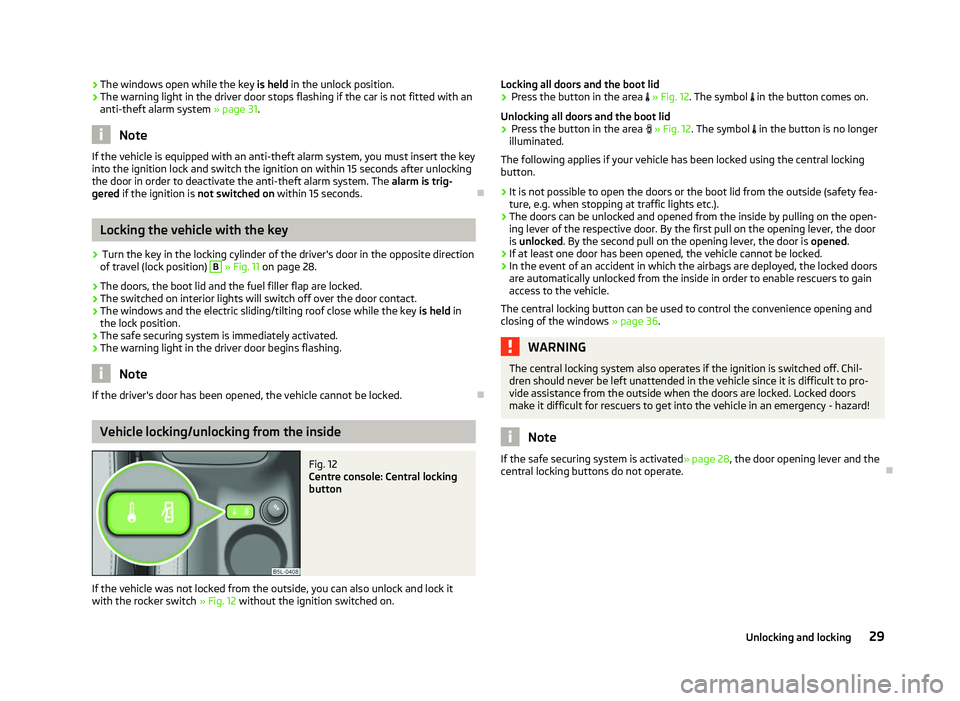
Fig. 12
Centre console: Central locking
button
If the vehicle was not locked from the outside, you can also unlock and lock it
with the rocker switch » Fig. 12 without the ignition switched on. Locking all doors and the boot lid
› Press the button in the area » Fig. 12. The symbol
in the button comes on.
Unlocking all doors and the boot lid
› Press the button in the area » Fig. 12. The symbol
in the button is no longer
illuminated.
The following applies if your vehicle has been locked using the central locking
button.
› It is not possible to open the doors or the boot lid from the outside (safety fea-
ture, e.g. when stopping at traffic lights etc.).
› The doors can be unlocked and opened from the inside by pulling on the open-
ing lever of the respective door. By the first pull on the opening lever, the door
is unlocked . By the second pull on the opening lever, the door is opened.
› If at least one door has been opened, the vehicle cannot be locked.
› In the event of an accident in which the airbags are deployed, the locked doors
are automatically unlocked from the inside in order to enable rescuers to gain
access to the vehicle.
The central locking button can be used to control the convenience opening and
closing of the windows »
page 36. WARNING
The central locking system also operates if the ignition is switched off. Chil-
dren should never be left unattended in the vehicle since it is difficult to pro-
vide assistance from the outside when the doors are locked. Locked doors
make it difficult for rescuers to get into the vehicle in an emergency - hazard! Note
If the safe securing system is activated » page 28, the door opening lever and the
central locking buttons do not operate. Ð
29
Unlocking and locking
Page 34 of 218
Note
■ The working life of the alarm siren is 5 years.
■ Before leaving the car, it must be checked that all of the windows, doors and
the electric sliding/tilting roof are properly closed to ensure the full functionality
of the anti-theft alarm system. ■ Coding of the radio remote control and the receiver unit precludes the use of
the radio remote control from other vehicles. ÐInterior monitor and towing protection monitoring
Fig. 14
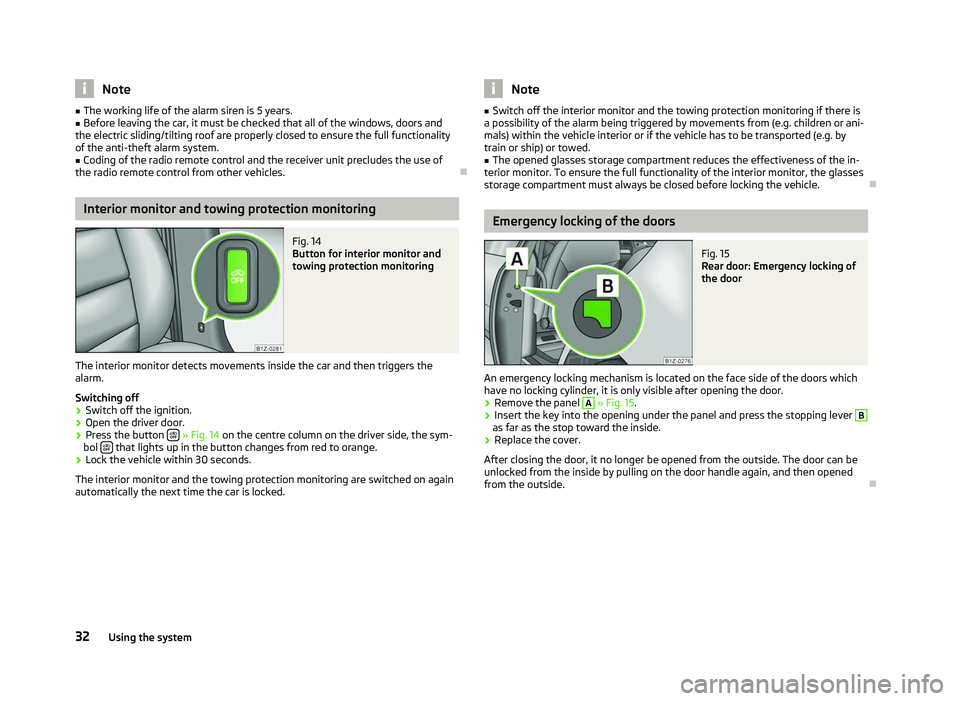
Button for interior monitor and
towing protection monitoring
The interior monitor detects movements inside the car and then triggers the
alarm.
Switching off
› Switch off the ignition.
› Open the driver door.
› Press the button
» Fig. 14 on the centre column on the driver side, the sym-
bol that lights up in the button changes from red to orange.
› Lock the vehicle within 30 seconds.
The interior monitor and the towing protection monitoring are switched on again
automatically the next time the car is locked. Note
■ Switch off the interior monitor and the towing protection monitoring if there is
a possibility of the alarm being triggered by movements from (e.g. children or ani-
mals) within the vehicle interior or if the vehicle has to be transported (e.g. by
train or ship) or towed. ■ The opened glasses storage compartment reduces the effectiveness of the in-
terior monitor. To ensure the full functionality of the interior monitor, the glasses
storage compartment must always be closed before locking the vehicle. Ð Emergency locking of the doors
Fig. 15
Rear door: Emergency locking of
the door
An emergency locking mechanism is located on the face side of the doors which
have no locking cylinder, it is only visible after opening the door. › Remove the panel A
» Fig. 15.
› Insert the key into the opening under the panel and press the stopping lever B
as far as the stop toward the inside.
› Replace the cover.
After closing the door, it no longer be opened from the outside. The door can be
unlocked from the inside by pulling on the door handle again, and then opened
from the outside. Ð
32 Using the system
Page 39 of 218
Operational faults
First read and observe the introductory information and safety warn-
ings on page 34.
Electrically operated power windows do not operate
If the battery has been disconnected and then reconnected while the window
was opened, the electrically operated power windows do not operate. The system
must be activated. Proceed as follows in order to re-establish the function:
› switch on the ignition;
› pull the top edge of the button in the driver's door to close the window;
› release the button;
› pull the relevant button upwards again for approx. 3
seconds.
Operation in winter
In the winter, ice accumulating on the surface of the window may cause there to
be more resistance when closing the window. The window will stop and move
back several centimetres.
It is necessary to deactivate the force limiter to close the window » page 36.ÐElectric sliding/tilting roof
Introductory information
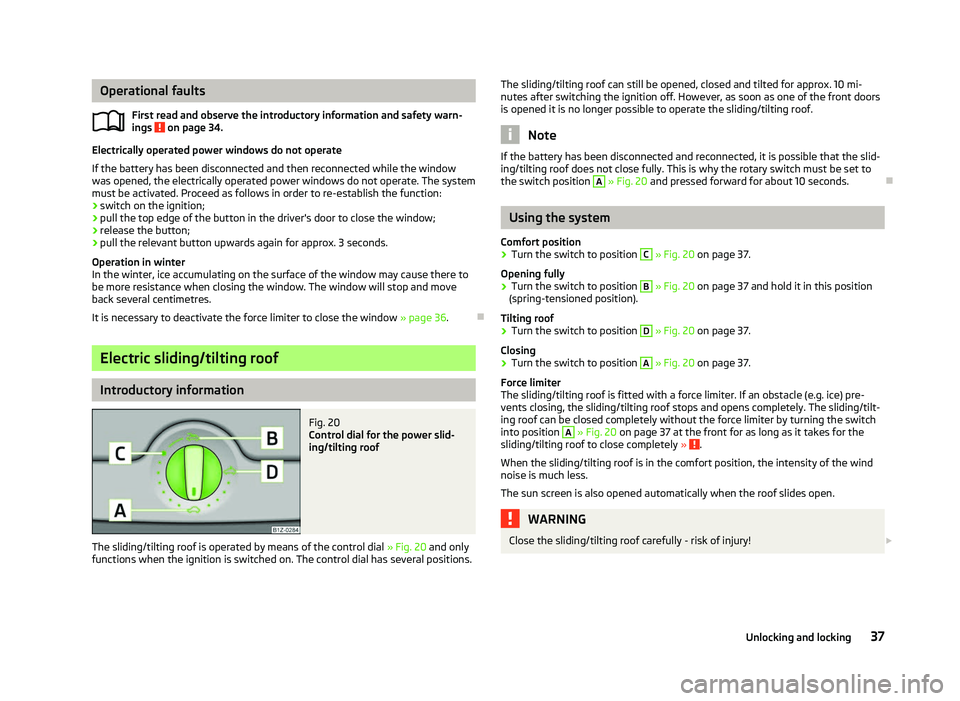
Fig. 20
Control dial for the power slid-
ing/tilting roof
The sliding/tilting roof is operated by means of the control dial » Fig. 20
and only
functions when the ignition is switched on. The control dial has several positions.
ä
The sliding/tilting roof can still be opened, closed and tilted for approx. 10
mi-
nutes after switching the ignition off. However, as soon as one of the front doors
is opened it is no longer possible to operate the sliding/tilting roof. Note
If the battery has been disconnected and reconnected, it is possible that the slid-
ing/tilting roof does not close fully. This is why the rotary switch must be set to
the switch position A
» Fig. 20 and pressed forward for about 10
seconds.Ð Using the system
Comfort position
› Turn the switch to position C
» Fig. 20 on page 37
.
Opening fully
› Turn the switch to position B
» Fig. 20 on page 37
and hold it in this position
(spring-tensioned position).
Tilting roof
› Turn the switch to position D
» Fig. 20 on page 37
.
Closing
› Turn the switch to position A
» Fig. 20 on page 37
.
Force limiter
The sliding/tilting roof is fitted with a force limiter. If an obstacle (e.g. ice) pre-
vents closing, the sliding/tilting roof stops and opens completely. The sliding/tilt-
ing roof can be closed completely without the force limiter by turning the switch
into position A
» Fig. 20 on page 37 at the front for as long as it takes for the
sliding/tilting roof to close completely » .
When the sliding/tilting roof is in the comfort position, the intensity of the wind
noise is much less.
The sun screen is also opened automatically when the roof slides open. WARNING
Close the sliding/tilting roof carefully - risk of injury! £
37
Unlocking and locking
Page 40 of 218
CAUTION
During the winter it may be necessary to remove any ice and snow in the vicinity
of the sliding/tilting roof before opening it to prevent any damage to the opening
mechanism and seal. ÐConvenience operation
An open sliding/tilting roof can also be closed from the outside.
› Press and hold the lock button
on the remote control key or keep the key in
the lock cylinder of the driver's door in the locked position » .
The closing operation stops immediately when you release the key or the lock
button. WARNING
Close the sliding/tilting roof carefully - risk of injury! The force limiter does not
operate with the convenience closing. ÐEmergency operation
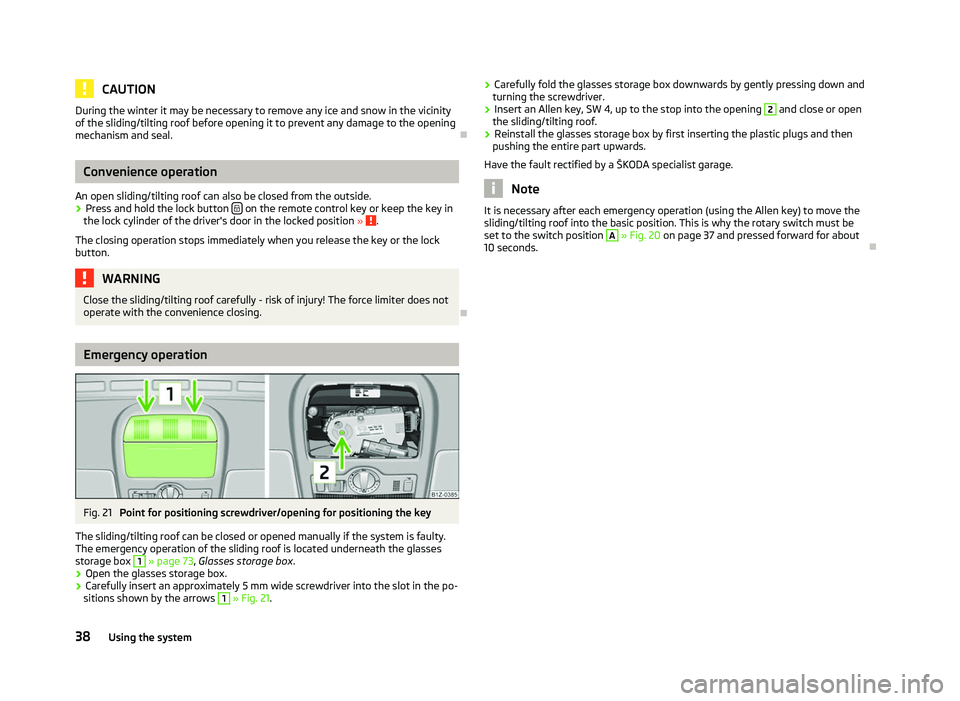
Fig. 21
Point for positioning screwdriver/opening for positioning the key
The sliding/tilting roof can be closed or opened manually if the system is faulty.
The emergency operation of the sliding roof is located underneath the glasses
storage box 1
» page 73
, Glasses storage box .
› Open the glasses storage box.
› Carefully insert an approximately 5 mm wide screwdriver into the slot in the po-
sitions shown by the arrows 1
» Fig. 21. ›
Carefully fold the glasses storage box downwards by gently pressing down and
turning the screwdriver.
› Insert an Allen key, SW 4, up to the stop into the opening 2
and close or open
the sliding/tilting roof.
› Reinstall the glasses storage box by first inserting the plastic plugs and then
pushing the entire part upwards.
Have the fault rectified by a
ŠKODA specialist garage. Note
It is necessary after each emergency operation (using the Allen key) to move the
sliding/tilting roof into the basic position. This is why the rotary switch must be
set to the switch position A
» Fig. 20 on page 37 and pressed forward for about
10 seconds. Ð38
Using the system
Page 68 of 218
›
First pull the cross rod back slightly on the one side and then on the other side
and remove it from the mounts C
.
› Hold the cross rod in such a way that the net partition can slowly roll up into
the housing B
without being damaged.
› Fold the storage compartment cover D
downwards.
If you wish to use the entire boot, the foldable boot cover can be re-
moved » Fig. 56 on page 64. ÐUsing the net partition behind the front seats
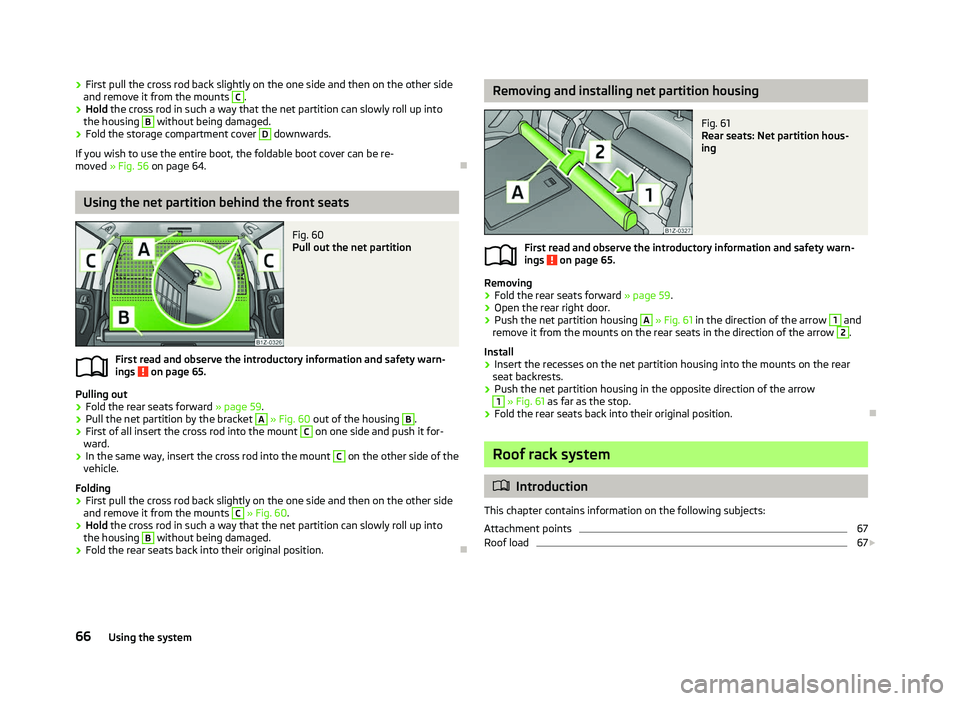
Fig. 60
Pull out the net partition
First read and observe the introductory information and safety warn-
ings on page 65.
Pulling out
› Fold the rear seats forward
» page 59.
› Pull the net partition by the bracket A
» Fig. 60
out of the housing B
.
› First of all insert the cross rod into the mount C
on one side and push it for-
ward.
› In the same way, insert the cross rod into the mount C
on the other side of the
vehicle.
Folding
› First pull the cross rod back slightly on the one side and then on the other side
and remove it from the mounts C
» Fig. 60
.
› Hold the cross rod in such a way that the net partition can slowly roll up into
the housing B
without being damaged.
› Fold the rear seats back into their original position. Ð
ä Removing and installing net partition housing
Fig. 61
Rear seats: Net partition hous-
ing
First read and observe the introductory information and safety warn-
ings on page 65.
Removing
› Fold the rear seats forward
»
page 59.
› Open the rear right door.
› Push the net partition housing A
» Fig. 61 in the direction of the arrow 1
and
remove it from the mounts on the rear seats in the direction of the arrow 2
.
Install
› Insert the recesses on the net partition housing into the mounts on the rear
seat backrests.
› Push the net partition housing in the opposite direction of the arrow 1
» Fig. 61 as far as the stop.
› Fold the rear seats back into their original position. Ð Roof rack system
ä
Introduction
This chapter contains information on the following subjects:
Attachment points 67
Roof load 67
£
ä
66 Using the system
Page 69 of 218
WARNING
■ The items which you transport on the roof bar system must be reliably at-
tached - risk of accident!
■ Always secure the load with appropriate and undamaged lashing straps or
tensioning straps. ■ Distribute the load evenly over the roof rack system.
■ The handling properties of your vehicle change when you transport heavy or
bulky items on the roof bar system as a result of the displacement of the cen-
tre of gravity and the increased wind attack area - risk of accident! The style
of driving and speed must therefore be adapted to the current circumstances. ■ Avoid abrupt and sudden driving/braking manoeuvres.
■ Adjust the speed and driving style to the visibility, weather, road and traffic
conditions. ■ The permissible roof load, permissible axle loads and gross permissible
weight of your vehicle must not be exceeded under any circumstances - risk
of accident! CAUTION
■ Only use roof rack systems approved by ŠKODA.
■ If other roof rack systems are used or if the roof bars are not fitted correctly,
any resulting damage to the vehicle is not covered by the warranty. It is therefore
essential that the supplied fitting instructions for the roof rack system are ob-
served.
■ On models fitted with a power sliding/tilting roof, ensure that the opened slid-
ing/tilting roof does not strike any items of luggage transported on the roof. ■ Ensure that the boot lid does not hit the roof load when opened.
■ The height of the vehicle changes after mounting a roof luggage rack system
and the load that is secured to it. Compare the vehicle height with available clear-
ances, such as underpasses and garage doors.
■ Always remove the roof luggage rack system before entering an automated car
wash. ■ Ensure the roof aerial is not impaired by the secured load. For the sake of the environment
The increased aerodynamic drag results in a higher fuel consumption. Note
If the vehicle is not factory-equipped with a roof rack, it can be purchased from
the
ŠKODA Original Accessories. Ð Attachment points
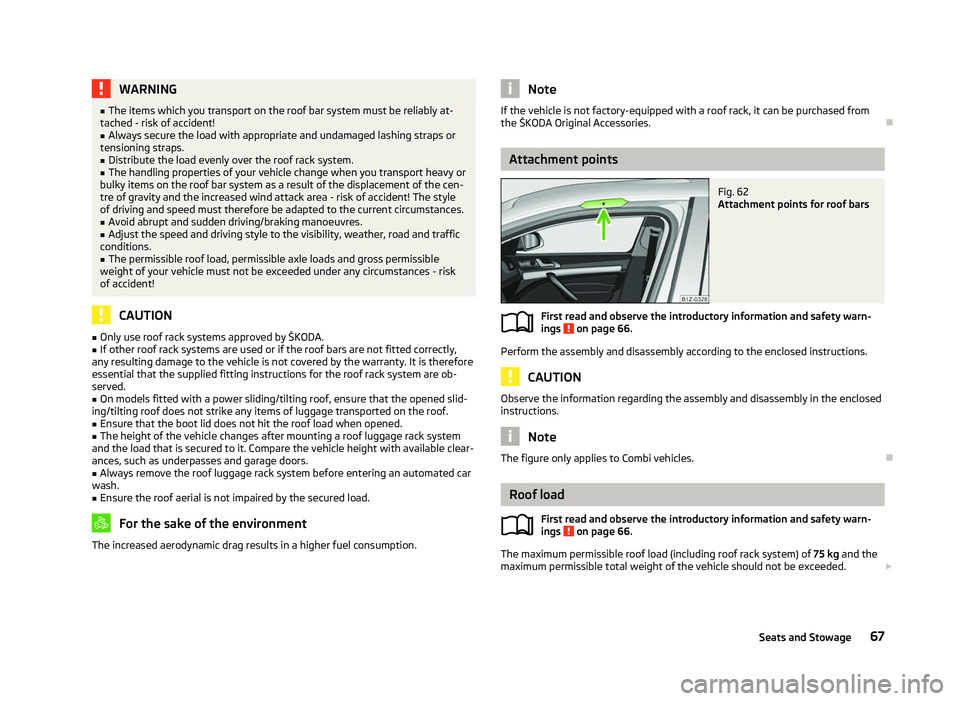
Fig. 62
Attachment points for roof bars
First read and observe the introductory information and safety warn-
ings on page 66.
Perform the assembly and disassembly according to the enclosed instructions.
CAUTION
Observe the information regarding the assembly and disassembly in the enclosed
instructions. Note
The figure only applies to Combi vehicles. Ð Roof load
First read and observe the introductory information and safety warn-
ings on page 66.
The maximum permissible roof load (including roof rack system) of
75 kg and the
maximum permissible total weight of the vehicle should not be exceeded. £
ä
ä
67
Seats and Stowage
Page 70 of 218
The full permissible roof load cannot be used if a roof rack system with a lower
load carrying capacity is used. In this case, the roof rack system must only be loa-
ded up to the maximum weight limit specified in the fitting instructions.
ÐCup holder
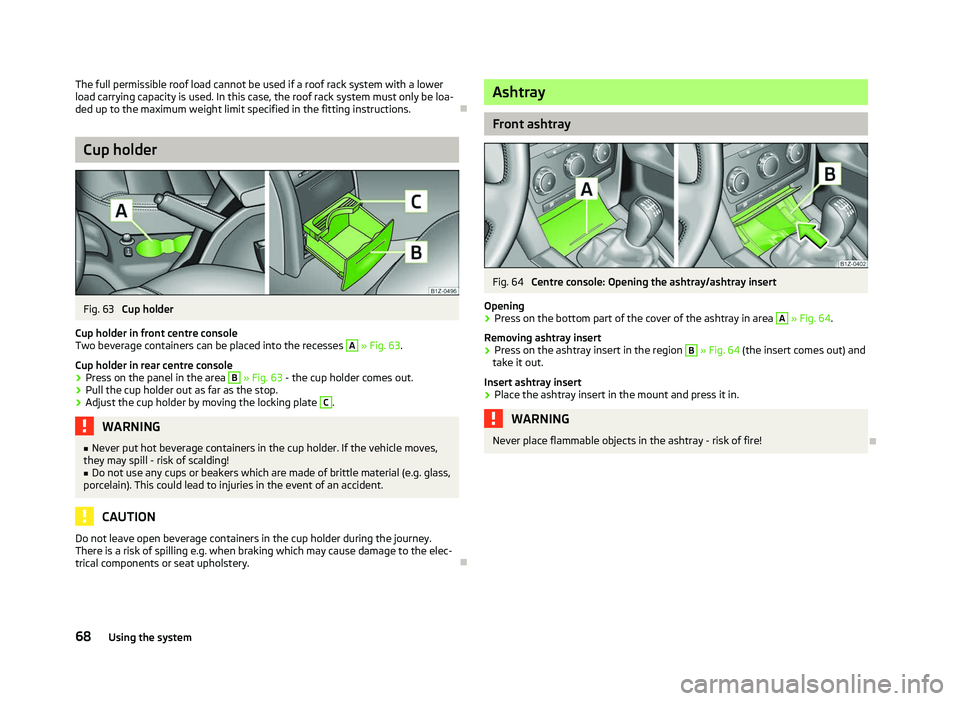
Fig. 63
Cup holder
Cup holder in front centre console
Two beverage containers can be placed into the recesses A
» Fig. 63.
Cup holder in rear centre console
› Press on the panel in the area B
» Fig. 63 - the cup holder comes out.
› Pull the cup holder out as far as the stop.
› Adjust the cup holder by moving the locking plate C
.
WARNING
■ Never put hot beverage containers in the cup holder. If the vehicle moves,
they may spill - risk of scalding!
■ Do not use any cups or beakers which are made of brittle material (e.g. glass,
porcelain). This could lead to injuries in the event of an accident. CAUTION
Do not leave open beverage containers in the cup holder during the journey.
There is a risk of spilling e.g. when braking which may cause damage to the elec-
trical components or seat upholstery. Ð Ashtray
Front ashtray
Fig. 64
Centre console: Opening the ashtray/ashtray insert
Opening
› Press on the bottom part of the cover of the ashtray in area A
» Fig. 64
.
Removing ashtray insert
› Press on the ashtray insert in the region B
» Fig. 64
(the insert comes out) and
take it out.
Insert ashtray insert
› Place the ashtray insert in the mount and press it in. WARNING
Never place flammable objects in the ashtray - risk of fire! Ð
68 Using the system
Page 86 of 218
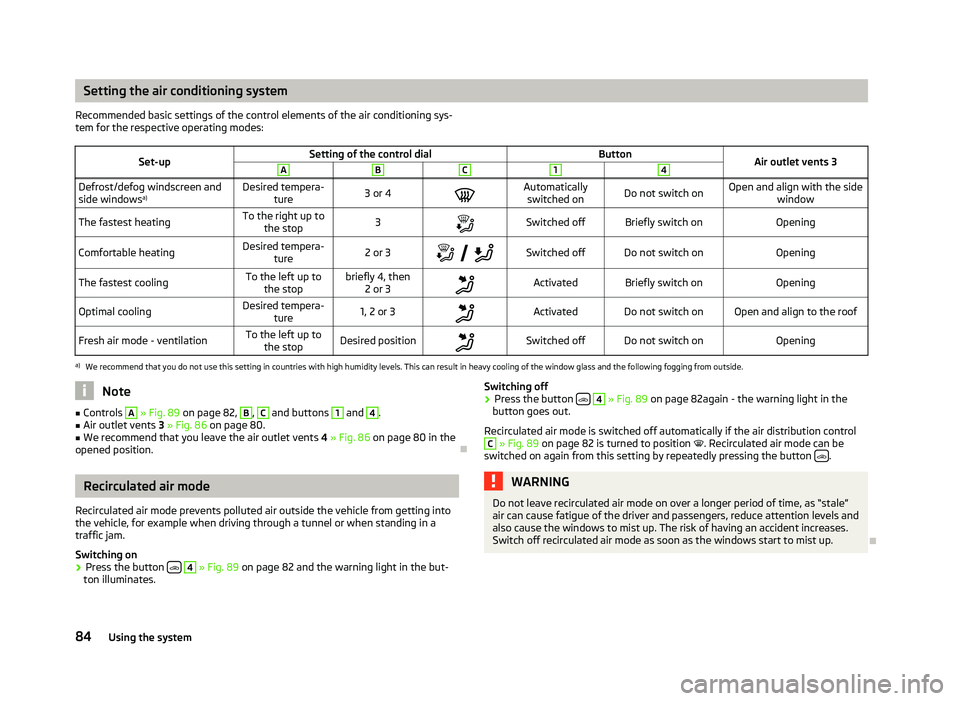
Setting the air conditioning system
Recommended basic settings of the control elements of the air conditioning sys-
tem for the respective operating modes:
Set-up Setting of the control dial
Button
Air outlet vents 3 A B C 1 4
Defrost/defog windscreen and
side windows
a) Desired tempera-
ture 3 or 4
Automatically
switched on Do not switch on Open and align with the side
window
The fastest heating To the right up to
the stop 3
Switched off Briefly switch on
Opening
Comfortable heating Desired tempera-
ture 2 or 3
Switched off Do not switch on
Opening
The fastest cooling To the left up to
the stop briefly 4, then
2 or 3 Activated Briefly switch on
Opening
Optimal cooling Desired tempera-
ture 1, 2 or 3
Activated Do not switch on Open and align to the roof
Fresh air mode - ventilation To the left up to
the stop Desired position
Switched off Do not switch on
Openinga)
We recommend that you do not use this setting in countries with high humidity levels. This can result in heavy cooling of the window glass and the following fogging from outside. Note
■ Controls A
» Fig. 89
on page 82, B
, C
and buttons 1
and 4
.
■ Air outlet vents 3 » Fig. 86 on page 80.
■ We recommend that you leave the air outlet vents 4 » Fig. 86 on page 80 in the
opened position. ÐRecirculated air mode
Recirculated air mode prevents polluted air outside the vehicle from getting into
the vehicle, for example when driving through a tunnel or when standing in a
traffic jam.
Switching on
› Press the button
4
» Fig. 89
on page 82 and the warning light in the but-
ton illuminates. Switching off
› Press the button
4
» Fig. 89
on page 82again - the warning light in the
button goes out.
Recirculated air mode is switched off automatically if the air distribution control C
» Fig. 89
on page 82 is turned to position . Recirculated air mode can be
switched on again from this setting by repeatedly pressing the button .
WARNING
Do not leave recirculated air mode on over a longer period of time, as “stale”
air can cause fatigue of the driver and passengers, reduce attention levels and
also cause the windows to mist up. The risk of having an accident increases.
Switch off recirculated air mode as soon as the windows start to mist up. Ð
84 Using the system