boot SKODA OCTAVIA 2007 1.G / (1U) Owner's Manual
[x] Cancel search | Manufacturer: SKODA, Model Year: 2007, Model line: OCTAVIA, Model: SKODA OCTAVIA 2007 1.G / (1U)Pages: 288, PDF Size: 15.19 MB
Page 31 of 288
Instruments and Indicator/Warning Lights
30
The following text will be displayed in the information display*:
STOP! Oil Pressure Engine off! Owner's manual
WARNING
•If you must stop for technical reasons, then park the vehicle at a safe
distance from the traffic and switch off the engine and switch on the hazard
warning light system ⇒ page 55.
•The red oil pressure light is not an oil level indicator! One should
therefore check the oil level at regular intervals, preferably after every refu-
eling stop.
Bonnet
The warning light comes on if the bonnet is unlocked.
The warning light comes on even when the ignition is switched off. The warning
light goes out about 15 seconds after locking the vehicle.
Open door*
The warning light comes on if one or several door s are opened or if the boot lid
is opened.
The warning light on vehicles fitted wi th information display comes on when
switching the ignition off. The warning li ght goes out about 15 seconds after locking
the vehicle.
The warning light on vehicles fitted wi th information display goes out after
switching the ignition off.
Engine oil level*
Warning light lights up
If the warning light
lights up, the quantity of oil in the engine is probably too low.
Check as soon as possible the oil level or top up ⇒page 213 with engine oil.
A peep sounds as an additional warning signal.
The following text will be displayed in the information display*: Check oil level!
The warning light will go out if the bonnet is left open for more than 30 seconds. If
no engine oil has been replenished, the warning light will come on again after
driving about 100 km.
Warning light
flashes
A fault on the engine oil level sensor is indicated additionally by an audible signal
and the warning light coming on several times after the ignition has been switched
on.
In this case have the engine inspecte d without delay by a specialist garage.
The following text will be displayed in the information display*: Oil sensor workshop!
Tyre inflation pressure*
The warning light lights up, if there is a substantial drop in inflation pressure in
one of the tyres. Reduce the speed and check or correct as soon as possible the
inflation pressure in the tyres ⇒page 223.
A peep sounds as an additional warning signal.
If the warning light flashes, there is a system fault. Visit the nearest specialist garage
and have the fault rectified.
Further information about tyre pressure-control system ⇒page 187.
NKO A5 20 MR08.book Page 30 Wednesday, April 11, 2007 2:54 PM
Page 38 of 288
Unlocking and locking37
Using the systemSafetyDriving TipsGeneral MaintenanceBreakdown assistanceTechnical Data
So long as the child safety lock is switched
on it is not possible to open the door
from the inside with the door opening lever. In this case the door can be opened
only from the outside.
Central locking system
Description
Unlocking or locking the vehicle causes all the doors and the fuel filler flap* to be
unlocked or locked at the same time by th e central locking system. The boot lid is
unlocked when opening. It can be opened by pressing the ha nd grip above the
licence plate ⇒page 40, fig. 29 .
Operation of the central locking system is possible:
•from the outside using the vehicle key ⇒page 38,
•using the buttons for the central locking system ⇒page 39,
•by using the remote control ⇒page 42.
Indicator light in the driver's door on vehicles without anti-theft alarm system
After the car is locked, the indicator light flashes after 2 seconds.
After the car is locked with the deactivate d safe securing system, the indicator light
flashes only after 30 seconds.
Indicator light in the driver's door on vehicles with anti-theft alarm system
After locking the vehicle the indicator light flashes for 2 seconds fast, then more
slowly.
If the vehicle is locked and the safe securing system ⇒page 38 is not operating, the
indicator light in the driver door flashes for about 2 seconds fast, goes out and starts
to flash slowly after about 30 seconds.
If the indicator light first of all flashes fast for about 2 seconds, afterwards lights up
for about 30 seconds and then flashes slowly, there is a fault in the system of the
central locking or the interior monitor* ⇒page 44. Contact a specialist garage to
obtain assistance. Convenience operation of windows
One can open and close the electrically powered windows when unlocking and
locking the vehicle
⇒page 47, “Window convenience operation”.
Opening a single door*
This function allows one to just unlock the driver's door. The other doors and the
fuel filler flap* remain locked and are only unlocked after repetitive unlocking.
If you wish, you can have your Škoda Dealer activate the function of the single door
opening mode.
Automatic locking*
All the doors and the boot lid are locked automatically once the car reaches a speed
of about 15 km/h.
If the ignition key is withdrawn, the car is then automatically unlocked again. In
addition, it is possible for the driver to unlock the car by pressing the central locking
button
or by pulling the door opening lever.
If you wish, your Škoda Deal er can activate the function of the automatic locking
mode.
WARNING
Locking the doors prevents involuntary opening in an exceptional situation
(an accident). Locked doors prevent unwanted entry into the vehicle from
outside, for example at road crossings. Locked doors do, however, make it
more difficult for rescuers to get into the vehicle in an emergency - danger to
life!
Note
•In the event of an accident in which the airbags are deployed, the locked doors
are automatically unlocked in order to enable rescuers to gain access to the vehicle.
•Only the front doors can be unlocked and locked using the key if the central
locking system fails. You can lock or unlock manually the other doors and the boot
lid.
−Emergency locking of the door ⇒page 40.
NKO A5 20 MR08.book Page 37 Wednesday, April 11, 2007 2:54 PM
Page 39 of 288
Unlocking and locking
38
− Emergency unlocking of the boot lid ⇒page 41.
Safe securing
The central locking system is equipped with a safe securing system. Locking the
vehicle from the outside causes the door lock s to be automatically blocked. It is not
possible to open the doors with the door handle either from the inside or from the
outside. This acts as an effective deterrent for attempts to break into your vehicle.
You can deactivate the safe securing system. This is done by locking the vehicle with
the key or radio-operated key twice within 2 seconds.
If the safe securing system is not operating:
•the indicator light in the driver door flashes for about 2 seconds fast, goes out
and starts to flash slowly after about 30 seconds,
•is the fuel filler flap unlocked.
The safe securing system is again activate d the next time the vehicle is unlocked and
locked again.
The doors can be opened from the inside if the vehicle is locked and the safe
securing system is deactivated:
•The door is unlocked by actuating the door-opening lever.
•The door opens upon actuating the door-opening lever again.
WARNING
If the vehicle is locked from the outside and the safe securing system is acti-
vated, there must not be any person and animals in the vehicle as it is then
not possible to open either a door or a window from the inside. The locked
doors make it more difficult for rescuers to get into the vehicle in an emer-
gency - hazard!
Note
The anti-theft alarm system* is also activated with the deactivated safe securing
system when locking the vehicle. The inte rior monitor* is however not activated.
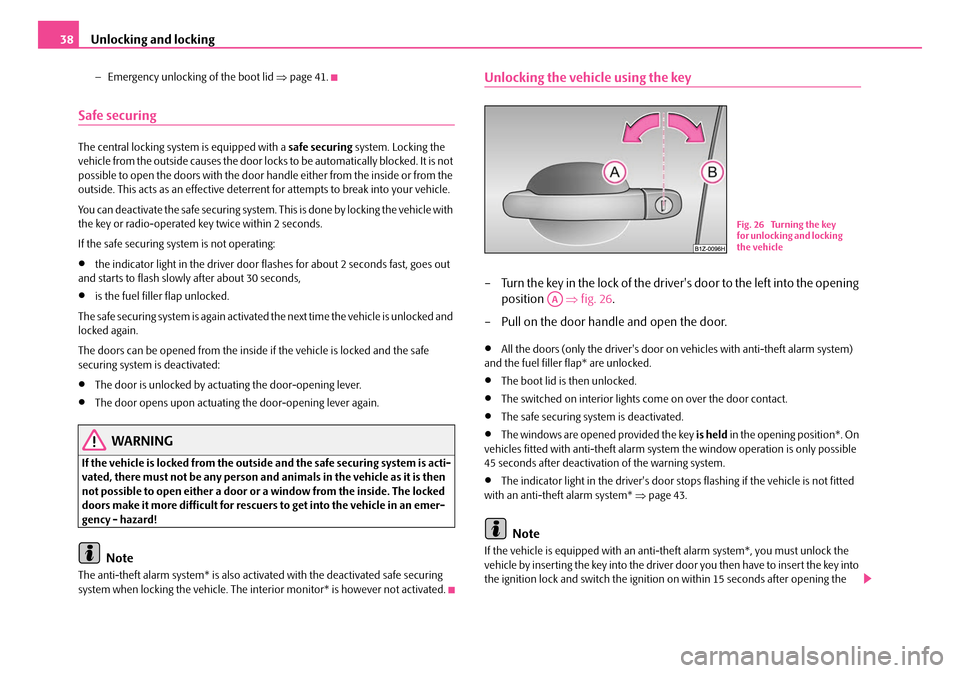
Unlocking the vehicle using the key
– Turn the key in the lock of the driver's door to the left into the opening
position ⇒fig. 26 .
– Pull on the door handle and open the door.
•All the doors (only the driver's door on vehicles with anti-theft alarm system)
and the fuel filler flap* are unlocked.
•The boot lid is then unlocked.
•The switched on interior lights come on over the door contact.
•The safe securing system is deactivated.
•The windows are opened provided the key is held in the opening position*. On
vehicles fitted with anti-theft alarm syst em the window operation is only possible
45 seconds after deactivation of the warning system.
•The indicator light in the driver's door stops flashing if the vehicle is not fitted
with an anti-theft alarm system* ⇒page 43.
Note
If the vehicle is equipped with an anti-theft alarm system*, you must unlock the
vehicle by inserting the key into the driver door you then have to insert the key into
the ignition lock and switch the ignition on within 15 seconds after opening the
Fig. 26 Turning the key
for unlocking and locking
the vehicle
AA
NKO A5 20 MR08.book Page 38 Wednesday, April 11, 2007 2:54 PM
Page 40 of 288
Unlocking and locking39
Using the systemSafetyDriving TipsGeneral MaintenanceBreakdown assistanceTechnical Data
door. The
alarm will be triggered if you do not switch on the ignition within 15
seconds.
Closing the vehicle with the key
– Turn the key in the lock of the driver door to the right into the closing position ⇒page 38, fig. 26 .
•The doors, the boot lid and the fuel filler flap* are locked.
•The switched on interior lights wi ll switch off over the door contact.
•The windows and the electric sliding/tilting roof* are closed provided the key is
held in the locking position.
•The safe securing system is activated immediately.
•The indicator light in the driver door begins flashing.
Note
The opened driver door cannot be locked. It must be locked separately after closing
it.
Buttons for the central locking system
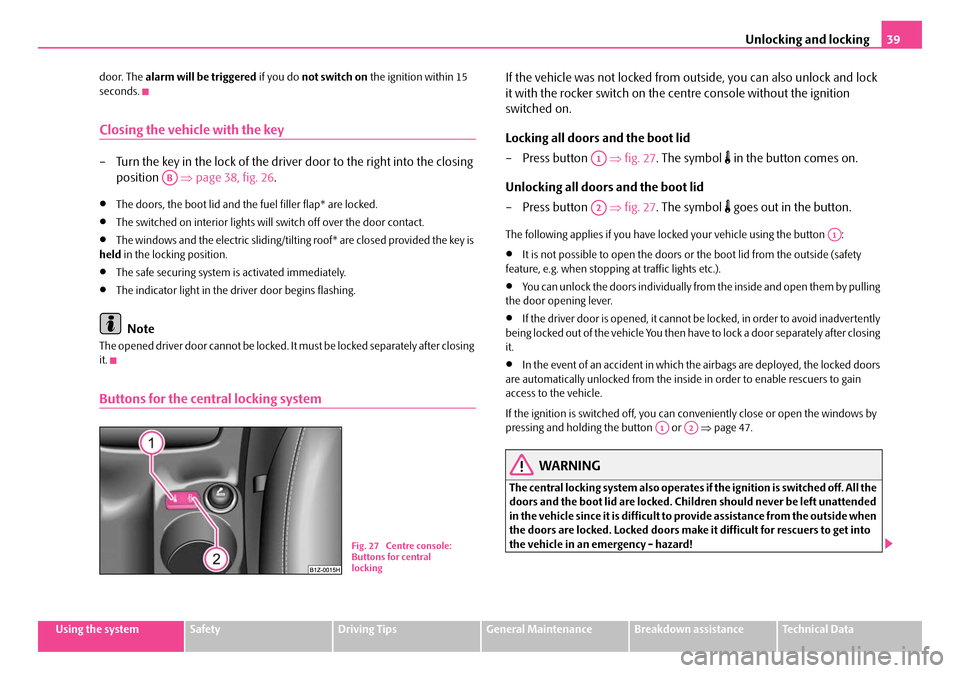
If the vehicle was not locked from ou tside, you can also unlock and lock
it with the rocker switch on the centre console without the ignition
switched on.
Locking all doors and the boot lid
–Press button ⇒fig. 27 . The symbol
in the button comes on.
Unlocking all doors and the boot lid
–Press button ⇒fig. 27 . The symbol
goes out in the button.
The following applies if you have lo cked your vehicle using the button :
•It is not possible to open the doors or the boot lid from the outside (safety
feature, e.g. when stopping at traffic lights etc.).
•You can unlock the doors individually from the inside and open them by pulling
the door opening lever.
•If the driver door is opened, it cannot be locked, in order to avoid inadvertently
being locked out of the vehicle You then have to lock a door separately after closing
it.
•In the event of an accident in which the airbags are deployed, the locked doors
are automatically unlocked from the inside in order to enable rescuers to gain
access to the vehicle.
If the ignition is switched off, you can conveniently close or open the windows by
pressing and holdin g the button or ⇒page 47.
WARNING
The central locking system also operates if the ignition is switched off. All the
doors and the boot lid are locked. Children should never be left unattended
in the vehicle since it is difficult to provide assistance from the outside when
the doors are locked. Locked doors make it difficult for rescuers to get into
the vehicle in an emergency - hazard!
AB
Fig. 27 Centre console:
Buttons for central
locking
A1
A2
A1
A1A2
NKO A5 20 MR08.book Page 39 Wednesday, April 11, 2007 2:54 PM
Page 41 of 288
Unlocking and locking
40
Note
The door opening lever and the buttons for the central locking system do not
operate if the safe securing system is activated.
Emergency locking of the doors
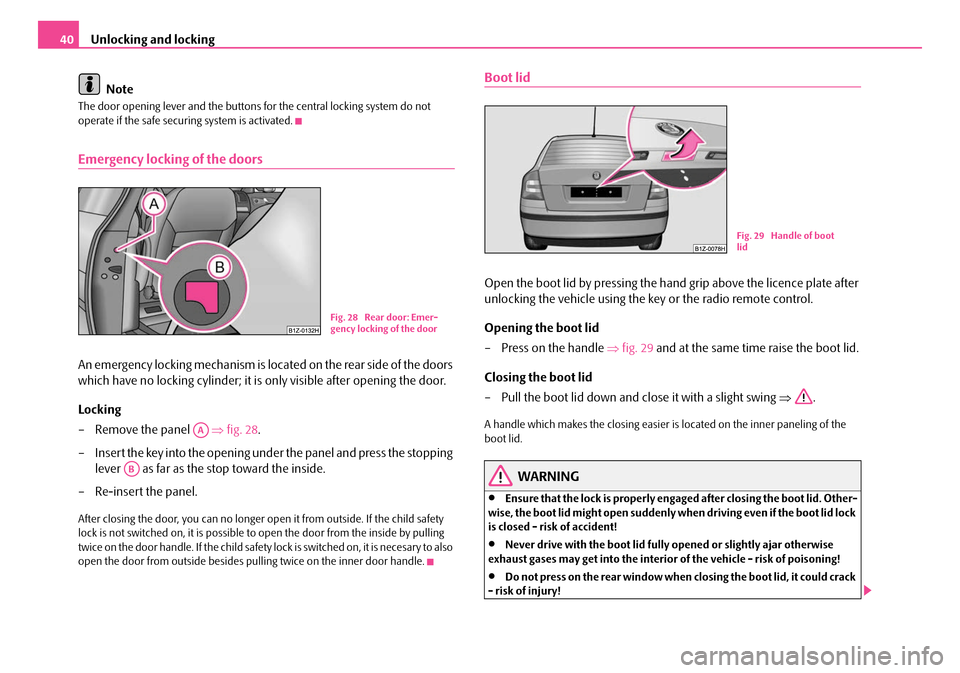
An emergency locking mechanism is loca ted on the rear side of the doors
which have no locking cyli nder; it is only visible after opening the door.
Locking
– Remove the panel ⇒fig. 28 .
– Insert the key into the opening under the panel and press the stopping lever as far as the stop toward the inside.
– Re-insert the panel.
After closing the door, you can no longer op en it from outside. If the child safety
lock is not switched on, it is possible to open the door from the inside by pulling
twice on the door handle. If the child safety lock is switched on, it is necesary to also
open the door from outside besides pu lling twice on the inner door handle.
Boot lid
Open the boot lid by pressing the hand grip above the licence plate after
unlocking the vehicle using the key or the radio remote control.
Opening the boot lid
– Press on the handle ⇒ fig. 29 and at the same time raise the boot lid.
Closing the boot lid
– Pull the boot lid down and close it with a slight swing ⇒.
A handle which makes the closing easier is located on the inner paneling of the
boot lid.
WARNING
•Ensure that the lock is properly enga ged after closing the boot lid. Other-
wise, the boot lid might open suddenly wh en driving even if the boot lid lock
is closed - risk of accident!
•Never drive with the boot lid fully opened or slightly ajar otherwise
exhaust gases may get into the interior of the vehicle - risk of poisoning!
•Do not press on the rear window when closing the boot lid, it could crack
- risk of injury!
Fig. 28 Rear door: Emer-
gency locking of the door
AA
AB
Fig. 29 Handle of boot
lid
NKO A5 20 MR08.book Page 40 Wednesday, April 11, 2007 2:54 PM
Page 42 of 288
Unlocking and locking41
Using the systemSafetyDriving TipsGeneral MaintenanceBreakdown assistanceTechnical Data
Note
•After closing the boot lid, it is automatically locked within 2 seconds and
the anti-theft alarm system* is activated. This applies only if the vehicle was
locked before closing the boot lid.
•The function of the hand grip above the licence plate is deactivated when
starting off or as of a speed of more than 5 km/hour for vehicles with central
locking. The function of the hand grip is activated again when the vehicle has
stopped and a door is opened.
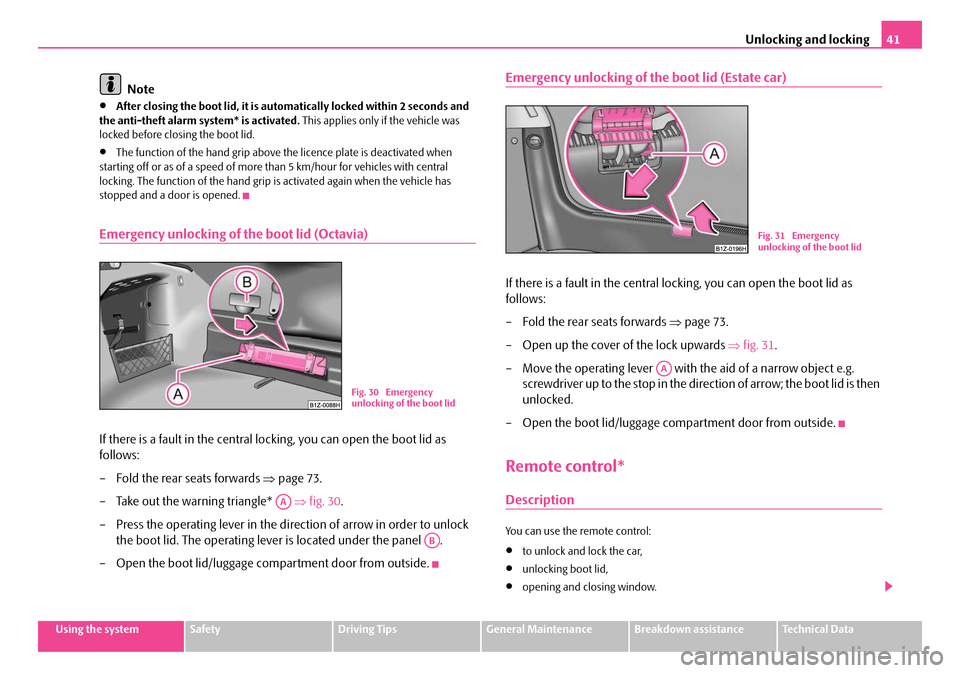
Emergency unlocking of the boot lid (Octavia)
If there is a fault in the central lo cking, you can open the boot lid as
follows:
– Fold the rear seats forwards ⇒page 73.
– Take out the warning triangle* ⇒fig. 30 .
– Press the operating lever in the direction of arrow in order to unlock the boot lid. The operating leve r is located under the panel .
– Open the boot lid/luggage compartment door from outside.
Emergency unlocking of the boot lid (Estate car)
If there is a fault in the central locking, you can open the boot lid as
follows:
– Fold the rear seats forwards ⇒page 73.
– Open up the cover of the lock upwards ⇒fig. 31 .
– Move the operating lever with the aid of a narrow object e.g. screwdriver up to the stop in the direction of arrow; the boot lid is then
unlocked.
– Open the boot lid/luggage compartment door from outside.
Remote control*
Description
You can use the remote control:
•to unlock and lock the car,
•unlocking boot lid,
•opening and closing window.
Fig. 30 Emergency
unlocking of the boot lid
AA
AB
Fig. 31 Emergency
unlocking of the boot lid
AA
NKO A5 20 MR08.book Page 41 Wednesday, April 11, 2007 2:54 PM
Page 43 of 288
Unlocking and locking
42
The transmitter with the battery is housed in the handle of the master key. The
receiver is located in the interior of th e car. The operating range of the remote
control is 10 metres but this range can be reduced if the batteries are weak.
The master key has a fold-open key bit whic h can be used for unlocking and locking
the car manually and also for starting the engine.
If a lost key is replaced or if the rece iver unit has been repaired or a new unit
installed, it is then necessary for a Škoda Dealer to initialise the system. Only after
this is it possible to again use the remote control.
Note
•The remote control is automatically deac tivated when the ignition is switched
on.
•The operation of the remote control may temporarily be affected by interfer-
ence from transmitters close to the car and which operate in the same frequency
range (e.g. mobile phone, TV transmitter).
•The battery must be replaced, ideally by a Škoda Service Partner, if the central
locking or anti-theft alarm system does re act to the remote control at less than 3
metres away.
Unlocking and locking car
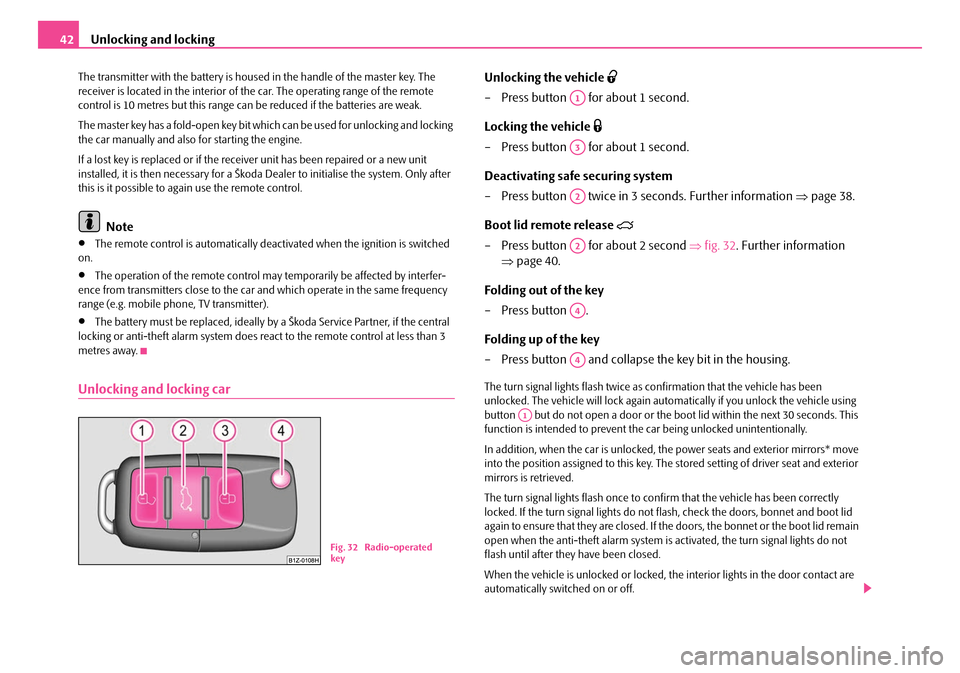
Unlocking the vehicle
– Press button for about 1 second.
Locking the vehicle
– Press button for about 1 second.
Deactivating safe securing system
– Press button twice in 3 seconds. Further information ⇒page 38.
Boot lid remote release
– Press button for about 2 second ⇒fig. 32 . Further information
⇒ page 40.
Folding out of the key
– Press button .
Folding up of the key
– Press button and collapse the key bit in the housing.
The turn signal lights flash twice as confirmation that the vehicle has been
unlocked. The vehicle will lock again auto matically if you unlock the vehicle using
button but do not open a door or the b oot lid within the next 30 seconds. This
function is intended to prevent th e car being unlocked unintentionally.
In addition, when the car is unlocked, the power seats and exterior mirrors* move
into the position assigned to this key. The stored setting of driver seat and exterior
mirrors is retrieved.
The turn signal lights flash once to co nfirm that the vehicle has been correctly
locked. If the turn signal lights do not fl ash, check the doors, bonnet and boot lid
again to ensure that they are closed. If th e doors, the bonnet or the boot lid remain
open when the anti-theft alarm system is activated, the turn signal lights do not
flash until after they have been closed.
When the vehicle is unlocked or locked, the interior lights in the door contact are
automatically switched on or off.
Fig. 32 Radio-operated
key
A1
A3
A2
A2
A4
A4
A1
NKO A5 20 MR08.book Page 42 Wednesday, April 11, 2007 2:54 PM
Page 44 of 288
Unlocking and locking43
Using the systemSafetyDriving TipsGeneral MaintenanceBreakdown assistanceTechnical Data
WARNING
If the vehicle is locked from the outside and the safe securing system is acti-
vated, there must not be any person in the vehicle as it is then not possible
to open either a door or a window from the inside. The locked doors make it
more difficult for rescuers to get into the vehicle in an emergency - hazard!
Note
•Operate the radio remote control only when the doors and boot lid are closed
and you have visual contact with the vehicle.
•Once in the car, you must not press the lock button of the radio remote
control before inserting the key into the igni tion lock in order to avoid the car being
inadvertently locked and, in addition, the anti-theft alarm system* being switched
on. Should this happen, press the unlock button
of the radio remote control.
Synchonisation of the remote control
If the vehicle cannot be unlocked by actuatin g the remote control system then it is
possible that the code in the key and the control unit in the vehicle are no longer
synchronised. This can occur when the butt ons on the radio-operated key are actu-
ated a number of times outside of the operative range of the equipment or the
battery on the remote control was replaced.
This means it is necessary to synchronise the code as follows:
•Press any button on the remote control.
•pressing of the button means that the door will unlock with the key within 1
minute.
Anti-theft alarm system*
Description
The anti-theft alarm system increases the level of protection against people seeking
to break into the vehicle. The system triggers audible and visual warning signals if
an attempt is made to break into the vehicle.
How is the alarm system activated?
The anti-theft alarm system is activated automatically when the vehicle is locked
with the key on the closed driver's door or by using the radio remote control. It is
activated 30 seconds after closing the door.
How is the alarm system deactivated?
The anti-theft alarm system is deactivated if the vehicle is unlocked by only using
the radio remote control. The vehicle is automatically locked again if the vehicle is
not opened within 30 seconds after reactivating the anti-theft alarm system.
Once you unlock the vehicle by inserting the key into the driver door you then have
to insert the key into the ignition lock and switch the ignition on within 15 seconds
after opening the door in order to deactivate the anti-theft alarm system. The
alarm will be triggered if you do not switch on the ignition within 15 seconds.
When is the alarm triggered?
The following security areas of the locked vehicle are monitored:
•Bonnet,
•Boot lid,
•Doors,
•Ignition lock,
•Angle of the vehicle* ⇒page 44,
•Vehicle interior* ⇒page 44,
•A drop in voltage of the on-board power supply.
An alarm is immediately triggered if either of the two battery terminals is discon-
nected while the anti-theft alarm system is activated.
NKO A5 20 MR08.book Page 43 Wednesday, April 11, 2007 2:54 PM
Page 54 of 288
Lights and Visibility53
Using the systemSafetyDriving TipsGeneral MaintenanceBreakdown assistanceTechnical Data
Fog lights*
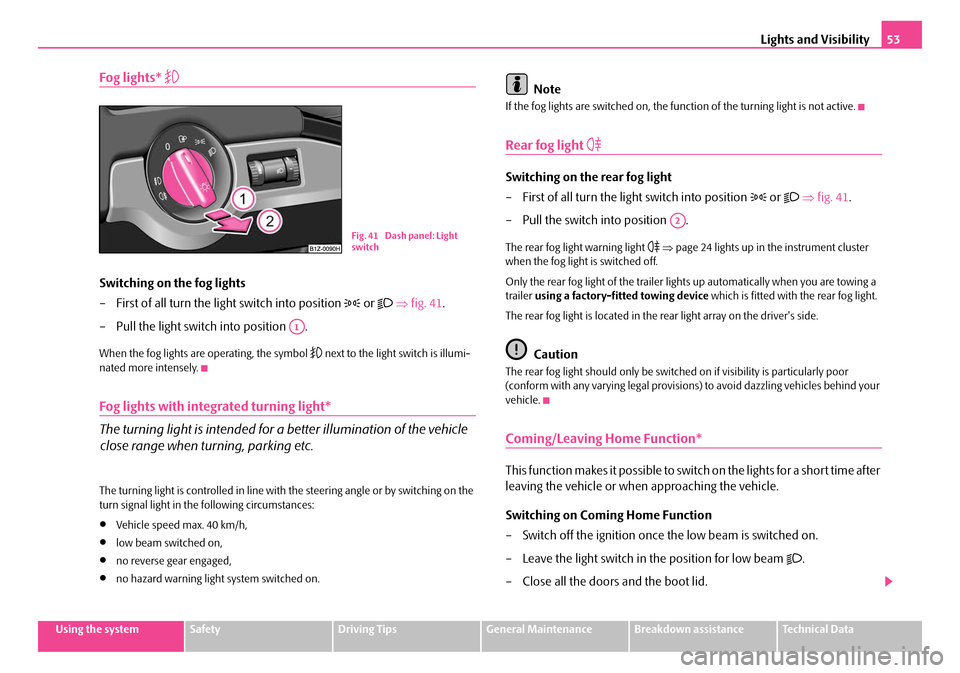
Switching on the fog lights
– First of all turn the light switch into position
or ⇒ fig. 41 .
– Pull the light switch into position .
When the fog lights are operating, the symbol next to the light switch is illumi-
nated more intensely.
Fog lights with integrated turning light*
The turning light is intended for a better illumination of the vehicle
close range when turning, parking etc.
The turning light is controlled in line with the steering angle or by switching on the
turn signal light in the following circumstances:
•Vehicle speed max. 40 km/h,
•low beam switched on,
•no reverse gear engaged,
•no hazard warning light system switched on.
Note
If the fog lights are switched on, the function of the turning light is not active.
Rear fog light
Switching on the rear fog light
– First of all turn the light switch into position
or ⇒ fig. 41 .
– Pull the switch into position .
The rear fog light warning light ⇒ page 24 lights up in the instrument cluster
when the fog light is switched off.
Only the rear fog light of the trailer ligh ts up automatically when you are towing a
trailer using a factory-fitted towing device which is fitted with the rear fog light.
The rear fog light is located in the rear light array on the driver's side.
Caution
The rear fog light should only be switched on if visibility is particularly poor
(conform with any varying legal provisions) to avoid dazzling vehicles behind your
vehicle.
Coming/Leaving Home Function*
This function makes it possible to switch on the lights for a short time after
leaving the vehicle or when approaching the vehicle.
Switching on Coming Home Function
– Switch off the ignition once the low beam is switched on.
– Leave the light switch in the position for low beam
.
– Close all the doors and the boot lid.
Fig. 41 Dash panel: Light
switch
A1
A2
NKO A5 20 MR08.book Page 53 Wednesday, April 11, 2007 2:54 PM
Page 55 of 288
Lights and Visibility
54
Switching on Leaving Home Function
– Unlock the vehicle with the radio remote control - the lights come on.
Depending on equipment fitted the functi on Coming/Leaving Home switches on
the following lights:
•Parking lights,
•Low beam,
•Entry lighting in the exterior mirrors,
•Licence plate light.
Coming Home Function
The function Coming Home is only switch ed on, if the low beam was switched on
when the ignition is on.
The lights go out 30 seconds after cl osing all the doors and the boot lid.
If a door or the boot lid remains open, th e lights go out 30 seconds after switching
off the ignition.
The light switch remains in the position for low beam also after switching off the
Coming Home Function, all lights are automatically switched off.
On vehicles fitted with automatic driving la mp control you can also switch the light
switch in the position
⇒ page 51, fig. 39 . The function Coming Home is
controlled with the light sensor in the mount of the interior rear mirror. If the light
intensity is higher than the set value of the light sensor, the Coming Home Function
is not switched on after switching off the ignition.
Leaving Home Function
The function Leaving Home is controlled wi th the light sensor in the mount of the
interior rear mirror. If the light intensity is higher than the set value of the light
sensor, the Leaving Home Func tion is not switched on after unlocking the vehicle
with the radio remote control.
After unlocking the vehicle with the radio re mote control, the lights come on for 30
seconds. The Leaving Home Function is al so switched off after the ignition is
switched on and after locking the vehicle. If no door is opened within 30 seconds, th
e lights go out and the vehicle is locked
automatically.
Note
•If the Coming/Leaving Home Function is switched on constantly, the battery will
be heavily discharged particularly in short-haul traffic.
•The switching on of the described lights should only be undertaken in accord-
ance with the legal requirements.
•You can change the illumination period for the Coming/Leaving Home Function
by means of the information display* ⇒page 22.
Instrument lighting*
You can adjust the brightness of the instrument lighting.
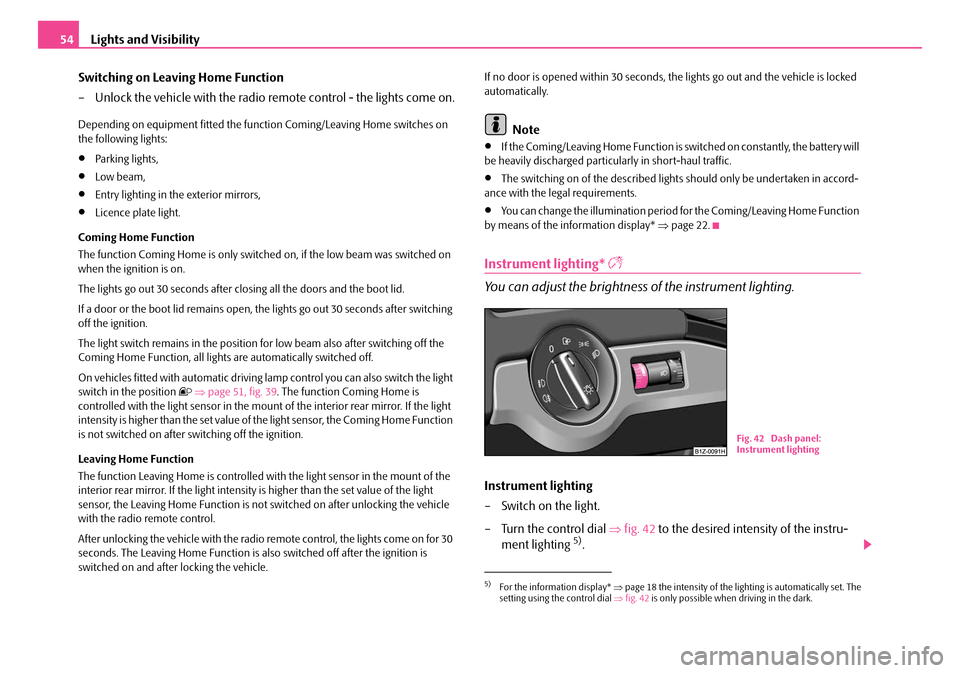
Instrument lighting
– Switch on the light.
– Turn the control dial ⇒fig. 42 to the desired intensity of the instru-
ment lighting
5).
5)For the information display* ⇒page 18 the intensity of the lighting is automatically set. The
setting using the control dial ⇒fig. 42 is only possible when driving in the dark.
Fig. 42 Dash panel:
Instrument lighting
NKO A5 20 MR08.book Page 54 Wednesday, April 11, 2007 2:54 PM