ESP SKODA OCTAVIA 2009 2.G / (1Z) Owner's Manual
[x] Cancel search | Manufacturer: SKODA, Model Year: 2009, Model line: OCTAVIA, Model: SKODA OCTAVIA 2009 2.G / (1Z)Pages: 304, PDF Size: 19.56 MB
Page 5 of 304
Contents 4Communication
. . . . . . . . . . . . . . . . . . . . . . . . . . . . . . .
Multifunction steering wheel* . . . . . . . . . . . . . . . . .
Mobile phones and two-way radio systems . . . . .
Universal telephone preinstallation GSM II* . . . . .
Phone voice phonebook* . . . . . . . . . . . . . . . . . . . . .
Universal telephone preinstallation GSM III* . . . .
Phone voice phonebook* . . . . . . . . . . . . . . . . . . . . .
Inputs AUX-IN* and MDI* . . . . . . . . . . . . . . . . . . . . .
CD changer* . . . . . . . . . . . . . . . . . . . . . . . . . . . . . . . . .
Safety
. . . . . . . . . . . . . . . . . . . . . . . . . . . . . . . . . . . . . . .
Passive Safety
. . . . . . . . . . . . . . . . . . . . . . . . . . . . . . . . .
Basic information . . . . . . . . . . . . . . . . . . . . . . . . . . . . .
Correct seated position . . . . . . . . . . . . . . . . . . . . . . .
Seat belts
. . . . . . . . . . . . . . . . . . . . . . . . . . . . . . . . . . . . . .
Why seat belts? . . . . . . . . . . . . . . . . . . . . . . . . . . . . . . .
The physical principle of a frontal collision . . . . . .
Important safety information regarding the use of seat
belts . . . . . . . . . . . . . . . . . . . . . . . . . . . . . . . . . . . . . . . . .
How are seat belts correctly fastened? . . . . . . . . . .
Airbag system
. . . . . . . . . . . . . . . . . . . . . . . . . . . . . . . . .
Description of the airbag system . . . . . . . . . . . . . . .
Front airbag . . . . . . . . . . . . . . . . . . . . . . . . . . . . . . . . . .
Side airbags* . . . . . . . . . . . . . . . . . . . . . . . . . . . . . . . . .
Head airbags* . . . . . . . . . . . . . . . . . . . . . . . . . . . . . . . .
Deactivating an airbag . . . . . . . . . . . . . . . . . . . . . . . .
Transporting children safely
. . . . . . . . . . . . . . . . . .
What you should know about transporting children!
Child seat . . . . . . . . . . . . . . . . . . . . . . . . . . . . . . . . . . . .
Attaching a child seat using the “ISOFIX” system .
Attaching child seat using the “Top Tether” system
Driving Tips
. . . . . . . . . . . . . . . . . . . . . . . . . . . . . .
Intelligent Technology
. . . . . . . . . . . . . . . . . . . . . . . .
Electronic stability programme (ESP)* . . . . . . . . . .
Brakes . . . . . . . . . . . . . . . . . . . . . . . . . . . . . . . . . . . . . . . Brake booster . . . . . . . . . . . . . . . . . . . . . . . . . . . . . . . .
Antilock brake system (ABS) . . . . . . . . . . . . . . . . . . .
Brake Assist* . . . . . . . . . . . . . . . . . . . . . . . . . . . . . . . . .
Uphill-Start off-Assist* . . . . . . . . . . . . . . . . . . . . . . . .
Electromechanical power steering . . . . . . . . . . . . .
Tyre inflation pressure-control system* . . . . . . . . .
Diesel particle filter* (diesel engine) . . . . . . . . . . . .
Driving and the Environment
. . . . . . . . . . . . . . . . .
The first 1 500 kilometres and then afterwards . .
Catalytic converter . . . . . . . . . . . . . . . . . . . . . . . . . . . .
Driving in an economical and environmentally
conscious manner . . . . . . . . . . . . . . . . . . . . . . . . . . . .
Environmental compatibility . . . . . . . . . . . . . . . . . . .
Motoring abroad . . . . . . . . . . . . . . . . . . . . . . . . . . . . .
Avoiding damage to your vehicle . . . . . . . . . . . . . . .
Towing a trailer
. . . . . . . . . . . . . . . . . . . . . . . . . . . . . . . .
Towing a trailer . . . . . . . . . . . . . . . . . . . . . . . . . . . . . . .
General Maintenance
. . . . . . . . . . . . . . .
Taking care of your vehicle and cleaning the
vehicle
. . . . . . . . . . . . . . . . . . . . . . . . . . . . . . . . . . . . . . . . .
General . . . . . . . . . . . . . . . . . . . . . . . . . . . . . . . . . . . . . .
Care of the exterior of vehicle . . . . . . . . . . . . . . . . . .
Care of the interior of vehicle . . . . . . . . . . . . . . . . . .
Fuel
. . . . . . . . . . . . . . . . . . . . . . . . . . . . . . . . . . . . . . . . . . . .
Petrol . . . . . . . . . . . . . . . . . . . . . . . . . . . . . . . . . . . . . . . .
Biofuel Ethanol E85* . . . . . . . . . . . . . . . . . . . . . . . . . .
Diesel . . . . . . . . . . . . . . . . . . . . . . . . . . . . . . . . . . . . . . . .
Refuelling . . . . . . . . . . . . . . . . . . . . . . . . . . . . . . . . . . . .
Inspecting and replenishing
. . . . . . . . . . . . . . . . . .
Engine compartment . . . . . . . . . . . . . . . . . . . . . . . . .
Engine oil . . . . . . . . . . . . . . . . . . . . . . . . . . . . . . . . . . . .
Cooling system . . . . . . . . . . . . . . . . . . . . . . . . . . . . . . .
Brake fluid . . . . . . . . . . . . . . . . . . . . . . . . . . . . . . . . . . .
Battery . . . . . . . . . . . . . . . . . . . . . . . . . . . . . . . . . . . . . . .
Windshield washer system . . . . . . . . . . . . . . . . . . . .
Wheels and Tyres
. . . . . . . . . . . . . . . . . . . . . . . . . . . . . .
Wheels . . . . . . . . . . . . . . . . . . . . . . . . . . . . . . . . . . . . . . .
Accessories, changes and replacement of partsAccessories and replacement parts . . . . . . . . . . . . .
Technical changes . . . . . . . . . . . . . . . . . . . . . . . . . . . . .
Vehicles of the group N1 . . . . . . . . . . . . . . . . . . . . . . .Breakdown assistance
. . . . . . . . . . . . . .
Breakdown assistance
. . . . . . . . . . . . . . . . . . . . . . . . .
First-aid box* and Warning triangle* (Octavia) . . .
First-aid box* and warning triangle* (Estate car) .
Fire extinguisher* . . . . . . . . . . . . . . . . . . . . . . . . . . . . .
Vehicle tool kit . . . . . . . . . . . . . . . . . . . . . . . . . . . . . . . .
Tyre repair kit* . . . . . . . . . . . . . . . . . . . . . . . . . . . . . . . .
Spare wheel* . . . . . . . . . . . . . . . . . . . . . . . . . . . . . . . . .
Changing a wheel . . . . . . . . . . . . . . . . . . . . . . . . . . . . .
Jump-starting . . . . . . . . . . . . . . . . . . . . . . . . . . . . . . . .
Tow-starting and towing vehicle . . . . . . . . . . . . . . . .
Fuses and light bulbs
. . . . . . . . . . . . . . . . . . . . . . . . . .
Electric fuses . . . . . . . . . . . . . . . . . . . . . . . . . . . . . . . . .
Bulbs . . . . . . . . . . . . . . . . . . . . . . . . . . . . . . . . . . . . . . . .
Technical Data
. . . . . . . . . . . . . . . . . . . . . . . . . .
Technical Data
. . . . . . . . . . . . . . . . . . . . . . . . . . . . . . . . .
General information . . . . . . . . . . . . . . . . . . . . . . . . . . .
Used abbreviations . . . . . . . . . . . . . . . . . . . . . . . . . . .
Performances . . . . . . . . . . . . . . . . . . . . . . . . . . . . . . . . .
Weight . . . . . . . . . . . . . . . . . . . . . . . . . . . . . . . . . . . . . . .
Identification details . . . . . . . . . . . . . . . . . . . . . . . . . .
Fuel consumption according to the regulations
(99/100/EU) . . . . . . . . . . . . . . . . . . . . . . . . . . . . . . . . . .
Dimensions . . . . . . . . . . . . . . . . . . . . . . . . . . . . . . . . . .
Engine oil specifications . . . . . . . . . . . . . . . . . . . . . . .
1.4 ltr./59 kW - EU4 . . . . . . . . . . . . . . . . . . . . . . . . . . . .
1.4 ltr./90 kW TSI - EU5 . . . . . . . . . . . . . . . . . . . . . . . .
1.6 ltr./75 kW - EU4, EU2 . . . . . . . . . . . . . . . . . . . . . . . 139
139
142
142
149
152
158
160
160
163
163
163
164
168
168
169
169
170
174
174
175
178
180
181
184
184
187
190
191
193
193
193
196197
197
198
198
198
199
200
201
201
202
202
206
206
207
208
208
211
211
211
211
216
219
219
219
221
222
224
224
227
228
231
232
236238
238
244
244
244
244
245
245
245
245
245
246
246
247
247
252
253
258
258
261
271
271
271
271
271
271
272
272
273
274
276
278
280
se0.1.book Page 4 Friday, April 10, 2009 3:19 PM
Page 7 of 304
Layout of this Owner's Manual (explanations)
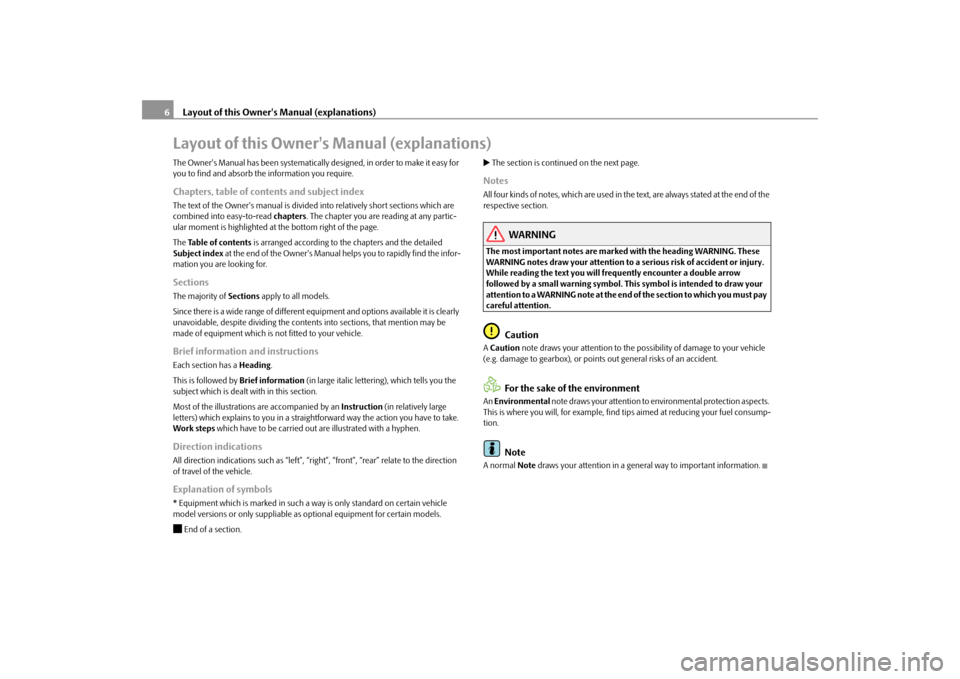
6Layout of this Owner's Manual (explanations)The Owner's Manual has been systematically designed, in order to make it easy for you to find and absorb the information you require.Chapters, table of contents and subject indexThe text of the Owner's manual is divided into relatively short sections which are combined into easy-to-read
chapters
. The chapter you are reading at any partic-
ular moment is highlighted at the bottom right of the page. The
Table of contents
is arranged according to the chapters and the detailed
Subject index
at the end of the Owner's Manual helps you to rapidly find the infor-
mation you are looking for.SectionsThe majority of
Sections
apply to all models.
Since there is a wide range of different equipment and options available it is clearly unavoidable, despite dividing the contents into sections, that mention may be made of equipment which is
not fitted to your vehicle.
Brief information and instructionsEach section has a
Heading
.
This is followed by
Brief information
(in large italic lettering), which tells you the
subject which is dealt with in this section. Most of the illustrations are accompanied by an
Instruction
(in relatively large
letters) which explains to you in a straig
htforward way the action you have to take.
Work steps
which have to be carried out are illustrated with a hyphen.
Direction indicationsAll direction indications such as “left”, “right
”, “front”, “rear” relate to the direction
of travel of the vehicle.Explanation of symbols* Equipment which is marked in such a wa
y is only standard
on certain vehicle
model versions or only suppliable as
optional equipment for certain models.
End of a section.
The section is continued on the next page.NotesAll four kinds of notes, which are used in th
e text, are always stated at the end of the
respective section.
WARNING
The most important notes are marked with the heading WARNING. These WARNING notes draw your attention to a serious risk of accident or injury. While reading the text you will frequently encounter a double arrow followed by a small warning symbol. This
symbol is intended to draw your
attention to a WARNING note at the end of the section to which you must pay careful attention.
Caution
A Caution
note draws your
attention to the possibility of damage to your vehicle
(e.g. damage to gearbox), or points
out general risks of an accident.
For the sake of the environment
An Environmental
note draws your attention to environmental protection aspects.
This is where you will, for example, find tips aimed at reducing your fuel consump- tion.
Note
A normal
Note
draws your attention
in a general way to important information.
se0.1.book Page 6 Friday, April 10, 2009 3:19 PM
Page 10 of 304
Cockpit
9
Using the system
Safety
Driving Tips
General Maintenance
Breakdown assistance
Technical Data
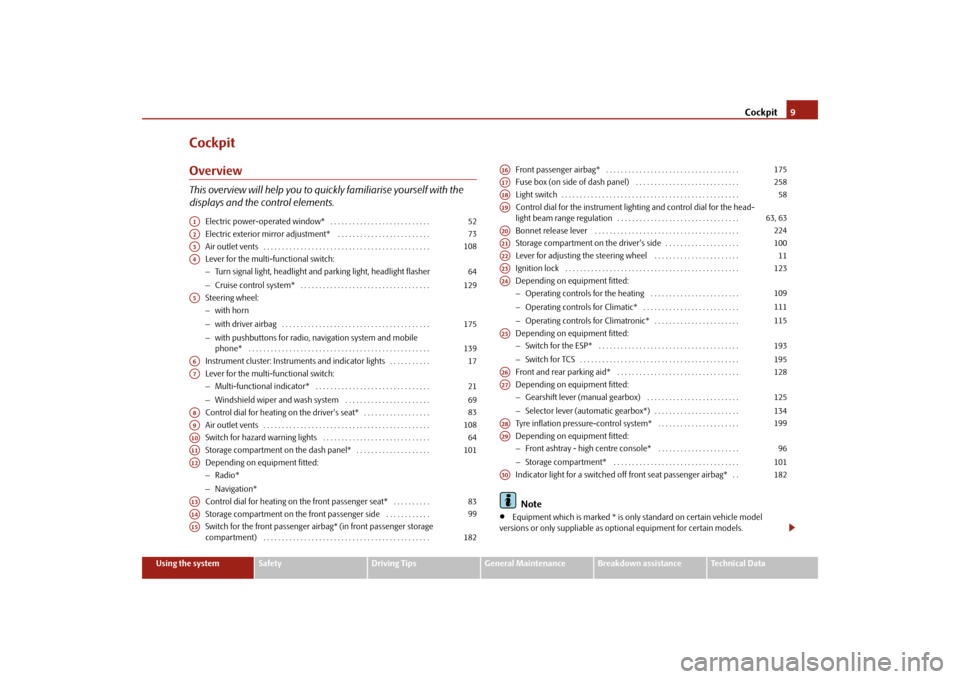
CockpitOverviewThis overview will help you to quickly familiarise yourself with the displays and the control elements.
Electric power-operated window* . . . . . . . . . . . . . . . . . . . . . . . . . . . Electric exterior mirror adjustment* . . . . . . . . . . . . . . . . . . . . . . . . . Air outlet vents . . . . . . . . . . . . . . . . . . . . . . . . . . . . . . . . . . . . . . . . . . . . . Lever for the multi-functional switch:− Turn signal light, headlight and parking light, headlight flasher − Cruise control system* . . . . . . . . . . . . . . . . . . . . . . . . . . . . . . . . . . . Steering wheel: − with horn − with driver airbag . . . . . . . . . . . . . . . . . . . . . . . . . . . . . . . . . . . . . . . . − with pushbuttons for radio, na
vigation system and mobile
phone* . . . . . . . . . . . . . . . . . . . . . . . . . . . . . . . . . . . . . . . . . . . . . . . . . Instrument cluster: Instrum
ents and indicator lights . . . . . . . . . . .
Lever for the multi-functional switch:− Multi-functional indicator* . . . . . . . . . . . . . . . . . . . . . . . . . . . . . . . − Windshield wiper and wash system . . . . . . . . . . . . . . . . . . . . . . . Control dial for heating on the driver's seat* . . . . . . . . . . . . . . . . . . Air outlet vents . . . . . . . . . . . . . . . . . . . . . . . . . . . . . . . . . . . . . . . . . . . . . Switch for hazard warning lights . . . . . . . . . . . . . . . . . . . . . . . . . . . . . Storage compartment on the dash panel* . . . . . . . . . . . . . . . . . . . . Depending on equipment fitted:− Radio* − Navigation* Control dial for heating on the front passenger seat* . . . . . . . . . . Storage compartment on the front passenger side . . . . . . . . . . . . Switch for the front passenger airbag* (in front passenger storage compartment) . . . . . . . . . . . . . . . . . . . . . . . . . . . . . . . . . . . . . . . . . . . . .
Front passenger airbag* . . . . . . . . . . . . . . . . . . . . . . . . . . . . . . . . . . . . Fuse box (on side of dash panel) . . . . . . . . . . . . . . . . . . . . . . . . . . . . Light switch . . . . . . . . . . . . . . . . . . . . . . . . . . . . . . . . . . . . . . . . . . . . . . . . Control dial for the instrument lighting and control dial for the head- light beam range regulation . . . . . . . . . . . . . . . . . . . . . . . . . . . . . . . . . Bonnet release lever . . . . . . . . . . . . . . . . . . . . . . . . . . . . . . . . . . . . . . . Storage compartment on the driver's side . . . . . . . . . . . . . . . . . . . . Lever for adjusting the steering wheel . . . . . . . . . . . . . . . . . . . . . . . Ignition lock . . . . . . . . . . . . . . . . . . . . . . . . . . . . . . . . . . . . . . . . . . . . . . . Depending on equipment fitted:− Operating controls for the heating . . . . . . . . . . . . . . . . . . . . . . . . − Operating controls for Climatic* . . . . . . . . . . . . . . . . . . . . . . . . . . − Operating controls for Climatronic* . . . . . . . . . . . . . . . . . . . . . . . Depending on equipment fitted: − Switch for the ESP* . . . . . . . . . . . . . . . . . . . . . . . . . . . . . . . . . . . . . . − Switch for TCS . . . . . . . . . . . . . . . . . . . . . . . . . . . . . . . . . . . . . . . . . . . Front and rear parking aid* . . . . . . . . . . . . . . . . . . . . . . . . . . . . . . . . . Depending on equipment fitted: − Gearshift lever (manual gearbox) . . . . . . . . . . . . . . . . . . . . . . . . . − Selector lever (automatic gearbox*) . . . . . . . . . . . . . . . . . . . . . . . Tyre inflation pressure-control system* . . . . . . . . . . . . . . . . . . . . . . Depending on equipment fitted: − Front ashtray - high centre console* . . . . . . . . . . . . . . . . . . . . . . − Storage compartment* . . . . . . . . . . . . . . . . . . . . . . . . . . . . . . . . . . Indicator light for a switched off front seat passenger airbag* . . Note
•
Equipment which is marked * is only standard on certain vehicle model
versions or only suppliable as op
tional equipment for certain models.
A1
52
A2
73
A3
108
A4
64 129
A5
175 139
A6
17
A7
21 69
A8
83
A9
108
A10
64
A11
101
A12A13
83
A14
99
A15
182
A16
175
A17
258
A18
58
A19
63, 63
A20
224
A21
100
A22
11
A23
123
A24
109111115
A25
193195
A26
128
A27
125134
A28
199
A29
96101
A30
182
se0.1.book Page 9 Friday, April 10, 2009 3:19 PM
Page 29 of 304
Instruments and Indicator/Warning Lights
28
which door is still open or whether the luggage compartment door or bonnet is
not
closed
⇒fig. 30
.
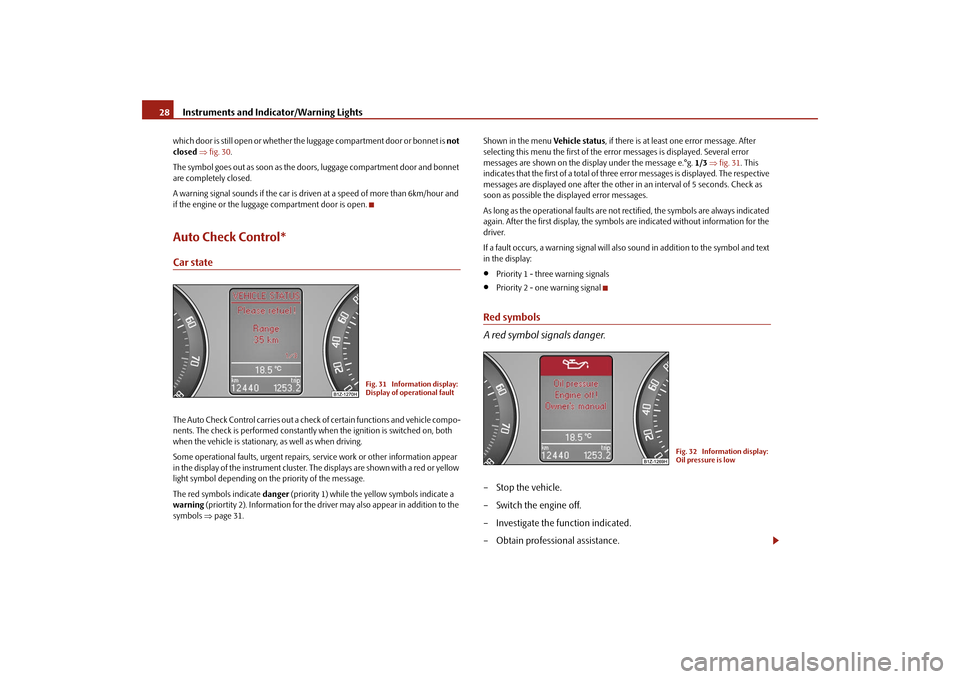
The symbol goes out as soon as the doors, luggage compartment door and bonnet are completely closed. A warning signal sounds if the car is driven at a speed of more than 6km/hour and if the engine or the luggage compartment door is open.Auto Check Control*Car stateThe Auto Check Control carries out a check of certain functions and vehicle compo-nents. The check is performed constantly wh
en the ignition is switched on, both
when the vehicle is stationary, as well as when driving. Some operational faults, urgent repairs,
service work or other information appear
in the display of the instrument cluster. The displays are shown with a red or yellow light symbol depending on the priority of the message. The red symbols indicate
danger
(priority 1) while the yellow symbols indicate a
warning
(priortity 2). Information for the driver
may also appear in addition to the
symbols
⇒page 31.
Shown in the menu
Vehicle status
, if there is at least one error message. After
selecting this menu the first of the error messages is displayed. Several error messages are shown on the display under the message e.°g.
1/3
⇒fig. 31
. This
indicates that the first of a total of three error messages is displayed. The respective messages are displayed one after the other in an interval of 5 seconds. Check as soon as possible the displayed error messages. As long as the operational faults are not rectified, the symbols are always indicated again. After the first display, the symbol
s are indicated without information for the
driver. If a fault occurs, a warning signal will also sound in addition to the symbol and text in the display:•
Priority 1 - three warning signals
•
Priority 2 - one warning signal
Red symbols A red symbol signals danger.– Stop the vehicle. – Switch the engine off. – Investigate the function indicated.– Obtain professional assistance.
Fig. 31 Information display: Display of operational fault
Fig. 32 Information display: Oil pressure is low
se0.1.book Page 28 Friday, April 10, 2009 3:19 PM
Page 30 of 304
Instruments and Indicator/Warning Lights
29
Using the system
Safety
Driving Tips
General Maintenance
Breakdown assistance
Technical Data
Meaning of the red symbols: Three
successive warning signals will
sound if a red symbol appears.
Yellow symbolsCheck the relevant function
as soon as possible.
The meaning of the yellow symbols: One
warning signal will sound
if a yellow symbol appears.
If several operational faults of priority 2 exist, the symbols appear one after the other and are each illumi
nated for about 5 seconds.
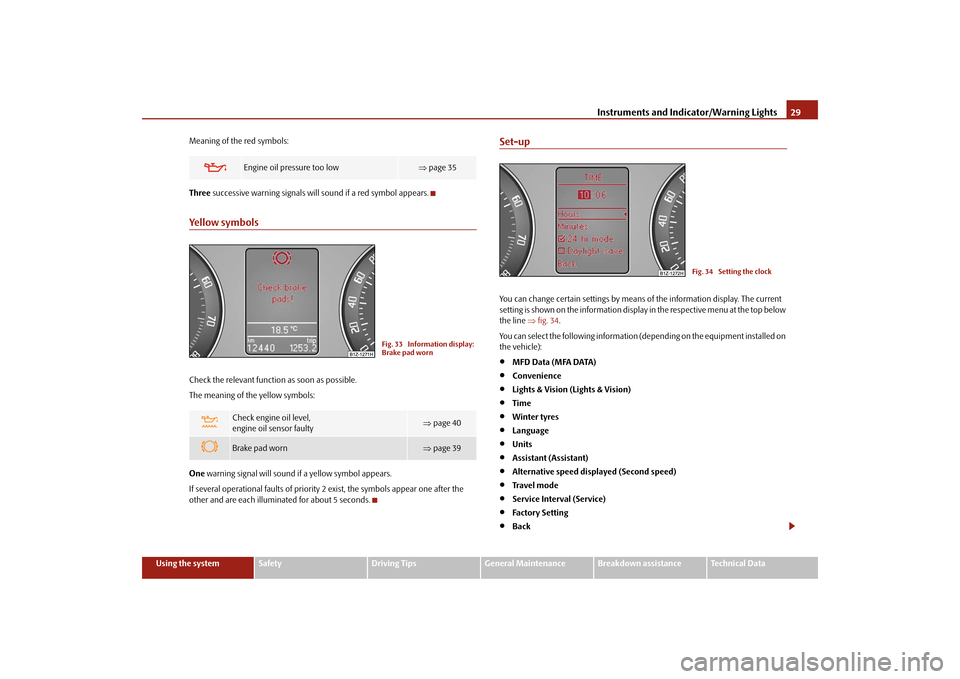
Set-upYou can change certain settings by means
of the information display. The current
setting is shown on the information display in the respective menu at the top below the line
⇒fig. 34
.
You can select the following information (d
epending on the equipment installed on
the vehicle):•
MFD Data (MFA DATA)
•
Convenience
•
Lights & Vision (Lights & Vision)
•
Time
•
Winter tyres
•
Language
•
Units
•
Assistant (Assistant)
•
Alternative speed displayed (Second speed)
•
Tra v e l m o d e
•
Service Interval (Service)
•
Factory Setting
•
Back
Engine oil pressure too low
⇒ page 35
Check engine oil level, engine oil sensor faulty
⇒ page 40
Brake pad worn
⇒page 39
Fig. 33 Information display: Brake pad worn
Fig. 34 Setting the clock
se0.1.book Page 29 Friday, April 10, 2009 3:19 PM
Page 33 of 304
Instruments and Indicator/Warning Lights
32
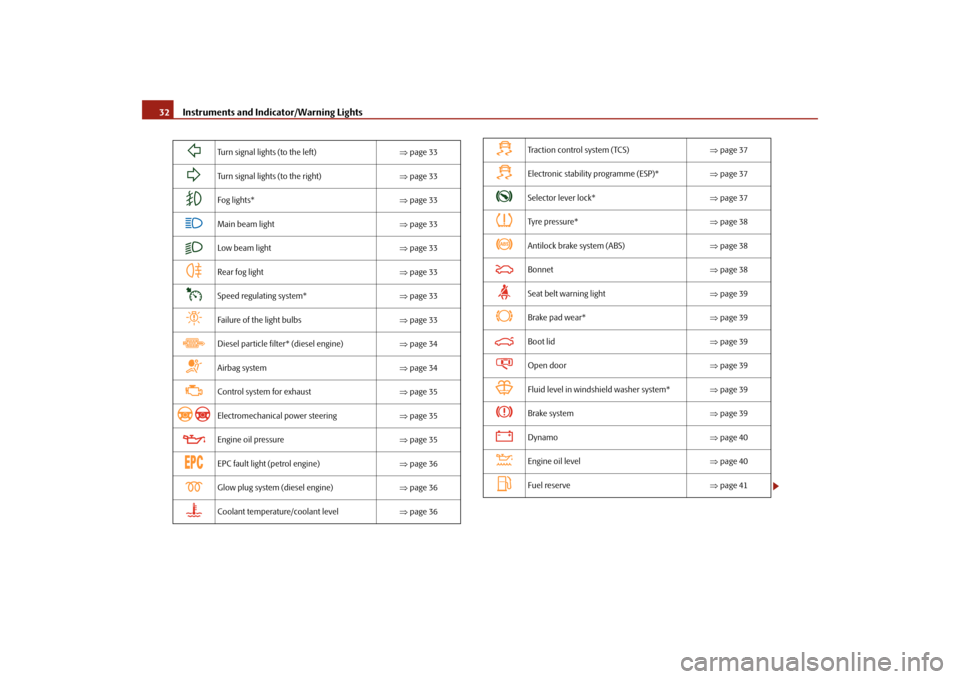
Turn signal lights (to the left)
⇒page 33
Turn signal lights (to the right)
⇒page 33
Fog lights*
⇒page 33
Main beam light
⇒page 33
Low beam light
⇒page 33
Rear fog light
⇒page 33
Speed regulating system*
⇒page 33
Failure of the light bulbs
⇒page 33
Diesel particle filter* (diesel engine)
⇒page 34
Airbag system
⇒page 34
Control system for exhaust
⇒page 35
Electromechanical power steering
⇒page 35
Engine oil pressure
⇒page 35
EPC fault light (petrol engine)
⇒page 36
Glow plug system (diesel engine)
⇒page 36
Coolant temperature/coolant level
⇒page 36
Traction control system (TCS)
⇒page 37
Electronic stability programme (ESP)*
⇒page 37
Selector lever lock*
⇒page 37
Tyre pressure*
⇒page 38
Antilock brake system (ABS)
⇒page 38
Bonnet
⇒page 38
Seat belt warning light
⇒page 39
Brake pad wear*
⇒page 39
Boot lid
⇒page 39
Open door
⇒page 39
Fluid level in windshield washer system*
⇒page 39
Brake system
⇒page 39
Dynamo
⇒page 40
Engine oil level
⇒page 40
Fuel reserve
⇒page 41
se0.1.book Page 32 Friday, April 10, 2009 3:19 PM
Page 38 of 304
Instruments and Indicator/Warning Lights
37
Using the system
Safety
Driving Tips
General Maintenance
Breakdown assistance
Technical Data
WARNING
•
If you must stop for technical reasons, then park the vehicle at a safe
distance from the traffic
and switch off the engine and switch on the hazard
warning light system
⇒page 64.
•
Take care when opening the coolant expa
nsion bottle. If the engine is hot,
the cooling system is pressurized - risk of scalding! It is best to allow the engine to cool down before removing the cap.•
Do not touch the coolant fan The coolant fan may switch on automati-
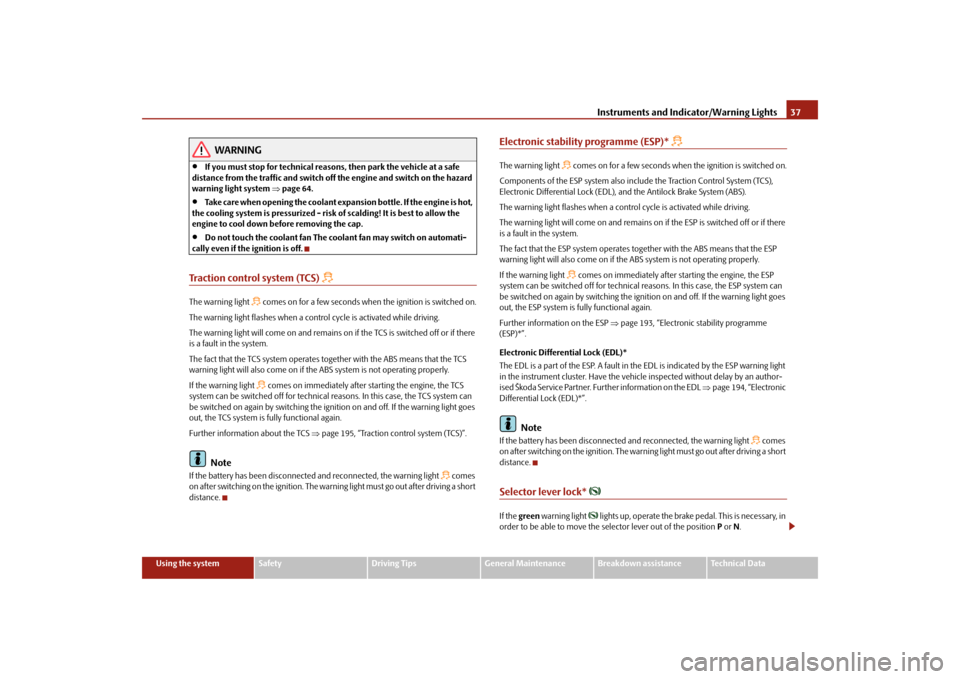
cally even if the ignition is off.Traction control system (TCS)
The warning light
comes on for a few seconds when the ignition is switched on.
The warning light flashes when a cont
rol cycle is activated while driving.
The warning light will come on and remains on
if the TCS is switched off or if there
is a fault in the system. The fact that the TCS system operates together with the ABS means that the TCS warning light will also come on if the
ABS system is not operating properly.
If the warning light
comes on immediately after starting the engine, the TCS
system can be switched off for technical
reasons. In this case, the TCS system can
be switched on again by switching the ignition on and off. If the warning light goes out, the TCS system is fully functional again. Further information about the TCS
⇒page 195, “Traction control system (TCS)”.
Note
If the battery has been disconnected
and reconnected, the warning light
comes
on after switching on the ignition. The warn
ing light must go out after driving a short
distance.
Electronic stability programme (ESP)*
The warning light
comes on for a few seconds when
the ignition is switched on.
Components of the ESP system also incl
ude the Traction Control System (TCS),
Electronic Differential Lock (EDL),
and the Antilock Brake System (ABS).
The warning light flashes when a control cycle is activated while driving.The warning light will come on and remains on
if the ESP is switched off or if there
is a fault in the system. The fact that the ESP system operates together with the ABS means that the ESP warning light will also come on if the ABS system is not operating properly. If the warning light
comes on immediately after starting the engine, the ESP
system can be switched off for technical
reasons. In this case, the ESP system can
be switched on again by swit
ching the ignition on and off. If the warning light goes
out, the ESP system is fully functional again. Further information on the ESP
⇒page 193, “Electronic
stability programme
(ESP)*”. Electronic Differential Lock (EDL)* The EDL is a part of the ESP. A fault in the EDL is indicated by the ESP warning light in the instrument cluster. Have the vehicle inspected without delay by an author- ised Škoda Service Partner. Further information on the EDL
⇒page 194, “Electronic
Differential Lock (EDL)*”.
Note
If the battery has been disconnected
and reconnected, the warning light
comes
on after switching on the ignition. The warn
ing light must go out after driving a short
distance.Selector lever lock*
If the
green
warning light
lights up, operate the brake pedal. This is necessary, in
order to be able to move the selector lever out of the position
P or N.
se0.1.book Page 37 Friday, April 10, 2009 3:19 PM
Page 53 of 304
Unlocking and locking
52
Switch off the interior monitor and towing protection monitoring – Switch off the ignition. – Open the driver door. – Press the button
at the centre column on the driver side
⇒
page 51, fig. 48
, the symbol
which lights up in the button
changes from red to orange.
– Lock the vehicle within 30 seconds.The interior monitor and the towing protec
tion monitoring are switched on again
automatically the next ti
me the car is locked.
Note
•
You can switch the interior monitor and th
e towing protection monitoring off if
there is a possibility that movements from (e.g. children or animals) inside the vehicle interior or if the vehicle must be transported (e.g. by train or ship) or towed, might trigger the alarm.•
The opened storage compartment for spectacles reduces the effectiveness of
the interior monitor. In order to ensure the function of the interior monitor to be fully operational, always close the stor
age compartment for spectacles before
locking the vehicle.
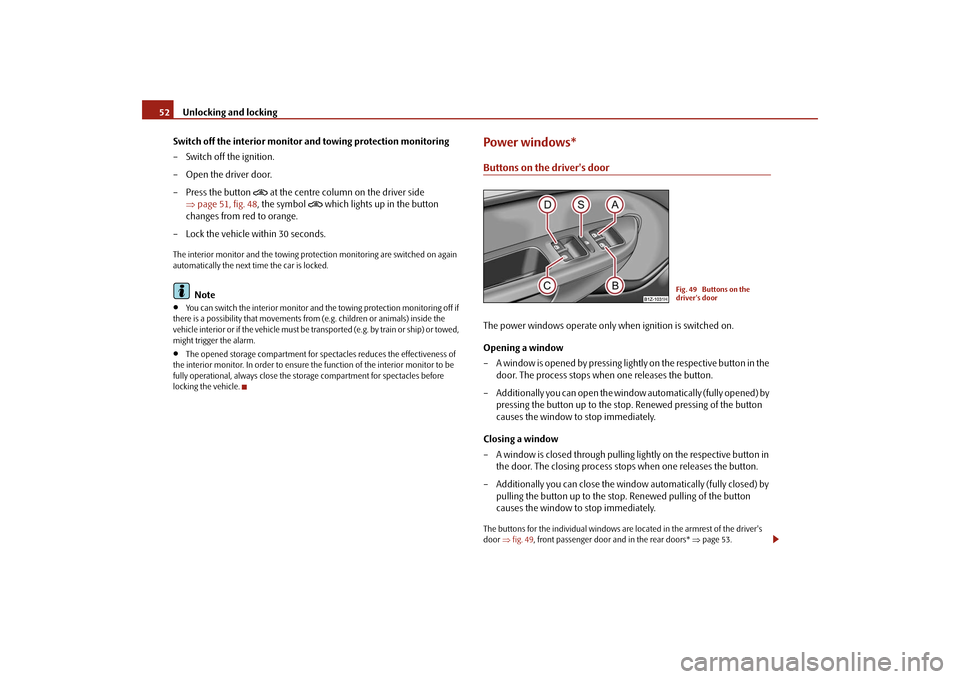
Power windows*Buttons on the driver's doorThe power windows operate only when ignition is switched on. Opening a window – A window is opened by pressing lightly on the respective button in the
door. The process stops when one releases the button.
– Additionally you can open the window automatically (fully opened) by
pressing the button up to the stop. Renewed pressing of the button causes the window to stop immediately.
Closing a window – A window is closed through pulling lightly on the respective button in
the door. The closing process stops when one releases the button.
– Additionally you can close the window automatically (fully closed) by
pulling the button up to the stop. Renewed pulling of the button causes the window to stop immediately.
The buttons for the individual windows are located in the armrest of the driver's door
⇒fig. 49
, front passenger door and in the rear doors*
⇒page 53.
Fig. 49 Buttons on the driver's door
se0.1.book Page 52 Friday, April 10, 2009 3:19 PM
Page 61 of 304
Lights and Visibility
60
If the vehicle speed is below 65 km/h for at least 2 minutes, the lights are switched off. Rain lights If you switch on the windscreen wipe in
the operation rain sensor* for longer than
10 seconds or in the operation pe
rmanent wipe (position 2 or 3)
⇒page 69
switching on for longer than 15 seconds, th
e side lights and low beam are switched
on automatically. The light switches off if
the windscreen wipe is in operation rain
sensor* for more than 4 minutes or is no
t switched on in the operation permanent
wipe.
WARNING
The automatic light control only operat
es as a support. The driver is not
released from his responsibility to inspect the light and if necessary to switch on the light depending on the light
conditions. The light sensor cannot
detect for example rain or snow. Fo
r these conditions we recommend to
switch on the low beam
!
Note
•
Do not affix any stickers in front of the light sensor, so that you do not impair its
function or put it out of operation.•
The same principles as for using the au
tomatic light control also apply to the
light which is switched on manually
⇒page 58.
Cornering lights*The cornering lights are used to illuminate the curves by means of the cone of light swiveling together with the front headlight with Xenon lights*. This function is active when the speed of the car increases to more than 10km/h. The swiveling function of the headlights ca
n be switched off / on via the menu point
Assistant
in the main menu of the Information display*
⇒page 26.
WARNING
If the cornering lights are defectiv
e, the headlights are automatically
lowered to the emergency position, wh
ich prevents a possible dazzling of
oncoming traffic. Thus the illuminated length of the road is shortened. Drive carefully and have the car inspected
immediately by a specialist garage.
Coming Home FunctionThe function makes it possible to switch on the lights in the darkness for a short time after leaving the vehicle. Switching on Coming Home Function – The light switch is in the positi
on automatic driving lamp control
and the low beam illuminates.
– Switch off the ignition. – After opening the driver's door, the function Coming Home is
switched on.
– Close all the doors and the boot lid and lock the vehicle. After a short
time, switch all lights off.
Depending on equipment fitted the func
tion Coming Home switches on the
following lights:•
Parking lights,
•
Low beam,
•
Entry lighting in the exterior mirrors,
•
Licence plate light.
Coming Home Function The lights go out 10 seconds after closing all the doors and the boot lid. If a door or the boot lid re
mains open, the lights go ou
t 60 seconds after switching
off the ignition.
se0.1.book Page 60 Friday, April 10, 2009 3:19 PM
Page 64 of 304

Lights and Visibility
63
Using the system
Safety
Driving Tips
General Maintenance
Breakdown assistance
Technical Data
Instrument lighting*
You can adjust the brightness of the instrument lighting.Instrument lighting – Switch on the light. – Turn the control dial
⇒
fig. 57
to the desired intensity of the instru-
ment lighting.
For the information display*
⇒page 26 the intensity of the lighting is automatically
set. It is only possible to adjust the inst
rument lighting with the control dial if the
light intensity drops below the set value of the light sensor.
Headlamp range adjustment
Once the low beam is switched on
you can then adapt the range of
the headlights to the
load of the vehicle.
– Turn the control dial
⇒
fig. 58
until you have adjusted the low beam
so that oncoming traffic is not dazzled.
Settings The positions correspond approximat
ely to the following vehicle loads:
Front seats occupied, luggage compartment empty. All seats occupied, lugga
ge compartment empty.
All seats occupied, luggage compartment laden.Driver seat occupied, lu
ggage compartment laden.
Caution
Set the headlight beam adjustment in su
ch a way as to avoid dazzling oncoming
traffic.
Note
Headlights fitted with Xenon bulbs* adap
t automatically to the load and driving
state of the vehicle (e.g. accelerating, braking) when the ignition is switched on and
Fig. 57 Dash panel: Instru- ment lighting
Fig. 58 Dash panel: Lights and Visibility
A-A1A2A3
se0.1.book Page 63 Friday, April 10, 2009 3:19 PM