low beam SKODA OCTAVIA 2009 2.G / (1Z) Owner's Manual
[x] Cancel search | Manufacturer: SKODA, Model Year: 2009, Model line: OCTAVIA, Model: SKODA OCTAVIA 2009 2.G / (1Z)Pages: 304, PDF Size: 19.56 MB
Page 14 of 304
The brief instruction
13
Using the system
Safety
Driving Tips
General Maintenance
Breakdown assistance
Technical Data
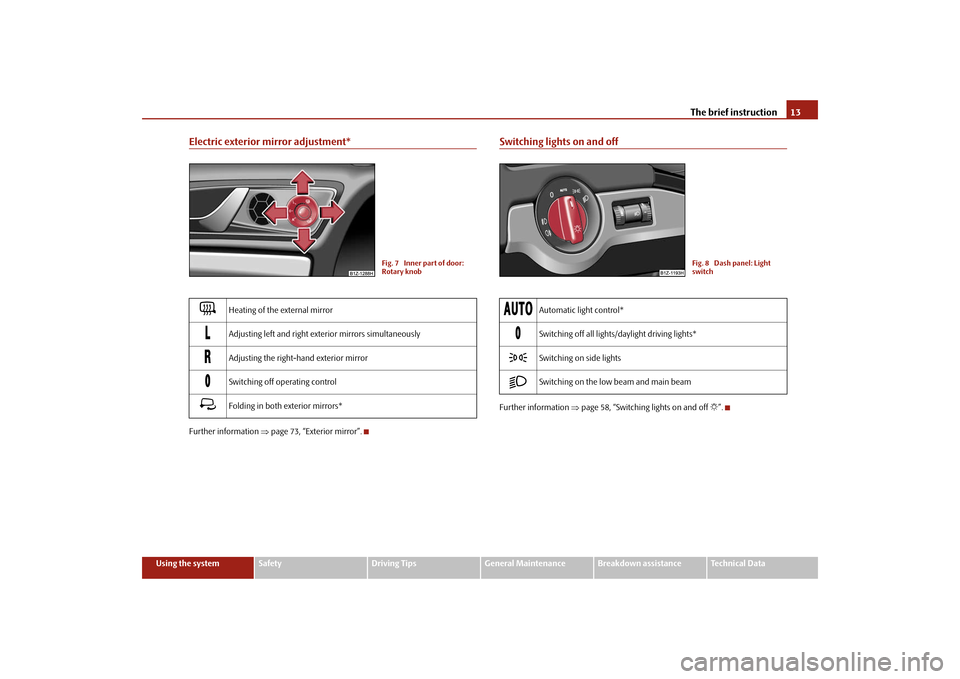
Electric exterior mirror adjustment*Further information
⇒page 73, “Exterior mirror”.
Switching lights on and offFurther information
⇒page 58, “Switching lights on and off
”.
Heating of the external mirror
Adjusting left and right exterior mirrors simultaneously
Adjusting the right-hand exterior mirror
Switching off operating control
Folding in both exterior mirrors*
Fig. 7 Inner part of door: Rotary knob
Automatic light control*
Switching off all lights/daylight driving lights*
Switching on side lights
Switching on the low beam and main beam
Fig. 8 Dash panel: Light switch
se0.1.book Page 13 Friday, April 10, 2009 3:19 PM
Page 15 of 304
The brief instruction
14
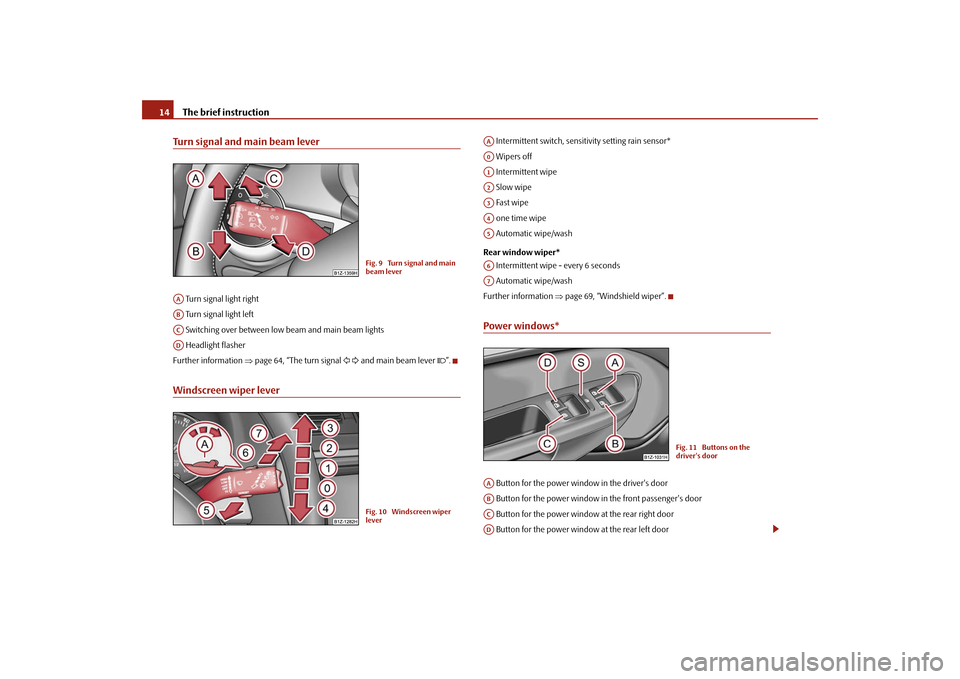
Turn signal and main beam lever Turn signal light right Turn signal light left Switching over between low beam and main beam lights Headlight flasherFurther information
⇒page 64, “The turn signal
and main beam lever
”.
Windscreen wiper lever
Intermittent switch, sensitivity setting rain sensor* Wipers off Intermittent wipe Slow wipe Fast wipe one time wipe Automatic wipe/wash Rear window wiper* Intermittent wipe - every 6 seconds Automatic wipe/washFurther information
⇒page 69, “Windshield wiper”.
Power windows* Button for the power window in the driver's door Button for the power window in the front passenger's door Button for the power window at the rear right door Button for the power window at the rear left door
Fig. 9 Turn signal and main beam lever
AAABACAD
Fig. 10 Windscreen wiper lever
AAA0A1A2A3A4A5A6A7
Fig. 11 Buttons on the driver's door
AAABACAD
se0.1.book Page 14 Friday, April 10, 2009 3:19 PM
Page 33 of 304
Instruments and Indicator/Warning Lights
32
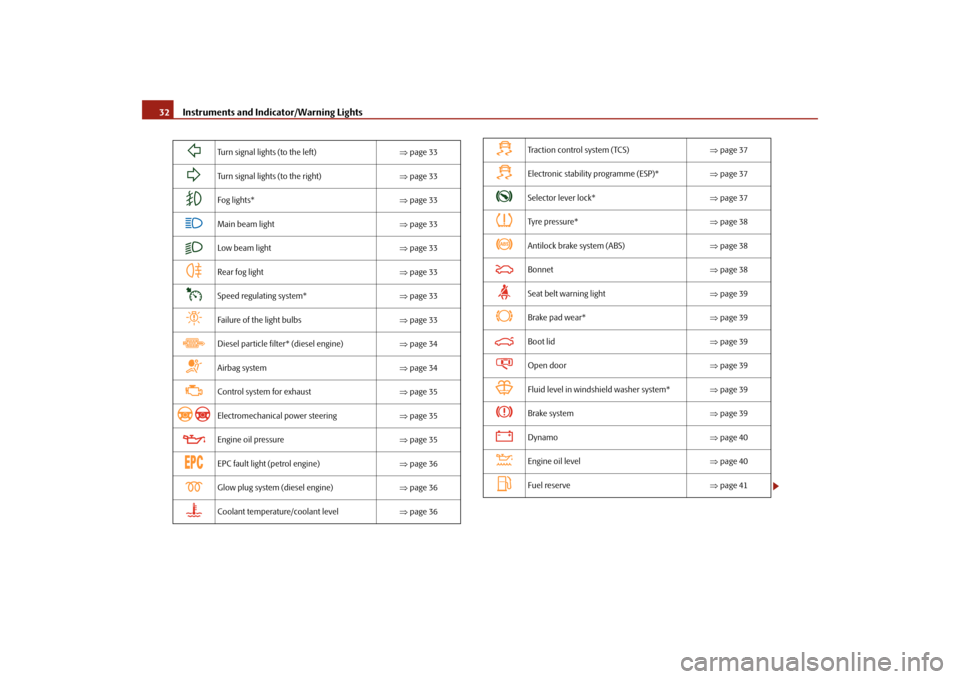
Turn signal lights (to the left)
⇒page 33
Turn signal lights (to the right)
⇒page 33
Fog lights*
⇒page 33
Main beam light
⇒page 33
Low beam light
⇒page 33
Rear fog light
⇒page 33
Speed regulating system*
⇒page 33
Failure of the light bulbs
⇒page 33
Diesel particle filter* (diesel engine)
⇒page 34
Airbag system
⇒page 34
Control system for exhaust
⇒page 35
Electromechanical power steering
⇒page 35
Engine oil pressure
⇒page 35
EPC fault light (petrol engine)
⇒page 36
Glow plug system (diesel engine)
⇒page 36
Coolant temperature/coolant level
⇒page 36
Traction control system (TCS)
⇒page 37
Electronic stability programme (ESP)*
⇒page 37
Selector lever lock*
⇒page 37
Tyre pressure*
⇒page 38
Antilock brake system (ABS)
⇒page 38
Bonnet
⇒page 38
Seat belt warning light
⇒page 39
Brake pad wear*
⇒page 39
Boot lid
⇒page 39
Open door
⇒page 39
Fluid level in windshield washer system*
⇒page 39
Brake system
⇒page 39
Dynamo
⇒page 40
Engine oil level
⇒page 40
Fuel reserve
⇒page 41
se0.1.book Page 32 Friday, April 10, 2009 3:19 PM
Page 34 of 304
Instruments and Indicator/Warning Lights
33
Using the system
Safety
Driving Tips
General Maintenance
Breakdown assistance
Technical Data
WARNING
•
If you do not pay attention to the warning lights coming on and the corre-
sponding descriptions and warning notes, this may result in severe body injuries or major vehicle damage.•
The engine compartment of your car is
a hazardous area. There is a risk
of injuries, scalding, accidents and
fire when working in the engine
compartment, e.g. inspecting and replenis
hing oil and other fluids. It is also
essential to observe all warnings
⇒page 225, “Working in the engine
compartment”.
Note
•
The arrangement of the indicator lights depends on the model version. The
symbols shown in the following functional description are to be found as indicator lights in the instrument cluster.•
Operational faults are shown in the instrument cluster as red symbols (priority
1 - danger) or yellow symb
ols (priority 2 - warning).
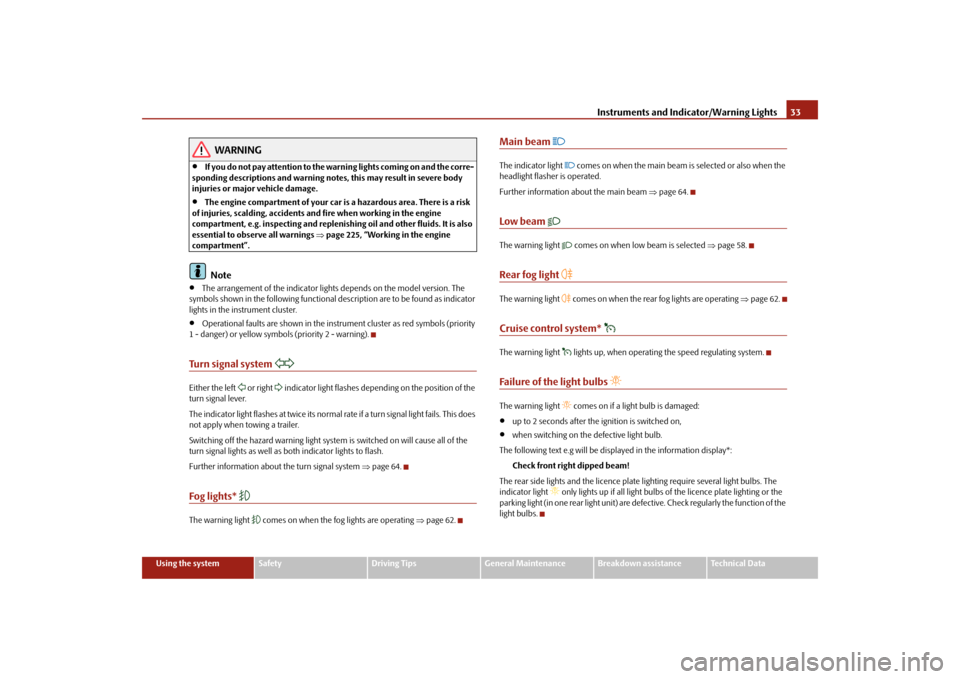
Turn signal system
Either the left
or right
indicator light flashes depending on the position of the
turn signal lever. The indicator light flashes at twice its normal ra
te if a turn signal light fails. This does
not apply when towing a trailer. Switching off the hazard warning light system is switched on will cause all of the turn signal lights as well as
both indicator lights to flash.
Further information about
the turn signal system
⇒page 64.
Fog lights*
The warning light
comes on when the fog lights are operating
⇒page 62.
Main beam
The indicator light
comes on when the main beam is selected or also when the
headlight flasher is operated. Further information about the main beam
⇒page 64.
Low beam
The warning light
comes on when low beam is selected
⇒page 58.
Rear fog light
The warning light
comes on when the rear fog lights are operating
⇒page 62.
Cruise control system*
The warning light
lights up, when operating the speed regulating system.
Failure of the light bulbs
The warning light
comes on if a light bulb is damaged:
•
up to 2 seconds after the ignition is switched on,
•
when switching on the defective light bulb.
The following text e.g will be displayed in the information display*:
Check front right dipped beam!
The rear side lights and the licence plate
lighting require several light bulbs. The
indicator light
only lights up if all light bulbs
of the licence plate lighting or the
parking light (in one rear light unit) are defe
ctive. Check regularly the function of the
light bulbs.
se0.1.book Page 33 Friday, April 10, 2009 3:19 PM
Page 59 of 304
Lights and Visibility
58
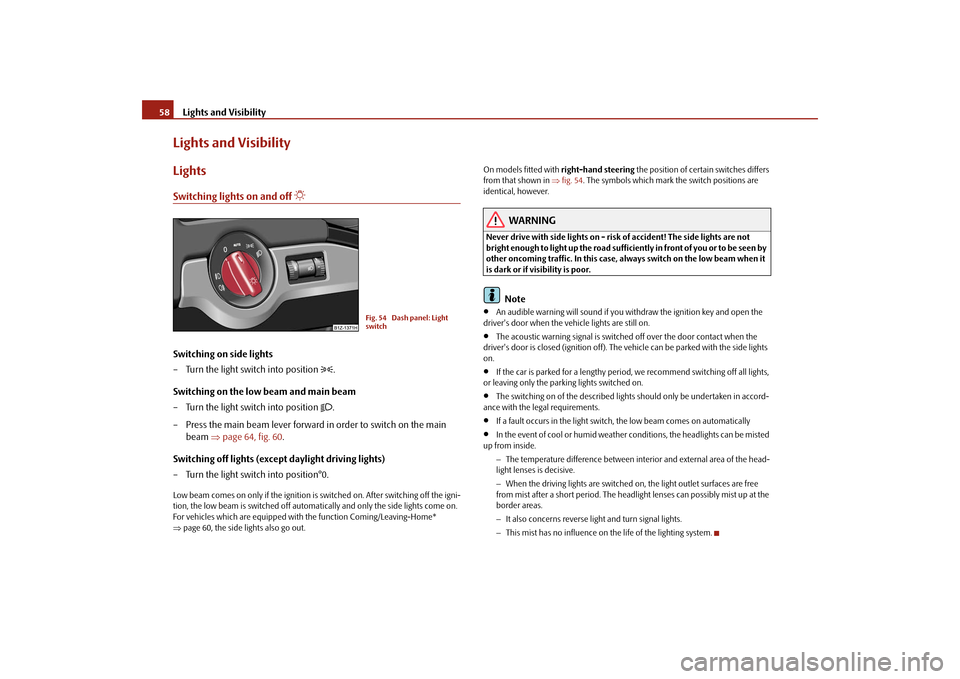
Lights and VisibilityLightsSwitching lights on and off
Switching on side lights – Turn the light switch into position
.
Switching on the low beam and main beam – Turn the light switch into position
.
– Press the main beam lever forward in order to switch on the main
beam
⇒
page 64, fig. 60
.
Switching off lights (except daylight driving lights) – Turn the light switch into position°0.Low beam comes on only if the ignition is switched on. After switching off the igni- tion, the low beam is switched off automati
cally and only the side lights come on.
For vehicles which are equipped with
the function Comi
ng/Leaving-Home*
⇒ page 60, the side lights also go out.
On models fitted with
right-hand steering
the position of certain switches differs
from that shown in
⇒fig. 54
. The symbols which mark the switch positions are
identical, however.
WARNING
Never drive with side lights on - risk of accident! The side lights are not bright enough to light up the road sufficiently in front of you or to be seen by other oncoming traffic. In this case, always switch on the low beam when it is dark or if visibility is poor.
Note
•
An audible warning will sound if you withdraw the ignition key and open the
driver's door when the vehicle lights are still on.•
The acoustic warning signal is switched off over the door contact when the
driver's door is closed (ignition off). The
vehicle can be parked with the side lights
on.•
If the car is parked for a lengthy period
, we recommend switching off all lights,
or leaving only the parking lights switched on.•
The switching on of the described lights
should only be undertaken in accord-
ance with the legal requirements.•
If a fault occurs in the light switch, the low beam comes on automatically
•
In the event of cool or humid weather co
nditions, the headligh
ts can be misted
up from inside.
− The temperature difference between interior and external area of the head- light lenses is decisive. − When the driving lights are switched on, the light outlet surfaces are free from mist after a short period. The headli
ght lenses can possib
ly mist up at the
border areas. − It also concerns reverse light and turn signal lights. − This mist has no influence on th
e life of the lighting system.
Fig. 54 Dash panel: Light switch
se0.1.book Page 58 Friday, April 10, 2009 3:19 PM
Page 60 of 304
Lights and Visibility
59
Using the system
Safety
Driving Tips
General Maintenance
Breakdown assistance
Technical Data
Daylight driving lights*In some countries, the national legisl
ation requires that the vehicles are
equipped with the function
daylight driving lights.
Switching on daylight driving lights – Switch on the ignition without turnin
g the light switch out of the posi-
tion 0.
Deactivate function daylight driving lights – Pull the turn signal light lever towards the steering wheel up to 3
seconds after switching on the ignition
and at the same time, slide it to
the bottom and hold it in this position for at least 3 seconds.
Activate function daylight driving lights – Pull the turn signal light lever towards the steering wheel up to 3
seconds after switching on the ignition
and at the same time, slide it to
the top and hold it in this position for at least 3 seconds.
When the daylight driving lights are switched on, the side lights and the low beam come on together. On vehicles which are fitted with bulbs for
daylight driving lights* in the fog lights,
the parking lights do not co
me on when activating the function daylight driving
lights
9).
When the daylight driving lights are switched on, the illumination of the instrument cluster is switched off, however, it is switched on in the position
when it is dark
and the low beam shines with full brightness (100 % of the performance). On vehicles fitted with an information displa
y*, you can activate or
deactivate in the
menu the function daylight driving lights:„
SETUP (Settings)
„
Lights & Vision (Lights & Vision)
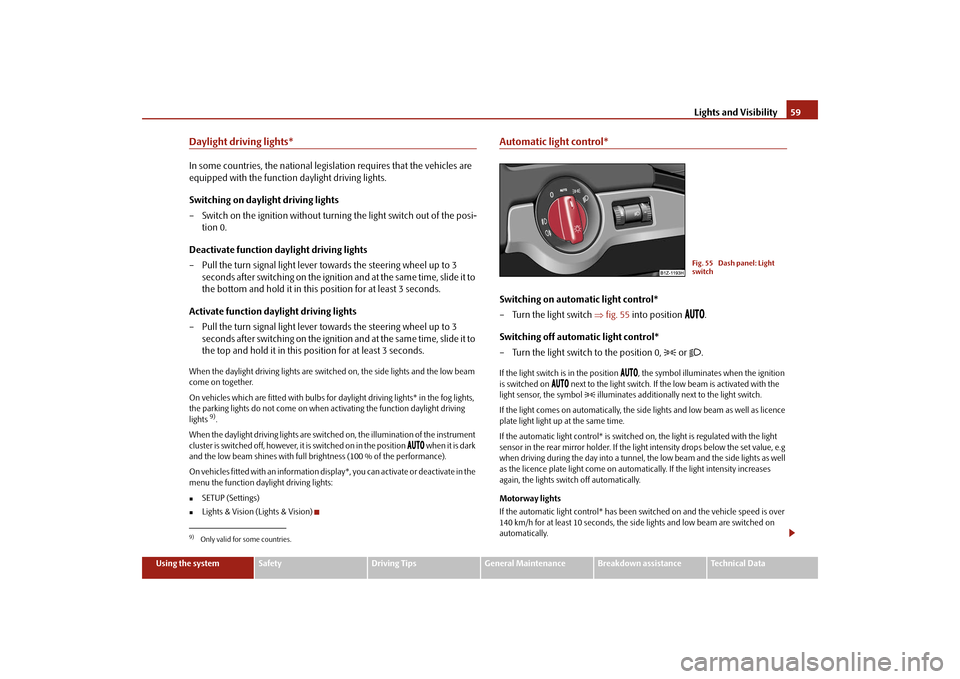
Automatic light control*Switching on automatic light control* – Turn the light switch
⇒
fig. 55
into position
.
Switching off automatic light control* – Turn the light switch to the position 0,
or
.
If the light switch is in the position
, the symbol illuminates when the ignition
is switched on
next to the light switch. If th
e low beam is activated with the
light sensor, the symbol
illuminates additionally next to the light switch.
If the light comes on automatically, the side lights and low beam as well as licence plate light light up at the same time. If the automatic light control* is switched on, the light is regulated with the light sensor in the rear mirror holder. If the light intensity drops below the set value, e.g when driving during the day into a tunnel, the low beam and the side lights as well as the licence plate light come on automa
tically. If the light intensity increases
again, the lights switch off automatically. Motorway lights If the automatic light control* has been sw
itched on and the vehicle speed is over
140 km/h for at least 10 seconds, the side
lights and low beam are switched on
automatically.
9)Only valid for some countries.
Fig. 55 Dash panel: Light switch
se0.1.book Page 59 Friday, April 10, 2009 3:19 PM
Page 61 of 304
Lights and Visibility
60
If the vehicle speed is below 65 km/h for at least 2 minutes, the lights are switched off. Rain lights If you switch on the windscreen wipe in
the operation rain sensor* for longer than
10 seconds or in the operation pe
rmanent wipe (position 2 or 3)
⇒page 69
switching on for longer than 15 seconds, th
e side lights and low beam are switched
on automatically. The light switches off if
the windscreen wipe is in operation rain
sensor* for more than 4 minutes or is no
t switched on in the operation permanent
wipe.
WARNING
The automatic light control only operat
es as a support. The driver is not
released from his responsibility to inspect the light and if necessary to switch on the light depending on the light
conditions. The light sensor cannot
detect for example rain or snow. Fo
r these conditions we recommend to
switch on the low beam
!
Note
•
Do not affix any stickers in front of the light sensor, so that you do not impair its
function or put it out of operation.•
The same principles as for using the au
tomatic light control also apply to the
light which is switched on manually
⇒page 58.
Cornering lights*The cornering lights are used to illuminate the curves by means of the cone of light swiveling together with the front headlight with Xenon lights*. This function is active when the speed of the car increases to more than 10km/h. The swiveling function of the headlights ca
n be switched off / on via the menu point
Assistant
in the main menu of the Information display*
⇒page 26.
WARNING
If the cornering lights are defectiv
e, the headlights are automatically
lowered to the emergency position, wh
ich prevents a possible dazzling of
oncoming traffic. Thus the illuminated length of the road is shortened. Drive carefully and have the car inspected
immediately by a specialist garage.
Coming Home FunctionThe function makes it possible to switch on the lights in the darkness for a short time after leaving the vehicle. Switching on Coming Home Function – The light switch is in the positi
on automatic driving lamp control
and the low beam illuminates.
– Switch off the ignition. – After opening the driver's door, the function Coming Home is
switched on.
– Close all the doors and the boot lid and lock the vehicle. After a short
time, switch all lights off.
Depending on equipment fitted the func
tion Coming Home switches on the
following lights:•
Parking lights,
•
Low beam,
•
Entry lighting in the exterior mirrors,
•
Licence plate light.
Coming Home Function The lights go out 10 seconds after closing all the doors and the boot lid. If a door or the boot lid re
mains open, the lights go ou
t 60 seconds after switching
off the ignition.
se0.1.book Page 60 Friday, April 10, 2009 3:19 PM
Page 62 of 304

Lights and Visibility
61
Using the system
Safety
Driving Tips
General Maintenance
Breakdown assistance
Technical Data
The function Coming Home is controlled wi
th the light sensor in the mount of the
interior rear mirror. If the light intensity is higher than the set value of the light sensor, the Coming Home Function is not switched on after switching off the igni-tion.
Note
•
If the Coming Home Function is switch
ed on constantly, the battery will be
heavily discharged particular
ly in short-haul traffic.
•
The switching on of the described lights
should only be undertaken in accord-
ance with the legal requirements.•
You can change the illumination period
for the Coming Home Function by
means of the information display*.Leaving Home FunctionThis function makes it possible to switch on the lights when approaching the vehicle. Switching on Leaving Home Function – Unlock the vehicle with the radio remote control - the lights come on.Depending on equipment fitted the function Leaving Home switches on the following lights:•
Parking lights,
•
Low beam,
•
Entry lighting in the exterior mirrors,
•
Licence plate light.
Leaving Home Function The function Leaving Home is controlled wi
th the light sensor in the mount of the
interior rear mirror. If the light intensity is higher than the set value of the light sensor, the Leaving Home Function is not
switched on after unlocking the vehicle
with the radio remote control.
After unlocking the vehicle with the radio re
mote control, the lights come on for 10
seconds. The Leaving Home Function is also switched off after the ignition is switched on and after locking the vehicle. If no door is opened within 30 seconds,
the lights go out and the vehicle is locked
automatically.
Note
•
If the Leaving Home Function is switch
ed on constantly, the battery will be
heavily discharged particular
ly in short-haul traffic.
•
The switching on of the described lights
should only be und
ertaken in accord-
ance with the legal requirements.•
You can change the illumination period
for the Leaving Home Function by
means of the information display*.To u r i s t l i g h t *This mode makes it possible to drive in
countries with opposing traffic system,
driving on the left/right, without dazzling the oncoming vehicles. When the mode “tourist light” is active, the side to side swivel of the headlights is deactivated. The mode “tourist light” is activated / deac
tivated via the information display* in the
menu:„
SETUP (Settings)
„
Tra v e l m o d e„
Off
„
On
se0.1.book Page 61 Friday, April 10, 2009 3:19 PM
Page 63 of 304
Lights and Visibility
62
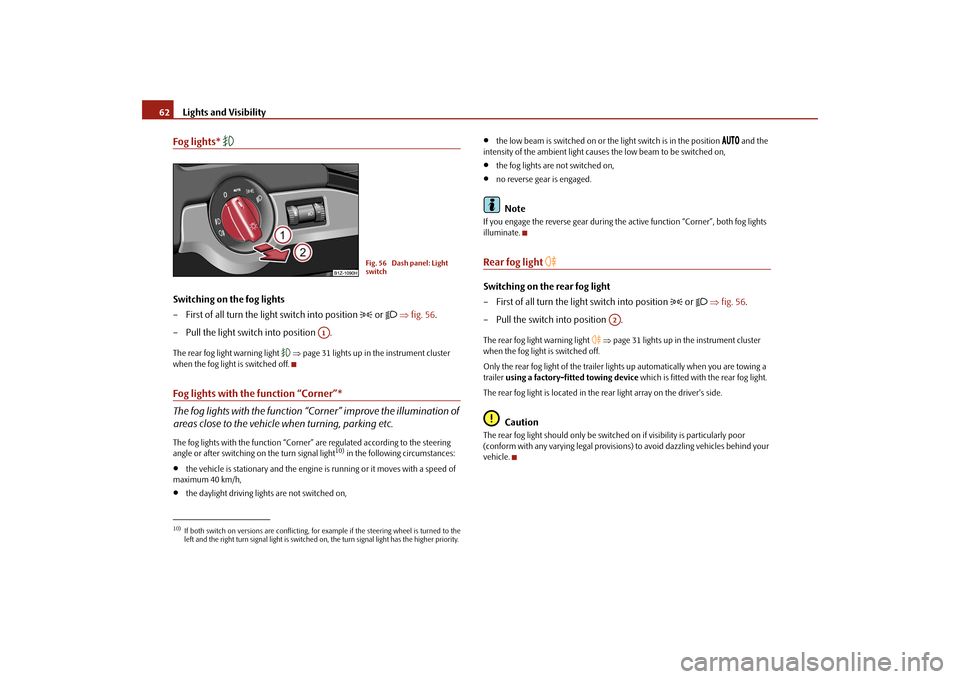
Fog lights*
Switching on the fog lights – First of all turn the light switch into position
or
⇒
fig. 56
.
– Pull the light switch into position .The rear fog light warning light
⇒page 31 lights up in the instrument cluster
when the fog light is switched off.Fog lights with the function “Corner”* The fog lights with the function “Corner” improve the illumination of areas close to the vehicle
when turning, parking etc.
The fog lights with the function “Corner”
are regulated according to the steering
angle or after switching on the turn signal light
10) in the following circumstances:
•
the vehicle is stationary and the engine
is running or it moves with a speed of
maximum 40 km/h,•
the daylight driving lights are not switched on,
•
the low beam is switched on or the
light switch is in the position
and the
intensity of the ambient light causes
the low beam to be switched on,
•
the fog lights are not switched on,
•
no reverse gear is engaged.Note
If you engage the reverse gear during the
active function “Corner”, both fog lights
illuminate.Rear fog light
Switching on the rear fog light – First of all turn the light switch into position
or
⇒
fig. 56
.
– Pull the switch into position .The rear fog light warning light
⇒page 31 lights up in the instrument cluster
when the fog light is switched off. Only the rear fog light of the trailer ligh
ts up automatically when you are towing a
trailer
using a factory-fitted towing device
which is fitted with the rear fog light.
The rear fog light is located in the rear light array on the driver's side.
Caution
The rear fog light should only be switched
on if visibility is particularly poor
(conform with any varying legal provisions) to avoid dazzling vehicles behind your vehicle.
10)If both switch on versions are conflicting, fo
r example if the steering wheel is turned to the
left and the right turn signal light is switched on, the turn signal light has the higher priority.
Fig. 56 Dash panel: Light switch
A1
A2
se0.1.book Page 62 Friday, April 10, 2009 3:19 PM
Page 64 of 304

Lights and Visibility
63
Using the system
Safety
Driving Tips
General Maintenance
Breakdown assistance
Technical Data
Instrument lighting*
You can adjust the brightness of the instrument lighting.Instrument lighting – Switch on the light. – Turn the control dial
⇒
fig. 57
to the desired intensity of the instru-
ment lighting.
For the information display*
⇒page 26 the intensity of the lighting is automatically
set. It is only possible to adjust the inst
rument lighting with the control dial if the
light intensity drops below the set value of the light sensor.
Headlamp range adjustment
Once the low beam is switched on
you can then adapt the range of
the headlights to the
load of the vehicle.
– Turn the control dial
⇒
fig. 58
until you have adjusted the low beam
so that oncoming traffic is not dazzled.
Settings The positions correspond approximat
ely to the following vehicle loads:
Front seats occupied, luggage compartment empty. All seats occupied, lugga
ge compartment empty.
All seats occupied, luggage compartment laden.Driver seat occupied, lu
ggage compartment laden.
Caution
Set the headlight beam adjustment in su
ch a way as to avoid dazzling oncoming
traffic.
Note
Headlights fitted with Xenon bulbs* adap
t automatically to the load and driving
state of the vehicle (e.g. accelerating, braking) when the ignition is switched on and
Fig. 57 Dash panel: Instru- ment lighting
Fig. 58 Dash panel: Lights and Visibility
A-A1A2A3
se0.1.book Page 63 Friday, April 10, 2009 3:19 PM