navigation system SKODA OCTAVIA 2009 2.G / (1Z) Owner's Manual
[x] Cancel search | Manufacturer: SKODA, Model Year: 2009, Model line: OCTAVIA, Model: SKODA OCTAVIA 2009 2.G / (1Z)Pages: 304, PDF Size: 19.56 MB
Page 10 of 304
Cockpit
9
Using the system
Safety
Driving Tips
General Maintenance
Breakdown assistance
Technical Data
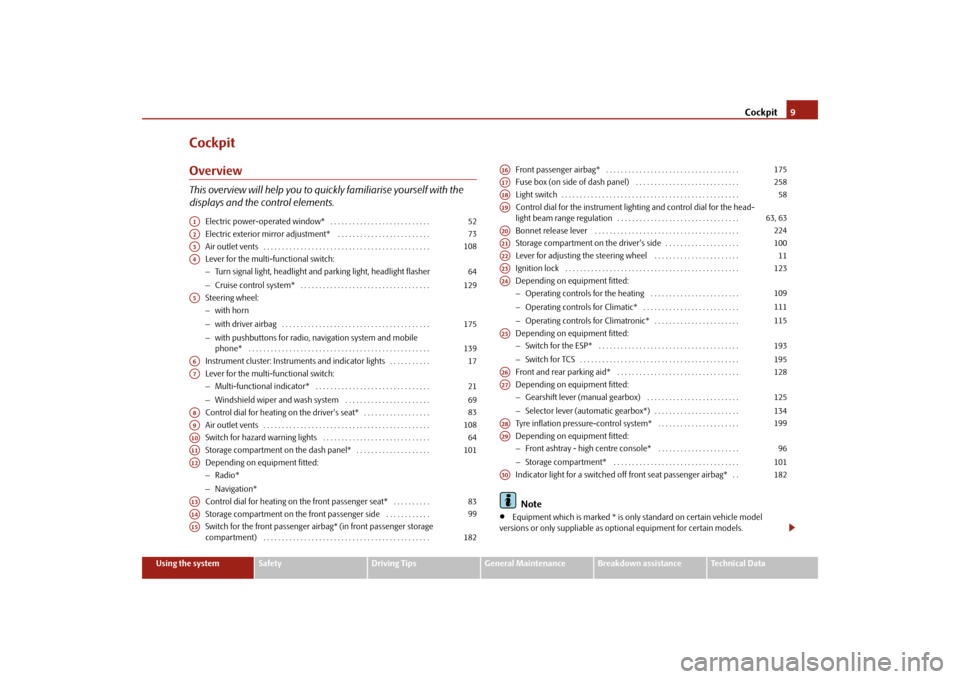
CockpitOverviewThis overview will help you to quickly familiarise yourself with the displays and the control elements.
Electric power-operated window* . . . . . . . . . . . . . . . . . . . . . . . . . . . Electric exterior mirror adjustment* . . . . . . . . . . . . . . . . . . . . . . . . . Air outlet vents . . . . . . . . . . . . . . . . . . . . . . . . . . . . . . . . . . . . . . . . . . . . . Lever for the multi-functional switch:− Turn signal light, headlight and parking light, headlight flasher − Cruise control system* . . . . . . . . . . . . . . . . . . . . . . . . . . . . . . . . . . . Steering wheel: − with horn − with driver airbag . . . . . . . . . . . . . . . . . . . . . . . . . . . . . . . . . . . . . . . . − with pushbuttons for radio, na
vigation system and mobile
phone* . . . . . . . . . . . . . . . . . . . . . . . . . . . . . . . . . . . . . . . . . . . . . . . . . Instrument cluster: Instrum
ents and indicator lights . . . . . . . . . . .
Lever for the multi-functional switch:− Multi-functional indicator* . . . . . . . . . . . . . . . . . . . . . . . . . . . . . . . − Windshield wiper and wash system . . . . . . . . . . . . . . . . . . . . . . . Control dial for heating on the driver's seat* . . . . . . . . . . . . . . . . . . Air outlet vents . . . . . . . . . . . . . . . . . . . . . . . . . . . . . . . . . . . . . . . . . . . . . Switch for hazard warning lights . . . . . . . . . . . . . . . . . . . . . . . . . . . . . Storage compartment on the dash panel* . . . . . . . . . . . . . . . . . . . . Depending on equipment fitted:− Radio* − Navigation* Control dial for heating on the front passenger seat* . . . . . . . . . . Storage compartment on the front passenger side . . . . . . . . . . . . Switch for the front passenger airbag* (in front passenger storage compartment) . . . . . . . . . . . . . . . . . . . . . . . . . . . . . . . . . . . . . . . . . . . . .
Front passenger airbag* . . . . . . . . . . . . . . . . . . . . . . . . . . . . . . . . . . . . Fuse box (on side of dash panel) . . . . . . . . . . . . . . . . . . . . . . . . . . . . Light switch . . . . . . . . . . . . . . . . . . . . . . . . . . . . . . . . . . . . . . . . . . . . . . . . Control dial for the instrument lighting and control dial for the head- light beam range regulation . . . . . . . . . . . . . . . . . . . . . . . . . . . . . . . . . Bonnet release lever . . . . . . . . . . . . . . . . . . . . . . . . . . . . . . . . . . . . . . . Storage compartment on the driver's side . . . . . . . . . . . . . . . . . . . . Lever for adjusting the steering wheel . . . . . . . . . . . . . . . . . . . . . . . Ignition lock . . . . . . . . . . . . . . . . . . . . . . . . . . . . . . . . . . . . . . . . . . . . . . . Depending on equipment fitted:− Operating controls for the heating . . . . . . . . . . . . . . . . . . . . . . . . − Operating controls for Climatic* . . . . . . . . . . . . . . . . . . . . . . . . . . − Operating controls for Climatronic* . . . . . . . . . . . . . . . . . . . . . . . Depending on equipment fitted: − Switch for the ESP* . . . . . . . . . . . . . . . . . . . . . . . . . . . . . . . . . . . . . . − Switch for TCS . . . . . . . . . . . . . . . . . . . . . . . . . . . . . . . . . . . . . . . . . . . Front and rear parking aid* . . . . . . . . . . . . . . . . . . . . . . . . . . . . . . . . . Depending on equipment fitted: − Gearshift lever (manual gearbox) . . . . . . . . . . . . . . . . . . . . . . . . . − Selector lever (automatic gearbox*) . . . . . . . . . . . . . . . . . . . . . . . Tyre inflation pressure-control system* . . . . . . . . . . . . . . . . . . . . . . Depending on equipment fitted: − Front ashtray - high centre console* . . . . . . . . . . . . . . . . . . . . . . − Storage compartment* . . . . . . . . . . . . . . . . . . . . . . . . . . . . . . . . . . Indicator light for a switched off front seat passenger airbag* . . Note
•
Equipment which is marked * is only standard on certain vehicle model
versions or only suppliable as op
tional equipment for certain models.
A1
52
A2
73
A3
108
A4
64 129
A5
175 139
A6
17
A7
21 69
A8
83
A9
108
A10
64
A11
101
A12A13
83
A14
99
A15
182
A16
175
A17
258
A18
58
A19
63, 63
A20
224
A21
100
A22
11
A23
123
A24
109111115
A25
193195
A26
128
A27
125134
A28
199
A29
96101
A30
182
se0.1.book Page 9 Friday, April 10, 2009 3:19 PM
Page 27 of 304
Instruments and Indicator/Warning Lights
26
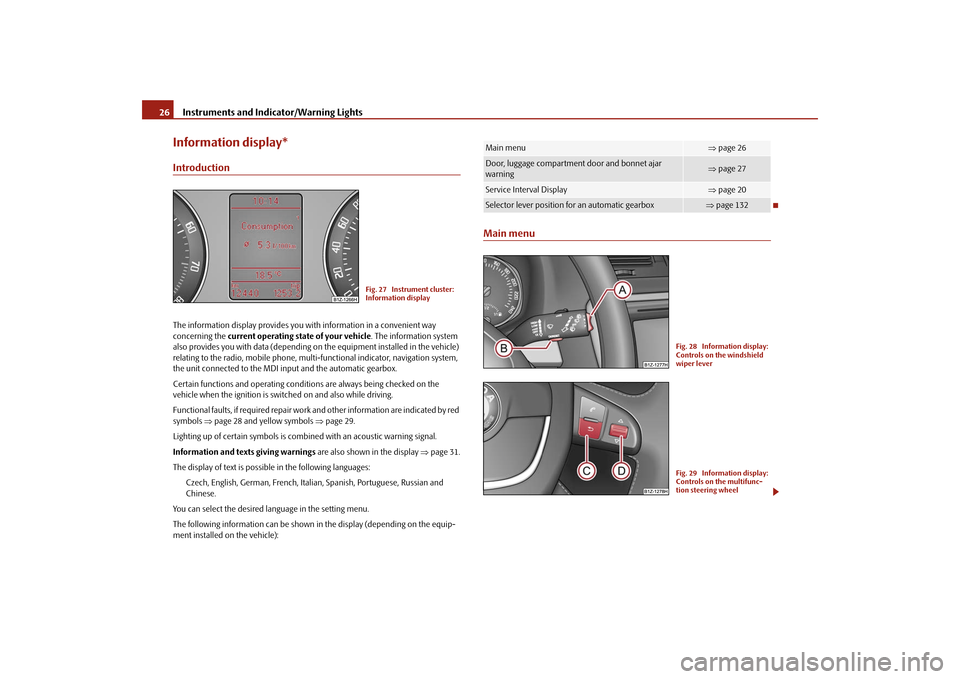
Information display*IntroductionThe information display provides you with information in a convenient way concerning the
current operating state of your vehicle
. The information system
also provides you with data (depending on
the equipment installed in the vehicle)
relating to the radio, mobile phone, mult
i-functional indicator, navigation system,
the unit connected to the MDI input and the automatic gearbox. Certain functions and operating conditio
ns are always being checked on the
vehicle when the ignition is switched on and also while driving. Functional faults, if required repair work
and other information are indicated by red
symbols
⇒page 28 and yellow symbols
⇒page 29.
Lighting up of certain symbols is comb
ined with an acoustic warning signal.
Information and text
s giving warnings
are also shown in the display
⇒page 31.
The display of text is possible in the following languages:
Czech, English, German, French, Italia
n, Spanish, Portuguese, Russian and
Chinese.
You can select the desired language in the setting menu.The following information can be shown in
the display (depending on the equip-
ment installed on the vehicle):
Main menu
Fig. 27 Instrument cluster: Information display
Main menu
⇒ page 26
Door, luggage compartment door and bonnet ajar warning
⇒ page 27
Service Interval Display
⇒page 20
Selector lever position for an automatic gearbox
⇒page 132
Fig. 28 Information display: Controls on the windshield wiper leverFig. 29 Information display: Controls on the multifunc-tion steering wheel
se0.1.book Page 26 Friday, April 10, 2009 3:19 PM
Page 28 of 304

Instruments and Indicator/Warning Lights
27
Using the system
Safety
Driving Tips
General Maintenance
Breakdown assistance
Technical Data
Operating with the buttons on the windshield wiper lever – You can activate the
MAIN MENU
by pressing the rocker switch
⇒
page 26, fig. 28
for more than 1 second.
– You can select the menu through the rocker switch . When the
pushbutton is briefly pressed, the information you have selected is displayed.
Operating with the buttons on the multifunction steering wheel – You can activate the
MAIN MENU
by pressing the rocker switch
⇒
page 26, fig. 29
for more than 1 second.
– You can select the individual menus by pressing the handwheel .
After briefly pressing the handwh
eel , the desired menu is indi-
cated.
– After briefly pressing the button
you can achieve a higher level, by
pressing the button for longer than 1 second, you can call up the MAIN MENU
.
You can select the following information (d
epending on the equipment installed on
the vehicle):„
MFD (Onboard computer)
⇒page 21
„
Audio
*
„
Navigation
*
„
Phone
* ⇒page 142
„
Aux. Heating (auxiliary heating)
* ⇒page 119
„
Assistant
* ⇒page 60
„
Vehicle status
⇒page 28
„
Setup
⇒page 29
The menu point
Audio
is only then displayed when the factory-fitted Radio* is
switched on.
The menu point
Navigation
is only then displayed when the factory-fitted Naviga-
tion system* is switched on. The menu point
Aux. Heating
is only then displayed, if the vehicle is fitted with the
factory-fitted auxiliary heating*. The menu point
Assistant
is only then displayed, if the vehicle is fitted with
cornering lights*.
Note
•
If warning messages are shown on the information display
⇒page 27
⇒ page 28, these messages ca
n be confirmed with the button on the wind-
shield wiper lever or with the button
on the multifunction steering wheel in
order to call up the main menu.•
If you do not activate the information
display at that moment, the menu shifts
to one level higher every 10 seconds.•
The operation of the factory-fitted radio*
or the navigation system* is described
in separate operating instructions to be found in the on-board literature.Door, luggage compartment door and bonnet ajar warningThe door, luggage compartment and bonnet aj
ar warning lights up if at least one
door, the luggage compartment or bonnet are not closed. The symbol indicates
AA
AA
AB
ACAD
AD
AC
AC
AB
AD
Fig. 30 Information display: Door warning
se0.1.book Page 27 Friday, April 10, 2009 3:19 PM
Page 117 of 304
Heating and air conditioning system
116
WARNING
•
For your own safety and that of other road users, ensure that all the
windows are free of ice, snow and mistin
g. Please familiarize yourself about
how to correctly operate th
e heating and ventilation systems, how to demist
and defrost the windows, as well as with the cooling mode.•
You should not leave recirculated air mode on over a longer period of
time, as “stale” air may result in fatigue in the driver and occupants, divert your attention and also cause the windows to mist up. The risk of having an accident increases. Switch recirculated air mode off as soon as the windows begin misting up.
Note
•
If the cooling system has not been switched on for a lengthy period, odours may
be produced at the evaporator because of
deposits. Switch the cooling system on
at least once a month for approximately 5 mi
nutes at the highest blower stage - also
during the cold season of the year - in order to remove such odours. Also open a window for a short time.•
We recommend that you do not smoke in the vehicle when the recirculating air
mode is operating since the smoke which is drawn at the evaporator from the inte-rior of the vehicle forms deposits in the
evaporator of the air
conditioning system.
This produces a permanent odour when the air conditioning system is operating which can only be eliminated through considerable effort and expense (replace-ment of compressor).•
The used air streams out through the air removal openings in the luggage
compartment.•
On vehicles equipped with a factory-fitted radio* or navigation*, the informa-
tion of the Climatronic is also shown on th
e display. This function can be switched
off, see operating instructions of th
e radio* or the navigation system*.
•
Using the cooling economically
⇒page 114.
•
Operational problems
⇒page 115.
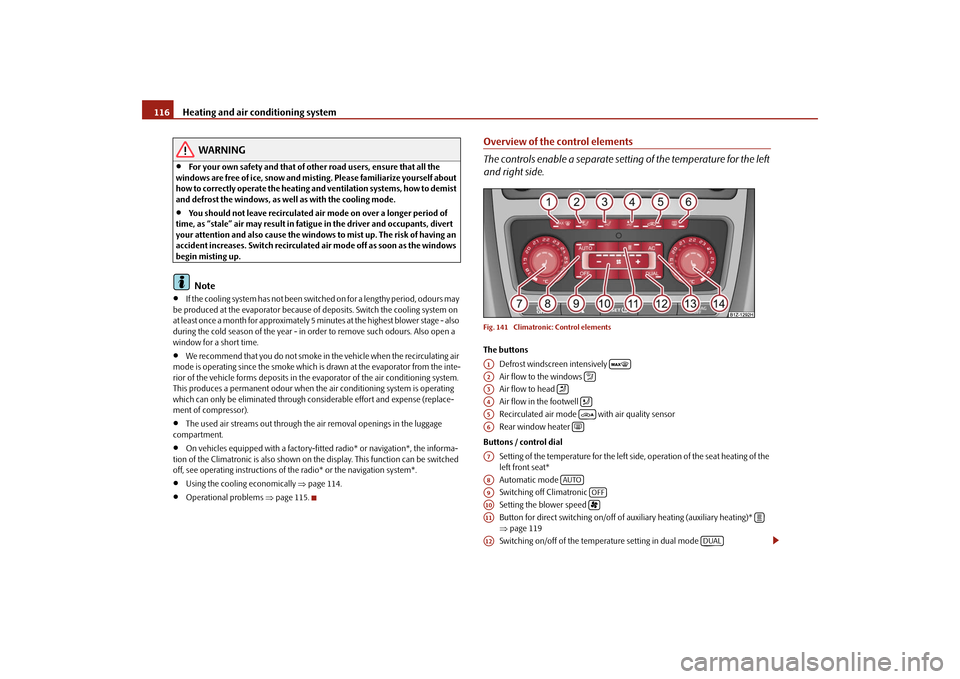
Overview of the control elements The controls enable a separate setting of the temperature for the left and right side.Fig. 141 Climatronic: Control elementsThe buttons
Defrost windscreen intensively Air flow to the windows Air flow to head Air flow in the footwell Recirculated air mode with air quality sensor Rear window heater
Buttons / control dial
Setting of the temperature for the left side, operation of the seat heating of the left front seat* Automatic mode Switching off Climatronic Setting the blower speed Button for direct switching on/off of auxiliary heating (auxiliary heating)* ⇒ page 119 Switching on/off of the temperature setting in dual mode
A1
A2
A3
A4
A5
A6
A7A8
AUTO
A9
OFF
A10
A11
A12
DUAL
se0.1.book Page 116 Frida
y, April 10, 2009 3:19 PM
Page 128 of 304
Starting-off and Driving
127
Using the system
Safety
Driving Tips
General Maintenance
Breakdown assistance
Technical Data
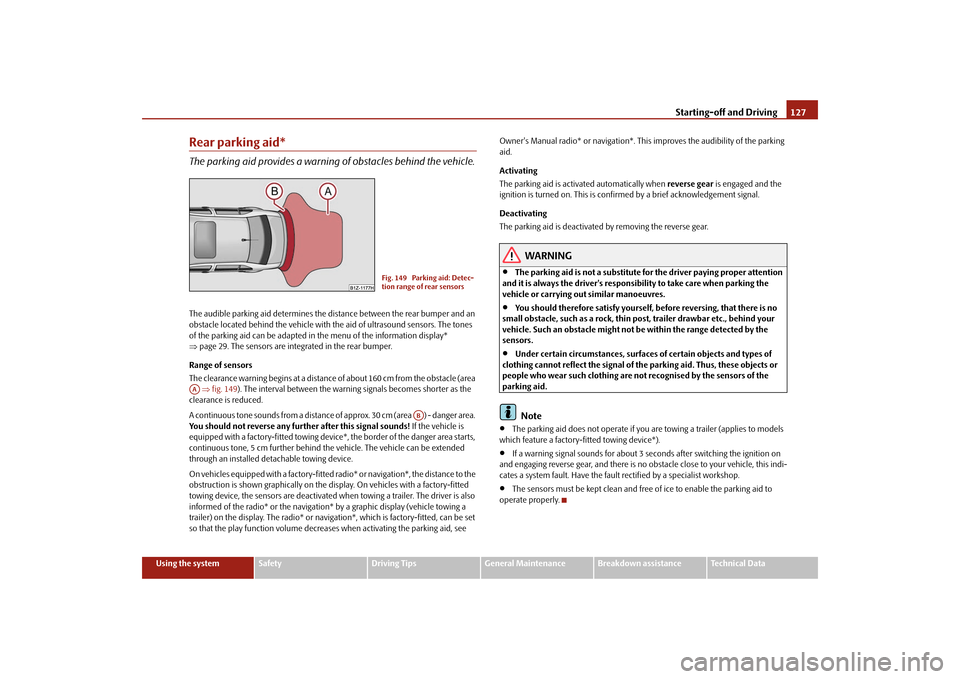
Rear parking aid*The parking aid provides a warning of obstacles behind the vehicle.The audible parking aid determines the distance between the rear bumper and an obstacle located behind the vehicle with
the aid of ultrasound sensors. The tones
of the parking aid can be adapted in
the menu of the information display*
⇒ page 29. The sensors are integrated in the rear bumper. Range of sensors The clearance warning begins at a distance
of about 160 cm from the obstacle (area
⇒fig. 149
). The interval between the warning signals becomes shorter as the
clearance is reduced. A continuous tone sounds from a distance
of approx. 30 cm (area ) - danger area.
You should not reverse any further after this signal sounds!
If the vehicle is
equipped with a factory-fitted towing device*, the border of the danger area starts, continuous tone, 5 cm further behind th
e vehicle. The vehicle can be extended
through an installed detachable towing device. On vehicles equipped with a factory-fitted
radio* or navigation*, the distance to the
obstruction is shown graphically on the disp
lay. On vehicles with a factory-fitted
towing device, the sensors are deactivated when towing a trailer. The driver is also informed of the radio* or the navigation
* by a graphic display (vehicle towing a
trailer) on the display. The radio* or navi
gation*, which is factory-fitted, can be set
so that the play function volume decrea
ses when activating the parking aid, see
Owner's Manual radio* or navigation*. This
improves the audibility of the parking
aid. Activating The parking aid is activated automatically when
reverse gear
is engaged and the
ignition is turned on. This is conf
irmed by a brief acknowledgement signal.
Deactivating The parking aid is deactivated by removing the reverse gear.
WARNING
•
The parking aid is not a substitute for the driver paying proper attention
and it is always the driver's responsibility to take care when parking the vehicle or carrying ou
t similar manoeuvres.
•
You should therefore satisfy yourself, before reversing, that there is no
small obstacle, such as a rock, thin post, trailer drawbar etc., behind your vehicle. Such an obstacle might not
be within the range detected by the
sensors.•
Under certain circumstances, surfaces of certain objects and types of
clothing cannot reflect the signal of th
e parking aid. Thus, these objects or
people who wear such clothing are not recognised by the sensors of the parking aid.
Note
•
The parking aid does not operate if you are towing a trailer (applies to models
which feature a factory-fi
tted towing device*).
•
If a warning signal sounds for about 3 seconds after switching the ignition on
and engaging reverse gear, and there is no ob
stacle close to your vehicle, this indi-
cates a system fault. Have the fault rectified by a specialist workshop.•
The sensors must be kept clean and free of ice to enable the parking aid to
operate properly.
Fig. 149 Parking aid: Detec- tion range of rear sensors
AA
AB
se0.1.book Page 127 Frida
y, April 10, 2009 3:19 PM
Page 140 of 304

Communication
139
Using the system
Safety
Driving Tips
General Maintenance
Breakdown assistance
Technical Data
CommunicationMultifunction steering wheel*Operate radio und navigation on the multifunction steering wheelThe driver can set the basic functions of
the radio and navigation by simply oper-
ating the buttons located on the steering wheel so that he can concentrate on the traffic situation without being distracted as little as possible by operating the radio and navigation
⇒fig. 159
.
This applies only if your vehicle has been installed with radio and navigation at the factory. You can of course operate the radio and navigation at the appliance. You will find a description in the operating instructions of your radio system. When the headlights are switched on, the
steering wheel pushbuttons are then also
illuminated. The buttons apply for the respective operating mode of the current radio or naviga- tion. By pressing the buttons, you can
carry out the following functions:
Fig. 159 Multifunction steering wheel: control buttons
se0.1.book Page 139 Frida
y, April 10, 2009 3:19 PM
Page 142 of 304

Communication
141
Using the system
Safety
Driving Tips
General Maintenance
Breakdown assistance
Technical Data
Button
Action
Radio, traffic information
CD
The CD changer / MP3
Navigation
press briefly
Switch off/on tone
press button for a long period of time
switch off/on*
turn upwards
Increase volume
turn down- wards
Decrease volume
press briefly
Changing to the next stored radio station Changing to the next stored traffic infor-
mation
Interrupting the traffic report
Changing to the next title
press button for a long time
Interruption of the traffic report
fast forward
press briefly
Changing to the previously stored radio
station
Changing to the previously stored traffic
information
Interrupting the traffic report
Changing to the previous title
press button for a long time
Interruption of the traffic report
fast rewind
Changing the audio source
press briefly
Calling up the main menu
press button for a long timepress briefly
Interruption of the traffic report
without function
press button for a long period of time turn upwards
Display of the station list
scroll upwards
Interruption of the traffic reports
Changing to the previous title
without function
A1A1A1A1A2A2A3A3A4A5A5A6A6A6A6
se0.1.book Page 141 Frida
y, April 10, 2009 3:19 PM
Page 148 of 304

Communication
147
Using the system
Safety
Driving Tips
General Maintenance
Breakdown assistance
Technical Data
The buttons operate the functions for
the operating mode of the current
telephone.Operate the telephone via the information display* On vehicles which are factory-fitted with a navigation system* with voice control, it is only possible
to operate the voice control via the
navigation system*. The descript
ion on how to operate the voice
control can be found in the operatin
g instructions of your navigation
system*.If you select the menu point
Te l e p h o n e
on the information display with the aid of
the handwheel , you can chan
ge to the following menus:
„
Phone book
„
Last calls
„
Received calls
„
Missed calls
Phone book In the menu point
Phone book
is the list of the loaded contacts from the telephone
memory and the SIM card of the mobile
phone. In the phone phonebook there are
1500 free memory locations available.
Note
The display of texts in the menu
Te l e p h o n e
is only possible in German, English,
French, Italian, Spanish and Czech.
Voice commandsVoice commands for mobile phone operation Voice commands for operating the phone phone book
A4
Voice command
Activity
ENTER PIN/PIN CODE
After this command the PIN code of the mobile phone can be entered
⇒page 148.
DIAL NUMBER
After this command a telephone number can be entered which establishes a connection to the requested partner
⇒page 148.
REDIAL
After this command the last selected telephone number is selected again
⇒page 149.
Voice command
Activity
SAVE/STORE
NAMES/NAME/NUMBE
R
After this command a name with its telephone number can be stored in the phone phone book ⇒ page 149.
SELECT NAMES/NAME
After this command a telephone number which was stored under its given name in the phone phone book can be selected
⇒page 150.
DELETE NAMES/NAME
After this command a name in the phone phone book can be erased
⇒page 150.
LISTEN TO/PLAY PHONEBOOK
After this command you ca
n listen-in to the phone
phone book
⇒page 151.
DELETE PHONEBOOK
After this command the co
mplete phone book or a
name can be erased
⇒page 151.
se0.1.book Page 147 Frida
y, April 10, 2009 3:19 PM
Page 154 of 304

Communication
153
Using the system
Safety
Driving Tips
General Maintenance
Breakdown assistance
Technical Data
•
Please also refer to the additional instructions
⇒page 142, “Mobile phones
and two-way radio systems”.Bluetooth
®
The equipment enables the wireless connection to the control unit of a telephone with Bluetooth
® function which supports the
rSAP
profile.
Process of connection – Switch on the ignition. – If you have not switched on Bluetooth
® on your telephone, switch it
on.
– For certain mobile phones it is necessary to switch on first the
rSAP
function.
– Press the button
on the multifunction steering wheel and select
device search
. The system searches mobile devices and shows these
in the information display*.
– Select your telephone in the information display by turning the hand-
wheel and select it by
pressing the handwheel.
– Within 30 seconds enter in your te
lephone the 16 digit PIN of your
control unit, which is indicated in the information display* and confirm it according to the instructions on the display of your tele- phone.
– If your SIM card is blocked by a PIN code, enter the PIN of the SIM card
of your telephone. The telephone
connects to the control unit (during
the first connection you can only se
lect in the information display*
and when the vehicle is stationary
, if the PIN should be stored).
– For the first storage of a new user
follow the instructions in the infor-
mation display.
– To download the telephone book and the indentification data of the
SIM card into the new control unit, confirm again the command
rSAP
in your mobile phone. The sy
stem reads the telephone book.
If you do not want to confirm the command
rSAP
during each connection of the
telephone to the control unit, then you mu
st carry out in the menu of the mobile
phone an authorization using the control unit. The telephone deregisters from the GSM network and only the control unit ensures the communication with the network. In th
e telephone only the interface for Blue-
tooth
® remains active. In this case, you can only
select to separate from the device,
switch off the Bluetooth
® connection or the number of the emergency call 112.
If the PIN was stored, an automatic select
ion and connection of the telephone take
place the next time the ignition is swit
ched. Check on your mobile phone if the
automatic connectio
n was established.
Connection terminated The connection of the handsfree-system is terminated by means of Bluetooth
®:
•
When removing the key from the igniti
on lock (during a telephone call, the
connection is disconnected).•
By switching off the Bluetooth
® in the mobile phone.
•
By selecting “separate telephone” in the menu of the mobile phone.
On vehicles which are fitted out with radio or navigation at the factory, it is possible to terminate the telephone call after remo
ving the key from th
e ignition lock by
pressing the icon on the touch-screen of the radio
17) or the navigation, see oper-
ating instructions for radio or for navigation.
WARNING
•
Pay attention primarily to the traffic situation! As the driver you are fully
responsible for road safety. Use the tele
phone system only to such an extent,
so that you are in full control of your vehicle at any time - risk of accident!•
In the event of air transport, the Bluetooth
® function of the handsfree-
system must be switched of
f by a specialist garage!
17)Does not apply for Radio Swing.
se0.1.book Page 153 Frida
y, April 10, 2009 3:19 PM
Page 161 of 304
Communication
160
Inputs AUX-IN* and MDI*The input AUX-IN is located below the armr
est* of the front seats and is marked
with
.
The input MDI is located in the storage compartment on the front passenger side.The inputs AUX-IN and MDI connect the ex
ternal audio sources (e.g. iPod or mp3
player) and record music from these device
s via your radio* or navigation system*
installed in the factory. The description of the operation can be
found in the relevant Owner's Manual of
your radio* or your navigation*.
Note
•
The loudspeakers in the vehicle are matched to a power output of the radio and
navigation system of 4x 20°W.•
For the equipment sound system*, the loudspeakers are matched to a power
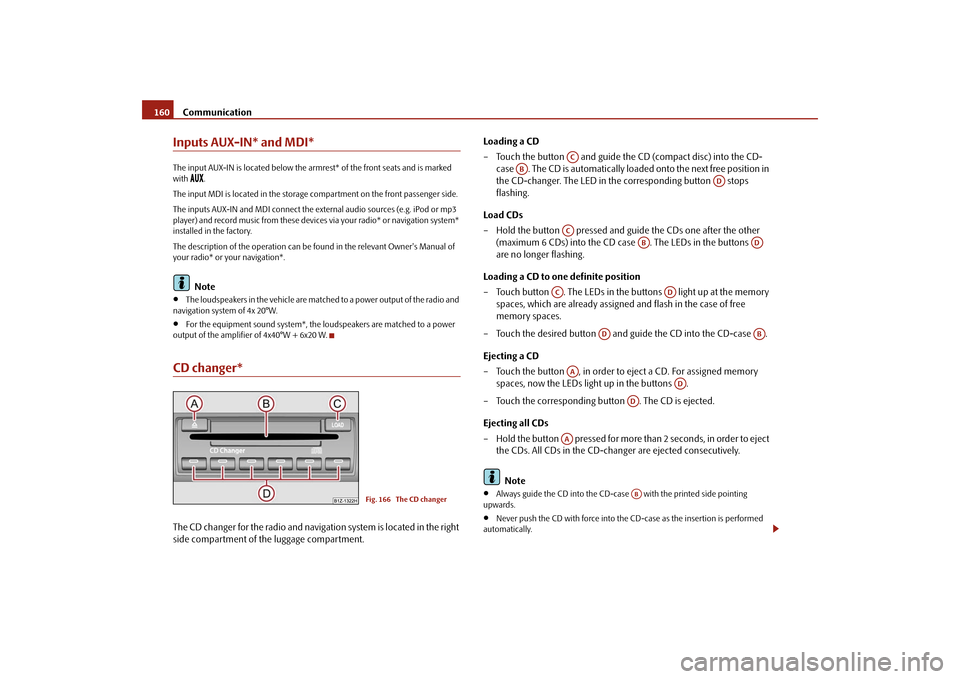
output of the amplifier of 4x40°W + 6x20 W.CD changer*The CD changer for the radio and navigation system is located in the right side compartment of the luggage compartment.
Loading a CD – Touch the button and guide the
CD (compact disc) into the CD-
case . The CD is automatically loaded onto the next free position in the CD-changer. The LED in the corresponding button stops flashing.
Load CDs – Hold the button pressed and guide the CDs one after the other
(maximum 6 CDs) into the CD case
. The LEDs in the buttons
are no longer flashing.
Loading a CD to one definite position – Touch button . The LEDs in the buttons light up at the memory
spaces, which are already assigned and flash in the case of free memory spaces.
– Touch the desired button and guide the CD into the CD-case . Ejecting a CD – Touch the button , in order to eject a CD. For assigned memory
spaces, now the LEDs light up in the buttons .
– Touch the corresponding button . The CD is ejected. Ejecting all CDs – Hold the button pressed for more th
an 2 seconds, in order to eject
the CDs. All CDs in the CD-changer are ejected consecutively. Note
•
Always guide the CD into the CD-cas
e with the printed side pointing
upwards.•
Never push the CD with force into the CD-case as the insertion is performed
automatically.
Fig. 166 The CD changer
AC
AB
AD
AC
AB
AD
AC
AD
AD
AB
AA
AD
AD
AA
AB
se0.1.book Page 160 Frida
y, April 10, 2009 3:19 PM