tow SKODA OCTAVIA 2009 2.G / (1Z) Owner's Manual
[x] Cancel search | Manufacturer: SKODA, Model Year: 2009, Model line: OCTAVIA, Model: SKODA OCTAVIA 2009 2.G / (1Z)Pages: 304, PDF Size: 19.56 MB
Page 4 of 304
Contents3
Using the system
Safety
Driving Tips
General Maintenance
Breakdown assistance
Technical Data
ContentsLayout of this Owner's Manual
(explanations)
. . . . . . . . . . . . . . . . . . . . . . . . . .
Using the system
. . . . . . . . . . . . . . . . . . . . . .
Cockpit
. . . . . . . . . . . . . . . . . . . . . . . . . . . . . . . . . . . . . . . .
Overview . . . . . . . . . . . . . . . . . . . . . . . . . . . . . . . . . . . .
The brief instruction
. . . . . . . . . . . . . . . . . . . . . . . . . .
Basic functions and important information . . . . .
Instruments and Indicator/Warning Lights
. . .
General view of the instrument cluster . . . . . . . . .
Engine revolutions counter . . . . . . . . . . . . . . . . . . . .
Speedometer . . . . . . . . . . . . . . . . . . . . . . . . . . . . . . . .
Coolant temperature gauge . . . . . . . . . . . . . . . . . . .
Fuel gauge . . . . . . . . . . . . . . . . . . . . . . . . . . . . . . . . . . .
Counter for distance driven . . . . . . . . . . . . . . . . . . .
Service Interval Display . . . . . . . . . . . . . . . . . . . . . . .
Digital clock . . . . . . . . . . . . . . . . . . . . . . . . . . . . . . . . . .
Multi-functional indicator (onboard computer)*
Information display* . . . . . . . . . . . . . . . . . . . . . . . . . .
Auto Check Control* . . . . . . . . . . . . . . . . . . . . . . . . . .
Warning lights . . . . . . . . . . . . . . . . . . . . . . . . . . . . . . . .
Unlocking and locking
. . . . . . . . . . . . . . . . . . . . . . . .
Key . . . . . . . . . . . . . . . . . . . . . . . . . . . . . . . . . . . . . . . . . .
Changing the battery of the radio remote control
Electronic immobiliser . . . . . . . . . . . . . . . . . . . . . . . .
Child safety lock . . . . . . . . . . . . . . . . . . . . . . . . . . . . . .
Central locking system . . . . . . . . . . . . . . . . . . . . . . . .
Remote control* . . . . . . . . . . . . . . . . . . . . . . . . . . . . . .
Synchonisation of the remote control . . . . . . . . . .
Anti-theft alarm system* . . . . . . . . . . . . . . . . . . . . . . Power windows* . . . . . . . . . . . . . . . . . . . . . . . . . . . . .
Electric sliding/tilting roof* . . . . . . . . . . . . . . . . . . . .
Lights and Visibility
. . . . . . . . . . . . . . . . . . . . . . . . . . .
Lights . . . . . . . . . . . . . . . . . . . . . . . . . . . . . . . . . . . . . . . .
Interior lighting . . . . . . . . . . . . . . . . . . . . . . . . . . . . . . .
Visibility . . . . . . . . . . . . . . . . . . . . . . . . . . . . . . . . . . . . .
Windshield wiper and wash system . . . . . . . . . . . .
Rear-view mirror . . . . . . . . . . . . . . . . . . . . . . . . . . . . .
Seats and Stowage
. . . . . . . . . . . . . . . . . . . . . . . . . . . .
Front seats . . . . . . . . . . . . . . . . . . . . . . . . . . . . . . . . . . .
Adjusting front seats electrically* . . . . . . . . . . . . . .
Head restraints . . . . . . . . . . . . . . . . . . . . . . . . . . . . . . .
Middle rear head restraint . . . . . . . . . . . . . . . . . . . . .
Rear seats . . . . . . . . . . . . . . . . . . . . . . . . . . . . . . . . . . . .
Pedals . . . . . . . . . . . . . . . . . . . . . . . . . . . . . . . . . . . . . . .
luggage compartment . . . . . . . . . . . . . . . . . . . . . . . .
Net partition (Combi)* . . . . . . . . . . . . . . . . . . . . . . . .
The roof rack* . . . . . . . . . . . . . . . . . . . . . . . . . . . . . . . .
Cup holder . . . . . . . . . . . . . . . . . . . . . . . . . . . . . . . . . . .
Note holder . . . . . . . . . . . . . . . . . . . . . . . . . . . . . . . . . .
Ashtray* . . . . . . . . . . . . . . . . . . . . . . . . . . . . . . . . . . . . .
Cigarette lighter*, power sockets . . . . . . . . . . . . . . .
Storage compartments . . . . . . . . . . . . . . . . . . . . . . . .
Overview . . . . . . . . . . . . . . . . . . . . . . . . . . . . . . . . . . . .
Storage compartment on the front passenger side
Cooling of storage compartment on front
passenger side* . . . . . . . . . . . . . . . . . . . . . . . . . . . . . .
Storage compartment on the driver's side . . . . . .
Storage compartment on the dash panel* . . . . . .
Storage compartment in front centre console* . .
Storage net on the front centre console* . . . . . . .
Storage compartment for spectacles* . . . . . . . . . .
Storage compartment in the front doors . . . . . . . . Storage compartment below front passenger
seat* . . . . . . . . . . . . . . . . . . . . . . . . . . . . . . . . . . . . . . . .
Front seat armrest with storage compartment* .
Rear seat armrest with storage compartment* . .
Storage compartment in rear centre console* . .
Seat backrest with opening for skis* . . . . . . . . . . . .
Through-loading bag (Unibag)* . . . . . . . . . . . . . . .
Side compartment* . . . . . . . . . . . . . . . . . . . . . . . . . .
Storage compartment behind the rear seats*
(Combi) . . . . . . . . . . . . . . . . . . . . . . . . . . . . . . . . . . . . .
Clothes hooks* . . . . . . . . . . . . . . . . . . . . . . . . . . . . . .
Heating and air conditioning system
. . . . . . . . .
Air outlet vents . . . . . . . . . . . . . . . . . . . . . . . . . . . . . . .
Heating . . . . . . . . . . . . . . . . . . . . . . . . . . . . . . . . . . . . . .
Climatic* (semi-automatic air conditioning
system) . . . . . . . . . . . . . . . . . . . . . . . . . . . . . . . . . . . . . .
Climatronic* (automatic air conditioning) . . . . . .
Auxiliary heating (auxiliary heating and
ventilation)* . . . . . . . . . . . . . . . . . . . . . . . . . . . . . . . . .
Starting-off and Driving
. . . . . . . . . . . . . . . . . . . . . .
Setting steering wheel position . . . . . . . . . . . . . . . .
Ignition lock . . . . . . . . . . . . . . . . . . . . . . . . . . . . . . . . .
Starting the engine . . . . . . . . . . . . . . . . . . . . . . . . . . .
Switching off the engine . . . . . . . . . . . . . . . . . . . . . .
Shifting (manual gearbox) . . . . . . . . . . . . . . . . . . . . .
Handbrake . . . . . . . . . . . . . . . . . . . . . . . . . . . . . . . . . . .
Rear parking aid* . . . . . . . . . . . . . . . . . . . . . . . . . . . . .
Front and rear parking aid* . . . . . . . . . . . . . . . . . . . .
Cruise control system (CCS)* . . . . . . . . . . . . . . . . . .
Automatic gearbox
. . . . . . . . . . . . . . . . . . . . . . . . . . .
Automatic gearbox* . . . . . . . . . . . . . . . . . . . . . . . . . . 6
7
9
9
11
11
17
17
18
18
18
18
19
20
21
21
26
28
31
42
42
42
43
44
44
49
50
5152
55
58
58
65
67
69
72
75
75
76
79
80
81
84
84
91
93
95
96
96
98
99
99
99
100
100
101
101
101
102
102103
103
104
104
105
105
106
107
107
108
108
109
111
115
119
122
122
123
124
125
125
126
127
128
129
132
132
se0.1.book Page 3 Friday, April 10, 2009 3:19 PM
Page 5 of 304
Contents 4Communication
. . . . . . . . . . . . . . . . . . . . . . . . . . . . . . .
Multifunction steering wheel* . . . . . . . . . . . . . . . . .
Mobile phones and two-way radio systems . . . . .
Universal telephone preinstallation GSM II* . . . . .
Phone voice phonebook* . . . . . . . . . . . . . . . . . . . . .
Universal telephone preinstallation GSM III* . . . .
Phone voice phonebook* . . . . . . . . . . . . . . . . . . . . .
Inputs AUX-IN* and MDI* . . . . . . . . . . . . . . . . . . . . .
CD changer* . . . . . . . . . . . . . . . . . . . . . . . . . . . . . . . . .
Safety
. . . . . . . . . . . . . . . . . . . . . . . . . . . . . . . . . . . . . . .
Passive Safety
. . . . . . . . . . . . . . . . . . . . . . . . . . . . . . . . .
Basic information . . . . . . . . . . . . . . . . . . . . . . . . . . . . .
Correct seated position . . . . . . . . . . . . . . . . . . . . . . .
Seat belts
. . . . . . . . . . . . . . . . . . . . . . . . . . . . . . . . . . . . . .
Why seat belts? . . . . . . . . . . . . . . . . . . . . . . . . . . . . . . .
The physical principle of a frontal collision . . . . . .
Important safety information regarding the use of seat
belts . . . . . . . . . . . . . . . . . . . . . . . . . . . . . . . . . . . . . . . . .
How are seat belts correctly fastened? . . . . . . . . . .
Airbag system
. . . . . . . . . . . . . . . . . . . . . . . . . . . . . . . . .
Description of the airbag system . . . . . . . . . . . . . . .
Front airbag . . . . . . . . . . . . . . . . . . . . . . . . . . . . . . . . . .
Side airbags* . . . . . . . . . . . . . . . . . . . . . . . . . . . . . . . . .
Head airbags* . . . . . . . . . . . . . . . . . . . . . . . . . . . . . . . .
Deactivating an airbag . . . . . . . . . . . . . . . . . . . . . . . .
Transporting children safely
. . . . . . . . . . . . . . . . . .
What you should know about transporting children!
Child seat . . . . . . . . . . . . . . . . . . . . . . . . . . . . . . . . . . . .
Attaching a child seat using the “ISOFIX” system .
Attaching child seat using the “Top Tether” system
Driving Tips
. . . . . . . . . . . . . . . . . . . . . . . . . . . . . .
Intelligent Technology
. . . . . . . . . . . . . . . . . . . . . . . .
Electronic stability programme (ESP)* . . . . . . . . . .
Brakes . . . . . . . . . . . . . . . . . . . . . . . . . . . . . . . . . . . . . . . Brake booster . . . . . . . . . . . . . . . . . . . . . . . . . . . . . . . .
Antilock brake system (ABS) . . . . . . . . . . . . . . . . . . .
Brake Assist* . . . . . . . . . . . . . . . . . . . . . . . . . . . . . . . . .
Uphill-Start off-Assist* . . . . . . . . . . . . . . . . . . . . . . . .
Electromechanical power steering . . . . . . . . . . . . .
Tyre inflation pressure-control system* . . . . . . . . .
Diesel particle filter* (diesel engine) . . . . . . . . . . . .
Driving and the Environment
. . . . . . . . . . . . . . . . .
The first 1 500 kilometres and then afterwards . .
Catalytic converter . . . . . . . . . . . . . . . . . . . . . . . . . . . .
Driving in an economical and environmentally
conscious manner . . . . . . . . . . . . . . . . . . . . . . . . . . . .
Environmental compatibility . . . . . . . . . . . . . . . . . . .
Motoring abroad . . . . . . . . . . . . . . . . . . . . . . . . . . . . .
Avoiding damage to your vehicle . . . . . . . . . . . . . . .
Towing a trailer
. . . . . . . . . . . . . . . . . . . . . . . . . . . . . . . .
Towing a trailer . . . . . . . . . . . . . . . . . . . . . . . . . . . . . . .
General Maintenance
. . . . . . . . . . . . . . .
Taking care of your vehicle and cleaning the
vehicle
. . . . . . . . . . . . . . . . . . . . . . . . . . . . . . . . . . . . . . . . .
General . . . . . . . . . . . . . . . . . . . . . . . . . . . . . . . . . . . . . .
Care of the exterior of vehicle . . . . . . . . . . . . . . . . . .
Care of the interior of vehicle . . . . . . . . . . . . . . . . . .
Fuel
. . . . . . . . . . . . . . . . . . . . . . . . . . . . . . . . . . . . . . . . . . . .
Petrol . . . . . . . . . . . . . . . . . . . . . . . . . . . . . . . . . . . . . . . .
Biofuel Ethanol E85* . . . . . . . . . . . . . . . . . . . . . . . . . .
Diesel . . . . . . . . . . . . . . . . . . . . . . . . . . . . . . . . . . . . . . . .
Refuelling . . . . . . . . . . . . . . . . . . . . . . . . . . . . . . . . . . . .
Inspecting and replenishing
. . . . . . . . . . . . . . . . . .
Engine compartment . . . . . . . . . . . . . . . . . . . . . . . . .
Engine oil . . . . . . . . . . . . . . . . . . . . . . . . . . . . . . . . . . . .
Cooling system . . . . . . . . . . . . . . . . . . . . . . . . . . . . . . .
Brake fluid . . . . . . . . . . . . . . . . . . . . . . . . . . . . . . . . . . .
Battery . . . . . . . . . . . . . . . . . . . . . . . . . . . . . . . . . . . . . . .
Windshield washer system . . . . . . . . . . . . . . . . . . . .
Wheels and Tyres
. . . . . . . . . . . . . . . . . . . . . . . . . . . . . .
Wheels . . . . . . . . . . . . . . . . . . . . . . . . . . . . . . . . . . . . . . .
Accessories, changes and replacement of partsAccessories and replacement parts . . . . . . . . . . . . .
Technical changes . . . . . . . . . . . . . . . . . . . . . . . . . . . . .
Vehicles of the group N1 . . . . . . . . . . . . . . . . . . . . . . .Breakdown assistance
. . . . . . . . . . . . . .
Breakdown assistance
. . . . . . . . . . . . . . . . . . . . . . . . .
First-aid box* and Warning triangle* (Octavia) . . .
First-aid box* and warning triangle* (Estate car) .
Fire extinguisher* . . . . . . . . . . . . . . . . . . . . . . . . . . . . .
Vehicle tool kit . . . . . . . . . . . . . . . . . . . . . . . . . . . . . . . .
Tyre repair kit* . . . . . . . . . . . . . . . . . . . . . . . . . . . . . . . .
Spare wheel* . . . . . . . . . . . . . . . . . . . . . . . . . . . . . . . . .
Changing a wheel . . . . . . . . . . . . . . . . . . . . . . . . . . . . .
Jump-starting . . . . . . . . . . . . . . . . . . . . . . . . . . . . . . . .
Tow-starting and towing vehicle . . . . . . . . . . . . . . . .
Fuses and light bulbs
. . . . . . . . . . . . . . . . . . . . . . . . . .
Electric fuses . . . . . . . . . . . . . . . . . . . . . . . . . . . . . . . . .
Bulbs . . . . . . . . . . . . . . . . . . . . . . . . . . . . . . . . . . . . . . . .
Technical Data
. . . . . . . . . . . . . . . . . . . . . . . . . .
Technical Data
. . . . . . . . . . . . . . . . . . . . . . . . . . . . . . . . .
General information . . . . . . . . . . . . . . . . . . . . . . . . . . .
Used abbreviations . . . . . . . . . . . . . . . . . . . . . . . . . . .
Performances . . . . . . . . . . . . . . . . . . . . . . . . . . . . . . . . .
Weight . . . . . . . . . . . . . . . . . . . . . . . . . . . . . . . . . . . . . . .
Identification details . . . . . . . . . . . . . . . . . . . . . . . . . .
Fuel consumption according to the regulations
(99/100/EU) . . . . . . . . . . . . . . . . . . . . . . . . . . . . . . . . . .
Dimensions . . . . . . . . . . . . . . . . . . . . . . . . . . . . . . . . . .
Engine oil specifications . . . . . . . . . . . . . . . . . . . . . . .
1.4 ltr./59 kW - EU4 . . . . . . . . . . . . . . . . . . . . . . . . . . . .
1.4 ltr./90 kW TSI - EU5 . . . . . . . . . . . . . . . . . . . . . . . .
1.6 ltr./75 kW - EU4, EU2 . . . . . . . . . . . . . . . . . . . . . . . 139
139
142
142
149
152
158
160
160
163
163
163
164
168
168
169
169
170
174
174
175
178
180
181
184
184
187
190
191
193
193
193
196197
197
198
198
198
199
200
201
201
202
202
206
206
207
208
208
211
211
211
211
216
219
219
219
221
222
224
224
227
228
231
232
236238
238
244
244
244
244
245
245
245
245
245
246
246
247
247
252
253
258
258
261
271
271
271
271
271
271
272
272
273
274
276
278
280
se0.1.book Page 4 Friday, April 10, 2009 3:19 PM
Page 26 of 304
Instruments and Indicator/Warning Lights
25
Using the system
Safety
Driving Tips
General Maintenance
Breakdown assistance
Technical Data
Average speedThe average speed since the memory was last erased is shown in the display in km/hour
⇒page 21. If you wish to determine the average vehicle speed over a
certain period of time you must set the me
mory to zero at the start of the measure-
ment using the button on
the windshield wiper lever
⇒page 22, fig. 22
or with
the handwheel on the mult
ifunction stee
ring wheel*
⇒page 23, fig. 23
.
A zero appears in the display for the first 100 m you drive after erasing the memory.The indicated value will be updated every 5 seconds while you are driving.Current speed*The current speed which is identical to the display of the speedometer, is indicated on the display
⇒page 17, fig. 18
.
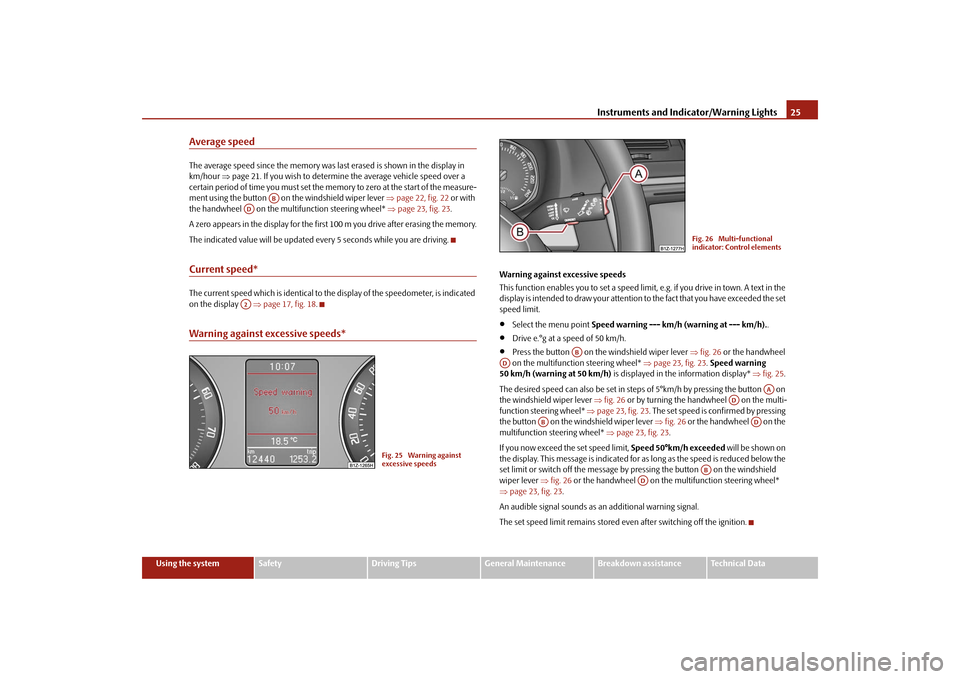
Warning against excessive speeds*
Warning against excessive speeds This function enables you to set a speed limit, e.g. if you drive in town. A text in the display is intended to draw yo
ur attention to the fact that
you have exceeded the set
speed limit.•
Select the menu point
Speed warning --- km/h (warning at --- km/h).
.
•
Drive e.°g at a speed of 50 km/h.
•
Press the button on the windshield wiper lever
⇒fig. 26
or the handwheel
on the multifunction steering wheel*
⇒page 23, fig. 23
. Speed warning
50 km/h (warning at 50 km/h)
is displayed in the information display*
⇒fig. 25
.
The desired speed can also be set in steps of 5°km/h by pressing the button on the windshield wiper lever
⇒fig. 26
or by turning the handwheel on the multi-
function stee
ring wheel*
⇒page 23, fig. 23
. The set speed is confirmed by pressing
the button on the windshield wiper lever
⇒fig. 26
or the handwheel on the
multifunction steering wheel*
⇒page 23, fig. 23
.
If you now exceed th
e set speed limit,
Speed 50°km/h exceeded
will be shown on
the display. This message is indicated for as long as the speed is reduced below the set limit or switch off the message by pr
essing the button on the windshield
wiper lever
⇒fig. 26
or the handwheel on the multifunction steering wheel*
⇒ page 23, fig. 23
.
An audible signal sounds as an additional warning signal.The set speed limit remains stored even after switching off the ignition.
AB
ADA2
Fig. 25 Warning against excessive speeds
Fig. 26 Multi-functional indicator: Control elements
AB
AD
AA
AD
AB
AD
AB
AD
se0.1.book Page 25 Friday, April 10, 2009 3:19 PM
Page 34 of 304
Instruments and Indicator/Warning Lights
33
Using the system
Safety
Driving Tips
General Maintenance
Breakdown assistance
Technical Data
WARNING
•
If you do not pay attention to the warning lights coming on and the corre-
sponding descriptions and warning notes, this may result in severe body injuries or major vehicle damage.•
The engine compartment of your car is
a hazardous area. There is a risk
of injuries, scalding, accidents and
fire when working in the engine
compartment, e.g. inspecting and replenis
hing oil and other fluids. It is also
essential to observe all warnings
⇒page 225, “Working in the engine
compartment”.
Note
•
The arrangement of the indicator lights depends on the model version. The
symbols shown in the following functional description are to be found as indicator lights in the instrument cluster.•
Operational faults are shown in the instrument cluster as red symbols (priority
1 - danger) or yellow symb
ols (priority 2 - warning).
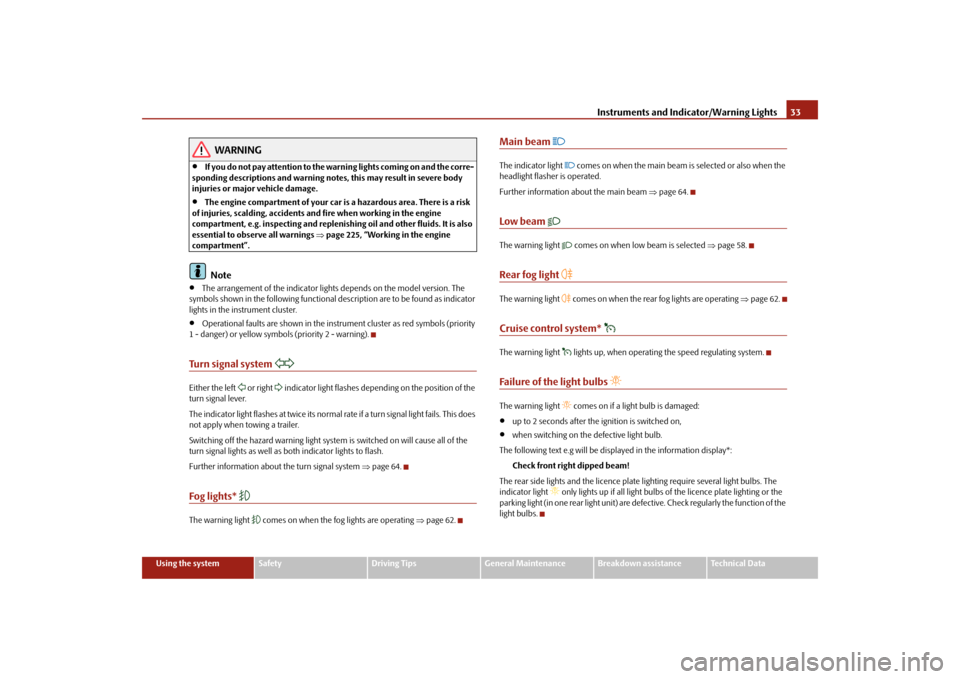
Turn signal system
Either the left
or right
indicator light flashes depending on the position of the
turn signal lever. The indicator light flashes at twice its normal ra
te if a turn signal light fails. This does
not apply when towing a trailer. Switching off the hazard warning light system is switched on will cause all of the turn signal lights as well as
both indicator lights to flash.
Further information about
the turn signal system
⇒page 64.
Fog lights*
The warning light
comes on when the fog lights are operating
⇒page 62.
Main beam
The indicator light
comes on when the main beam is selected or also when the
headlight flasher is operated. Further information about the main beam
⇒page 64.
Low beam
The warning light
comes on when low beam is selected
⇒page 58.
Rear fog light
The warning light
comes on when the rear fog lights are operating
⇒page 62.
Cruise control system*
The warning light
lights up, when operating the speed regulating system.
Failure of the light bulbs
The warning light
comes on if a light bulb is damaged:
•
up to 2 seconds after the ignition is switched on,
•
when switching on the defective light bulb.
The following text e.g will be displayed in the information display*:
Check front right dipped beam!
The rear side lights and the licence plate
lighting require several light bulbs. The
indicator light
only lights up if all light bulbs
of the licence plate lighting or the
parking light (in one rear light unit) are defe
ctive. Check regularly the function of the
light bulbs.
se0.1.book Page 33 Friday, April 10, 2009 3:19 PM
Page 48 of 304
Unlocking and locking
47
Using the system
Safety
Driving Tips
General Maintenance
Breakdown assistance
Technical Data
If the vehicle was not locked from ou
tside, you can also
unlock and lock
it with the rocker switch on the centre console without the ignition switched on. Locking all doors and the boot lid – Press button
⇒
page 46, fig. 42
. The symbol
in the button comes
on.
Unlocking all doors and the boot lid – Press button
⇒
page 46, fig. 42
. The symbol
goes out in the
button.
The following applies if you have lock
ed your vehicle using the button :
•
It is not possible to open the doors or the boot lid from the outside (safety
feature, e.g. when stopping at traffic lights etc.).•
You can unlock the doors individually from
the inside and open them by pulling
the door opening lever.•
As long as one door is opened
8), the vehicle cannot be lo
cked in order to avoid
inadvertently locking the key in the vehicle.•
In the event of an accident in which the airbags are deployed, the locked doors
are automatically unlocked from the inside
in order to enable rescuers to gain
access to the vehicle. By pressing and holding th
e button or , you can conveniently close or open
the windows
⇒page 54.
WARNING
The central locking system al
so operates if the ignition is switched off. All the
doors and the boot lid are locked. Childr
en should never be left unattended
in the vehicle since it is difficult to
provide assistance from the outside when
the doors are locked. Locked doors make
it difficult for rescuers to get into
the vehicle in an emergency - hazard!
Note
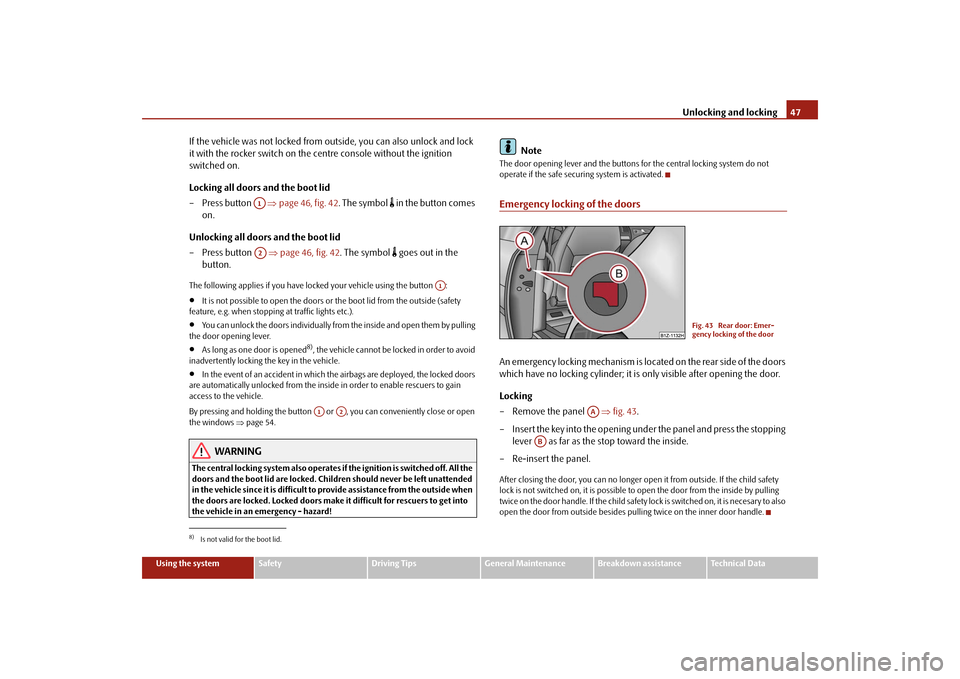
The door opening lever and the buttons for the central locking system do not operate if the safe securing system is activated.Emergency locking of the doorsAn emergency locking mechanism is located on the rear side of the doors which have no locking cyli
nder; it is only visible after opening the door.
Locking – Remove the panel
⇒
fig. 43
.
– Insert the key into the opening under the panel and press the stopping
lever as far as the stop toward the inside.
– Re-insert the panel.After closing the door, you can no longer op
en it from outside. If the child safety
lock is not switched on, it is possible to
open the door from the inside by pulling
twice on the door handle. If the child safety lock is switched on, it is necesary to also open the door from outside besides pu
lling twice on the
inner door handle.
8)Is not valid for the boot lid.
A1A2
A1
A1
A2
Fig. 43 Rear door: Emer- gency locking of the door
AA
AB
se0.1.book Page 47 Friday, April 10, 2009 3:19 PM
Page 52 of 304
Unlocking and locking
51
Using the system
Safety
Driving Tips
General Maintenance
Breakdown assistance
Technical Data
This means it is necessary to synchronise the code as follows:•
Press any button on the remote control.
•
Pressing of the button means that the
door will unlock with the key within 1
minute.Anti-theft alarm system*DescriptionThe anti-theft alarm system increases the le
vel of protection against people seeking
to break into the vehicle. The system tri
ggers audible and visual warning signals if
an attempt is made to break into the vehicle. How is the alarm system activated? The anti-theft alarm system is activated
automatically when th
e vehicle is locked
with the key on the closed driver's door or
by using the radio remote control. It is
activated 30 seconds after closing the door. How is the alarm system deactivated? The anti-theft alarm system is deactivated
if the vehicle is unlocked by only using
the radio remote control. The vehicle is au
tomatically locked agai
n if the vehicle is
not opened within 30 seconds after reac
tivating the anti-theft alarm system.
Once you unlock the vehicle by inserting the key into the driver door you then have to insert the key into the ignition lock an
d switch the ignition on within 15 seconds
after opening the door in order to deactivate the anti-theft alarm system. The alarm will be triggered
if you do
not switch on
the ignition within 15 seconds.
When is the alarm triggered? The following security areas of the locked vehicle are monitored:•
Bonnet,
•
Boot lid,
•
Doors,
•
Ignition lock,
•
Angle of the vehicle*
⇒page 51,
•
Vehicle interior*
⇒page 51,
•
A drop in voltage of the on-board power supply.
An alarm is immediately triggered if either of the two battery terminals is discon- nected while the anti-theft
alarm system is activated.
How is the alarm switched off? You switch the alarm off if you unlock the car with the radio remote control in the key or if you switch the ignition on.
Note
•
The working life of the alarm siren is 6 years. More detailed information is avail-
able by a specialist garage.•
Before leaving the car, check that all the doors, windows and the electric
sliding/tilting roof* are properly closed in order to ensure that the anti-theft alarm system is fully operational.•
Coding of the radio remote control and
the receptor part precludes the use of
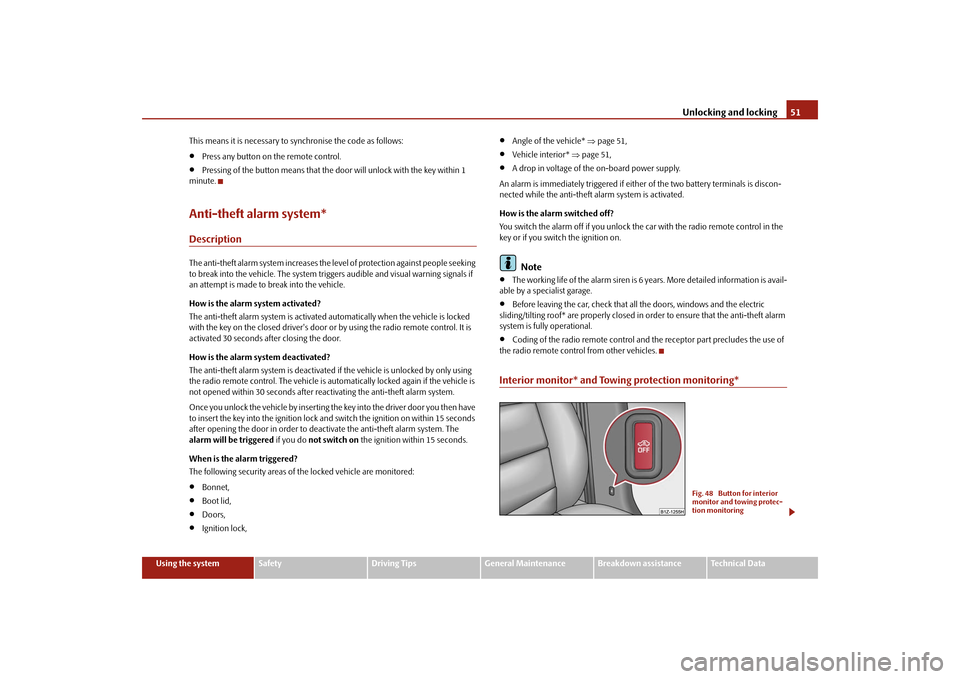
the radio remote control from other vehicles.Interior monitor* and Towing protection monitoring*
Fig. 48 Button for interior monitor and towing protec-tion monitoring
se0.1.book Page 51 Friday, April 10, 2009 3:19 PM
Page 53 of 304
Unlocking and locking
52
Switch off the interior monitor and towing protection monitoring – Switch off the ignition. – Open the driver door. – Press the button
at the centre column on the driver side
⇒
page 51, fig. 48
, the symbol
which lights up in the button
changes from red to orange.
– Lock the vehicle within 30 seconds.The interior monitor and the towing protec
tion monitoring are switched on again
automatically the next ti
me the car is locked.
Note
•
You can switch the interior monitor and th
e towing protection monitoring off if
there is a possibility that movements from (e.g. children or animals) inside the vehicle interior or if the vehicle must be transported (e.g. by train or ship) or towed, might trigger the alarm.•
The opened storage compartment for spectacles reduces the effectiveness of
the interior monitor. In order to ensure the function of the interior monitor to be fully operational, always close the stor
age compartment for spectacles before
locking the vehicle.
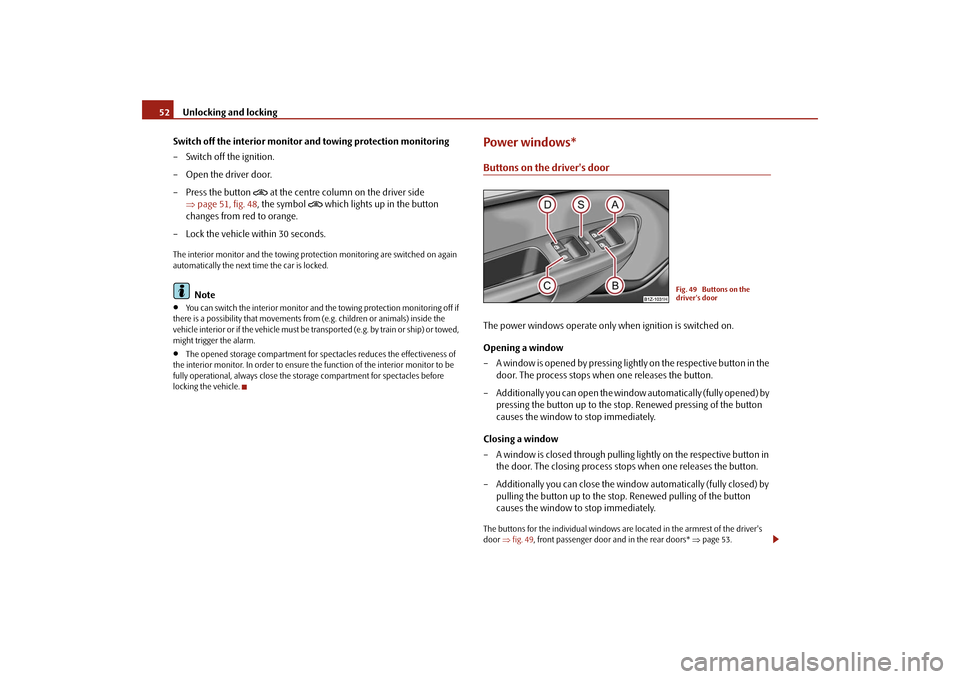
Power windows*Buttons on the driver's doorThe power windows operate only when ignition is switched on. Opening a window – A window is opened by pressing lightly on the respective button in the
door. The process stops when one releases the button.
– Additionally you can open the window automatically (fully opened) by
pressing the button up to the stop. Renewed pressing of the button causes the window to stop immediately.
Closing a window – A window is closed through pulling lightly on the respective button in
the door. The closing process stops when one releases the button.
– Additionally you can close the window automatically (fully closed) by
pulling the button up to the stop. Renewed pulling of the button causes the window to stop immediately.
The buttons for the individual windows are located in the armrest of the driver's door
⇒fig. 49
, front passenger door and in the rear doors*
⇒page 53.
Fig. 49 Buttons on the driver's door
se0.1.book Page 52 Friday, April 10, 2009 3:19 PM
Page 60 of 304
Lights and Visibility
59
Using the system
Safety
Driving Tips
General Maintenance
Breakdown assistance
Technical Data
Daylight driving lights*In some countries, the national legisl
ation requires that the vehicles are
equipped with the function
daylight driving lights.
Switching on daylight driving lights – Switch on the ignition without turnin
g the light switch out of the posi-
tion 0.
Deactivate function daylight driving lights – Pull the turn signal light lever towards the steering wheel up to 3
seconds after switching on the ignition
and at the same time, slide it to
the bottom and hold it in this position for at least 3 seconds.
Activate function daylight driving lights – Pull the turn signal light lever towards the steering wheel up to 3
seconds after switching on the ignition
and at the same time, slide it to
the top and hold it in this position for at least 3 seconds.
When the daylight driving lights are switched on, the side lights and the low beam come on together. On vehicles which are fitted with bulbs for
daylight driving lights* in the fog lights,
the parking lights do not co
me on when activating the function daylight driving
lights
9).
When the daylight driving lights are switched on, the illumination of the instrument cluster is switched off, however, it is switched on in the position
when it is dark
and the low beam shines with full brightness (100 % of the performance). On vehicles fitted with an information displa
y*, you can activate or
deactivate in the
menu the function daylight driving lights:„
SETUP (Settings)
„
Lights & Vision (Lights & Vision)
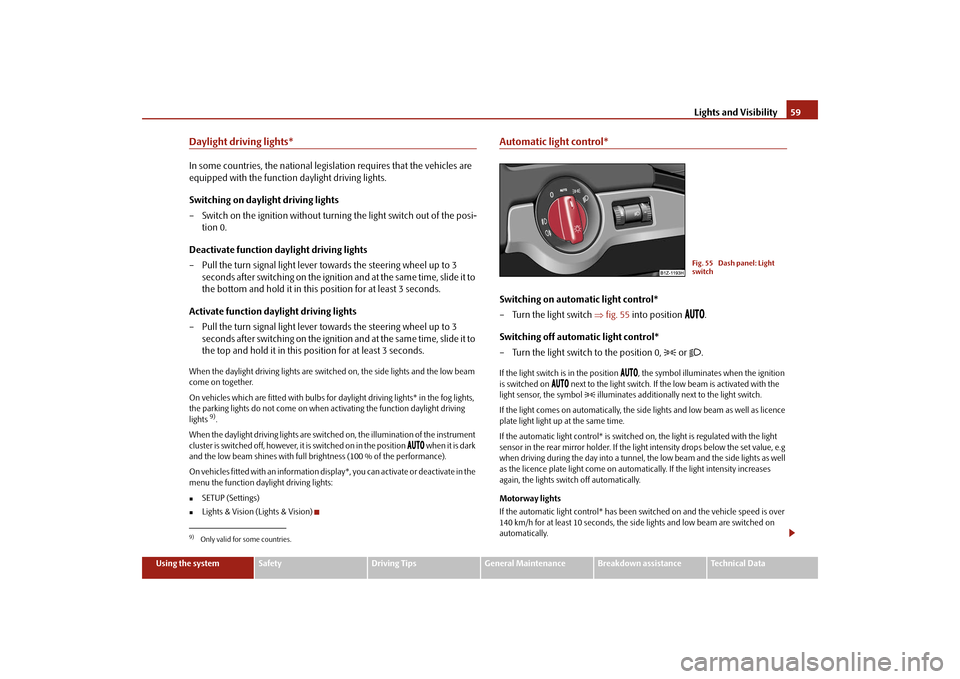
Automatic light control*Switching on automatic light control* – Turn the light switch
⇒
fig. 55
into position
.
Switching off automatic light control* – Turn the light switch to the position 0,
or
.
If the light switch is in the position
, the symbol illuminates when the ignition
is switched on
next to the light switch. If th
e low beam is activated with the
light sensor, the symbol
illuminates additionally next to the light switch.
If the light comes on automatically, the side lights and low beam as well as licence plate light light up at the same time. If the automatic light control* is switched on, the light is regulated with the light sensor in the rear mirror holder. If the light intensity drops below the set value, e.g when driving during the day into a tunnel, the low beam and the side lights as well as the licence plate light come on automa
tically. If the light intensity increases
again, the lights switch off automatically. Motorway lights If the automatic light control* has been sw
itched on and the vehicle speed is over
140 km/h for at least 10 seconds, the side
lights and low beam are switched on
automatically.
9)Only valid for some countries.
Fig. 55 Dash panel: Light switch
se0.1.book Page 59 Friday, April 10, 2009 3:19 PM
Page 63 of 304
Lights and Visibility
62
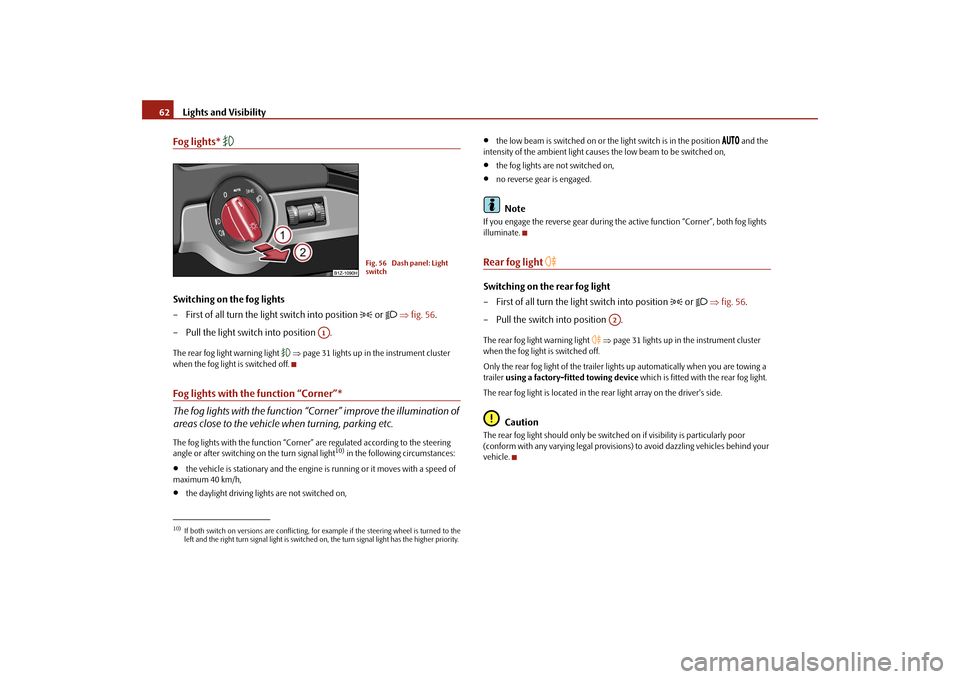
Fog lights*
Switching on the fog lights – First of all turn the light switch into position
or
⇒
fig. 56
.
– Pull the light switch into position .The rear fog light warning light
⇒page 31 lights up in the instrument cluster
when the fog light is switched off.Fog lights with the function “Corner”* The fog lights with the function “Corner” improve the illumination of areas close to the vehicle
when turning, parking etc.
The fog lights with the function “Corner”
are regulated according to the steering
angle or after switching on the turn signal light
10) in the following circumstances:
•
the vehicle is stationary and the engine
is running or it moves with a speed of
maximum 40 km/h,•
the daylight driving lights are not switched on,
•
the low beam is switched on or the
light switch is in the position
and the
intensity of the ambient light causes
the low beam to be switched on,
•
the fog lights are not switched on,
•
no reverse gear is engaged.Note
If you engage the reverse gear during the
active function “Corner”, both fog lights
illuminate.Rear fog light
Switching on the rear fog light – First of all turn the light switch into position
or
⇒
fig. 56
.
– Pull the switch into position .The rear fog light warning light
⇒page 31 lights up in the instrument cluster
when the fog light is switched off. Only the rear fog light of the trailer ligh
ts up automatically when you are towing a
trailer
using a factory-fitted towing device
which is fitted with the rear fog light.
The rear fog light is located in the rear light array on the driver's side.
Caution
The rear fog light should only be switched
on if visibility is particularly poor
(conform with any varying legal provisions) to avoid dazzling vehicles behind your vehicle.
10)If both switch on versions are conflicting, fo
r example if the steering wheel is turned to the
left and the right turn signal light is switched on, the turn signal light has the higher priority.
Fig. 56 Dash panel: Light switch
A1
A2
se0.1.book Page 62 Friday, April 10, 2009 3:19 PM
Page 66 of 304

Lights and Visibility
65
Using the system
Safety
Driving Tips
General Maintenance
Breakdown assistance
Technical Data
Headlight flasher
– Pull the lever towards the steering wheel (spring-tensioned position)
- the main beam and warning light
in the instrument cluster come
on.
Parking light
– Switch off the ignition. – Push the lever up or down - the ri
ght-hand or left-hand parking light
is switched on.
Information concerning the function of the lights.•
The
turn signal system
only operates when the ignition is switched on. The
corresponding indicator light
or in the instrument cluster also flashes.
•
The turn signal is automatically cancelled after negotiating a curve.
•
The indicator light flashes at twice its normal
ra te if a bulb of the turn s ignal lig ht
fails.•
The side light and rear light on the appropriate side of the vehicle are switched
on when the
parking light
is selected. The parking light only operates if the ignition
is switched off.
Caution
Use main beam or the headlight flasher only
if this does not risk dazzling other road
users.
Note
•
If you have switched on the right or left
turn signal light and you switch off the
ignition, the parking light is
not automatically switched on.
•
Use only in accordance with the legal
requirements the described lighting and
signal systems.
Interior lightingvehicle interior lighting front and rear*The same principles apply for the lighti
ng of the front and rear part of the
vehicle. Switching the interior light on – Press the switch to the left, the symbol
⇒
fig. 61
appears.
Switching the interior light off – Press the switch into the middle position
O.
– On the version without reading lights press the switch to the right,
the symbol
O appears.
Door contact setting – Press the switch to the right, the symbol
appears.
– On the version without reading lights press the switch into the
middle position
.
Fig. 61 Detail of the head- liner: Front and rear interior lighting
AAAA
AA
AA
AA
se0.1.book Page 65 Friday, April 10, 2009 3:19 PM