trailer SKODA OCTAVIA 2009 2.G / (1Z) Owner's Manual
[x] Cancel search | Manufacturer: SKODA, Model Year: 2009, Model line: OCTAVIA, Model: SKODA OCTAVIA 2009 2.G / (1Z)Pages: 304, PDF Size: 19.56 MB
Page 5 of 304
Contents 4Communication
. . . . . . . . . . . . . . . . . . . . . . . . . . . . . . .
Multifunction steering wheel* . . . . . . . . . . . . . . . . .
Mobile phones and two-way radio systems . . . . .
Universal telephone preinstallation GSM II* . . . . .
Phone voice phonebook* . . . . . . . . . . . . . . . . . . . . .
Universal telephone preinstallation GSM III* . . . .
Phone voice phonebook* . . . . . . . . . . . . . . . . . . . . .
Inputs AUX-IN* and MDI* . . . . . . . . . . . . . . . . . . . . .
CD changer* . . . . . . . . . . . . . . . . . . . . . . . . . . . . . . . . .
Safety
. . . . . . . . . . . . . . . . . . . . . . . . . . . . . . . . . . . . . . .
Passive Safety
. . . . . . . . . . . . . . . . . . . . . . . . . . . . . . . . .
Basic information . . . . . . . . . . . . . . . . . . . . . . . . . . . . .
Correct seated position . . . . . . . . . . . . . . . . . . . . . . .
Seat belts
. . . . . . . . . . . . . . . . . . . . . . . . . . . . . . . . . . . . . .
Why seat belts? . . . . . . . . . . . . . . . . . . . . . . . . . . . . . . .
The physical principle of a frontal collision . . . . . .
Important safety information regarding the use of seat
belts . . . . . . . . . . . . . . . . . . . . . . . . . . . . . . . . . . . . . . . . .
How are seat belts correctly fastened? . . . . . . . . . .
Airbag system
. . . . . . . . . . . . . . . . . . . . . . . . . . . . . . . . .
Description of the airbag system . . . . . . . . . . . . . . .
Front airbag . . . . . . . . . . . . . . . . . . . . . . . . . . . . . . . . . .
Side airbags* . . . . . . . . . . . . . . . . . . . . . . . . . . . . . . . . .
Head airbags* . . . . . . . . . . . . . . . . . . . . . . . . . . . . . . . .
Deactivating an airbag . . . . . . . . . . . . . . . . . . . . . . . .
Transporting children safely
. . . . . . . . . . . . . . . . . .
What you should know about transporting children!
Child seat . . . . . . . . . . . . . . . . . . . . . . . . . . . . . . . . . . . .
Attaching a child seat using the “ISOFIX” system .
Attaching child seat using the “Top Tether” system
Driving Tips
. . . . . . . . . . . . . . . . . . . . . . . . . . . . . .
Intelligent Technology
. . . . . . . . . . . . . . . . . . . . . . . .
Electronic stability programme (ESP)* . . . . . . . . . .
Brakes . . . . . . . . . . . . . . . . . . . . . . . . . . . . . . . . . . . . . . . Brake booster . . . . . . . . . . . . . . . . . . . . . . . . . . . . . . . .
Antilock brake system (ABS) . . . . . . . . . . . . . . . . . . .
Brake Assist* . . . . . . . . . . . . . . . . . . . . . . . . . . . . . . . . .
Uphill-Start off-Assist* . . . . . . . . . . . . . . . . . . . . . . . .
Electromechanical power steering . . . . . . . . . . . . .
Tyre inflation pressure-control system* . . . . . . . . .
Diesel particle filter* (diesel engine) . . . . . . . . . . . .
Driving and the Environment
. . . . . . . . . . . . . . . . .
The first 1 500 kilometres and then afterwards . .
Catalytic converter . . . . . . . . . . . . . . . . . . . . . . . . . . . .
Driving in an economical and environmentally
conscious manner . . . . . . . . . . . . . . . . . . . . . . . . . . . .
Environmental compatibility . . . . . . . . . . . . . . . . . . .
Motoring abroad . . . . . . . . . . . . . . . . . . . . . . . . . . . . .
Avoiding damage to your vehicle . . . . . . . . . . . . . . .
Towing a trailer
. . . . . . . . . . . . . . . . . . . . . . . . . . . . . . . .
Towing a trailer . . . . . . . . . . . . . . . . . . . . . . . . . . . . . . .
General Maintenance
. . . . . . . . . . . . . . .
Taking care of your vehicle and cleaning the
vehicle
. . . . . . . . . . . . . . . . . . . . . . . . . . . . . . . . . . . . . . . . .
General . . . . . . . . . . . . . . . . . . . . . . . . . . . . . . . . . . . . . .
Care of the exterior of vehicle . . . . . . . . . . . . . . . . . .
Care of the interior of vehicle . . . . . . . . . . . . . . . . . .
Fuel
. . . . . . . . . . . . . . . . . . . . . . . . . . . . . . . . . . . . . . . . . . . .
Petrol . . . . . . . . . . . . . . . . . . . . . . . . . . . . . . . . . . . . . . . .
Biofuel Ethanol E85* . . . . . . . . . . . . . . . . . . . . . . . . . .
Diesel . . . . . . . . . . . . . . . . . . . . . . . . . . . . . . . . . . . . . . . .
Refuelling . . . . . . . . . . . . . . . . . . . . . . . . . . . . . . . . . . . .
Inspecting and replenishing
. . . . . . . . . . . . . . . . . .
Engine compartment . . . . . . . . . . . . . . . . . . . . . . . . .
Engine oil . . . . . . . . . . . . . . . . . . . . . . . . . . . . . . . . . . . .
Cooling system . . . . . . . . . . . . . . . . . . . . . . . . . . . . . . .
Brake fluid . . . . . . . . . . . . . . . . . . . . . . . . . . . . . . . . . . .
Battery . . . . . . . . . . . . . . . . . . . . . . . . . . . . . . . . . . . . . . .
Windshield washer system . . . . . . . . . . . . . . . . . . . .
Wheels and Tyres
. . . . . . . . . . . . . . . . . . . . . . . . . . . . . .
Wheels . . . . . . . . . . . . . . . . . . . . . . . . . . . . . . . . . . . . . . .
Accessories, changes and replacement of partsAccessories and replacement parts . . . . . . . . . . . . .
Technical changes . . . . . . . . . . . . . . . . . . . . . . . . . . . . .
Vehicles of the group N1 . . . . . . . . . . . . . . . . . . . . . . .Breakdown assistance
. . . . . . . . . . . . . .
Breakdown assistance
. . . . . . . . . . . . . . . . . . . . . . . . .
First-aid box* and Warning triangle* (Octavia) . . .
First-aid box* and warning triangle* (Estate car) .
Fire extinguisher* . . . . . . . . . . . . . . . . . . . . . . . . . . . . .
Vehicle tool kit . . . . . . . . . . . . . . . . . . . . . . . . . . . . . . . .
Tyre repair kit* . . . . . . . . . . . . . . . . . . . . . . . . . . . . . . . .
Spare wheel* . . . . . . . . . . . . . . . . . . . . . . . . . . . . . . . . .
Changing a wheel . . . . . . . . . . . . . . . . . . . . . . . . . . . . .
Jump-starting . . . . . . . . . . . . . . . . . . . . . . . . . . . . . . . .
Tow-starting and towing vehicle . . . . . . . . . . . . . . . .
Fuses and light bulbs
. . . . . . . . . . . . . . . . . . . . . . . . . .
Electric fuses . . . . . . . . . . . . . . . . . . . . . . . . . . . . . . . . .
Bulbs . . . . . . . . . . . . . . . . . . . . . . . . . . . . . . . . . . . . . . . .
Technical Data
. . . . . . . . . . . . . . . . . . . . . . . . . .
Technical Data
. . . . . . . . . . . . . . . . . . . . . . . . . . . . . . . . .
General information . . . . . . . . . . . . . . . . . . . . . . . . . . .
Used abbreviations . . . . . . . . . . . . . . . . . . . . . . . . . . .
Performances . . . . . . . . . . . . . . . . . . . . . . . . . . . . . . . . .
Weight . . . . . . . . . . . . . . . . . . . . . . . . . . . . . . . . . . . . . . .
Identification details . . . . . . . . . . . . . . . . . . . . . . . . . .
Fuel consumption according to the regulations
(99/100/EU) . . . . . . . . . . . . . . . . . . . . . . . . . . . . . . . . . .
Dimensions . . . . . . . . . . . . . . . . . . . . . . . . . . . . . . . . . .
Engine oil specifications . . . . . . . . . . . . . . . . . . . . . . .
1.4 ltr./59 kW - EU4 . . . . . . . . . . . . . . . . . . . . . . . . . . . .
1.4 ltr./90 kW TSI - EU5 . . . . . . . . . . . . . . . . . . . . . . . .
1.6 ltr./75 kW - EU4, EU2 . . . . . . . . . . . . . . . . . . . . . . . 139
139
142
142
149
152
158
160
160
163
163
163
164
168
168
169
169
170
174
174
175
178
180
181
184
184
187
190
191
193
193
193
196197
197
198
198
198
199
200
201
201
202
202
206
206
207
208
208
211
211
211
211
216
219
219
219
221
222
224
224
227
228
231
232
236238
238
244
244
244
244
245
245
245
245
245
246
246
247
247
252
253
258
258
261
271
271
271
271
271
271
272
272
273
274
276
278
280
se0.1.book Page 4 Friday, April 10, 2009 3:19 PM
Page 34 of 304
Instruments and Indicator/Warning Lights
33
Using the system
Safety
Driving Tips
General Maintenance
Breakdown assistance
Technical Data
WARNING
•
If you do not pay attention to the warning lights coming on and the corre-
sponding descriptions and warning notes, this may result in severe body injuries or major vehicle damage.•
The engine compartment of your car is
a hazardous area. There is a risk
of injuries, scalding, accidents and
fire when working in the engine
compartment, e.g. inspecting and replenis
hing oil and other fluids. It is also
essential to observe all warnings
⇒page 225, “Working in the engine
compartment”.
Note
•
The arrangement of the indicator lights depends on the model version. The
symbols shown in the following functional description are to be found as indicator lights in the instrument cluster.•
Operational faults are shown in the instrument cluster as red symbols (priority
1 - danger) or yellow symb
ols (priority 2 - warning).
Turn signal system
Either the left
or right
indicator light flashes depending on the position of the
turn signal lever. The indicator light flashes at twice its normal ra
te if a turn signal light fails. This does
not apply when towing a trailer. Switching off the hazard warning light system is switched on will cause all of the turn signal lights as well as
both indicator lights to flash.
Further information about
the turn signal system
⇒page 64.
Fog lights*
The warning light
comes on when the fog lights are operating
⇒page 62.
Main beam
The indicator light
comes on when the main beam is selected or also when the
headlight flasher is operated. Further information about the main beam
⇒page 64.
Low beam
The warning light
comes on when low beam is selected
⇒page 58.
Rear fog light
The warning light
comes on when the rear fog lights are operating
⇒page 62.
Cruise control system*
The warning light
lights up, when operating the speed regulating system.
Failure of the light bulbs
The warning light
comes on if a light bulb is damaged:
•
up to 2 seconds after the ignition is switched on,
•
when switching on the defective light bulb.
The following text e.g will be displayed in the information display*:
Check front right dipped beam!
The rear side lights and the licence plate
lighting require several light bulbs. The
indicator light
only lights up if all light bulbs
of the licence plate lighting or the
parking light (in one rear light unit) are defe
ctive. Check regularly the function of the
light bulbs.
se0.1.book Page 33 Friday, April 10, 2009 3:19 PM
Page 63 of 304
Lights and Visibility
62
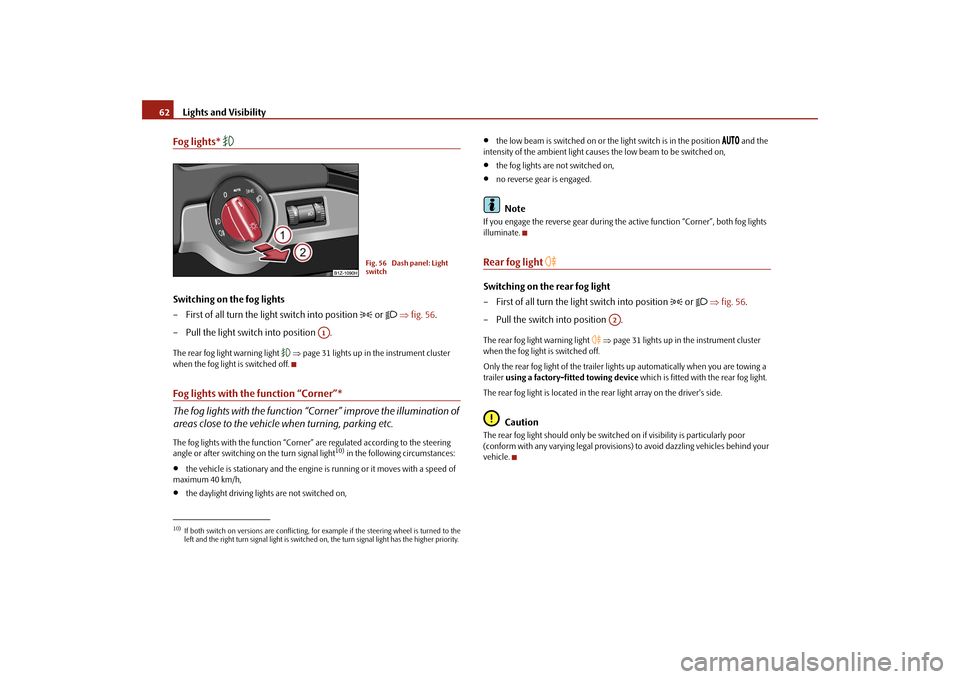
Fog lights*
Switching on the fog lights – First of all turn the light switch into position
or
⇒
fig. 56
.
– Pull the light switch into position .The rear fog light warning light
⇒page 31 lights up in the instrument cluster
when the fog light is switched off.Fog lights with the function “Corner”* The fog lights with the function “Corner” improve the illumination of areas close to the vehicle
when turning, parking etc.
The fog lights with the function “Corner”
are regulated according to the steering
angle or after switching on the turn signal light
10) in the following circumstances:
•
the vehicle is stationary and the engine
is running or it moves with a speed of
maximum 40 km/h,•
the daylight driving lights are not switched on,
•
the low beam is switched on or the
light switch is in the position
and the
intensity of the ambient light causes
the low beam to be switched on,
•
the fog lights are not switched on,
•
no reverse gear is engaged.Note
If you engage the reverse gear during the
active function “Corner”, both fog lights
illuminate.Rear fog light
Switching on the rear fog light – First of all turn the light switch into position
or
⇒
fig. 56
.
– Pull the switch into position .The rear fog light warning light
⇒page 31 lights up in the instrument cluster
when the fog light is switched off. Only the rear fog light of the trailer ligh
ts up automatically when you are towing a
trailer
using a factory-fitted towing device
which is fitted with the rear fog light.
The rear fog light is located in the rear light array on the driver's side.
Caution
The rear fog light should only be switched
on if visibility is particularly poor
(conform with any varying legal provisions) to avoid dazzling vehicles behind your vehicle.
10)If both switch on versions are conflicting, fo
r example if the steering wheel is turned to the
left and the right turn signal light is switched on, the turn signal light has the higher priority.
Fig. 56 Dash panel: Light switch
A1
A2
se0.1.book Page 62 Friday, April 10, 2009 3:19 PM
Page 128 of 304
Starting-off and Driving
127
Using the system
Safety
Driving Tips
General Maintenance
Breakdown assistance
Technical Data
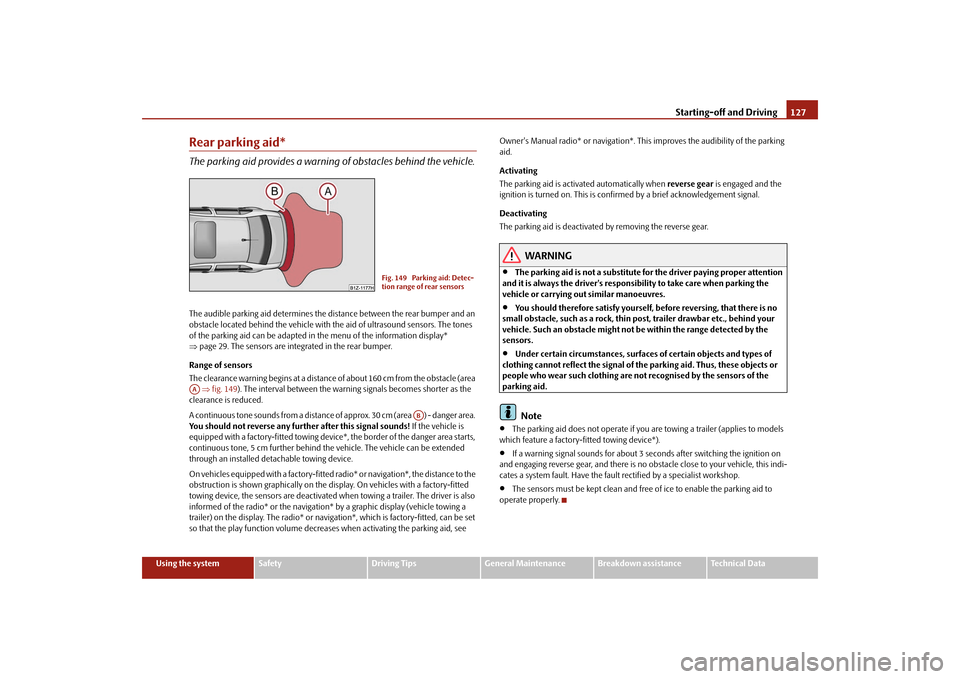
Rear parking aid*The parking aid provides a warning of obstacles behind the vehicle.The audible parking aid determines the distance between the rear bumper and an obstacle located behind the vehicle with
the aid of ultrasound sensors. The tones
of the parking aid can be adapted in
the menu of the information display*
⇒ page 29. The sensors are integrated in the rear bumper. Range of sensors The clearance warning begins at a distance
of about 160 cm from the obstacle (area
⇒fig. 149
). The interval between the warning signals becomes shorter as the
clearance is reduced. A continuous tone sounds from a distance
of approx. 30 cm (area ) - danger area.
You should not reverse any further after this signal sounds!
If the vehicle is
equipped with a factory-fitted towing device*, the border of the danger area starts, continuous tone, 5 cm further behind th
e vehicle. The vehicle can be extended
through an installed detachable towing device. On vehicles equipped with a factory-fitted
radio* or navigation*, the distance to the
obstruction is shown graphically on the disp
lay. On vehicles with a factory-fitted
towing device, the sensors are deactivated when towing a trailer. The driver is also informed of the radio* or the navigation
* by a graphic display (vehicle towing a
trailer) on the display. The radio* or navi
gation*, which is factory-fitted, can be set
so that the play function volume decrea
ses when activating the parking aid, see
Owner's Manual radio* or navigation*. This
improves the audibility of the parking
aid. Activating The parking aid is activated automatically when
reverse gear
is engaged and the
ignition is turned on. This is conf
irmed by a brief acknowledgement signal.
Deactivating The parking aid is deactivated by removing the reverse gear.
WARNING
•
The parking aid is not a substitute for the driver paying proper attention
and it is always the driver's responsibility to take care when parking the vehicle or carrying ou
t similar manoeuvres.
•
You should therefore satisfy yourself, before reversing, that there is no
small obstacle, such as a rock, thin post, trailer drawbar etc., behind your vehicle. Such an obstacle might not
be within the range detected by the
sensors.•
Under certain circumstances, surfaces of certain objects and types of
clothing cannot reflect the signal of th
e parking aid. Thus, these objects or
people who wear such clothing are not recognised by the sensors of the parking aid.
Note
•
The parking aid does not operate if you are towing a trailer (applies to models
which feature a factory-fi
tted towing device*).
•
If a warning signal sounds for about 3 seconds after switching the ignition on
and engaging reverse gear, and there is no ob
stacle close to your vehicle, this indi-
cates a system fault. Have the fault rectified by a specialist workshop.•
The sensors must be kept clean and free of ice to enable the parking aid to
operate properly.
Fig. 149 Parking aid: Detec- tion range of rear sensors
AA
AB
se0.1.book Page 127 Frida
y, April 10, 2009 3:19 PM
Page 129 of 304
Starting-off and Driving
128
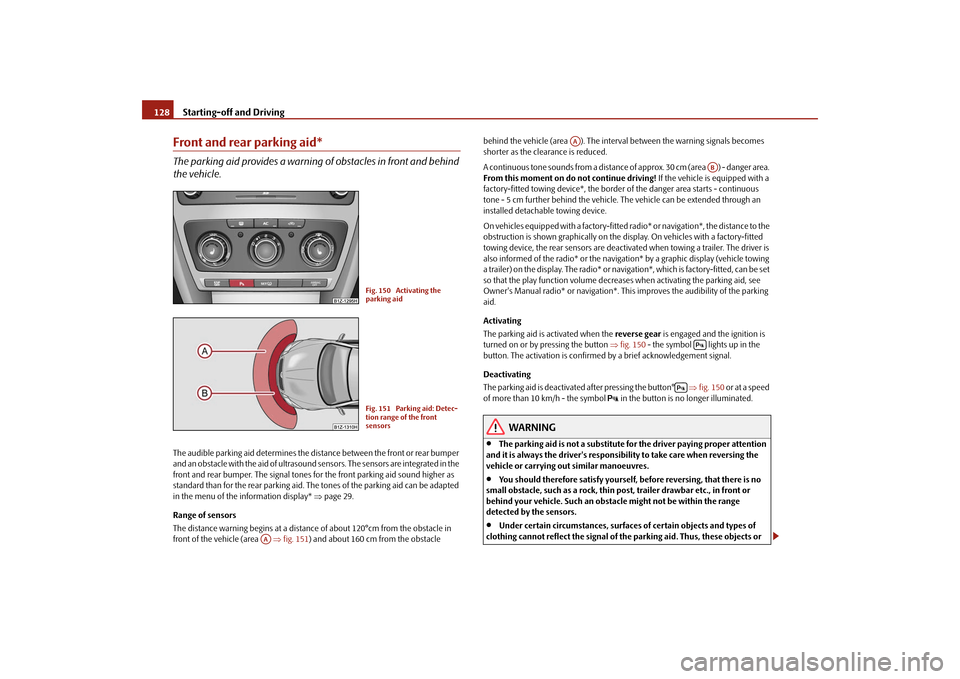
Front and rear parking aid*The parking aid provides a warning of obstacles in front and behind the vehicle.The audible parking aid determines the distance between the front or rear bumper and an obstacle with the aid of ultrasound sensors. The sensors are integrated in the front and rear bumper. The signal tones for the front parking aid sound higher as standard than for the rear parking aid. The tones of the parking aid can be adapted in the menu of the information display*
⇒page 29.
Range of sensors The distance warning begins at a distance
of about 120°cm from the obstacle in
front of the vehicle (area
⇒fig. 151
) and about 160 cm from the obstacle
behind the vehicle (area ). The interv
al between the warning signals becomes
shorter as the clearance is reduced. A continuous tone sounds from a distance
of approx. 30 cm (area ) - danger area.
From this moment on do not continue driving!
If the vehicle is equipped with a
factory-fitted towing device*, the border
of the danger area
starts - continuous
tone - 5 cm further behind
the vehicle. The vehicle ca
n be extended through an
installed detachable towing device. On vehicles equipped with a factory-fitted radio* or navigation*, the distance to the obstruction is shown graphically on the di
splay. On vehicles with a factory-fitted
towing device, the rear sensors are deactivated when towing a trailer. The driver is also informed of the radio* or the navigation* by a graphic display (vehicle towing a trailer) on the display. The radio* or navi
gation*, which is factory-fitted, can be set
so that the play function volume decreases when activating the parking aid, see Owner's Manual radio* or navigation*. This
improves the audibili
ty of the parking
aid. Activating The parking aid is activated when the
reverse gear
is engaged and the ignition is
turned on or by pressing the button
⇒fig. 150
- the symbol lights up in the
button. The activation is confirmed
by a brief acknowledgement signal.
Deactivating The parking aid is deactivate
d after pressing the button°
⇒fig. 150
or at a speed
of more than 10 km/h - the symbol
in the button is no longer illuminated.
WARNING
•
The parking aid is not a substitute fo
r the driver paying proper attention
and it is always the driver's responsibility to take care when reversing the vehicle or carrying out similar manoeuvres.•
You should therefore satisfy yourself, before reversing, that there is no
small obstacle, such as a rock, thin post, trailer drawbar etc., in front or behind your vehicle. Such an obstacle might not be within the range detected by the sensors.•
Under certain circumstances, surfaces of certain objects and types of
clothing cannot reflect the signal of the parking aid. Thus, these objects or
Fig. 150 Activating the parking aidFig. 151 Parking aid: Detec-tion range of the front sensors
AA
AA
AB
se0.1.book Page 128 Frida
y, April 10, 2009 3:19 PM
Page 130 of 304
Starting-off and Driving
129
Using the system
Safety
Driving Tips
General Maintenance
Breakdown assistance
Technical Data
people who wear such clothing are not recognised by the sensors of the parking aid.
Note
•
Only the front parking aid operates if you are towing a trailer (applies only to
models which feature a factory-fitted towing device*).•
If a warning signal sounds for about 3 seconds after activating the system and
there is no obstacle close to your vehicle,
this indicates a system fault. The fault is
confirmed additionally
when the symbol flashes in the button
⇒page 128,
fig. 150
. Have the fault rectified by a specialist workshop.
•
The sensors must be kept clean and free of ice to enable the parking aid to
operate properly.•
If the parking aid is activated and the se
lector lever of the automatic gearbox is
in the position , warning signal indicates interruption (vehicle can no longer move).Cruise control system (CCS)*IntroductionThe cruise control system (CCS) maintains a constant speed, more than 30 km/h (20 mph), once it has been set, without you
having to depress the accelerator pedal.
This is only possible within the range wh
ich is permitted by the power output and
braking power of the engine. The cruise co
ntrol system makes it possible - particu-
larly on long journeys - for you
to rest your “accelerator foot”.
WARNING
•
The cruise control system must not, for safety reasons, be used in dense
traffic or on unfavourable road surfaces (such as icy roads, slippery roads or loose chippings) - risk of accident!
•
In order to prevent unintentional use of the cruise control system, always
switch off the system after use.
Note
•
Models fitted with a manual gearbox: Al
ways depress the clutch pedal if you
switch on the cruise control system when
the gearbox is in Neutral. Otherwise the
engine can rev up unintentionally.•
The cruise control system is not able to maintain a constant speed when driving
on steep downhill sections. The weight of
the vehicle increases the speed at which
it travels. One should shift down in good
time to a lower gear or slow the vehicle
down by applying the foot brake.•
It is not possible on vehicles fitted with
an automatic gearbo
x to switch on the
cruise control system if the sele
ctor lever is in the position
P, N or R.
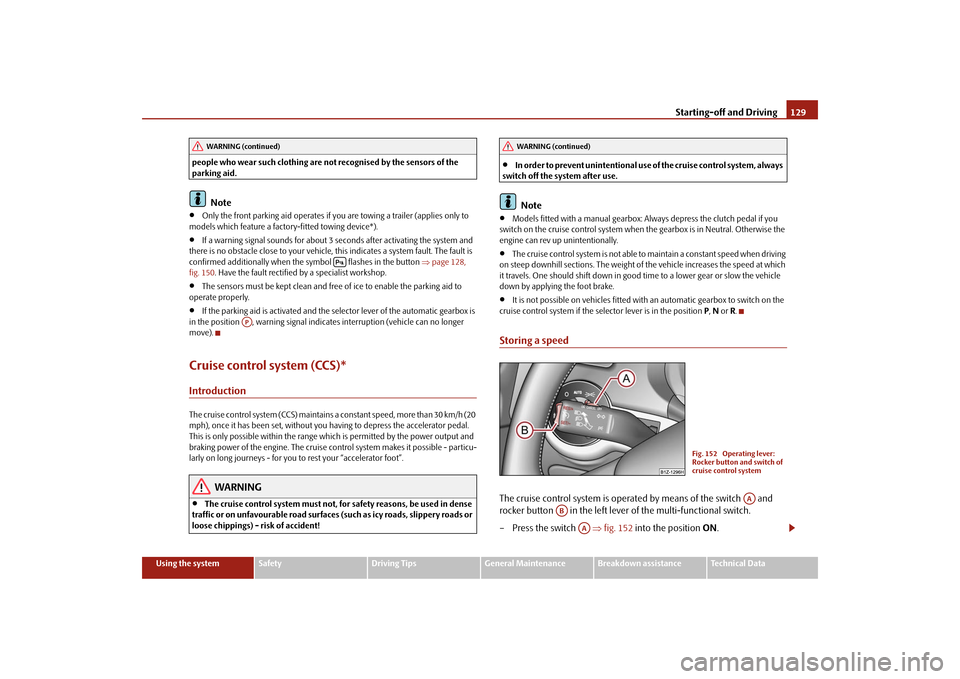
Storing a speedThe cruise control system is operat
ed by means of the switch and
rocker button in the left lever of the multi-functional switch. – Press the switch
⇒
fig. 152
into the position
ON
.
WARNING (continued)
AP
WARNING (continued)
Fig. 152 Operating lever: Rocker button and switch of cruise control system
AA
AB
AA
se0.1.book Page 129 Frida
y, April 10, 2009 3:19 PM
Page 135 of 304
Automatic gearbox
134
result of this the vehicle can no longer be
driven. If the clutch opens automatically,
depress the brake pedal, wait a few se
conds and only then continue driving.
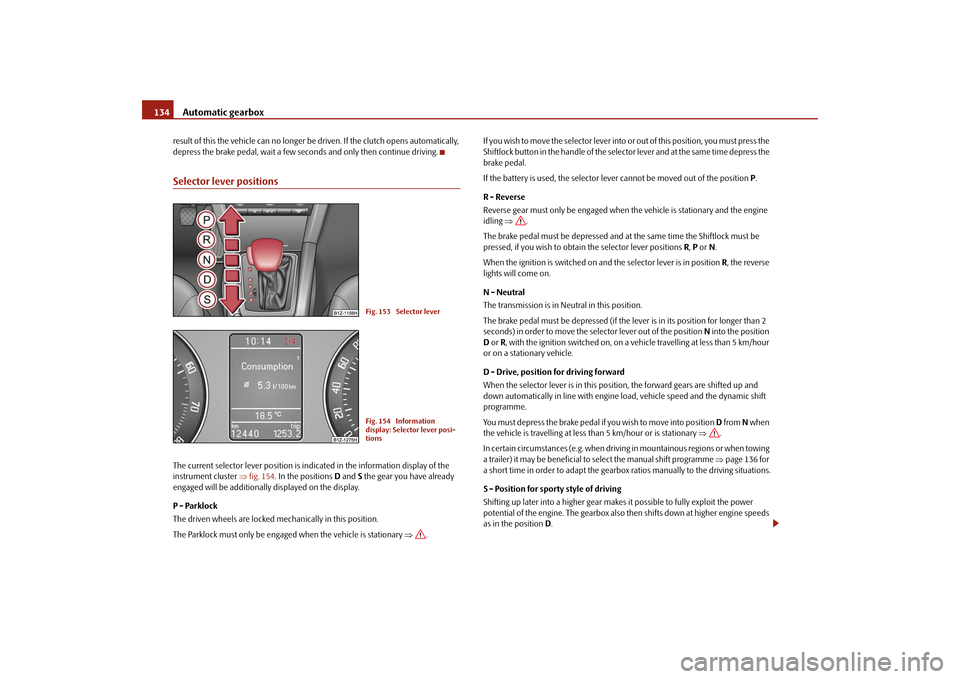
Selector lever positionsThe current selector lever position is in
dicated in the information display of the
instrument cluster
⇒fig. 154
. In the positions
D and
S the gear you have already
engaged will be additionally displayed on the display. P - Parklock The driven wheels are locked mechanically in this position. The Parklock must only be engaged when the vehicle is stationary
⇒
.
I f y o u w i s h t o m o v e t h e s e l e c t o r l e v e r i n to
or out of this position, you must press the
Shiftlock button in the handle of the selector lever and at the same time depress the brake pedal. If the battery is used, the selector leve
r cannot be moved out of the position
P.
R - Reverse Reverse gear must only be engaged when
the vehicle is stationary and the engine
idling
⇒
.
The brake pedal must be depressed and at the same time the Shiftlock must be pressed, if you wish to obtain the selector lever positions
R, P or N.
When the ignition is switched on and the selector lever is in position
R, the reverse
lights will come on. N - Neutral The transmission is in Neutral in this position. The brake pedal must be depressed (if the lever is in its position for longer than 2 seconds) in order to move the selector lever out of the position
N into the position
D or R, with the ignition switched on, on a vehicle travelling at less than 5 km/hour
or on a stationary vehicle. D - Drive, position for driving forward When the selector lever is in this position, the forward gears are shifted up and down automatically in line with engine load, vehicle speed and the dynamic shift programme. You must depress the brake pedal if you wish to move into position
D from
N when
the vehicle is travelling
at less than 5 km/hour or is stationary
⇒
.
In certain circumstances (e.g. when driving in mountainous regions or when towing a trailer) it may be beneficial to
select the manual shift programme
⇒page 136 for
a short time in order to adapt the gearbox ratios manually to the driving situations. S - Position for sporty style of driving Shifting up later into a higher gear make
s it possible to fully exploit the power
potential of the engine. The gearbox also then shifts down at higher engine speeds as in the position
D.
Fig. 153 Selector leverFig. 154 Information display: Selector lever posi-tions
se0.1.book Page 134 Frida
y, April 10, 2009 3:19 PM
Page 200 of 304

Intelligent Technology
199
Using the system
Safety
Driving Tips
General Maintenance
Breakdown assistance
Technical Data
Tyre inflation pressu
re-control system*
The tyre inflation pressure-control system compares with the aid of the ABS sensors the speed and also the rolling circumference
of the individual wheels. If the rolling
circumference of a wheel is changed, the warning light
lights up in the instru-
ment cluster
⇒page 38 and an audible signal sound
s. The rolling circumference of
the tyre can change if:•
the tyre inflation pressure is too low,
•
the structure of the tyre is damaged,
•
the vehicle is loaded on one side,
•
the wheels of an axle are loaded heavily (e.g. when towing a trailer or when
driving uphill or downhill),•
snow chains are mounted,
•
the temporary spare wheel is mounted,
•
one wheel per axle was changed.
Basic setting of tyre inflation pressure-control system After changing the tyre inflation pressures or after changing one or several wheels, a basic setting of the system must be carried out as follows.•
Inflate all tyres to the specified inflation pressure
⇒page 238.
•
Switch on the ignition.
•
Press button
⇒fig. 198
for more than 2 seconds. While pressing the
button, the warning light
lights up. At the same time the memory of the system
is erased and the new calibration is star
ted, which is confirmed with an audible
signal and then the warning light
goes out.
•
If the warning light
does not go out after the basic setting, there is a fault in
the system. Have the vehicle inspected by your nearest specialist garage. Warning light
lights up
If the tyre inflation pressure of at least on
e wheel is insufficiently inflated in compar-
ison to the stored basic value, the warning light
⇒
lights up.
Warning light
flashes
If the warning light flashes, there is a system fault. Have the vehicle inspected by your nearest specialist garage.
WARNING
•
When the warning light
lights up, immediately reduce the speed and
avoid sudden steering and brake mano
euvres. Please stop the vehicle
without delay at the nearest possible stop and inspect the tyres and their inflation pressures.•
The driver is responsible for the correc
t tyre inflation pressures. For this
reason, the tyre inflation pressures must be checked regularly.•
Under certain circumstances (e.g. sporty style of driving, wintry or
unpaved roads) the warning light
can be delayed or does not light up at
all.•
The tyre inflation pressure-control system does not take away the
responsability from the driver for the correct tyre inflation pressure.
Note
The tyre inflation pressure-control system:•
does not replace the regular tyre inflatio
n pressure control, because the system
cannot detect an even pressure loss,
Fig. 198 Button for setting the tyre inflation pressure control value
se0.1.book Page 199 Frida
y, April 10, 2009 3:19 PM
Page 202 of 304

Driving and the Environment
201
Using the system
Safety
Driving Tips
General Maintenance
Breakdown assistance
Technical Data
Driving and the EnvironmentThe first 1 500 kilometres and then afterwardsA new engine The engine has to be run in during the first 1 500 kilometres.Up to 1 000 kilometres – Do not drive faster than 3/4 of the
maximum speed of the gear in use,
that is 3/4 of the maximum permissible engine speed.
– Do not use full throttle.– Avoid high engine revolutions. – Do not tow a trailer. From 1 000 up to 1 500 kilometres – Increase the power output of the engine
gradually
up to the full
speed of the gear engaged, that
is up to the maximum permissible
engine revolutions.
During the first operating hours the engine
has higher internal
friction than later
until all of the moving parts have harmonized. The driving style which you adopt during the first approx.1 500 kilometres
plays a decisive part in the success of
running in yo
ur vehicle.
You should not drive at unnecessarily
high engine revolutions
even after the
running-in period is
complete. The maximum permissib
le engine spee
d is marked
by the beginning of the red zone on the scale of the revolutions counter. Shift up into the next higher gear on a vehicle
fitted with manual gearbox before the red
zone is reached.
Extremely
high engine revolutions are automatically governed, by
the way. For a vehicle fitted with a manual gearbox
the converse situation also applies: Do
not drive at engine revolutions which are
too low
. Shift down as soon as the engine
is no longer running smoothly.
Caution
All the speed and engine revolution figure
s apply only when the engine is at its
normal operating temperature. Never rev up
an engine which is cold, neither when
the vehicle is stationary nor when driving in individual gears.
For the sake of the environment
Not driving at unnecessarily high engine revolutions and shifting to a higher gear as early as possible are ways to minimise fuel consumption and operating noise levels and protects the environment.New tyresNew tyres have to be “run in” since they do
not offer optimal grip at first. You should
take account of this fact for the first 500 kilometres and drive particularly carefully.New brake padsAllow for the fact that new brake pads do
not achieve their full braking efficiency
until approximately 200 kilometres. New brake pads must be first “run in” before they develop their optimal friction force.
You can, however, compensate for this
slightly reduced braking force by increasing the pressure on the brake pedal. This guideline also applies to any new
brake pads installed at a future date.
During the running-in period, you should
avoid excessive stresses on the brakes.
This includes, for example, violent braking,
particularly from very high speeds, and
also when crossing mountain passes.
se0.1.book Page 201 Frida
y, April 10, 2009 3:19 PM
Page 204 of 304

Driving and the Environment
203
Using the system
Safety
Driving Tips
General Maintenance
Breakdown assistance
Technical Data
number of tips on how to protect the environment and at the same time save money. The fuel consumption can naturally also be
influenced by factors which are beyond
the driver's control. It is,
for example, normal for the fu
el consumption to increase
in winter and under worsened
conditions such as poor road conditions, towing a
trailer, etc. The technical requirements for low fuel
usage and economic efficiency of the
vehicle have already been built into the ve
hicle at the works.
Special attention has
been given to minimising ne
gative effects on the environment. It is necessary to
take note of the guidelines given in this
chapter in order to make best use of these
characteristics and to maintain their effectiveness. The optimal engine speed should be obtained when accelerating, in order to avoid a high fuel consumption an
d resonance of the vehicle.
Looking ahead when driving A vehicle's highest fuel consumption occurs it accelerates.Avoid accelerating and brakin
g unnecessarily. If you drive
with forsight you will not
need to brake so often and will also then
not have to accelerate so much. Let your
vehicle coast to a stop, for example, if this
is possible, when you see that the next
set of traffic lights is at red.
Shifting gears and saving energy Shifting up early saves on fuel.Manual gearbox – Drive no more than about one length of your vehicle in first gear. – Always shift up into the next higher gear at approx. 2 000 to 2 500 revs. Automatic gearbox – Depress the accelerator pedal
slowly
. Do not depress it beyond the
kickdown position, however.
An effective way of achieving good
fuel economy is to shift up
early
. You will
consume more fuel if you drive at unnecessa
rily high revolutions in any given gear.
The
⇒fig. 200
shows the ratio of fuel consumption to the speed of your vehicle in
the relevant gears. Fuel consumption in 1st
gear is the highest, while that in 5th or
the 6th gear is the lowest. Only depress the accelerator pedal slowly if
your vehicle is fitted with an automatic
gearbox in order to automatically select an economic driving programme. You will achieve good fuel economy by shifting
up early and shifting down late.
Fig. 200 Fuel consumption in litres/100 km. and speed in km/h.
se0.1.book Page 203 Frida
y, April 10, 2009 3:19 PM