remote control SKODA OCTAVIA 2012 3.G / (5E) User Guide
[x] Cancel search | Manufacturer: SKODA, Model Year: 2012, Model line: OCTAVIA, Model: SKODA OCTAVIA 2012 3.G / (5E)Pages: 222, PDF Size: 13.52 MB
Page 60 of 222

When the interior lights are switched on or the reverse gear is engaged, the mir-
ror always moves back into the basic position (not dimmed).
Do not attach external navigation devices on to the windscreen or in the vicinity
of the automatic dimming interior mirror » page 57,
in section Introduction .
Exterior mirror
Fig. 43
Inner part of door: Rotary knob
First read and observe the introductory information and safety warn-
ings on page 56.
Mirror heater
›
Set the rotary knob into the position
» Fig. 43 .
The mirror heater only operates when the engine is running and up to an outside temperature of +35 ℃.
Adjusting both mirrors in sync
›
Set the rotary dial into position
or, on right-hand drive vehicles, into position
» Fig. 43 . The movement of the mirror surface is identical to the movement of
the rotary knob.
The synchronous setting of both mirrors can be activated/deactivated in the Info-
tainment » operating instructions for Infotainment , chapter Setting vehicle sys-
tems (CAR button) .
Adjusting the front passenger's mirror
›
Set the rotary dial into position
or, on right-hand drive vehicles, into position
» Fig. 43 . The movement of the mirror surface is identical to the movement of
the rotary knob.
Switching off operating control
›
Set the rotary knob into the position
» Fig. 43 .
Folding-in both of the exterior mirrors with the rotary knob›Set the rotary knob into the position » Fig. 43 .
It is only possible to fold in both exterior mirrors when the ignition is switched on and at a speed of up to 50 km/h.
The mirrors are folded back into the driving position after the rotary knob is
turned from the position to a different one.
Folding-in both of the exterior mirrors using the remote control key›
Hold down the lock button on the remote control key, or when using the
KESSY system, keep your finger on the sensor
1
» Fig. 15 on page 33.
Folding in requires that all electrical power windows are working » page 41, Op-
erational faults in the automatic power windows .
The exterior mirror is folded back into the driving position when the ignition is
switched on.
Folding in of both mirrors can be activated/deactivated in the Infotainment » op-
erating instructions for Infotainment , chapter Setting vehicle systems (CAR but-
ton) .
Automatic dimming mirror
The exterior mirrors are dimmed together with the automatic dimming interior
mirror » page 57 .
Tilting surface of front passenger mirror
On vehicles fitted with the memory function for the driver seat » page 61, the
surface of the mirror tilts down slightly when the reverse gear is engaged and the rotary knob is in the position
or in position
on vehicles with right-hand
drive » Fig. 43 . This provides an aid in seeing the kerb of the pavement when
parking the car.
The mirror returns into its initial position, after the rotary knob is moved out of
the position
or position
on vehicles with right-hand drive, and put into another
position or if the speed is more than 15 km/h.
Tilting the surface of the front passenger mirror can be activated/deactivated in the Infotainment » operating instructions for Infotainment , chapter Setting vehi-
cle systems (CAR button) .
Memory function for mirrors
On vehicles fitted with the memory function for the driver seat » page 61 or the
memory function for the remote control key » page 61 it is possible to save the
position of the exterior mirror when saving the driver seat position.
58Using the system
Page 61 of 222
Seats and Stowage
Front seats
Introduction
This chapter contains information on the following subjects:
Manually adjusting the front seats
60
Electrically adjusting the front seats
60
Memory function of the power seat
61
Memory function of the remote control key
61
The driver's seat should be adjusted in such a way that the pedals can be fully
pressed to the floor with slightly bent legs.
The seat backrest on the driver's seat should be adjusted in such a way that the
upper point of the steering wheel can be easily reached with slightly bent arms.
Correct adjustment of the seats is particularly important for:
› safely and quickly reaching the controls;
› a relaxed, fatigue-free body position;
› achieving the maximum protection offered by the seat belts and the airbag
system.
WARNING■ Only adjust the driver's seat when the vehicle is stationary – risk of accident!■Caution when adjusting the seat! You may suffer injuries or bruises as a re-
sult of adjusting the seat without paying proper attention.■
As the electric front seats can also be adjusted when the ignition is switch-
ed off (even when the ignition key is withdrawn), never leave children unat-
tended in the car.
■
The seat backrests must not be angled too far back when driving otherwise
this will affect proper operation of the seat belts and of the airbag system –
risk of injury!
■
Never carry more people than the number of seats in the vehicle.
WARNING (Continued)■ Each occupant must correctly fasten the seat belt belonging to the seat.
Children must be fastened » page 154, Transporting children safely with a
suitable restraint system.■
At all times, the front seats and head restraints must be adjusted to match
the person's body size and the seat belt must be attached properly to provide
the most effective levels of protection to passengers.
■
Always keep your feet in the footwell when the car is being driven – never
place your feet on the instrument panel, out of the window or on the surfaces
of the seats. This is particularly important for the front seat passenger. You
will be exposed to increased risk of injury if it becomes necessary to apply the
brake or in the event of an accident. If an airbag is deployed, you may suffer
fatal injuries when adopting an incorrect seated position!
■
The driver must maintain a distance of at least 25 cm from the steering
wheel, and a distance of at least 10 cm between the legs and the dash panel at the height of the knee airbag. The front passenger must maintain a dis-
tance of at least 25 cm to the dash panel. Not maintaining this minimum dis-
tance will mean that the airbag system will not be able to properly protect you
– hazard!
■
Ensure that there are no objects in the driver's footwell as they may get
caught behind the pedals when driving or applying the braking. You would
then no longer be able to operate the clutch, brake or accelerate.
■
Do not transport any objects on the front passenger seat except objects
(e.g. child safety seat) provided for this purpose – risk of accident!
Note
■ After a certain time, play can develop within the adjustment mechanism of the
backrest angle.■
For safety reasons, it is not possible to store the seated position in the seat
memory and remote control key memory if the inclination angle of the seat back-
rest is more than 102° in relation to the seat cushion.
■
Each new driver seat and external mirror position that is saved will overwrite
the existing setting.
59Seats and Stowage
Page 63 of 222
Reducing or increasing the curvature of the lumbar support›Push the switch A » Fig. 45 in the region of one of the arrows 2.
Raising or lowering the curvature of the lumbar support›
Push the switch
A
» Fig. 45 in the region of one of the arrows 1.
The adjusted driver's seat position can be set in the memory of the
seat » page 61 or the remote control key » page 61.
Note
If the setting procedure is interrupted, you will need to press the button again.
Memory function of the power seat
Fig. 47
Memory buttons and SET button
First read and observe the introductory information and safety warn-
ings on page 59.
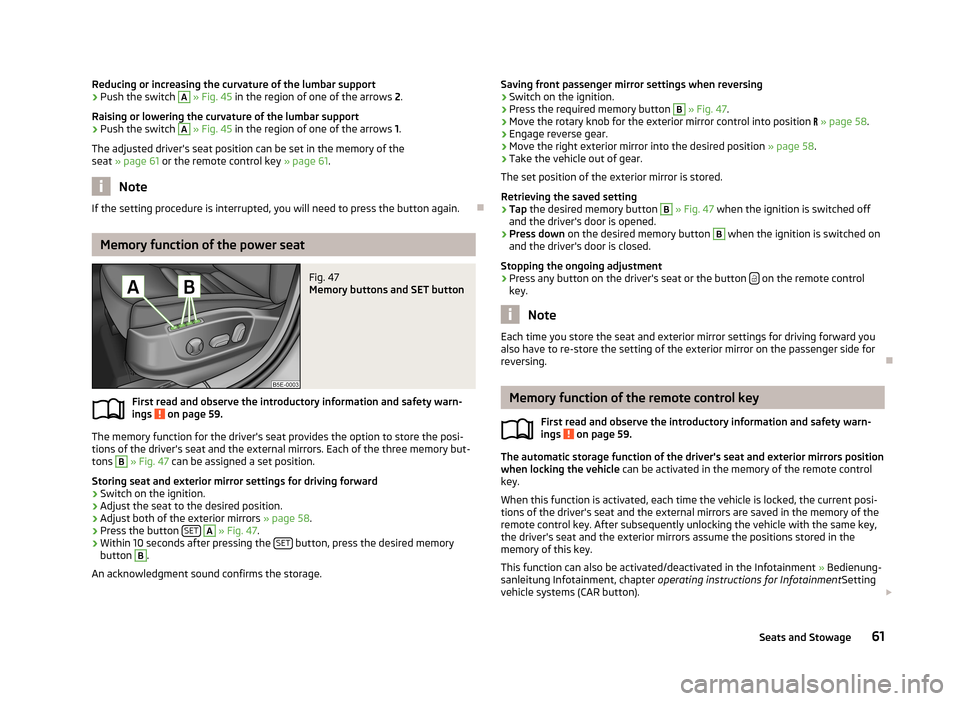
The memory function for the driver's seat provides the option to store the posi- tions of the driver's seat and the external mirrors. Each of the three memory but-
tons
B
» Fig. 47 can be assigned a set position.
Storing seat and exterior mirror settings for driving forward
›
Switch on the ignition.
›
Adjust the seat to the desired position.
›
Adjust both of the exterior mirrors » page 58.
›
Press the button SET
A
» Fig. 47 .
›
Within 10 seconds after pressing the SET button, press the desired memory
button
B
.
An acknowledgment sound confirms the storage.
Saving front passenger mirror settings when reversing›Switch on the ignition.›
Press the required memory button
B
» Fig. 47 .
›
Move the rotary knob for the exterior mirror control into position » page 58 .
›
Engage reverse gear.
›
Move the right exterior mirror into the desired position » page 58.
›
Take the vehicle out of gear.
The set position of the exterior mirror is stored.
Retrieving the saved setting
›
Tap the desired memory button
B
» Fig. 47 when the ignition is switched off
and the driver's door is opened.
›
Press down on the desired memory button
B
when the ignition is switched on
and the driver's door is closed.
Stopping the ongoing adjustment
›
Press any button on the driver's seat or the button on the remote control
key.
Note
Each time you store the seat and exterior mirror settings for driving forward you
also have to re-store the setting of the exterior mirror on the passenger side for
reversing.
Memory function of the remote control key
First read and observe the introductory information and safety warn-ings
on page 59.
The automatic storage function of the driver's seat and exterior mirrors position
when locking the vehicle can be activated in the memory of the remote control
key.
When this function is activated, each time the vehicle is locked, the current posi-
tions of the driver's seat and the external mirrors are saved in the memory of the remote control key. After subsequently unlocking the vehicle with the same key,the driver's seat and the exterior mirrors assume the positions stored in the
memory of this key.
This function can also be activated/deactivated in the Infotainment » Bedienung-
sanleitung Infotainment, chapter operating instructions for Infotainment Setting
vehicle systems (CAR button).
61Seats and Stowage
Page 64 of 222
Activating the function›Unlock the vehicle with the remote control key.›
Press and hold any memory button
B
» Fig. 47 on page 61. After the seat has
assumed the position stored under this button, at the same time press the but-
ton
on the remote control key within 10 seconds.
The successful activation of the function is confirmed by an audible signal. The seat and exterior mirror settings are not saved in the memory of the key,
which is already saved in the memory button.
The seat can be adjusted to the required position if necessary » page 60.
After locking the vehicle, the current positions of the driver's seat and the exter-
nal mirrors are saved in the memory of the remote control key.
Deactivating the function
›
Unlock the vehicle with the remote control key.
›
Press and hold the SET button
A
» Fig. 47 on page 61. At the same time, press
the button on the remote control key within 10 seconds.
The successful deactivation of the function is confirmed by an audible signal.
Stopping the ongoing adjustment
›
Press any button on the driver's seat or the button on the remote control
key.
Seat heaters
Fig. 48
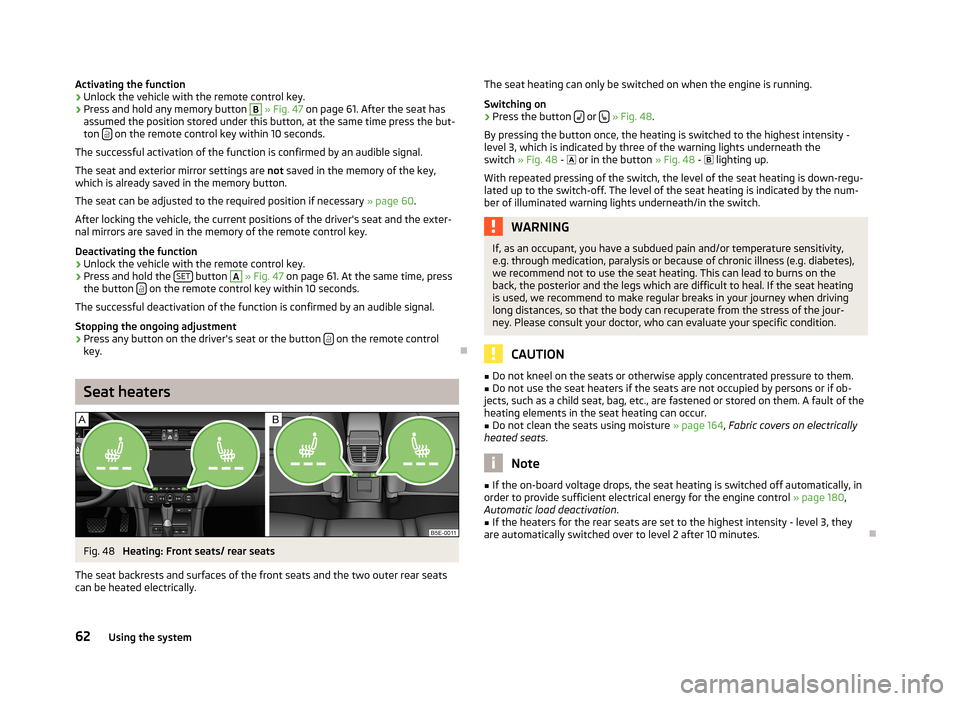
Heating: Front seats/ rear seats
The seat backrests and surfaces of the front seats and the two outer rear seats can be heated electrically.
The seat heating can only be switched on when the engine is running.
Switching on›
Press the button or
» Fig. 48 .
By pressing the button once, the heating is switched to the highest intensity - level 3, which is indicated by three of the warning lights underneath theswitch » Fig. 48 - or in the button » Fig. 48 - lighting up.
With repeated pressing of the switch, the level of the seat heating is down-regu- lated up to the switch-off. The level of the seat heating is indicated by the num-
ber of illuminated warning lights underneath/in the switch.
WARNINGIf, as an occupant, you have a subdued pain and/or temperature sensitivity,
e.g. through medication, paralysis or because of chronic illness (e.g. diabetes),
we recommend not to use the seat heating. This can lead to burns on the
back, the posterior and the legs which are difficult to heal. If the seat heating
is used, we recommend to make regular breaks in your journey when driving
long distances, so that the body can recuperate from the stress of the jour- ney. Please consult your doctor, who can evaluate your specific condition.
CAUTION
■ Do not kneel on the seats or otherwise apply concentrated pressure to them.■Do not use the seat heaters if the seats are not occupied by persons or if ob-
jects, such as a child seat, bag, etc., are fastened or stored on them. A fault of the
heating elements in the seat heating can occur.■
Do not clean the seats using moisture » page 164, Fabric covers on electrically
heated seats .
Note
■
If the on-board voltage drops, the seat heating is switched off automatically, in
order to provide sufficient electrical energy for the engine control » page 180,
Automatic load deactivation .■
If the heaters for the rear seats are set to the highest intensity - level 3, they
are automatically switched over to level 2 after 10 minutes.
62Using the system
Page 90 of 222
If a considerable increase in concentration of pollutants is recognised by the air
quality sensor, recirculated air mode will temporarily be switched off.
If the concentration of pollutants decreases to the normal level, the air distribu-
tion control is automatically switched off so that fresh air can be guided into the
vehicle interior.
In recirculated air mode air is sucked out of the interior of the vehicle and then
fed back into the interior. When the automatic air distribution control is switched on, an air quality sensor measures the concentration of pollutants in the drawn inair.
If the air quality sensor does not switch on automatic recirculated air mode when there is an unpleasant smell, you can switch in on manually.
Switching on/off›
Press the button and the warning light underneath the button illuminates.
›
Press the button again, the warning light underneath the button goes out,
where necessary press the button AUTO.
You can also switch the system on/off in he Infotainment » Bedienungsanleitung
Infotainment, chapter Setting vehicle systems (CAR button) .
WARNINGDo not leave recirculated air mode on over a longer period of time, as “stale”
air can cause fatigue of the driver and passengers, reduce attention levels and
also cause the windows to mist up. The risk of having an accident increases.
Switch off recirculated air mode as soon as the windows start to mist up.
Note
■ If the windscreen mists up, press the button . Press the button AUTO when
the windscreen is demisted.■
The automatic air distribution control operates only if the outside temperature
is higher than approx. 2 °C.
Controlling blower
The blower stage can be manually adapted to suit your particular needs.
›
Turn the control dial
B
» Fig. 86 on page 86 to the left or right to increase or
decrease the blower speed.
If the blower speed is reduced to a minimum, Climatronic is switched off.
The set blower speed is displayed in the control dial B when the respective num-
ber of warning lights come on.WARNING■ “Stale air” may result in fatigue in the driver and occupants, reduce attention
levels and also cause the windows to mist up. The risk of having an accident
increases.■
Do not switch off the Climatronic system for longer than necessary.
■
Switch on the Climatronic system as soon as the windows mist up.
Defrosting windscreen
Switching on/off
›
Press the button
» Fig. 86 on page 86.
›
Press the button or the button
AUTO again.
More air flows out of the air outlet vents 1 » Fig. 82 on page 82. The temperature
control is controlled automatically.
Auxiliary heating (auxiliary heating and ventilation)
Introduction
This chapter contains information on the following subjects:
Switching on/off
89
setting
90
Remote control
90
Replacing the battery in the remote control
91
Function prerequisites when switching on:
› Comfort temperature has been set;
› The blower is switched on;
› the air outlet vents are opened;
› The air outlet is set to position
or
.
Auxiliary heating (parking heating) › It can be used when stationary, when the engine is switched off to preheat the
vehicle and while driving (e.g. during the heating phase of the engine);
› It works in tandem with the hearer, air-conditioning system or Climatronic;
88Using the system
Page 91 of 222
›The engine is also preheated when the vehicle is stationary and the engine is
not running;
› It warms up the coolant by burning fuel from the vehicle tank. The coolant
warms up the air, which (if the blower speed is not set to zero) flows into the passenger compartment.
Auxiliary ventilation
The auxiliary ventilation enables fresh air to flow into the vehicle interior by
switching off the engine, whereby the interior temperature is effectively de-
creased (e.g. with the vehicle parked in the sun).WARNING■ The auxiliary heating must never be operated in closed rooms - risk of poi-
soning!■
The auxiliary heating must not be running during refuelling - risk of fire.
■
The exhaust pipe of the auxiliary heating is located on the underside of the
vehicle. Therefore, if you wish to operate the auxiliary heating, do not park the vehicle in such a way that the exhaust gases can come into contact with high-
ly flammable materials (e.g. dry grass) or easily inflammable substances (e.g.
spilt fuel).
CAUTION
■ The running auxiliary heater consumes fuel from the vehicle tank and automati-
cally controls the filling level. If only a low quantity of fuel is present in the fuel
tank, the function of the auxiliary heating is blocked.■
The exhaust pipe of the auxiliary heating, which is located on the underside of
the vehicle, must not be clogged and the exhaust flow must not be blocked.
■
If the auxiliary heating and ventilation is running, the vehicle battery discharges.
If the auxiliary heating and ventilation has been operated several times over a
longer period, the vehicle must be driven a few kilometres in order to recharge
the vehicle battery.
Note
■ The auxiliary heating only switches the blower on, if it has achieved a coolant
temperature of approx. 50 °C.■
At low outside temperatures, this can result in a formation of water vapour in
the area of the engine compartment. This is quite normal and is not an operating problem.
■
The air inlet in front of the windscreen must be free of e.g. ice, snow or leaves
to ensure that the auxiliary heating and cooling system operates properly.
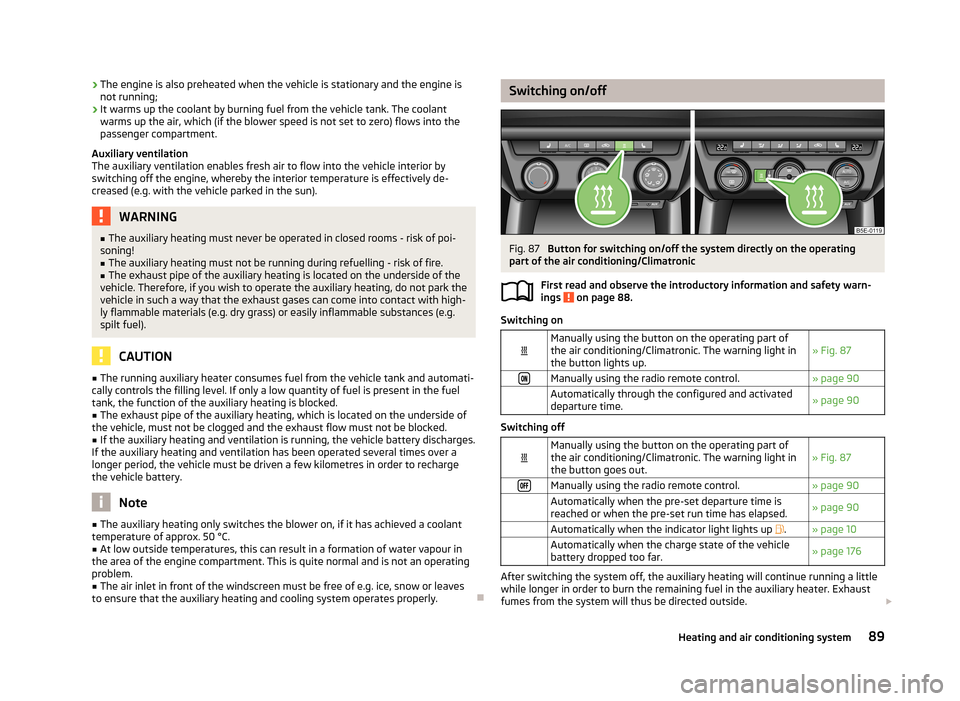
Switching on/offFig. 87
Button for switching on/off the system directly on the operating
part of the air conditioning/Climatronic
First read and observe the introductory information and safety warn-ings
on page 88.
Switching on
Manually using the button on the operating part of
the air conditioning/Climatronic. The warning light in the button lights up.» Fig. 87Manually using the radio remote control.» page 90 Automatically through the configured and activated
departure time.» page 90
Switching off
Manually using the button on the operating part of
the air conditioning/Climatronic. The warning light in the button goes out.» Fig. 87Manually using the radio remote control.» page 90 Automatically when the pre-set departure time is
reached or when the pre-set run time has elapsed.» page 90 Automatically when the indicator light lights up .» page 10 Automatically when the charge state of the vehicle
battery dropped too far.» page 176
After switching the system off, the auxiliary heating will continue running a little
while longer in order to burn the remaining fuel in the auxiliary heater. Exhaust
fumes from the system will thus be directed outside.
89Heating and air conditioning system
Page 92 of 222
After switching off the auxiliary heating, the coolant pump runs for a short period.
The auxiliary heater does not switch on: › when the following appears in the instrument cluster display, or the the follow-
ing was displayed before the ignition was turned off: Please refuel. Range: ...
km or PLEASE REFUEL ;
› when the charge state of the vehicle battery is too low;
› when no pre-set time is activated.
setting
First read and observe the introductory information and safety warn-
ings
on page 88.
Information on the setting » Bedienungsanleitung Infotainment, chapter Setting
vehicle systems (CAR button) .
Before the setting is started, check the correct time and date settings.
Checking the settings
When the departure time is activated, the indicator light in the button
lights up
for around 10 seconds after the ignition is turned off.
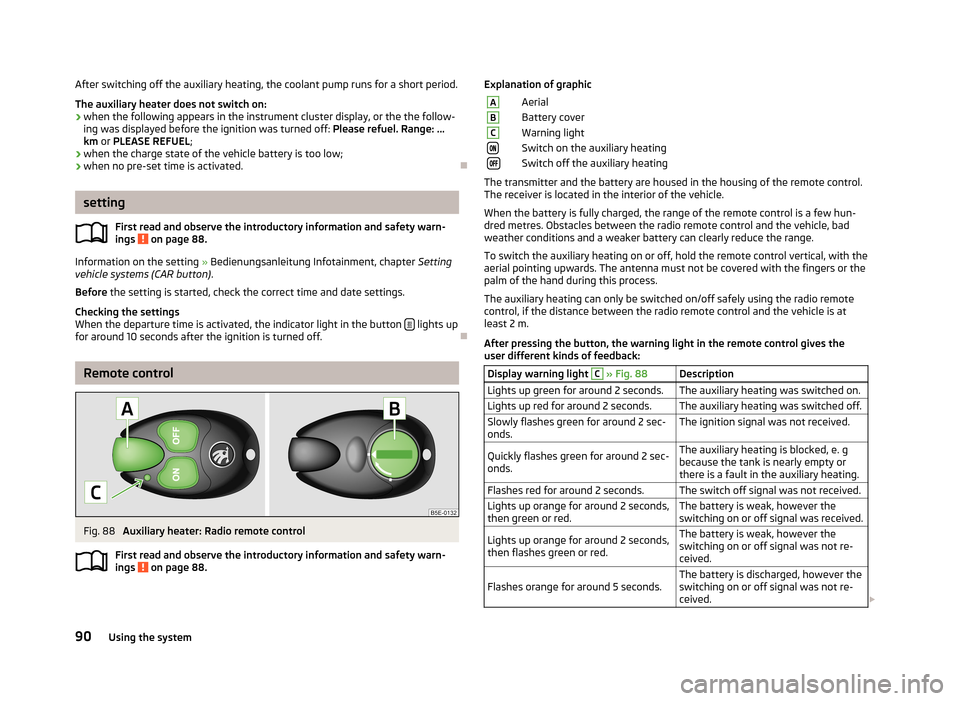
Remote control
Fig. 88
Auxiliary heater: Radio remote control
First read and observe the introductory information and safety warn-
ings
on page 88.
Explanation of graphicAAerialBBattery coverCWarning lightSwitch on the auxiliary heatingSwitch off the auxiliary heating
The transmitter and the battery are housed in the housing of the remote control.
The receiver is located in the interior of the vehicle.
When the battery is fully charged, the range of the remote control is a few hun-
dred metres. Obstacles between the radio remote control and the vehicle, bad
weather conditions and a weaker battery can clearly reduce the range.
To switch the auxiliary heating on or off, hold the remote control vertical, with the
aerial pointing upwards. The antenna must not be covered with the fingers or the palm of the hand during this process.
The auxiliary heating can only be switched on/off safely using the radio remote control, if the distance between the radio remote control and the vehicle is at
least 2 m.
After pressing the button, the warning light in the remote control gives the
user different kinds of feedback:
Display warning light C » Fig. 88DescriptionLights up green for around 2 seconds.The auxiliary heating was switched on.Lights up red for around 2 seconds.The auxiliary heating was switched off.Slowly flashes green for around 2 sec-
onds.The ignition signal was not received.Quickly flashes green for around 2 sec-
onds.The auxiliary heating is blocked, e. g
because the tank is nearly empty or
there is a fault in the auxiliary heating.Flashes red for around 2 seconds.The switch off signal was not received.Lights up orange for around 2 seconds,
then green or red.The battery is weak, however the
switching on or off signal was received.Lights up orange for around 2 seconds,
then flashes green or red.The battery is weak, however the
switching on or off signal was not re-
ceived.Flashes orange for around 5 seconds.The battery is discharged, however the
switching on or off signal was not re-
ceived. 90Using the system
Page 93 of 222
CAUTIONThe radio remote control comprises electronic components and must therefore be
protected against water, severe impacts and direct sunlight.
Replacing the battery in the remote control
First read and observe the introductory information and safety warn-
ings
on page 88.
If the indicator light
C
» Fig. 88 on page 90on the radio remote control indicates
a weak or discharged battery, it must be replaced.
The battery is located under a cover
B
» Fig. 88 on page 90 on the back of the
radio remote control.
›
Insert a flat, blunt object, such as a coin, into the gap of the battery cover.
›
Turn the cover against the direction of the arrow up to the mark to open the cover.
›
Replace the battery.
›
Return the battery cover.
›
Turn the cover in the direction of the arrow up to the initial marking, engage.
When replacing the battery, pay attention to the correct polarity.
The replacement battery must have the same specification as the original battery.
For the sake of the environment
Dispose of the used battery in accordance with national legal provisions.
91Heating and air conditioning system
Page 214 of 222
Index
A
ABS Function
113
Warning light17
Accessories165
Active driver-steering recommendation (DSR)112
Adjusting Exterior mirror
58
Interior mirror57
Adjusting seats139
Adjustment Seat
60
Aerial160
see Radio reception162
Airbag146
Deployment146
Front airbag147
Head airbag150
Knee airbag148
Side airbag149
Airbag system146
Air conditioning system Air outlets
82
Climatronic86
Manual air conditioning system84
Air outlets82
Alarm35
Anti-theft alarm system35
Antilock brake system113
Armrest Front
76
rear64
Ashtray70
Assist systems ABS
17, 113
Cruise control systems (CCS)119
EDL114
ESC17, 112
Headlight assist47
Lane Assist126
Park Assist116
Parking aid114
ProActive passenger protection125
Select driving mode124
START/STOP121
TCS16, 113
Auto Check Control12
Automatic driving lamp control45
Automatic gearbox Dynamic shift programme
132
Emergency programme132
Kickdown132
Selector lever-emergency unlocking133
Selector lever lock131
Selector lever positions130
Starting-off and driving130
Tiptronic131
Automatic load deactivation180
Automatic transmission129
Auxiliary heating and cooling system Switching on/off
89
Auxiliary heating (auxiliary heating and ventila- tion)
88
setting90
B
Ball rod Check attachment
108
installing107
Ready position107
removing108
Battery Replacing the battery in the remote control(aux-
iliary heating)
91
Before setting off138
Belt tensioners145
Bonnet Closing171
Opening171
Boot Cover
67
Fastening elements65
Fixing of the floor covering66
Light65
see Boot lid37
Boot lid37
Automatic locking38
Brake booster97
Brake fluid Checking
175
Brake pads Indicator light
20
Brakes Brake assist systems
112
Brake booster97
Handbrake98
Running in100
Warning light14
Braking Brake fluid
175
Information for braking97
Breakdown kit192
Break recommendation see Fatigue detection
27
Bulbs Replacing
202
Button in the driver's door Electrical power windows
38
C
Car computer see Multifunction display
22
Car jack188
Carrier68
Catalytic converter100
Central locking button32
212Index
Page 217 of 222
Hazard warning light system49
Headlight beam adjustment44
Headlight flasher45
Main beam45
parking light45
Parking light44
Rear fog light48
Replacing bulbs202
Tourist light46
Turn signal light45
Lights Low beam
44
switching on and off44
Warning lights12
Loads207
Locking Remote control
32
Locking and unlocking from the inside32
Lock the vehicle Keys
31
Luggage compartment Emergency unlocking
38
Fixing nets66
Folding double hooks66
Unlocking the luggage compartment lid38
M
Mirror Exterior mirror
58
Vanity53
Mobile phone134
Multicollision brake112
Multifunction display Functions
22
Memory22
Select data22
Multimedia135
AUX137
MEDIA IN137
USB137
N
Nets
66
O
Oil refer to Engine oil
172
Onboard computer see Multifunction display
22
Operation in winter De-icing windows
162
Diesel fuel169
Vehicle battery179
Outside temperature21
Overview Engine compartment
172
Warning lights12
P
Paint see Paint damage
161
Paint damage161
Parking automatic brake assist
116
Manoeuvring out of a parallel parking space116
Park Assist116
Parking aid114
Parking ticket holder80
Passive Safety138
Pedals99
Petrol refer to Fuel
168
Polishing the paintwork refer to Taking care of your vehicle
161
Power sockets 12 V
71
230 V71
Power steering93
Power windows Button in the front passenger door40
Preservation refer to Taking care of your vehicle
161
ProActive passenger protection125
R
Radiator fan
175
Radio reception Aerial
162
Functional fault162
Raise vehicle191
Rear mirror56
Exterior mirror58
Interior mirror57
Rear seats Seat backrest
63
Rear window - heating52
Recirculated air mode Climatronic
87
Manual air conditioning system85
Recommended gear21
Refuelling167
Fuel167
Regulation Headlight beam
44
Remote control32
Auxiliary heating (auxiliary heating)90
Synchronisation process33
Remote control key Replacing the battery
28
Replacement of parts165
replacing Vehicle battery
179
Replacing bulbs
202
Fuses199
The rear window wiper blade56
Wiper blades56
215Index