steering SKODA OCTAVIA 2012 3.G / (5E) User Guide
[x] Cancel search | Manufacturer: SKODA, Model Year: 2012, Model line: OCTAVIA, Model: SKODA OCTAVIA 2012 3.G / (5E)Pages: 222, PDF Size: 13.52 MB
Page 46 of 222
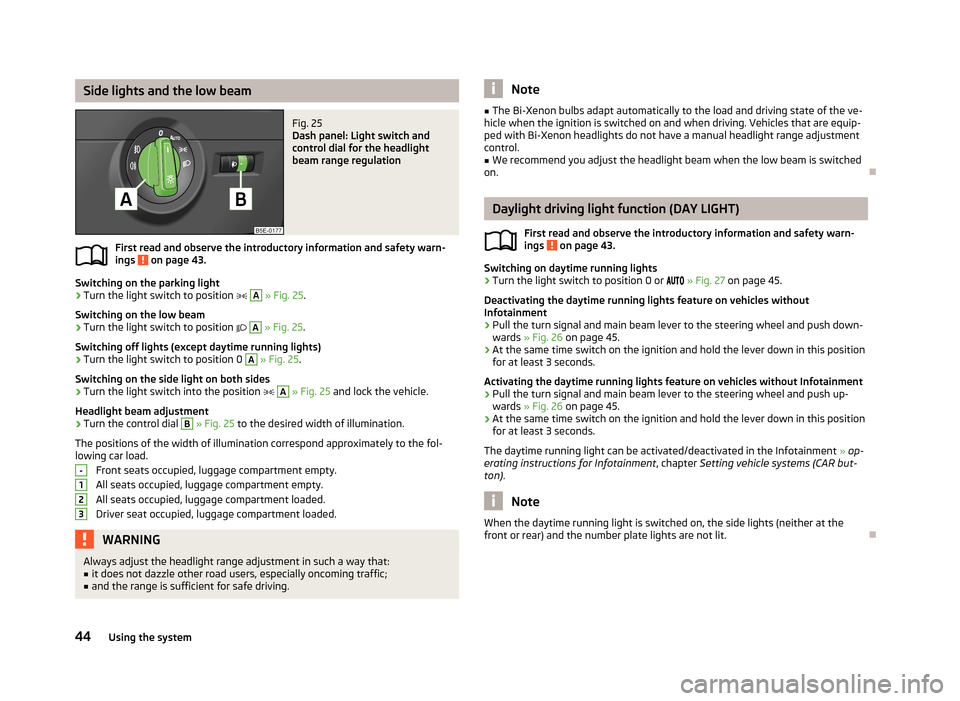
Side lights and the low beamFig. 25
Dash panel: Light switch and
control dial for the headlight
beam range regulation
First read and observe the introductory information and safety warn- ings on page 43.
Switching on the parking light
›
Turn the light switch to position
A
» Fig. 25 .
Switching on the low beam
›
Turn the light switch to position
A
» Fig. 25 .
Switching off lights (except daytime running lights)
›
Turn the light switch to position 0
A
» Fig. 25 .
Switching on the side light on both sides
›
Turn the light switch into the position
A
» Fig. 25 and lock the vehicle.
Headlight beam adjustment
›
Turn the control dial
B
» Fig. 25 to the desired width of illumination.
The positions of the width of illumination correspond approximately to the fol-
lowing car load.
Front seats occupied, luggage compartment empty.All seats occupied, luggage compartment empty.All seats occupied, luggage compartment loaded.
Driver seat occupied, luggage compartment loaded.
WARNINGAlways adjust the headlight range adjustment in such a way that:■it does not dazzle other road users, especially oncoming traffic;■
and the range is sufficient for safe driving.-123Note■ The Bi-Xenon bulbs adapt automatically to the load and driving state of the ve-
hicle when the ignition is switched on and when driving. Vehicles that are equip- ped with Bi-Xenon headlights do not have a manual headlight range adjustment
control.■
We recommend you adjust the headlight beam when the low beam is switched
on.
Daylight driving light function (DAY LIGHT)
First read and observe the introductory information and safety warn-ings
on page 43.
Switching on daytime running lights
›
Turn the light switch to position 0 or
» Fig. 27 on page 45.
Deactivating the daytime running lights feature on vehicles without
Infotainment
›
Pull the turn signal and main beam lever to the steering wheel and push down-
wards » Fig. 26 on page 45.
›
At the same time switch on the ignition and hold the lever down in this position
for at least 3 seconds.
Activating the daytime running lights feature on vehicles without Infotainment
›
Pull the turn signal and main beam lever to the steering wheel and push up- wards » Fig. 26 on page 45.
›
At the same time switch on the ignition and hold the lever down in this position
for at least 3 seconds.
The daytime running light can be activated/deactivated in the Infotainment » op-
erating instructions for Infotainment , chapter Setting vehicle systems (CAR but-
ton) .
Note
When the daytime running light is switched on, the side lights (neither at the
front or rear) and the number plate lights are not lit.
44Using the system
Page 48 of 222
Deactivating›Turn the light switch to position 0, or » Fig. 27 .
If the light switch is in position , the symbol lights up next to the light
switch. If the light is switched on automatically, the symbol next to the light
switch also lights up.
Automatic headlight control in rain
If the light switch is in position and if automatic wiping in rain or wiping (posi-
tion 2 or 3) is switched on for longer than 30 seconds » page 54, the side lights
and low beam will switch on automatically.
The light switches off when automatic wiping/wiping (position 2 or 3) is not
switched on for longer than approx. 4 seconds.
The automatic headlight control in rain can be activated/deactivated in the Info-tainment » operating instructions for Infotainment , chapter Setting vehicle sys-
tems (CAR button) .
CAUTION
Do not affix any stickers or similar objects in front of the light sensor on the wind-
screen, so that its functionality is not impaired or disabled.
Adaptive headlights (AHL)
First read and observe the introductory information and safety warn-ings
on page 43.
The AFS system works in tandem with automatic driving lamp control
, please
read the following » page 45.
The AFS system makes sure the street remains lit up depending on the traffic and weather situation.
The system automatically adjusts the cone of light in front of the vehicle based
on the vehicle speed, whether the windscreen wipers are in use, the rear fog lights, and data from Infotainment Navigation.
Activating
›
Turn the light switch into position
» Fig. 27 on page 45.
Deactivating
›
Turn the light switch to position 0,
or
» Fig. 27 on page 45.
The AHL system operates in the following modes.
Out of town mode
The cone of light in front of the vehicle is similar to the low beam. The mode is
active if none of the following modes are active.
City mode
The cone of light in front of the vehicle is adjusted so that it illuminates the adja- cent pavement, crossings, etc. The mode is active at speeds of 15-50 km/h.
Motorway mode
The cone of light in front of the vehicle is adjusted so that the driver can respond
in time to an obstruction or other hazard in time. The mode is active at speeds
above 110 km/h.
Rain mode
The cone of light in front of the vehicle is adjusted so that the driver can reduce the glare from oncoming traffic in rain. The mode is active at speeds of 50 –
90 km/h and if the windscreen wipers continuously operate for a period of time
longer than 2 minutes. The mode is deactivated when the windscreen wipers are switched off for longer than 8 minutes.
Fog mode
The cone of light in front of the vehicle is adjusted so that the driver is not daz-
zled by the reflection of the cone of light by fog in front of the vehicle. The mode
is active at speeds of 15 – 70 km/h and if the rear fog light is switched on for a
period of time longer than 10 seconds. The mode is deactivated when the rear fig
light is switched off for longer than 5 seconds.
Dynamic cornering lights
The cone of light in front of the vehicle is adjusted to the steering angle so that
the road in the curve is illuminated. This function is active at speeds greater than
10 km.h and in all AFS modes.
Tourist light
This mode makes it possible to drive in countries with opposing traffic system, driving on the left/right, without dazzling the oncoming vehicles. When the “tou- rist light” mode is active, the above-mentioned modes and the side swivel of the
headlights is deactivated.
The "Tourist light" mode can be configured in the Infotainment » operating in-
structions for Infotainment , chapter Setting vehicle systems (CAR button) .46Using the system
Page 50 of 222
WARNINGHeadlight assist only functions as a support and does not relieve the driver of
his responsibility to check the headlights and light beam and, if necessary, to
switch on the lights depending on the light conditions. Manual operation may be required in the following situations:■
in poor visibility conditions, e.g. fog, heavy rain, thick snowfall;
■
on A roads or motorways when oncoming traffic is partially obscured;
■
when passing poorly lit traffic, e.g. cyclists;
■
around sharp curves;
■
on sharp slopes up/down;
■
while driving through poorly-lit villages;
■
while driving over highly reflective surfaces;
■
when the windscreen around the camera is dirty, iced up, misted up, or cov-
ered up by stickers;
■
when an external navigation system is attached to the windscreen.
CAUTION
■ Do not attach any stickers or similar objects to the windscreen to avoid impair-
ing the functions of the Assist system.
Fog lights
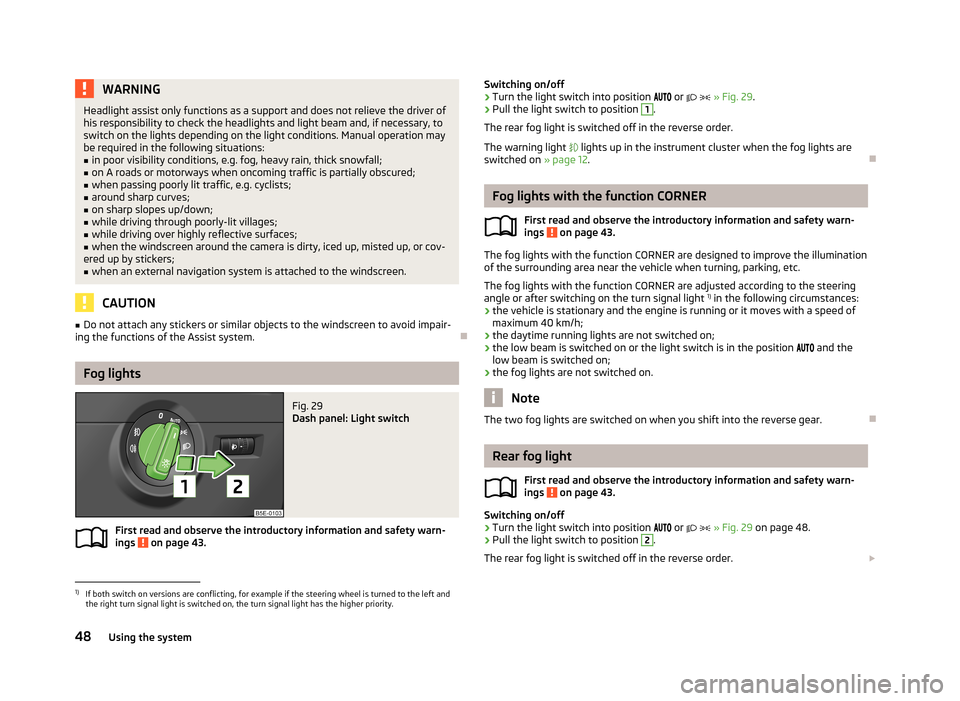
Fig. 29
Dash panel: Light switch
First read and observe the introductory information and safety warn- ings on page 43.
Switching on/off›Turn the light switch into position or » Fig. 29 .›
Pull the light switch to position
1
.
The rear fog light is switched off in the reverse order.
The warning light lights up in the instrument cluster when the fog lights are
switched on » page 12.
Fog lights with the function CORNER
First read and observe the introductory information and safety warn-
ings
on page 43.
The fog lights with the function CORNER are designed to improve the illumination
of the surrounding area near the vehicle when turning, parking, etc.
The fog lights with the function CORNER are adjusted according to the steeringangle or after switching on the turn signal light 1)
in the following circumstances:
› the vehicle is stationary and the engine is running or it moves with a speed of
maximum 40 km/h;
› the daytime running lights are not switched on;
› the low beam is switched on or the light switch is in the position
and the
low beam is switched on;
› the fog lights are not switched on.
Note
The two fog lights are switched on when you shift into the reverse gear.
Rear fog light
First read and observe the introductory information and safety warn-
ings
on page 43.
Switching on/off
›
Turn the light switch into position
or
» Fig. 29 on page 48.
›
Pull the light switch to position
2
.
The rear fog light is switched off in the reverse order.
1)
If both switch on versions are conflicting, for example if the steering wheel is turned to the left and
the right turn signal light is switched on, the turn signal light has the higher priority.
48Using the system
Page 61 of 222
Seats and Stowage
Front seats
Introduction
This chapter contains information on the following subjects:
Manually adjusting the front seats
60
Electrically adjusting the front seats
60
Memory function of the power seat
61
Memory function of the remote control key
61
The driver's seat should be adjusted in such a way that the pedals can be fully
pressed to the floor with slightly bent legs.
The seat backrest on the driver's seat should be adjusted in such a way that the
upper point of the steering wheel can be easily reached with slightly bent arms.
Correct adjustment of the seats is particularly important for:
› safely and quickly reaching the controls;
› a relaxed, fatigue-free body position;
› achieving the maximum protection offered by the seat belts and the airbag
system.
WARNING■ Only adjust the driver's seat when the vehicle is stationary – risk of accident!■Caution when adjusting the seat! You may suffer injuries or bruises as a re-
sult of adjusting the seat without paying proper attention.■
As the electric front seats can also be adjusted when the ignition is switch-
ed off (even when the ignition key is withdrawn), never leave children unat-
tended in the car.
■
The seat backrests must not be angled too far back when driving otherwise
this will affect proper operation of the seat belts and of the airbag system –
risk of injury!
■
Never carry more people than the number of seats in the vehicle.
WARNING (Continued)■ Each occupant must correctly fasten the seat belt belonging to the seat.
Children must be fastened » page 154, Transporting children safely with a
suitable restraint system.■
At all times, the front seats and head restraints must be adjusted to match
the person's body size and the seat belt must be attached properly to provide
the most effective levels of protection to passengers.
■
Always keep your feet in the footwell when the car is being driven – never
place your feet on the instrument panel, out of the window or on the surfaces
of the seats. This is particularly important for the front seat passenger. You
will be exposed to increased risk of injury if it becomes necessary to apply the
brake or in the event of an accident. If an airbag is deployed, you may suffer
fatal injuries when adopting an incorrect seated position!
■
The driver must maintain a distance of at least 25 cm from the steering
wheel, and a distance of at least 10 cm between the legs and the dash panel at the height of the knee airbag. The front passenger must maintain a dis-
tance of at least 25 cm to the dash panel. Not maintaining this minimum dis-
tance will mean that the airbag system will not be able to properly protect you
– hazard!
■
Ensure that there are no objects in the driver's footwell as they may get
caught behind the pedals when driving or applying the braking. You would
then no longer be able to operate the clutch, brake or accelerate.
■
Do not transport any objects on the front passenger seat except objects
(e.g. child safety seat) provided for this purpose – risk of accident!
Note
■ After a certain time, play can develop within the adjustment mechanism of the
backrest angle.■
For safety reasons, it is not possible to store the seated position in the seat
memory and remote control key memory if the inclination angle of the seat back-
rest is more than 102° in relation to the seat cushion.
■
Each new driver seat and external mirror position that is saved will overwrite
the existing setting.
59Seats and Stowage
Page 94 of 222
Starting-off and Driving
Starting and stopping the engine
Introduction
This chapter contains information on the following subjects:
Adjusting the steering wheel position
93
Power steering
93
Electronic immobiliser
93
Ignition lock
94
Starting engine
94
Switching the engine off
94
Starting and stopping the engine on vehicles with the KESSY system » page 95.
WARNING■
Never adjust the steering wheel when the vehicle is moving only when the
vehicle is stationary!■
Maintain a distance of 25 cm
1
to the steering wheel » Fig. 89 on page 93
– . Not maintaining this minimum distance will mean that the airbag system
will not be able to properly protect you – hazard!
■
The lever for adjusting the steering wheel must be locked whilst driving so
that the position of the steering wheel cannot accidently change during the journey – risk of accident!
■
If the steering wheel is adjusted further towards the head, the protection
provided by the driver airbag in the event of an accident is reduced. Check
that the steering wheel is aligned to the chest.
■
When driving, hold the steering wheel with both hands firmly on the outer
edge in the 9 o'clock and 3 o'clock position. Never hold the steering wheel in
the 12 o'clock position or in any other way (e.g. in the middle or inner edge of the steering wheel). In such cases, you could injure the arms, hands and head
when the driver airbag is deployed.
WARNING (Continued)■ When driving, the ignition key must always be in the position 2 » Fig. 90 on
page 94 (ignition switched on) without the engine running. This position is
indicated by the warning lights coming on. If this is not the case, it could result
in unexpected locking of the steering wheel – risk of accident!■
Only pull the ignition key from the ignition lock when the vehicle has come
to a complete stop (by applying the handbrake). Otherwise the steering wheel
could block – risk of accident!
■
When leaving the vehicle, the ignition must always be removed. This is par-
ticularly important if children are left in the vehicle. Otherwise the children
could, for example, start the engine – risk of accident or injury!
■
Never leave the engine running in unventilated or closed rooms. The ex-
haust gases of the engine contain besides the odorless and colourless carbon
monoxide a poisonous gas – hazard! Carbon monoxide can cause uncon-
sciousness and death.
■
Never leave the vehicle unattended with the engine running.
■
Never switch off the engine before the vehicle is stationary – risk of acci-
dent!
CAUTION
■ The starter may only be operated (ignition key position 3 » Fig. 90 on
page 94), if the engine is not running. The starter or engine can be damaged if
the starter is activated when the engine is running.■
Avoid high engine revolutions, full throttle and high engine loads as long as the
engine has not yet reached its operating temperature – risk of damaging the en-
gine!
■
Do not tow start the engine - danger of damaging the engine! On vehicles with
a catalytic converter, unburnt fuel may get into the catalytic converter where it
may ignite. This in turn may damage the catalytic converter. The battery from an- other vehicle can be used as a jump-start aid » page 195.
■
Do not switch the engine off immediately at the end of your journey after the
engine has been operated over a prolonged period at high loads but leave it to
run at an idling speed for about 1 minute. This prevents any possible accumulation of heat when the engine is switched off.
For the sake of the environment
Do not warm up the engine while the vehicle is stationary. If possible, start your
journey as soon as the engine has started. Through this the engine reaches its
operating temperature more rapidly and the pollutant emissions are lower. 92Using the system
Page 95 of 222
Note■The engine can only be started with a genuine ŠKODA key with the matching
code.■
The engine running noises may louder at first be louder for a short time after
starting the cold engine. This is quite normal and is not an operating problem.
■
After switching off the ignition, the radiator fan can intermittently continue to
operate for approx. 10 minutes.
■
If the engine also does not start after the second attempt, the fuse for the elec-
tric fuel pump (in petrol engines) or the control unit for the glow plug system or
glow plug system relay and fuel pump (in diesel engines) could be faulty. Check
the fuse and replace, if necessary » page 199 or seek assistance from a ŠKODA
specialist garage.
■
We recommend locking the steering wheel whenever leaving the vehicle. This
acts as a deterrent against the attempted theft of your car.
Adjusting the steering wheel position
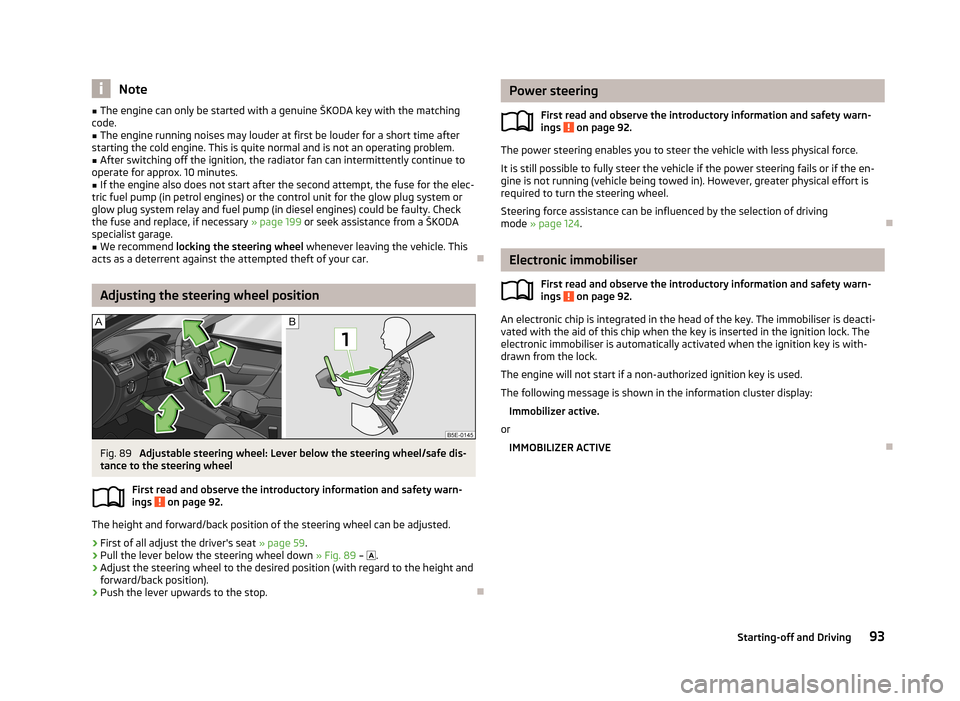
Fig. 89
Adjustable steering wheel: Lever below the steering wheel/safe dis-
tance to the steering wheel
First read and observe the introductory information and safety warn-
ings
on page 92.
The height and forward/back position of the steering wheel can be adjusted.
›
First of all adjust the driver's seat » page 59.
›
Pull the lever below the steering wheel down » Fig. 89 –
.
›
Adjust the steering wheel to the desired position (with regard to the height and
forward/back position).
›
Push the lever upwards to the stop.
Power steering
First read and observe the introductory information and safety warn-ings
on page 92.
The power steering enables you to steer the vehicle with less physical force.
It is still possible to fully steer the vehicle if the power steering fails or if the en- gine is not running (vehicle being towed in). However, greater physical effort is
required to turn the steering wheel.
Steering force assistance can be influenced by the selection of driving
mode » page 124 .
Electronic immobiliser
First read and observe the introductory information and safety warn-
ings
on page 92.
An electronic chip is integrated in the head of the key. The immobiliser is deacti-
vated with the aid of this chip when the key is inserted in the ignition lock. The
electronic immobiliser is automatically activated when the ignition key is with-
drawn from the lock.
The engine will not start if a non-authorized ignition key is used.
The following message is shown in the information cluster display: Immobilizer active.
or
IMMOBILIZER ACTIVE
93Starting-off and Driving
Page 96 of 222
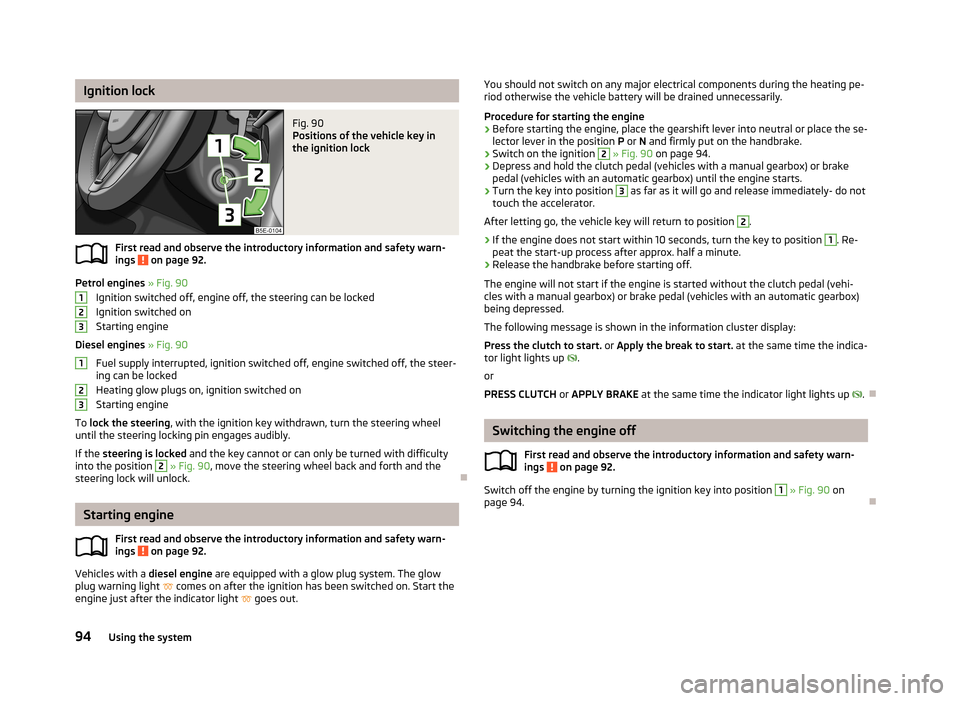
Ignition lockFig. 90
Positions of the vehicle key in
the ignition lock
First read and observe the introductory information and safety warn-
ings on page 92.
Petrol engines » Fig. 90
Ignition switched off, engine off, the steering can be locked
Ignition switched on Starting engine
Diesel engines » Fig. 90
Fuel supply interrupted, ignition switched off, engine switched off, the steer-
ing can be locked
Heating glow plugs on, ignition switched on
Starting engine
To lock the steering , with the ignition key withdrawn, turn the steering wheel
until the steering locking pin engages audibly.
If the steering is locked and the key cannot or can only be turned with difficulty
into the position
2
» Fig. 90 , move the steering wheel back and forth and the
steering lock will unlock.
Starting engine
First read and observe the introductory information and safety warn-ings
on page 92.
Vehicles with a diesel engine are equipped with a glow plug system. The glow
plug warning light
comes on after the ignition has been switched on. Start the
engine just after the indicator light
goes out.
123123You should not switch on any major electrical components during the heating pe-
riod otherwise the vehicle battery will be drained unnecessarily.
Procedure for starting the engine›
Before starting the engine, place the gearshift lever into neutral or place the se-
lector lever in the position P or N and firmly put on the handbrake.
›
Switch on the ignition
2
» Fig. 90 on page 94.
›
Depress and hold the clutch pedal (vehicles with a manual gearbox) or brake
pedal (vehicles with an automatic gearbox) until the engine starts.
›
Turn the key into position
3
as far as it will go and release immediately- do not
touch the accelerator.
After letting go, the vehicle key will return to position
2
.
›
If the engine does not start within 10 seconds, turn the key to position
1
. Re-
peat the start-up process after approx. half a minute.
›
Release the handbrake before starting off.
The engine will not start if the engine is started without the clutch pedal (vehi- cles with a manual gearbox) or brake pedal (vehicles with an automatic gearbox)
being depressed.
The following message is shown in the information cluster display:
Press the clutch to start. or Apply the break to start. at the same time the indica-
tor light lights up
.
or
PRESS CLUTCH or APPLY BRAKE at the same time the indicator light lights up
.
Switching the engine off
First read and observe the introductory information and safety warn-ings
on page 92.
Switch off the engine by turning the ignition key into position
1
» Fig. 90 on
page 94.
94Using the system
Page 97 of 222
KESSY system
Introduction
This chapter contains information on the following subjects:
Unlocking and locking the steering
95
Switching on the ignition
96
Switching off the ignition
96
Emergency ignition shutoff system
96
Starting engine
96
Emergency start-up of the engine
97
Switching the engine off
97
The KESSY system makes it possible to switch the ignition on/off and to start/
stop the engine without actively using the key.
A key must be in the vehicle to unlock the steering, switch on the steering andstart the vehicle.
WARNING■ Never switch off the ignition while driving, as the power steering and brake
booster will no longer operate - risk of accident!■
Never leave the keys in the vehicle, if leaving children unattended in the ve-
hicle. Otherwise the children could start the engine - risk of accident!
Note
■ After pressing the starter button while the steering is locked, the steering is un-
locked, the electrical components are activated (e.g. Infotainment, etc.) and the ignition is switched on.■
If you do not leave the vehicle after locking the steering and wish to unlock the
steering again, press the starter button. At the same time, electrical components
are activated (e.g. Infotainment etc.) and the ignition is switched on.
■
The KESSY system is protected against inadvertently switching off the engine
while driving, this means that the engine can only be switched off in an emergen-
cy » page 96 .
■
The steering is not unlocked or locked if the starter button is repeatedly press-
ed at short intervals.
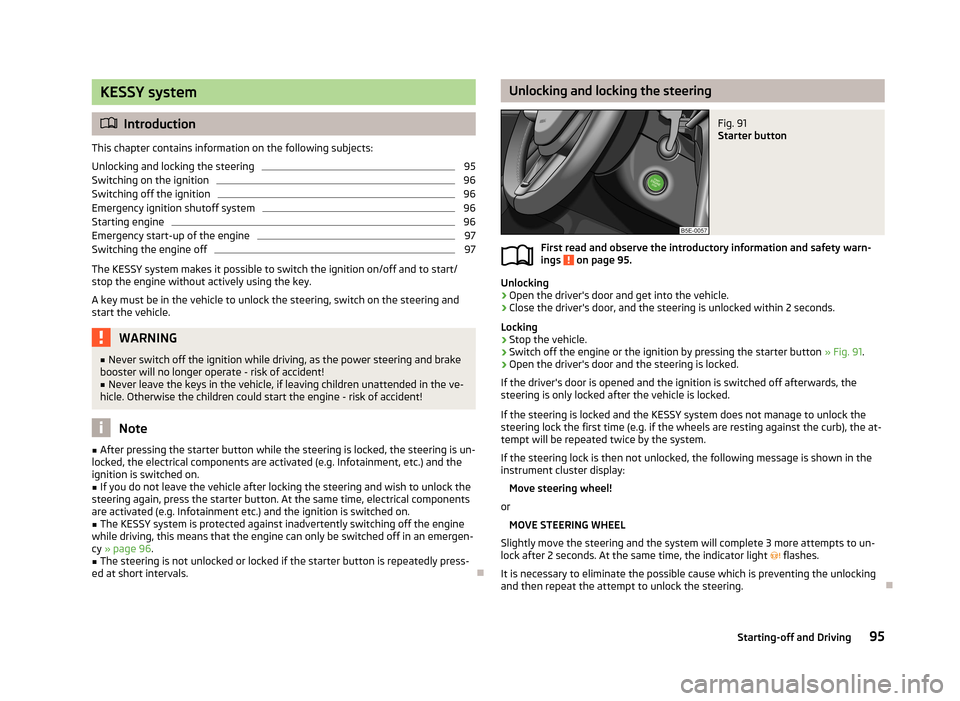
Unlocking and locking the steeringFig. 91
Starter button
First read and observe the introductory information and safety warn-
ings on page 95.
Unlocking
›
Open the driver's door and get into the vehicle.
›
Close the driver's door, and the steering is unlocked within 2 seconds.
Locking
›
Stop the vehicle.
›
Switch off the engine or the ignition by pressing the starter button » Fig. 91.
›
Open the driver's door and the steering is locked.
If the driver's door is opened and the ignition is switched off afterwards, the steering is only locked after the vehicle is locked.
If the steering is locked and the KESSY system does not manage to unlock the steering lock the first time (e.g. if the wheels are resting against the curb), the at-
tempt will be repeated twice by the system.
If the steering lock is then not unlocked, the following message is shown in the
instrument cluster display:
Move steering wheel!
or MOVE STEERING WHEEL
Slightly move the steering and the system will complete 3 more attempts to un-
lock after 2 seconds. At the same time, the indicator light
flashes.
It is necessary to eliminate the possible cause which is preventing the unlocking
and then repeat the attempt to unlock the steering.
95Starting-off and Driving
Page 98 of 222
Switching on the ignitionFirst read and observe the introductory information and safety warn-
ings
on page 95.
The steering must be unlocked to switch on the ignition.
›
Briefly press the starter button » Fig. 91 on page 95 and the ignition is switched
on.
If the ignition is switched on and the driver's door is opened, the following mes-
sage appears in the instrument cluster display:
Ignition on!
or IGNITION STILL ON
Switching off the ignition
First read and observe the introductory information and safety warn-ings
on page 95.
›
Briefly press the starter button » Fig. 91 on page 95 and the ignition is switched
off.
The ignition can be switched off up to a speed of 2 km/h.
On vehicles fitted with a manual gearbox, the clutch pedal must not be depressed after switching off the ignition otherwise the system would try to start.
On vehicles fitted with an automatic gearbox, the selector lever must be in theposition P or N and the brake pedal must not be depressed.
Emergency ignition shutoff system
First read and observe the introductory information and safety warn-
ings
on page 95.
In an emergency, it is possible to switch off the ignition even at speeds greater than 2 km/h, by using the "emergency ignition shutoff system".
›
Press the starter button » Fig. 91 on page 95 for longer than 1 second or twice
within 1 second.
Starting engine
First read and observe the introductory information and safety warn-ings
on page 95.
Maintain the clutch pedal depressed when starting vehicles fitted with a manualgearbox. On vehicles with an automatic gearbox, place the selector lever in posi-
tion P or N and depress the brake pedal until the engine starts.
The engine will not start if the engine is started without the clutch pedal (vehi- cles with a manual gearbox) or brake pedal (vehicles with an automatic gearbox) being depressed.
The following message is shown in the information cluster display: Press the clutch to start. or Apply the break to start. at the same time the indica-
tor light lights up
.
or
PRESS CLUTCH or APPLY BRAKE at the same time the indicator light lights up
.
Petrol engines
›
Briefly press the starter button » Fig. 91 on page 95 - the engine fires up.
Diesel engines
›
Briefly press the starter button - the engine starts after the indicator light
goes out.
The diesel engine can also be started by pressing the starter button, the ignition
is switched on and the glow plug warning light
illuminates. Wait until the glow
plug warning light goes out and then press and hold the starter button until the
engine starts.
96Using the system
Page 112 of 222
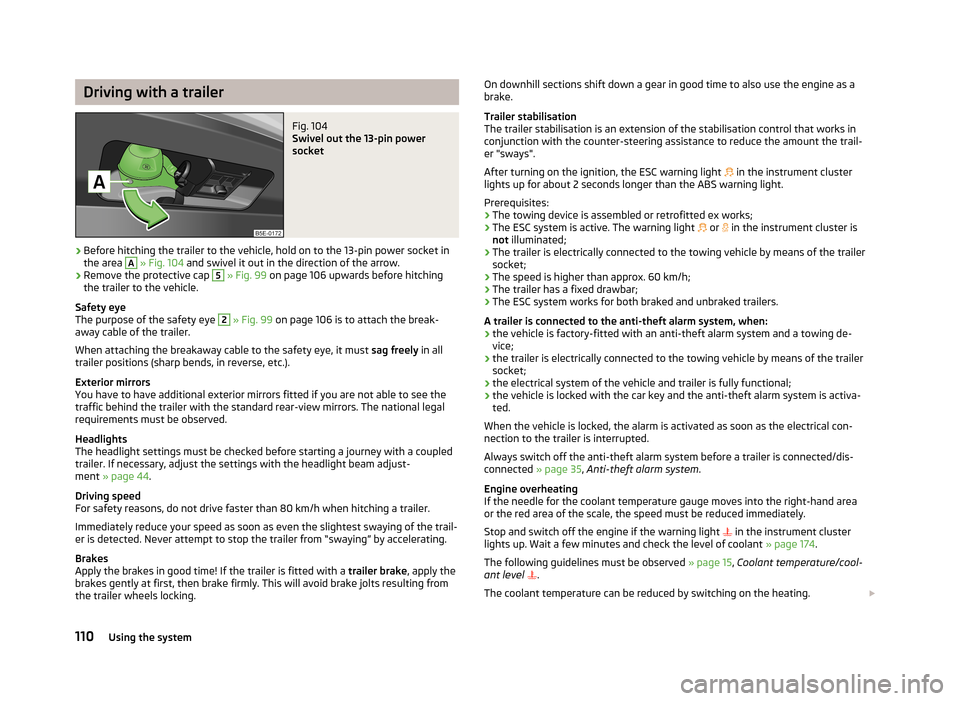
Driving with a trailerFig. 104
Swivel out the 13-pin power
socket
›
Before hitching the trailer to the vehicle, hold on to the 13-pin power socket in the area
A
» Fig. 104 and swivel it out in the direction of the arrow.
›
Remove the protective cap
5
» Fig. 99 on page 106 upwards before hitching
the trailer to the vehicle.
Safety eye
The purpose of the safety eye
2
» Fig. 99 on page 106 is to attach the break-
away cable of the trailer.
When attaching the breakaway cable to the safety eye, it must sag freely in all
trailer positions (sharp bends, in reverse, etc.).
Exterior mirrors
You have to have additional exterior mirrors fitted if you are not able to see the
traffic behind the trailer with the standard rear-view mirrors. The national legal
requirements must be observed.
Headlights
The headlight settings must be checked before starting a journey with a coupled
trailer. If necessary, adjust the settings with the headlight beam adjust-
ment » page 44 .
Driving speed
For safety reasons, do not drive faster than 80 km/h when hitching a trailer.
Immediately reduce your speed as soon as even the slightest swaying of the trail- er is detected. Never attempt to stop the trailer from “swaying” by accelerating.
Brakes
Apply the brakes in good time! If the trailer is fitted with a trailer brake, apply the
brakes gently at first, then brake firmly. This will avoid brake jolts resulting from
the trailer wheels locking.
On downhill sections shift down a gear in good time to also use the engine as a
brake.
Trailer stabilisation
The trailer stabilisation is an extension of the stabilisation control that works in
conjunction with the counter-steering assistance to reduce the amount the trail-
er "sways".
After turning on the ignition, the ESC warning light in the instrument cluster
lights up for about 2 seconds longer than the ABS warning light.
Prerequisites: › The towing device is assembled or retrofitted ex works;
› The ESC system is active. The warning light
or in the instrument cluster is
not illuminated;
› The trailer is electrically connected to the towing vehicle by means of the trailer
socket;
› The speed is higher than approx. 60 km/h;
› The trailer has a fixed drawbar;
› The ESC system works for both braked and unbraked trailers.
A trailer is connected to the anti-theft alarm system, when: › the vehicle is factory-fitted with an anti-theft alarm system and a towing de-
vice;
› the trailer is electrically connected to the towing vehicle by means of the trailer
socket;
› the electrical system of the vehicle and trailer is fully functional;
› the vehicle is locked with the car key and the anti-theft alarm system is activa-
ted.
When the vehicle is locked, the alarm is activated as soon as the electrical con-
nection to the trailer is interrupted.
Always switch off the anti-theft alarm system before a trailer is connected/dis- connected » page 35, Anti-theft alarm system .
Engine overheating
If the needle for the coolant temperature gauge moves into the right-hand area or the red area of the scale, the speed must be reduced immediately.
Stop and switch off the engine if the warning light
in the instrument cluster
lights up. Wait a few minutes and check the level of coolant » page 174.
The following guidelines must be observed » page 15, Coolant temperature/cool-
ant level
.
The coolant temperature can be reduced by switching on the heating. 110Using the system