ABS SKODA OCTAVIA 2012 3.G / (5E) Owner's Manual
[x] Cancel search | Manufacturer: SKODA, Model Year: 2012, Model line: OCTAVIA, Model: SKODA OCTAVIA 2012 3.G / (5E)Pages: 222, PDF Size: 13.52 MB
Page 7 of 222
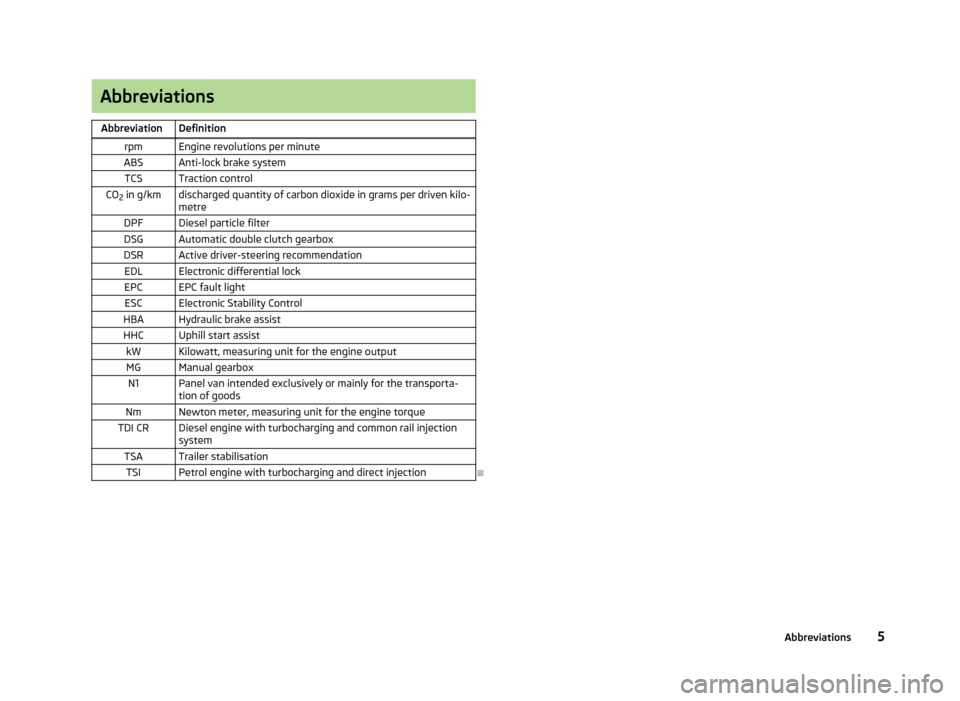
AbbreviationsAbbreviationDefinitionrpmEngine revolutions per minuteABSAnti-lock brake systemTCSTraction controlCO2 in g/kmdischarged quantity of carbon dioxide in grams per driven kilo-
metreDPFDiesel particle filterDSGAutomatic double clutch gearboxDSRActive driver-steering recommendationEDLElectronic differential lockEPCEPC fault lightESCElectronic Stability ControlHBAHydraulic brake assistHHCUphill start assistkWKilowatt, measuring unit for the engine outputMGManual gearboxN1Panel van intended exclusively or mainly for the transporta-
tion of goodsNmNewton meter, measuring unit for the engine torqueTDI CRDiesel engine with turbocharging and common rail injection systemTSATrailer stabilisationTSIPetrol engine with turbocharging and direct injection
5Abbreviations
Page 15 of 222
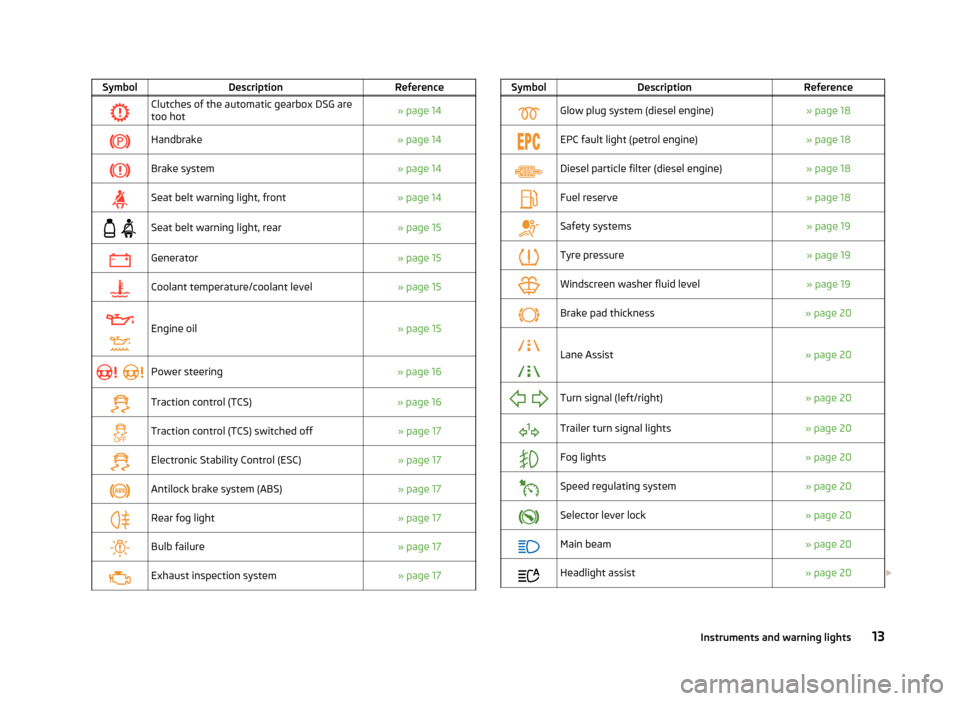
SymbolDescriptionReferenceClutches of the automatic gearbox DSG aretoo hot» page 14Handbrake» page 14Brake system» page 14Seat belt warning light, front» page 14
Seat belt warning light, rear» page 15Generator» page 15Coolant temperature/coolant level» page 15
Engine oil» page 15
Power steering» page 16Traction control (TCS)» page 16Traction control (TCS) switched off» page 17Electronic Stability Control (ESC)» page 17Antilock brake system (ABS)» page 17Rear fog light» page 17Bulb failure» page 17Exhaust inspection system» page 17SymbolDescriptionReferenceGlow plug system (diesel engine)» page 18EPC fault light (petrol engine)» page 18Diesel particle filter (diesel engine)» page 18Fuel reserve» page 18Safety systems» page 19Tyre pressure» page 19Windscreen washer fluid level» page 19Brake pad thickness» page 20
Lane Assist» page 20
Turn signal (left/right)» page 20Trailer turn signal lights» page 20Fog lights» page 20Speed regulating system» page 20Selector lever lock» page 20Main beam» page 20Headlight assist» page 20 13Instruments and warning lights
Page 16 of 222
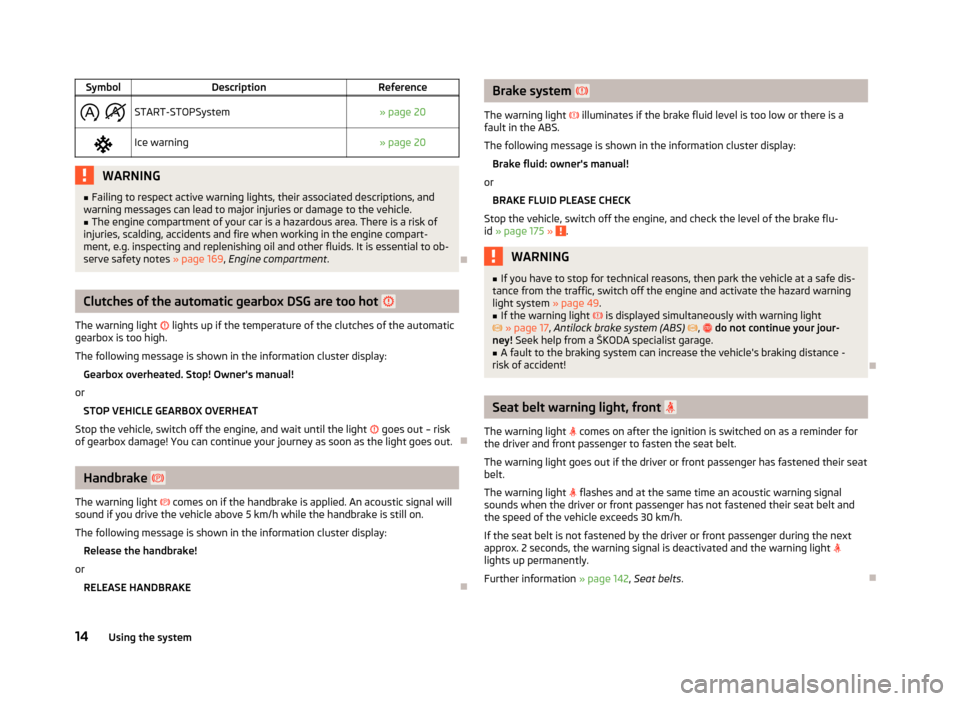
SymbolDescriptionReference
START-STOPSystem» page 20Ice warning» page 20WARNING■
Failing to respect active warning lights, their associated descriptions, and
warning messages can lead to major injuries or damage to the vehicle.■
The engine compartment of your car is a hazardous area. There is a risk of
injuries, scalding, accidents and fire when working in the engine compart-
ment, e.g. inspecting and replenishing oil and other fluids. It is essential to ob-
serve safety notes » page 169, Engine compartment .
Clutches of the automatic gearbox DSG are too hot
The warning light
lights up if the temperature of the clutches of the automatic
gearbox is too high.
The following message is shown in the information cluster display: Gearbox overheated. Stop! Owner's manual!
or STOP VEHICLE GEARBOX OVERHEAT
Stop the vehicle, switch off the engine, and wait until the light
goes out – risk
of gearbox damage! You can continue your journey as soon as the light goes out.
Handbrake
The warning light
comes on if the handbrake is applied. An acoustic signal will
sound if you drive the vehicle above 5 km/h while the handbrake is still on.
The following message is shown in the information cluster display: Release the handbrake!
or RELEASE HANDBRAKE
Brake system
The warning light illuminates if the brake fluid level is too low or there is a
fault in the ABS.
The following message is shown in the information cluster display: Brake fluid: owner's manual!
or BRAKE FLUID PLEASE CHECK
Stop the vehicle, switch off the engine, and check the level of the brake flu-
id » page 175 »
.
WARNING■
If you have to stop for technical reasons, then park the vehicle at a safe dis-
tance from the traffic, switch off the engine and activate the hazard warning
light system » page 49.■
If the warning light is displayed simultaneously with warning light
» page 17 , Antilock brake system (ABS) , do not continue your jour-
ney! Seek help from a ŠKODA specialist garage.
■
A fault to the braking system can increase the vehicle's braking distance -
risk of accident!
Seat belt warning light, front
The warning light
comes on after the ignition is switched on as a reminder for
the driver and front passenger to fasten the seat belt.
The warning light goes out if the driver or front passenger has fastened their seat
belt.
The warning light
flashes and at the same time an acoustic warning signal
sounds when the driver or front passenger has not fastened their seat belt and
the speed of the vehicle exceeds 30 km/h.
If the seat belt is not fastened by the driver or front passenger during the next
approx. 2 seconds, the warning signal is deactivated and the warning light
lights up permanently.
Further information » page 142, Seat belts .
14Using the system
Page 19 of 222
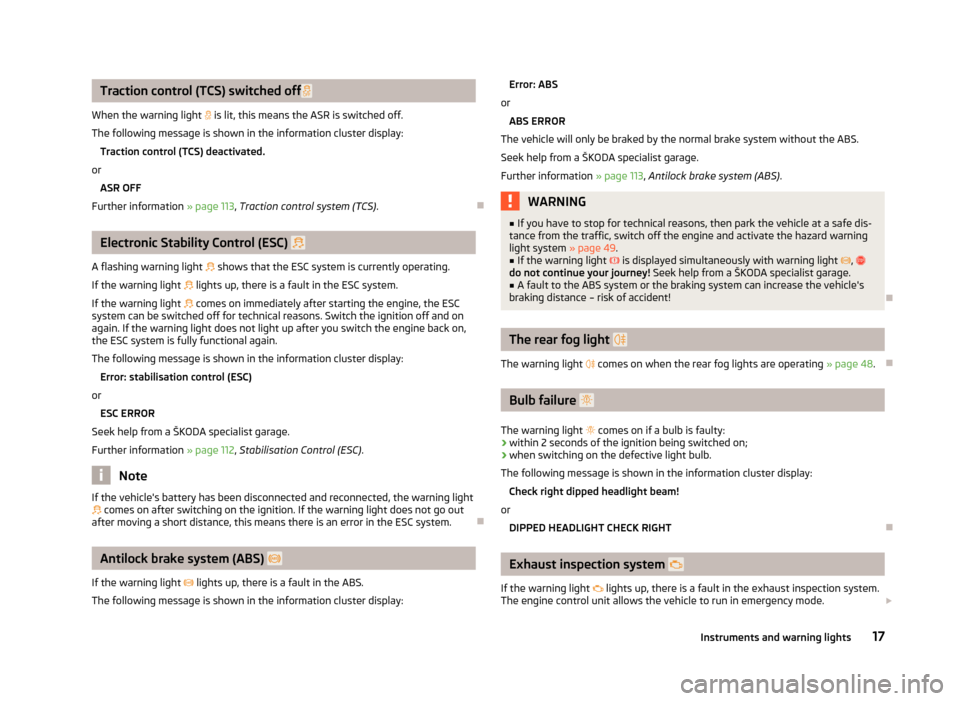
Traction control (TCS) switched off
When the warning light is lit, this means the ASR is switched off.
The following message is shown in the information cluster display: Traction control (TCS) deactivated.
or ASR OFF
Further information » page 113, Traction control system (TCS) .
Electronic Stability Control (ESC)
A flashing warning light
shows that the ESC system is currently operating.
If the warning light
lights up, there is a fault in the ESC system.
If the warning light
comes on immediately after starting the engine, the ESC
system can be switched off for technical reasons. Switch the ignition off and on
again. If the warning light does not light up after you switch the engine back on,
the ESC system is fully functional again.
The following message is shown in the information cluster display:
Error: stabilisation control (ESC)
or
ESC ERROR
Seek help from a ŠKODA specialist garage.
Further information » page 112, Stabilisation Control (ESC) .
Note
If the vehicle's battery has been disconnected and reconnected, the warning light
comes on after switching on the ignition. If the warning light does not go out
after moving a short distance, this means there is an error in the ESC system.
Antilock brake system (ABS)
If the warning light
lights up, there is a fault in the ABS.
The following message is shown in the information cluster display:
Error: ABS
or
ABS ERROR
The vehicle will only be braked by the normal brake system without the ABS.
Seek help from a ŠKODA specialist garage. Further information » page 113, Antilock brake system (ABS) .WARNING■
If you have to stop for technical reasons, then park the vehicle at a safe dis-
tance from the traffic, switch off the engine and activate the hazard warning
light system » page 49.■
If the warning light is displayed simultaneously with warning light ,
do not continue your journey! Seek help from a ŠKODA specialist garage.
■
A fault to the ABS system or the braking system can increase the vehicle's
braking distance – risk of accident!
The rear fog light
The warning light
comes on when the rear fog lights are operating » page 48.
Bulb failure
The warning light
comes on if a bulb is faulty:
› within 2 seconds of the ignition being switched on;
› when switching on the defective light bulb.
The following message is shown in the information cluster display: Check right dipped headlight beam!
or DIPPED HEADLIGHT CHECK RIGHT
Exhaust inspection system
If the warning light
lights up, there is a fault in the exhaust inspection system.
The engine control unit allows the vehicle to run in emergency mode.
17Instruments and warning lights
Page 30 of 222
Unlocking and locking
Vehicle key
Introductory information
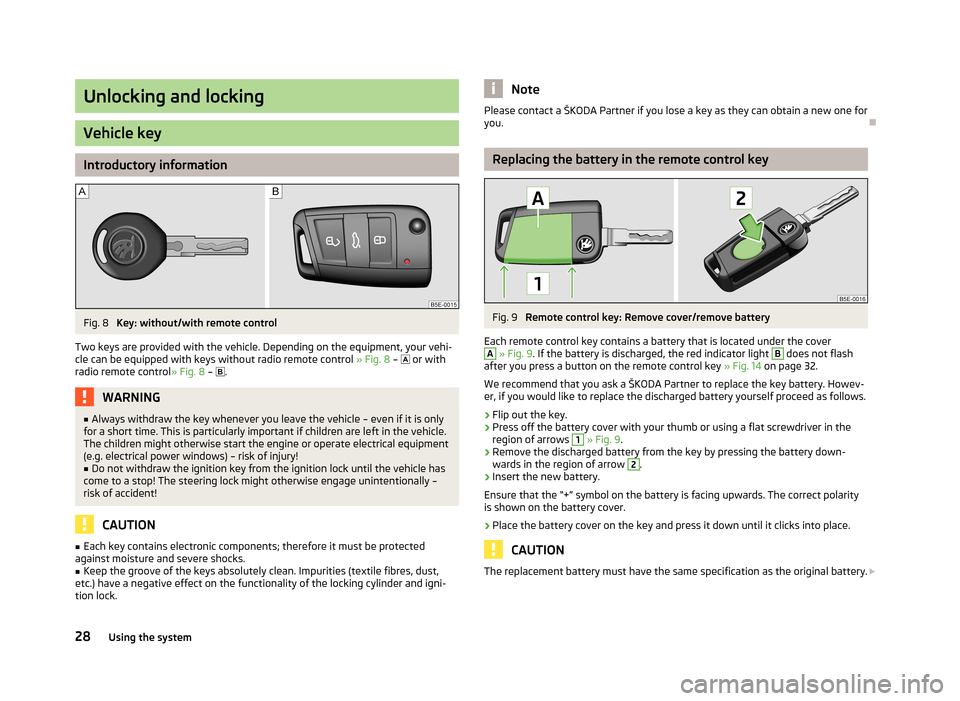
Fig. 8
Key: without/with remote control
Two keys are provided with the vehicle. Depending on the equipment, your vehi- cle can be equipped with keys without radio remote control » Fig. 8 –
or with
radio remote control » Fig. 8 –
.
WARNING■
Always withdraw the key whenever you leave the vehicle – even if it is only
for a short time. This is particularly important if children are left in the vehicle.
The children might otherwise start the engine or operate electrical equipment
(e.g. electrical power windows) – risk of injury!■
Do not withdraw the ignition key from the ignition lock until the vehicle has
come to a stop! The steering lock might otherwise engage unintentionally – risk of accident!
CAUTION
■ Each key contains electronic components; therefore it must be protected
against moisture and severe shocks.■
Keep the groove of the keys absolutely clean. Impurities (textile fibres, dust,
etc.) have a negative effect on the functionality of the locking cylinder and igni-
tion lock.
NotePlease contact a ŠKODA Partner if you lose a key as they can obtain a new one for you.
Replacing the battery in the remote control key
Fig. 9
Remote control key: Remove cover/remove battery
Each remote control key contains a battery that is located under the cover
A
» Fig. 9 . If the battery is discharged, the red indicator light
B
does not flash
after you press a button on the remote control key » Fig. 14 on page 32.
We recommend that you ask a ŠKODA Partner to replace the key battery. Howev- er, if you would like to replace the discharged battery yourself proceed as follows.
›
Flip out the key.
›
Press off the battery cover with your thumb or using a flat screwdriver in theregion of arrows
1
» Fig. 9 .
›
Remove the discharged battery from the key by pressing the battery down-
wards in the region of arrow
2
.
›
Insert the new battery.
Ensure that the “+” symbol on the battery is facing upwards. The correct polarity
is shown on the battery cover.
›
Place the battery cover on the key and press it down until it clicks into place.
CAUTION
The replacement battery must have the same specification as the original battery. 28Using the system
Page 35 of 222
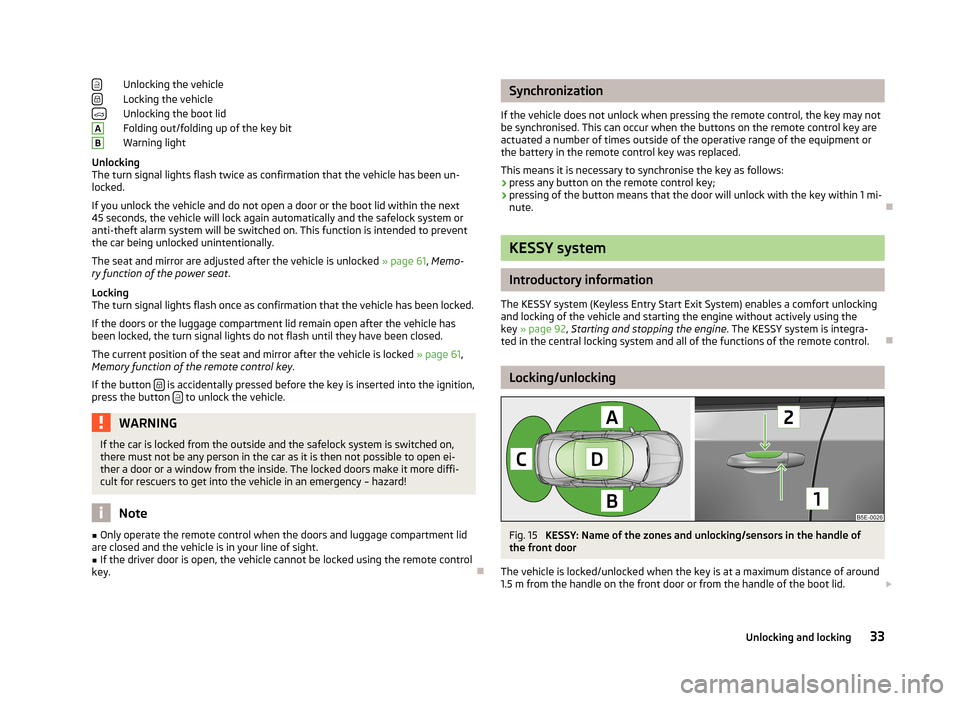
Unlocking the vehicle
Locking the vehicle
Unlocking the boot lid
Folding out/folding up of the key bit
Warning light
Unlocking
The turn signal lights flash twice as confirmation that the vehicle has been un-
locked.
If you unlock the vehicle and do not open a door or the boot lid within the next
45 seconds, the vehicle will lock again automatically and the safelock system or
anti-theft alarm system will be switched on. This function is intended to prevent
the car being unlocked unintentionally.
The seat and mirror are adjusted after the vehicle is unlocked » page 61, Memo-
ry function of the power seat .
Locking
The turn signal lights flash once as confirmation that the vehicle has been locked.
If the doors or the luggage compartment lid remain open after the vehicle has
been locked, the turn signal lights do not flash until they have been closed.
The current position of the seat and mirror after the vehicle is locked » page 61,
Memory function of the remote control key .
If the button
is accidentally pressed before the key is inserted into the ignition,
press the button to unlock the vehicle.
WARNINGIf the car is locked from the outside and the safelock system is switched on,
there must not be any person in the car as it is then not possible to open ei-
ther a door or a window from the inside. The locked doors make it more diffi-
cult for rescuers to get into the vehicle in an emergency – hazard!
Note
■ Only operate the remote control when the doors and luggage compartment lid
are closed and the vehicle is in your line of sight.■
If the driver door is open, the vehicle cannot be locked using the remote control
key.
ABSynchronization
If the vehicle does not unlock when pressing the remote control, the key may not be synchronised. This can occur when the buttons on the remote control key areactuated a number of times outside of the operative range of the equipment or
the battery in the remote control key was replaced.
This means it is necessary to synchronise the key as follows:
› press any button on the remote control key;
› pressing of the button means that the door will unlock with the key within 1 mi-
nute.
KESSY system
Introductory information
The KESSY system (Keyless Entry Start Exit System) enables a comfort unlocking
and locking of the vehicle and starting the engine without actively using the
key » page 92 , Starting and stopping the engine . The KESSY system is integra-
ted in the central locking system and all of the functions of the remote control.
Locking/unlocking
Fig. 15
KESSY: Name of the zones and unlocking/sensors in the handle of
the front door
The vehicle is locked/unlocked when the key is at a maximum distance of around
1.5 m from the handle on the front door or from the handle of the boot lid.
33Unlocking and locking
Page 112 of 222
Driving with a trailerFig. 104
Swivel out the 13-pin power
socket
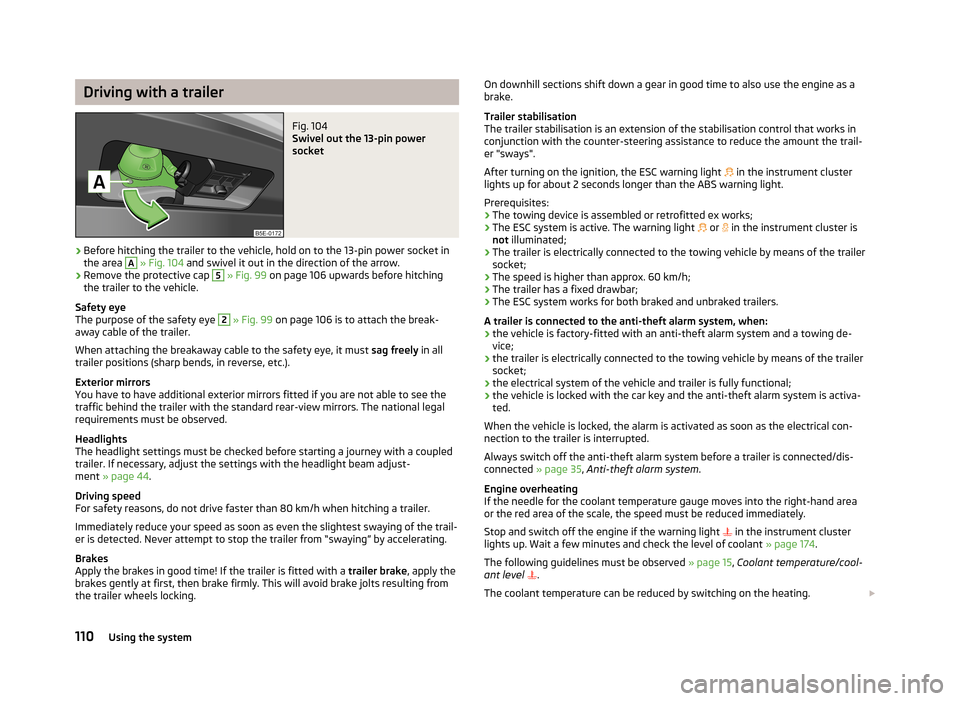
›
Before hitching the trailer to the vehicle, hold on to the 13-pin power socket in the area
A
» Fig. 104 and swivel it out in the direction of the arrow.
›
Remove the protective cap
5
» Fig. 99 on page 106 upwards before hitching
the trailer to the vehicle.
Safety eye
The purpose of the safety eye
2
» Fig. 99 on page 106 is to attach the break-
away cable of the trailer.
When attaching the breakaway cable to the safety eye, it must sag freely in all
trailer positions (sharp bends, in reverse, etc.).
Exterior mirrors
You have to have additional exterior mirrors fitted if you are not able to see the
traffic behind the trailer with the standard rear-view mirrors. The national legal
requirements must be observed.
Headlights
The headlight settings must be checked before starting a journey with a coupled
trailer. If necessary, adjust the settings with the headlight beam adjust-
ment » page 44 .
Driving speed
For safety reasons, do not drive faster than 80 km/h when hitching a trailer.
Immediately reduce your speed as soon as even the slightest swaying of the trail- er is detected. Never attempt to stop the trailer from “swaying” by accelerating.
Brakes
Apply the brakes in good time! If the trailer is fitted with a trailer brake, apply the
brakes gently at first, then brake firmly. This will avoid brake jolts resulting from
the trailer wheels locking.
On downhill sections shift down a gear in good time to also use the engine as a
brake.
Trailer stabilisation
The trailer stabilisation is an extension of the stabilisation control that works in
conjunction with the counter-steering assistance to reduce the amount the trail-
er "sways".
After turning on the ignition, the ESC warning light in the instrument cluster
lights up for about 2 seconds longer than the ABS warning light.
Prerequisites: › The towing device is assembled or retrofitted ex works;
› The ESC system is active. The warning light
or in the instrument cluster is
not illuminated;
› The trailer is electrically connected to the towing vehicle by means of the trailer
socket;
› The speed is higher than approx. 60 km/h;
› The trailer has a fixed drawbar;
› The ESC system works for both braked and unbraked trailers.
A trailer is connected to the anti-theft alarm system, when: › the vehicle is factory-fitted with an anti-theft alarm system and a towing de-
vice;
› the trailer is electrically connected to the towing vehicle by means of the trailer
socket;
› the electrical system of the vehicle and trailer is fully functional;
› the vehicle is locked with the car key and the anti-theft alarm system is activa-
ted.
When the vehicle is locked, the alarm is activated as soon as the electrical con-
nection to the trailer is interrupted.
Always switch off the anti-theft alarm system before a trailer is connected/dis- connected » page 35, Anti-theft alarm system .
Engine overheating
If the needle for the coolant temperature gauge moves into the right-hand area or the red area of the scale, the speed must be reduced immediately.
Stop and switch off the engine if the warning light
in the instrument cluster
lights up. Wait a few minutes and check the level of coolant » page 174.
The following guidelines must be observed » page 15, Coolant temperature/cool-
ant level
.
The coolant temperature can be reduced by switching on the heating. 110Using the system
Page 114 of 222
Assist systems
Brake assist systems
Introduction
This chapter contains information on the following subjects:
Stabilisation Control (ESC)
112
Antilock brake system (ABS)
113
Traction control system (TCS)
113
Electronic differential lock (EDL)
114WARNING■ A lack of fuel can cause irregular engine running or cause the engine to shut
down. The brake assist systems would then be without function – risk of acci-
dent!■
Adjust the speed and driving style to the current visibility, weather, road and
traffic conditions. The increased safety offered by the brake assist systems must not tempt you to take greater risks than otherwise – risk of an accident!
■
In the event of an ABS fault, visit a ŠKODA specialist garage immediately.
Adjust your style of driving according to the damage to the ABS as you will not know how great the damage is and the limitation it is placing on the braking
efficiency.
CAUTION
■ All four wheels must be fitted with the same tyres approved by the manufactur-
er to ensure the brake assist systems operate correctly.■
Changes to the vehicle (e.g. to the engine, brakes, chassis) can influence the
functionality of the brake assist systems » page 165.
Note
If a fault occurs in the ABS system, the ESC, ASR and EDL also do not work. An
ABS fault is indicated with the warning light » page 17 .
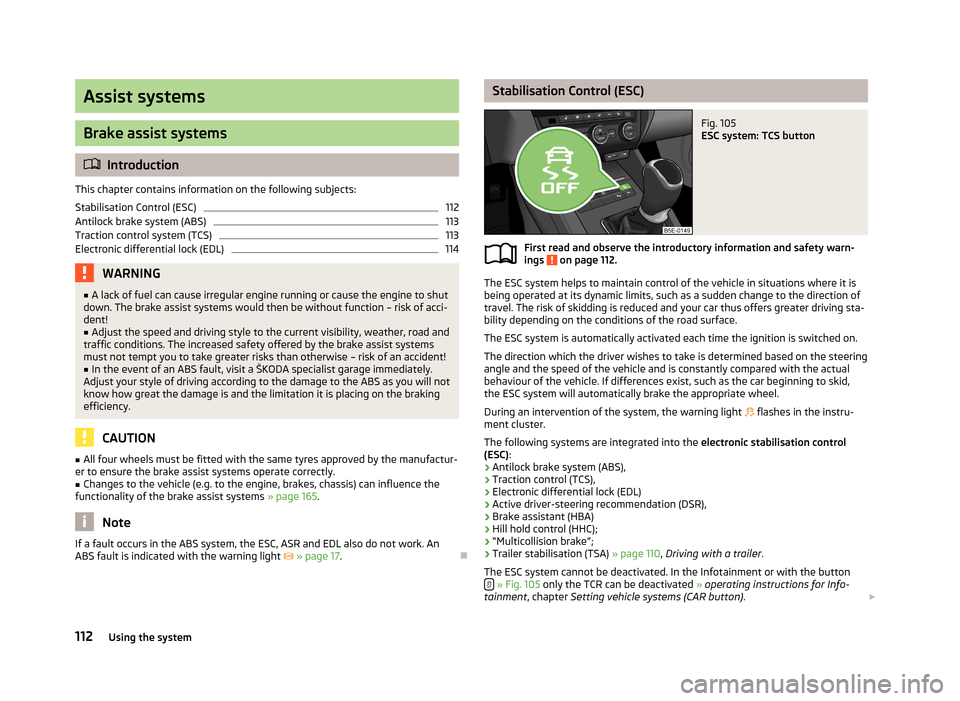
Stabilisation Control (ESC)Fig. 105
ESC system: TCS button
First read and observe the introductory information and safety warn-
ings on page 112.
The ESC system helps to maintain control of the vehicle in situations where it is
being operated at its dynamic limits, such as a sudden change to the direction of
travel. The risk of skidding is reduced and your car thus offers greater driving sta-
bility depending on the conditions of the road surface.
The ESC system is automatically activated each time the ignition is switched on.The direction which the driver wishes to take is determined based on the steering angle and the speed of the vehicle and is constantly compared with the actualbehaviour of the vehicle. If differences exist, such as the car beginning to skid,
the ESC system will automatically brake the appropriate wheel.
During an intervention of the system, the warning light
flashes in the instru-
ment cluster.
The following systems are integrated into the electronic stabilisation control
(ESC) :
› Antilock brake system (ABS),
› Traction control (TCS),
› Electronic differential lock (EDL)
› Active driver-steering recommendation (DSR),
› Brake assistant (HBA)
› Hill hold control (HHC);
› “Multicollision brake”;
› Trailer stabilisation (TSA)
» page 110, Driving with a trailer .
The ESC system cannot be deactivated. In the Infotainment or with the button
» Fig. 105 only the TCR can be deactivated » operating instructions for Info-
tainment , chapter Setting vehicle systems (CAR button) .
112Using the system
Page 115 of 222
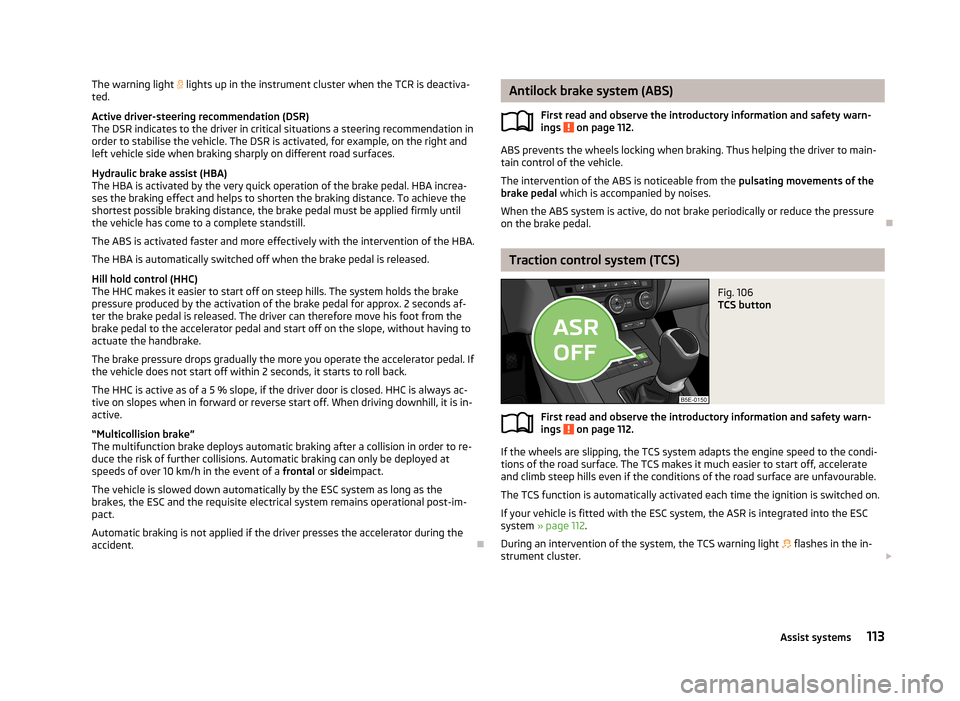
The warning light lights up in the instrument cluster when the TCR is deactiva-
ted.
Active driver-steering recommendation (DSR) The DSR indicates to the driver in critical situations a steering recommendation in
order to stabilise the vehicle. The DSR is activated, for example, on the right and
left vehicle side when braking sharply on different road surfaces.
Hydraulic brake assist (HBA)
The HBA is activated by the very quick operation of the brake pedal. HBA increa- ses the braking effect and helps to shorten the braking distance. To achieve the
shortest possible braking distance, the brake pedal must be applied firmly until the vehicle has come to a complete standstill.
The ABS is activated faster and more effectively with the intervention of the HBA. The HBA is automatically switched off when the brake pedal is released.
Hill hold control (HHC)
The HHC makes it easier to start off on steep hills. The system holds the brake
pressure produced by the activation of the brake pedal for approx. 2 seconds af-
ter the brake pedal is released. The driver can therefore move his foot from the
brake pedal to the accelerator pedal and start off on the slope, without having to
actuate the handbrake.
The brake pressure drops gradually the more you operate the accelerator pedal. If the vehicle does not start off within 2 seconds, it starts to roll back.
The HHC is active as of a 5 % slope, if the driver door is closed. HHC is always ac- tive on slopes when in forward or reverse start off. When driving downhill, it is in-
active.
“Multicollision brake”
The multifunction brake deploys automatic braking after a collision in order to re-
duce the risk of further collisions. Automatic braking can only be deployed at
speeds of over 10 km/h in the event of a frontal or side impact.
The vehicle is slowed down automatically by the ESC system as long as the brakes, the ESC and the requisite electrical system remains operational post-im-
pact.
Automatic braking is not applied if the driver presses the accelerator during the
accident.
Antilock brake system (ABS)
First read and observe the introductory information and safety warn-
ings
on page 112.
ABS prevents the wheels locking when braking. Thus helping the driver to main-
tain control of the vehicle.
The intervention of the ABS is noticeable from the pulsating movements of the
brake pedal which is accompanied by noises.
When the ABS system is active, do not brake periodically or reduce the pressure
on the brake pedal.
Traction control system (TCS)
Fig. 106
TCS button
First read and observe the introductory information and safety warn- ings on page 112.
If the wheels are slipping, the TCS system adapts the engine speed to the condi-
tions of the road surface. The TCS makes it much easier to start off, accelerate
and climb steep hills even if the conditions of the road surface are unfavourable.
The TCS function is automatically activated each time the ignition is switched on.
If your vehicle is fitted with the ESC system, the ASR is integrated into the ESC
system » page 112 .
During an intervention of the system, the TCS warning light flashes in the in-
strument cluster.
113Assist systems
Page 128 of 222

NoteIf the front passenger front airbag is deactivated » page 151 the belt tensioning
function for the front passenger seat is switched off.
Lane Assist
Introduction
This chapter contains information on the following subjects:
Operating principle
126
Explanations of situations
127
Information for the driver
128WARNING■ Lane Assist only operates as a support- it does absolve the driver of the re-
sponsibility to maintain full control over the vehicle's steering.■
Lane Assist only makes the driver away that the vehicle is approaching the
line between two lanes by means of a steering intervention. The driver retains
responsibility at all times for keeping the vehicle within the lane.
■
Lane Assist can help you keep the vehicle within the lane. However, it does
not steer the vehicle for you. The driver retains full responsibility for steering at all times.
■
The camera need not be able to detect all lane lines. A steering intervention
can only be made when the vehicle approaches a detected line between lanes.
■
Some objects on the road may be incorrectly detected as lines. As a result,
an incorrect steering intervention may take place.
■
The function of adaptive lane guidance Assist system may be restricted
when driving e.g. over rutted roads, on a slope, or if there are lateral winds.
■
Do not use the Assist system in poor weather, e.g. black ice, fog, heavy rain -
risk of accident!
WARNINGThe camera's powers of detection may be limited by a range of external influ-
ences. In this case, the Assist system may not be able to detect the line cor-
rectly, if at all. The camera's powers of detection may be limited, e.g. in the fol- lowing:■
in poor visibility conditions, e.g. fog, heavy rain, thick snowfall;
■
when dazzled by the sun;
■
when dazzled by oncoming traffic;
■
by vehicles ahead;
■
when the camera viewing range is obstructed by an obstacle.
CAUTION
Do not attach any stickers or similar objects to the windscreen to avoid impairing
the functions of the Assist system.
Operating principle
Fig. 117
Windscreen: Camera viewing
window for Lane Assist
First read and observe the introductory information and safety warn- ings on page 126.
Lane Assist (in the following referred to as the system) detects the lines between
lanes using data obtained from the camera (continuous and interrupted) » Fig. 117.
When the vehicle approaches a detected line between lanes, the system makes a
light movement of the steering wheel in the opposite direction to the boundary
line. This corrective steering intervention can be overridden at any time.
The strength of the steering movement can be activated/deactivated in the Info-
tainment » operating instructions for Infotainment , chapter Setting vehicle sys-
tems (CAR button) .
126Using the system