ignition SKODA OCTAVIA 2015 3.G / (5E) Repair Manual
[x] Cancel search | Manufacturer: SKODA, Model Year: 2015, Model line: OCTAVIA, Model: SKODA OCTAVIA 2015 3.G / (5E)Pages: 268, PDF Size: 37.54 MB
Page 158 of 268
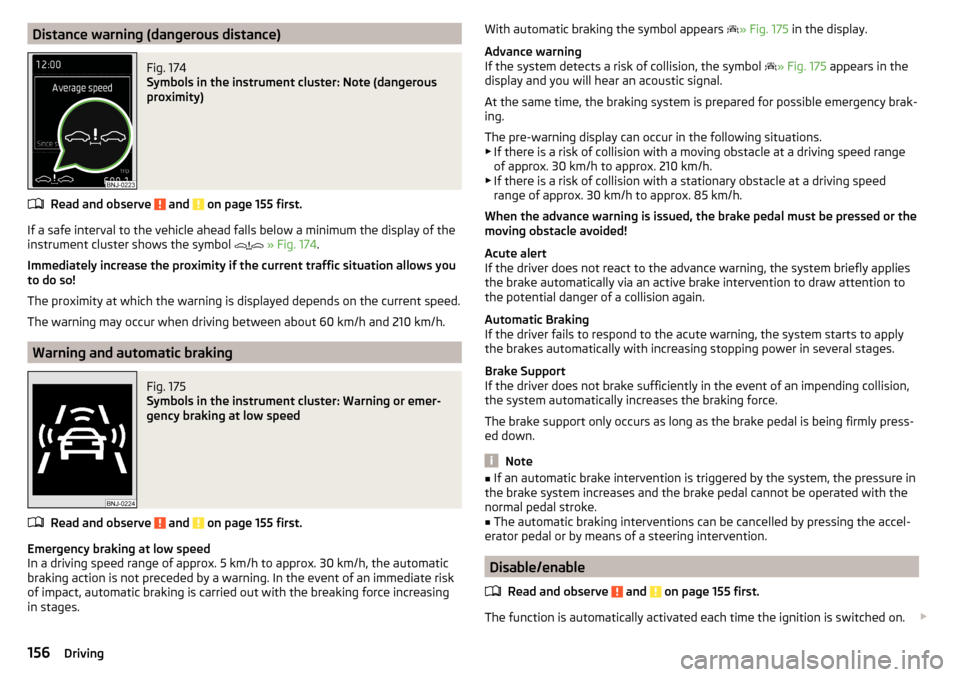
Distance warning (dangerous distance)Fig. 174
Symbols in the instrument cluster: Note (dangerous
proximity)
Read and observe and on page 155 first.
If a safe interval to the vehicle ahead falls below a minimum the display of the
instrument cluster shows the symbol
» Fig. 174 .
Immediately increase the proximity if the current traffic situation allows you to do so!
The proximity at which the warning is displayed depends on the current speed.
The warning may occur when driving between about 60 km/h and 210 km/h.
Warning and automatic braking
Fig. 175
Symbols in the instrument cluster: Warning or emer-
gency braking at low speed
Read and observe and on page 155 first.
Emergency braking at low speed
In a driving speed range of approx. 5 km/h to approx. 30 km/h, the automatic braking action is not preceded by a warning. In the event of an immediate risk
of impact, automatic braking is carried out with the breaking force increasing
in stages.
With automatic braking the symbol appears » Fig. 175 in the display.
Advance warning
If the system detects a risk of collision, the symbol
» Fig. 175 appears in the
display and you will hear an acoustic signal.
At the same time, the braking system is prepared for possible emergency brak-
ing.
The pre-warning display can occur in the following situations.
▶ If there is a risk of collision with a moving obstacle at a driving speed range
of approx. 30 km/h to approx. 210 km/h.
▶ If there is a risk of collision with a stationary obstacle at a driving speed
range of approx. 30 km/h to approx. 85 km/h.
When the advance warning is issued, the brake pedal must be pressed or the
moving obstacle avoided!
Acute alert
If the driver does not react to the advance warning, the system briefly applies
the brake automatically via an active brake intervention to draw attention to
the potential danger of a collision again.
Automatic Braking
If the driver fails to respond to the acute warning, the system starts to apply
the brakes automatically with increasing stopping power in several stages.
Brake Support
If the driver does not brake sufficiently in the event of an impending collision,
the system automatically increases the braking force.
The brake support only occurs as long as the brake pedal is being firmly press-
ed down.
Note
■ If an automatic brake intervention is triggered by the system, the pressure in
the brake system increases and the brake pedal cannot be operated with the
normal pedal stroke.■
The automatic braking interventions can be cancelled by pressing the accel-
erator pedal or by means of a steering intervention.
Disable/enable
Read and observe
and on page 155 first.
The function is automatically activated each time the ignition is switched on.
156Driving
Page 159 of 268
The system should only be disabled in exceptional cases » .
The system can be activated or deactivated in one of two ways. ▶ In the instrument cluster display » page 48, Menu itemAssist systems
.
▶ Infotainment » Owner´s Manual Infotainment , chapter CAR - vehicle set-
tings .
The following functions can be activated or deactivated separately in infotain-
ment. ▶ Distance warning
▶ Advance warning
f the distance-warning function was deactivated before switching off the igni-
tion, it remains deactivated after switching on the ignition.
WARNINGIn the following situations, Front Assist should be switched off for safety
reasons.■
When the vehicle is being towed away.
■
When the vehicle is on a rolling test bench.
■
If an unfounded warning was issued or a system action carried out.
■
When on a truck, car ferry or similar.
Information messages
Read and observe
and on page 155 first.
The information messages are shown in the instrument cluster display.
Front Assist: no sensor view.
The sensor is soiled or covered.
Stop the vehicle, switch off the engine and clean the sensor or remove the ob-
stacle causing the lack of visibility » page 135, Radar sensor .
If after engine start the message persists, then the help of a professional or-
ganisation is required.
Front Assist not available.
The system is not available for an unknown reason.
Stop the vehicle, switch off the engine and then start it again.
If after engine start the message persists, then the help of a professional or- ganisation is required.
Selection of the driving mode (Driving Mode Selection)
Introduction
This chapter contains information on the following subjects:
Normal157Sport
mode
157Eco
mode
158Individual
mode
158Off-road
mode
158
Mode selection and Infotainment display
159Individual
mode settings
159
By selecting the driving mode, the driving behaviour can be adapted to the de-
sired mode of operation.
The following modes of operation are available
Normal
,
Sport
,
Eco
,
Individual
and
Off-road
.
The mode
Off-road
is only available on the vehicles Octavia SCOUT.
WARNINGThe general information relating to the use of assistance systems must be
observed » page 135, in section Introduction .
Normal
Read and observe on page 157 first.
This mode is suitable for a conventional driving.
Sport
mode
Read and observe
on page 157 first.
This mode is suitable for a sporty driving.
Selecting this mode primarily affects the function of the following systems.
Steering
The power steering is reduced slightly, i.e., the driver needs to exert more
force for steering .
157Assist systems
Page 162 of 268

Proactive passenger protection (Crew Protect Assist)
Introduction
This chapter contains information on the following subjects:
Function
160
Proactive passenger protection (hereafter known as system) increases pas-
senger protection in the front seats in situations that could lead to vehicle im-
pact or overturning.
WARNINGThe general information relating to the use of assistance systems must be
observed » page 135, in section Introduction .
Note
The system component service life is monitored electronically. Further infor-
mation » page 35 , Safety systems .
Function
Read and observe
on page 160 first.
In critical driving situations (e.g. during emergency braking or a sudden changein direction), the following steps can be taken separately or combined in order
to reduce the risk of serious injury.
▶ The front passenger's and driver's seatbelts, if worn, are automatically ten-
sioned closely over the body.
▶ The windows in the side doors (if open) are automatically closed up to a gap
of about 5 cm from the edge.
▶ The sliding/tilting roof is closed.
Once the critical driving situation has passed, the tension on the seatbelts will
be released again.
The system operates at two levels of protection.
The first level of protection
The system already intervenes in situations that may occur during dynamic
driving. As a result, this primarily helps to keep the driver and the passenger in
the correct seated position.
The first protection level can be deactivated in one of the following ways.
▶ The system deactivation in the Infotainment » Owner´s Manual Infotain-
ment , chapter CAR - vehicle settings .
▶ Deactivation of TCS » page 136.
▶ Selecting the driving mode Sport
» page 157 .
Provided that the driving mode
Sport
is not selected, the system is activated
over the two levels of protection after switching the ignition off and on again.
The second level of protection
The system intervenes only if the situation is evaluated as critical, such as in
panic braking at high speeds.
This level of protection cannot be deactivated.
Note
If the front passenger front airbag is deactivated » page 19 the belt tensioning
function for the front passenger seat is switched off.
Lane Departure Warning (Lane Assist)
Introduction
Fig. 178
Camera viewing window for Lane
Assist
This chapter contains information on the following subjects:
Operation
161
Activation / deactivation
162
Information messages
162
The lane departure warning (hereinafter known as system) helps to keep the
vehicle between the boundary lines of a lane.
The system detects the boundary lines of a lane using the camera » Fig. 178.
160Driving
Page 164 of 268
The boundary lines are clearly visible (appropriate longitudinal markings).
The boundary line of at least one side of the lane is detected.
The driver's hands are on the steering wheel.
The lane is more than 2.5 m in width.
If the turn signal is switched on prior to driving over the boundary line (e.g.
when making a turn), no steering intervention takes place when the vehicle
approaches the boundary line. The system regards the situation as an inten-
ded lane change.
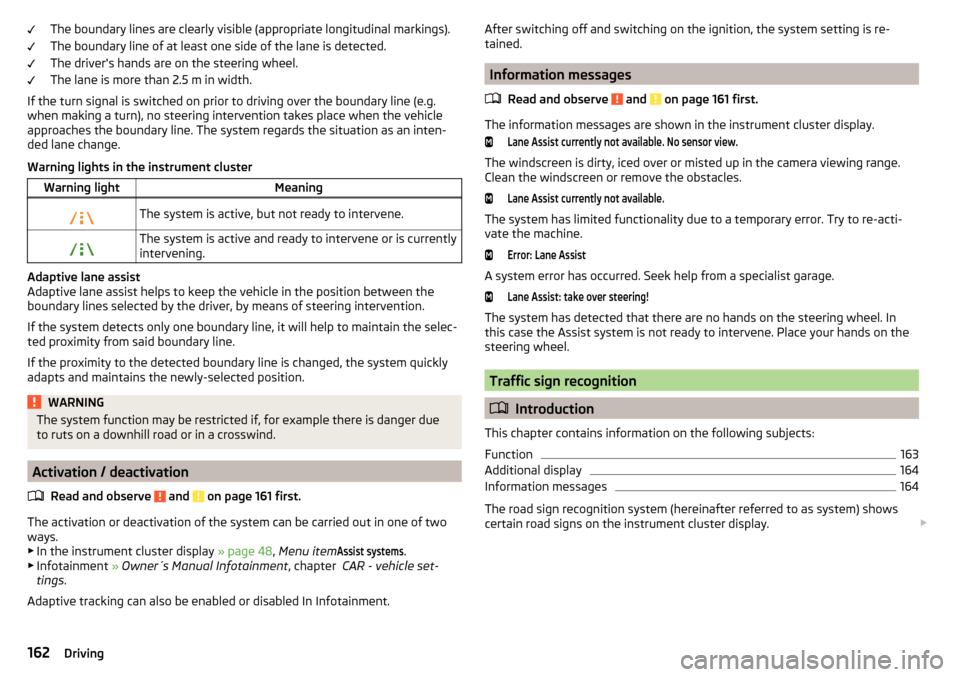
Warning lights in the instrument clusterWarning lightMeaningThe system is active, but not ready to intervene.The system is active and ready to intervene or is currently
intervening.
Adaptive lane assist
Adaptive lane assist helps to keep the vehicle in the position between the
boundary lines selected by the driver, by means of steering intervention.
If the system detects only one boundary line, it will help to maintain the selec-
ted proximity from said boundary line.
If the proximity to the detected boundary line is changed, the system quickly
adapts and maintains the newly-selected position.
WARNINGThe system function may be restricted if, for example there is danger due
to ruts on a downhill road or in a crosswind.
Activation / deactivation
Read and observe
and on page 161 first.
The activation or deactivation of the system can be carried out in one of two
ways. ▶ In the instrument cluster display » page 48, Menu item
Assist systems
.
▶ Infotainment » Owner´s Manual Infotainment , chapter CAR - vehicle set-
tings .
Adaptive tracking can also be enabled or disabled In Infotainment.
After switching off and switching on the ignition, the system setting is re-
tained.
Information messages
Read and observe
and on page 161 first.
The information messages are shown in the instrument cluster display.
Lane Assist currently not available. No sensor view.
The windscreen is dirty, iced over or misted up in the camera viewing range.
Clean the windscreen or remove the obstacles.
Lane Assist currently not available.
The system has limited functionality due to a temporary error. Try to re-acti-
vate the machine.
Error: Lane Assist
A system error has occurred. Seek help from a specialist garage.
Lane Assist: take over steering!
The system has detected that there are no hands on the steering wheel. In
this case the Assist system is not ready to intervene. Place your hands on the
steering wheel.
Traffic sign recognition
Introduction
This chapter contains information on the following subjects:
Function
163
Additional display
164
Information messages
164
The road sign recognition system (hereinafter referred to as system) shows
certain road signs on the instrument cluster display.
162Driving
Page 167 of 268
The system detects a break from driving when one of the following condi-
tions is met.
▶ The vehicle is stopped and the ignition is turned off.
▶ The vehicle is stopped, the seat belt is taken off and the driver's door is
opened.
▶ The vehicle is stopped for more than 15 minutes.
If none of these conditions are met or if the driving style is not changed, the system recommends a driving break again after 15 minutes.
The system can be activated or deactivated in the Infotainment » Owner´s
Manual Infotainment , chapter CAR - vehicle settings .
Information messages
Read and observe
on page 164 first.
The icon appears and the following message for a few seconds in the display
of the instrument cluster and the following message.
Driver alert.
Take a break!DRIVER ALERT TAKE A BREAK
An audible signal is also emitted.
Tyre pressure monitoring
Introduction
This chapter contains information on the following subjects:
Saving tyre pressure values
165
Saving tyre pressure values and infotainment display
166
Saving tyre pressure values by pressing a button
166
The tyre pressure monitoring function (hereinafter referred to as the system)
monitors the tyre pressure while driving.
If the tyre inflation pressure changes, the warning light lights up in the in-
strument cluster and an audible signal is heard.
Information on the procedure for the notification of a change in tyre inflation
pressure » page 35 .
The system can only function properly if the tyres have the prescribed inflation
pressure and these pressure values are stored in the system.
WARNING■ The general information relating to the use of assistance systems must
be observed » page 135, in section Introduction .■
Having the correct tyre inflation pressure is always the driver's responsi-
bility. Tyre inflation pressure must be checked regularly » page 205.
■
The system cannot warn in case of very rapid tyre inflation pressure loss,
e.g. in case of sudden tyre damage.
Saving tyre pressure values
Read and observe
on page 165 first.
The tyre pressure values are always stored in the system if one of the follow-
ing events occurs.
▶ Change of tyre inflation pressure.
▶ Change one or more wheels.
▶ Change in position of a wheel on the vehicle.
▶ The warning light lights up in the instrument cluster.
Depending on the vehicle equipment, the tyre pressure values are stored ei-
ther in Infotainment or by pressing a button.
WARNINGBefore storing the pressure values, the tyres must be inflated to the speci-
fied inflation pressure » page 205. If incorrect pressure values are saved,
the system may also not issue a warning even if the tyre inflation pressure
is too low.l
CAUTION
The tyre pressure values must be saved every 10,000 km or once annually in
order to ensure correct system functioning.165Assist systems
Page 168 of 268
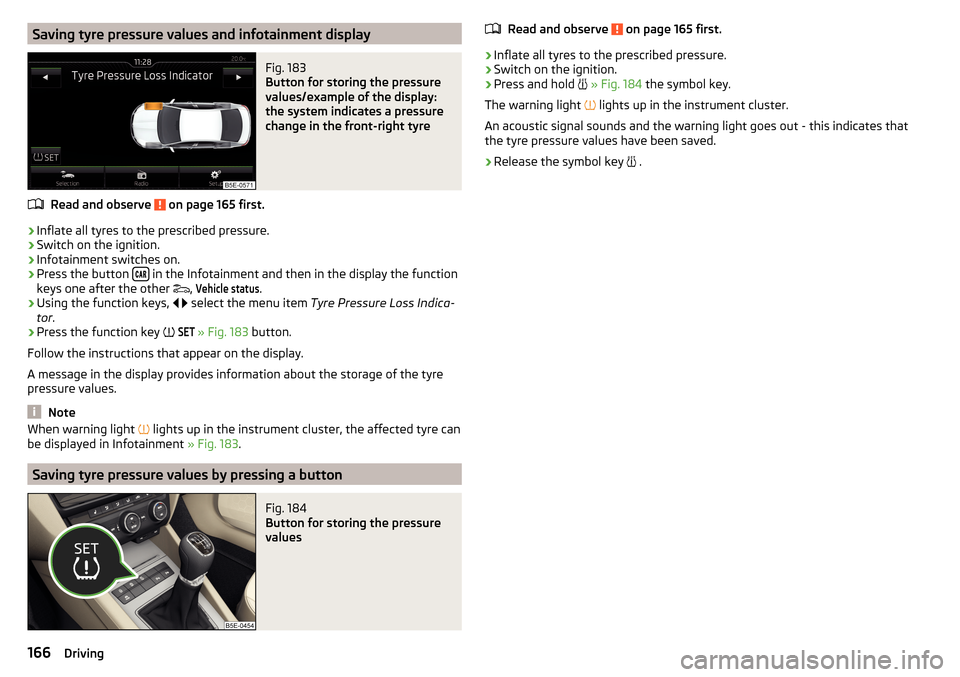
Saving tyre pressure values and infotainment displayFig. 183
Button for storing the pressure
values/example of the display:
the system indicates a pressure
change in the front-right tyre
Read and observe on page 165 first.
›
Inflate all tyres to the prescribed pressure.
›
Switch on the ignition.
›
Infotainment switches on.
›
Press the button in the Infotainment and then in the display the function
keys one after the other ,
Vehicle status
.
›
Using the function keys,
select the menu item
Tyre Pressure Loss Indica-
tor .
›
Press the function key
SET
» Fig. 183
button.
Follow the instructions that appear on the display.
A message in the display provides information about the storage of the tyre pressure values.
Note
When warning light lights up in the instrument cluster, the affected tyre can
be displayed in Infotainment » Fig. 183.
Saving tyre pressure values by pressing a button
Fig. 184
Button for storing the pressure
values
Read and observe on page 165 first.›
Inflate all tyres to the prescribed pressure.
›
Switch on the ignition.
›
Press and hold
» Fig. 184 the symbol key.
The warning light
lights up in the instrument cluster.
An acoustic signal sounds and the warning light goes out - this indicates that
the tyre pressure values have been saved.
›
Release the symbol key
.
166Driving
Page 175 of 268
Exterior mirrors
You should have additional exterior mirrors fitted if you are not able to see the
traffic behind the trailer with the standard rear-view mirrors.
Headlights
The front of the vehicle may lift up when a trailer is being towed and the head-
lights may dazzle other road users.
Adjust the headlights using the headlight beam control » page 68, Operating
the lights 1)
.
Power to the trailer power grid
For the electrical connection between the vehicle and trailer, the trailer's pow-
er supply is provided by the vehicle.
The power supply works with ignition on or off.
With the ignition off, the battery of the towing vehicle is discharged by activa-
ted consumers.
At low charge state of the vehicle battery power to the trailer is interrupted.WARNING■ Improperly connected trailer electrical installations may cause accidents
or serious injury due to electric shock.■
Work on the electrical system must only be carried out by specialist ga-
rages.
■
Never directly connect the trailer's electrical system with the electrical
connections for the tail lights or other current sources.
WARNING (Continued)■ After attaching the trailer and connecting the power socket, check that
the rear lights on the trailer are working correctly.■
Never use the safety eye to tow a vehicle!
CAUTION
Improperly connected trailer electrical installations may cause malfunction of
the entire vehicle electronics.
Note
■ The total power consumption of all the connected consumers on the trailer
must not exceed 350 watts.■
Coat the ball head of the towing device with a suitable grease whenever
necessary.
Loading a trailer
Distribution of the cargo
Distribute the cargo in the trailer in such a way that heavy items are located as
close to the trailer axle as possible. Secure the items from slipping.
The distribution of the weight is very poor if your vehicle is unladen and the
trailer is laden. Drive at a particularly low speed if you cannot avoid driving
with this combination.
Tyre pressure
Correct the tyre inflation pressure on the vehicle for a “full load” » page 205.
WARNINGSliding cargo can significantly adversely affect stability and driving safety -
risk of accident!
Trailer load
The permissible trailer load must not be exceeded under any circumstances. 1)
Applies to vehicles with xenon headlights.
173Hitch and trailer
Page 191 of 268
Inspecting and replenishing
Fuel
Introduction
This chapter contains information on the following subjects:
Petrol and diesel refuelling
189
Lead-free petrol
190
Diesel fuel
191
Refuelling with CNG (compressed natural gas)
192
CNG
193
The correct fuels for your vehicle are specified on the inside of the fuel filler
flap » Fig. 199 on page 189 .
WARNING■
The operating instructions of the refuelling system must always be fol-
lowed.■
Do not smoke when refuelling and do not use a mobile phone.
■
The fuel and fuel vapours are explosive - risk to life!
CAUTION
■ Never drive until the fuel tank is completely empty! The irregular supply of
fuel can cause misfiring, which can result in damage to parts of the engine and
the exhaust system.■
Immediately remove any fuel that has spilled onto the vehicle's paintwork –
risk of paint damage.
■
If the vehicle was not purchased in the country where it was intended to be
operated, you should check whether the fuel specified by the manufacturer is
offered in the country where the vehicle will be operated. You should also per-
haps check whether the manufacturer has recommended a different fuel for
operation of the vehicle in the corresponding country. If no prescribed fuel is
available, then you must check whether it is permitted by the manufacturer to
operate the vehicle with another fuel type.
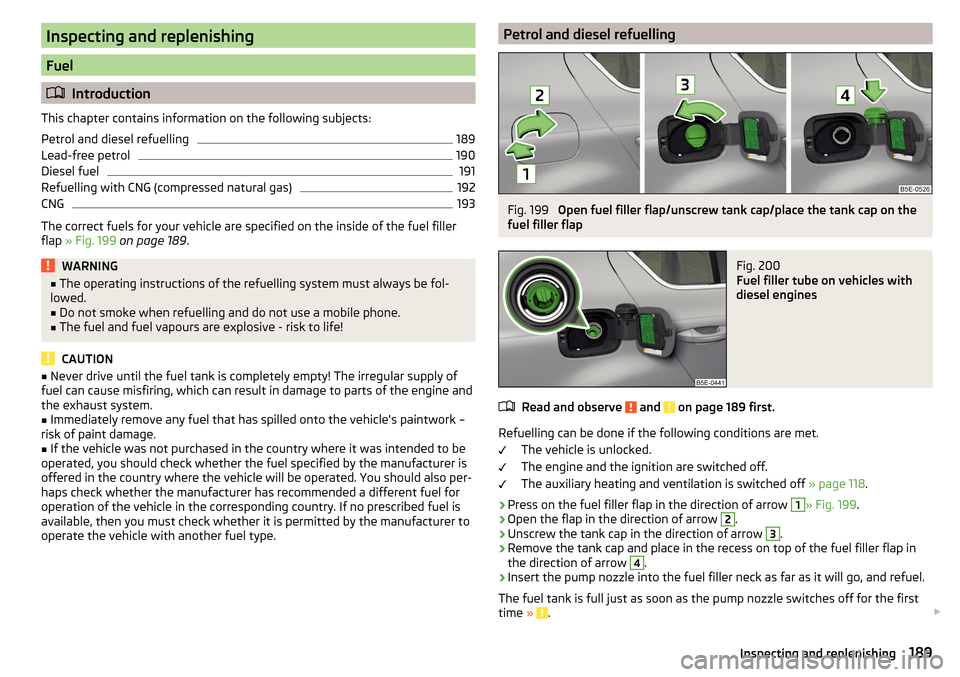
Petrol and diesel refuellingFig. 199
Open fuel filler flap/unscrew tank cap/place the tank cap on the
fuel filler flap
Fig. 200
Fuel filler tube on vehicles with
diesel engines
Read and observe and on page 189 first.
Refuelling can be done if the following conditions are met.
The vehicle is unlocked.
The engine and the ignition are switched off.
The auxiliary heating and ventilation is switched off » page 118.
›
Press on the fuel filler flap in the direction of arrow
1
» Fig. 199.
›
Open the flap in the direction of arrow
2
.
›
Unscrew the tank cap in the direction of arrow
3
.
›
Remove the tank cap and place in the recess on top of the fuel filler flap in
the direction of arrow
4
.
›
Insert the pump nozzle into the fuel filler neck as far as it will go, and refuel.
The fuel tank is full just as soon as the pump nozzle switches off for the first
time »
.
189Inspecting and replenishing
Page 193 of 268
Fuel additives
Unleaded petrol in accordance with the EN 228 standard 1)
meets all the condi-
tions for a smooth-running engine. We therefore recommend that no fuel ad-
ditives are used. This can result in considerable damage to parts of the engine
or the exhaust system.
CAUTION
■ Even one filling of the tank with petrol that does not meet the standards can
lead to serious damage to parts of the exhaust system!■
If a fuel other than unleaded fuel which complies to the above mentioned
standards (e.g. leaded petrol) is put in the tank by mistake, do not start the en-
gine or switch on the ignition. Extensive damage to engine parts can occur.
CAUTION
■ If petrol with a lower octane number than the one prescribed is used do not
drive with a high engine speed. A high engine load can severely damage en-
gine components.■
Even in the event of an emergency, petrol of a lower octane number than 91
RON must not be used, otherwise the engine can be severely damaged.
CAUTION
In no case may fuel additives with metal components be used, especially not
with manganese or iron content. There is a risk of causing severe damage to
parts of the engine or exhaust system.
CAUTION
Do not use fuels with metal components, such as LRP (lead replacement
petrol) . There is a risk of causing severe damage to parts of the engine or ex-
haust system.Note■ Unleaded petrol that has a higher octane number than that required by the
engine can be used without limitations.■
The use of petrol with an octane rating higher than 95 RON in does not re-
sult in either a noticeable increase in power nor lower fuel consumption in ve-
hicles for which unleaded petrol 95/min 92 or 93 RON is specified.
■
On vehicles using prescribed unleaded petrol of min. 95 RON, the use of pet-
rol with a higher octane number than 95 RON can increase the power and re-
duce fuel consumption.
Diesel fuel
The correct fuel grades for your vehicle are specified on the inside of the fuel
filler flap.
Read and observe
and on page 189 first.
The vehicle can only be operated with diesel fuel that meets the EN 5902)
standard.
All diesel engines can be operated using diesel fuel with at most 7% biodiesel
(B7) 3)
.
On the Indian market, your vehicle will only be able to run on diesel fuel com-
pliant with standard IS 1460/Bharat IV. If diesel fuel which complies with this
standard is not available, you can refuel with diesel fuel according to standard
IS 1460/Bharat III in case of emergency.
Operation in winter – Winter-grade diesel fuel
In the cold season, only use “winter-grade diesel fuel” which will still operate
properly even at a temperature of -20 °C.
It is often the case in countries with different climatic conditions that diesel
fuels available have a different temperature characteristic. The ŠKODA Part-
ners and filling stations in the relevant country will be able to provide you with
information regarding the diesel fuels available.
1)
In Germany also DIN 51626-1 or E10 for unleaded petrol with octane number 91 or 95 or DIN 51626-2 or E5
for unleaded petrol with octane number 95 and 98.
2)
In Germany also DIN 51628, in Austria ÖNORM C 1590, in Russia GOST R 52368-2005 / EN 590:2004.
3)
In Germany according to the DIN 52638 standard, in Austria ÖNORM C 1590, in France EN 590.
191Inspecting and replenishing
Page 194 of 268
Preheating fuel
The vehicle is fitted with a fuel filter preheating system. This secures opera-
tion of a vehicle using diesel fuel down to an environmental temperature of
-24 °C.
Diesel fuel additives
The diesel fuel in accordance with the prescribed standards meets all the con-
ditions for a smooth running engine. We therefore recommend that no diesel
fuel additives are used. This can result in considerable damage to parts of the
engine or the exhaust system.
CAUTION
■ Just filling the tank once with diesel fuel that does not comply with the
standard, can cause severe damage to parts of the engine, the fuel and ex-
haust system.■
If a different fuel other than diesel fuel, which complies to the above men-
tioned standards (e.g. petrol) is used, do not start the engine or switch on the
ignition! Extensive damage to engine parts can occur.
■
Water which has collected in the fuel filter can cause engine faults.
CAUTION
■ The vehicle cannot be operated with bio fuel RME, therefore this fuel must
not be filled in the tank and used for driving the vehicle. The use of biofuel
RME can cause considerable damage to parts of the engine or fuel system.■
Do not mix any fuel additives, so-called “flow improvers” (petrol and similar
agents) into the diesel. This can result in considerable damage to parts of the
engine or the exhaust system.
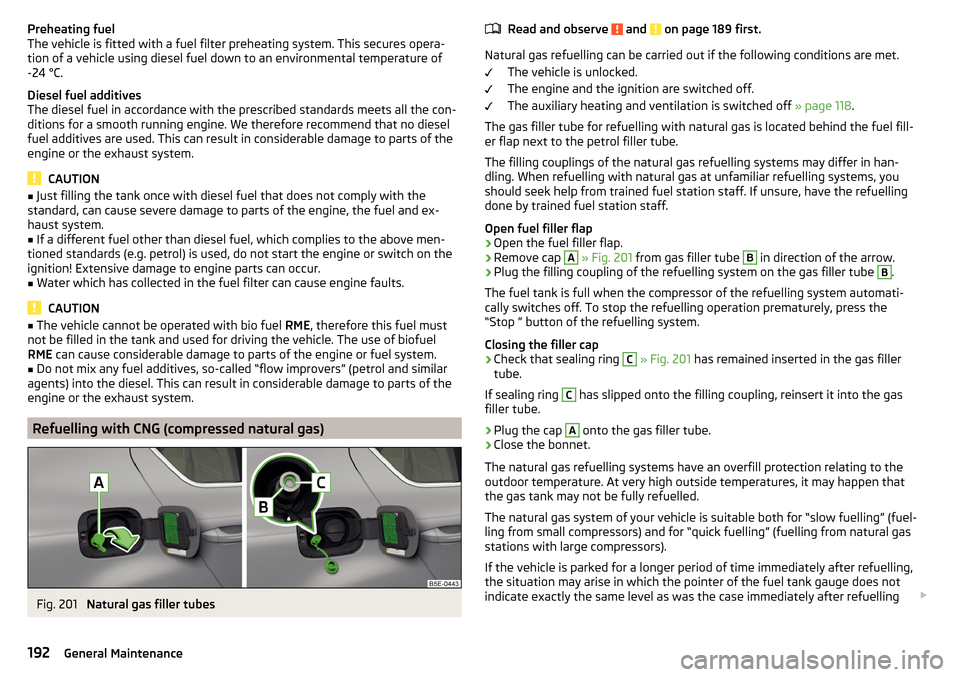
Refuelling with CNG (compressed natural gas)
Fig. 201
Natural gas filler tubes
Read and observe and on page 189 first.
Natural gas refuelling can be carried out if the following conditions are met.
The vehicle is unlocked.
The engine and the ignition are switched off.
The auxiliary heating and ventilation is switched off » page 118.
The gas filler tube for refuelling with natural gas is located behind the fuel fill-
er flap next to the petrol filler tube.
The filling couplings of the natural gas refuelling systems may differ in han-
dling. When refuelling with natural gas at unfamiliar refuelling systems, you
should seek help from trained fuel station staff. If unsure, have the refuelling
done by trained fuel station staff.
Open fuel filler flap
›
Open the fuel filler flap.
›
Remove cap
A
» Fig. 201 from gas filler tube
B
in direction of the arrow.
›
Plug the filling coupling of the refuelling system on the gas filler tube
B
.
The fuel tank is full when the compressor of the refuelling system automati-
cally switches off. To stop the refuelling operation prematurely, press the
“Stop ” button of the refuelling system.
Closing the filler cap
›
Check that sealing ring
C
» Fig. 201 has remained inserted in the gas filler
tube.
If sealing ring
C
has slipped onto the filling coupling, reinsert it into the gas
filler tube.
›
Plug the cap
A
onto the gas filler tube.
›
Close the bonnet.
The natural gas refuelling systems have an overfill protection relating to the
outdoor temperature. At very high outside temperatures, it may happen that
the gas tank may not be fully refuelled.
The natural gas system of your vehicle is suitable both for “slow fuelling” (fuel-
ling from small compressors) and for “quick fuelling” (fuelling from natural gas
stations with large compressors).
If the vehicle is parked for a longer period of time immediately after refuelling,
the situation may arise in which the pointer of the fuel tank gauge does not
indicate exactly the same level as was the case immediately after refuelling
192General Maintenance