media SKODA OCTAVIA 2016 3.G / (5E) Columbus Amundsen Bolero Infotainment System Navigation Manual
[x] Cancel search | Manufacturer: SKODA, Model Year: 2016, Model line: OCTAVIA, Model: SKODA OCTAVIA 2016 3.G / (5E)Pages: 100, PDF Size: 12.8 MB
Page 70 of 100
›Press the
button, then tap on the function
Tap → driver assistance →
Traffic Sign Recognition → Speed warning:
.
For trailer towing We recommend that you activate the detection of trailer-re-
lated traffic signs.›
Press the button, then tap on the function
Tap →
driver assistance
→
Trailer detection →
Show Traffic Signs relevant to trailers
.
Route guidance
Introduction to the subject
A route is created by starting route guidance to a destination. Additional inter-
mediate destinations can be added to the route.
The route guidance takes place as follows
▶ Through graphical driving instructions in the device display screen and in the
display of the instrument cluster.
▶ With navigation announcements.
The unit tries to allow for continued guidance even if the navigation data is in-
complete or there is no data at all for the given area.
The route is recalculated each time if you ignore driving recommendations or change the route.
CAUTION
The navigation announcements provided may vary from the actual situations,
e.g. due to out-of-date navigation data.
Destination details
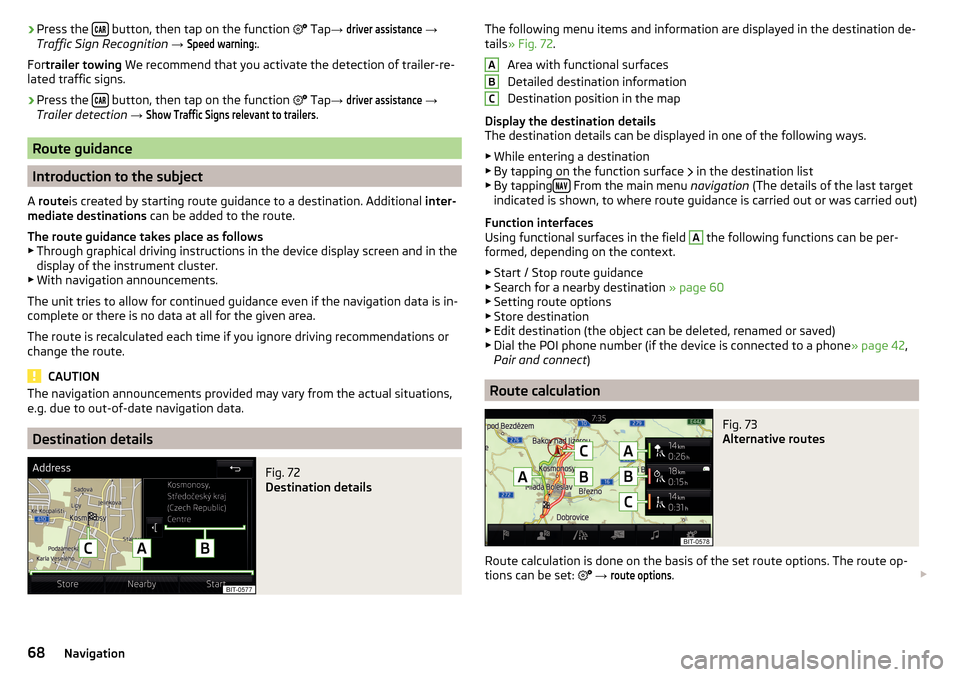
Fig. 72
Destination details
The following menu items and information are displayed in the destination de-
tails » Fig. 72 .
Area with functional surfaces
Detailed destination information
Destination position in the map
Display the destination details
The destination details can be displayed in one of the following ways.
▶ While entering a destination
▶ By tapping on the function surface
in the destination list
▶ By tapping
From the main menu
navigation (The details of the last target
indicated is shown, to where route guidance is carried out or was carried out)
Function interfaces
Using functional surfaces in the field
A
the following functions can be per-
formed, depending on the context.
▶ Start / Stop route guidance
▶ Search for a nearby destination » page 60
▶ Setting route options
▶ Store destination
▶ Edit destination (the object can be deleted, renamed or saved)
▶ Dial the POI phone number (if the device is connected to a phone » page 42,
Pair and connect )
Route calculation
Fig. 73
Alternative routes
Route calculation is done on the basis of the set route options. The route op-
tions can be set:
→
route options
.
ABC68Navigation
Page 75 of 100
Description of the function surfaces A » Fig. 77
Context-dependent:
▶ Route guidance is disabled -Start recording waypoint tour/ show man-
agement of saved waypoint tours/ Exit Waypoint mode menu
▶ Waypoint recording is taking place - Stop recording a waypoint/ man-
ually adjust waypoint / Exit Waypoint menu
▶ Route guidance is enabled Stop guidance / skip to the next waypoint /-
Exit Waypoint menu
Set the map display / show / hide the additional window / switch on / off the display of special destinations in the map
Playback Control Radio
/
Media
/
TV tuner
setting navigation is not available in the Waypoint menu
Record waypoints
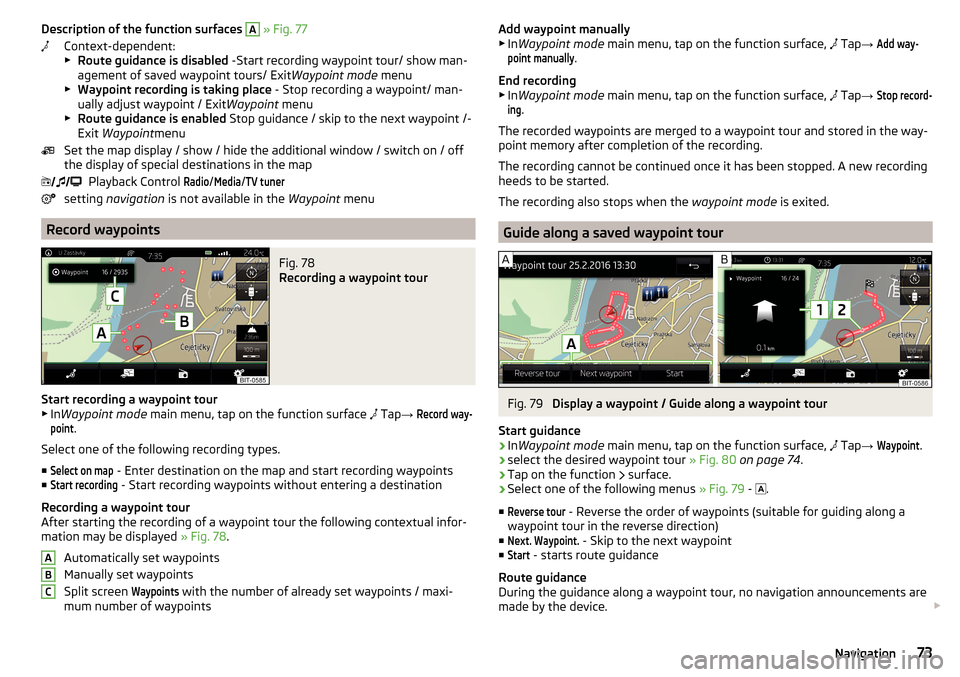
Fig. 78
Recording a waypoint tour
Start recording a waypoint tour
▶ In Waypoint mode main menu, tap on the function surface
Tap
→
Record way-point
.
Select one of the following recording types. ■
Select on map
- Enter destination on the map and start recording waypoints
■
Start recording
- Start recording waypoints without entering a destination
Recording a waypoint tour
After starting the recording of a waypoint tour the following contextual infor-
mation may be displayed » Fig. 78.
Automatically set waypoints
Manually set waypoints
Split screen
Waypoints
with the number of already set waypoints / maxi-
mum number of waypoints
ABCAdd waypoint manually
▶ In Waypoint mode main menu, tap on the function surface, Tap → Add way-point manually
.
End recording
▶ In Waypoint mode main menu, tap on the function surface,
Tap →
Stop record-ing
.
The recorded waypoints are merged to a waypoint tour and stored in the way-
point memory after completion of the recording.
The recording cannot be continued once it has been stopped. A new recording
heeds to be started.
The recording also stops when the waypoint mode is exited.
Guide along a saved waypoint tour
Fig. 79
Display a waypoint / Guide along a waypoint tour
Start guidance
›
In Waypoint mode main menu, tap on the function surface,
Tap
→
Waypoint
.
›
select the desired waypoint tour » Fig. 80 on page 74 .
›
Tap on the function
surface.
›
Select one of the following menus
» Fig. 79 -
.
■
Reverse tour
- Reverse the order of waypoints (suitable for guiding along a
waypoint tour in the reverse direction)
■
Next. Waypoint.
- Skip to the next waypoint
■
Start
- starts route guidance
Route guidance
During the guidance along a waypoint tour, no navigation announcements are
made by the device.
73Navigation
Page 80 of 100
Vehicle systems
CAR - vehicle setting
Introduction to the subject
In the menu CAR travel data and information displayed on the vehicle and
some vehicle systems can be set.
Description of the individual systems » Owner's Manual .
Note
Settings relating to the vehicle systems can only be made when the ignition is
switched on.
Main menu
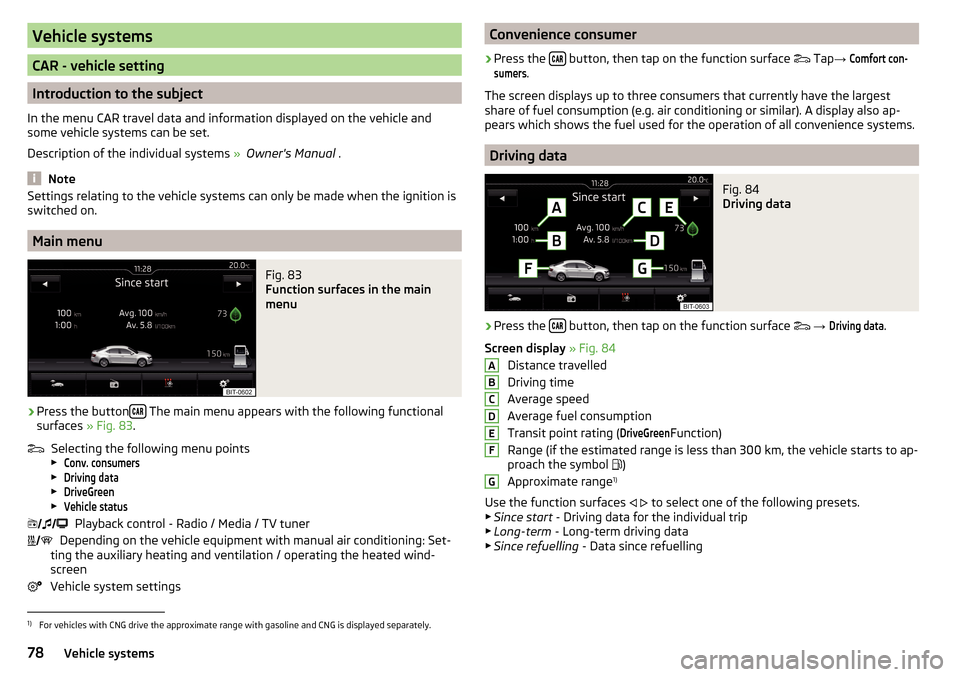
Fig. 83
Function surfaces in the main
menu
›
Press the button The main menu appears with the following functional
surfaces » Fig. 83.
Selecting the following menu points
▶
Conv. consumers
▶
Driving data
▶
DriveGreen
▶
Vehicle status
Playback control - Radio / Media / TV tuner
Depending on the vehicle equipment with manual air conditioning: Set-
ting the auxiliary heating and ventilation / operating the heated wind- screen
Vehicle system settings
Convenience consumer›
Press the button, then tap on the function surface
Tap →
Comfort con-sumers
.
The screen displays up to three consumers that currently have the largest
share of fuel consumption (e.g. air conditioning or similar). A display also ap-
pears which shows the fuel used for the operation of all convenience systems.
Driving data
Fig. 84
Driving data
›
Press the button, then tap on the function surface
→
Driving data
.
Screen display » Fig. 84
Distance travelled
Driving time
Average speed
Average fuel consumption
Transit point rating (
DriveGreen
Function)
Range (if the estimated range is less than 300 km, the vehicle starts to ap-
proach the symbol )
Approximate range 1)
Use the function surfaces
to select one of the following presets.
▶ Since start - Driving data for the individual trip
▶ Long-term - Long-term driving data
▶ Since refuelling - Data since refuelling
ABCDEFG1)
For vehicles with CNG drive the approximate range with gasoline and CNG is displayed separately.
78Vehicle systems
Page 87 of 100
Index
A
A2DP/AVRCP
44
Abort route guidance70
ACC80
Adaptive Cruise Control80
Additional keyboard languages18
Additional windows Audio
60
Compass60
Manoeuvre60, 69
Map60
Menus60
Most frequent routes60
Satellite data60
Turn on/off60
Waypoint tour60
Aim Enter destination using the address
61
entered in map62
Search60
Air conditioning83
Alphanumeric with keyboard13
Alternative routes76
Android Auto™55
Connection establishment55
Disconnection55
Home Page55
APN19
Apple CarPlay™56
Connection establishment56
disconnection56
Main menu56
Assistance systems80
AT THE21
Audio Media
24
Radio21
Audio source26
Auto-locking81
Automatic air conditioning83
Automatic air recirculation mode83
Automatic driving light when raining79
Automatic rear window wiper81
Automatic wiping when raining81
AUX29
Settings26
Auxiliary heating83
B
Background lighting
81
Blind spot monitoring80
Bluetooth A2DP / AVRCP
19
Name19
on / off19
Paired external devices19
rSAP46
set to19, 41
Set to19
Update11, 19
Visibility19
Bluetooth Player29
Bluetooth profile44
Breakdown service46
Broadcasting21
See main menu21
Button CAR78
C
Call list Call list
48
CAR78
CD27
Central locking81
Clear calls41
Climatronic display83
setting83
Close81
Comfort turn signal79
COMING HOME79
Compatible sources Pictures
32
Video DVD33
Conditions for coupling43
Conference call49
Configuration wizard16
Convenience consumer78
Cooling system82
Custom destination64
D
DAB
21
Additional information21
Radio Text and image presentation21
Settings23
DAB slideshow21
Data connection53
Data roaming19
Data transfer of external devices14
Date17
Daytime running light79
Daytime running light when raining79
Default settings18
Delete destination68
Demo mode69, 77
Destination Custom destination
64
Favourite63, 68
final destinations62
Flagged destination63
Home address63
Image with GPS64
Memory68
85Index
Page 88 of 100
Saved destination63
Telephone contact63
vCard63
Destination details68
Destination management Destination details
68
Favourite68
Storage68
Destination memory63
Detail of the traffic report75
device Restart
11
Device connect to the telephone
42
Software update11
Device Description - Amundsen8
Device Description - Columbus7
Device Hotspot52
Device language18
Device menu CAR
78
Media Command36
Media (Audio)24
Media (video)32
Navigation59
Phone39
Radio21
Sound17
TV tuner34
Device Menu Pictures
31
SmartLink54
Device operation12
Device screen12
Device operation using an application in the ex- ternal device
14
device screen keyboard
13
Device screen17
Areas12
Important information10
Maintenance10
Operation12
Disclaimer6
Diverting calls41
Door locking81
Doors-Operation81
Door unlocking81
DriveGreen79
Driver Assistance80
Driving abroad - light79
Driving data Display
78
Power on/off82
DVD27
DVD-Video Select video source
32
DVD video Main menu
32
Menu33
DVD video menu33
Dynamic Road Sign Display80
Dynamic route switch on / off
75
E
Easy Open
81
Eco Tips - Multi-function display82
Edit route70
Elevation59
Emergency call46
Enter destination address
61
Destination on the map62
EPG TV tuner
35
Equalizer17
ESC sport79
ESC system79
external device data transfer18
External devices6
External module CD / DVD
27
SD card28
SIM card45
Video DVD32
F
Factory settings
82
Fatigue detection80
Favourite63, 68
file formats media
30
Requirements and Restrictions30
File formats Pictures
32
Video DVD33
Finish route guidance70
Flagged destination63
FM21
Settings23
Front Assist80
Fuel options77
Function surfaces12
G
Gas station
62
GPS59
Graphical driving recommendations69
H
Headlight range control
79
Heated windscreen83
Heating82, 83
High beam79
86Index
Page 89 of 100
Home address63, 76
Home menu MirrorLink®
57
Home Page Android Auto™
55
I
Images Display
32
Main menu31
safe removal of the data source18
Select Image Source31
service31
Settings32
Image viewer31
Important notes6
Import contacts41
Import destinations64
Import my destinations64
Information service46
Input screen with keyboard13
Inspection82
Instrument cluster82
Instrument lighting79
Interior - lighting81
Interior lighting81
Intermediate target68
Introductory information6
J
Jukebox
27
K
Key - memory function
81
keyboard13
L
L-band
24
Lane Assist80
Lane recommendation69
Language characters18
Last destinations62
Latitude59
LEAVING HOME79
Light79
Light assistance79
Light sensor - switch-on the lights79
List of available channels (TV tuner)
35
of available stations22
of telephone contacts47
With folder / track list25
List of paired external devices44
List of traffic reports74
Longitude59
Luggage compartment- Open81
Luggage compartment cover81
M
main menu Apple CarPlay™
56
Main menu CAR
78
DVD video32
Images31
Media24
Media Command36
Navigation59
Radio21
SmartLink54
SMS50
TV tuner34
Waypoint mode72
Manage Favourites41
Manage memory76
Managing paired devices44
Manoeuvre Graphical driving recommendations69
Nav. announcements70
Manoeuvring80
Map automatic scale
66
Display65
Display of traffic signs76
Display options66
Display options in the split screen67
Fast Map66
Lane recommendation76
Main menu65
Manual scale66
Map alignment67
Operation65
POI display76
Road sign67
Show POI65
|Alignment66
media Compatible sources
30
file formats30
Requirements and Restrictions30
Media24
Audio source26
AUX29
Bluetooth Audio29
Browser25
CD / DVD27
Foreword24
Jukebox27
List25
Main menu24
Multimedia database26
Operation24
safe removal of the data source18
SD card28
Select audio source25
Settings26
USB28
87Index
Page 90 of 100
Use play25
Voice control14
WLAN29
Media Command36
Control37
Main menu36
supported formats38
Memory function of remote control key81
Memory list TV tuner
35
Menu Set up
16
Menu CAR78
Mirror Fold in when parked
81
Lower while reversing81
Synchronous adjustment81
MirrorLink®56
Connection establishment57
Disconnection57
function issues58
Main menu57
Operation57
Mobile phone6
Most common routes70
Multi-function display82
Multi-media AUX
29
Multimedia USB
28
Multimedia database26
Mute12
My destinations64
My POIs64
N
navigation Destination on the map
62
Map orientation66
Route calculation68
Navigation59
Abort route guidance70
Additional windows60
Advanced settings77
Alternative routes76
Contacts63
Demo mode69, 77
Destination address61
Destination details68
destination memory63
Destination presentation in the split screen67
Destination representation66
Destination Search60
Dynamic route76
Edit route70
Favourites63
Final destinations62
Finish route guidance70
Foreword59
Fuel options77
GPS59
Graphical driving recommendations69
Home address63
Image with GPS64
Import destination64
Imported destinations76
Intermediate target68
Main menu59
Manage memory76
Map76
Map alignment67
Map scale66
Most common routes70
My destinations64
Navigation announcements76
Navigation data59
Nav. announcements70
Options for map display66
Options for map display in the split screen67
Preferred type of route76
Route68
Route change71
Route display66
Route display in the split screen67
Route guidance68
Route information70
Route memory72
Route options76
Route plan70
Settings76
Status line77
Traffic jam ahead75
Traffic reports (TMC)74
Trailer towing69
Transit point71
Voice control14
Waypoint mode72
Navigation announcements76
Navigation data59
Nav. announcements70
Network Data connection
19
Data roaming19
Set19
set to41
Values of the downloaded data19
New route72
O
Oil change
82
Open81
Operation Media
24
MirrorLink®57
88Index
Page 91 of 100
Radio21
Telephone41
Own POI categories64
P
Pairing process
43
Parking80
Parking aid80
Parking spot62
ParkPilot80
Personalisation79
Configuration wizard16
Personal POIs64
Petrol station logo76
Phone39
Adjust text messages41
Clear calls41
Diverting calls41
Import contacts41
Manage Favourites41
Premium41
rSAP46
Settings call41
set to41
User profile41
Voice control14
Phonebox39
Phone Premium rSAP
46
SIM card45
Pictures31
Compatible sources32
File formats32
Requirements and restrictions32
Supported file formats32
Pin code set to
41
Play Media
25
PlaybackVideo DVD33
POI64
Choose in the map65
Import64
My POIs64
Speed dial62
Tap in the map65
Pop-up window Map
67
Preferred contacts48
Principles of device operation12
Proactive passenger protection80
Q
Qi
39
R
radio Select station
21
Radio21
Broadcasting21
DAB settings23
FM - settings23
L-band24
List of available stations22
Main menu21
Operation21
Preface21
Radio station Logo22
Save station22
Scan21
Search stations21
set to23
Station buttons22
Traffic programme (TP)23
Voice control14
Radio station Logo
22
Radio station logos22
Update19
Radio stations Choose
21
Save station22
Search stations21
Select station21
Station buttons22
Rear seats83
Rear Traffic Alert80
Rear window - automatic wiping81
Recirculation mode83
Record waypoints73
Remote transfer of SIM data46
Reset - vehicle settings82
Restart the device11
restaurant62
Road sign67
Route68
New route72
Route import72
Route memory72
Route calculation68
Trailer towing69
Route import72
Route information70
Route memory72
Route options76
Route plan70
Route schedule70
rSAP46
S
Safe removal of the data source
18
Save station22
Screen See device screen
10
Screen display12
89Index
Page 92 of 100
SD card28
Search for car park62
Search for petrol station62
Search for restaurant62
seats heating
83
Seats Setting
81
Select broadcasting See main menu
21
Select Image Source Images
31
Select source Media
25
Select station See main menu
21
Select video source Video DVD
32
service Images
31
Service82
Set video DVD
34
Settings Additional keyboard languages
18
AUX26
Bluetooth19, 41
Codecs26
Configuration wizard16
DAB23
Data connection19
Device16
Device language18
Device screen17
Equalizer17
external device data transfer18
FM23
Images32
Manage favourites48
Media26
Navigation76
Network19
Phone41
Pin code41
Radio23
Reset to factory settings18
SmartLink55
Software update11
Sound17
Sound system17
Subwoofer17
Surround17
System information11, 19
Text messages41
Time and date17
TV tuner36
Units18
Update software19
User profile48
Vehicle78
Video DVD34
Voice control18
Volume12
WLAN19
Settings Call41
Set up16
Show POIs on the map65
SIM card Change PIN code
45
Data connection53
PIN code45
Plug in45
remove45
SmartLink54
Android Auto™55
Apple CarPlay™56
Main menu54
MirrorLink®56
set55
SMS50
new50
Operation50
received51
Software update11
Software Update19
Sound17
Sound system17
Speed limitations69
Speedlimit for winter tyres79
SSID19
START-STOP79
Station See main menu
21
Station logos Update
11
Status line12, 65
Navigation77
Telephone41
Stored destinations Destination memory
63
Final destinations62
Store destination68
Subwoofer17
Supported sources media
30
Surround17
Synchronous adjustment of both mirrors81
System information11, 19
T
TCS
79
telephone conditions for coupling
43
Telephone Additional telephone
40
Bluetooth profile44
Breakdown service46
Call list48
90Index