bluetooth SKODA OCTAVIA 2016 3.G / (5E) User Guide
[x] Cancel search | Manufacturer: SKODA, Model Year: 2016, Model line: OCTAVIA, Model: SKODA OCTAVIA 2016 3.G / (5E)Pages: 324, PDF Size: 48.85 MB
Page 152 of 324

Only valid for the navigation system Columbus
Connectionvariant
The first device (main phone)The second device (additional phone)
Third deviceFourth deviceTelephoneSIM card
(In the external mod- ule)TelephoneSIM card
(In the external mod- ule)
1.
rSAP
incoming / outgoing
Calls, text messages, Phone contacts,
Data connection,
Bluetooth ®
player a)
-HFP
(incoming calls),
Bluetooth ®
player a)-Bluetooth
®
player a)-2.
HFP
(Incoming / outgo-
ing
Calls), text messages, Phone contacts,
Bluetooth ®
player a)
-HFP
(incoming calls),
Bluetooth ®
player a)Data connectionBluetooth ®
player a)-3.
HFP
(Incoming / outgo-
ing
Calls), text messages, Phone contacts,
Bluetooth ®
player a)
--Incoming calls,
Text messages,
Data connectionBluetooth ®
player a)-4.-
incoming / outgoing
Calls, text messages, Phone contacts b)
,
Data connectionHFP (incoming calls),
Text messages,
Bluetooth ®
player a)-Phone contacts b)
,
Bluetooth ®
player a)Bluetooth ®
player a)
a)
In every connection variant, there is an option to only connect an external device as a Bluetooth connection
®
player with Infotainment.
b)
If phone contacts from the third device are imported into infotainment, the telephone contacts of the SIM card inserted in the external module cannot be used.
Applies to Infotainment Amundsen, BoleroThe first device (main phone)The second device (additional phone)HFP (Incoming / outgoing calls), SMS,
Phone contacts,
Bluetooth ®
player a)HFP
(incoming calls),
Bluetooth ®
player a)a)
Only an external device can be connected to Infotainment as a Bluetooth
®
player.
Applies to Infotainment SwingThe first device (main phone)The second device (additional phone)HFP (Incoming / outgoing calls),
Phone contacts,
Bluetooth ®
player a)Bluetooth ®
player a)
a)
Only an external device can be connected to Infotainment as a Bluetooth
®
player.
150Infotainment
Page 154 of 324
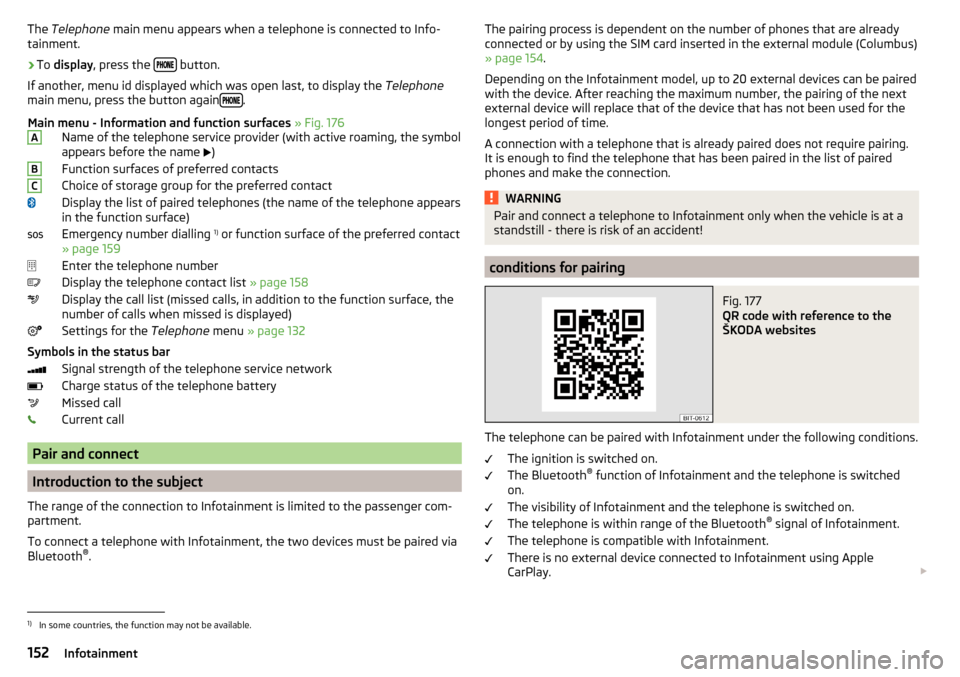
The Telephone main menu appears when a telephone is connected to Info-
tainment.›
To display , press the button.
If another, menu id displayed which was open last, to display the Telephone
main menu, press the button again
.
Main menu - Information and function surfaces » Fig. 176
Name of the telephone service provider (with active roaming, the symbol
appears before the name
)
Function surfaces of preferred contacts
Choice of storage group for the preferred contact
Display the list of paired telephones (the name of the telephone appears
in the function surface)
Emergency number dialling 1)
or function surface of the preferred contact
» page 159
Enter the telephone number
Display the telephone contact list » page 158
Display the call list (missed calls, in addition to the function surface, the
number of calls when missed is displayed)
Settings for the Telephone menu » page 132
Symbols in the status bar Signal strength of the telephone service network
Charge status of the telephone battery
Missed call
Current call
Pair and connect
Introduction to the subject
The range of the connection to Infotainment is limited to the passenger com-
partment.
To connect a telephone with Infotainment, the two devices must be paired via
Bluetooth ®
.
ABCThe pairing process is dependent on the number of phones that are already
connected or by using the SIM card inserted in the external module (Columbus)
» page 154 .
Depending on the Infotainment model, up to 20 external devices can be paired
with the device. After reaching the maximum number, the pairing of the next
external device will replace that of the device that has not been used for the
longest period of time.
A connection with a telephone that is already paired does not require pairing.
It is enough to find the telephone that has been paired in the list of paired
phones and make the connection.WARNINGPair and connect a telephone to Infotainment only when the vehicle is at a
standstill - there is risk of an accident!
conditions for pairing
Fig. 177
QR code with reference to the
ŠKODA websites
The telephone can be paired with Infotainment under the following conditions.
The ignition is switched on.
The Bluetooth ®
function of Infotainment and the telephone is switched
on.
The visibility of Infotainment and the telephone is switched on.
The telephone is within range of the Bluetooth ®
signal of Infotainment.
The telephone is compatible with Infotainment.
There is no external device connected to Infotainment using Apple
CarPlay.
1)
In some countries, the function may not be available.
152Infotainment
Page 155 of 324

The pairing can be initiated from Infotainment or from the telephone.
During the pairing and connection process, information messages are dis-
played on the Infotainment screen and the telephone screen. These messages
must be observed and if necessary confirmed (e.g. enabling the contact import,
connecting the Bluetooth ®
player among others).
Compatibility and update
By reading the QR code » Fig. 177 or after typing the following address into the
web browser, information about the compatibility of phones and updates are
available for Infotainment Bluetooth ®
can be displayed.
http://go.skoda.eu/compatibility
Pairing and connection process
Pair the telephone with Infotainment
›
Search available Bluetooth ®
devices in your telephone.
›
Select Infotainment (name of Infotainment
→
Bluetooth
→
Name:
).
›
Confirm or enter the PIN code to confirm the pairing.
The phone is connected to the infotainment or merely coupled, depending on
the number of already connected external devices and using the SIM card in-
serted in the external module (Columbus).
Pair Infotainment with the telephone
›
If there is no telephone connected to Infotainment, then press the but-
ton then tap the function surface
Find telephone
.
›
or If Infotainment is connected to a phone, then in the main menu Telephone
tap on the function surface
→
Search phone
.
›
or: If a SIM card with activated telephone services is inserted in the external
module of infotainment Columbus, then, in the main menu Telephone, tap on
the function surface
→
Find telephone
.
›
Select the desired telephone from the list of visited external Bluetooth ®
de-
vices.
›
Confirm the PIN code (enter and confirm if necessary to confirm the pairing.
If external Bluetooth ®
devices are already connected to Infotainment, then
during the Infotainment pairing and connection process, messages and op-
tions for the possible connection type (e.g. replacement of the connected ex-
ternal Bluetooth ®
device) are displayed.
Possible connection types for phones, if required, for the SIM card in the exter- nal module » page 149.
Managing paired external devicesFig. 178
Infotainment Columbus: list of paired external devices / list of
available Bluetooth® profiles
Fig. 179
Infotainment Swing: list of paired external devices / list of avail-
able Bluetooth® profiles
›
In the Telephone main menu, tap on the function surface,
Tap →
Bluetooth
→
Paired devices
.
In the list of paired external devices, the following symbols of the Bluetooth ®
profile may appear for the individual external devices » Fig. 178 and » Fig. 179
.
Applies to Infotainment Columbus, Amundsen, Bolero
SymbolSymbol colourOperationgreyExternal device can be connected as telephoneGreenExternal device is connected as telephone 153Telephone
Page 156 of 324
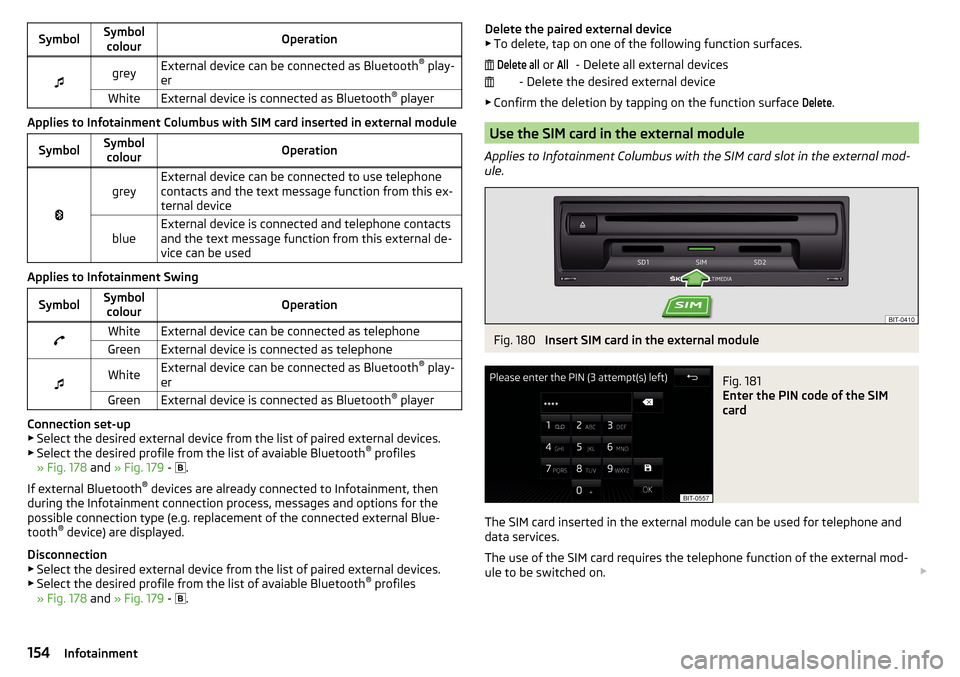
SymbolSymbolcolourOperationgreyExternal device can be connected as Bluetooth ®
play-
erWhiteExternal device is connected as Bluetooth ®
player
Applies to Infotainment Columbus with SIM card inserted in external module
SymbolSymbol
colourOperation
greyExternal device can be connected to use telephone
contacts and the text message function from this ex-
ternal deviceblueExternal device is connected and telephone contacts
and the text message function from this external de-
vice can be used
Applies to Infotainment Swing
SymbolSymbol colourOperationWhiteExternal device can be connected as telephoneGreenExternal device is connected as telephone
WhiteExternal device can be connected as Bluetooth ®
play-
erGreenExternal device is connected as Bluetooth ®
player
Connection set-up
▶ Select the desired external device from the list of paired external devices.
▶ Select the desired profile from the list of avaiable Bluetooth ®
profiles
» Fig. 178 and » Fig. 179 -
.
If external Bluetooth ®
devices are already connected to Infotainment, then
during the Infotainment connection process, messages and options for the
possible connection type (e.g. replacement of the connected external Blue-
tooth ®
device) are displayed.
Disconnection
▶ Select the desired external device from the list of paired external devices.
▶ Select the desired profile from the list of avaiable Bluetooth ®
profiles
» Fig. 178 and » Fig. 179 -
.
Delete the paired external device
▶ To delete, tap on one of the following function surfaces.
- Delete all external devices
- Delete the desired external device
▶ Confirm the deletion by tapping on the function surface Delete
.
Use the SIM card in the external module
Applies to Infotainment Columbus with the SIM card slot in the external mod-
ule.
Fig. 180
Insert SIM card in the external module
Fig. 181
Enter the PIN code of the SIM
card
The SIM card inserted in the external module can be used for telephone and
data services.
The use of the SIM card requires the telephone function of the external mod-
ule to be switched on.
Delete all or All154Infotainment
Page 157 of 324
Switching on and off›In the Telephone main menu, tap on the function surface →
Phone interface“Business”
.
Insert SIM card
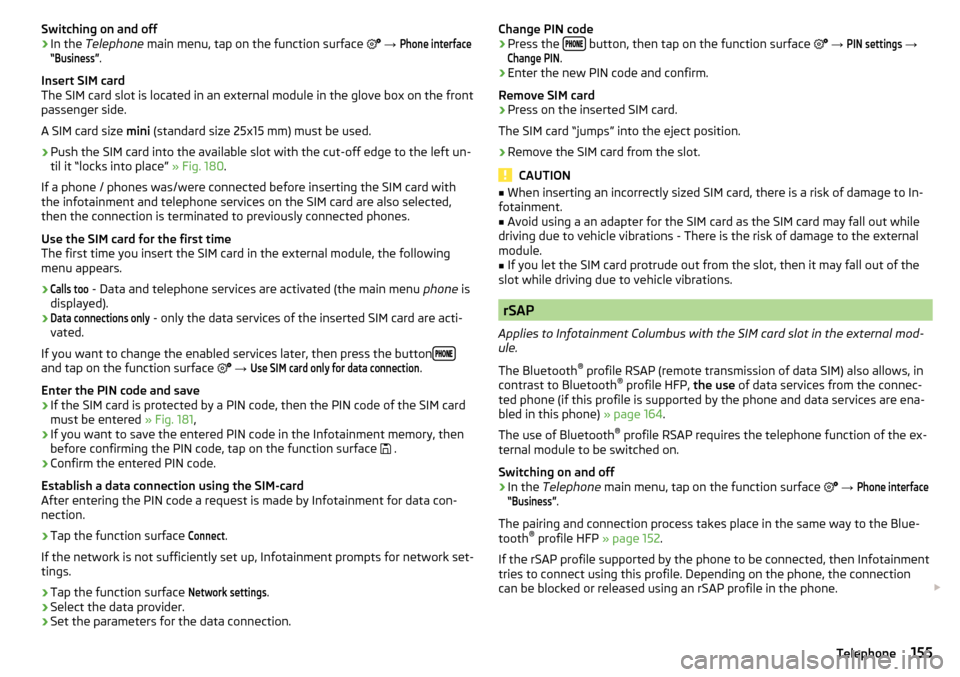
The SIM card slot is located in an external module in the glove box on the front
passenger side.
A SIM card size mini (standard size 25x15 mm) must be used.
›
Push the SIM card into the available slot with the cut-off edge to the left un-
til it “locks into place” » Fig. 180.
If a phone / phones was/were connected before inserting the SIM card with
the infotainment and telephone services on the SIM card are also selected,
then the connection is terminated to previously connected phones.
Use the SIM card for the first time
The first time you insert the SIM card in the external module, the following
menu appears.
›Calls too
- Data and telephone services are activated (the main menu phone is
displayed).
›Data connections only
- only the data services of the inserted SIM card are acti-
vated.
If you want to change the enabled services later, then press the button
and tap on the function surface
→
Use SIM card only for data connection
.
Enter the PIN code and save
›
If the SIM card is protected by a PIN code, then the PIN code of the SIM card
must be entered » Fig. 181,
›
If you want to save the entered PIN code in the Infotainment memory, then
before confirming the PIN code, tap on the function surface .
›
Confirm the entered PIN code.
Establish a data connection using the SIM-card
After entering the PIN code a request is made by Infotainment for data con-
nection.
›
Tap the function surface
Connect
.
If the network is not sufficiently set up, Infotainment prompts for network set-
tings.
›
Tap the function surface
Network settings
.
›
Select the data provider.
›
Set the parameters for the data connection.
Change PIN code›Press the button, then tap on the function surface
→
PIN settings
→
Change PIN
.
›
Enter the new PIN code and confirm.
Remove SIM card
›
Press on the inserted SIM card.
The SIM card “jumps” into the eject position.
›
Remove the SIM card from the slot.
CAUTION
■ When inserting an incorrectly sized SIM card, there is a risk of damage to In-
fotainment.■
Avoid using a an adapter for the SIM card as the SIM card may fall out while
driving due to vehicle vibrations - There is the risk of damage to the external
module.
■
If you let the SIM card protrude out from the slot, then it may fall out of the
slot while driving due to vehicle vibrations.
rSAP
Applies to Infotainment Columbus with the SIM card slot in the external mod-
ule.
The Bluetooth ®
profile RSAP (remote transmission of data SIM) also allows, in
contrast to Bluetooth ®
profile HFP, the use of data services from the connec-
ted phone (if this profile is supported by the phone and data services are ena-
bled in this phone) » page 164.
The use of Bluetooth ®
profile RSAP requires the telephone function of the ex-
ternal module to be switched on.
Switching on and off
›
In the Telephone main menu, tap on the function surface
→
Phone interface“Business”
.
The pairing and connection process takes place in the same way to the Blue-
tooth ®
profile HFP » page 152.
If the rSAP profile supported by the phone to be connected, then Infotainment
tries to connect using this profile. Depending on the phone, the connection
can be blocked or released using an rSAP profile in the phone.
155Telephone
Page 164 of 324
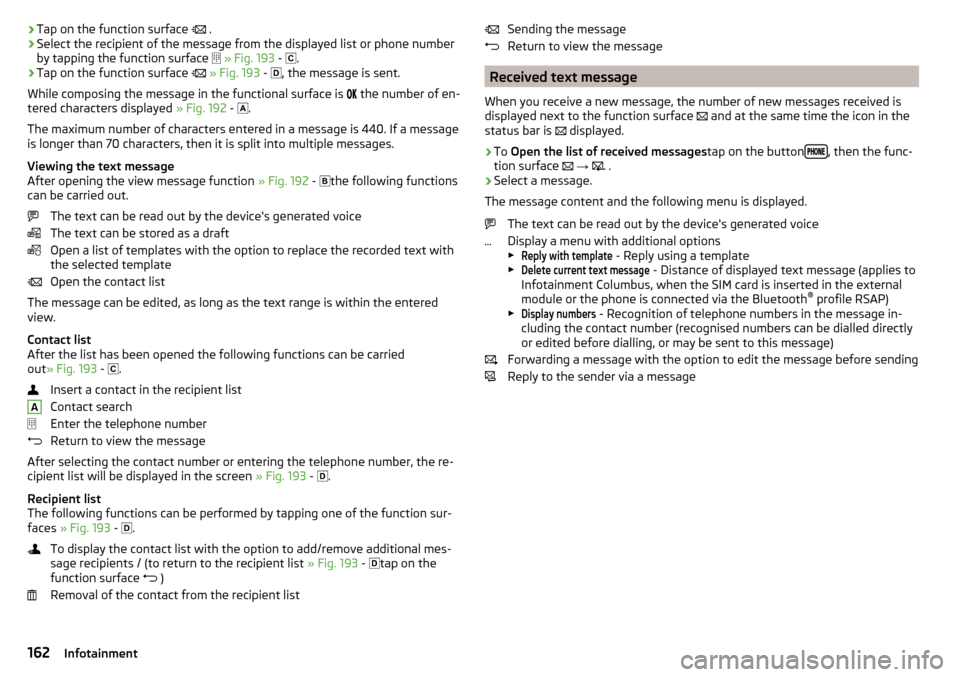
›Tap on the function surface
.›Select the recipient of the message from the displayed list or phone number
by tapping the function surface
» Fig. 193 -
.›
Tap on the function surface
» Fig. 193 -
, the message is sent.
While composing the message in the functional surface is
the number of en-
tered characters displayed » Fig. 192 -
.
The maximum number of characters entered in a message is 440. If a message
is longer than 70 characters, then it is split into multiple messages.
Viewing the text message
After opening the view message function » Fig. 192 -
the following functions
can be carried out.
The text can be read out by the device's generated voice
The text can be stored as a draft
Open a list of templates with the option to replace the recorded text with
the selected template
Open the contact list
The message can be edited, as long as the text range is within the entered
view.
Contact list
After the list has been opened the following functions can be carried
out » Fig. 193 -
.
Insert a contact in the recipient list
Contact search
Enter the telephone number
Return to view the message
After selecting the contact number or entering the telephone number, the re-
cipient list will be displayed in the screen » Fig. 193 -
.
Recipient list
The following functions can be performed by tapping one of the function sur-
faces » Fig. 193 -
.
To display the contact list with the option to add/remove additional mes-
sage recipients / (to return to the recipient list » Fig. 193 -
tap on the
function surface )
Removal of the contact from the recipient list
ASending the message
Return to view the message
Received text message
When you receive a new message, the number of new messages received is
displayed next to the function surface
and at the same time the icon in the
status bar is
displayed.
›
To Open the list of received messages tap on the button, then the func-
tion surface
→
.
›
Select a message.
The message content and the following menu is displayed.
The text can be read out by the device's generated voice
Display a menu with additional options
▶
Reply with template
- Reply using a template
▶
Delete current text message
- Distance of displayed text message (applies to
Infotainment Columbus, when the SIM card is inserted in the external
module or the phone is connected via the Bluetooth ®
profile RSAP)
▶
Display numbers
- Recognition of telephone numbers in the message in-
cluding the contact number (recognised numbers can be dialled directly
or edited before dialling, or may be sent to this message)
Forwarding a message with the option to edit the message before sending
Reply to the sender via a message
162Infotainment
Page 165 of 324
Hotspot (WLAN) and data connection
Hotspot (WLAN)
Introduction to the subject
Applies to Infotainment Columbus, Amundsen.
WLAN can be used to connect to the Internet, to playback audio files in the menu media (if the connected external device allows this) or for operating the
device using an application in the external device (e.g. ŠKODA Media Command).
The requirement for the WLAN function is that the ignition is switched on. Af-
ter switching on the ignition, the last-used WLAN connection appears.
It is possible to connect up to 8 external devices to the Infotainment hotspot
and at the same time to connect Infotainment to the hotspot of other external
devices.
If there is a SIM card with activated data services in the external module of In-
fotainment Columbus or there is a connection to the phone via Bluetooth ®
profile RSAP, a connection cannot be established to the external device hot-
spot.
connect an external device to the Infotainment hotspot (WLAN)
Switch Infotainment hotspot on / off
›
Press the button, then tap on the function surface
Tap on
→
WLAN
→
Mobile hotspot
→
Mobile hotspot
.
Set infotainment hotspot
▶ Press the
button, then tap on the function surface
Tap on
→
WLAN
→
Mobile hotspot
→
Hotspot (WLAN) settings
.
▶ Setting required menu items from the following menu.
■
Security level:
- Setting the connection security
■
Network key
- Entering the access password
■
SSID: ...
- Name of the Infotainment hotspot
■
Do not send network name (SSID)
-Turn Infotainment hotspot visibility on/off
▶ Tap the function surface Store to save the parameters of the Infotainment
hotspot.
Connect ▶ Enable the Wi-Fi in the external device and search for any available hotspots.
▶ Select the Infotainment hotspot (if necessary, enter the required password).
▶ Confirm the connection.
Establish secure connection using WPS (applies to Infotainment Amundsen) ▶ Turn on Infotainment in the device.
▶ Press the
button, then tap on the function surface
→
WLAN
→
Portablehotspot
→
WPS Quick Connection (WPS button)
.
▶ Turn on the option to connect to Infotainment hotspot using WPS.
Note
If the external device is connected to the Infotainment hotspot (WLAN), then
the data connection to the external device cannot be used.
Connect Infotainment to the hotspot (WLAN) of the external
device
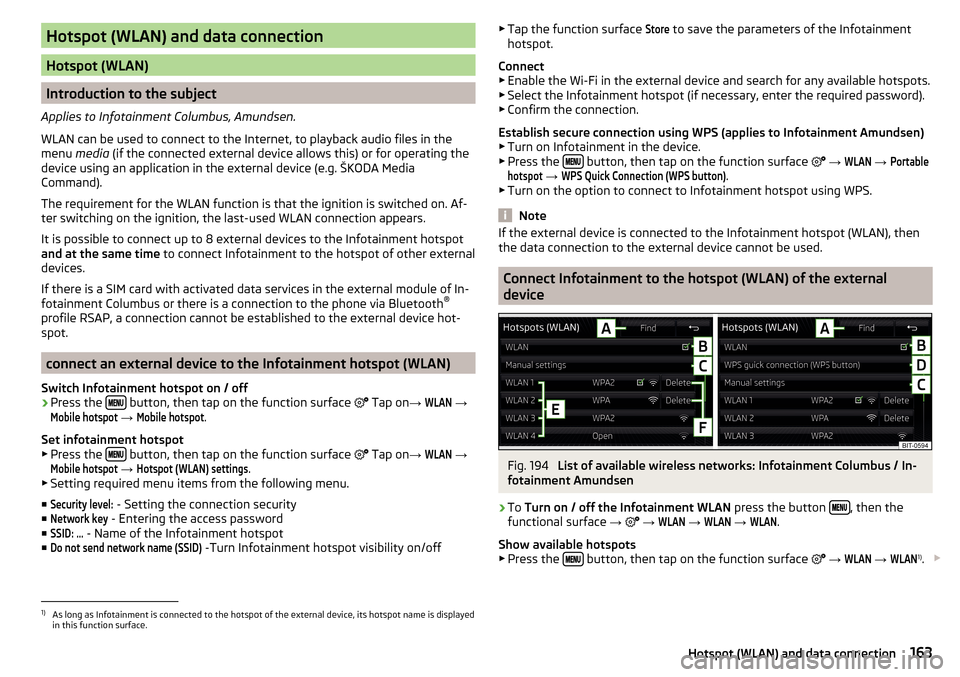
Fig. 194
List of available wireless networks: Infotainment Columbus / In-
fotainment Amundsen
›
To Turn on / off the Infotainment WLAN press the button , then the
functional surface →
→
WLAN
→
WLAN
→
WLAN
.
Show available hotspots
▶ Press the
button, then tap on the function surface
→
WLAN
→
WLAN
1)
.
1)
As long as Infotainment is connected to the hotspot of the external device, its hotspot name is displayed
in this function surface.
163Hotspot (WLAN) and data connection
Page 166 of 324
With WLAN activated, a list of available or previously connected hotspots with
the following information and function surfacesis displayed » Fig. 194.
Searching for available hotspots
Turn Infotainment WLAN on/off
Manual hotspot search and connect
Automatic establishment of the secure connection to the hotspot via WPS
(Applies to Infotainment Amundsen)
Functional surfaces of the available hotspots
Disconnection from the currently connected hotpot by deleting the Info-
tainment memory access password (The functional surface will only be
shown when connected)
Current connection
Wi-Fi strength of the external device
Connect ▶ Turn on Infotainment in the device.
▶ Show the list of available hotspots, if necessary, update the list by tapping
the function surface Find
.
▶ Select the desired hotspot.
▶ If the access to the hotspot is password protected, then enter the required
password.
Search for connection manually and connect ▶ Turn on Infotainment in the device.
▶ Display list of available hotspots.
▶ Tap on the function surface
Manual settings
and set the required hotspot pa-
rameters.
▶ Tap the function surface
Connect
.
▶ If the parameters for the search are set correctly and the hotspot is available,
then the connection will take place.
Establish secure connection using WPS (applies to Infotainment Amundsen)
▶ Turn on Infotainment in the device.
▶ In the external device, turn on the option to connect to the external device
via WPS.
▶ Press the
button, then tap on the function surface
Tap on
→
WLAN
→
Mobile hotspot
→
WPS quick connection (WPS button)
.
End connection to the hotspot ▶ Press button when the desired Hotspot (WLAN) is found
,then the func-
tion surface →
→
WLAN
→
WLAN
→
Delete
.
ABCDEFData connection
Using the data connection, Infotainment can be connected to the Internet. The
data connection can be established in one of the following ways.
Data connection via WLAN›
Connect Infotainment to the hotspot of an external device with activated da-
ta services » page 163, Connect Infotainment to the hotspot (WLAN) of the
external device .
Data connection using the SIM card in the external module (applies to
Infotainment Columbus)
›
Insert a SIM card with activated data services in the external module
» page 154 , Use the SIM card in the external module .
Data connection using rSAP (applies to Infotainment Columbus)
›
Connect Infotainment via Bluetooth ®
profile rSAP to a telephone with activa-
ted data services » page 155, rSAP .
CAUTION
When inserting an incorrectly sized SIM card, there is a risk of damage to the
CarStick device.
Note
The Internet connection may be chargeable based on the terms and conditions
of your data provider.164Infotainment
Page 168 of 324
Connection set-up▶ Connect the external device via a connecting cable to the USB input
» page 85 .
▶ In the main menu SmartLink Choose the connected external device and the
type of communication system if necessary » Fig. 196 -
.
Return to the main menu of the active connection from another Infotainment
menu
(E.g. From the Radio menu)
▶ Press the button
and select the active connection.
Disconnection
▶ To end the connection, tap on the function surface in the main menu
SmartLink
» Fig. 196 -
.
▶ or Disconnect the device from the USB input.
If the connection was ended by tapping on the function surface from the
main menu SmartLink, the connection needs to be re-established when the
external device is connected again.
If the connection was terminated by disconnecting the cable from the USB
port, then the last active connection is shown in the main menu when the ex-
ternal device is reconnected.
Android Auto
Introduction to the subject
The Android Auto- connection can be set up under the following conditions. The ignition is switched on.
Infotainment is switched on.
The external device to be connected is switched on.
Some applications require the data connection in the connected external de-
vice to be turned on.
If Infotainment is connected to an external device via Android Auto then all the
phones currently connected, as well as the Bluetooth ®
players are disconnec-
ted.
The external device to be connected will automatically establish a telephone
connection via Bluetooth ®
as a main phone. Connecting an additional tele-
phone and using telephone services of the SIM card in the external module are
not possible for the duration of the connection. A possible data connection us-
ing the SIM card inserted in the external module remains operational
» page 164 .
An external device connected using Android Auto cannot be used as an audio source in the menu Media.
If route guidance is taking place at this moment in Infotainment, then there is
the option to start the route guidance in the Android Auto application. This is
also true reciprocally.
A list of devices and applications that the Android Autoconnection supports
can be found on the Google websites. Functionality is not guaranteed outside
of the supported regions.
Home Page
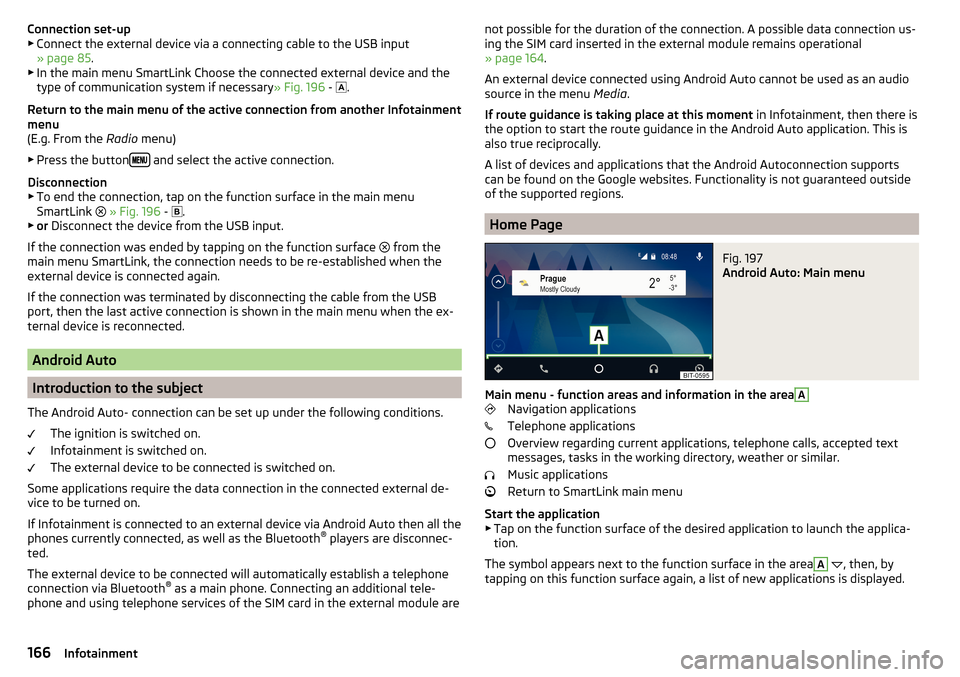
Fig. 197
Android Auto: Main menu
Main menu - function areas and information in the area
A
Navigation applications
Telephone applications
Overview regarding current applications, telephone calls, accepted text
messages, tasks in the working directory, weather or similar.
Music applications
Return to SmartLink main menu
Start the application ▶ Tap on the function surface of the desired application to launch the applica-
tion.
The symbol appears next to the function surface in the area
A
, then, by
tapping on this function surface again, a list of new applications is displayed.
166Infotainment
Page 169 of 324
Apple CarPlay
Introduction to the subject
The Apple CarPlay connection can be set up under the following conditions. The ignition is switched on.
Infotainment is switched on.
The external device to be connected is switched on.
The data connection is turned on in the device to be connected.
Voice control is turned on in the device to be connected.
If Infotainment is connected to an external device via Apple CarPlay then the use of the Bluetooth ®
connection is not possible and the Telephone menu is
not available. A possible data connection via the SIM card remains operational
» page 164 .
A device connected using Apple CarPlay cannot be used as an audio source in
the menu Media.
If route guidance is taking place at this moment using Infotainment, then this
is terminated by starting the route guidance in the Apple CarPlay application.
This is also true reciprocally.
A list of devices and applications that the Apple CarPlayconnection supports
can be found on the Apple websites. Functionality is not guaranteed outside of
the supported regions.
Main menu
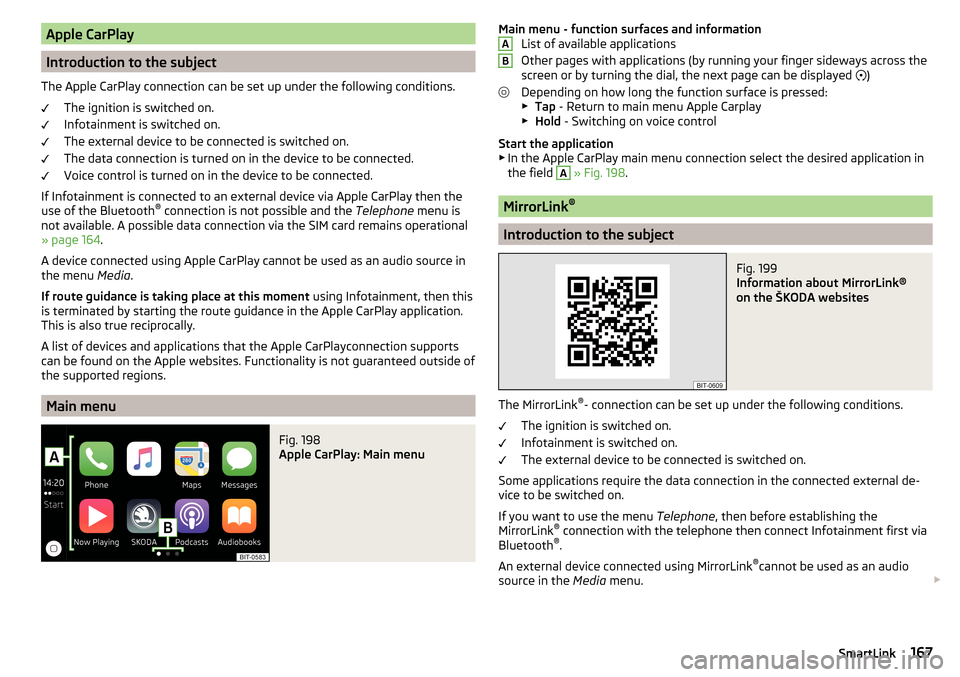
Fig. 198
Apple CarPlay: Main menu
Main menu - function surfaces and information List of available applications
Other pages with applications (by running your finger sideways across the
screen or by turning the dial, the next page can be displayed
)
Depending on how long the function surface is pressed: ▶ Tap - Return to main menu Apple Carplay
▶ Hold - Switching on voice control
Start the application ▶ In the Apple CarPlay main menu connection select the desired application in
the field A
» Fig. 198 .
MirrorLink ®
Introduction to the subject
Fig. 199
Information about MirrorLink®
on the ŠKODA websites
The MirrorLink ®
- connection can be set up under the following conditions.
The ignition is switched on.
Infotainment is switched on.
The external device to be connected is switched on.
Some applications require the data connection in the connected external de-
vice to be switched on.
If you want to use the menu Telephone, then before establishing the
MirrorLink ®
connection with the telephone then connect Infotainment first via
Bluetooth ®
.
An external device connected using MirrorLink ®
cannot be used as an audio
source in the Media menu.
AB167SmartLink