key battery SKODA OCTAVIA 2016 3.G / (5E) User Guide
[x] Cancel search | Manufacturer: SKODA, Model Year: 2016, Model line: OCTAVIA, Model: SKODA OCTAVIA 2016 3.G / (5E)Pages: 324, PDF Size: 48.85 MB
Page 277 of 324
Vehicles with a tow hitch
For vehicles with factory-fitted towing device, at the back there is no mount
for a screw-in towing eye. Use the detachable ball rod for towing » page 230,
Hitch .WARNINGThe towing eye must always be firmly in place, otherwise the towing eye
could break whilst being towed.
Remote - replacing battery
Introduction
This chapter contains information on the following subjects:
Remote control key
275
Remote control of the auxiliary heating
275
CAUTION
■ The replacement battery must correspond to the original specification.■Pay attention to the correct polarity when changing the battery.
Note
■We recommend you have the battery replaced by a specialist garage.■If a key has an affixed decorative cover, this will be destroyed when the bat-
tery is replaced. A replacement cover can be purchased from a ŠKODA Partner.
Remote control key
Fig. 315
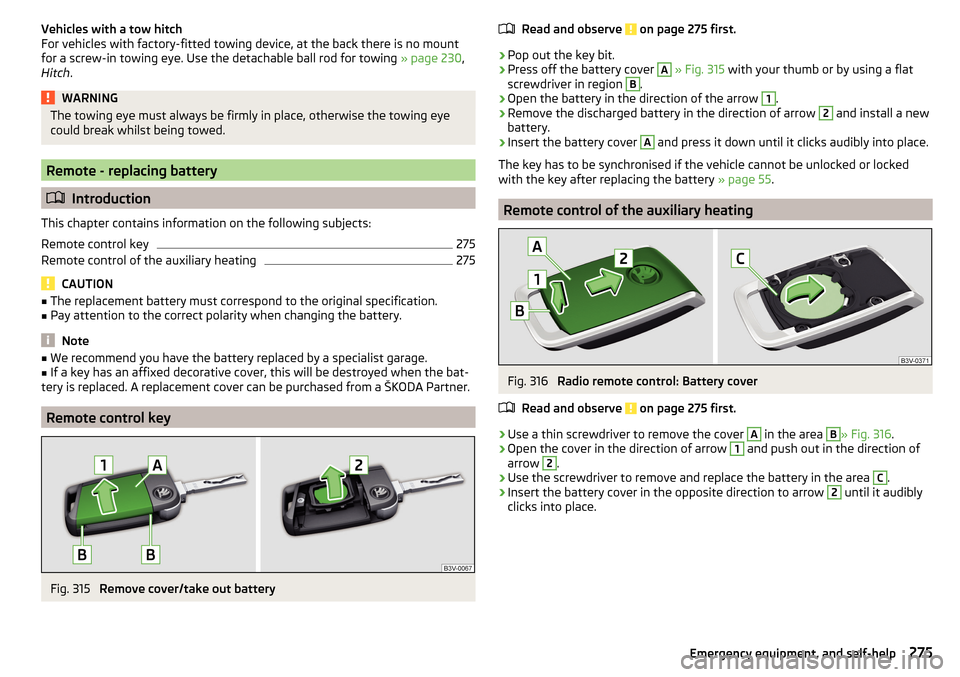
Remove cover/take out battery
Read and observe on page 275 first.›
Pop out the key bit.
›
Press off the battery cover
A
» Fig. 315 with your thumb or by using a flat
screwdriver in region
B
.
›
Open the battery in the direction of the arrow
1
.
›
Remove the discharged battery in the direction of arrow
2
and install a new
battery.
›
Insert the battery cover
A
and press it down until it clicks audibly into place.
The key has to be synchronised if the vehicle cannot be unlocked or locked
with the key after replacing the battery » page 55.
Remote control of the auxiliary heating
Fig. 316
Radio remote control: Battery cover
Read and observe
on page 275 first.
›
Use a thin screwdriver to remove the cover
A
in the area
B
» Fig. 316 .
›
Open the cover in the direction of arrow
1
and push out in the direction of
arrow
2
.
›
Use the screwdriver to remove and replace the battery in the area
C
.
›
Insert the battery cover in the opposite direction to arrow
2
until it audibly
clicks into place.
275Emergency equipment, and self-help
Page 283 of 324
No.Consumer50Opening the boot lid51Multi-function unit for taxi vehicles52Voltage stabiliser for taxi vehicles53Rear window heating
Fuses in the engine compartment
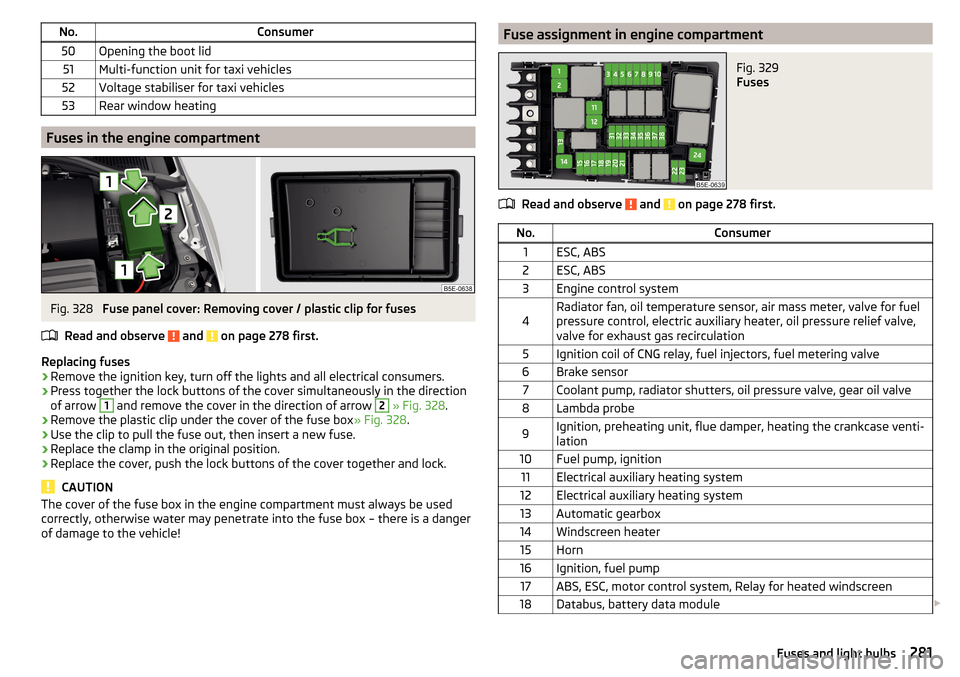
Fig. 328
Fuse panel cover: Removing cover / plastic clip for fuses
Read and observe
and on page 278 first.
Replacing fuses
›
Remove the ignition key, turn off the lights and all electrical consumers.
›
Press together the lock buttons of the cover simultaneously in the direction
of arrow
1
and remove the cover in the direction of arrow
2
» Fig. 328 .
›
Remove the plastic clip under the cover of the fuse box » Fig. 328.
›
Use the clip to pull the fuse out, then insert a new fuse.
›
Replace the clamp in the original position.
›
Replace the cover, push the lock buttons of the cover together and lock.
CAUTION
The cover of the fuse box in the engine compartment must always be used
correctly, otherwise water may penetrate into the fuse box – there is a danger
of damage to the vehicle!Fuse assignment in engine compartmentFig. 329
Fuses
Read and observe and on page 278 first.
No.Consumer1ESC, ABS2ESC, ABS3Engine control system4Radiator fan, oil temperature sensor, air mass meter, valve for fuel
pressure control, electric auxiliary heater, oil pressure relief valve,
valve for exhaust gas recirculation5Ignition coil of CNG relay, fuel injectors, fuel metering valve6Brake sensor7Coolant pump, radiator shutters, oil pressure valve, gear oil valve8Lambda probe9Ignition, preheating unit, flue damper, heating the crankcase venti-
lation10Fuel pump, ignition11Electrical auxiliary heating system12Electrical auxiliary heating system13Automatic gearbox14Windscreen heater15Horn16Ignition, fuel pump17ABS, ESC, motor control system, Relay for heated windscreen18Databus, battery data module 281Fuses and light bulbs
Page 304 of 324
Ball headCheck fitting233
Ready position231
Battery Change in key
275
Replace the battery in the remote control in the auxiliary heating
275
Belts15
Belt tensioners17
Bluetooth A2DP / AVRCP
124
Name124
on / off124
Paired external devices124
rSAP155
Set131
set to124, 126
Set to124
Switch on/off131
Update122, 125
Updates131
Visibility124, 131
Bluetooth Player141
Bluetooth profile153
Bluetooth® update153
Bonnet Close
253
Open253
Boot Class N1 vehicles
100
see boot lid56
Stow roof rack103
Boot lid57
Automatic locking57
Open/close58
Open/Close56
Brake Assist (HBA)202
Brake booster191
Brake fluid257
Check257
specification257
Brake linings warning light
36
Brake pads new
191
Brake pedal (automatic gearbox) Warning light
37
Brakes Brake booster
191
Brake fluid257
Braking and stabilisation systems200
Handbrake192
Information on braking191
Run in196
Warning lights33
Brake system200
Breakdown call157
Breakdown kit270
Broadcasting133
See main menu133
Bulbs Replacing
282
Button in driver's door Electric windows
60
C
Call list Call list
159
Camera See reversing camera
207
CAR187
Car battery Automatic consumer shutdown
258
Check condition259
Cover259
Disconnecting and reconnecting260
Replacing260
Winter operation259
CAR button187
Car care Exterior
245, 247
Interior247
Car cleaning Exterior
247
Windscreens247
Car computer see multifunction display
44
Care and maintenance240
Cargo element99
CAR menu187
Car washing244
Interior247
washing244
CD139
Central locking51
Problems55
Central locking button53
Change battery
275
Changing Windscreen wiper blades
278
Changing a wheel266
Changing266
Changing gear Selector lever
194
Tiptronic195
Changing wheels Wheels
266
Charging a vehicle battery259
Check Brake fluid
257
Engine oil256
Fit ball head properly233
Oil level256
Checking Battery status
259
Coolant257
302Index
Page 308 of 324
High beam assistantWarning light39
Hill Start Assist (HHC)202
hitch235
Hitch230
home address128
Home address174
Home Page Android Auto
166
Hook96
horn29
I
I-PAD holder
92
Ignition lock189
Images Display
126
Main menu144
Operation144
safe removal of the data source124
Select Image Source144
Set to126
Image viewer144
Immobiliser188
Import contacts126, 132
Import destinations175
Import my destinations175
In an emergency Changing a wheel
266
Inertia reels17
Information about the towing process273
Information call157
Information system41
Auto Check Control41
Door alarm41
Eco tips41
Gear recommendation42
Lap timer47
MAXI DOT display46
Multifunction display44
Service interval display48
Stop watch47
Infotainment Auxiliary heating (auxiliary heating and ventila-tion)
110
connect to the telephone152
Restart117
Software update122
Infotainment display Driving data
45
Infotainment Hotspot163
Infotainment language123, 130
Infotainment menu CAR
187
Media (video)145
Sound122
Infotainment menus118
Infotainment operation116
Infotainment screen116
Infotainment operation using an application in the external device
119
Infotainment screen123, 130
Areas116
Important information115
keyboard117
Maintenance115
Operation116
Input screen Language characters
130
Input screen with keyboard117
Instrument cluster30
Auto check control42
Warning lights32
interior light69, 70
Interior monitor56
Intermediate target179
ISOFIX25
J
Jack
266
Jukebox141
Jump-starting272
K
KESSY Unlocking / locking
52
key Starting / stopping the engine
189
Switch on/off ignition189
Key Change battery
275
Lock51
Unlock51
keyboard117
L
L-band
126
Lamp failure Warning light
39
Lamps Warning light
39
Lane Assist Malfunctions
226
See lane departure warning224
Settings in Infotainment225
Warning light36
Lane Departure Warning224
Activation / deactivation226
Operation225
Settings in Infotainment225
Lane recommendation180
Language characters123
Lap timer47
Last destinations173
Latitude169
LEAVING HOME68
306Index
Page 313 of 324
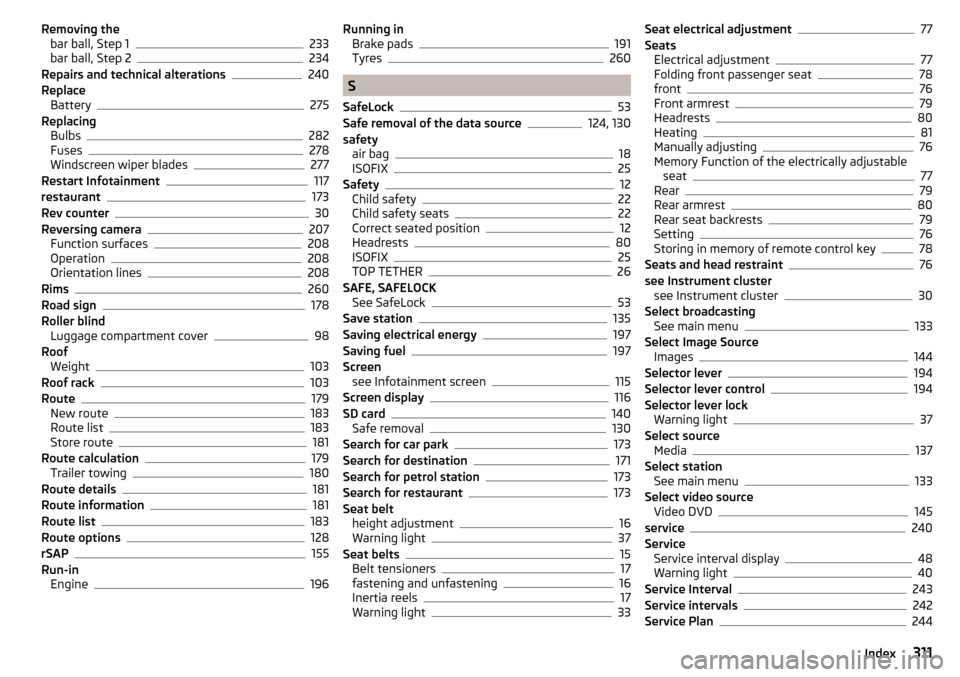
Removing thebar ball, Step 1233
bar ball, Step 2234
Repairs and technical alterations240
Replace Battery
275
Replacing Bulbs
282
Fuses278
Windscreen wiper blades277
Restart Infotainment117
restaurant173
Rev counter30
Reversing camera207
Function surfaces208
Operation208
Orientation lines208
Rims260
Road sign178
Roller blind Luggage compartment cover
98
Roof Weight
103
Roof rack103
Route179
New route183
Route list183
Store route181
Route calculation179
Trailer towing180
Route details181
Route information181
Route list183
Route options128
rSAP155
Run-in Engine
196
Running inBrake pads191
Tyres260
S
SafeLock
53
Safe removal of the data source124, 130
safety air bag
18
ISOFIX25
Safety12
Child safety22
Child safety seats22
Correct seated position12
Headrests80
ISOFIX25
TOP TETHER26
SAFE, SAFELOCK See SafeLock
53
Save station135
Saving electrical energy197
Saving fuel197
Screen see Infotainment screen
115
Screen display116
SD card140
Safe removal130
Search for car park173
Search for destination171
Search for petrol station173
Search for restaurant173
Seat belt height adjustment
16
Warning light37
Seat belts15
Belt tensioners17
fastening and unfastening16
Inertia reels17
Warning light33
Seat electrical adjustment77
Seats Electrical adjustment
77
Folding front passenger seat78
front76
Front armrest79
Headrests80
Heating81
Manually adjusting76
Memory Function of the electrically adjustable seat
77
Rear79
Rear armrest80
Rear seat backrests79
Setting76
Storing in memory of remote control key78
Seats and head restraint76
see Instrument cluster see Instrument cluster
30
Select broadcasting See main menu
133
Select Image Source Images
144
Selector lever194
Selector lever control194
Selector lever lock Warning light
37
Select source Media
137
Select station See main menu
133
Select video source Video DVD
145
service240
Service Service interval display
48
Warning light40
Service Interval243
Service intervals242
Service Plan244
311Index
Page 315 of 324

START-STOP190
Jump-starting272
manually activate/ deactivate system191
Operation190
Warning light39
START-STOP system190
Start engine Immobiliser
188
Jump-starting272
Starter button Lock / unlock the steering lock
188
Problems with the engine start190
Starting / stopping the engine189
Switch on/off ignition189
Starting engine Jump-starting
272
Starting the engine Key
189
Starter button189
Start the route guidance179
Station See main menu
133
Station logos Update
122
status line Navigation
129
Status line116, 170
Telephone151
Steering lock (KESSY system) Warning light
33
Steering wheel Buttons
43
Proper posture13
Setting13
Stopping see Parking
193
Stopping the engine Key
189
Starter button189
Stop watch47
Storage82
Storage compartment Glasses compartment
87
in the front centre console84
in the rear centre console88
on the driver's side83
on the front passenger side87
under the front arm rest86
Storage compartments82
Stored destinations Destination memory
174
Final destinations173
Store destination179
Storing seats
77
Storing skis89
Stowage compartments in the doors
83
Subwoofer122
Sunblind for the tilt / slide sunroof63
Sun visors71
Supported sources media
142, 143
Surround122
Switch Car battery
260
Switching the lights on and off64
Switch off Alarm
55
Switch off ignition189
Key189
Switch on ignition189
Key189
System information122, 125, 131
T
Tablet holder
92
Tailgate56
TCS Deactivate/activate201
Function201
Warning light34
TCS - off Warning light
34
Technical data288
telephone conditions for pairing
152
Telephone Additional telephone
149
Adjust text messages126
Bluetooth profile153
Breakdown call157
Call list159
Clear calls126
Conference call160
Connection types149
Connect to Infotainment152
Dialling the telephone number157
Diverting calls126
Emergency call157
Enter telephone number157
Functions157
Import contacts126, 132
Information service157
Main menu151
Main telephone149
Manage favourites132
Manage Favourites126
Operation151
Pair152
Pairing process153
Preferred contacts159
Premium126
rSAP149
Set132
Settings call126
set to126
SIM card149
313Index