remote SKODA OCTAVIA 2016 3.G / (5E) User Guide
[x] Cancel search | Manufacturer: SKODA, Model Year: 2016, Model line: OCTAVIA, Model: SKODA OCTAVIA 2016 3.G / (5E)Pages: 324, PDF Size: 48.85 MB
Page 110 of 324
CAUTIONWe recommend not smoking in the vehicle when the recirculating air operation
is switched on. The smoke sucked from the interior is deposited on the evapo-
rator of the air conditioner. This produces a permanent odour when the air
conditioning system is operating which can only be eliminated through consid-
erable effort and expense (replacement of compressor).
Air outlet vents
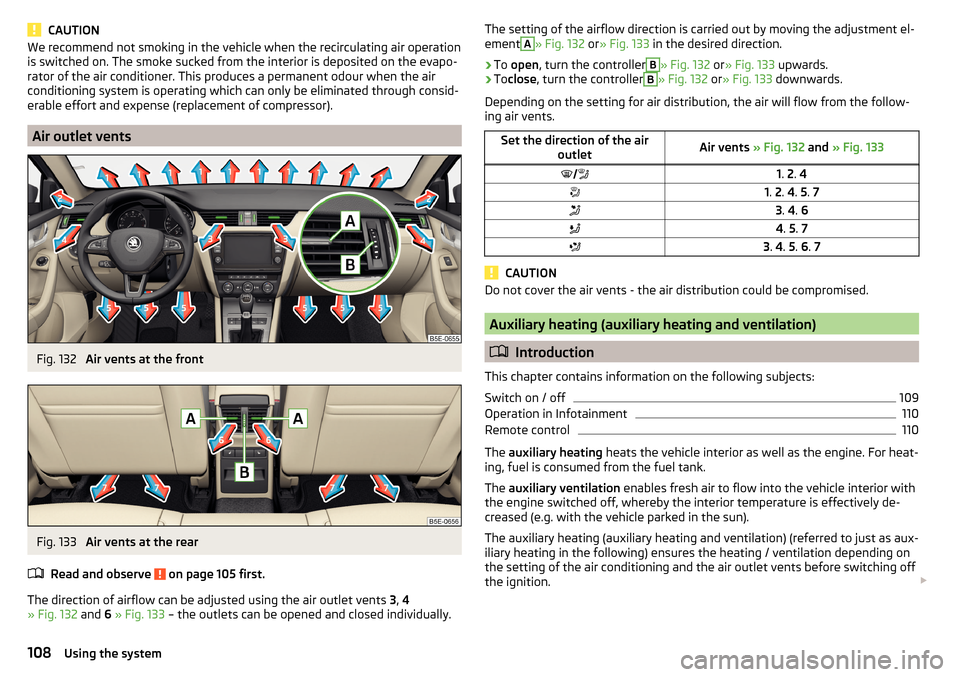
Fig. 132
Air vents at the front
Fig. 133
Air vents at the rear
Read and observe
on page 105 first.
The direction of airflow can be adjusted using the air outlet vents 3, 4
» Fig. 132 and 6 » Fig. 133 – the outlets can be opened and closed individually.
The setting of the airflow direction is carried out by moving the adjustment el-
ementA» Fig. 132 or» Fig. 133 in the desired direction.›
To open , turn the controller
B
» Fig. 132 or» Fig. 133 upwards.
›
Toclose , turn the controller
B
» Fig. 132 or» Fig. 133 downwards.
Depending on the setting for air distribution, the air will flow from the follow-
ing air vents.
Set the direction of the air outletAir vents » Fig. 132 and » Fig. 1331. 2 . 41. 2 . 4 . 5 . 73 . 4 . 64 . 5 . 73 . 4 . 5 . 6 . 7
CAUTION
Do not cover the air vents - the air distribution could be compromised.
Auxiliary heating (auxiliary heating and ventilation)
Introduction
This chapter contains information on the following subjects:
Switch on / off
109
Operation in Infotainment
110
Remote control
110
The auxiliary heating heats the vehicle interior as well as the engine. For heat-
ing, fuel is consumed from the fuel tank.
The auxiliary ventilation enables fresh air to flow into the vehicle interior with
the engine switched off, whereby the interior temperature is effectively de-
creased (e.g. with the vehicle parked in the sun).
The auxiliary heating (auxiliary heating and ventilation) (referred to just as aux- iliary heating in the following) ensures the heating / ventilation depending on
the setting of the air conditioning and the air outlet vents before switching off
the ignition.
108Using the system
Page 111 of 324
WARNING■The auxiliary heating must never be operated in closed rooms (e.g. garag-
es) – risk of poisoning!■
The auxiliary heating must not be allowed to run during refuelling – risk
of fire.
■
The exhaust pipe of the auxiliary heating is located on the underside of
the vehicle. If you want to use the auxiliary heating, do not park the vehicle
in places where the exhaust fumes can come into contact with flammable
materials such as dry grass, undergrowth, leaves, spilled fuel etc. - There is
a risk of fire.
CAUTION
The air inlet in front of the windscreen must be free (e.g. of ice, snow or
leaves) to ensure that the auxiliary heating operates properly.
Note
■ The auxiliary heating only switches the blower on, if it has achieved a coolant
temperature of approx. 50 °C.■
In the engine compartment, water vapour may form during the operation of
the heater.
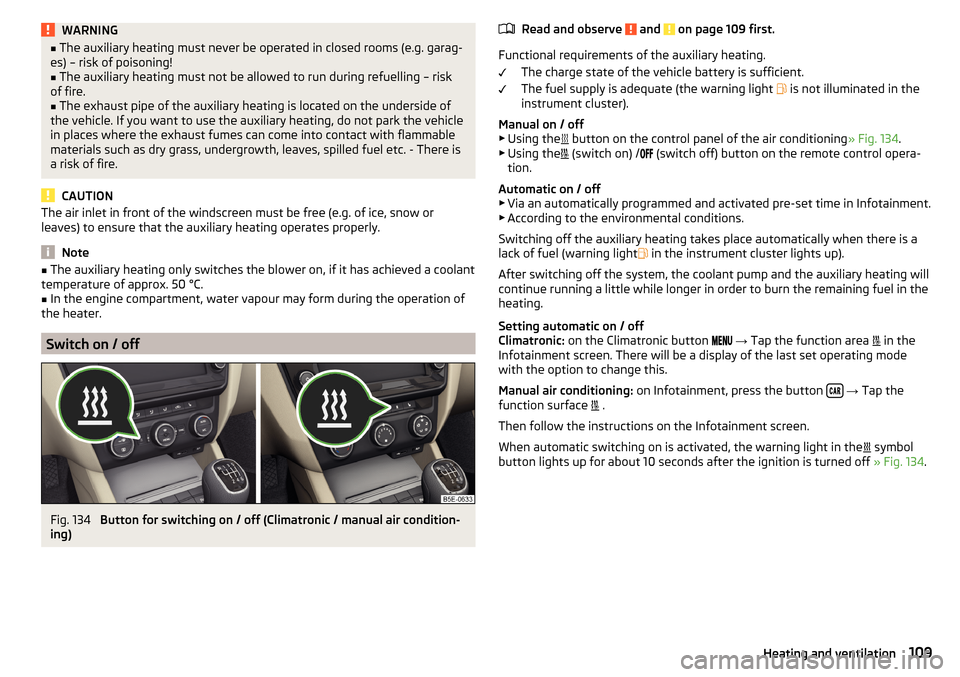
Switch on / off
Fig. 134
Button for switching on / off (Climatronic / manual air condition-
ing)
Read and observe and on page 109 first.
Functional requirements of the auxiliary heating.
The charge state of the vehicle battery is sufficient.
The fuel supply is adequate (the warning light
is not illuminated in the
instrument cluster).
Manual on / off ▶ Using the
button on the control panel of the air conditioning » Fig. 134.
▶ Using the
(switch on) /
(switch off) button on the remote control opera-
tion.
Automatic on / off ▶ Via an automatically programmed and activated pre-set time in Infotainment.
▶ According to the environmental conditions.
Switching off the auxiliary heating takes place automatically when there is a
lack of fuel (warning light in the instrument cluster lights up).
After switching off the system, the coolant pump and the auxiliary heating will
continue running a little while longer in order to burn the remaining fuel in the
heating.
Setting automatic on / off
Climatronic: on the Climatronic button
→ Tap the function area
in the
Infotainment screen. There will be a display of the last set operating mode
with the option to change this.
Manual air conditioning: on Infotainment, press the button
→ Tap the
function surface .
Then follow the instructions on the Infotainment screen.
When automatic switching on is activated, the warning light in the symbol
button lights up for about 10 seconds after the ignition is turned off » Fig. 134.
109Heating and ventilation
Page 112 of 324
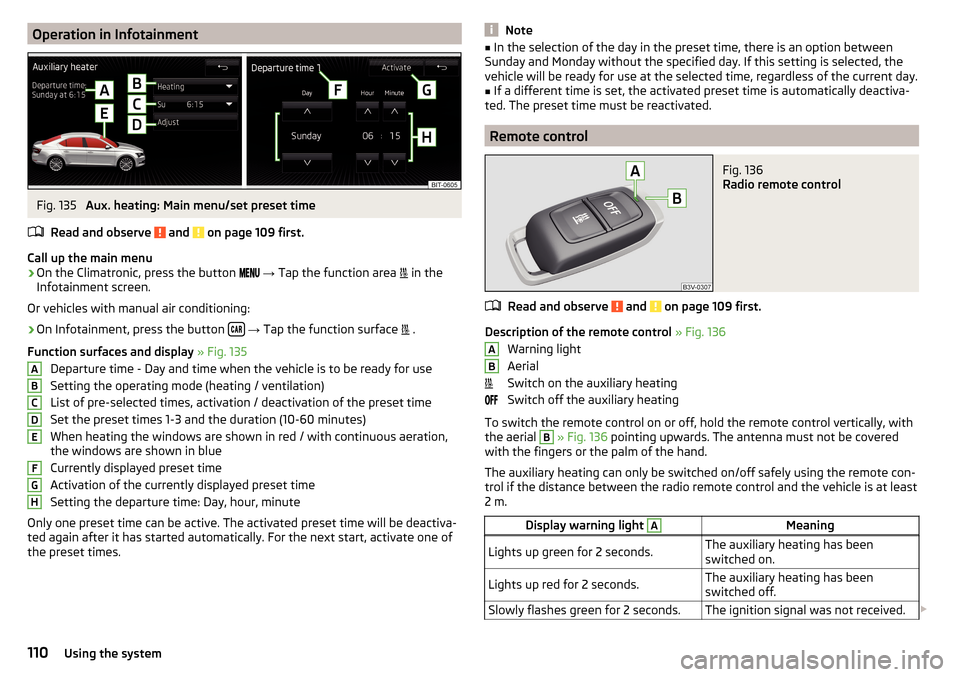
Operation in InfotainmentFig. 135
Aux. heating: Main menu/set preset time
Read and observe
and on page 109 first.
Call up the main menu
›
On the Climatronic, press the button
→ Tap the function area
in the
Infotainment screen.
Or vehicles with manual air conditioning:
›
On Infotainment, press the button
→ Tap the function surface
.
Function surfaces and display » Fig. 135
Departure time - Day and time when the vehicle is to be ready for use
Setting the operating mode (heating / ventilation)
List of pre-selected times, activation / deactivation of the preset time Set the preset times 1-3 and the duration (10-60 minutes)
When heating the windows are shown in red / with continuous aeration,
the windows are shown in blue
Currently displayed preset time
Activation of the currently displayed preset time
Setting the departure time: Day, hour, minute
Only one preset time can be active. The activated preset time will be deactiva-
ted again after it has started automatically. For the next start, activate one of
the preset times.
ABCDEFGHNote■ In the selection of the day in the preset time, there is an option between
Sunday and Monday without the specified day. If this setting is selected, the
vehicle will be ready for use at the selected time, regardless of the current day.■
If a different time is set, the activated preset time is automatically deactiva-
ted. The preset time must be reactivated.
Remote control
Fig. 136
Radio remote control
Read and observe and on page 109 first.
Description of the remote control » Fig. 136
Warning light
Aerial
Switch on the auxiliary heating
Switch off the auxiliary heating
To switch the remote control on or off, hold the remote control vertically, with the aerial
B
» Fig. 136 pointing upwards. The antenna must not be covered
with the fingers or the palm of the hand.
The auxiliary heating can only be switched on/off safely using the remote con-
trol if the distance between the radio remote control and the vehicle is at least
2 m.
Display warning light AMeaningLights up green for 2 seconds.The auxiliary heating has been
switched on.Lights up red for 2 seconds.The auxiliary heating has been
switched off.Slowly flashes green for 2 seconds.The ignition signal was not received. AB110Using the system
Page 113 of 324

Display warning light AMeaning
Quickly flashes green for 2 seconds.
The auxiliary heating is blocked, e.g.
because the tank is nearly empty or
there is a fault in the auxiliary heat-
ing.Flashes red for 2 seconds.The switch off signal was not re-
ceived.Lights up orange for 2 seconds, then
green or red.The battery is weak, however the
switching on or off signal was re-
ceived.Lights up orange for 2 seconds, then
flashes green or red.The battery is weak, however the
switching on or off signal was not re-
ceived.Flashes orange for 5 seconds.The battery is discharged, however
the switching on or off signal was not
received.
Replace the battery » page 275.
CAUTION
■
The remote control must be protected against moisture, severe shocks and
direct sunlight - Otherwise, there is a risk of damage to the remote control.■
The range of the remote control with a charged battery is a few hundred me-
tres (depending on obstructions between the remote control and the vehicle,
weather conditions, the battery condition etc.).
111Heating and ventilation
Page 157 of 324
Switching on and off›In the Telephone main menu, tap on the function surface →
Phone interface“Business”
.
Insert SIM card
The SIM card slot is located in an external module in the glove box on the front
passenger side.
A SIM card size mini (standard size 25x15 mm) must be used.
›
Push the SIM card into the available slot with the cut-off edge to the left un-
til it “locks into place” » Fig. 180.
If a phone / phones was/were connected before inserting the SIM card with
the infotainment and telephone services on the SIM card are also selected,
then the connection is terminated to previously connected phones.
Use the SIM card for the first time
The first time you insert the SIM card in the external module, the following
menu appears.
›Calls too
- Data and telephone services are activated (the main menu phone is
displayed).
›Data connections only
- only the data services of the inserted SIM card are acti-
vated.
If you want to change the enabled services later, then press the button
and tap on the function surface
→
Use SIM card only for data connection
.
Enter the PIN code and save
›
If the SIM card is protected by a PIN code, then the PIN code of the SIM card
must be entered » Fig. 181,
›
If you want to save the entered PIN code in the Infotainment memory, then
before confirming the PIN code, tap on the function surface .
›
Confirm the entered PIN code.
Establish a data connection using the SIM-card
After entering the PIN code a request is made by Infotainment for data con-
nection.
›
Tap the function surface
Connect
.
If the network is not sufficiently set up, Infotainment prompts for network set-
tings.
›
Tap the function surface
Network settings
.
›
Select the data provider.
›
Set the parameters for the data connection.
Change PIN code›Press the button, then tap on the function surface
→
PIN settings
→
Change PIN
.
›
Enter the new PIN code and confirm.
Remove SIM card
›
Press on the inserted SIM card.
The SIM card “jumps” into the eject position.
›
Remove the SIM card from the slot.
CAUTION
■ When inserting an incorrectly sized SIM card, there is a risk of damage to In-
fotainment.■
Avoid using a an adapter for the SIM card as the SIM card may fall out while
driving due to vehicle vibrations - There is the risk of damage to the external
module.
■
If you let the SIM card protrude out from the slot, then it may fall out of the
slot while driving due to vehicle vibrations.
rSAP
Applies to Infotainment Columbus with the SIM card slot in the external mod-
ule.
The Bluetooth ®
profile RSAP (remote transmission of data SIM) also allows, in
contrast to Bluetooth ®
profile HFP, the use of data services from the connec-
ted phone (if this profile is supported by the phone and data services are ena-
bled in this phone) » page 164.
The use of Bluetooth ®
profile RSAP requires the telephone function of the ex-
ternal module to be switched on.
Switching on and off
›
In the Telephone main menu, tap on the function surface
→
Phone interface“Business”
.
The pairing and connection process takes place in the same way to the Blue-
tooth ®
profile HFP » page 152.
If the rSAP profile supported by the phone to be connected, then Infotainment
tries to connect using this profile. Depending on the phone, the connection
can be blocked or released using an rSAP profile in the phone.
155Telephone
Page 277 of 324
Vehicles with a tow hitch
For vehicles with factory-fitted towing device, at the back there is no mount
for a screw-in towing eye. Use the detachable ball rod for towing » page 230,
Hitch .WARNINGThe towing eye must always be firmly in place, otherwise the towing eye
could break whilst being towed.
Remote - replacing battery
Introduction
This chapter contains information on the following subjects:
Remote control key
275
Remote control of the auxiliary heating
275
CAUTION
■ The replacement battery must correspond to the original specification.■Pay attention to the correct polarity when changing the battery.
Note
■We recommend you have the battery replaced by a specialist garage.■If a key has an affixed decorative cover, this will be destroyed when the bat-
tery is replaced. A replacement cover can be purchased from a ŠKODA Partner.
Remote control key
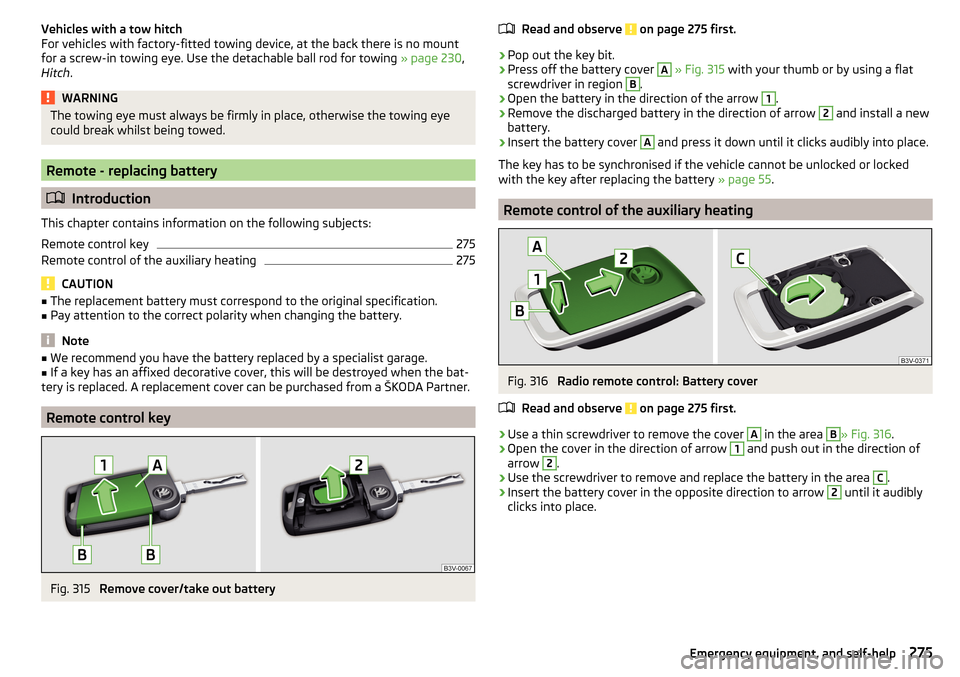
Fig. 315
Remove cover/take out battery
Read and observe on page 275 first.›
Pop out the key bit.
›
Press off the battery cover
A
» Fig. 315 with your thumb or by using a flat
screwdriver in region
B
.
›
Open the battery in the direction of the arrow
1
.
›
Remove the discharged battery in the direction of arrow
2
and install a new
battery.
›
Insert the battery cover
A
and press it down until it clicks audibly into place.
The key has to be synchronised if the vehicle cannot be unlocked or locked
with the key after replacing the battery » page 55.
Remote control of the auxiliary heating
Fig. 316
Radio remote control: Battery cover
Read and observe
on page 275 first.
›
Use a thin screwdriver to remove the cover
A
in the area
B
» Fig. 316 .
›
Open the cover in the direction of arrow
1
and push out in the direction of
arrow
2
.
›
Use the screwdriver to remove and replace the battery in the area
C
.
›
Insert the battery cover in the opposite direction to arrow
2
until it audibly
clicks into place.
275Emergency equipment, and self-help
Page 282 of 324
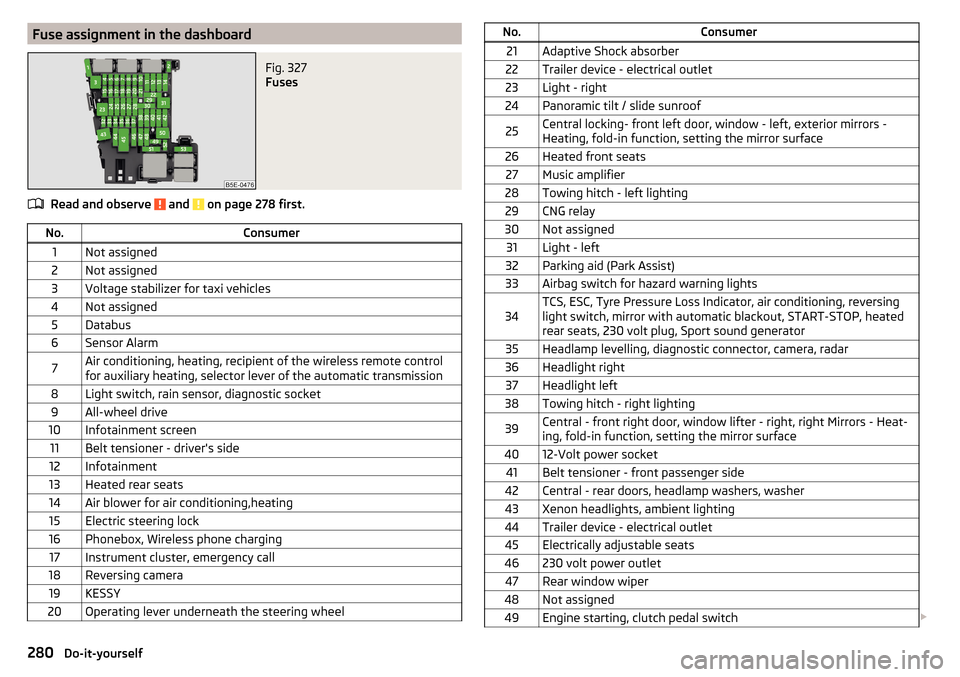
Fuse assignment in the dashboardFig. 327
Fuses
Read and observe and on page 278 first.
No.Consumer1Not assigned2Not assigned3Voltage stabilizer for taxi vehicles4Not assigned5Databus6Sensor Alarm7Air conditioning, heating, recipient of the wireless remote control
for auxiliary heating, selector lever of the automatic transmission8Light switch, rain sensor, diagnostic socket9All-wheel drive10Infotainment screen11Belt tensioner - driver's side12Infotainment13Heated rear seats14Air blower for air conditioning,heating15Electric steering lock16Phonebox, Wireless phone charging17Instrument cluster, emergency call18Reversing camera19KESSY20Operating lever underneath the steering wheelNo.Consumer21Adaptive Shock absorber22Trailer device - electrical outlet23Light - right24Panoramic tilt / slide sunroof25Central locking- front left door, window - left, exterior mirrors -
Heating, fold-in function, setting the mirror surface26Heated front seats27Music amplifier28Towing hitch - left lighting29CNG relay30Not assigned31Light - left32Parking aid (Park Assist)33Airbag switch for hazard warning lights34TCS, ESC, Tyre Pressure Loss Indicator, air conditioning, reversing
light switch, mirror with automatic blackout, START-STOP, heated
rear seats, 230 volt plug, Sport sound generator35Headlamp levelling, diagnostic connector, camera, radar36Headlight right37Headlight left38Towing hitch - right lighting39Central - front right door, window lifter - right, right Mirrors - Heat-
ing, fold-in function, setting the mirror surface4012-Volt power socket41Belt tensioner - front passenger side42Central - rear doors, headlamp washers, washer43Xenon headlights, ambient lighting44Trailer device - electrical outlet45Electrically adjustable seats46230 volt power outlet47Rear window wiper48Not assigned49Engine starting, clutch pedal switch 280Do-it-yourself
Page 304 of 324
Ball headCheck fitting233
Ready position231
Battery Change in key
275
Replace the battery in the remote control in the auxiliary heating
275
Belts15
Belt tensioners17
Bluetooth A2DP / AVRCP
124
Name124
on / off124
Paired external devices124
rSAP155
Set131
set to124, 126
Set to124
Switch on/off131
Update122, 125
Updates131
Visibility124, 131
Bluetooth Player141
Bluetooth profile153
Bluetooth® update153
Bonnet Close
253
Open253
Boot Class N1 vehicles
100
see boot lid56
Stow roof rack103
Boot lid57
Automatic locking57
Open/close58
Open/Close56
Brake Assist (HBA)202
Brake booster191
Brake fluid257
Check257
specification257
Brake linings warning light
36
Brake pads new
191
Brake pedal (automatic gearbox) Warning light
37
Brakes Brake booster
191
Brake fluid257
Braking and stabilisation systems200
Handbrake192
Information on braking191
Run in196
Warning lights33
Brake system200
Breakdown call157
Breakdown kit270
Broadcasting133
See main menu133
Bulbs Replacing
282
Button in driver's door Electric windows
60
C
Call list Call list
159
Camera See reversing camera
207
CAR187
Car battery Automatic consumer shutdown
258
Check condition259
Cover259
Disconnecting and reconnecting260
Replacing260
Winter operation259
CAR button187
Car care Exterior
245, 247
Interior247
Car cleaning Exterior
247
Windscreens247
Car computer see multifunction display
44
Care and maintenance240
Cargo element99
CAR menu187
Car washing244
Interior247
washing244
CD139
Central locking51
Problems55
Central locking button53
Change battery
275
Changing Windscreen wiper blades
278
Changing a wheel266
Changing266
Changing gear Selector lever
194
Tiptronic195
Changing wheels Wheels
266
Charging a vehicle battery259
Check Brake fluid
257
Engine oil256
Fit ball head properly233
Oil level256
Checking Battery status
259
Coolant257
302Index
Page 309 of 324
LeverACC216
Cruise control213
Front Assist220
Operation of the information system43
Turn signal/main beam65
Windscreen wipers72, 73
Liability for defects5
light High-beam assistant
67
Light64
Cockpit69
COMING HOME / LEAVING HOME68
Daytime running lights65
Flash65
Fog lights/rear fog light67
Fog lights with CORNER function68
Hazard warning light system68
Headlight cleaning system73
Parking light68
Replacing bulbs282
Turn signal/main beam65
Xenon headlight66
Light Assist See high-beam assistant
67
Lighting Entry space
69
Interior lighting69
Luggage compartment93
Lights Abroad
69
Automatic driving light control66
Dipped beam64
Headlight range control64
Parking lights64
Switching on and off64
Warning lights32
List of available stations
134
of telephone contacts158
With folder / track list138
List of paired external devices153
List of traffic reports185
Load291
Lock Individual settings
53
KESSY52
Key51
Locking Central locking button
53
in case of emergency276
Remote control52
Lock steering lock188
Long cargo channel89
Longitude169
Luggage compartment93
Compartment with cargo element99
Cover97
Fastening elements94
Fastening the flooring96
Fixing nets95
Floor covering on both sides96
foldable hook96
Folding double hooks96
Lighting93
Net on the luggage compartment cover97
Net partition102
Roll-up cover98
Storage compartments under the floor cover- ing
99
unlock manually276
Unlock the boot lid276
Variable loading floor100
Luggage compartment cover97
Roll-up cover98
Luggage storage Multi-function pocket
100
M
Main beam
65
Warning light37
Main menu Apple CarPlay167
CAR187
Images144
Media136
Media Command147
MirrorLink®168
Navigation170
Radio133
SmartLink165
SMS161
Video DVD145
Waypoint mode183
Manage favourites132
Manage Favourites126
Manage memory128
Managing paired devices153
Managing saved routes183
Manoeuvre Graphical driving recommendations
180
Nav. announcements181
Manoeuvring205
Manual air conditioning Air distribution control
107
Controls105
Manual gear changing See Gear changing
193
Map Automatic scale
177
Display170
Display of traffic signs128
Display options176
Display options in the split screen178
Fast Map177
Lane guidance128
Main menu170
Manual scale177
Map alignment178
Operation170
POI display128
307Index
Page 312 of 324
Passive safetyBefore setting off12
Driving safety12
Passive Safety12
Pedals194
Floor mats194
Personalisation Configuration wizard
118
Personal POIs175
Petrol249
Petrol station logo128
Phone Bluetooth® update
153
Compatibility153
Introductory information149
rSAP155
Voice control119
Phonebox84
Phone compatibility153
Phone Premium SIM card
154
Pictures Compatible sources
145
File formats145
Requirements and restrictions145
Supported file formats145
Pin code set to
126
Playback Video DVD
145
Plsyback Media
137
Pockets88
Pockets in the luggage compartment95
POI175
Choose on the map176
Import175
My POIs175
Tap on the map176
Pop-up window Map178
Positioning the jack
269
Power limit Tilt / slide sunroof
62
Power steering33
Power windows Button in the front passenger door
60
Button in the rear doors60
Practical features Pockets
88
Seat backrest with long cargo channel89
Storage compartment for umbrella87
Waste container85
Preferred contacts159
Preheating unit35
Principles of Infotainment operation116
Proactive passenger protection223
Warning light35
R
Rack
103
Radiator shutters198
radio Select station
133
Radio Broadcasting
133
DAB - settings132
DAB settings125
FM - settings125, 131
L-band126
List of available stations134
Main menu133
Operation133
Preface133
Radio station logo135
Save station135
Scan133
Search stations133
set to125, 131
Station buttons135
Traffic program (TP)136
Voice control119
Radio station logo135
Radio station logos Update
125
Radio stations Choose
133
Logo135
Save station135
Search stations133
Select station133
Station buttons135
Raising the vehicle269
Rear fog light67
Warning light34
Rear seats79
Rear view mirror73
Rear window - heating71
Record waypoints184
Refilling Coolant
257
Engine oil256
Windscreen washer fluid254
Reflective vest265
Refuelling249
Fuel249
Regulation Headlight beam
64
Remote Change battery
275
Remote control Auxiliary heating (auxiliary heating and ventila- tion)
110
Synchronisation process55
Unlocking/locking the vehicle52
Remote transfer of SIM data155
Removable through-loading bag89
310Index