headlights SKODA OCTAVIA 2016 3.G / (5E) Owner's Manual
[x] Cancel search | Manufacturer: SKODA, Model Year: 2016, Model line: OCTAVIA, Model: SKODA OCTAVIA 2016 3.G / (5E)Pages: 324, PDF Size: 48.85 MB
Page 66 of 324
Lights and visibility
Light
Introduction
This chapter contains information on the following subjects:
Operating the lights
64
Daytime running lights(DAY LIGHT)
65
Turn signal and main beam
65
Automatic driving light control
66
Xenon headlight
66
High-beam assistant (Light Assist)
67
Fog lights/rear fog light
67
Fog lights with CORNER function
68
COMING HOME / LEAVING HOME
68
Hazard warning light system
68
Parking light
68
Entry space lighting
69
Driving abroad
69
The lights work only with the ignition on, unless otherwise stated.
The layout of the controls on right-hand drive vehicles differs partially from
that shown in this layout » Fig. 46 on page 64 .
WARNINGThe automatic driving lamp control only operates as a support and
does not release the driver from his responsibility to check the light and, if
necessary, to switch on the light depending on the light conditions.
Note
The headlights may mist up temporarily. When the light is on, the light-emit-
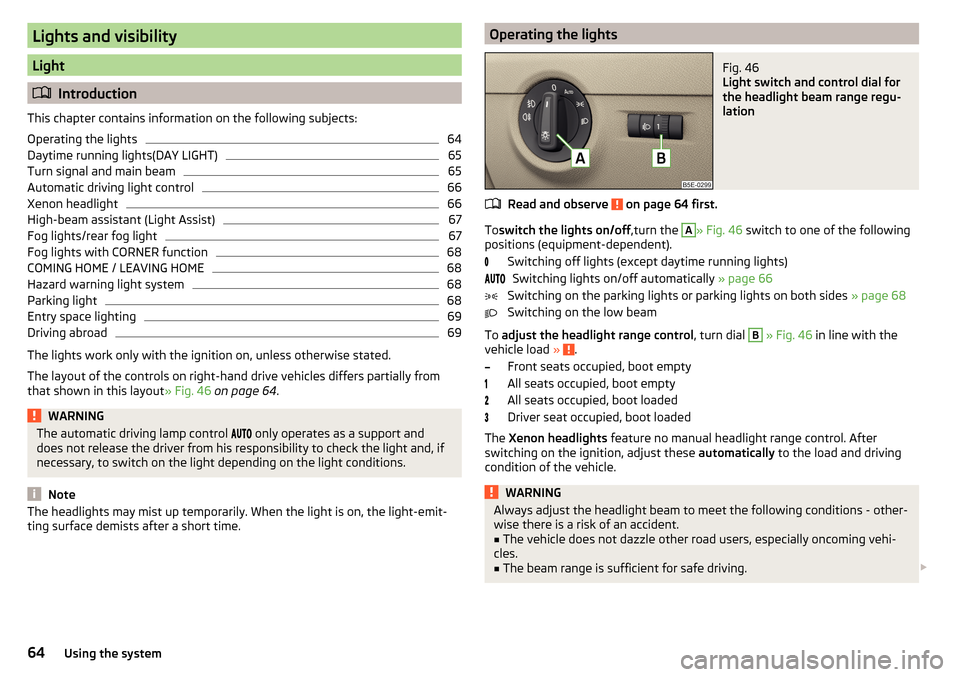
ting surface demists after a short time.Operating the lightsFig. 46
Light switch and control dial for
the headlight beam range regu-
lation
Read and observe on page 64 first.
To switch the lights on/off ,turn the
A
» Fig. 46 switch to one of the following
positions (equipment-dependent).
Switching off lights (except daytime running lights)Switching lights on/off automatically » page 66
Switching on the parking lights or parking lights on both sides » page 68
Switching on the low beam
To adjust the headlight range control , turn dial
B
» Fig. 46 in line with the
vehicle load » .
Front seats occupied, boot empty
All seats occupied, boot empty
All seats occupied, boot loaded
Driver seat occupied, boot loaded
The Xenon headlights feature no manual headlight range control. After
switching on the ignition, adjust these automatically to the load and driving
condition of the vehicle.
WARNINGAlways adjust the headlight beam to meet the following conditions - other-
wise there is a risk of an accident.■
The vehicle does not dazzle other road users, especially oncoming vehi-
cles.
■
The beam range is sufficient for safe driving.
64Using the system
Page 68 of 324
WARNINGOnly turn on the main beam or the headlight flasher if other road users will
not be dazzled.
Automatic driving light control
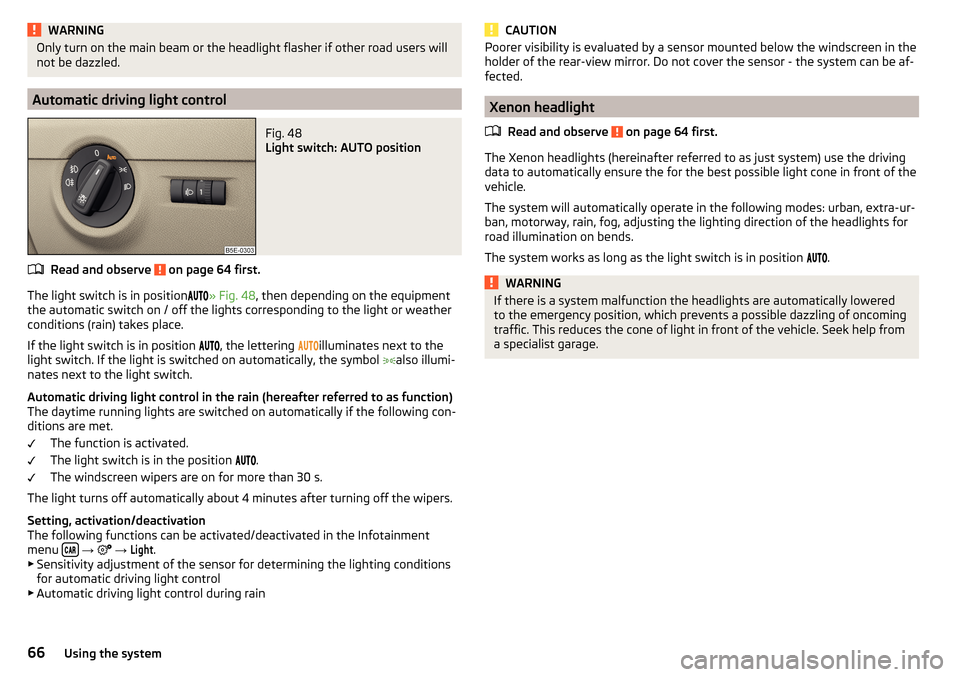
Fig. 48
Light switch: AUTO position
Read and observe on page 64 first.
The light switch is in position
» Fig. 48 , then depending on the equipment
the automatic switch on / off the lights corresponding to the light or weather
conditions (rain) takes place.
If the light switch is in position
, the lettering
illuminates next to the
light switch. If the light is switched on automatically, the symbol
also illumi-
nates next to the light switch.
Automatic driving light control in the rain (hereafter referred to as function)
The daytime running lights are switched on automatically if the following con-
ditions are met.
The function is activated.
The light switch is in the position
.
The windscreen wipers are on for more than 30 s.
The light turns off automatically about 4 minutes after turning off the wipers.
Setting, activation/deactivation
The following functions can be activated/deactivated in the Infotainment
menu
→
→
Light
.
▶ Sensitivity adjustment of the sensor for determining the lighting conditions
for automatic driving light control
▶ Automatic driving light control during rain
CAUTIONPoorer visibility is evaluated by a sensor mounted below the windscreen in the
holder of the rear-view mirror. Do not cover the sensor - the system can be af-
fected.
Xenon headlight
Read and observe
on page 64 first.
The Xenon headlights (hereinafter referred to as just system) use the drivingdata to automatically ensure the for the best possible light cone in front of the
vehicle.
The system will automatically operate in the following modes: urban, extra-ur-
ban, motorway, rain, fog, adjusting the lighting direction of the headlights for
road illumination on bends.
The system works as long as the light switch is in position .
WARNINGIf there is a system malfunction the headlights are automatically lowered
to the emergency position, which prevents a possible dazzling of oncoming
traffic. This reduces the cone of light in front of the vehicle. Seek help from
a specialist garage.66Using the system
Page 71 of 324

›Press the control lever all the way into position
or until it stops » Fig. 47
on page 65 .
The parking light is illuminated on the relevant side of the vehicle.
Switching on the side light on both sides ›
Switch on the ignition and turn the light switch into position
» page 64 ,
the parking lights are turned on.
›
Switch off the ignition and lock the vehicle.
After pulling out the ignition key and opening the driver's door, an audible
warning sounds. After a few seconds or after closing the driver's door, the au-
dible warning is turned off.
CAUTION
■ Turning on the parking light means the battery is heavily loaded.■The parking lights may switch off automatically due to a low battery charge.
If the two-sided parking lights are switched on when the ignition is off, the
parking lights will not switch on automatically!
Entry space lighting
Read and observe
on page 64 first.
The lighting is positioned on the lower edge of the exterior mirror and illumi-nates the entry area of the front door.
The lighting switches on after unlocking or opening the vehicle door (depend-
ing on the lighting conditions).
The lighting switches off after around 30 seconds after closing the front door
or switching on the ignition.
Driving abroad
Read and observe
on page 64 first.
When driving in countries with opposing traffic system (traffic on the
left/right), your headlights may dazzle oncoming traffic. Therefore, it is neces-
sary to have the headlights adapted by a specialist garage.
You can set the xenon headlights yourself by activating travel mode in the In-
fotainment menu
→
→
Light
. In this mode, no automatic beam adjust-
ment is made ahead of the vehicle.
Interior lighting
Introduction
This chapter contains information on the following subjects:
interior light, front
69
Interior light, rear
70
The inner lighting also works if the ignition is switched off. With the ignition
switched off, the lights will automatically switch off after approximately after
10 minutes.
interior light, front
Fig. 52
Operation of the front light: Version 1 / version 2
Positions of the rocker switch
A
» Fig. 52
Switching on
Automatic operation (centre position)
Switching off
There is no icon available for the centre position (automatic operation) in Ver-
sion 2.
Switch on / off (by pressing the relevant switch
B
) » Fig. 52
Reading lamp left
Reading lamp right
69Lights and visibility
Page 75 of 324
Automatic windscreen wiping during rain can be in the Infotainment menu
→ →
Mirrors and wipers
activated/ deactivated .WARNINGAutomatic wiping during rain is only a support. The driver is still responsible
for setting the function of the windscreen wipers manually depending on
the visibility conditions.
Note
If the wiping is carried out without interruption, the wiping speed varies de-
pending on the vehicle speed.
Rear wipers and washers / reversing camera cleaning system
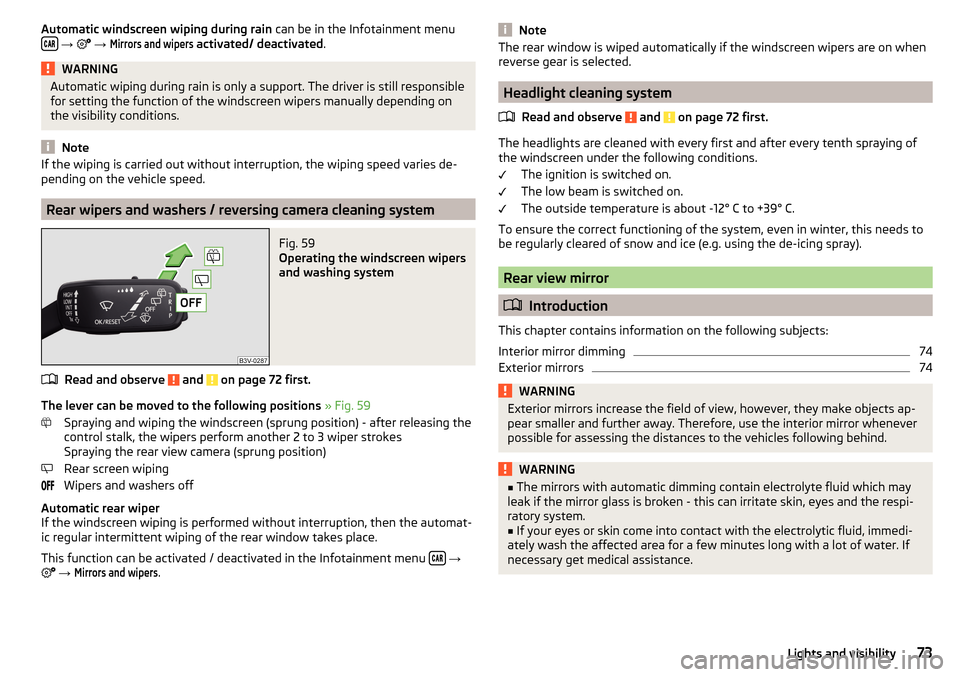
Fig. 59
Operating the windscreen wipers
and washing system
Read and observe and on page 72 first.
The lever can be moved to the following positions » Fig. 59
Spraying and wiping the windscreen (sprung position) - after releasing the
control stalk, the wipers perform another 2 to 3 wiper strokes
Spraying the rear view camera (sprung position)
Rear screen wiping
Wipers and washers off
Automatic rear wiper
If the windscreen wiping is performed without interruption, then the automat-
ic regular intermittent wiping of the rear window takes place.
This function can be activated / deactivated in the Infotainment menu
→
→
Mirrors and wipers
.
NoteThe rear window is wiped automatically if the windscreen wipers are on when
reverse gear is selected.
Headlight cleaning system
Read and observe
and on page 72 first.
The headlights are cleaned with every first and after every tenth spraying of
the windscreen under the following conditions.
The ignition is switched on.
The low beam is switched on.
The outside temperature is about -12° C to +39° C.
To ensure the correct functioning of the system, even in winter, this needs to
be regularly cleared of snow and ice (e.g. using the de-icing spray).
Rear view mirror
Introduction
This chapter contains information on the following subjects:
Interior mirror dimming
74
Exterior mirrors
74WARNINGExterior mirrors increase the field of view, however, they make objects ap-
pear smaller and further away. Therefore, use the interior mirror whenever
possible for assessing the distances to the vehicles following behind.WARNING■ The mirrors with automatic dimming contain electrolyte fluid which may
leak if the mirror glass is broken - this can irritate skin, eyes and the respi-
ratory system.■
If your eyes or skin come into contact with the electrolytic fluid, immedi-
ately wash the affected area for a few minutes long with a lot of water. If
necessary get medical assistance.
73Lights and visibility
Page 202 of 324
The sensor is a component of the ACC » page 214 and Front Assist
» page 219 systems.
The sensor function may be impaired in the events of one of the following. ▶ The sensor cover is soiled (e.g. with mud, snow etc.).
▶ The area in front of and around the sensor cover is obscured (e.g. by labels,
auxiliary headlights etc.).
▶ When visibility is poor, (e.g. fog, heavy rain, thick snowfall).
If the sensor is covered or dirty, the corresponding message appears in the in-
strument cluster display for the ACC system » page 218, Malfunctions or Front
Assist system » page 221, Malfunctions .WARNING■
If you suspect that the sensor is damaged, deactivate the ACC system and
Front Assist system » page 216» page 220 . Have the sensor checked by a
specialist garage.■
A collision or damage in the front or lower area of the vehicle could affect
the sensor function - there is risk of accident! Have the sensor checked by
a specialist garage.
■
Do not cover the area in front of and around the sensor cover. This can
lead to impaired function of the sensor - risk of accidents!
CAUTION
Remove the snow with a brush and the ice with a solvent-free de-icer.
Braking and stabilisation systems
Introduction
This chapter contains information on the following subjects:
Stability Control (ESC)
200
ESC Sport
200
Anti-lock braking system (ABS)
201
Engine drag torque control (MSR)
201
Traction control (TCS)
201
Electronic Differential Lock (EDL and XDS)
201
Active steering assist (DSR)
202
Brake Assist (HBA)
202
Hill Start Assist (HHC)
202Multicollision brake (MCB)202Trailer stabilisation system (TSA)202
The brake and stabilization systems are automatically activated each time the
ignition is switched on, unless otherwise indicated.
The error display is in Chapter » page 32, Warning lights .
WARNINGThe general information relating to the use of assistance systems must be
observed » page 199, in section Introduction .
Stability Control (ESC)
Read and observe
on page 200 first.
ESC improves vehicle stability in critical driving situations (e.g. if the vehicle
starts to skid) by the braking the individual wheels to maintain the direction.
If there is a TCS intervention, the indicator light flashes in the instrument
cluster.
ESC Sport
Read and observe
on page 200 first.
ESC Sport allows for a sportier driving style. With ESC Sport activated, no ESC
intervention takes place when the vehicle slightly oversteers and understeers,
and ASR is so limited that the drive wheels can be spun.
Activation
›
Press and hold down the
» Fig. 241 on page 201 button.
›
or: On Infotainment, press the button
→ Press the function area
→
ESC system:
→
ESC Sport
.
With activation the warning light
lights up in the instrument cluster and an
appropriate message is displayed in the instrument cluster.
Deactivation
›
Press the
» Fig. 241 on page 201 button.
›
or: On Infotainment, press the button
→ Press the function area
→
ESC system:
→
Activated
.
With deactivation the warning light extinguishes in the instrument cluster
and an appropriate message is displayed in the instrument cluster.
200Driving
Page 225 of 324
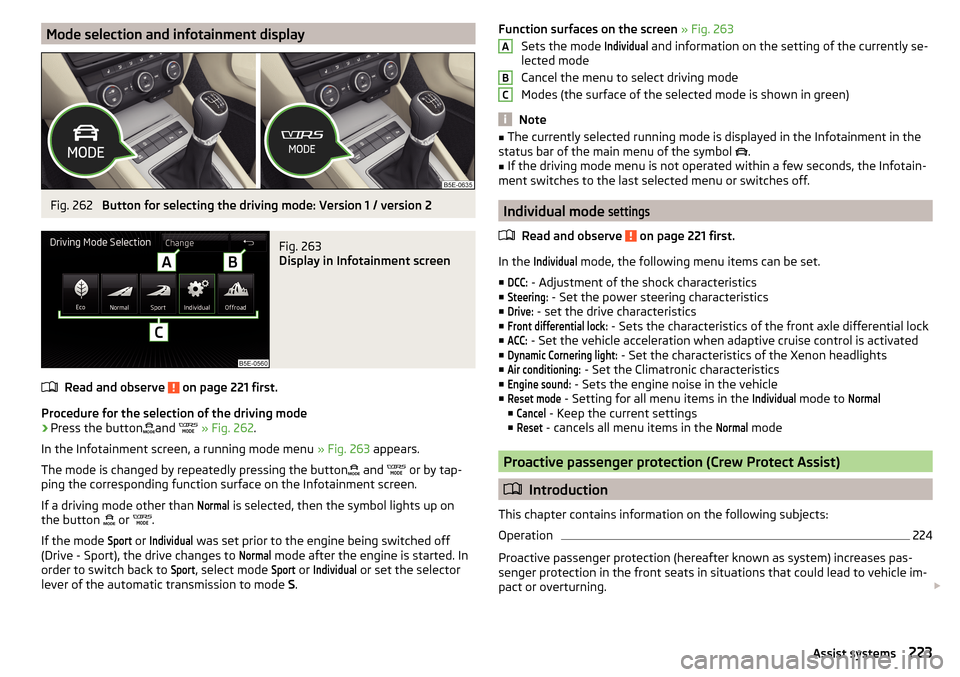
Mode selection and infotainment displayFig. 262
Button for selecting the driving mode: Version 1 / version 2
Fig. 263
Display in Infotainment screen
Read and observe on page 221 first.
Procedure for the selection of the driving mode
›
Press the buttonand
» Fig. 262 .
In the Infotainment screen, a running mode menu » Fig. 263 appears.
The mode is changed by repeatedly pressing the button and
or by tap-
ping the corresponding function surface on the Infotainment screen.
If a driving mode other than
Normal
is selected, then the symbol lights up on
the button or
.
If the mode
Sport
or
Individual
was set prior to the engine being switched off
(Drive - Sport), the drive changes to
Normal
mode after the engine is started. In
order to switch back to
Sport
, select mode
Sport
or
Individual
or set the selector
lever of the automatic transmission to mode S.
Function surfaces on the screen » Fig. 263
Sets the mode Individual
and information on the setting of the currently se-
lected mode
Cancel the menu to select driving mode
Modes (the surface of the selected mode is shown in green)
Note
■ The currently selected running mode is displayed in the Infotainment in the
status bar of the main menu of the symbol .■
If the driving mode menu is not operated within a few seconds, the Infotain-
ment switches to the last selected menu or switches off.
Individual mode
settings
Read and observe on page 221 first.
In the
Individual
mode, the following menu items can be set.
■
DCC:
- Adjustment of the shock characteristics
■
Steering:
- Set the power steering characteristics
■
Drive:
- set the drive characteristics
■
Front differential lock:
- Sets the characteristics of the front axle differential lock
■
ACC:
- Set the vehicle acceleration when adaptive cruise control is activated
■
Dynamic Cornering light:
- Set the characteristics of the Xenon headlights
■
Air conditioning:
- Set the Climatronic characteristics
■
Engine sound:
- Sets the engine noise in the vehicle
■
Reset mode
- Setting for all menu items in the
Individual
mode to
Normal
■
Cancel
- Keep the current settings
■
Reset
- cancels all menu items in the
Normal
mode
Proactive passenger protection (Crew Protect Assist)
Introduction
This chapter contains information on the following subjects:
Operation
224
Proactive passenger protection (hereafter known as system) increases pas-
senger protection in the front seats in situations that could lead to vehicle im-
pact or overturning.
ABC223Assist systems
Page 237 of 324
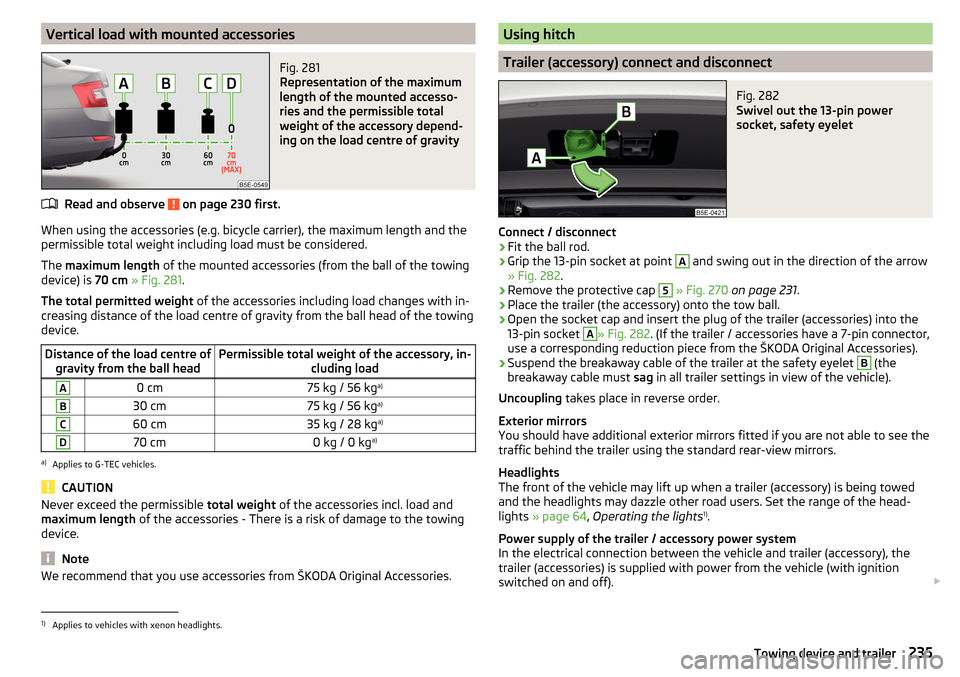
Vertical load with mounted accessoriesFig. 281
Representation of the maximum
length of the mounted accesso-
ries and the permissible total
weight of the accessory depend-
ing on the load centre of gravity
Read and observe on page 230 first.
When using the accessories (e.g. bicycle carrier), the maximum length and the
permissible total weight including load must be considered.
The maximum length of the mounted accessories (from the ball of the towing
device) is 70 cm » Fig. 281 .
The total permitted weight of the accessories including load changes with in-
creasing distance of the load centre of gravity from the ball head of the towing
device.
Distance of the load centre of gravity from the ball headPermissible total weight of the accessory, in- cluding loadA0 cm75 kg / 56 kga)B30 cm75 kg / 56 kg a)C60 cm35 kg / 28 kg a)D70 cm0 kg / 0 kga)a)
Applies to G-TEC vehicles.
CAUTION
Never exceed the permissible
total weight of the accessories incl. load and
maximum length of the accessories - There is a risk of damage to the towing
device.
Note
We recommend that you use accessories from ŠKODA Original Accessories.Using hitch
Trailer (accessory) connect and disconnect
Fig. 282
Swivel out the 13-pin power
socket, safety eyelet
Connect / disconnect
›
Fit the ball rod.
›
Grip the 13-pin socket at point
A
and swing out in the direction of the arrow
» Fig. 282 .
›
Remove the protective cap
5
» Fig. 270 on page 231 .
›
Place the trailer (the accessory) onto the tow ball.
›
Open the socket cap and insert the plug of the trailer (accessories) into the
13-pin socket
A
» Fig. 282 . (If the trailer / accessories have a 7-pin connector,
use a corresponding reduction piece from the ŠKODA Original Accessories).
›
Suspend the breakaway cable of the trailer at the safety eyelet
B
(the
breakaway cable must sag in all trailer settings in view of the vehicle).
Uncoupling takes place in reverse order.
Exterior mirrors
You should have additional exterior mirrors fitted if you are not able to see the
traffic behind the trailer using the standard rear-view mirrors.
Headlights
The front of the vehicle may lift up when a trailer (accessory) is being towed
and the headlights may dazzle other road users. Set the range of the head-
lights » page 64 , Operating the lights 1)
.
Power supply of the trailer / accessory power system
In the electrical connection between the vehicle and trailer (accessory), the
trailer (accessories) is supplied with power from the vehicle (with ignition
switched on and off).
1)
Applies to vehicles with xenon headlights.
235Towing device and trailer
Page 256 of 324
›Raise the bonnet in the direction of the arrow 3.›Remove the lid prop in the direction of arrow 4 from the holder.›
Secure the open flap inserting the end of the post into the opening in the di-
rection of arrow
5
.
Close the flap
›
Lift the bonnet.
›
Decouple the bonnet support and press into the holder designed to hold it.
›
Drop down the bonnet lid from a height of about 20 cm applying light pres-
sure until it clicks safely into place.
If the bonnet lid is not properly closed, the display of the instrument cluster will show a representation of a vehicle with an open bonnet lid.
WARNING■ Never drive with the bonnet lid not properly closed - risk of accident!■Make sure that when closing the bonnet, no body parts are crushed -
there is danger of injury!
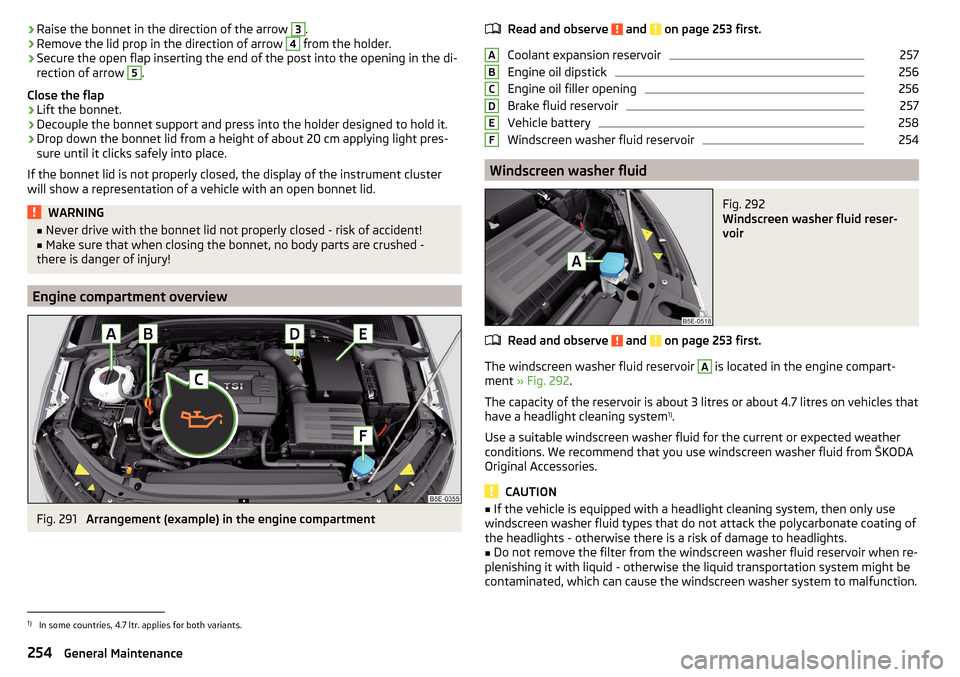
Engine compartment overview
Fig. 291
Arrangement (example) in the engine compartment
Read and observe and on page 253 first.
Coolant expansion reservoir
257
Engine oil dipstick
256
Engine oil filler opening
256
Brake fluid reservoir
257
Vehicle battery
258
Windscreen washer fluid reservoir
254
Windscreen washer fluid
Fig. 292
Windscreen washer fluid reser-
voir
Read and observe and on page 253 first.
The windscreen washer fluid reservoir
A
is located in the engine compart-
ment » Fig. 292 .
The capacity of the reservoir is about 3 litres or about 4.7 litres on vehicles that
have a headlight cleaning system 1)
.
Use a suitable windscreen washer fluid for the current or expected weather
conditions. We recommend that you use windscreen washer fluid from ŠKODA
Original Accessories.
CAUTION
■ If the vehicle is equipped with a headlight cleaning system, then only use
windscreen washer fluid types that do not attack the polycarbonate coating of
the headlights - otherwise there is a risk of damage to headlights.■
Do not remove the filter from the windscreen washer fluid reservoir when re-
plenishing it with liquid - otherwise the liquid transportation system might be
contaminated, which can cause the windscreen washer system to malfunction.
ABCDEF1)
In some countries, 4.7 ltr. applies for both variants.
254General Maintenance
Page 282 of 324
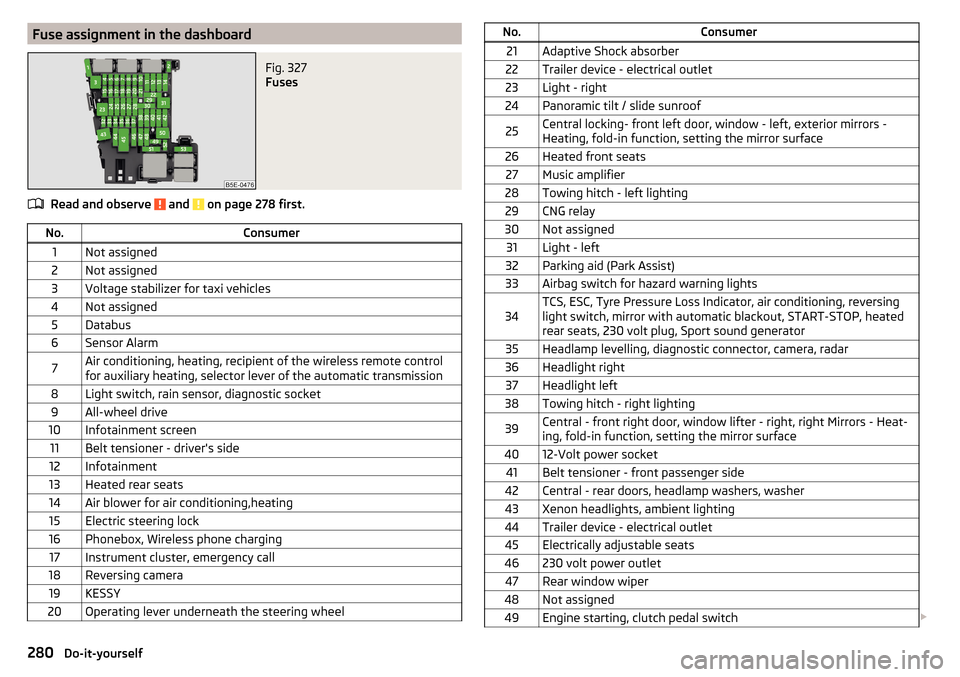
Fuse assignment in the dashboardFig. 327
Fuses
Read and observe and on page 278 first.
No.Consumer1Not assigned2Not assigned3Voltage stabilizer for taxi vehicles4Not assigned5Databus6Sensor Alarm7Air conditioning, heating, recipient of the wireless remote control
for auxiliary heating, selector lever of the automatic transmission8Light switch, rain sensor, diagnostic socket9All-wheel drive10Infotainment screen11Belt tensioner - driver's side12Infotainment13Heated rear seats14Air blower for air conditioning,heating15Electric steering lock16Phonebox, Wireless phone charging17Instrument cluster, emergency call18Reversing camera19KESSY20Operating lever underneath the steering wheelNo.Consumer21Adaptive Shock absorber22Trailer device - electrical outlet23Light - right24Panoramic tilt / slide sunroof25Central locking- front left door, window - left, exterior mirrors -
Heating, fold-in function, setting the mirror surface26Heated front seats27Music amplifier28Towing hitch - left lighting29CNG relay30Not assigned31Light - left32Parking aid (Park Assist)33Airbag switch for hazard warning lights34TCS, ESC, Tyre Pressure Loss Indicator, air conditioning, reversing
light switch, mirror with automatic blackout, START-STOP, heated
rear seats, 230 volt plug, Sport sound generator35Headlamp levelling, diagnostic connector, camera, radar36Headlight right37Headlight left38Towing hitch - right lighting39Central - front right door, window lifter - right, right Mirrors - Heat-
ing, fold-in function, setting the mirror surface4012-Volt power socket41Belt tensioner - front passenger side42Central - rear doors, headlamp washers, washer43Xenon headlights, ambient lighting44Trailer device - electrical outlet45Electrically adjustable seats46230 volt power outlet47Rear window wiper48Not assigned49Engine starting, clutch pedal switch 280Do-it-yourself
Page 284 of 324
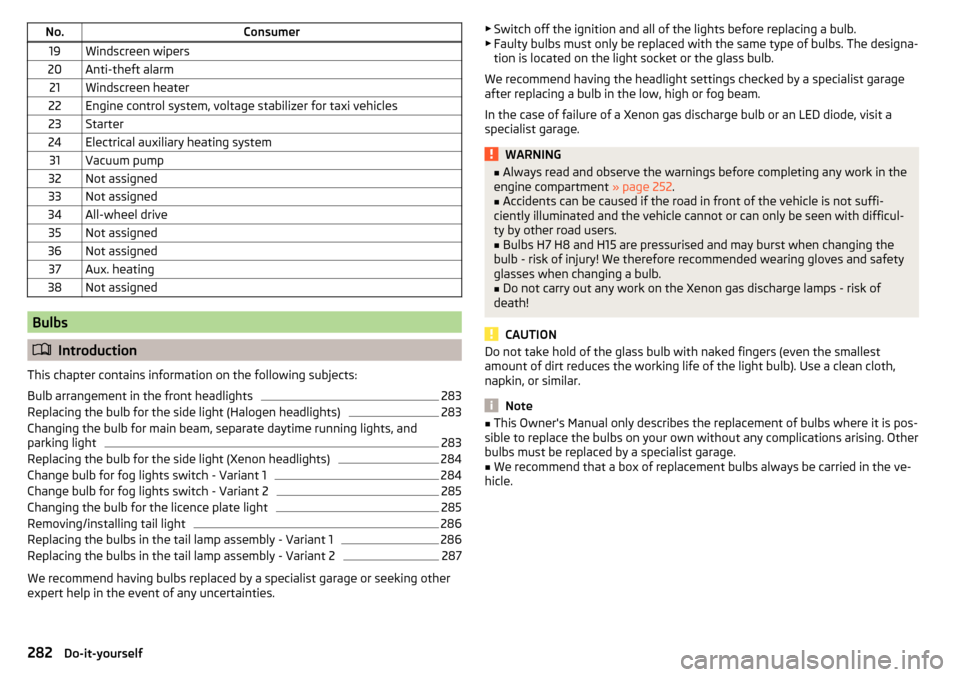
No.Consumer19Windscreen wipers20Anti-theft alarm21Windscreen heater22Engine control system, voltage stabilizer for taxi vehicles23Starter24Electrical auxiliary heating system31Vacuum pump32Not assigned33Not assigned34All-wheel drive35Not assigned36Not assigned37Aux. heating38Not assigned
Bulbs
Introduction
This chapter contains information on the following subjects:
Bulb arrangement in the front headlights
283
Replacing the bulb for the side light (Halogen headlights)
283
Changing the bulb for main beam, separate daytime running lights, and
parking light
283
Replacing the bulb for the side light (Xenon headlights)
284
Change bulb for fog lights switch - Variant 1
284
Change bulb for fog lights switch - Variant 2
285
Changing the bulb for the licence plate light
285
Removing/installing tail light
286
Replacing the bulbs in the tail lamp assembly - Variant 1
286
Replacing the bulbs in the tail lamp assembly - Variant 2
287
We recommend having bulbs replaced by a specialist garage or seeking other
expert help in the event of any uncertainties.
▶ Switch off the ignition and all of the lights before replacing a bulb.
▶ Faulty bulbs must only be replaced with the same type of bulbs. The designa-
tion is located on the light socket or the glass bulb.
We recommend having the headlight settings checked by a specialist garage after replacing a bulb in the low, high or fog beam.
In the case of failure of a Xenon gas discharge bulb or an LED diode, visit a
specialist garage.WARNING■ Always read and observe the warnings before completing any work in the
engine compartment » page 252.■
Accidents can be caused if the road in front of the vehicle is not suffi-
ciently illuminated and the vehicle cannot or can only be seen with difficul-
ty by other road users.
■
Bulbs H7 H8 and H15 are pressurised and may burst when changing the
bulb - risk of injury! We therefore recommended wearing gloves and safety
glasses when changing a bulb.
■
Do not carry out any work on the Xenon gas discharge lamps - risk of
death!
CAUTION
Do not take hold of the glass bulb with naked fingers (even the smallest
amount of dirt reduces the working life of the light bulb). Use a clean cloth,
napkin, or similar.
Note
■ This Owner's Manual only describes the replacement of bulbs where it is pos-
sible to replace the bulbs on your own without any complications arising. Other
bulbs must be replaced by a specialist garage.■
We recommend that a box of replacement bulbs always be carried in the ve-
hicle.
282Do-it-yourself